Study Power Lab
Sample size and statistical power, visually
Figure out how many participants, plots or animals your study needs — and see why — with interactive power curves for the tests researchers actually use.
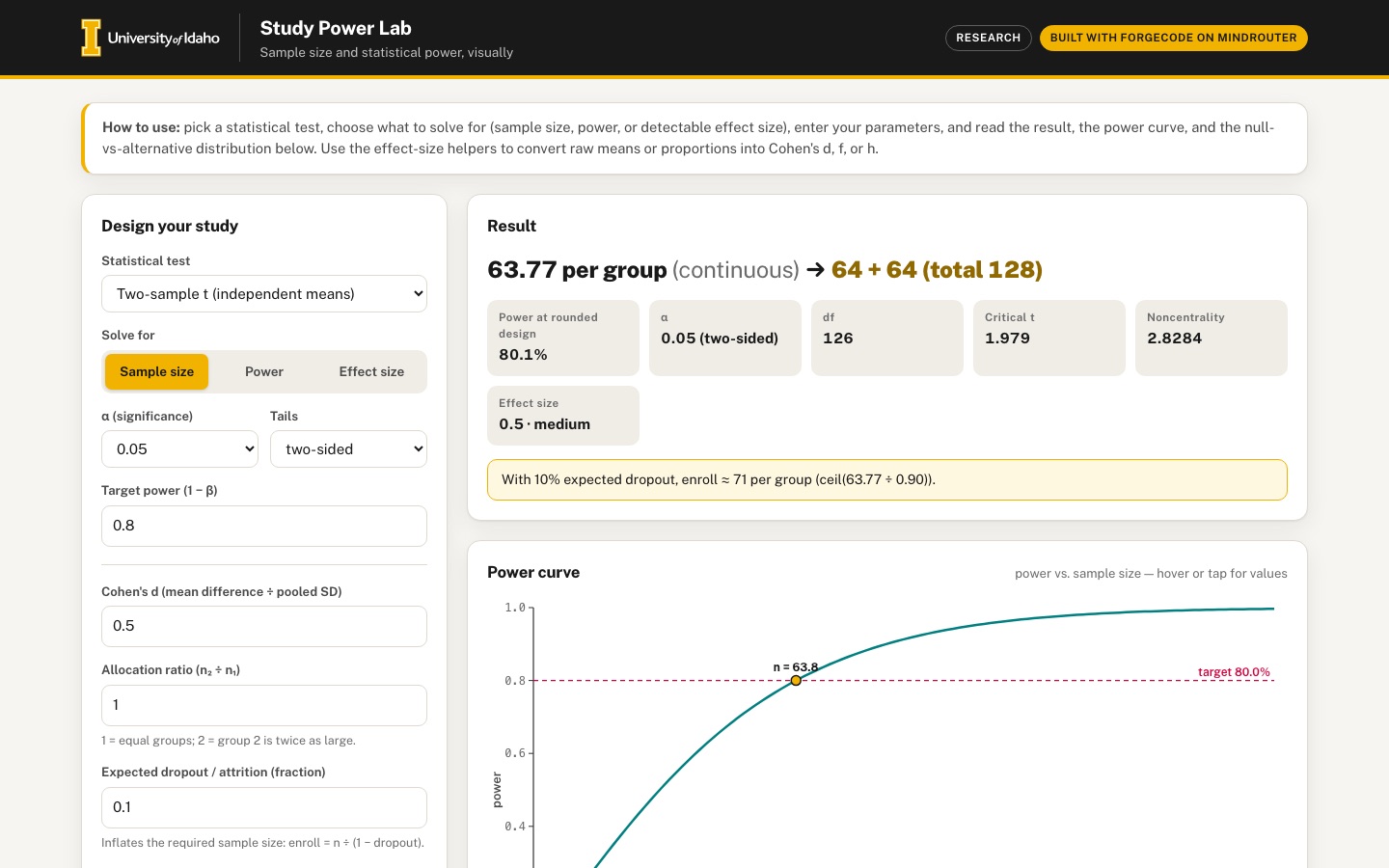 Desktop · click to enlarge
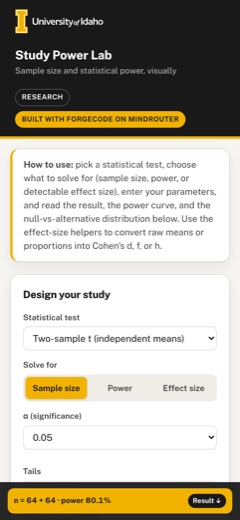
What it is ✎ blurb written by the AI critic
Study Power Lab works out how many participants, plots or animals a study needs for six common tests: two-sample and paired t, one-way ANOVA, two proportions, correlation and chi-square goodness of fit. Choose to solve for sample size, power or the smallest detectable effect, and the power curve and the null-versus-alternative plot update as you type, with dropout and unequal group sizes included. Every number is computed in the page and checked against 32 reference cases from statsmodels, SciPy and the G*Power manual.
Try this
- Switch Solve for to Effect size to see the smallest difference 50 people per group can detect with 80% power (d = 0.566), then press Copy on the methods sentence.
- Set the allocation ratio to 2 and the dropout to 0.2, then check how many people to enroll in each group and download the CSV power table.
- Type group means such as 10, 12, 14 and a within-group SD of 5 into the Cohen's f helper. The app switches to one-way ANOVA and sizes the study.
Highlights ✎ written by the AI critic
- Solves for sample size, power or detectable effect size across six tests, using noncentral t, F and chi-square distributions
- Power curve with a hover or tap readout, plus a null-vs-alternative plot with the alpha and beta regions shaded
- Dropout inflation and unequal group allocation carry through to the result, the copyable methods sentence and the CSV power table
- Effect-size helpers turn means, SDs and proportions into Cohen's d, f and h with small/medium/large guidance
- A validation panel re-runs 32 reference cases (statsmodels, SciPy, G*Power manual) in the browser, and all 32 pass
Who it's for
Graduate students, IRB/IACUC protocol writers, faculty planning experiments
Features
- Test chooser: two-sample t, paired t, one-way ANOVA, two proportions, correlation, chi-square goodness-of-fit
- Solve for any one of: sample size, power, detectable effect size — given alpha and the others
- Live power curve (power vs n) and a distribution plot showing null vs alternative with α and β regions shaded
- Effect-size helpers (Cohen's d from means/SD, f from group means, h from proportions) with plain-language small/medium/large guidance
- Attrition/dropout inflation and unequal allocation ratio
- Copyable methods-section sentence and CSV of the power table
Data & sources
- data/raw/reference_values.json: validation oracle of 32 cases, computed with statsmodels 0.15.0 and SciPy 1.14.1 (derived, not downloaded), with selected values transcribed from the G*Power 3.1 manual (June 1, 2023). Embedded by the harness's scripts/build_validation_data.py as data/embed/validation.json
- doi.org — Cohen, J. (1988). Statistical Power Analysis for the Behavioral Sciences (2nd ed.).
- doi.org — Cohen, J. (1992). A power primer. Psychological Bulletin 112(1).
- www.psychologie.hhu.de — G*Power 3.1 manual:
- doi.org — Faul et al. (2007)
- www.statsmodels.org — statsmodels power docs
How it was built
Written by ForgeCode 2.13.21 (forgecode.dev) on qwen/qwen3.8-27b, served by MindRouter, the University of Idaho's on-premises AI platform.
Rounds by kind
| build | 1 |
| feedback | 8 |
| continue | 2 |
| critic | 2 |
Lines of code per file
| body html | 249 |
| app css | 444 |
| app js | 1,782 |
| scripts | 103 |
Critic scores ✎ scored by the independent AI critic, 1–10
Independent audits ✎ by the AI critic
Automated checks
Checked by critic-verify.
Data spot checks ✎ written by the AI critic
- Default two-sample t (d 0.5, alpha .05 two-sided, power .80): app 63.77 per group -> 64 + 64, power at rounded design 80.1%; SciPy 63.7656 and 0.80146; data/raw/reference_values.json T1 statsmodels 63.765612 (64 + 64, actual power 0.80146)
- Attrition, 10% dropout on the default design: app 'enroll ~ 71 per group'; by hand ceil(63.7656 / 0.90) = 71; reference_values.json D1 variant ceil_of_continuous_over_retention = 71
- Unequal allocation, ratio 2: app 47.74 -> 48 + 96 (total 144), enroll 54 + 107; SciPy n1 = 47.742; reference_values.json T4 n1 = 47.742 (48 + 96); by hand ceil(47.742/0.9) = 54, ceil(95.484/0.9) = 107
- Two-sample t, d 0.4, alpha .01 one-sided, power .90, equal groups (hero view): app 164.07 -> 165 + 165, critical t 2.3378, noncentrality 3.6332, power 90.2%, enroll 183; SciPy 164.072, 2.33777, 3.63318, 0.90179, ceil(164.072/0.9) = 183
- Same test with ratio 2: app 122.94 -> 123 + 246, critical t 2.3366, 90.0%; SciPy 122.940, 2.33655, 0.90015
Round-by-round timeline
Every harness round, in order. The prompts and FEEDBACK.md were written by the AI reviewer; the app code was written by the harness. Expand a round to see the exact prompt and the FEEDBACK.md the harness received.
-
"Solve for: Sample size" is broken for every test. With the defaults (two-sample t, d = 0.5, α = 0.05 two-sided, power 0.8, ratio 1, dropout 0) the result reads "2 per group (continuous) → 50 + 50 (total 100)". Expected "63.77 per group (continuous) → 64 + 64 (total 128), actual power 80.1%". The rounded design just echoes the old n inputs instead of ceil(continuous solution). Same pattern everywhere: paired t dz = 0.5 shows "3 pairs → 50 pairs" (expected 33.37 → 34 pairs); ANOVA f = 0.25, k = 3 shows "5 per group → 20 per group × 3 (total 60)" (expected N = 157.19 → 53 per group, N = 159); two proportions .65 vs .45 shows "2 per group → 100 per group" (expected 95.77 → 96 per group); correlation r = .30 shows "4 → 60 participants" (expected 84.93 → 85); chi-square w = 0.3, k = 4 shows "2 → 60" (expected 121.14 → 122). Changing the allocation ratio to 2 changes nothing (expected 47.74 → 48 + 96). The Validation panel passes A1/H1/R1, so the panel and the main UI evidently use different code paths — the main UI must use the same verified solver.
-
"Solve for: Effect size" always shows 0 ("0 (Cohen's d)", "0 (Cohen's dz)", "0 (Cohen's f)", "0 (Cohen's h)", "0 (Fisher z difference)", "0 (Cohen's w)"). Expected e.g. two-sample t with 30 + 30, power .8, α .05 two-sided → d = 0.7356 (case T7); correlation should report r (not a Fisher-z difference) — N = 100, power .8 → r = 0.277 (R5).
-
t-test power is wrong. Two-sample t, d = 0.5, n = 50 + 50, α .05 two-sided shows 33.8%; expected 69.7% (T6). Paired t, dz = 0.5, 50 pairs shows 82.3%; expected about 93.4%. The noncentrality shown for the two-sample case is 2.5 (correct), so the noncentral-t CDF/survival function itself is wrong. Validation cases T1–T7 and P1–P6 all FAIL (e.g. T1 app 93.42 vs expected 63.77).
-
Chi-square goodness-of-fit is completely broken. The "Critical chi2" tile shows "357,303,691,362.7946" (df 2) and "100,940,668,751,159,450,000,000,000" (df 3); power is 0.0% at every N; the power curve is a flat line at 0; C1–C4 FAIL. Expected for df 3, α .05: critical χ² = 7.8147; w = 0.3, N = 122 → power ≈ 0.80. (The round-1 log shows the central χ² CDF was being computed through the incomplete beta function and did not match numeric integration — the χ² CDF is the regularized lower incomplete gamma P(df/2, x/2).) Selecting chi-square also produces console errors:
Error: <path> attribute d: Expected number, "M52.00 NaN L54.05 NaN L…".,Error: <path> attribute d: Expected number, "M248.80 NaN L250.85 NaN …".,Error: <line> attribute y1: Expected length, "NaN".and... y2 ...(the distribution plot gets NaN coordinates). The page must have zero console errors for every test and mode. -
Validation panel shows "15 of 32 cases within tolerance". After fixing 1–4 every case (T, P, A, H, R, C, D) must PASS with the tolerances in data/raw/SOURCES.md. Keep the red FAIL styling for genuine failures.
-
Power curve is useless in sample-size mode: the x-axis only spans n = 2…20 and the curve hugs 0, with the marker stuck at "n = 2" (its label is drawn on top of the y-axis line). Expected: the x range extends past the point where power reaches ~0.95–0.99, the target-power line crosses the curve at the solved n, a gold marker + label sits at the solved/rounded n, and the plot animates smoothly when inputs change. Add a hover crosshair/tooltip that shows "n = …, power = …%" (currently hovering does nothing).
-
Power table has only 2 rows in sample-size mode (n = 2 and 3, power 0.0%), so the CSV download is also just 2 rows ("n,power,beta / 2,0.000000,1.000000 / 3,0.000171,0.999829"). Expected a useful table around the answer (e.g. ~20–30 sensible n values from small to where power ≈ 0.99, including the solved n, highlighted), with total N and enrolled-with-attrition columns where relevant; the CSV should contain the same rows plus a header with the test, α, tails, effect size and ratio.
-
Attrition text is wrong and inconsistent: "With 10% expected dropout, enroll ≈ 3 per group (ceil(2 ÷ 0.90))" — it inflates the broken n. Expected for T1: "enroll 71 per group (ceil(63.77 ÷ 0.90))", also showing the total to recruit. Changing dropout from 10% to 30% should visibly change the number.
-
Methods sentence has bugs: "…(Cohen's d = 0.5, two-sided, α = 0.05 (two-sided)) requires n = 30 per group (total N = 60) to detect the effect with 12.0% power. Allowing for 15% attrition, enroll approximately 3 per group." — "two-sided" is duplicated with a stray double parenthesis, the enroll number contradicts n, and it should say which software/method was used (e.g. "computed with Study Power Lab using the noncentral t distribution"). For ANOVA and chi-square it must not say "two-sided".
-
Stat tiles: the α tile's label renders as "A" (the uppercase text-transform turns "α" into a capital alpha that reads as the letter A); ANOVA and chi-square tiles say "0.05 (two-sided)" although F and χ² tests are one-tailed — hide the Tails control and the "(two-sided)" wording for those tests. "CRITICAL CHI2" should read "Critical χ²".
-
No input validation / empty states: setting d = 0, d = −3 or target power = 1.5 leaves the old result on screen with no message. Expected an inline error under the field (e.g. "Power must be between α and 0.999", "Effect size must be non-zero") and the result card replaced by a friendly hint until inputs are valid.
-
Effect-size helpers give no feedback: typing means 105 / 100 and SD 15 and clicking "Compute d" silently puts 0.3333333333333333 into the d field — no result is shown next to the helper and no plain-language guidance. Expected: a result line under each helper like "d = 0.33 — small-to-medium (Cohen: .2 small, .5 medium, .8 large)" with a small visual scale/marker, the value rounded to 3 decimals, and a button to "Use this value" that switches the test if needed (Compute f while the two-sample t test is selected currently writes f into a hidden field with no effect; Compute h does not update p₁/p₂ or the result). Empty or invalid helper inputs (blank mean, SD = 0) must show an inline message; they currently do nothing. The helper inputs are also too narrow — the third placeholder is cut off ("poole").
-
Distribution plot legend collides with the critical-value label: at 1440 px and at 390 px the legend box ("null distribution / alternative (H₁) / α (reject H₀)") is drawn on top of the right-hand "critical t = 1.984" label. Move the legend outside the plot area (e.g. above it) and also shade the β region (the area of the alternative distribution that falls inside the acceptance region) in a second colour, as SPEC.md requires, with β listed in the legend.
-
Phone (390 px): the power-curve and distribution-plot tick labels and axis titles are ~6 px tall and hard to read — scale the SVG text so it stays ≥ 11 px on phones (or draw with a phone-specific layout). The Validation table is wider than the card: the right-hand "This app" and "Status" columns are cut off with no visible cue; on phones show it as stacked cards or a clearly horizontally scrollable table with a hint.
-
Polish: add subtle 150–250 ms transitions when the result number changes (e.g. count-up), keep the "How to use" box, and make sure every control has a visible focus ring. Re-read SPEC.md afterwards and confirm every required feature works for all six tests in all three solve modes.
-
"Solve for: Sample size" is broken for every test. With the defaults (two-sample t, d = 0.5, α = 0.05 two-sided, power 0.8, ratio 1, dropout 0) the result reads "2 per group (continuous) → 50 + 50 (total 100)". Expected "63.77 per group (continuous) → 64 + 64 (total 128), actual power 80.1%". The rounded design just echoes the old n inputs instead of ceil(continuous solution). Same pattern everywhere: paired t dz = 0.5 shows "3 pairs → 50 pairs" (expected 33.37 → 34 pairs); ANOVA f = 0.25, k = 3 shows "5 per group → 20 per group × 3 (total 60)" (expected N = 157.19 → 53 per group, N = 159); two proportions .65 vs .45 shows "2 per group → 100 per group" (expected 95.77 → 96 per group); correlation r = .30 shows "4 → 60 participants" (expected 84.93 → 85); chi-square w = 0.3, k = 4 shows "2 → 60" (expected 121.14 → 122). Changing the allocation ratio to 2 changes nothing (expected 47.74 → 48 + 96). The Validation panel passes A1/H1/R1, so the panel and the main UI evidently use different code paths — the main UI must use the same verified solver.
-
"Solve for: Effect size" always shows 0 ("0 (Cohen's d)", "0 (Cohen's dz)", "0 (Cohen's f)", "0 (Cohen's h)", "0 (Fisher z difference)", "0 (Cohen's w)"). Expected e.g. two-sample t with 30 + 30, power .8, α .05 two-sided → d = 0.7356 (case T7); correlation should report r (not a Fisher-z difference) — N = 100, power .8 → r = 0.277 (R5).
-
t-test power is wrong. Two-sample t, d = 0.5, n = 50 + 50, α .05 two-sided shows 33.8%; expected 69.7% (T6). Paired t, dz = 0.5, 50 pairs shows 82.3%; expected about 93.4%. The noncentrality shown for the two-sample case is 2.5 (correct), so the noncentral-t CDF/survival function itself is wrong. Validation cases T1–T7 and P1–P6 all FAIL (e.g. T1 app 93.42 vs expected 63.77).
-
Chi-square goodness-of-fit is completely broken. The "Critical chi2" tile shows "357,303,691,362.7946" (df 2) and "100,940,668,751,159,450,000,000,000" (df 3); power is 0.0% at every N; the power curve is a flat line at 0; C1–C4 FAIL. Expected for df 3, α .05: critical χ² = 7.8147; w = 0.3, N = 122 → power ≈ 0.80. (The round-1 log shows the central χ² CDF was being computed through the incomplete beta function and did not match numeric integration — the χ² CDF is the regularized lower incomplete gamma P(df/2, x/2).) Selecting chi-square also produces console errors:
Error: <path> attribute d: Expected number, "M52.00 NaN L54.05 NaN L…".,Error: <path> attribute d: Expected number, "M248.80 NaN L250.85 NaN …".,Error: <line> attribute y1: Expected length, "NaN".and... y2 ...(the distribution plot gets NaN coordinates). The page must have zero console errors for every test and mode. -
Validation panel shows "15 of 32 cases within tolerance". After fixing 1–4 every case (T, P, A, H, R, C, D) must PASS with the tolerances in data/raw/SOURCES.md. Keep the red FAIL styling for genuine failures.
-
Power curve is useless in sample-size mode: the x-axis only spans n = 2…20 and the curve hugs 0, with the marker stuck at "n = 2" (its label is drawn on top of the y-axis line). Expected: the x range extends past the point where power reaches ~0.95–0.99, the target-power line crosses the curve at the solved n, a gold marker + label sits at the solved/rounded n, and the plot animates smoothly when inputs change. Add a hover crosshair/tooltip that shows "n = …, power = …%" (currently hovering does nothing).
-
Power table has only 2 rows in sample-size mode (n = 2 and 3, power 0.0%), so the CSV download is also just 2 rows ("n,power,beta / 2,0.000000,1.000000 / 3,0.000171,0.999829"). Expected a useful table around the answer (e.g. ~20–30 sensible n values from small to where power ≈ 0.99, including the solved n, highlighted), with total N and enrolled-with-attrition columns where relevant; the CSV should contain the same rows plus a header with the test, α, tails, effect size and ratio.
-
Attrition text is wrong and inconsistent: "With 10% expected dropout, enroll ≈ 3 per group (ceil(2 ÷ 0.90))" — it inflates the broken n. Expected for T1: "enroll 71 per group (ceil(63.77 ÷ 0.90))", also showing the total to recruit. Changing dropout from 10% to 30% should visibly change the number.
-
Methods sentence has bugs: "…(Cohen's d = 0.5, two-sided, α = 0.05 (two-sided)) requires n = 30 per group (total N = 60) to detect the effect with 12.0% power. Allowing for 15% attrition, enroll approximately 3 per group." — "two-sided" is duplicated with a stray double parenthesis, the enroll number contradicts n, and it should say which software/method was used (e.g. "computed with Study Power Lab using the noncentral t distribution"). For ANOVA and chi-square it must not say "two-sided".
-
Stat tiles: the α tile's label renders as "A" (the uppercase text-transform turns "α" into a capital alpha that reads as the letter A); ANOVA and chi-square tiles say "0.05 (two-sided)" although F and χ² tests are one-tailed — hide the Tails control and the "(two-sided)" wording for those tests. "CRITICAL CHI2" should read "Critical χ²".
-
No input validation / empty states: setting d = 0, d = −3 or target power = 1.5 leaves the old result on screen with no message. Expected an inline error under the field (e.g. "Power must be between α and 0.999", "Effect size must be non-zero") and the result card replaced by a friendly hint until inputs are valid.
-
Effect-size helpers give no feedback: typing means 105 / 100 and SD 15 and clicking "Compute d" silently puts 0.3333333333333333 into the d field — no result is shown next to the helper and no plain-language guidance. Expected: a result line under each helper like "d = 0.33 — small-to-medium (Cohen: .2 small, .5 medium, .8 large)" with a small visual scale/marker, the value rounded to 3 decimals, and a button to "Use this value" that switches the test if needed (Compute f while the two-sample t test is selected currently writes f into a hidden field with no effect; Compute h does not update p₁/p₂ or the result). Empty or invalid helper inputs (blank mean, SD = 0) must show an inline message; they currently do nothing. The helper inputs are also too narrow — the third placeholder is cut off ("poole").
-
Distribution plot legend collides with the critical-value label: at 1440 px and at 390 px the legend box ("null distribution / alternative (H₁) / α (reject H₀)") is drawn on top of the right-hand "critical t = 1.984" label. Move the legend outside the plot area (e.g. above it) and also shade the β region (the area of the alternative distribution that falls inside the acceptance region) in a second colour, as SPEC.md requires, with β listed in the legend.
-
Phone (390 px): the power-curve and distribution-plot tick labels and axis titles are ~6 px tall and hard to read — scale the SVG text so it stays ≥ 11 px on phones (or draw with a phone-specific layout). The Validation table is wider than the card: the right-hand "This app" and "Status" columns are cut off with no visible cue; on phones show it as stacked cards or a clearly horizontally scrollable table with a hint.
-
Polish: add subtle 150–250 ms transitions when the result number changes (e.g. count-up), keep the "How to use" box, and make sure every control has a visible focus ring. Re-read SPEC.md afterwards and confirm every required feature works for all six tests in all three solve modes.
-
Noncentral t distribution is wrong, so both t tests give wrong power. Two-sample t, d = 0.5, n = 50 + 50, α .05 two-sided shows 33.8%; expected 69.689% (case T6). Paired t, dz = 0.5, 50 pairs shows 82.3%; expected ≈ 93.4%. The critical t (1.9845 for df 98) and noncentrality (2.5) shown are correct; the noncentral-t CDF is what is broken. By definition, for df ν and noncentrality δ, P(T ≤ t) = ∫₀^∞ Φ(t·√(u/ν) − δ) · f(u) du, where f is the central χ² density with ν df; this integral is easy to evaluate accurately numerically (e.g. composite Simpson over the range where the χ²ν density is non-negligible; compute the density through log-gamma so it does not overflow at large ν — case P5 has ν = 1491). Lenth (1989) AS 243 is an alternative. Two-sided power = P(T > t_crit) + P(T < −t_crit); one-sided ("larger") power = P(T > t_crit). Exact targets:
-
T6: t_crit 1.984467, ν 98, δ 2.5 → two-sided power 0.696893
-
P2: t_crit 2.009575, ν 49, δ 2.981424 → two-sided 0.832114
-
P4: t_crit 1.699127, ν 29, δ 3.423266 → one-sided 0.955144
-
P5: t_crit 2.579131, ν 1491, δ 3.862642 → two-sided 0.900169
-
T1 design 64 + 64: t_crit 1.978971, ν 126, δ 2.828427 → 0.801460
-
-
Chi-square goodness of fit is completely broken. The "Critical chi2" tile shows "357,303,691,362.7946" for df 2 and "100,940,668,751,159,450,000,000,000" for df 3; power is 0.0% for every N; the power curve is a flat line at 0; C1–C4 FAIL. Expected critical χ²: df 1 → 3.841459, df 2 → 5.991465, df 3 → 7.814728. The central χ² CDF is the regularized lower incomplete gamma P(ν/2, x/2) (the current code routes it through the incomplete beta function, which is wrong). Power = P(noncentral χ²(ν, λ) > χ²_crit) with λ = w²·N (a Poisson(λ/2)-weighted mixture of central χ² with ν + 2j df). Targets:
-
C1: w 0.3, k 4 (df 3), N 122 → λ 10.98, power 0.803087; solve-for-N gives 121.14 → 122
-
C3: w 0.5, k 2 (df 1), N 30 → λ 7.5, power 0.781908
-
C4: k 5 (df 4), N 200, power .8 → w 0.244288 Selecting chi-square also logs console errors from the distribution plot — they must disappear:
Error: <path> attribute d: Expected number, "M52.00 NaN L54.05 NaN L…".,Error: <path> attribute d: Expected number, "M248.80 NaN L250.85 NaN …".,Error: <line> attribute y1: Expected length, "NaN".,Error: <line> attribute y2: Expected length, "NaN".
-
-
"Solve for: Sample size" in the main UI is broken for every test (even ANOVA, proportions and correlation, which pass in the Validation panel — so the main UI must call the same solver the Validation panel uses). With the defaults (two-sample t, d 0.5, α .05 two-sided, power .8, ratio 1) the result reads "2 per group (continuous) → 50 + 50 (total 100)"; the continuous value is stuck at the lower search bound and the rounded design just echoes the old n inputs. Expected:
-
two-sample t d 0.5 → "63.77 per group → 64 + 64 (total 128), actual power 80.1%"; ratio 2 → 47.74 → 48 + 96
-
paired t dz 0.5 → 33.37 → 34 pairs (actual power 80.8%)
-
ANOVA f 0.25, k 3 → N 157.19 → 53 per group, N 159 (actual power 80.5%) — currently "5 per group → 20 × 3"
-
two proportions .65 vs .45 → 95.77 → 96 per group — currently "2 → 100 per group"
-
correlation r .30, ρ₀ 0 → 84.93 → 85 — currently "4 → 60"
-
chi-square w .3, k 4 → 121.14 → 122 — currently "2 → 60" The "Power at rounded design" tile, df, critical value and noncentrality tiles, attrition line, power table, power curve and methods sentence must all use the solved, rounded design (not the stale n inputs).
-
-
"Solve for: Effect size" always shows 0 for all six tests ("0 (Cohen's d)", "0 (Cohen's f)", …). Expected: T7 two-sample 30 + 30, power .8, α .05 two-sided → d = 0.7356; P6 25 pairs → dz = 0.5840; A4 k 4, N 80 → f = 0.3788; H5 → h = 0.2802; R5 N 100, ρ₀ 0 → report r = 0.2770 (show r, not the Fisher-z difference); C4 → w = 0.2443.
-
Validation panel shows "15 of 32 cases within tolerance" (T1–T7, P1–P6 and C1–C4 FAIL). After items 1–4, all 32 must PASS within the tolerances in data/raw/SOURCES.md (n within 0.05, power within 5e-4, effect size within 1e-3). Load index.html in a browser (or check the functions with node) and confirm the summary reads "32 of 32".
-
The main UI never gives the solvers the target power (causes "2 per group", "3 pairs", "5 per group", "4 participants" and every "0 (Cohen's …)" result). In
engineParams()(≈ line 510) none of the returned objects containspower, but everysolveN/solveEffectcomputesthis.power(...) - p.power. Withp.powerundefined the function value is NaN,bisect()(≈ line 241) never moveslo, and the result collapses to the lower search bound (n = 2, effect = 1e-6 shown as 0). The Validation panel passes its own power, which is why A/H/R cases pass there. Expected: the target power from the "Target power" field reaches the solvers; e.g. ANOVA f 0.25, k 3 → N 157.19; two proportions .65 vs .45 → 95.77 per group; correlation r .30 → 84.93; ANOVA k 4, N 80, power .8 → f 0.3788. Also insolveCurrent()(≈ line 563):T.design(p)is built from the stale n inputs, so after a sample-size solve the rounded design still shows "50 + 50 (total 100)" / "20 per group × 3 (total 60)" instead of the ceiling of the solved n (64 + 64; 53 per group × 3 = 159; 96 per group; 85). In sample-size mode the design, "power at rounded design", attrition line, table, curve marker and methods sentence must all use ceil(solved n) (for ANOVA: n per group = ceil(N/k), total = k × that; for unequal allocation: n1 = ceil(n1), n2 = ceil(ratio × n1)). In effect-size mode the result card must show the solved effect (e.g. "d = 0.736"), and the charts must use it. -
chi2Cdf(x, df)(≈ line 147) uses the wrong formula —ibeta(df/2, 0.5, x/(x+df))is not the χ² CDF. Consequences:chi2Invdiverges (the "Critical chi2" tile shows 357,303,691,362.7946 for df 2 and 1.0e26 for df 3), chi-square power is 0.0% at every N, C1–C4 fail, and the distribution plot logsError: <path> attribute d: Expected number, "M52.00 NaN L54.05 NaN L…".andError: <line> attribute y1: Expected length, "NaN".The χ² CDF is the regularized lower incomplete gamma function P(df/2, x/2) (series expansion for x < a + 1, continued fraction otherwise).ncx2Cdfis also off: its Poisson weights must be Poisson(λ/2), i.e. start at e^(−λ/2) and multiply by (λ/2)/(j+1). Expected: critical χ² df 1 → 3.841459, df 2 → 5.991465, df 3 → 7.814728; C1 w 0.3, df 3, N 122 (λ 10.98) → power 0.803087; C3 w 0.5, df 1, N 30 (λ 7.5) → 0.781908. -
nctCdf(x, df, delta)(≈ line 201) is not a valid noncentral-t CDF — its weights (e^(−1)/j!) and terms ignore df entirely, so two-sample d 0.5, 50 + 50 shows power 33.8% (expected 69.689%). A correct and simple route is the definition P(T ≤ t) = ∫₀^∞ Φ(t·√(u/df) − δ) · f(u; df) du, where f is the central χ² density with df degrees of freedom, evaluated with composite Simpson's rule over u from ~max(0, df − 12√(2df)) to df + 12√(2df) (a few hundred intervals), computing the density throughlogGammaso large df (1491) does not overflow. Exact targets (critical t, df, δ → power):-
1.984467, 98, 2.5 → two-sided 0.696893 (T6)
-
2.009575, 49, 2.981424 → two-sided 0.832114 (P2)
-
1.699127, 29, 3.423266 → one-sided 0.955144 (P4)
-
2.579131, 1491, 3.862642 → two-sided 0.900169 (P5) After this fix, two-sample d 0.5 should solve to 63.77 → 64 + 64 (actual power 80.1%), paired dz 0.5 to 33.37 → 34 pairs.
-
-
Validation panel reads "15 of 32 cases within tolerance". After items 1–3 it must read 32 of 32, and switching through all six tests in all three "Solve for" modes must produce no console errors.
-
chi2Pdf(x, df)(≈ line 181) multiplies the density by an extra e^(−df/2). Its exponent is-x / 2 - df / 2; the χ² density is exp(−x/2) · x^(df/2 − 1) / (2^(df/2) Γ(df/2)) — there is no −df/2 term. Currently chi2Pdf(2, 3) = 0.046312; the true value is 0.207554. Becausechi2Invuses this density for its Newton steps, the critical value diverges: the "Critical chi2" tile shows 4.4481 for df 2 (true 5.991465) and 10,672.2374 for df 3 (true 7.814728); chi-square w 0.3, k 4 solves to 901 observations (true 121.14 → 122, power 80.3%). The distribution plot's alternative curve also uses this density. -
nctCdf(x, df, delta)(≈ line 237) has the same spurious term in its log constant (logCstarts with-df / 2, which does not belong in the log χ² density). Currently nctCdf(1.984467, 98, 2.5) = 1.6e-22 instead of ≈ 0.3031, so every t-test power shows 100.0%, two-sample d 0.5 solves to 2.54 per group → 3 + 3, and "Solve for: Effect size" shows 0 (Cohen's d). I checked: with only that term removed, your existing Simpson integration gives T6 0.696894 (target 0.696893), P4 0.955144 (one-sided, target 0.955144) and P5 0.900169 (target 0.900169). Expected afterwards: two-sample d 0.5 → 63.77 → 64 + 64 (total 128), 80.1%; ratio 2 → 47.74 → 48 + 96; paired dz 0.5 → 33.37 → 34 pairs; two-sample 30 + 30, power .8 → d = 0.7356; 25 pairs → dz = 0.5840; two-sample 50 + 50, d 0.5 → power 69.7%. -
Two proportions shows the total as "per group". p₁ .65 vs p₂ .45, power .8 reads "95.77 per group (continuous) → 192 per group". Expected "95.77 per group (continuous) → 96 + 96 (total 192)", exactly like the two-sample t display; with ratio 2 → 69.52 → 70 + 140.
-
No input validation; d = 0 hangs and throws. Setting Cohen's d to 0 shows "10,000,000 per group (continuous) → 10000000 + 10000000 (total 20000000)" and throws two uncaught page errors
Invalid array length(the power-table loop, ≈ line 949, tries to build rows across a 10-million-wide n range). Setting d = −3 or target power = 1.5 silently shows a result. Expected: an inline message under the offending field (e.g. "Effect size must be non-zero", "Target power must be between α and 0.99") with the field outlined in red, and the result card, charts, table and methods sentence replaced by a friendly hint until the inputs are valid; a negative d/dz/h should be treated by its absolute value; also guard dropout (0 ≤ x < 0.9), allocation ratio (> 0), k (≥ 2), proportions (0 < p < 1, p₁ ≠ p₂) and |r| < 1. The table/curve must never build more than a few hundred rows/points. -
Correlation "Solve for: Effect size" reports the wrong quantity: N 60, power .8 shows "0.355 (Fisher z difference)". Users think in r: show "r = 0.341" (tanh of that z when ρ₀ = 0; in general r = tanh(atanh(ρ₀) + z)), e.g. N 100 → r = 0.2770 (case R5).
-
Text bugs in the result card and methods sentence. (a) The copied methods sentence reads "…(Cohen's d = 0.5, two-sided, α = 0.05 (two-sided)) requires…" — "two-sided" is duplicated and there is a stray double parenthesis; ANOVA and chi-square sentences must not mention tails at all (F and χ² tests are one-tailed), and the sentence should name the method (e.g. "noncentral t distribution"). (b) The α tile's label is rendered in uppercase, which turns "α" into a capital alpha that reads as "A" — keep the Greek letter lowercase. (c) The ANOVA and chi-square tiles say "0.05 (two-sided)"; drop "(two-sided)" there and hide the Tails control for those tests. (d) "CRITICAL CHI2" → "Critical χ²".
-
Validation panel reads "16 of 32 cases within tolerance". After items 1, 2 and 5 it must read 32 of 32.
-
The two-sided distribution plot shades the wrong region. Two-sample t, two-sided, defaults: the whole area under the null curve between −1.979 and +1.979 is filled dark pink and labelled "α (reject H₀)". That is the acceptance region (area 0.95). Only the two tails beyond ±critical t (total area α = 0.05) should be shaded. The one-sided t, ANOVA F and chi-square plots already shade only the right tail correctly; make the two-sided case match, and check the two-proportions and correlation (z) plots too.
-
The β region is missing (SPEC.md requires α and β shaded). Also shade the area under the alternative curve that falls inside the acceptance region (between −crit and +crit for two-sided tests, left of crit for one-sided, F and χ²) in a second translucent colour (e.g. Lupine or Clearwater). List both in the legend with their areas, e.g. "α = 5.0% (reject H₀ when H₀ is true)" and "β = 19.9% (miss a real effect; power 80.1%)". Update the subtitle "α region shaded under the null" to mention both.
-
The legend collides with the critical-value label. Two-sample two-sided: "critical t = 1.979" is drawn underneath "null distribution" at the top right. One-sided: "critical t = 1.66" overlaps the legend swatch. This happens at 1440 px and at 390 px. Move the legend out of the plot area (e.g. an HTML legend row above the chart) so it can never cover curves or labels.
-
ANOVA mislabels total N as "per group". f 0.25, k 3 reads "157.19 per group (continuous) → 53 per group × 3 (total 159)", but 157.19 is the total N. After Compute f it reads "60.91 per group (continuous) → 21 per group × 3 (total 63)". Expected "N = 157.19 total (52.40 per group, continuous) → 53 per group × 3 = 159".
-
Target-power validation is incomplete. Typing 1.5 into Target power shows no message, and the previous result ("63.77 per group …") stays on screen. Expected: the same inline error and hint behaviour that d = 0 already has. Apply it to 1.5, 0, negative values and values ≤ α.
-
The effect-size helpers show no visible output.
-
Means 105 / 100 with SD 15 → "Compute d" silently writes 0.3333333333333333 into the d field and shows nothing next to the helper. Compute f and Compute h also show nothing.
-
Blank or invalid helper inputs (empty mean, SD = 0) do nothing.
Expected:
-
Under each helper, a result line with plain-language guidance, e.g. "d = 0.333 — small (Cohen: .2 small · .5 medium · .8 large)", with a small scale bar marking where the value falls.
-
The value rounded to 3 decimals in the field.
-
An inline message for blank inputs or SD ≤ 0.
-
Compute f while another test is selected should switch to one-way ANOVA; Compute h should switch to two proportions and fill p₁ / p₂.
-
The third helper input's placeholder is cut off ("poole"); widen the inputs or stack them in the narrow card.
-
-
The Effect size tile ignores the solved effect. Solve for: Effect size (two-sample t, 50 + 50, power .8): the result says "0.566 (Cohen's d)" but the tile still shows "0.5 · medium" (the old input). Show the solved value and its label ("0.566 · medium").
-
The power curve has no hover interaction. Hovering over the chart does nothing: there are no tooltip or crosshair elements. Expected: a vertical crosshair that follows the pointer (and touch on phones) with a small tooltip such as "n = 40 per group · power 59.8%". The curve and marker should also animate smoothly (150–250 ms) when inputs change.
-
Phone (390 px): chart text is too small. Tick labels ("0.8", "20", "−4"), axis titles and the critical-value labels on both charts render at about 6–7 px, because a wide SVG drawing is scaled down. Expected text of at least 11 px on phones, e.g. by drawing at the container's actual width with fewer ticks.
-
Phone (390 px): the Validation table is cut off. The "This app" and "Status" columns are clipped at the card edge ("0.58…", "157.…") with no visible cue. Expected: on narrow screens, a stacked card per case (ID and PASS badge on top, expected vs app value below), or a clearly scrollable table with an edge fade and a "scroll →" hint.
-
Chi-square labels: the plot says "critical chi2 = 5.991" and the axis says "test statistic (chi2)". Use χ².
-
Artefact in the F and χ² null curves: both are drawn with a vertical spike from 0 up to the peak at x = 0 (ANOVA k 3: up to ≈ 0.9; χ² df 2: up to ≈ 0.48) before the curve starts falling. For these df the density starts at its maximum at x = 0 and decays smoothly. There should be no vertical line along the axis.
-
The CSV has no context: the file starts directly with "n,power,beta". Include the test, α, tails, effect size, ratio, target power and dropout, either as header comment lines or as columns. Add an "enroll (with attrition)" column, and name the file after the test (e.g. "power-two-sample-t.csv").
-
Regression guard: after these changes the Validation panel must still read 32 of 32, and switching through all six tests in all three Solve-for modes must still log no console errors.
-
Most of the last review is fixed and verified in a browser: α tails and the β region are shaded correctly, and the legend row sits above the plot.
-
Target-power validation works.
-
The helpers show a rounded value, plain-language guidance and a scale bar, and switch the test.
-
The Effect size tile shows the solved value.
-
The power curve has a crosshair and tooltip.
-
The CSV has a context header.
-
χ² labels are correct.
-
Phone chart text is ≥ 12 px.
-
Validation is still 32 of 32.
-
Regression: selecting One-way ANOVA breaks the result card. The console shows
Uncaught ReferenceError: p is not definedatrenderResults. The cause is src/app.js line 777, the new ANOVA label:…(${fmt(res.value / p.k, 2)} per group, continuous)…. Nopexists in that function.-
It happens in ANOVA Sample-size and Power modes, and whenever "Compute f" switches the test to ANOVA.
-
The result card is left showing a stale value (e.g. "0.411 (Cohen's f)" while Sample size is selected), and the attrition line is missing.
-
Expected: "N = 157.19 total (52.40 per group, continuous) → 53 per group × 3 = 159", with no console errors.
-
-
Phone (390 px): the Validation cases disappeared. Below the "32 of 32 cases within tolerance" badge and the intro paragraph, none of the 32 case rows are visible; the next card ("Effect-size benchmarks") begins right away. Expected: on narrow screens show each case as a small stacked card, with the ID and PASS badge on the top line, then the description, then expected vs this app. Keep the desktop table as it is.
-
Phone (390 px): the critical-value labels overlap. On the two-sided distribution plot, "critical t = -1.979" and "critical t = 1.979" run into each other ("critical t = -1.97critical t = 1.979"). Place them so they can never collide: right-align the left label to the left of its line and left-align the right label, or show "±1.979" once.
-
Spikes at the left edge of curves.
-
(a) The χ² (df 2) and ANOVA null densities are still drawn with a vertical line from 0 up to the peak at x = 0 (≈ 0.48 for χ² df 2).
-
(b) The ANOVA power curve (k 3) has a sharp spike near the y-axis, up to ≈ 0.5 at the smallest N, before it drops and rises again.
Expected: smooth curves with no vertical segments. Start the ANOVA power curve at a valid N (at least k + 2 so the denominator df ≥ 2), and start the densities just right of 0.
-
-
The ANOVA power curve is too short in Power mode. With N 60, k 3, f 0.25 the curve ends at ≈ 0.72 at the right edge and never crosses the 80% target line. Expected: extend the x-range until power ≥ 0.95 (as the two-sample curve already does), for every test in every mode.
-
The CSV rows are missing a column. The header is
n,power,beta,enroll_with_attrition, but every row has only three values (e.g.31,0.490870,0.509130). Add the enroll value, ceil(n ÷ (1 − dropout)), to each row. -
Desktop (1440 px) chart text is now too small. Tick labels ("1.0", "0.8", "20"), axis titles, "target 80.0%" and "n = 63.8" render at ≈ 9–10 px (they were ≈ 14 px before). Keep them ≥ 12 px on desktop too, while keeping the ≥ 12 px phone size you achieved.
-
Phone (390 px): the helper placeholders are clipped. "pooled SD" is cut off mid-letter, and "means, e.g. 10, 12, 14" shows as "means, e.g. 1(". Use short placeholders with small labels above the inputs, or let the inputs wrap onto two rows.
-
Phone UX: results are far from the controls. On a phone the Result card appears only after the whole controls card and helper panel (about two screens of scrolling), so editing an input gives no visible feedback. On narrow viewports add a compact sticky summary bar at the bottom of the screen (e.g. "n = 64 + 64 · power 80.1%") that updates live and scrolls to the Result card when tapped.
-
Regression guard: afterwards the Validation panel must still read 32 of 32, and switching through all six tests in all three Solve-for modes (especially One-way ANOVA) must log no console errors.
-
Excellent progress. Verified in a browser: ANOVA works again, with the correct "N = 157.19 total (52.4 per group…)" label.
-
The Validation cases show as stacked cards on phones (32 PASS).
-
The sticky summary bar updates live and scrolls to the result when tapped.
-
The critical labels no longer overlap each other.
-
The χ² and F densities start smoothly.
-
Chart text is 12–14 px on desktop and phone.
-
The CSV has the enroll column.
-
There is a gold focus ring.
-
There are no console errors in any test × mode.
-
ANOVA attrition is wrong (correctness bug). With f 0.25, k 3, power .8 and 10% dropout, the attrition box reads "With 10% expected dropout, enroll ≈ 175 per group (ceil(157.19 ÷ 0.90))". The methods sentence ends "enroll approximately 175 per group". That divides the total N by 0.90 and calls it per group.
-
Expected: "enroll ≈ 59 per group × 3 = 177 total (ceil(52.40 ÷ 0.90) per group)", and the same numbers in the methods sentence.
-
Also check that the sticky summary bar and the CSV
enroll_with_attritioncolumn use per-group / total correctly for ANOVA. -
The other five tests are already correct (71 per group, 38 pairs, 107 per group, 95 participants, 119 observations).
-
-
The ANOVA Power-mode power curve's x-range overshoots badly. With N 60, k 3, f 0.25 the x-axis runs to 2,000, while power already reaches ≈ 1.0 by N ≈ 450. About three-quarters of the plot is a flat line at 1.0 and the interesting part is squeezed against the y-axis. Expected: end the range where power first reaches ≈ 0.99 (≈ 450–500 here), using the same rule for every test and mode.
-
The marker label "power = 37.4%" is also drawn on top of the y-axis tick labels ("0.4") when the point is near the left edge. Offset the label into the plot area.
-
-
The tooltip wording is wrong for total-N tests. In ANOVA the hover tooltip reads "n = 1,972 N · power 100.0%". Expected "N = 1,972 total (657 per group) · power 100.0%" for ANOVA, and "N = … · power …" for correlation and chi-square.
-
Touch does nothing on the power curve. On a 390 px touch viewport, tapping the power curve shows no crosshair or tooltip; only mouse hover works. Expected: a tap (and a drag) on the chart shows the same crosshair and tooltip.
-
Phone (390 px): the left critical-value label crosses the y-axis. "critical t = -1.979" is drawn over the y-axis line, which runs through the text ("criti|cal t = -1.979"). Keep both labels inside the plot area, e.g. place the label to the right of its line whenever it would reach the axis, or shorten it to "−1.979".
-
Regression guard: the Validation panel must still read 32 of 32, and switching through all six tests in all three Solve-for modes must log no console errors.
-
Regression: the power-curve x-axis now runs to 2,000 almost everywhere.
-
Where: on first load (two-sample t, d 0.5, power .8) the x-axis runs from 0 to 2,000 per group. Power reaches 100% by n ≈ 525, so about three-quarters of the chart is a flat line at 1.0. The curve is a near-vertical line squeezed against the y-axis, and the "n = 63.8" marker sits beside the axis. In round 8 the same chart ran 0–140 and looked great.
-
Hover readings: at 30%, 60% and 95% of the chart width the tooltip reads "n = 525 per group · power 100.0%", "n = 1,173 per group · power 100.0%" and "n = 1,928 per group · power 100.0%".
-
Affected (x-max = 2,000):
-
two-sample t: Sample size and Power
-
paired t: Sample size
-
one-way ANOVA: Power
-
two proportions: Sample size and Power
-
correlation: Sample size and Power
-
chi-square: Sample size and Power
-
-
Already correct: paired t Power mode (x 0–100, power 99.9% at the right edge) and one-way ANOVA Sample-size mode (x 0–350, power 98.8% at the right edge). Use that behaviour everywhere.
-
Expected: for every test and mode, including on first load, the x-range ends at roughly the first n where power reaches ≈ 0.99, and never less than about 1.3 × the solved or current n.
-
Default two-sample: ≈ 0–150 per group.
-
Two proportions .65 vs .45: ≈ 0–230 per group.
-
Correlation r .3: ≈ 0–200.
-
Chi-square w .3, k 3: ≈ 0–250.
-
ANOVA Power mode, N 60, f .25, k 3: ≈ 0–350 total.
-
-
-
Touch: tapping the chart shows nothing, and the page can no longer be scrolled over it on phones. The power curve SVG now has
touch-action: none(src/app.js ≈ line 1039).-
On a 390 px touch viewport, a tap on the chart shows no crosshair or tooltip.
-
Because touch-action is none, a vertical swipe that starts on the full-width chart no longer scrolls the page, which traps phone users.
-
Expected: vertical page scrolling still works over the chart (allow vertical panning, e.g.
pan-y). A tap, or a horizontal drag, on the chart shows the same crosshair and tooltip as mouse hover, and the tooltip stays visible after the finger lifts until the next tap elsewhere.
-
-
Regression guard: afterwards the default two-sample result must still be "63.77 per group (continuous) → 64 + 64 (total 128)" with the attrition line "enroll ≈ 71 per group". The Validation panel must still read 32 of 32, and switching through all six tests in all three Solve-for modes must log no console errors.
-
Regression: the power-curve x-axis now runs to 2,000 almost everywhere.
-
Cause: in the power-curve range code (src/app.js lines ≈ 968–978), the first upper bound is max(2.2 × n, n + 10, 20). When power at that bound is below 0.99 (raised from 0.95 in round 9), the next candidate is
Math.max(nMax * 2, 2000). That jumps straight to at least 2,000 instead of growing gradually, so nearly every chart ends at 2,000. -
Where: on first load (two-sample t, d 0.5, power .8) the x-axis runs from 0 to 2,000 per group. Power reaches 100% by n ≈ 525, so about three-quarters of the chart is a flat line at 1.0. The curve is a near-vertical line squeezed against the y-axis, and the "n = 63.8" marker sits beside the axis. In round 8 the same chart ran 0–140 and looked great.
-
Hover readings: at 30%, 60% and 95% of the chart width the tooltip reads "n = 525 per group · power 100.0%", "n = 1,173 per group · power 100.0%" and "n = 1,928 per group · power 100.0%".
-
Affected (x-max = 2,000):
-
two-sample t: Sample size and Power
-
paired t: Sample size
-
one-way ANOVA: Power
-
two proportions: Sample size and Power
-
correlation: Sample size and Power
-
chi-square: Sample size and Power
-
-
Already correct: paired t Power mode (x 0–100) and one-way ANOVA Sample-size mode (x 0–350).
-
Expected: grow the upper bound in small steps (e.g. × 1.25 at a time from the first bound) until power first reaches ≈ 0.99, with no 2,000 floor. Keep a sensible hard cap only for effects so tiny that 0.99 is never reached. The range must never be less than about 1.3 × the solved or current n.
-
Default two-sample: ≈ 0–150 per group.
-
Two proportions .65 vs .45: ≈ 0–230 per group.
-
Correlation r .3: ≈ 0–200.
-
Chi-square w .3, k 3: ≈ 0–250.
-
ANOVA Power mode, N 60, f .25, k 3: ≈ 0–350 total.
-
-
-
Touch: tapping the chart shows nothing, and the page can no longer be scrolled over it on phones.
-
Cause: src/app.js line ≈ 1039 sets the power-curve SVG's
touchActionto"none". -
Tap: with the pointer handlers at lines ≈ 1073–1084, a tap on a 390 px touch viewport still shows no crosshair or tooltip; only mouse hover works.
-
Scroll: because touch-action is none, a vertical swipe that starts on the full-width chart no longer scrolls the page, which traps phone users.
-
Expected: vertical page scrolling still works over the chart (
pan-y). A tap, or a horizontal drag, on the chart shows the same crosshair and tooltip as mouse hover (handlepointerdown/pointermovefor touch pointers and call the same show-tooltip function). The tooltip stays visible after the finger lifts until the next tap elsewhere.
-
-
Regression guard: afterwards the default two-sample result must still be "63.77 per group (continuous) → 64 + 64 (total 128)" with the attrition line "enroll ≈ 71 per group". The Validation panel must still read 32 of 32, and switching through all six tests in all three Solve-for modes must log no console errors.
-
Effect-size mode: the power curve, marker, power table, CSV and methods sentence use the old hidden effect size, not the solved one.
-
Repro: default two-sample t, choose Solve for → Effect size (n 50 + 50, power .80).
-
The Result card correctly shows d = 0.566.
-
The power-curve marker, however, reads "power = 69.7%", below the 80% target line.
-
The table row n = 50 shows 69.7%.
-
The copyable sentence says "(Cohen's d = 0.5 …) requires n = 50 per group … with 80.0% power". That sentence is false: d = 0.5 with 50 per group gives 69.7%.
-
-
All six tests show this:
-
paired: marker 93.4% vs solved dz 0.404
-
ANOVA: 37.4% vs f 0.411
-
proportions: 52.6% vs h 0.56
-
correlation: 64.7% vs r 0.355
-
chi-square: 53.7% vs w 0.401
-
-
Cause: these all read
state.d / state.dz / state.f / state.w / state.rho1/hFromProportions(state.p1, state.p2)instead of the solved valueres.value:-
powerAtN()(lines ≈ 590–608), used byrenderPowerCurve()(≈ 952–1106) andbuildTable()(≈ 1254) -
renderMethods()(≈ 867–904) and the CSV header inrenderTable()(≈ 1280), both viacurrentEffectValue()
-
-
Expected: when
state.solveFor === "effect_size", the curve, marker, table, CSV# effect_sizeline and methods sentence all use the solved effect. For example, givepowerAtN(n, effectOverride)an optional effect argument. -
Result for the default case: marker "power = 80.0%" sitting on the target line at n = 50, table row 50 → 80.0%, and a sentence naming d = 0.566. SciPy reference: detectable d = 0.5659.
-
-
Methods sentence wording is wrong outside Sample-size mode.
-
In Power mode it says "requires n = 50 per group (total N = 100) to detect the effect with 69.7% power". In Effect size mode it also says "requires".
-
Expected, one phrasing per mode (all six tests):
-
Sample size: keep the current wording.
-
Power: "With n = 50 per group (total N = 100), a two-sided two-sample t test at α = 0.05 has 69.7% power to detect Cohen's d = 0.5 (noncentral t distribution)."
-
Effect size: "With n = 50 per group (total N = 100), a two-sided two-sample t test at α = 0.05 has 80% power to detect an effect of Cohen's d = 0.566 or larger (noncentral t distribution)."
-
-
-
Unequal allocation: the attrition line, methods sentence and CSV ignore group 2.
-
Repro: default two-sample t, set Allocation ratio = 2. The result is correct: "48 + 96 (total 144)".
-
Wrong outputs:
-
The attrition box says "enroll ≈ 54 per group".
-
The methods sentence says "requires n = 48 per group (total N = 144)".
-
The CSV
enroll_with_attritioncolumn is computed from n₁ only.
-
-
Cause: attrition text in
renderResults()(≈ 851–856),renderMethods()(≈ 875, 884, 899–900), andrenderTable()enroll column (≈ 1297–1303). -
Expected with ratio ≠ 1, for both two-sample t and two proportions:
-
Attrition: "enroll ≈ 54 + 107 (total 161)", from ceil(47.74 ÷ 0.90) = 54 and ceil(95.48 ÷ 0.90) = 107.
-
Methods: "n₁ = 48 and n₂ = 96 (total N = 144)".
-
CSV: columns
n1,n2,power,beta,enroll_n1,enroll_n2. -
When ratio = 1, keep the current "per group" wording.
-
-
-
Correlation, Effect-size mode with ρ₀ ≠ 0 returns r = 0, and ρ₀ cannot be seen or changed.
-
Repro: Correlation, set H₀ ρ₀ = 0.5 and N = 60, then choose Effect size.
-
The result reads "r = 0", with "Power at rounded design 98.6%".
-
The ρ₀ input disappears, because its whole field group in
src/body.html(lines ≈ 59–64) carriesdata-effinput.
-
-
Cause:
TESTS.correlation.solveEffect()(≈ 448–451) bisects r on [1e-6, 0.999999]. With ρ₀ = 0.5 the power at the lower bound already exceeds the target, sobisect()returns the lower bound. -
Expected:
-
Keep the ρ₀ input visible in Effect-size mode (hide only the H₁ r input).
-
Solve for the detectable r on (ρ₀, 0.999999).
-
SciPy reference: ρ₀ = .5, N = 60, α .05 two-sided, power .80 → r = 0.726.
-
Validation case R5 (ρ₀ = 0) must still pass.
-
-
-
Phone: tapping the power curve still shows no tooltip. The cause is now confirmed.
-
On a 390 px touch viewport, a tap fires
pointerdown → pointerup → lostpointercapture → pointerout → pointerleave → click. -
pointerup(line ≈ 1096) setstouchActive = false. Then thepointerleavehandler (≈ 1102–1105) callshide(), so the tooltip vanishes immediately. -
Expected:
-
pointerleavedoes nothing fore.pointerType === "touch". -
After a tap, the crosshair, dot and tooltip ("n = … · power …") stay visible until the next tap.
-
Keep
touch-action: pan-y.
-
-
-
Distribution legend numbers disagree with the Result card for small samples.
-
Repro: Paired t, Power mode, 6 pairs, dz 1.2.
-
The Result card says 65.5% power (SciPy 0.6550).
-
The legend says "α = 4.4%" and "β = 36.2% (… power 63.8%)".
-
-
Cause: in
renderDistribution()(≈ 1167–1197):-
α is summed only over the visible x-range, so the tails are truncated at xLo/xHi.
-
β uses a shifted central t,
tCdf(x − ncp), instead of the noncentral t.
-
-
Expected:
-
The legend α equals the chosen α exactly: use the full tails, nullCdf(−crit) + 1 − nullCdf(crit).
-
β = 1 − (power at the design), computed with
nctCdf/ncfCdf/ncx2Cdfover the whole acceptance region. -
The legend's "power" must match the Result card in every test and mode.
-
The shading may stay clipped to the plot.
-
-
-
Large noncentrality: the alternative (purple) curve becomes a flat line.
-
Repro: ANOVA, Power mode, f 0.4, N 1000 (λ = 160). Also chi-square, w 0.5, N 400 (λ = 100). The alternative density is drawn as 0 everywhere.
-
Cause: the Poisson-mixture loops in
ncx2Cdf/ncx2Pdf(≈ 203–230) andncfCdf(≈ 261–273) start at j = 0 andbreakas soon asterm < 1e-16. For λ/2 ≳ 41 the first weights are already below that, so the loop stops before reaching the bulk of the Poisson mass. -
Expected:
-
Start at the Poisson mode j = floor(λ/2) and sum outward in both directions, computing weights in log space (logGamma).
-
Stop only when the terms on both sides are negligible.
-
Validation stays at 32 of 32, and the alternative curve is visible for λ up to at least 400.
-
-
-
The invalid-input state leaves a stale legend. Set Target power to 1.5: the charts clear, but the legend still says "β = 19.5% … power 80.5%". In
renderInvalidHint()(≈ 698–709), also clear#dist-legend, and show a short muted message inside each chart card, e.g. "Fix the highlighted inputs to draw this chart". -
The power table header shows "B" instead of β.
.data-table th { text-transform: uppercase }insrc/app.cssturns "β" into the capital Greek "Β", which reads as a Latin B, and "n" into "N". Disable uppercase for the power table header, or label the columns "n", "Power", "β (miss rate)" withtext-transform: none. -
The correlation "Effect size" tile reads "0.3 · r = 0.3".
renderResults()(≈ 827) special-cases correlation. Label it with Cohen's r benchmarks (.1/.3/.5) like the other tests: "0.3 · medium". -
The phone sticky bar wraps to two lines for ANOVA ("enroll 59 × 3 = 177 total · power 80.5%"). At widths below 480 px, use a shorter text such as "59 × 3 = 177 · 80.5%", or
white-space: nowrapwith a slightly smaller font, so the bar stays one line. -
The default page still shows "63.77 per group (continuous) → 64 + 64 (total 128)", "enroll ≈ 71 per group", and Validation "32 of 32 cases within tolerance".
-
Switching through all six tests × three Solve-for modes logs no console errors.
-
The power-curve x-axis ranges stay as they are now (default two-sample: about 0–170).
-
The CSV is misaligned for unequal allocation, because the n₂ value is missing from every row.
-
Repro: default two-sample t, set Allocation ratio = 2, click Download CSV.
-
The header row is
n1,n2,power,beta,enroll_n1,enroll_n2(6 columns). -
Every data row has only 5 values, e.g.
23,0.488016,0.511984,26,52, so power lands undern2.
-
-
Cause:
renderTable(), line ≈ 1411, builds each row asn,power,beta,enroll(n), and never writes n₂. -
Expected for ratio ≠ 1 (two-sample t and two proportions):
23,46,0.488016,0.511984,26,52, where n₂ = ceil(n₁ × ratio). -
On-screen table too: when ratio ≠ 1, add an "n₂" column after "n" and label the first column "n₁", so the visible table matches the CSV. Keep the ratio = 1 and ANOVA formats exactly as they are now.
-
-
Attrition rounding is inconsistent between equal and unequal allocation.
-
Equal groups inflate the continuous n: 63.77 ÷ 0.90 → enroll 71.
-
Unequal groups inflate the already rounded n (
renderResults()≈ 893–898 andrenderMethods()unequal branch, usingd.n1/d.n2). This gives a different answer.-
Repro: Two proportions, p₁ 0.3, p₂ 0.2, ratio 1.5.
-
It shows "enroll ≈ 272 + 406" (ceil(244 ÷ 0.90) = 272).
-
The continuous rule used everywhere else gives 271 + 406: ceil(243.07 ÷ 0.90) = 271 and ceil(364.61 ÷ 0.90) = 406.
-
-
Expected: in both places, use the continuous solution for each group, n₁ =
res.valueand n₂ =res.value × state.ratio.-
Text: "enroll ≈ 271 + 406 (total 677) (ceil(243.07 ÷ 0.90) and ceil(364.61 ÷ 0.90))".
-
Default ratio-2 case: must still show 54 + 107 (total 161).
-
-
-
The power-curve subtitle says "hover for values" (
src/body.htmlline ≈ 166). Phones use tap now, so change it to "hover or tap for values". -
The default page shows "63.77 per group (continuous) → 64 + 64 (total 128)", "enroll ≈ 71 per group", and "32 of 32 cases within tolerance".
-
Effect-size mode (default two-sample t) still shows d = 0.566 with the curve marker "power = 80.0%".
-
No console errors in any of the 18 test × Solve-for combinations.
1 build 29.5 min · 6 files changed, 5519 insertions(+), 3 deletions(-) Show prompt
Read AGENTS.md, SPEC.md and BRAND.md in this directory. Then build the complete app they describe, step by step: first write a small Python standard-library script in scripts/ that reads the validation oracle data/raw/reference_values.json (see data/raw/SOURCES.md for its layout; do NOT copy or run data/raw/compute_reference_values.py, it needs non-stdlib packages) and writes a compact JSON of the validation cases (id, test, solve_for, label, inputs, expected value, integer-n design and any published G*Power values) plus the Cohen effect-size benchmarks into data/embed/, and run it; the app must compute every statistic itself in JavaScript and show its own result next to each expected reference value in a 'Validation' panel, and cite the links listed in data/raw/SOURCES.md in a visible 'Data & sources' section. Then write src/body.html, src/app.css and src/app.js; run python3 build.py --check and fix any error it reports. Implement every required feature in SPEC.md with a polished, modern, responsive University of Idaho design. Do not stop until python3 build.py --check succeeds and every feature is implemented.
2 feedback 24.3 min · 1 file changed, 96 insertions(+) Show prompt
Read FEEDBACK.md in this directory — it lists problems a reviewer found when testing index.html in a real browser. Fix every item, keeping everything that already works, then run python3 build.py --check.
Reviewer findings — round 1 (tested index.html in headless Chromium, 1440 px and 390 px)
The layout, validation panel, sources list, CSV download and Copy button are a good start. The statistics engine and the solvers are the big problem: most results a user sees are wrong. Fix items 1–5 first (verify with node against data/embed/validation.json before touching the UI), then the rest.
3 continue 15.4 min · 1 file changed, 11 insertions(+) Show prompt
Read FEEDBACK.md in this directory — it lists problems a reviewer found when testing index.html in a real browser. Fix every item, keeping everything that already works, then run python3 build.py --check.
Reviewer findings — round 1 (tested index.html in headless Chromium, 1440 px and 390 px)
Important — none of these items has been fixed yet. The previous fix attempt spent its entire 100-request budget on ~96 throwawaynode -eexperiments (93 successive variants of a noncentral-t CDF, none matching the expected values) and never editedsrc/app.js, so index.html is unchanged. Work incrementally this time: save each fix intosrc/app.jsas soon as it works, runpython3 build.py --checkafter each item, and keep exploratory experiments to a handful. For the noncentral t distribution, a well-known reliable method is Lenth (1989), Applied Statistics Algorithm AS 243 (Poisson-weighted sums of regularized incomplete beta terms, summed outward from the mode). Exact targets to test against: critical t 1.984467, df 98, noncentrality 2.5 → two-sided power 0.696893 (T6); critical t 2.009575, df 49, noncentrality 2.981424 → 0.832114 (P2). Get the statistics right first (items 1–5), then do items 6–15.
The layout, validation panel, sources list, CSV download and Copy button are a good start. The statistics engine and the solvers are the big problem: most results a user sees are wrong. Fix items 1–5 first (verify with node against data/embed/validation.json before touching the UI), then the rest.
4 feedback 8.1 min · 1 file changed, 67 insertions(+), 105 deletions(-) Show prompt
Read FEEDBACK.md in this directory — it lists problems a reviewer found when testing index.html in a real browser. Fix every item, keeping everything that already works, then run python3 build.py --check.
Reviewer findings — statistics engine (tested index.html in headless Chromium)
Read this first. Two earlier fix attempts changed nothing insrc/, so every problem below is still present in index.html: - attempt 1 spent its whole 100-request budget on ~96 throwawaynode -eexperiments (93 variants of a noncentral-t CDF) and never saved a fix; - attempt 2 tried to writesrc/app.jsthrough a Python heredoc, generated hundreds of numbered variables (p0…p830) instead of a loop, failed withSyntaxError: unterminated triple-quoted string literal, and hit the tool-failure limit. So this time: editsrc/app.jsdirectly with the file-editing tool (not via python/shell heredocs), write short functions with loops, save each fix as soon as it works, and runpython3 build.py --checkafter each item. You may test with one smallnodescript that loads your functions, but keep the number of experiments small. This review covers only the statistics. The UI findings (power-curve range, power table, helper feedback, legend overlap, phone text size, …) will come in the next review once these pass — do not work on them now.
5 feedback 11.8 min · 3 files changed, 243 insertions(+), 135 deletions(-) Show prompt
Read FEEDBACK.md in this directory — it lists problems a reviewer found when testing index.html in a real browser. Fix every item, keeping everything that already works, then run python3 build.py --check.
Reviewer findings — four defects in src/app.js (tested index.html in headless Chromium)
Read this first. Three earlier fix attempts changed nothing insrc/: - attempt 1: ~96 throwawaynode -eexperiments on a noncentral-t CDF, request budget exhausted, no edit saved; - attempt 2: tried to write app.js through a Python heredoc with hundreds of numbered variables (p0…p830),SyntaxError: unterminated triple-quoted string literal, tool-failure limit hit; - attempt 3: 95python3 -ccalls printingdata/embed/validation.jsonone case at a time, budget exhausted, no edit saved. Rules for this attempt: do NOT inspectdata/embed/validation.jsonordata/raw/— every number you need is in this file. Readsrc/app.js, then make the edits below directly with the file-editing tool (not via python/shell heredocs), saving each one before moving on, and runpython3 build.py --checkafter each. Keep test experiments to at most a few smallnodechecks. This review covers only these four defects.
6 feedback 4.2 min · 4 files changed, 321 insertions(+), 101 deletions(-) Show prompt
Read FEEDBACK.md in this directory — it lists problems a reviewer found when testing index.html in a real browser. Fix every item, keeping everything that already works, then run python3 build.py --check.
Reviewer findings — round 5 build (tested index.html in headless Chromium + node checks of the stats functions)
Good progress: the target power now reaches the solvers, ANOVA (157.19 → 53 × 3 = 159, 80.5%) and correlation (84.93 → 85) are right in the main UI, chi-square CDF and noncentral χ² are right, and the page has no console errors on load. Two tiny defects still make every t test and every chi-square critical value wrong.
Rules for this attempt. Make the edits directly insrc/app.jswith the file-editing tool, one item at a time, and runpython3 build.py --checkafter each. These functions were verified correct — do not change or re-test them:logGamma(logGamma(10.5) = 13.940625, logGamma(7.25) = 7.052185 are the true values),gammaincP,chi2Cdf(chi2Cdf(7.814728, 3) = 0.950000),ncx2Cdf(1 − ncx2Cdf(7.814728, 3, 10.98) = 0.803087),tInv,fCdf,ncfCdf. Do not inspect data/embed/validation.json — the targets are below.
The remaining UI findings from the first review (power-curve hover tooltip and x-range, power-table range and CSV header, effect-size helper feedback, distribution-plot legend overlap and β shading, phone text size, validation table on phones) will be re-checked in the next review — do items 1–7 first.
7 feedback 9.1 min · 5 files changed, 732 insertions(+), 211 deletions(-) Show prompt
Read FEEDBACK.md in this directory — it lists problems a reviewer found when testing index.html in a real browser. Fix every item, keeping everything that already works, then run python3 build.py --check.
Reviewer findings — round 6 build (tested index.html in headless Chromium at 1440 px and 390 px)
Great work: every statistic is now correct. The Validation panel reads 32 of 32; two-sample d 0.5 → 64 + 64, ratio 2 → 48 + 96, paired → 34 pairs, ANOVA → 159, proportions → 96 + 96, correlation → 85, chi-square → 122, power 69.7%, effect size d 0.736, attrition 71 / 92, and d = 0 shows the "Fix the highlighted inputs" hint. The console is clean.
Do not change any statistics or solver code (logGamma,gammaincP,chi2Pdf,chi2Cdf,chi2Inv,ncx2Cdf,nctCdf,tInv,fCdf,ncfCdf, the per-testpower/solveN/solveEffect/designfunctions,engineParams,solveCurrent). This review is about presentation and interaction only. Editsrc/app.js,src/app.cssandsrc/body.htmldirectly, one item at a time, and runpython3 build.py --checkafter each.
8 feedback 7.9 min · 6 files changed, 452 insertions(+), 142 deletions(-) Show prompt
Read FEEDBACK.md in this directory — it lists problems a reviewer found when testing index.html in a real browser. Fix every item, keeping everything that already works, then run python3 build.py --check.
Reviewer findings — round 7 build (tested index.html in headless Chromium at 1440 px and 390 px)
Do not change any statistics or solver code. Editsrc/app.js,src/app.cssandsrc/body.htmldirectly, one item at a time, and runpython3 build.py --checkafter each.
9 feedback 3.9 min · 4 files changed, 363 insertions(+), 98 deletions(-) Show prompt
Read FEEDBACK.md in this directory — it lists problems a reviewer found when testing index.html in a real browser. Fix every item, keeping everything that already works, then run python3 build.py --check.
Reviewer findings — round 8 build (tested index.html in headless Chromium at 1440 px and 390 px)
Only a few issues remain.
Do not change any statistics or solver code. Editsrc/app.js,src/app.cssandsrc/body.htmldirectly, one item at a time, and runpython3 build.py --checkafter each.
10 feedback 5.6 min · 1 file changed, 50 insertions(+), 49 deletions(-) Show prompt
Read FEEDBACK.md in this directory — it lists problems a reviewer found when testing index.html in a real browser. Fix every item, keeping everything that already works, then run python3 build.py --check.
Reviewer findings — round 9 build (tested index.html in headless Chromium at 1440 px and 390 px)
Round 9 fixed ANOVA attrition. The attrition box, methods sentence, sticky bar and CSV now all say 59 per group × 3 = 177. The ANOVA tooltip wording is fixed, the phone critical-value labels are fine, and Validation is still 32 of 32 with no console errors.
However, the power-curve range change caused a visible regression on the very first chart visitors see, and touch support is not working yet. This is the last review round, so please fix only these items and change nothing else.
Do not change any statistics, solver, attrition, methods-sentence, CSV, validation or layout code. Edit only the power-curve range logic and the power-curve pointer/touch handling insrc/app.js, then runpython3 build.py --check.
11 continue 2.2 min · 3 files changed, 93 insertions(+), 42 deletions(-) Show prompt
Read FEEDBACK.md in this directory — it lists problems a reviewer found when testing index.html in a real browser. Fix every item, keeping everything that already works, then run python3 build.py --check.
Reviewer findings — round 9 build (tested index.html in headless Chromium at 1440 px and 390 px)
Read this first — nothing below has been fixed yet. The previous attempt spent its whole 100-request budget on 98 shell commands (reading code,git showof older commits) and never editedsrc/app.js, so index.html is unchanged. The code locations are given below. Opensrc/app.js, make the two edits directly with the file-editing tool, then runpython3 build.py --check. Do not explore git history.
Round 9 fixed ANOVA attrition. The attrition box, methods sentence, sticky bar and CSV now all say 59 per group × 3 = 177. The ANOVA tooltip wording is fixed, the phone critical-value labels are fine, and Validation is still 32 of 32 with no console errors.
However, the power-curve range change caused a visible regression on the very first chart visitors see, and touch support is not working yet. Fix only these items and change nothing else.
Do not change any statistics, solver, attrition, methods-sentence, CSV, validation or layout code. Edit only the power-curve range logic and the power-curve pointer/touch handling in src/app.js.
12 critic 5.0 min · 5 files changed, 539 insertions(+), 154 deletions(-) Show prompt
A reviewer tested the app in a browser. Read FEEDBACK.md and fix every item in it, highest priority first. It names the exact functions and line numbers in src/app.js (plus src/body.html and src/app.css for a few items) and gives the expected numbers. Edit those files directly with the file-editing tool; do not explore git history and do not write scratch experiment scripts. Keep everything that already works (see the regression guard at the end of FEEDBACK.md). When done, run python3 build.py --check and make sure it succeeds.
Reviewer findings (critic pass): tested index.html in headless Chromium at 1440 px and 390 px
Read this first. Every item below was reproduced in a browser, and the expected numbers were checked with SciPy. Line numbers refer to the currentsrc/app.js. Open the named functions and edit them directly with the file-editing tool. Do not explore git history, and do not write scratch experiment scripts. Runpython3 build.py --checkwhen done. What already works and must not change: the Sample-size and Power results for all six tests match SciPy. The default result is "63.77 per group (continuous) → 64 + 64 (total 128)". Validation shows 32 of 32. Desktop hover works and there are no console errors.
High priority: wrong numbers or sentences shown to the user
Medium priority
Low priority (polish)
Regression guard (check before finishing)
13 critic 0.8 min · 4 files changed, 103 insertions(+), 154 deletions(-) Show prompt
A reviewer re-tested the app in a browser. Read FEEDBACK.md and fix the three small items in it. It names the exact functions and line numbers in src/app.js and src/body.html and gives the expected output. Edit those files directly with the file-editing tool; do not explore git history and do not write scratch experiment scripts. Change nothing else (see the regression guard at the end of FEEDBACK.md). When done, run python3 build.py --check and make sure it succeeds.
Reviewer findings (critic pass 2): tested index.html in headless Chromium at 1440 px and 390 px
Read this first. The previous round fixed every earlier item, and I re-checked them against SciPy: - Effect-size mode now uses the solved effect. - Correlation with ρ₀ = .5 gives r = 0.726. - Unequal attrition shows 54 + 107. - The legend matches the Result card. - A phone tap shows the tooltip. - Large-λ curves are drawn. - The table header reads β, and the sticky bar is one line. Validation is 32 of 32, with no console errors. Only the three small items below remain. Editsrc/app.js(andsrc/body.htmlfor item 3) directly with the file-editing tool. Do not explore git history and do not write scratch experiment scripts. Change nothing else, then runpython3 build.py --check.
Regression guard (check before finishing)
What the agent was asked
The full specification the harness received, rendered from the original Markdown.
Known limitations
Reported by the independent critic. ✎ written by the AI critic
- Charts are rebuilt from scratch on every input, so the CSS transitions on the curve and marker never animate. The page updates instantly but does not animate between states.
- Data caveat inherited from data prep: the Cohen h and w benchmarks were not checked against a retrieved copy of Cohen (1988/1992). The two-sample t, arcsine two-proportion and chi-square goodness-of-fit validation cases rely on statsmodels/SciPy agreement only, because the G*Power manual has no worked examples for them.
- Correlation uses the Fisher z approximation. The UI labels this, but G*Power's exact method can differ by one participant (manual example: exact 1928 vs approximation 1929).
- Two-proportions Effect-size mode reports the detectable Cohen's h only, not the corresponding detectable p2.
- On phones a tapped tooltip stays until the next tap on the chart. Tapping elsewhere does not dismiss it.
- The harness left two near-duplicate scripts, scripts/smoke_test.js and scripts/smoke-test.js. They are not part of the page.
- Harness independence: the critic rounds (12-13), like the driver's later rounds, needed feedback that named functions, line numbers and expected values. With that guidance ForgeCode fixed all 11 critic items in round 12 and the remaining 3 in round 13 without regressions.