Idaho Seismic Atlas
Earthquakes in and around Idaho
Replay decades of earthquakes across Idaho — including the 2020 Stanley M6.5 sequence — on an animated map with magnitude, depth and aftershock statistics.
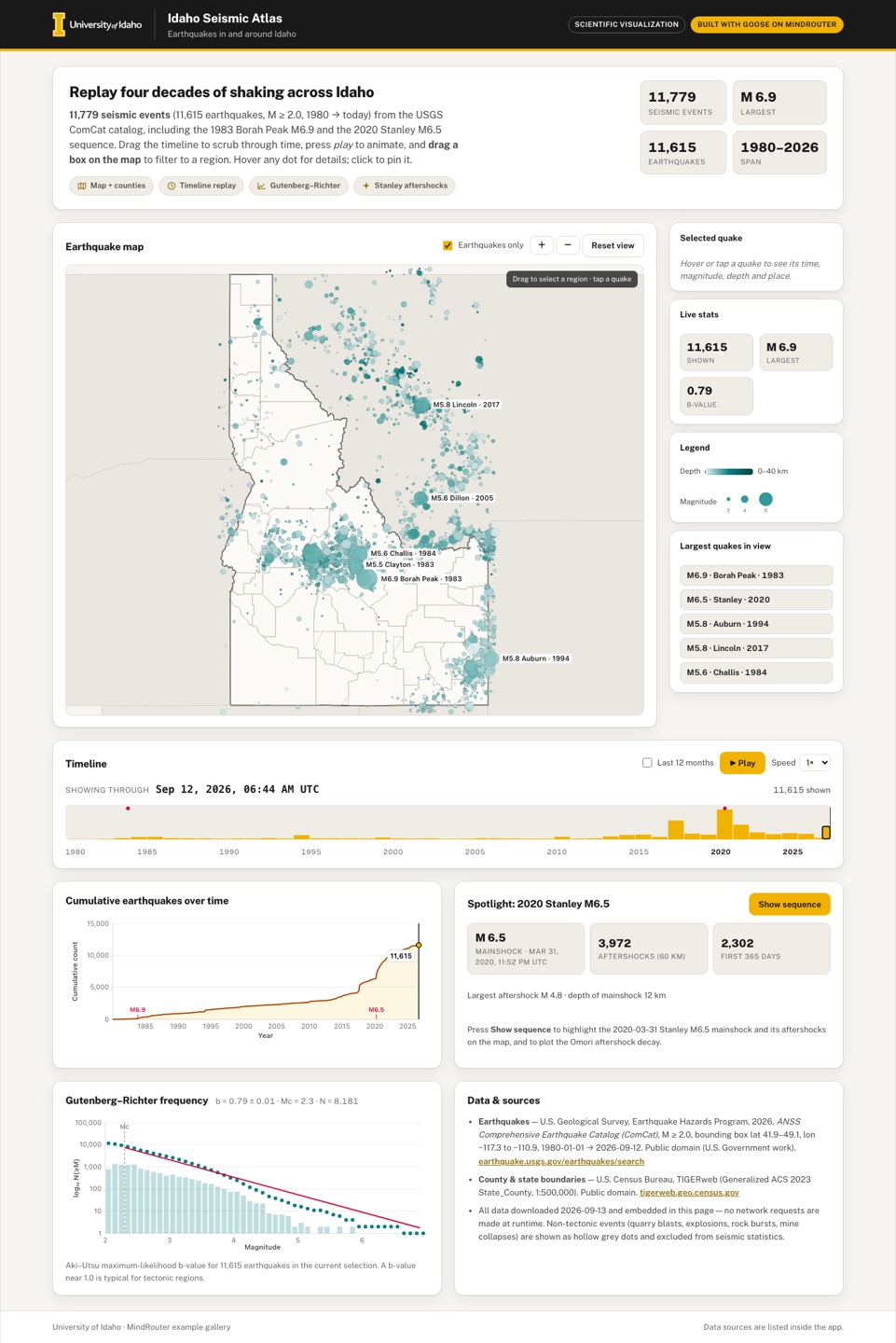 Desktop · click to enlarge

What it is ✎ blurb written by the AI critic
An animated map of every M2+ earthquake recorded in and around Idaho since 1980, drawn from the USGS catalog. Press play to watch four decades of shaking unfold, drag a box on the map to compare a region's magnitude statistics, or open the 2020 Stanley M6.5 spotlight to replay its first 90 days of aftershocks and see how their rate decays.
Try this
- Press Play and watch the 1983 Borah Peak M6.9 flash in central Idaho, then the 2017 Soda Springs swarm light up the southeast corner.
- Drag a box around the Stanley–Challis area and compare its b-value with the whole catalog's (0.82 vs 0.79).
- Open the Stanley spotlight, press 'Replay first 90 days', then check how closely the red dots follow the fitted Omori curve.
Highlights ✎ written by the AI critic
- 11,779 real USGS ComCat events (1980 to Sept 2026) on a hand-drawn Idaho county map, sized by magnitude and coloured by depth
- Timeline playback at 1 to 8 years per second, with flash rings for new quakes and a cumulative-count chart that follows along
- Drag a box on the map to filter it: every count, the largest-quakes list and the Gutenberg–Richter b-value update for that region
- 2020 Stanley M6.5 spotlight: a 90-day aftershock replay coloured by days since the mainshock, plus an Omori decay chart with its fitted curve
- Hover or tap any quake for time, magnitude, depth, coordinates and a link to its USGS event page
Who it's for
Geology courses, emergency management, curious Idahoans
Features
- Map of Idaho drawn in SVG/canvas (simple equirectangular or Albers projection coded by hand) with county lines, quakes as circles sized by magnitude and colored by depth
- Timeline slider + play button that animates the catalog through time, with a cumulative-count chart that follows
- Brush a region on the map to filter; details on hover/click (time, magnitude, depth, place)
- Gutenberg–Richter magnitude-frequency plot with a fitted b-value for the current selection
- Spotlight button for the 2020 Stanley sequence (Omori aftershock decay chart)
- Source/citation panel
Data & sources
- USGS ANSS ComCat FDSN event service (earthquake.usgs.gov/fdsnws/event/1/query), GeoJSON, bbox lat 41.9-49.1 lon -117.3 to -110.9, M>=2.0, 1980-01-05 to 2026-09-12, 11,779 events in 4 time-window files (reused from the earlier attempt after validation; public domain)
- U.S. Census Bureau TIGERweb Generalized_ACS2023 State_County layer 11 (Counties 500K): 44 Idaho counties as GeoJSON, downloaded 2026-09-13 (public domain)
- U.S. Census Bureau TIGERweb Generalized_ACS2023 State_County layer 7 (States 500K): outlines of Idaho plus WA/OR/MT/WY/UT/NV as GeoJSON, downloaded 2026-09-13 (public domain)
How it was built
Written by Goose 1.50.0 (github.com) on qwen/qwen3.8-27b, served by MindRouter, the University of Idaho's on-premises AI platform.
Rounds by kind
| build | 1 |
| feedback | 8 |
| continue | 5 |
| critic | 2 |
Lines of code per file
| body html | 164 |
| app css | 254 |
| app js | 1,549 |
| scripts | 158 |
Critic scores ✎ scored by the independent AI critic, 1–10
Independent audits ✎ by the AI critic
Automated checks
Checked by critic-verify.
Data spot checks ✎ written by the AI critic
- Borah Peak hover: app shows M6.9, Oct 28 1983 02:06 PM UTC, 10.0 km, 44.06°N 113.86°W. Raw usp0001zbv: M6.9, 1983-10-28 14:06:06 UTC, depth 10, lat 44.058, lon -113.857. Match.
- Auburn 'Largest quakes' button: app shows M5.8, Feb 3 1994 09:05 UTC, 7.9 km, 42.76°N 110.98°W. Raw usp00067xb: M5.8, 1994-02-03 09:05:04 UTC, depth 7.9, 42.762 / -110.976. Match.
- Stanley mainshock tap (phone): app shows M6.5, Mar 31 2020 11:52 PM UTC, 12.1 km. Raw us70008jr5: 2020-03-31 23:52:30 UTC, depth 12.06. Match.
- Stanley stats: app shows 3,972 aftershocks within 60 km, 2,302 in the first 365 days, largest M4.8. My own haversine calculation from raw gives 3,972 / 2,302 / M4.8 (2020-04-01 00:27 UTC). Match.
- Whole-catalog b-value: app shows b = 0.79 ± 0.01, Mc 2.3, N 8,181. My own Aki–Utsu calculation (0.1 bins rounded half-up, Mc = max-count bin + 0.2) gives b 0.7887, error 0.0087, Mc 2.3, N 8,181. Match. Rounding half-to-even instead gives b 0.806 and Mc 2.4, so the method choice matters.
Round-by-round timeline
Every harness round, in order. The prompts and FEEDBACK.md were written by the AI reviewer; the app code was written by the harness. Expand a round to see the exact prompt and the FEEDBACK.md the harness received.
-
Play does not animate — it jumps straight to the end. Click "▶ Play" (timeline at the end, or after dragging the slider to 1994): within one frame the date reads "Sep 11, 2026" again and the button returns to "▶ Play". The time advance per frame is ~1000× too large (the frame delta is in milliseconds but is multiplied as if it were seconds). Expected: at 1× a full 1980→2026 replay takes about 45 s (≈1 year per second; 2×/4×/8× faster), the date readout ticks visibly, the map fills in progressively, the cumulative chart grows, and Pause works mid-replay. To make the replay feel alive: newly appearing quakes should briefly flash (e.g. an expanding gold/red ring fading over ~1 s) and large ones (M ≥ 4.5) should get a short on-map label ("M6.9 Borah Peak 1983"). Add a "Show: all events up to date / only the last 12 months" option so replays show sequences appearing and fading. Playback must stay smooth (≥ 30 fps) — right now every frame rebuilds ~11,600 SVG circles.
-
Uncaught page errors (must be zero):
-
Cannot read properties of undefined (reading '4')— happens when the mouse moves over an empty part of the map (the "no quake under cursor" case is returned as -1 but treated as a valid index). -
svgPoint is not defined— happens on every mouse-wheel scroll over the map, so scroll-zoom never works.
-
-
"Brush a region to filter" is not implemented as a filter — dragging only zooms the map. Expected (SPEC): dragging on the map draws a selection rectangle that stays visible (gold outline, light fill) while quakes outside it are dimmed; the "shown" count, the cumulative chart, the Gutenberg–Richter plot and b-value all update to the selected region; a visible chip such as "Selection: 1,284 earthquakes · 44.1–45.0°N, 115.6–114.4°W ✕ Clear" appears, and Esc / ✕ clears it. Keep zoom as a separate control (+ / − / reset buttons and working wheel zoom). Brushing and tapping must also work with touch on phones (use pointer events; at present only mouse events are handled, so nothing can be brushed on a phone).
-
Cumulative chart does not follow the selection or the filters. After brushing central Idaho, toggling "Earthquakes only", or opening the Stanley spotlight, the curve is unchanged (always the whole catalog, y-max 11,779 which even includes blasts). Expected: the curve is computed for the current selection/filters, is drawn only up to the playhead (future part faded or hidden) so it grows during playback, shows the current count next to the playhead dot, has a y-axis title, marks big events (M ≥ 5.5, e.g. 1983 Borah Peak, 2020 Stanley) with small labelled ticks, and shows a hover tooltip (date + count).
-
Gutenberg–Richter b-value is wrong. It shows "b = -0.74" for the full catalog and "b = -0.19" when the timeline is at 1994; a b-value is a positive number (typically 0.8–1.2). The fit is a least-squares line through incremental 0.1-M bins including sparse bins, and bars start at log10 N = 0 so single-event bins vanish. Expected: plot cumulative N(≥M) as dots on a logarithmic y-axis with labelled decades (1, 10, 100, 1,000, 10,000) and the incremental counts as light bars behind; estimate the magnitude of completeness Mc (maximum-curvature method: the magnitude bin with the most events, plus 0.2); compute b with the Aki–Utsu maximum-likelihood estimator b = log10(e) / (mean(M for M ≥ Mc) − (Mc − 0.05)) with its uncertainty b/√N; draw the fitted line log10 N = a − b·M from Mc upward; report "b = 0.98 ± 0.02 · Mc = 2.4 · N = 5,432"; mark Mc with a vertical dashed line; x-axis should end at the largest magnitude present (not an empty 6–7 range). When fewer than ~50 events are above Mc, show a friendly empty state ("Select a larger region or time span to estimate a b-value").
-
Stanley aftershock numbers are wrong. The card says "5,230 aftershocks (60 km)" and "Largest aftershock M 4.9", but the distance test compares squared degrees with 60² (i.e. a 60-degree radius), so it counts quakes all over the region. With a real 60 km great-circle (haversine) distance from the mainshock (lon −115.1175, lat 44.4646) the data give ≈3,970 events after the mainshock, ≈2,300 in the first 365 days, and the largest aftershock is M4.8 (2020-04-01 00:27 UTC).
-
The Omori chart is not an Omori analysis. It is a linear, 7-day-smoothed daily count with the formula only in the caption. Expected: a log–log plot of aftershock rate (events/day) vs days since mainshock, using logarithmically growing time bins (e.g. from 0.01 day to ~2,000 days), shown as dots, with the fitted modified Omori law n(t) = K / (t + c)^p drawn as a line and the fitted values shown ("p = 1.05 · c = 0.08 d · K = …"), plus a one-sentence plain-language explanation. Also: pressing "Show sequence" currently leaves the timeline at Sep 2026, so the zoomed map shows 46 years of quakes, not the sequence. Expected: the spotlight shows only events from the mainshock onward (aftershocks coloured by days since mainshock, mainshock star + label), offers a "▶ Replay first 90 days" button that animates the sequence on the map, and a clear "Exit spotlight" that restores the previous view.
-
Times labelled "UTC" are really the browser's local time. Hover details say "May 19, 2026, 06:36 AM UTC" but the value is formatted in the local time zone (same for the timeline readout "Sep 11, 2026, 11:44 PM"). Format all times in UTC (and label them UTC) or explicitly in Mountain Time.
-
Phone (390 px) map is hard to use. Idaho fills only about a third of the 328 px-wide map (lots of empty neighbour-state area left and right), the legend box covers the whole southern third of Idaho, and the dark hint "Drag to zoom a region · scroll to zoom · double-click to reset" covers the panhandle. Expected: on narrow screens the map frames Idaho tightly (taller map, roughly 1.25× as tall as wide), the legend sits below the map (not over it) and the hint is short ("Drag to select a region · tap a quake") and not on top of data. On desktop the map also wastes the grey space left and right of Idaho — frame it to Idaho plus a small margin.
-
Timeline year labels collide on the phone ("19801985199019952000200520102015…" as one run of digits) and on desktop they are spaced evenly with flexbox rather than at their true time positions, so they don't line up with the histogram bars or the slider thumb. Expected: tick labels positioned by time, every 10 years on narrow screens. Also mark the big events on the histogram (small labelled dots for M ≥ 5.5).
-
Unbalanced layout with large empty areas (desktop 1440 px). The Timeline card has ~130 px of blank space under the year axis; the cumulative chart card has ~120 px blank at the bottom; the Gutenberg–Richter card is taller than its content; under the map there is an empty dashed box (the detail area) when nothing is hovered. Expected: a balanced, dashboard-like layout with no dead space — e.g. put the timeline/player as a full-width bar directly under the map section, give the detail area a helpful empty state ("Hover or tap a quake to see its time, magnitude, depth and place"), and size chart cards to their content. The intro stat tiles have uneven heights because "1980–2026" wraps onto two lines.
-
Chart text is tiny and not in the brand font. Canvas axis labels are 10 px and set with
"10px var(--font)"— CSS variables do not work in canvas font strings, so the browser falls back to its default font. Expected: 11–12 px labels in Public Sans (use the real family name), axis titles on every chart, crisp on high-DPI screens. -
Pinned highlight drawn in the wrong place. Click a quake to pin it, then drag-zoom elsewhere: a gold ring stays stuck in the top-left corner of the map even though that quake is outside the view. Only draw hover/pin rings for quakes inside the current view, and clear the pin when the selection changes.
-
Emoji used as icons (🗺️ ⏱️ 📈 💥 in the intro chips, 📅 ⬇ 📍 in the details) render differently on every OS and look less polished than the rest of the design. Replace them with small inline SVG icons or plain text labels.
-
Wording accuracy: the intro says "11,779 earthquakes", but 11,779 is all events; 11,615 are earthquakes and the rest are blasts / rock bursts. Say "11,779 seismic events (11,615 earthquakes)".
-
Play does not animate — it jumps straight to the end. Click "▶ Play" (timeline at the end, or after dragging the slider to 1994): within one frame the date reads "Sep 11, 2026" again and the button returns to "▶ Play". The time advance per frame is ~1000× too large (the frame delta is in milliseconds but is multiplied as if it were seconds). Expected: at 1× a full 1980→2026 replay takes about 45 s (≈1 year per second; 2×/4×/8× faster), the date readout ticks visibly, the map fills in progressively, the cumulative chart grows, and Pause works mid-replay. To make the replay feel alive: newly appearing quakes should briefly flash (e.g. an expanding gold/red ring fading over ~1 s) and large ones (M ≥ 4.5) should get a short on-map label ("M6.9 Borah Peak 1983"). Add a "Show: all events up to date / only the last 12 months" option so replays show sequences appearing and fading. Playback must stay smooth (≥ 30 fps) — right now every frame rebuilds ~11,600 SVG circles.
-
Uncaught page errors (must be zero):
-
Cannot read properties of undefined (reading '4')— happens when the mouse moves over an empty part of the map (the "no quake under cursor" case is returned as -1 but treated as a valid index). -
svgPoint is not defined— happens on every mouse-wheel scroll over the map, so scroll-zoom never works.
-
-
"Brush a region to filter" is not implemented as a filter — dragging only zooms the map. Expected (SPEC): dragging on the map draws a selection rectangle that stays visible (gold outline, light fill) while quakes outside it are dimmed; the "shown" count, the cumulative chart, the Gutenberg–Richter plot and b-value all update to the selected region; a visible chip such as "Selection: 1,284 earthquakes · 44.1–45.0°N, 115.6–114.4°W ✕ Clear" appears, and Esc / ✕ clears it. Keep zoom as a separate control (+ / − / reset buttons and working wheel zoom). Brushing and tapping must also work with touch on phones (use pointer events; at present only mouse events are handled, so nothing can be brushed on a phone).
-
Cumulative chart does not follow the selection or the filters. After brushing central Idaho, toggling "Earthquakes only", or opening the Stanley spotlight, the curve is unchanged (always the whole catalog, y-max 11,779 which even includes blasts). Expected: the curve is computed for the current selection/filters, is drawn only up to the playhead (future part faded or hidden) so it grows during playback, shows the current count next to the playhead dot, has a y-axis title, marks big events (M ≥ 5.5, e.g. 1983 Borah Peak, 2020 Stanley) with small labelled ticks, and shows a hover tooltip (date + count).
-
Gutenberg–Richter b-value is wrong. It shows "b = -0.74" for the full catalog and "b = -0.19" when the timeline is at 1994; a b-value is a positive number (typically 0.8–1.2). The fit is a least-squares line through incremental 0.1-M bins including sparse bins, and bars start at log10 N = 0 so single-event bins vanish. Expected: plot cumulative N(≥M) as dots on a logarithmic y-axis with labelled decades (1, 10, 100, 1,000, 10,000) and the incremental counts as light bars behind; estimate the magnitude of completeness Mc (maximum-curvature method: the magnitude bin with the most events, plus 0.2); compute b with the Aki–Utsu maximum-likelihood estimator b = log10(e) / (mean(M for M ≥ Mc) − (Mc − 0.05)) with its uncertainty b/√N; draw the fitted line log10 N = a − b·M from Mc upward; report "b = 0.98 ± 0.02 · Mc = 2.4 · N = 5,432"; mark Mc with a vertical dashed line; x-axis should end at the largest magnitude present (not an empty 6–7 range). When fewer than ~50 events are above Mc, show a friendly empty state ("Select a larger region or time span to estimate a b-value").
-
Stanley aftershock numbers are wrong. The card says "5,230 aftershocks (60 km)" and "Largest aftershock M 4.9", but the distance test compares squared degrees with 60² (i.e. a 60-degree radius), so it counts quakes all over the region. With a real 60 km great-circle (haversine) distance from the mainshock (lon −115.1175, lat 44.4646) the data give ≈3,970 events after the mainshock, ≈2,300 in the first 365 days, and the largest aftershock is M4.8 (2020-04-01 00:27 UTC).
-
The Omori chart is not an Omori analysis. It is a linear, 7-day-smoothed daily count with the formula only in the caption. Expected: a log–log plot of aftershock rate (events/day) vs days since mainshock, using logarithmically growing time bins (e.g. from 0.01 day to ~2,000 days), shown as dots, with the fitted modified Omori law n(t) = K / (t + c)^p drawn as a line and the fitted values shown ("p = 1.05 · c = 0.08 d · K = …"), plus a one-sentence plain-language explanation. Also: pressing "Show sequence" currently leaves the timeline at Sep 2026, so the zoomed map shows 46 years of quakes, not the sequence. Expected: the spotlight shows only events from the mainshock onward (aftershocks coloured by days since mainshock, mainshock star + label), offers a "▶ Replay first 90 days" button that animates the sequence on the map, and a clear "Exit spotlight" that restores the previous view.
-
Times labelled "UTC" are really the browser's local time. Hover details say "May 19, 2026, 06:36 AM UTC" but the value is formatted in the local time zone (same for the timeline readout "Sep 11, 2026, 11:44 PM"). Format all times in UTC (and label them UTC) or explicitly in Mountain Time.
-
Phone (390 px) map is hard to use. Idaho fills only about a third of the 328 px-wide map (lots of empty neighbour-state area left and right), the legend box covers the whole southern third of Idaho, and the dark hint "Drag to zoom a region · scroll to zoom · double-click to reset" covers the panhandle. Expected: on narrow screens the map frames Idaho tightly (taller map, roughly 1.25× as tall as wide), the legend sits below the map (not over it) and the hint is short ("Drag to select a region · tap a quake") and not on top of data. On desktop the map also wastes the grey space left and right of Idaho — frame it to Idaho plus a small margin.
-
Timeline year labels collide on the phone ("19801985199019952000200520102015…" as one run of digits) and on desktop they are spaced evenly with flexbox rather than at their true time positions, so they don't line up with the histogram bars or the slider thumb. Expected: tick labels positioned by time, every 10 years on narrow screens. Also mark the big events on the histogram (small labelled dots for M ≥ 5.5).
-
Unbalanced layout with large empty areas (desktop 1440 px). The Timeline card has ~130 px of blank space under the year axis; the cumulative chart card has ~120 px blank at the bottom; the Gutenberg–Richter card is taller than its content; under the map there is an empty dashed box (the detail area) when nothing is hovered. Expected: a balanced, dashboard-like layout with no dead space — e.g. put the timeline/player as a full-width bar directly under the map section, give the detail area a helpful empty state ("Hover or tap a quake to see its time, magnitude, depth and place"), and size chart cards to their content. The intro stat tiles have uneven heights because "1980–2026" wraps onto two lines.
-
Chart text is tiny and not in the brand font. Canvas axis labels are 10 px and set with
"10px var(--font)"— CSS variables do not work in canvas font strings, so the browser falls back to its default font. Expected: 11–12 px labels in Public Sans (use the real family name), axis titles on every chart, crisp on high-DPI screens. -
Pinned highlight drawn in the wrong place. Click a quake to pin it, then drag-zoom elsewhere: a gold ring stays stuck in the top-left corner of the map even though that quake is outside the view. Only draw hover/pin rings for quakes inside the current view, and clear the pin when the selection changes.
-
Emoji used as icons (🗺️ ⏱️ 📈 💥 in the intro chips, 📅 ⬇ 📍 in the details) render differently on every OS and look less polished than the rest of the design. Replace them with small inline SVG icons or plain text labels.
-
Wording accuracy: the intro says "11,779 earthquakes", but 11,779 is all events; 11,615 are earthquakes and the rest are blasts / rock bursts. Say "11,779 seismic events (11,615 earthquakes)".
-
Play still jumps to the end in one frame. Drag the slider to Jan 1994, press "▶ Play": one second later the readout already says "Sep 12, 2026, 06:44 AM UTC" and the button is back to "▶ Play". "Replay first 90 days" in the Stanley card is the same — it ends immediately at Jun 29, 2020. The time advance is still "one year per millisecond" (the frame delta in ms is multiplied by the length of a year in ms). Expected: at 1× one simulated year per real second (full 1980→2026 replay ≈ 46 s; 2×/4×/8× proportionally faster); after 1 s of playing from Jan 1994 the readout should say roughly Jan 1995. The Stanley replay should run the 90 days over about 15 s (i.e. ~6 days per second), with the date readout ticking day by day. Pause must stop at the current date.
-
Frozen gold rings cover every quake after pressing Play. Because playback stops on its first frame, every quake gets a "new quake" flash ring that is never cleared — the whole map (and the Stanley zoom) turns into a mass of gold and red circles. Expected: flash rings expand and fade out within ~1 s and are always removed afterwards, even when playback stops or is paused; when not playing no rings are drawn.
-
Uncaught page error still present:
Cannot read properties of undefined (reading '4')— every time the pointer moves over an empty part of the map and after zooming. The "no quake under the pointer" value (-1) is still stored as the hovered quake and later used as an index. Expected: no errors at all. -
Gutenberg–Richter plot is empty and the b-value is wrong. The header reads "b = 3.70 ± 0.05 · Mc = 2.4 · N = 5,953" for the whole catalog (and 3.84 after brushing central Idaho), and the chart area shows only the axes and the dashed Mc line — no dots, no bars, no fit line. Two defects: (a) the cumulative N(≥M) calculation reads one element past the end of its array, so every cumulative value becomes NaN and nothing can be positioned; (b) the Aki–Utsu formula uses ln(10) ≈ 2.303 where it needs log10(e) ≈ 0.4343, so b is ~5.3× too big. For reference, the raw data give b ≈ 0.78 (Mc ≈ 2.3–2.4, N ≈ 8,000) for all earthquakes, and b ≈ 1.1 for the first year of the Stanley sequence. Round magnitudes to 0.1 before binning. Expected: visible cumulative dots on the log axis, light incremental bars, the red fitted line running through the dots from Mc upward, and a plausible b.
-
Omori chart: points stop at 10 days and the fit line is wrong. The time bins only cover 0.01→10 days although the axis runs to 1,000+ days, so the long decay is missing. The orange fit line is drawn far above all the dots and runs outside the plot area into the top-right corner; "K = 25603" is meaningless (the fit is done in natural logs but K is then computed as a power of 10). Expected: bins out to ~2,000 days, a fitted curve that passes through the dots, drawn only inside the plot area, with sensible p, c, K. (Note: the first hours after a large quake are under-recorded in the catalog, so it is fine to fit from ~0.1 day and say so in the caption.)
-
Stanley spotlight still shows 40 years of unrelated quakes. After "Show sequence" or "Replay first 90 days" the zoomed map still shows events from 1980–2019 around Challis/Clayton with labels such as "M6.9 The 1983 Borah Peak Earthquake 1983" and "M5.5 Clayton 1983". Expected: while the spotlight is open, only events from the mainshock (2020-03-31 23:52 UTC) onward are drawn, coloured by days since the mainshock with a small legend, plus the mainshock star; "Exit spotlight" restores the normal view.
-
Map labels are an unreadable pile. Every M ≥ 4.5 quake (~40) gets a permanent label, so around Challis/Stanley and Soda Springs the labels overlap into illegible stacks, and on the phone they run off the right edge ("M4.7 Idaho-Montana border region 19", "M5.8 Lincoln 20"). Some texts are awkward ("M6.9 The 1983 Borah Peak Earthquake 1983"). Expected: permanent labels only for the few largest events (M ≥ 5.5), skipping any label that would overlap another one or leave the map; short clean text such as "M6.9 Borah Peak · 1983"; other M ≥ 4.5 events get a label only briefly while they appear during playback (fade out after ~3 s).
-
Desktop map is taller than the screen, so you cannot watch a replay. At 1440×900 the map is 1230×1046 px: when the map is in view, the Play button and date readout are off-screen, and Idaho sits in the middle with wide empty grey bands on both sides. Expected at 1440×900: map about 640–700 px tall, with a side column next to it (legend, quake details, selection chip, a few live stats such as shown count / largest / b-value) and the timeline player directly beneath, so the map, Play button and date readout are visible together.
-
"Last 12 months" does not update the count. Tick it at the end of the timeline: the map correctly drops to ~400 recent events but the readout still says "11,615 shown" until something else is changed. Expected: the count (and anything else that depends on it) updates immediately.
-
Cumulative chart text collisions. The rotated axis title "Cumulative count" is drawn on top of the y-tick numbers (8,711 / 5,808 / 2,904 are struck through), the "Year" title sits on top of the "2005" tick, and the count label beside the playhead dot is cut off at the right edge (only a stray "1" is visible above the top-right corner). I could not see a hover tooltip when moving the mouse across the chart — please make sure one appears (date + count) and disappears on mouse leave.
-
Phone (390 px) details. The dark "Drag to select a region · tap a quake" hint still covers quakes in the panhandle (move it below the map or hide it after 3 s); the "1980" tick of the timeline axis is clipped at the left edge of the card (also on desktop it sticks out left of the card's content area); the cumulative chart's year labels touch each other ("1985 1990 1995 2000 2005…") — use 10-year ticks on narrow screens.
-
Selection chip count does not match the filters. After brushing, the chip says "Selection: 5,659 earthquakes" while the readout says "5,657 shown" — the chip counts all event types and ignores the date. Make the chip use the same filters as the rest of the page.
-
Play still jumps to the end in one frame. In
playStep, the time advance multiplies the frame delta (in milliseconds) by the length of a year in milliseconds, i.e. one year per millisecond. Divide the frame delta by 1000 so 1× = one simulated year per real second (full replay ≈ 46 s; 2×/4×/8× faster). Test: slider at Jan 1994, press Play, after 1 s the readout should say about Jan 1995. The Stanley "Replay first 90 days" has the same bug and ends instantly; it should run the 90 days over ~15 s (about 6 simulated days per real second), stopping at day 90. -
Frozen gold rings after Play. Because playback stops on its first frame, every quake keeps a "new quake" flash ring forever and the map turns into a mass of gold/red circles. Flash rings must fade out within ~1 s and be removed (redraw once more after they expire, and clear them when playback stops or pauses).
-
Page error
Cannot read properties of undefined (reading '4')whenever the pointer moves over an empty part of the map:quakeAtreturns -1 for "nothing here" and that -1 is stored instate.hover/state.pinnedand later used as an index. Treat -1 as null everywhere (hover, pin, cursor, detail panel). -
Gutenberg–Richter chart is empty and b is ~5× too big ("b = 3.70 ± 0.05"). In
renderGR: (a) the cumulative array is filled withcum[b] = cum[b + 1] + bins[b]starting at the last bin, which reads past the end of the array (undefined → NaN), so every cumulative value is NaN and nothing is drawn — allocate one extra zero element or start frombins[last]; (b) the Aki–Utsu estimator is b = log10(e) / (mean(M ≥ Mc) − (Mc − 0.05)) where log10(e) = 0.4343 (Math.LOG10E); the code usesMath.log(10)(= 2.303) instead. Also round each magnitude to 0.1 before binning. After the fix the whole catalog gives a b-value a bit below 1 and the plot shows dots, bars and the red fit line. -
Omori chart. (a) The log time bins only go from 0.01 to 10 days (25 edges × 3/24 decades); extend them to ~2,000 days (about 0.01 → 2,000 d, ~8 bins per decade). (b) The fit is done with natural logs (
Math.log) but K is computed asMath.pow(10, logK)— useMath.exp(logK)so the line passes through the dots. (c) Clip the fit line to the plot area (it currently runs off into the top-right corner). (d) Fit only bins from ~0.1 day on and say in the caption that the first hours are under-recorded. -
Stanley spotlight shows 40 years of unrelated quakes. After "Show sequence" or "Replay first 90 days" the map still draws 1980–2019 events around Challis/Clayton ("M6.9 The 1983 Borah Peak Earthquake 1983"). While the spotlight is open, draw only events from the mainshock time onward, coloured by days since the mainshock with a small legend, plus the mainshock star. "Exit spotlight" restores the normal view.
-
Map labels pile up. Every M ≥ 4.5 quake (~40) has a permanent label; around Challis/Stanley and Soda Springs they overlap into unreadable stacks, and on the phone they run off the right edge ("M5.8 Lincoln 20"). Permanently label only M ≥ 5.5, skip any label whose box would overlap an already-drawn label or leave the map, and use short text like "M6.9 Borah Peak · 1983". Smaller M ≥ 4.5 events may get a label only briefly (~3 s) as they appear during playback.
-
Desktop map is taller than the screen. At 1440×900 the map is 1230×1046 px, so the Play button and the date readout are off-screen whenever the map is visible, and Idaho sits between wide empty grey bands. Make the map about 640–700 px tall with a side column beside it (legend, quake details, selection chip, live stats: shown count, largest magnitude, b-value) and keep the timeline player directly underneath, so map + Play + date fit in one screen. On phones keep the current stacked layout.
-
"Last 12 months" does not update the count. Ticking it drops the map to ~400 recent events, but the readout still says "11,615 shown". Call the same update used by the slider when the checkbox changes.
-
Cumulative chart text collisions. The rotated "Cumulative count" title overlaps the y-tick numbers; "Year" overlaps the "2005" tick; the count label next to the playhead dot is cut off at the right edge (a stray "1" shows). Give the axis titles their own margin, keep the count label inside the chart (flip it to the left of the dot near the right edge), and make sure the hover tooltip (date + count) is visible and disappears on mouse leave.
-
Phone (390 px). The dark "Drag to select a region · tap a quake" hint still covers quakes in the panhandle — put it below the map or fade it out after 3 s. The timeline's "1980" tick is clipped at the card's left edge (also sticks out on desktop). The cumulative chart's year labels touch each other — use 10-year ticks on narrow screens.
-
Selection chip count differs from the readout ("5,659 earthquakes" vs "5,657 shown"): the chip counts all event types and ignores the date. Use the same filters as the rest of the page.
-
Hover / tap shows the wrong quake. Pointing exactly at the centre of the big M6.9 Borah Peak circle (1983) shows "M 2.1 · 23 km WNW of Mackay, Idaho · Nov 26, 2020" in the detail panel; tapping it on the phone shows an M2.2 from 2021. The picker chooses the nearest centre among all visible quakes, so tiny quakes near a big one steal the hover. Expected: among quakes whose drawn circle contains the pointer (radius + a few px), choose the one drawn on top (the largest magnitude, since large ones are drawn last); fall back to the nearest centre only when no circle contains the pointer.
-
Click-to-pin does not stay pinned. Click a quake, then move the mouse elsewhere on the map: the detail panel goes back to "Hover or tap a quake to see its time, magnitude, depth and place." Expected: after a click/tap the pinned quake's details stay visible (with a small "✕ Unpin" button) and its gold ring stays, while hovering other quakes may temporarily preview them; clicking empty map, "✕ Unpin" or Esc unpins.
-
Omori fit line is far below the data. The caption reads "p = 0.57 · c = 0.01 d · K = 3" and the orange line runs from ~30 events/day at 0.01 day down to below 1/day at ~50 days, while the red dots are ~100–200/day at 0.1 day, ~60/day at 1 day and ~1/day at 1,000 days. The fitted curve must pass through the dots: fit and draw in the same units as plotted (rate in events/day vs days) — a quick sanity check is that the curve's value at 1 day is close to the dot near 1 day. Expected p roughly 0.6–1.2 with K in the hundreds.
-
b-value drops the Mc bin (floating-point comparison) and the two b-values disagree. In
renderGR,Mc = mMin + mcBin * 0.1 + 0.2evaluates to 2.3000000000000003, som >= Mcexcludes every M2.3 event: the header shows "N = 6,951" although about 8,090 earthquakes have M ≥ 2.3, and b is too low (0.68). Round Mc to one decimal (e.g.Math.round(x * 10) / 10) or compare with a small tolerance. The side "Live stats" card shows b = 0.72 at the same time as the chart header shows b = 0.68 for the same selection (it uses unrounded magnitudes) — compute the b-value once and show that same number in both places. The red fit line should start at the cumulative dot at Mc (now it starts visibly below it). -
Stanley spotlight: live stats and marker text don't match the map. While the spotlight shows only events since the mainshock, "Live stats" still says "5,804 shown · M6.9 largest" (largest should be M6.5). Stats must describe what is drawn. Also a second pink "Stanley M6.5" text is drawn behind the "M6.5 Stanley · 2020" label above the star, producing garbled overlapping text — draw a single label.
-
Desktop side column wastes space and the legend appears twice. At 1440 px the side column (Legend + Live stats) ends ~330 px above the bottom of the map card, leaving a large empty area, while the depth/magnitude legend is also repeated under the map, followed by the selection chip and the detail panel. Move the quake detail panel and the selection chip into the side column below Live stats, and remove the duplicate legend under the map, so the map card gets shorter and the timeline player sits closer to the map. On phones show the legend only once.
-
Awkward label text. The largest event is labelled "M6.9 The 1983 Borah Peak Earthquake · 1983". Clean the place name for labels: strip a leading "The", a trailing "Earthquake", distances like "23 km WNW of", and ", Idaho"/", Montana" → "M6.9 Borah Peak · 1983".
-
Map rendering artefacts. On the desktop map there is a white jagged sliver along the left edge at about 45.5–47°N (looks like a piece of a neighbouring state drawn with Idaho's white fill or an unfilled hole) and a lighter rectangular strip along the bottom-left edge of the map frame (x ≈ 100–240 px, just above the legend). Neighbouring states should be uniformly grey right up to the frame.
-
Clipped chart text. In the cumulative chart the count label above the playhead dot ("11,615", or "5,993" after brushing) is cut off by the top edge of the chart when the playhead is at the end. In the Gutenberg–Richter chart the rotated y-axis title "log₁₀ N(≥M)" overlaps the "1,000" tick label.
-
Timeline axis "1980" label still starts left of the card's content edge (x ≈ 86 px while the slider starts at x ≈ 101 px on desktop; at x = 0 on the phone). Keep the first and last tick labels inside the card.
-
Empty Spotlight card before it is opened. Next to the cumulative chart the Spotlight card is mostly blank (one sentence and a button). Show a small static teaser there: mainshock date/time UTC, M6.5, depth 12 km, "3,972 aftershocks within 60 km", so the card is informative before the button is pressed.
-
Keyboard access to the map. Tab goes from the header straight to the timeline; the map itself cannot be explored without a mouse. Add a keyboard path: e.g. make the map focusable with arrow keys to pan and +/− to zoom, and an "Earthquake list" of the 10 largest events in the current selection (buttons that pin the quake on the map).
-
Hover / tap shows the wrong quake. Pointing exactly at the centre of the big M6.9 Borah Peak circle (1983) shows "M 2.1 · 23 km WNW of Mackay, Idaho · Nov 26, 2020" in the detail panel; tapping it on the phone shows an M2.2 from 2021.
quakeAtpicks the nearest centre, so tiny quakes next to a big one steal the hover. Expected: among quakes whose drawn circle contains the pointer (radius + 3 px), choose the one with the largest magnitude (it is drawn on top); only when no circle contains the pointer fall back to the nearest centre within 12 px. -
Click-to-pin does not stay pinned. Click a quake, then move the mouse elsewhere over the map: the detail panel returns to "Hover or tap a quake to see its time, magnitude, depth and place." Expected: after a click/tap the pinned quake's details stay (with a small "✕ Unpin" button) and its gold ring stays; hovering other quakes may preview them temporarily, but leaving them shows the pinned quake again. Clicking empty map, "✕ Unpin" or Esc unpins.
-
Omori fit line is far below the data. The chart reads "p = 0.57 · c = 0.01 d · K = 3" and the orange line runs from ~30 events/day at 0.01 day to below 1/day at ~50 days, while the red dots are ~100–200/day at 0.1 day, ~60/day at 1 day and ~1/day at 1,000 days. Fit in exactly the quantities that are plotted (x = bin-centre days, y = events/day): minimise the squared error of ln(rate) − [ln K − p·ln(t + c)] over the plotted dots with t ≥ 0.1 day, and draw K / (t + c)^p with that same K. Sanity check in code: the curve at t = 1 day should be within a factor of ~2 of the dot nearest 1 day. Expected p roughly 0.6–1.2 and K in the tens to hundreds.
-
b-value drops the Mc bin (floating point) and the two b-values disagree. In
renderGR,Mc = mMin + mcBin * 0.1 + 0.2evaluates to 2.3000000000000003, som >= Mcexcludes every M2.3 event (header shows "N = 6,951" although about 8,090 earthquakes have M ≥ 2.3) and b comes out too low (0.68). Round Mc to one decimal (Math.round(x * 10) / 10) before comparing. The side "Live stats" card shows b = 0.72 while the chart header shows b = 0.68 for the same selection (Live stats uses unrounded magnitudes) — compute the b-value in one shared function and show that same number in both places. The red fit line should start at the cumulative dot at Mc. -
Stanley spotlight: live stats and marker text don't match the map. While the spotlight shows only events since the mainshock, "Live stats" still says "5,804 shown · M6.9 largest" (largest should be M6.5). Stats must describe what is drawn. A second pink "Stanley M6.5" text is drawn behind the "M6.5 Stanley · 2020" label above the star, producing garbled overlapping text — draw only one label there.
-
Desktop side column wastes space; legend appears twice. At 1440 px the side column (Legend + Live stats) ends ~330 px above the bottom of the map card, while the depth/magnitude legend is repeated under the map, followed by the selection chip and the detail panel. Move the quake detail panel and the selection chip into the side column below Live stats and remove the legend under the map, so the map card is shorter and the timeline player sits right under the map. On phones show the legend only once.
-
Awkward label text. The largest event is labelled "M6.9 The 1983 Borah Peak Earthquake · 1983". When building a label, strip a leading "The ", a year and the word "Earthquake", any "NN km DIR of " prefix and a trailing ", Idaho"/", Montana"/etc. → "M6.9 Borah Peak · 1983".
-
Clipped chart text. In the cumulative chart the count label above the playhead dot ("11,615", or "5,993" after brushing) is cut off by the top edge when the playhead is at the end — place it below/left of the dot when it would leave the plot. In the Gutenberg–Richter chart the rotated y-axis title "log₁₀ N(≥M)" overlaps the "1,000" tick label — add left padding.
-
Timeline axis "1980" label starts left of the card's content edge (x ≈ 86 px while the slider starts at x ≈ 101 px on desktop; at x = 0 on the phone). Keep the first and last tick labels inside the card (left-align the first, right-align the last).
-
Empty Spotlight card before it is opened. The Spotlight card next to the cumulative chart is mostly blank (one sentence and a button). Show a small static teaser: "Mar 31, 2020 23:52 UTC · M6.5 · depth 12 km · 3,972 aftershocks within 60 km", so the card is informative before the button is pressed.
-
Keyboard access to the map. Tab goes from the page header straight to the timeline; the map cannot be explored without a mouse. Add a short "Largest quakes in view" list (top 8 by magnitude for the current filters) in the side column — each row a button that pins that quake on the map and shows its details.
-
quakeAtpicks the wrong quake under the pointer. It returns the quake with the nearest centre, so a tiny quake next to a large circle steals the hover/tap (pointing at the middle of the largest circle on the map shows a M2.1 quake). Change the rule: first collect every visible quake whose drawn circle contains the pointer (distance ≤ magRadius(mag) + 3 px) and return the one with the largest magnitude; only if none contains the pointer, return the nearest centre within 12 px; otherwise return null. -
Pinning does not persist. After a click/tap pins a quake, moving the pointer off it calls
showDetail(null)and the detail panel goes back to the empty hint. Change hover handling so that when nothing is hovered the panel shows the pinned quake (if any), with a small "✕ Unpin" button in the panel; the pinned gold ring stays drawn. Clicking empty map, the Unpin button, or pressing Esc clears the pin. -
Omori fit line does not pass through the dots. In
drawOmori, fit and draw in the same quantities that are plotted: x = bin-centre days t, y = rate in events/day. For each candidate c, do ordinary least squares of ln(rate) on ln(t + c) using only dots with t ≥ 0.1 day; slope = −p, intercept = ln K, so K = exp(intercept). Keep the c with the smallest squared error. Draw K / (t + c)^p across the plotted time range, clipped to the plot area (ctx.save(); ctx.rect(plot area); ctx.clip(); … ctx.restore()). Show "p = … · c = … d · K = …" with K rounded. -
Mc floating-point bug + two different b-values.
const Mc = mMin + mcBin * 0.1 + 0.2gives values like 2.3000000000000003, som >= Mcsilently excludes the whole Mc bin and b is too low. Useconst Mc = Math.round((mMin + mcBin * 0.1 + 0.2) * 10) / 10in bothrenderGRandrenderLiveStats. Better: move the Mc + Aki–Utsu calculation into one functionbValueFor(indices)that returns {b, err, Mc, N, a} computed from magnitudes rounded to 0.1, and use its result in both places so the Live stats card and the chart header always show the same b. -
Stanley spotlight details. (a)
renderLiveStatsignores the spotlight: whilestate.stanleyis on it still counts all events up to the playhead and reports the largest magnitude of the whole catalog. Make it count and take the largest magnitude only over the quakes that are actually drawn (the same testrenderQuakesuses in spotlight mode). (b)renderQuakesdraws the text "Stanley M6.5" next to the mainshock star and the regular big-quake label for the same event, so the two texts overlap — skip the regular label for the mainshock while the spotlight is on. -
Quake details appear off-screen on a laptop. At 1440×900, with the map scrolled into view, hovering or clicking a quake fills
#map-detail, which sits below the map (about 150 px under the bottom of the screen), so it looks as if nothing happens. Meanwhile the side column ends ~330 px above the bottom of the map card (empty space) and the depth/magnitude legend is shown twice (under the map and in the side "Legend" card). Change the markup: move#map-detailand#sel-chipinto the side column directly under "Live stats" (give the detail its own small card titled "Selected quake" with the existing empty hint), and delete the legend row under the map (#map-legend), keeping the side legend. On phones (stacked layout) the order should be: map → Selected quake → selection chip → Live stats → Legend. -
Clean label text. The largest quake is labelled "M6.9 The 1983 Borah Peak Earthquake · 1983". In
shortPlace(used for labels), when the place has no " of " part: remove a leading "The ", remove any 4-digit year, remove the word "Earthquake", remove a trailing ", Idaho" / ", Montana" / ", Utah" / ", Wyoming" / ", Nevada" / ", Oregon" / ", Washington" / ", Canada", and trim spaces → "M6.9 Borah Peak · 1983". Use the same short name in the timeline and cumulative-chart event markers if they show names. -
Clipped chart text. (a) Cumulative chart: when the playhead is at the end, the count label above the dot ("11,615") is cut off by the top of the canvas — if the label's top would be above the plot area, draw it below and to the left of the dot instead. (b) Gutenberg–Richter chart: the rotated y-axis title "log₁₀ N(≥M)" overlaps the "1,000" tick label — increase the left padding (≈ 64 px) and draw the rotated title at x ≈ 12 px.
-
Timeline tick labels overhang the card. The "1980" label starts ~15 px left of the slider/histogram (at x = 0 on the phone). Position tick labels relative to the slider track, left-align the first label and right-align the last one, so all labels stay inside the card.
-
Spotlight card is blank until opened. Before "Show sequence" is pressed, show the same three stat tiles that the opened card shows (mainshock M6.5 with date/time UTC, aftershocks within 60 km, first 365 days) plus one line "Largest aftershock M4.8 · depth of mainshock 12 km" — computed with the existing
stanleyAftershocks()— and keep the "Show sequence" button. Only the Omori chart and the Replay/Exit buttons are added when opened. -
Keyboard path to individual quakes. Add a small "Largest quakes in view" card in the side column (below the legend): the 6 largest currently visible quakes (same filters as the map) as buttons like "M6.9 · Borah Peak · 1983". Activating a button pins that quake (gold ring on the map + details in "Selected quake"). Refresh the list when filters, selection, spotlight or time change — during playback refresh at most twice per second.
-
"Show sequence" throws
ReferenceError: withinYear is not defined— the spotlight no longer opens. Clicking the button changes its label to "Hide sequence", but the card keeps the old intro sentence, no Omori chart, no "Replay first 90 days"/"Exit spotlight" buttons, and the console shows the error above. Cause:renderStanley()still builds a second stats block usingwithinYear(andmaxAft), butwithinYearnow only exists insidestanleyStatsHTML(). FixrenderStanley()so it usesstanleyStatsHTML()for the tiles only once (delete the duplicated<div class="stanley-stats">…</div>block that follows it) and then appends the Replay/Exit buttons, the Omori canvas and the caption. Test by clicking "Show sequence": the three tiles appear once, followed by the buttons and the Omori chart, and there is no console error. "Replay first 90 days", "Exit spotlight" and "Hide sequence" must all work as before. -
The spotlight teaser is not shown on page load. Before "Show sequence" is pressed the card still shows only "Press Show sequence to highlight…". Render
stanleyStatsHTML()(followed by that one-sentence hint) into#stanley-bodyduring initialisation, and use the same markup whenever the spotlight is closed (Hide sequence / Exit spotlight). -
Cumulative chart count label sits on top of the curve. The "11,615" label is drawn over the orange line just left of the playhead dot, so the line runs through the digits. Draw the label on a small white rounded background (a pill with 4 px padding) so it stays readable, left of the dot and slightly below the curve.
-
Map card shorter than the side column. On desktop the map card ends ~115 px above the bottom of the side column, leaving an empty strip under the map. Let the map card stretch to the row height (
.map-row { align-items: stretch }) and let the map area grow to fill the card (e.g. make the map wrapperflex: 1and redraw the map on resize), or cap the side column height to the map card with its list scrolling. -
No other regressions: after fixing, click through Play/Pause, brushing + ✕ Clear, zoom +/−/Reset, the Largest-quakes buttons, Show sequence → Replay first 90 days → Exit spotlight, and make sure
python3 build.py --checkpasses. -
On first load (desktop) the quakes do not line up with the state and county borders. Measured in the browser at 1440×900 right after load:
-
#mapSVG: 930 × 577 px,viewBox="0 0 930 577",mapH = 577 -
quake canvas overlay: CSS box 930 × 698 px (it is
inset:0; height:100%of#map-wrap, which has been stretched to 698 px by the flex row) but its bitmap is only 930 × 577.So the quake layer is stretched vertically by ~21 %: every quake is drawn too far south relative to the borders — e.g. the SE-Idaho cluster and its "M5.8 Auburn · 1994" label appear below the Idaho outline, over the white card, and the SVG base map leaves an empty white band under it. After any window resize everything becomes correct (SVG, viewBox, canvas all 930 × 698), which shows the cause:
sizeMap()measures the wrapper before the flex layout has stretched it, and nothing re-measures afterwards. Fix: size the map from the wrapper's real size after layout and whenever it changes — e.g. aResizeObserveron#map-wrapthat updatesmapW/mapH, the SVG size/viewBox and the canvas bitmap and CSS size together, then re-renders (avoid a resize loop: only re-render when the measured size actually changed by ≥ 1 px, and don't let the SVG's own height drive the wrapper's height). Also re-run it once after fonts/layout settle (e.g. in arequestAnimationFrameafter init). Check: on load, the SVG box, its viewBox, the canvas CSS box and the canvas bitmap (÷ devicePixelRatio) all have the same width and height, and SE-Idaho quakes sit inside the Idaho outline.
-
-
Hover/tap hit-testing must use the same size. After fixing item 1, make sure
svgPoint/quakeAtconvert pointer coordinates with the currentmapW/mapHand the element's current bounding box, so hovering a big circle still shows that quake (it does today; keep it working after the resize changes). -
Selected-quake place name. The details card shows the raw USGS place "The 1983 Borah Peak Earthquake, Idaho"; keep that raw text (it is the official name), but add the short name used on the map as the card's bold title, e.g. "Borah Peak" above the raw place line, so the card, map label and list button use the same name.
-
Hovering a quake resizes the map, so clicking pins the wrong quake (desktop). Measured at 1440×900: before hovering, the map is 930 × 721 px and the side column is 807 px tall. Hovering the big M6.9 circle fills the "Selected quake" card (41 px → 205 px tall), the side column grows to 949 px, the flex row stretches the map card, and the
ResizeObserverre-sizes the map to 930 × 863 px. The whole map re-projects under the still pointer (the M6.9 circle moves ~100 px down), so the click that follows pins a different quake (an M2.0 near Salmon). The map also visibly jumps every time the details card changes height. Fix: the map's height must not depend on the side column's content. Give the map area its own stable height derived from its width (e.g.mapH = clamp(round(mapW × 0.78), 560, 760)on desktop), stop stretching the map card to the side column (e.g..map-row { align-items: start }), and let the side column be as tall as it needs (or give itmax-heightequal to the map card withoverflow-y: auto). In theResizeObserver, only re-size/re-render when the width of#map-wrapchanges. Check: hovering and clicking quakes never changes the map's size or position. -
Phone map got much shorter. At 390 px wide the map is now 328 × 255 px (it was 328 × 410 px), so tall Idaho is squeezed into a short box and the circles overlap heavily. On narrow screens (≤ 700 px wide) use
mapH = round(mapW × 1.25)again (≈ 410 px at 390 px wide). -
Rules for this round: Edit only
src/app.js,src/app.cssand (if needed)src/body.html. Do not touch data/ or scripts/. -
Do NOT write or run exploratory python/node/
python3 -cdata queries. Every number the app shows was already verified against the raw USGS data and is correct. Nothing here needs data checking. -
Run
python3 build.py --checkonce at the end. -
Untick "Earthquakes only": the map draws 11,779 events but the Timeline still says "11,615 shown" and Live stats "Shown" still says 11,615.
-
Zoom in twice: the map draws 6,272 events but both still say 11,615.
-
Rules for this round: Edit only
src/app.js,src/app.cssand (if needed)src/body.html. Do not touch data/ or scripts/. -
Do NOT write or run exploratory python/node/
python3 -cdata queries. Every number the app shows was already verified against the raw USGS data and is correct. Nothing here needs data checking. -
Run
python3 build.py --checkonce at the end. -
Every function, id and class named below is in
src/app.js,src/app.cssorsrc/body.html.template.htmlandindex.htmlcontain none of them — do not grep or read those two files. Never run the same command twice in a row; after reading a section, edit it. -
Work through the items in order and edit the file after each item.
-
Untick "Earthquakes only": the map draws 11,779 events but the Timeline still says "11,615 shown" and Live stats "Shown" still says 11,615.
-
Zoom in twice: the map draws 6,272 events but both still say 11,615.
-
Rules for this round: Edit only
src/app.jsandsrc/app.css. Everything named below is in those two files. Do not grep or readtemplate.html,index.htmlorsrc/body.html. -
Do NOT write or run exploratory python/node data queries. The data is already verified.
-
Never run the same command twice in a row. Make the 3 edits, then run
python3 build.py --checkonce and stop. -
stanleyReplay()setsstate.stanleyReplay = trueandstanleyStopAt, then callsstartPlay()— butstartPlay()now clears both (linesstate.stanleyReplay = false;andstanleyStopAt = null;), so the replay plays at 1 year per second and runs to 2026. Fix: Delete those two lines fromstartPlay(). -
Replace the play-button handler
$("play").addEventListener("click", () => state.playing ? stopPlay() : startPlay());with -
Spotlight legend: "Days since mainshock" and "0 · 10 · 1000 d" each wrap onto two lines. In
renderLegend(), for the spotlight branch give the row an extra classlegend-daysand use the labels0 dand1000 don either side of the bar:<span>Days since mainshock</span><span>0 d</span><div class="legend-bar" …></div><span>1000 d</span>. Insrc/app.cssadd:.legend-days { flex-wrap: wrap; row-gap: 4px; } .legend-days > span:first-child { flex-basis: 100%; } -
Magnitude legend: the biggest circle covers its "6" label. In the magnitude
<svg>changeheight="26"toheight="36",viewBox="0 0 90 26"toviewBox="0 0 90 36", and all three<text … y="25"toy="34".
1 build 6.6 min · 9 files changed, 2630 insertions(+), 3 deletions(-) Show prompt
Read AGENTS.md, SPEC.md and BRAND.md in this directory. Then build the complete app they describe, step by step: first write scripts in scripts/ that turn the raw data in data/raw/ (see data/raw/SOURCES.md — USGS ComCat earthquake GeoJSON plus Census county and state boundary GeoJSON) into compact JSON in data/embed/ and run them; then write src/body.html, src/app.css and src/app.js; run python3 build.py --check and fix any error it reports. Implement every required feature in SPEC.md with a polished, modern, responsive University of Idaho design. Do not stop until python3 build.py --check succeeds and every feature is implemented.
2 feedback 1.1 min · 1 file changed, 99 insertions(+) Show prompt
Read FEEDBACK.md in this directory — it lists problems a reviewer found when testing index.html in a real browser. Fix every item, keeping everything that already works, then run python3 build.py --check.
Reviewer feedback — round 1 (tested index.html in Chromium at 1440×900 and 390×844)
The base looks promising (clean cards, good brand use, real data, map with counties). But several core features are broken or scientifically wrong. Most important first. Keep everything that already works.
3 continue 4.7 min · 4 files changed, 1559 insertions(+), 763 deletions(-) Show prompt
Read FEEDBACK.md in this directory — it lists problems a reviewer found when testing index.html in a real browser. Fix every item, keeping everything that already works, then run python3 build.py --check.
Reviewer feedback — round 1 (tested index.html in Chromium at 1440×900 and 390×844)
The base looks promising (clean cards, good brand use, real data, map with counties). But several core features are broken or scientifically wrong. Most important first. Keep everything that already works.
4 feedback 29.9 min · 1 file changed, 77 insertions(+), 99 deletions(-) Show prompt
Read FEEDBACK.md in this directory — it lists problems a reviewer found when testing index.html in a real browser. Fix every item, keeping everything that already works, then run python3 build.py --check.
Reviewer feedback — round 2 (tested index.html in Chromium at 1440×900 and 390×844)
Good progress: brushing now filters with a clear chip (also by touch on a phone), UTC times, Stanley counts (3,972 / 2,302 / M4.8) are correct, zoom buttons work, SVG icons, empty-state text. But the two headline features — playback and the Gutenberg–Richter plot — are still broken, and the map has become cluttered. Most important first. Keep everything that already works.
5 continue 28.4 min · — Show prompt
Read FEEDBACK.md in this directory — it lists problems a reviewer found when testing index.html in a real browser. Fix every item, keeping everything that already works, then run python3 build.py --check.
6 continue 8.6 min · 5 files changed, 556 insertions(+), 195 deletions(-) Show prompt
Read FEEDBACK.md in this directory — it lists problems a reviewer found when testing index.html in a real browser. Fix every item, keeping everything that already works, then run python3 build.py --check.
Reviewer feedback — round 2 (tested index.html in Chromium at 1440×900 and 390×844)
How to work on this: edit src/app.js, src/app.css and src/body.html directly, one item at a time, and run python3 build.py --check after each few items. The formulas below are already correct — there is no need to write or run Python scripts to re-derive the statistics (earlier attempts got stuck repeating the same failing script). If a shell command fails twice, stop repeating it and continue with the code change.
Good progress so far: brushing filters with a clear chip (also by touch), UTC times, correct Stanley counts (3,972 / 2,302 / M4.8), zoom buttons, SVG icons. Keep all of that. Still broken, most important first:
7 feedback 24.9 min · 1 file changed, 55 insertions(+), 53 deletions(-) Show prompt
Read FEEDBACK.md in this directory — it lists problems a reviewer found when testing index.html in a real browser. Fix every item, keeping everything that already works, then run python3 build.py --check.
Reviewer feedback — round 3 (tested index.html in Chromium at 1440×900 and 390×844)
How to work on this: edit src/app.js, src/app.css and src/body.html directly, one item at a time, and run python3 build.py --check after every few items. No need to write Python scripts to re-derive statistics. If a shell command fails twice, stop repeating it and continue with the code change.
Big improvement — playback now runs at ~1 year per second with fading flash rings, the Stanley replay animates day by day, the Gutenberg–Richter plot and b-value work, brushing and the side "Live stats" update, no page errors. Keep all of that. Remaining problems, most important first:
8 continue 11.9 min · 1 file changed, 48 insertions(+), 51 deletions(-) Show prompt
Read FEEDBACK.md in this directory — it lists problems a reviewer found when testing index.html in a real browser. Fix every item, keeping everything that already works, then run python3 build.py --check.
Reviewer feedback — round 3 (tested index.html in Chromium at 1440×900 and 390×844)
How to work on this (important): fix these by editing src/app.js, src/app.css and src/body.html directly, one item at a time, and run python3 build.py --check after every few items. Do not investigate the data with python3 -c one-liners — everything needed is described below. Never run the same command twice in a row; if a command does not give you what you need, make the code change instead and move on to the next item.
Big improvement: playback runs at ~1 year per second with fading flash rings, the Stanley replay animates day by day, the Gutenberg–Richter plot and b-value work, brushing and the side "Live stats" update, and there are no page errors. Keep all of that. Remaining problems, most important first:
9 feedback 2.6 min · 4 files changed, 277 insertions(+), 203 deletions(-) Show prompt
Read FEEDBACK.md in this directory — it lists problems a reviewer found when testing index.html in a real browser. Fix every item, keeping everything that already works, then run python3 build.py --check.
Reviewer feedback — round 4 (tested index.html in Chromium)
How to work on this (read first): these are all small code changes in src/app.js (plus a little src/app.css / src/body.html). Open the named function, make the change, move to the next item, and run python3 build.py --check at the end. Do not run any python3 -c data queries — the reviewer already checked the data; nothing here requires looking at data/embed/*.json. Never run the same command twice.
The app is in good shape (playback, flash rings, Stanley replay, brushing, Gutenberg–Richter, live stats, no errors). Keep all of that. Please fix these five things:
10 feedback 4.6 min · 5 files changed, 313 insertions(+), 86 deletions(-) Show prompt
Read FEEDBACK.md in this directory — it lists problems a reviewer found when testing index.html in a real browser. Fix every item, keeping everything that already works, then run python3 build.py --check.
Reviewer feedback — round 5 (tested index.html in Chromium at 1440×900 and 390×844)
How to work on this (read first): these are layout and polish changes in src/body.html, src/app.css and src/app.js. Make each change directly, then run python3 build.py --check at the end. Do not run any python3 -c data queries — nothing here needs the data files. Never run the same command twice.
Everything functional now works well (playback, Stanley replay + Omori fit, brushing, b-value, hover picking, pinning, live stats). Keep all of it. Please polish these six things:
11 feedback 3.2 min · 4 files changed, 114 insertions(+), 94 deletions(-) Show prompt
Read FEEDBACK.md in this directory — it lists problems a reviewer found when testing index.html in a real browser. Fix every item, keeping everything that already works, then run python3 build.py --check.
Reviewer feedback — round 6 (tested index.html in Chromium at 1440×900 and 390×844)
How to work on this (read first): small code changes in src/app.js (and a line of CSS). Make each change directly, then run python3 build.py --check. Do not run any python3 -c data queries. Never run the same command twice.
The new side column (Selected quake, Live stats, Legend, Largest quakes in view) looks great and works — keep it. But the last change broke the Stanley spotlight:
12 feedback 1.1 min · 4 files changed, 80 insertions(+), 61 deletions(-) Show prompt
Read FEEDBACK.md in this directory — it lists problems a reviewer found when testing index.html in a real browser. Fix every item, keeping everything that already works, then run python3 build.py --check.
Reviewer feedback — round 7 (tested index.html in Chromium at 1440×900 and 390×844)
How to work on this (read first): small code changes in src/app.js (and maybe a line of CSS). Make each change directly, then run python3 build.py --check. Do not run any python3 -c data queries. Never run the same command twice.
The spotlight works again, the teaser, Omori fit, count pill and side column all look great — keep everything. One important regression from stretching the map card, plus two small items:
13 feedback 0.9 min · 4 files changed, 65 insertions(+), 57 deletions(-) Show prompt
Read FEEDBACK.md in this directory — it lists problems a reviewer found when testing index.html in a real browser. Fix every item, keeping everything that already works, then run python3 build.py --check.
Reviewer feedback — round 8 (tested index.html in Chromium at 1440×900 and 390×844)
How to work on this (read first): two small layout fixes in src/app.css and the sizeMap() function in src/app.js. Make the changes directly, then run python3 build.py --check. Do not run any python3 -c data queries. Never run the same command twice. Keep everything else exactly as it is — the app is otherwise finished.
The map now lines up perfectly on load and on resize. Two layout problems remain:
14 critic 9.9 min · 1 file changed, 78 insertions(+) Show prompt
Read FEEDBACK.md in this directory — it lists problems a reviewer found when testing index.html in a real browser. Fix every item, keeping everything that already works, then run python3 build.py --check. Do not run exploratory data queries; the data is already verified.
FEEDBACK — reviewer findings from browser testing (fix every item, then rebuild)
1. Omori fit line is drawn wrong (function drawOmori)
The fit line is ONE straight segment from t = 0.01 to t = 2000 days (moveTo at tMin, lineTo at tMax). But n(t) = K / (t + c)^p with c = 0.20 is curved on log-log axes, so the straight chord sits below almost every red dot and misrepresents the fit. Replace the moveTo/lineTo pair with a sampled polyline:
for (let i = 0; i <= 120; i++) {
  const t = tMin * Math.pow(tMax / tMin, i / 120);
  const x = xOf(t), y = yOf(K / Math.pow(t + c, p));
  i ? ctx.lineTo(x, y) : ctx.moveTo(x, y);
}
Keep the existing clip rectangle.
2. Cumulative chart hover tooltip never appears (cumCanvas "mousemove" handler)
The handler uses pad = { l: 52, r: 12 } — no t/b, so dy is NaN and nothing is drawn; it also only accumulates counts up to ci, so maxC is wrong. Fix: use exactly the same pad as renderCum (l: 62, r: 16, t: 12, b: w < 500 ? 40 : 34), accumulate the whole array (for i < counts.length), then draw the dark tooltip box (date · count) above the point, clamped inside the canvas horizontally. Easiest: refactor renderCum(hoverX) to take an optional hover x and draw the tooltip at the end, and have mousemove call renderCum(x) and mouseleave call renderCum().
3. Counters go stale after "Earthquakes only" and zoom
Fix: call updateTimelineUI() (it refreshes #time-count and Live stats) at the end of the #eq-only change handler, zoomAt(), the map dblclick handler, and both branches of the stanleyBtn click handler.
4. During the Stanley spotlight the two counters disagree
With the spotlight on, Timeline says "5,804 shown" but Live stats says "4,363 shown" (the map only draws events from the mainshock onward). Add one helper and use it everywhere a quake is counted, drawn or hit-tested:
function drawn(i) {
  return visible(i) && !(state.stanley && DATA.meta.stanley && Q[i][4] < DATA.meta.stanley.t);
}
Use drawn(i) in renderQuakes, renderLiveStats, renderTopQuakes, updateTimelineUI (#time-count), updateSelChip and quakeAt, and delete the duplicated stanleyActive … continue checks there.
5. An interrupted Stanley replay leaves replay mode stuck
Steps: Show sequence → "Replay first 90 days" → press Pause → drag the timeline to 2010 → press Play. Time now advances at 6 days per second instead of 1 year per second and stops in June 2020, because state.stanleyReplay stays true and stanleyStopAt stays set. Fix: in the slider "input" handler and in the #play click handler (when it starts playback), set state.stanleyReplay = false; stanleyStopAt = null;. Only stanleyReplay() may set them.
6. "Hide sequence" must fully leave the spotlight
The gold "Hide sequence" button in the spotlight card header leaves the map zoomed on Stanley and the counters stale. When it is pressed while the spotlight is on, call exitStanley() (same as "Exit spotlight").
7. Side Legend should match the map during the spotlight
While the spotlight is on, the map colours dots by days since the mainshock, but the side Legend still shows the depth scale. Make renderLegend() check state.stanley: when on, show a "Days since mainshock" bar (CSS linear-gradient using stanleyColor(0), stanleyColor(10), stanleyColor(1000), labels "0 · 10 · 1000 d") instead of the depth bar; otherwise the depth bar. Call renderLegend() when the spotlight opens and in exitStanley(). Then remove the small white "Days since mainshock" legend box drawn on the map canvas.
8. Desktop side column is clipped and scrolls internally
.map-side { max-height: 780px; overflow-y: auto; } cuts off the bottom of "Largest quakes in view", and after brushing a region the "Selected quake" card scrolls out of sight inside the column. Remove max-height and overflow-y from .map-side so the column takes its natural height, and list the 5 (not 6) largest quakes.
9. Cumulative chart y-axis uses odd tick values (2,904 / 5,808 / 8,711)
Use round tick values: step = the smallest of {1, 2, 2.5, 5} × 10^k that is ≥ maxC / 4; ticks at 0, step, 2·step, … and set the top of the y scale to the first tick ≥ maxC (use that top in yOf).
10. Phone: the map hint covers the quakes
On screens ≤ 560 px wide the dark "Drag to select a region · tap a quake" pill sits on top of the dots. In the @media (max-width: 560px) block make .map-hint position: static, transparent background, muted text colour, no animation, shown as a small line under the map (it must not cover the map).
15 continue 9.3 min · 4 files changed, 174 insertions(+), 168 deletions(-) Show prompt
Read FEEDBACK.md in this directory — it lists problems a reviewer found when testing index.html in a real browser. Fix every item, keeping everything that already works, then run python3 build.py --check. Do not run exploratory data queries; the data is already verified.
FEEDBACK — reviewer findings from browser testing (fix every item, then rebuild)
1. Omori fit line is drawn wrong (function drawOmori)
The fit line is ONE straight segment from t = 0.01 to t = 2000 days (moveTo at tMin, lineTo at tMax). But n(t) = K / (t + c)^p with c = 0.20 is curved on log-log axes, so the straight chord sits below almost every red dot and misrepresents the fit. Replace the moveTo/lineTo pair with a sampled polyline:
for (let i = 0; i <= 120; i++) {
  const t = tMin * Math.pow(tMax / tMin, i / 120);
  const x = xOf(t), y = yOf(K / Math.pow(t + c, p));
  i ? ctx.lineTo(x, y) : ctx.moveTo(x, y);
}
Keep the existing clip rectangle.
2. Cumulative chart hover tooltip never appears (cumCanvas "mousemove" handler)
The handler uses pad = { l: 52, r: 12 } — no t/b, so dy is NaN and nothing is drawn; it also only accumulates counts up to ci, so maxC is wrong. Fix: use exactly the same pad as renderCum (l: 62, r: 16, t: 12, b: w < 500 ? 40 : 34), accumulate the whole array (for i < counts.length), then draw the dark tooltip box (date · count) above the point, clamped inside the canvas horizontally. Easiest: refactor renderCum(hoverX) to take an optional hover x and draw the tooltip at the end, and have mousemove call renderCum(x) and mouseleave call renderCum().
3. Counters go stale after "Earthquakes only" and zoom
Fix: call updateTimelineUI() (it refreshes #time-count and Live stats) at the end of the #eq-only change handler, zoomAt(), the map dblclick handler, and both branches of the stanleyBtn click handler.
4. During the Stanley spotlight the two counters disagree
With the spotlight on, Timeline says "5,804 shown" but Live stats says "4,363 shown" (the map only draws events from the mainshock onward). Add one helper and use it everywhere a quake is counted, drawn or hit-tested:
function drawn(i) {
  return visible(i) && !(state.stanley && DATA.meta.stanley && Q[i][4] < DATA.meta.stanley.t);
}
Use drawn(i) in renderQuakes, renderLiveStats, renderTopQuakes, updateTimelineUI (#time-count), updateSelChip and quakeAt, and delete the duplicated stanleyActive … continue checks there.
5. An interrupted Stanley replay leaves replay mode stuck
Steps: Show sequence → "Replay first 90 days" → press Pause → drag the timeline to 2010 → press Play. Time now advances at 6 days per second instead of 1 year per second and stops in June 2020, because state.stanleyReplay stays true and stanleyStopAt stays set. Fix: in the slider "input" handler and in the #play click handler (when it starts playback), set state.stanleyReplay = false; stanleyStopAt = null;. Only stanleyReplay() may set them.
6. "Hide sequence" must fully leave the spotlight
The gold "Hide sequence" button in the spotlight card header leaves the map zoomed on Stanley and the counters stale. When it is pressed while the spotlight is on, call exitStanley() (same as "Exit spotlight").
7. Side Legend should match the map during the spotlight
While the spotlight is on, the map colours dots by days since the mainshock, but the side Legend still shows the depth scale. Make renderLegend() check state.stanley: when on, show a "Days since mainshock" bar (CSS linear-gradient using stanleyColor(0), stanleyColor(10), stanleyColor(1000), labels "0 · 10 · 1000 d") instead of the depth bar; otherwise the depth bar. Call renderLegend() when the spotlight opens and in exitStanley(). Then remove the small white "Days since mainshock" legend box drawn on the map canvas.
8. Desktop side column is clipped and scrolls internally
.map-side { max-height: 780px; overflow-y: auto; } cuts off the bottom of "Largest quakes in view", and after brushing a region the "Selected quake" card scrolls out of sight inside the column. Remove max-height and overflow-y from .map-side so the column takes its natural height, and list the 5 (not 6) largest quakes.
9. Cumulative chart y-axis uses odd tick values (2,904 / 5,808 / 8,711)
Use round tick values: step = the smallest of {1, 2, 2.5, 5} × 10^k that is ≥ maxC / 4; ticks at 0, step, 2·step, … and set the top of the y scale to the first tick ≥ maxC (use that top in yOf).
10. Phone: the map hint covers the quakes
On screens ≤ 560 px wide the dark "Drag to select a region · tap a quake" pill sits on top of the dots. In the @media (max-width: 560px) block make .map-hint position: static, transparent background, muted text colour, no animation, shown as a small line under the map (it must not cover the map).
16 critic 0.6 min · 4 files changed, 66 insertions(+), 99 deletions(-) Show prompt
Read FEEDBACK.md in this directory — it lists problems a reviewer found when testing index.html in a real browser. Fix every item, keeping everything that already works, then run python3 build.py --check. Do not run exploratory data queries; the data is already verified.
FEEDBACK — reviewer findings from browser testing (fix every item, then rebuild)
The previous fixes all work. Only these 3 small items remain.
1. REGRESSION: "Replay first 90 days" no longer stops at 90 days
  $("play").addEventListener("click", () => {
    if (state.playing) { stopPlay(); return; }
    state.stanleyReplay = false;
    stanleyStopAt = null;
    startPlay();
  });
(Keep the two reset lines in the slider "input" handler.)
2. Cumulative chart: the rotated "Cumulative count" title overlaps the "10,000" / "15,000" tick labels
In renderCum, change pad to { l: 76, r: 16, t: 12, b: narrow ? 40 : 34 } and translate the rotated title to x = 10 instead of 14 (cumCtx.translate(10, pad.t + ph / 2)).
3. Legend polish
What the agent was asked
The full specification the harness received, rendered from the original Markdown.
Known limitations
Reported by the independent critic. ✎ written by the AI critic
- With the Stanley spotlight on, scrubbing or playing to a date before the 2020 mainshock leaves the map empty ('0 shown'), because the spotlight only draws events after the mainshock. There is no hint explaining this.
- Gutenberg–Richter chart: the cumulative dots are drawn at bin centre (M+0.05) while the fit line uses the Mc−0.05 convention, so dots and line are 0.1 magnitude apart. The y-axis also runs a decade above the data (to 100,000).
- The Omori fit uses every event within 60 km over about 6 years, so background seismicity pulls p down to ≈0.61 (typical aftershock sequences are near 1). The card does not mention this.
- The GR chart and b-value follow the region selection but not the timeline position or the spotlight. This matches the spec's 'current selection' wording, but visitors may expect the spotlight to show the Stanley sequence's own b-value.
- Small desktop map artefact: a faint lighter strip along the bottom-left edge of the map frame.
- On the phone the 'Selected quake' card sits below the map, so a tapped quake's details start near the bottom of the screen.
- Harness weakness: Goose looped on one repeated grep in rounds 14 (236 repeats, no edits) and 15 (191 repeats after its edits), and I killed both as stuck. Round 15's fix also broke the 90-day Stanley replay; round 16 fixed it.
- verify_app still reports empty_canvases: 1. That is a false positive: it samples a transparent corner of the quake overlay canvas.