Rubric Studio
Build rubrics, grade a class, see the patterns
Design an analytic rubric, grade a whole roster criterion by criterion with keyboard speed, and get instant analytics on where the class struggled — then export grades for the gradebook.
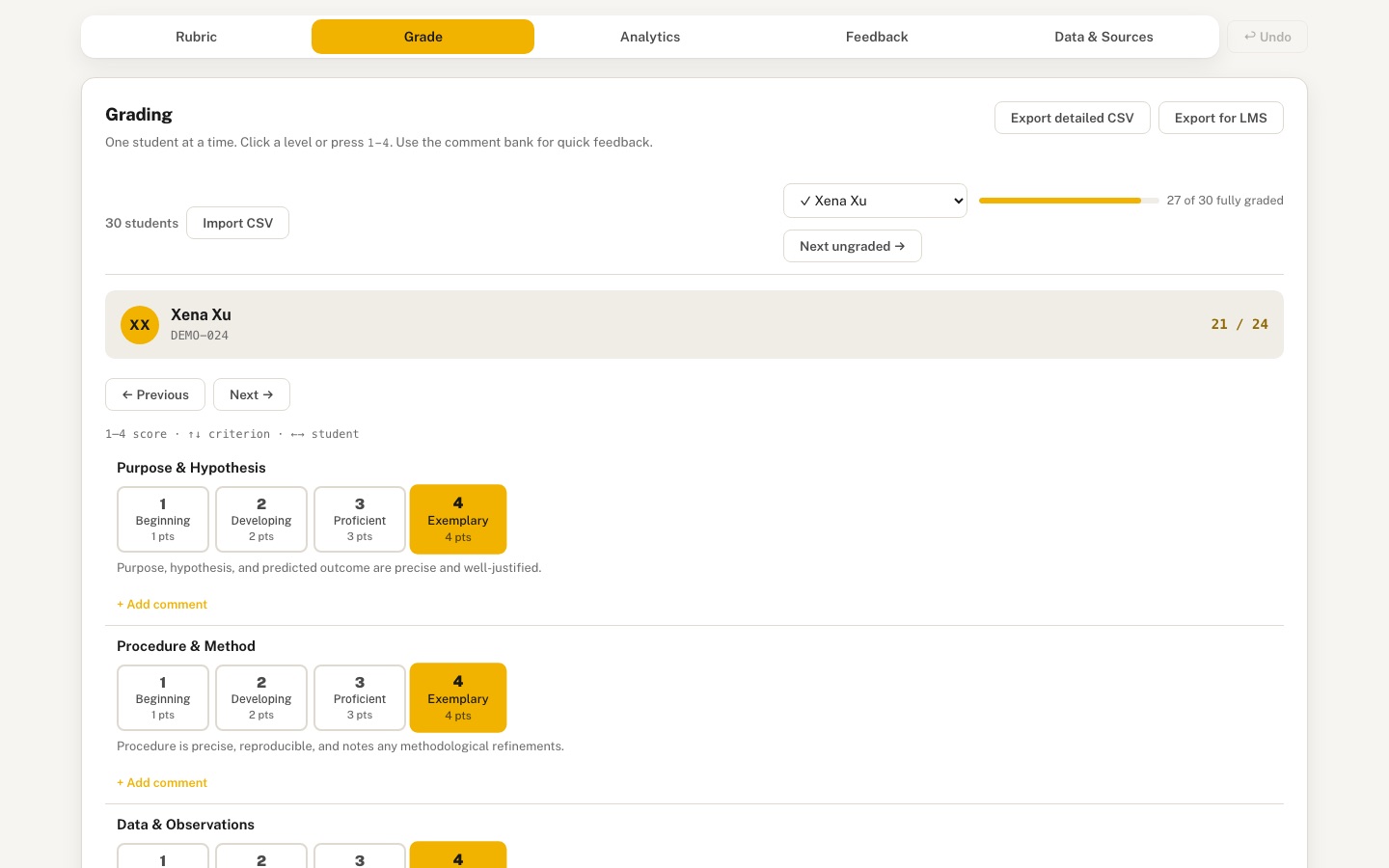 Desktop · click to enlarge
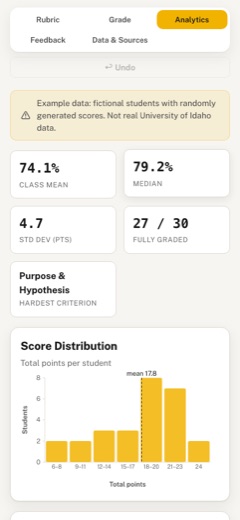
What it is ✎ blurb written by the AI critic
Rubric Studio lets an instructor build an analytic rubric, grade a class one student at a time with number keys and a reusable comment bank, and see where students struggled. It opens with a fictional 30-student chemistry lab-report class so the heatmap, score histogram, criterion difficulty chart and flagged-student lists have data to show, and it exports detailed or gradebook-ready CSVs plus one printable feedback sheet per student.
Try this
- Open Analytics and click Xena Xu in the Uneven Profiles card to jump to her weak Analysis score in the Grade tab.
- In Grade, click 'Next ungraded' to reach Lena Lopez's missing criterion, press 3, then check that Analytics now shows 28 of 30 fully graded.
- In Rubric, set Purpose & Hypothesis to weight 2 and watch totals, the difficulty chart and the outlier list recompute, then press Undo.
Highlights ✎ written by the AI critic
- Rubric builder with templates, editable levels and points, per-criterion weights, drag or up/down reordering, and undo
- Keyboard grading: keys 1-4 score the active criterion and move on to the next student; a comment bank adds feedback in one click
- Analytics: class KPIs, score histogram with a mean line, criterion difficulty as % of max, and a clickable student x criterion heatmap
- Flags students far below the class mean and students with one criterion well below their own average
- Exports a detailed CSV, a gradebook-import CSV, a JSON backup, and printable per-student feedback sheets
Who it's for
Instructors and TAs, program assessment coordinators
Features
- Rubric builder: criteria × performance levels grid, points or weights, level descriptors, drag to reorder, templates
- Grading mode: one student at a time, click or number-key to score each criterion, per-criterion comments with a reusable comment bank
- Roster import from CSV (name, id) and grade export to CSV compatible with an LMS gradebook import
- Analytics: score distribution, criterion difficulty (mean and spread), heatmap of students × criteria, flagged outliers
- Student feedback sheet generator (printable, one per student)
- Autosave to localStorage, undo, and full JSON backup/restore
Data & sources
- No external data (per SPEC). An example lab-report analytic rubric and a clearly fictional 30-student roster (DEMO-001..DEMO-030, fixed seed 20260913, deliberate outliers and 8 ungraded cells) are generated by the harness-written scripts/generate_example_data.py into data/embed/example_rubric.json and data/embed/example_roster.json. data/raw/SOURCES.md, verified by the data-prep workflow (verdict ready-after-repair), explains this and gives the suggested citation, which appears in the app's Data & Sources tab as 'Synthetic example data, no external source'.
How it was built
Written by Goose 1.50.0 (github.com) on qwen/qwen3.8-27b, served by MindRouter, the University of Idaho's on-premises AI platform.
Rounds by kind
| build | 1 |
| feedback | 8 |
| continue | 7 |
| critic | 3 |
Lines of code per file
| body html | 186 |
| app css | 597 |
| app js | 2,077 |
| scripts | 189 |
Critic scores ✎ scored by the independent AI critic, 1–10
Independent audits ✎ by the AI critic
Automated checks
Checked by critic-verify.
Data spot checks ✎ written by the AI critic
- Avery Alvarez (DEMO-001) total 22 / 24 (91.7%) on Grade and Feedback sheet = raw scores 3+4+4+4+3+4 = 22
- KPIs 74.1% mean / 79.2% median / SD 4.7 pts / 27 of 30 fully graded = independent Python over the 27 complete students (mean 17.78/24, median 19, population SD 4.70)
- Criterion difficulty Purpose & Hypothesis 2.52 +/- 0.92 (63%), Clarity & Presentation 3.52 +/- 0.74 (88%) = Python per-criterion mean/SD
- Flagged outliers Fiona Foster 8/24 and Sam Sato 6/24 (below mean - 1.5 SD = 10.73) = Python
- Histogram bins 6-8:2, 9-11:2, 12-14:3, 15-17:3, 18-20:8, 21-23:7, 24:2 = counts from sorted raw totals
Round-by-round timeline
Every harness round, in order. The prompts and FEEDBACK.md were written by the AI reviewer; the app code was written by the harness. Expand a round to see the exact prompt and the FEEDBACK.md the harness received.
-
Keyboard grading sets the wrong criterion. In the Grade tab, pressing
2changed criterion #2 ("Procedure & Method") to score 2, and pressing4changed criterion #4 to score 4. So the number picks the criterion and the score at once, and you can never give criterion 1 a 4 from the keyboard. Expected: one criterion is "active" and clearly highlighted (gold left border or ring). The number keys 1–N set the level for that active criterion and then move to the next criterion automatically. After the last criterion, move to the next student. Up/Down arrows (or J/K) change the active criterion, Left/Right change the student, and clicking a criterion makes it active. Show a small keyboard legend near the grading card. -
The rubric builder cannot edit levels or points. SPEC requires "criteria × performance levels grid, points or weights, level descriptors". Right now the level headers ("1 — Beginning" …) are static text, each criterion is fixed at "Max: 4 pts", and you cannot add or remove a level. Expected: editable level names and point values in the header row, "+ Add level" and remove-level buttons, and an editable weight (or max points) per criterion. The total at the bottom should update live. Grading, analytics, export and feedback sheets must all use these points and weights, e.g. a criterion weighted ×2 counts double in the total.
-
The criterion name is cut off in the rubric builder at 1440 px. "Conclusion & Discussio" and "Analysis & Calculations" are clipped by the 200 px name column. Make the column wider or let the name wrap (a textarea that grows is fine).
-
The level buttons in grading show only a bare number. A grader can't see what "3" means without switching tabs. Expected: each level option shows its label ("Proficient") and points, and the level descriptor text is visible (for example, under the buttons for the selected or hovered level, or as full-width selectable cards on desktop). The Grade tab is also very long: each criterion takes about 200 px, mostly an empty comment box and 4 identical truncated chips. Make each criterion block more compact.
-
There is no roster overview while grading. You can only step with Previous/Next. Expected: a student list or jump selector (a sidebar on desktop, a dropdown on a phone) showing each student's progress, e.g. "✓ graded", "3/6 criteria", or a mini progress bar. Add a class progress bar ("24 of 30 fully graded") and a filter or "next ungraded" button.
-
CSV import breaks on quoted names. Importing this file:
-
The grade export is not gradebook-compatible. The exported CSV's Total column contains strings like
20/24, which an LMS gradebook import rejects. Expected: numeric columns only. UseStudent,ID(orSIS User ID), one numeric column per criterion, a numeric total points column named after the rubric/assignment, and optionally a percentage column. Also consider an option to include comments. Show a short note in the UI saying what format it produces. -
Ungraded cells are counted as zeros in analytics. Bella Barnes (DEMO-028) has only 2 of 6 criteria graded, but she is listed in "Flagged Outliers" as LOW 3/24 and pulls the histogram down. Expected: totals and outlier detection use only fully graded students, or compare a percentage of graded points, and incomplete students are listed separately as "Incomplete grading (n)". Say this in the chart subtitle.
-
Analytics overflows horizontally on a phone. At 390 px the page scrolls sideways by 257 px on the Analytics tab. The Score Distribution and Criterion Difficulty cards are cut off on the right, so the right half of each chart is invisible. The charts must shrink to the card width at 390 px, and the heatmap may scroll inside its own card only.
-
Analytics needs better charts and a summary. (a) Add a row of KPI tiles: class mean %, median, standard deviation, number fully graded, hardest criterion. (b) Histogram: label the bins on the x-axis (score ranges), fix the duplicated y-axis ticks ("2, 2" appears when the max count is small), and use whole-number ticks. (c) Criterion difficulty: sort or colour by difficulty, show the mean value as a label, and show full criterion names on hover or in a legend. Don't truncate to "Purpose & …". (d) Heatmap: it fills only about 60% of the card width, so let columns stretch. Add a colour legend, sort options (by name, by total), a totals column, and highlight the flagged outliers' rows. (e) Add hover tooltips styled in HTML rather than relying only on SVG
<title>. -
Analytics on an imported (ungraded) roster shows broken charts instead of an empty state. After importing 3 new students, the histogram showed one bar at "0 … 0 Total Score", the difficulty chart was an empty grid, and the yellow banner still said "Example data: fictional students". Expected: a friendly empty state ("No grades yet — go to Grade to start") until at least one student is graded. Show the "Example data" banner only while the built-in example roster is loaded.
-
Feedback sheets are too bare to hand to a student. Each sheet is just criterion / score / comment. Expected: the rubric title and date at the top, each criterion's achieved level name, points and descriptor text (what that level means), total and percentage, a small bar per criterion, and the instructor comments. Add a student picker so one student's sheet can be previewed and printed on its own, plus "Print all". In print, each sheet should fill one page with no app chrome.
-
Choosing a template silently wipes all scores. Selecting "Essay" in "Load template…" erased every student's grades without warning (Undo works, but users won't know). Expected: an in-page confirmation that explains grades for the old criteria will be cleared, or keep grades for criteria that still exist.
-
Ctrl+Z inside a text field undoes the app state, not the typing. The global Ctrl/Cmd+Z handler calls
preventDefault()even while focus is in a textarea or input. Let native text undo work inside fields, and make app-level undo cover comments and rubric text edits as well (debounced). Also show a small "Saved ✓" autosave indicator, and remember that the "How to use" hint was dismissed. -
Polish and "feel alive". The tab bar on a phone cuts "Data & Sou…" off with no sign that it scrolls. Wrap the tabs, fit them, or add a fade edge. Animate score changes: a bump on the total, a selected-state transition, and chart bars growing when the Analytics tab opens. Add hover states to heatmap rows and sheet cards. Use
var(--font)rather than mono for student names in the heatmap. Keep the U of I palette. -
Keyboard grading sets the wrong criterion (
handleGradeKeydowninsrc/app.js). In the Grade tab, pressing2gave criterion #2 a score of 2, and pressing4gave criterion #4 a score of 4. The number picks the criterion and the score, so you can never give criterion 1 a 4 from the keyboard. Expected: keep an "active criterion" index in state and highlight that criterion's block (gold left border). Number keys 1–N set the level for the active criterion, then the next criterion becomes active. ArrowUp/ArrowDown change the active criterion, ArrowLeft/ArrowRight change the student, and clicking a level button also makes that criterion active. Add a one-line keyboard legend under the grading card title, e.g. "1–4 score · ↑↓ criterion · ←→ student". -
CSV import breaks on quoted names (
importRosterCSV). Importing -
The grade export is not gradebook-compatible (
exportGradesCSV). The Total column contains text like20/24, which an LMS gradebook import rejects. Expected: numeric values only. Use the columnsStudent,ID, then one numeric column per criterion, then a numeric total named after the rubric title (e.g.Chemistry 101 — Lab Report Rubric (Example) (out of 24)), thenPercent. Leave ungraded cells empty. -
Ungraded cells are counted as zeros in analytics (
renderAnalytics,renderDistribution,renderOutliers). DEMO-028 Bella Barnes has only 2 of 6 criteria graded, but she is listed under "Flagged Outliers" as LOW 3/24 and drags the histogram down. Expected: the histogram and outlier detection use only students whose criteria are all graded. Show students with missing scores in a separate "Incomplete grading" list under the outliers, with their name and how many criteria are graded, e.g. "2 of 6". -
Analytics overflows sideways on a phone (
src/app.css). At 390 px wide the Analytics tab scrolls sideways by 257 px, and the right half of the Score Distribution and Criterion Difficulty charts is cut off. Expected: no horizontal page scroll at 390 px. Cards and SVG charts shrink to fit the screen (min-width: 0on grid children, SVGwidth:100%). The heatmap may scroll only inside its own card. -
Analytics shows broken charts instead of an empty state (
renderAnalytics). After importing a new 3-student roster, the histogram showed one bar labelled "0 … 0", the difficulty chart was an empty grid, and the banner still said "Example data: fictional students…". Expected: until at least one student is fully graded, show a friendly empty state in the analytics area ("No complete grades yet — open the Grade tab to start"). Show the "Example data" banner only while the built-in example roster (iddemo-roster-2026) is loaded. -
Keyboard grading sets the wrong criterion (
handleGradeKeydowninsrc/app.js). In the Grade tab, pressing2gave criterion #2 a score of 2, and pressing4gave criterion #4 a score of 4. The number picks the criterion and the score, so you can never give criterion 1 a 4 from the keyboard. Expected: keep an "active criterion" index in state and highlight that criterion's block (gold left border). Number keys 1–N set the level for the active criterion, then the next criterion becomes active. ArrowUp/ArrowDown change the active criterion, ArrowLeft/ArrowRight change the student, and clicking a level button also makes that criterion active. Add a one-line keyboard legend under the grading card title, e.g. "1–4 score · ↑↓ criterion · ←→ student". -
CSV import breaks on quoted names (
importRosterCSV). Importing -
The grade export is not gradebook-compatible (
exportGradesCSV). The Total column contains text like20/24, which an LMS gradebook import rejects. Expected: numeric values only. Use the columnsStudent,ID, then one numeric column per criterion, then a numeric total named after the rubric title (e.g.Chemistry 101 — Lab Report Rubric (Example) (out of 24)), thenPercent. Leave ungraded cells empty. -
Ungraded cells are counted as zeros in analytics (
renderAnalytics,renderDistribution,renderOutliers). DEMO-028 Bella Barnes has only 2 of 6 criteria graded, but she is listed under "Flagged Outliers" as LOW 3/24 and drags the histogram down. Expected: the histogram and outlier detection use only students whose criteria are all graded. Show students with missing scores in a separate "Incomplete grading" list under the outliers, with their name and how many criteria are graded, e.g. "2 of 6". -
Analytics overflows sideways on a phone (
src/app.css). At 390 px wide the Analytics tab scrolls sideways by 257 px, and the right half of the Score Distribution and Criterion Difficulty charts is cut off. Expected: no horizontal page scroll at 390 px. Cards and SVG charts shrink to fit the screen (min-width: 0on grid children, SVGwidth:100%). The heatmap may scroll only inside its own card. -
Analytics shows broken charts instead of an empty state (
renderAnalytics). After importing a new 3-student roster, the histogram showed one bar labelled "0 … 0", the difficulty chart was an empty grid, and the banner still said "Example data: fictional students…". Expected: until at least one student is fully graded, show a friendly empty state in the analytics area ("No complete grades yet — open the Grade tab to start"). Show the "Example data" banner only while the built-in example roster (iddemo-roster-2026) is loaded. -
Analytics still shows the old class after importing a new roster (
renderAnalytics). I imported a 3-student CSV with nothing graded and opened Analytics. The histogram, difficulty chart and heatmap still showed the previous 30 example students (Avery Alvarez…). The banner was correctly hidden, but the "No complete grades yet" empty state never appeared. Cause: the code looks the container up withdocument.getElementById("rs-analytics-grid"), but insrc/body.htmlthat element only hasclass="rs-analytics-grid"and no id, soareais null and nothing is replaced. Expected: when no student is fully graded, hide the charts, heatmap and outliers cards and show the empty-state card instead. When grades exist again, e.g. after "Reset to Example", restore and redraw the charts. Don't destroy the chart containers withinnerHTMLin a way that stops them being redrawn later. -
The rubric builder cannot edit levels or points (
renderRubric,bindRubricEvents). SPEC requires a "criteria × performance levels grid, points or weights, level descriptors". The level headers ("1 — Beginning" …) are static text, every criterion is stuck at "Max: 4 pts", and levels cannot be added or removed. Expected:-
In the header row, each level has an editable name input and an editable points number input.
-
There is a "+ Add level" button and a small remove (✕) button per level. Keep at least 2 levels.
-
Each criterion row has an editable weight number input (default 1). A criterion's max points = weight × the highest level's points.
-
The "Total: N points" footer updates live as values change.
-
Grading totals, the export, analytics and feedback sheets all use level points × weight (a criterion weighted 2 counts double), not the raw level number.
-
Adding a level adds an empty descriptor cell to every row. Removing one clears any grades that used it.
-
-
Criterion names are cut off in the rubric builder (
.rs-crit-name/ the200pxgrid column insrc/app.cssandrenderRubric). At 1440 px, "Conclusion & Discussio" and "Analysis & Calculatio" are clipped. Expected: the full name is visible. Widen the first column to about 240 px and use a textarea that wraps, or let the input wrap to two lines. -
Grading cards show a bare number and hide what the level means (
renderGrade). Each level button shows only "1 2 3 4". Expected:-
Each level option shows its number, level name and points, e.g. "3 · Proficient · 3 pts".
-
The descriptor for the selected level (or the hovered one) appears under the options in small muted text.
-
The active criterion (
.rs-grade-crit.is-active) gets an obvious highlight: gold 4 px left border, light gold background, and it scrolls into view when it becomes active. At the moment I couldn't see any highlight in the screenshots. -
Make each criterion block more compact. For example, collapse the comment box to one line until focused, and show the comment-bank chips only for the active criterion.
-
-
There is no roster overview or grading progress while grading (
renderGrade). You can only step with Previous/Next. Expected:-
A student jump
<select>or list showing each student's status, e.g. "Avery Alvarez ✓", "Bella Barnes (2/6)". -
A class progress bar, e.g. "27 of 30 fully graded", using a gold fill.
-
A "Next ungraded →" button that jumps to the next student with a missing score.
-
On desktop this can be a narrow sidebar list. At 390 px use the select.
-
-
Feedback sheets are too bare to give to a student (
renderFeedback). Each sheet is only criterion / score / comment. Expected:-
The rubric title and today's date at the top of each sheet.
-
For each criterion: the achieved level name, points earned out of max, the descriptor text for that level, a thin horizontal bar showing the fraction earned, and the instructor comment.
-
Total points and percentage.
-
A student picker above the sheets, defaulting to the first student, so one sheet can be previewed and printed with "Print this sheet", plus "Print all sheets".
-
In print, one sheet per page with no app chrome. Keep the page-break rules.
-
-
Replacing data happens silently (the template
changehandler inbindRubricEventsandimportRosterCSV). Choosing "Essay" in "Load template…" erased every student's grades without warning, and importing a CSV replaced the whole roster without asking. Expected: before either action, show an in-page confirmation bar (noconfirm()/alert()) explaining what will be cleared, with "Replace" and "Cancel" buttons. After the change, show a toast with an "Undo" button. -
The rubric builder cannot edit levels, points or weights. SPEC requires a "criteria × performance levels grid, points or weights, level descriptors". In the Rubric tab the level headers ("1 — Beginning", "2 — Developing", …) are static text, every criterion shows a fixed "Max: 4 pts", and there is no way to add or remove a level. My test found 0 number inputs and 0 inputs in
.rs-levels-head. Expected:-
In
.rs-levels-head, each level column has a text input for the level name (e.g. "Proficient") and a small number input for its points (e.g. 3), witharia-labels. -
A "+ Add level" button next to the header adds a level with points = current highest + 1 and an empty descriptor textarea in every criterion row. Each level has a small ✕ remove button, and at least 2 levels must remain.
-
Each criterion row has a small number input labelled "Weight" (default 1, min 0.5, step 0.5). The row's "Max: N pts" text shows weight × highest level points.
-
The "Total: N points" footer updates live when points or weights change.
-
Store
weighton each criterion in state (missing = 1). Save it to localStorage, include it in the JSON backup, and push undo before structural changes. -
Everywhere a score is added up (the grading total,
exportGradesCSV, the analytics totals and outliers,renderFeedback), uselevelPoints(levelId) × criterion.weightinstead of the raw level number. Put that in one helper function, e.g.critPoints(crit, levelId)andmaxPoints(rubric), and call it from each place. -
Since the level count can change, the grid columns must come from
levels.length, not a fixedrepeat(4, 1fr).
-
-
Two criterion names are clipped (
.rs-crit-name, first grid column200px). At 1440 px, "Analysis & Calculations" and "Conclusion & Discussion" don't fit their input, so the text is cut off. Expected: the full name is always visible. Make the first columnminmax(240px, 280px)and turn the name into a textarea that wraps to 2 lines, or reduce the input's font size slightly so it fits. -
The new level controls do nothing (
bindRubricEventsinsrc/app.js).renderRubricoutputs.rs-level-name,.rs-level-points,#rs-add-leveland[data-del-level], but none of them has an event listener. I renamed "3 — Proficient" to "Solid", changed its points and clicked "+ Add level". The Total stayed "24 points", each row still had 4 descriptor boxes, and the Grade tab still had 4 buttons. Expected, inbindRubricEvents:-
.rs-level-nameoninput: setlevel.labelfor the matchingdata-levelid, thensaveState(). -
.rs-level-pointsoninput: setlevel.pointsto the number,saveState(), and update the "Max: N pts" labels and the "Total: N points" footer. It's fine to callrenderRubric()onchangeinstead of on every keystroke. -
#rs-add-levelonclick:pushUndo(), then append{ id: maxId + 1, label: "New level", points: highestPoints + 1 }tostate.rubric.levels, add an empty descriptor for that id to every criterion,saveState(),renderAll(). -
[data-del-level]onclick: if at least 3 levels exist,pushUndo(), remove that level, delete its descriptor from every criterion, set tonullany student score that used that level id,saveState(),renderAll(). With only 2 levels left, do nothing. -
The Grade tab's level buttons already come from
rubric.levels, so they will follow automatically.
-
-
The header row is misaligned and unstyled (
renderRubricplus the rubric CSS insrc/app.css). At 1440 px the level inputs are plain browser boxes and start about 100 px to the right of the descriptor columns under them. The header grid usesminmax(240px,280px)plus an extra "+ Add level" cell, while the rows use200px repeat(4, 1fr). "+ Add level" wraps onto its own line, and "Analysis & Calculations" and "Conclusion & Discussion" are still clipped in the 200 px name column. Expected:-
Build one
grid-template-columnsstring inrenderRubric, e.g."minmax(240px,280px) repeat(" + levels.length + ", 1fr)", and apply it to both.rs-levels-headand every.rs-crit-row. Remove the fixed200px repeat(4, 1fr)from the CSS. -
Move the "+ Add level" button out of the grid, next to "+ Add Criterion" in the rubric footer.
-
Style
.rs-level-namelike.rs-crit-name: bold, uppercase-free, transparent background with no border until hover or focus, then a gold underline. -
Put
.rs-level-pointson the same line as a small 56 px rounded input followed by the text "pts". -
Make
.rs-level-dela small muted ✕ that turns raspberry on hover. -
At ≤640 px keep the current stacked layout, with the header hidden.
-
-
There are no weights, so "points or weights" is still missing (
renderRubric,bindRubricEvents, plus every place that usesmax_points;grep -n max_points src/app.jsfinds them). Expected:-
Add a small number input
.rs-crit-weight(label "Weight ×", default 1, min 0.5, step 0.5) in each criterion's name cell, next to "Max: N pts". -
On
input/change, setcriterion.weight,saveState()and re-render. -
Add two helpers near the top of the file:
critPoints(crit, levelId)returns that level'spoints× (crit.weight|| 1), ornullif not graded;critMax(crit)returns the highest level's points × weight. -
Use them instead of the raw level number and
max_pointsin: the "Max: N pts" label, the "Total: N points" footer, the grading total inrenderGrade,exportGradesCSV(per-criterion values, total, "(out of N)" and Percent), the totals inrenderAnalytics/renderOutliers, andrenderFeedback. -
Check: setting "Purpose & Hypothesis" to weight 2 should change the Total to 28 points and the first student's grading total to "25 / 28".
-
-
Level buttons show only a bare number (
renderGrade,.rs-grade-crit__level-btn). Each criterion shows "1 2 3 4" in 44 px squares, so a grader can't see what a level means without switching tabs. Expected:-
Each button shows the number in bold, the level name in small text below it, and the points (level points × weight, e.g. "3 pts"). Strip a leading "3 — " from the label when displaying it, so the name is just "Proficient".
-
Make the buttons flexible-width, about 88–120 px wide and 56 px tall. Keep the gold selected state.
-
Under the buttons, show the descriptor for the selected level of that criterion (e.g. "Clear purpose and a testable hypothesis tied to the experiment.") in small muted text. On hover over another button, show that level's descriptor temporarily.
-
At 390 px the buttons wrap to two per row.
-
-
Each criterion block wastes a lot of vertical space (
renderGrade,.rs-grade-crit__commentCSS). Each block is about 200 px tall. Most of that is an empty 50 px comment textarea plus a row of four identical truncated chips ("Excellent work on this section…"), repeated for all six criteria. Expected:-
The comment textarea is one line tall (about 36 px) and grows to 3 rows when focused or when it has text.
-
The comment-bank chips appear only inside the active criterion (
.is-active), and there show all bank comments, not just 4. -
Reduce block padding so all six criteria of the example rubric fit in about one screen height at 1440×900.
-
-
There is no roster overview or grading progress (
renderGrade, the.rs-roster-bararea). You can only move with Previous/Next or ←/→. Expected:-
A
<select id="rs-student-jump">listing every student with a status suffix: "✓" when all criteria are graded, otherwise "(2/6)". Changing it jumps to that student. -
A slim class progress bar with the text "27 of 30 fully graded": a gold fill on a light track, animated width.
-
A "Next ungraded →" button that jumps to the next student (wrapping around) with any missing score, and sets the active criterion to the first missing one. If everyone is graded, show "All students graded ✓" instead.
-
Put the select, progress bar and button in the roster bar. They must wrap cleanly at 390 px.
-
-
Replacing data happens silently (the template
changehandler inbindRubricEventsandimportRosterCSV). Choosing "Essay" in "Load template…" immediately erased every student's grades, and importing a CSV replaced the whole roster with no warning. The only Undo button is in the Grade tab, so a user on the Rubric tab can't find it. Expected:-
Before either action, show an in-page confirmation bar at the top of the current card (no
confirm()/alert()), for example: "Loading the Essay template will clear grades for all 30 students." with "Replace" (gold) and "Cancel" buttons. -
After the change, show a small toast in the bottom-right corner, e.g. "Template loaded", with an "Undo" button that calls
undo(). It fades out after 6 s.
-
-
Level buttons show only a bare number. Each criterion shows "1 2 3 4" in 44 px squares (
.rs-grade-crit__level-btn), so a grader can't see what a level means without switching tabs. Expected:-
Inside each level button, render three lines:
<b>with the level number;<span class="lvl-name">with the level name with any leading "3 — " removed (e.g. "Proficient"); and<span class="lvl-pts">with points × weight (e.g. "3 pts"). -
CSS: the buttons are
min-width: 96px; height: auto; padding: 8px 12px, flex-direction column..lvl-nameis .75rem and.lvl-ptsis .7rem muted. Keep the gold.is-selectedstate. -
Directly under the buttons, add
<div class="rs-grade-crit__desc">containing the descriptor text (fromcrit.descriptors) of the currently selected level of that criterion, in .8rem muted text. Show nothing if the criterion is ungraded. -
At ≤640 px the buttons may wrap to two per row.
-
-
Each criterion card wastes a lot of vertical space. Each card is about 200 px tall. Most of that is an empty 50 px comment textarea plus a row of four identical truncated chips ("Excellent work on this section…"), repeated under all six criteria. Expected:
-
In
.rs-grade-crit__comment textarea, setmin-height: 36px; rows=1, and grow it to about 80 px on:focus. -
In
renderGrade, output the.rs-grade-crit__comment-bankchips only for the criterion whose index equalsstate.activeCritIdx, and there show every bank comment, not just the first 4. -
Reduce
.rs-grade-critpadding to10px 12px. -
Goal: at 1440×900 the six criteria of the example rubric take less than about 900 px of height in total.
-
-
There is no roster overview or grading progress (
renderGrade,bindGradeEventsand the.rs-roster-barmarkup insrc/body.html). The only way to move is Previous/Next or ←/→. There is no way to see who still needs grading or to jump straight to a student. Expected:-
In
renderGrade, fill#rs-grade-progress(currently plain text "1 of 30") with three things:-
<select id="rs-student-jump">with one<option>per student: "✓ Avery Alvarez" when all criteria are graded, otherwise "Bella Barnes (2/6)". The current student is selected, andchangesetsstate.gradingStudentIdxand re-renders. -
A slim progress bar:
<div class="rs-progress"><div class="rs-progress__fill" style="width:NN%"></div></div>with the label "27 of 30 fully graded". Gold fill on avar(--surface-2)track, 6 px tall, rounded,transition: width .3s. -
<button id="rs-next-ungraded">Next ungraded →</button>, which jumps to the next student after the current one (wrapping around) with any missing score and setsstate.activeCritIdxto their first missing criterion. When everyone is graded, disable it and change the label to "All graded ✓".
-
-
Arrange them in one row that wraps. At 390 px the select is full width.
-
-
Replacing data happens silently (the template
changehandler inbindRubricEvents,importRosterCSV, and the "Reset to Example" click handler ininit). Choosing "Essay" in "Load template…" immediately erased every student's grades, importing a CSV replaced the roster with no warning, and the only Undo button is inside the Grade tab. Expected:-
Add one helper
askConfirm(message, onConfirm). It shows a fixed bar at the bottom centre of the viewport (#rs-confirm: white card, shadow, raspberry left border) with the message, a gold "Replace" button and a ghost "Cancel" button. "Replace" runsonConfirmand hides the bar; "Cancel" just hides it (and resets the template select to ""). Don't useconfirm()oralert(). -
Wrap all three actions with it, e.g. "Load the Essay template? Grades for all 30 students will be cleared." or "Replace the current 30-student roster with 3 imported students?"
-
Add a second helper
showToast(message). It shows a small dark toast in the bottom-right corner (#rs-toast) with the message and an "Undo" button that callsundo(), and it fades out after 6 s. Call it after each confirmed replace, and after deleting a criterion or a level.
-
-
Inactive criterion cards are still tall (
renderGrade,.rs-grade-critCSS). Each non-active card is about 204 px, mostly the 36 px comment textarea plus padding. At 390 px the ten comment chips stack one per line in the active card, about 260 px of chips. Expected:-
For criteria that are not active: if the comment is empty, don't render the textarea; show a small text link "+ Add comment" that makes that criterion active. If the comment has text, show it as one line of muted, truncated text instead of a textarea.
-
The active criterion keeps the full textarea and chips.
-
At ≤640 px, show the chips in the active card as one horizontally scrollable row (
flex-wrap: nowrap; overflow-x: auto) instead of stacked. -
Goal: at 1440×900 the six example criteria take about 800 px in total.
-
-
Grade tab: the page scrolls 1874 px sideways at 390 px (a regression from the last round, in the ≤640 px CSS for
.rs-grade-crit__levels/.rs-grade-crit__level-btn). At a 390 px viewport,.rs-grade-crit__levelsmeasured 2231 px wide and each.rs-grade-crit__level-btnabout 1110 px wide, so the whole page scrolls horizontally on the Grade tab. The other tabs have 0 overflow. Expected: at ≤640 px the level buttons wrap two per row inside the card, e.g..rs-grade-crit__levels { display:flex; flex-wrap:wrap; gap:6px }and.rs-grade-crit__level-btn { flex: 1 1 calc(50% - 6px); min-width: 0; max-width: 100% }. Check that no rule gives these buttons a largemin-width,widthorflex-basis.document.documentElement.scrollWidthmust equal 390 on every tab. -
Feedback sheets are too bare to hand to a student (
renderFeedbackand the#panel-feedbackmarkup insrc/body.html). The Feedback tab shows 30 identical-looking cards with only criterion / score / comment. There is no rubric title, no date, no level name, no level description, no percentage and no way to print one student. Expected:-
Above the sheets, a toolbar with
<select id="rs-fb-student">("All students" plus one option per student), a "Print this sheet" button (disabled when "All students" is selected) and the existing "Print All Sheets". Choosing a student shows only that student's sheet. -
Each sheet header shows the rubric title, then the student name and ID, then today's date, with a large total on the right ("22 / 24") and the percentage under it ("91.7%").
-
Each criterion row shows:
-
the criterion name and weight if not 1;
-
the achieved level name (e.g. "Proficient") as a small pill;
-
points earned out of max (using the weight);
-
a thin bar with gold fill for the fraction earned;
-
the descriptor text for the achieved level in small muted text;
-
the instructor comment, if any, in italics. Show "Not graded" in grey for missing scores.
-
-
The footer line reads "Generated with Rubric Studio".
-
Print: "Print this sheet" prints only that student's sheet, and "Print All Sheets" prints one sheet per page. Keep the rule that hides app chrome and header/footer in print.
-
-
Analytics lacks a summary, and the chart axes are hard to read (
renderAnalytics,renderDistribution,renderCriterionDifficulty).-
(a) There are no KPI tiles, only a "Class mean: 17.7, SD: 4.7" line under the outliers. Add a row of 5 tiles at the top of the analytics grid, spanning the full width: "Class mean" as % of max, "Median" %, "Std dev" in points, "Fully graded" as "27 / 30", and "Hardest criterion" (the lowest mean % criterion name). Each tile has a big number in the mono font and a small label. At 390 px they wrap into 2 columns.
-
(b) Histogram: the y-axis ticks read "0, 2, 4, 5, 7" (uneven, rounded) and the x-axis shows only the min "6" and max "24". Use integer ticks with an even step (0, 2, 4, 6, 8), and label every bar's range under it (e.g. "18–20"). Give the axis a title, "Students", and the y-axis the label "Students"; the x-axis title is "Total points".
-
(c) Criterion difficulty: the x labels are truncated to 10 characters ("Purpose & …", "Conclusion…") and rotated. Instead, draw the chart as horizontal rows: the full criterion name on the left, a ±1 SD bar with a mean dot, and the mean value printed at the right end (e.g. "2.47"). Sort from hardest (lowest mean) at the top to easiest at the bottom.
-
-
The Grade tab at 390 px still scrolls 1874 px sideways, and I found the exact cause (
.rs-grade-critinsrc/app.css). It only happens in the active criterion card:-
The active card has the comment-chip row, which is
flex-wrap: nowrapand about 2231 px wide on one line. -
.rs-grade-critis a grid withgrid-template-columns: 1frat ≤640 px. Its first child is an unclassed<div>with the defaultmin-width: auto, so the1frcolumn grows to the chip row's full width. The computedgrid-template-columnswas "2231.17px". -
That makes
.rs-grade-crit__levels2231 px wide, so each.rs-grade-crit__level-btn(flex-basis: calc(50% - 6px)) becomes 1112 px wide. -
In the screenshot the active card shows one giant gold button cut off at the right edge, while the inactive cards correctly show 2 buttons per row.
Expected: use
grid-template-columns: minmax(0, 1fr)(andminmax(0,1fr) autoon desktop), add.rs-grade-crit > * { min-width: 0; }, and give the chip rowmax-width: 100%; overflow-x: auto. Result:document.documentElement.scrollWidthis 390 on the Grade tab, and the chips scroll inside the card.
-
-
Heatmap: no legend or sorting, and it fills only 60% of its card (
renderHeatmap). At 1440 px the table is 60% of the card width with empty space on the right. The column headers are truncated to 10 characters ("PURPOSE & …", "CONCLUSION…"), there is no colour legend, the students can't be sorted, and student names use the mono font. Expected:-
The table is
width: 100%with equal-width score columns, and the headers show the full criterion name, wrapping to 2 lines (no truncation). -
Add a Total % column at the right.
-
Add a small toolbar above the table:
<select id="rs-heat-sort">with "Roster order", "Name A–Z", "Total (high → low)", "Total (low → high)". -
Add a legend strip: the colour ramp from level 1 to the top level with labels, plus a grey swatch for "Not graded".
-
Shade the rows of flagged outlier students with a faint raspberry left border.
-
Student names use
var(--font), weight 600. -
At 390 px the table scrolls horizontally inside its card, and the student-name column stays sticky on the left (
position: sticky; left: 0; background: var(--surface)).
-
-
Small state and layout gaps.
-
(a) The "How to use" hint comes back after every reload even after clicking ✕. Remember the dismissal in localStorage (key
rubric-studio-hint-dismissed), inside try/catch. -
(b) The analytics empty state ("No complete grades yet") sits in the left half of the page. Make it span the full grid width (
grid-column: 1 / -1). -
(c) Feedback sheet: in rows with no grade the text runs together, "Data & ObservationsNot graded", so add a space or gap. The SCORE column shows the raw level number ("1", "2"); show points earned instead ("1 / 4"), or drop the column since the points already appear next to the pill. The FEEDBACK column header shows even though comments appear elsewhere; put the instructor comment in that column, or remove the column.
-
-
Phone polish for the charts and tabs (
renderDistribution,renderCriterionDifficulty,.rs-chart-wrap,.rs-tabsCSS).-
At 390 px the Score Distribution and Criterion Difficulty SVGs scale down so far that their text renders about 5–6 px tall (unreadable), and each card leaves about 150 px of empty space under the chart. Fix it: remove the fixed
min-heighton.rs-chart-wrap, and when the container is narrower than 500 px, draw the SVG with a narrower viewBox (e.g. width 360) and larger font sizes, so the labels render at least 10 px. Re-render on windowresize(debounced). -
The tab bar at 390 px cuts off the last tab ("Data & Sou…") with no hint that it scrolls. At ≤640 px make
.rs-tabsa 3-column grid (tabs wrap onto 2 rows), or shorten the label to "Sources".
-
-
Feel alive.
-
When the Analytics tab opens or the data changes, animate the histogram bars growing from the baseline (CSS
transform: scaleYwithtransform-origin: bottom, 300 ms, staggered 30 ms) and fade in the heatmap cells. -
When a score changes in the Grade tab, briefly pulse the student total ("22 / 24"): a 200 ms scale and gold flash.
-
Add a gentle hover lift to the KPI tiles.
-
Respect
prefers-reduced-motion: reduceby turning these animations off.
-
-
Verified working and looking good: No horizontal scroll on any tab at 390 px, and the tabs wrap onto 2 rows.
-
The heatmap: full headers, Total %, sorting, legend, ⚑ outlier flags, sticky names.
-
The hint dismissal is remembered, and the empty state spans the full width.
-
Phone chart labels are readable, histogram bars animate, and the total pulses.
-
Feedback sheets: level pill, bar, descriptor, "Not graded" spacing, the student picker, and print one or all.
-
Grading: jump select, progress, Next ungraded, confirm bar plus Undo toast.
-
Drag reorder by the handle, weights and levels, keyboard grading, CSV import/export, JSON backup/restore.
-
Phone: the Criterion Difficulty labels are clipped on the left (
renderCriterionDifficulty). At 390 px the criterion names are cut off at the card's left edge: "rpose & Hypothesis", "clusion & Discussion", "alysis & Calculations", "arity & Presentation". The labels are right-aligned text that starts before x = 0 of the narrow viewBox. Expected: at narrow widths, put each criterion name on its own line above its SD bar (left-aligned, starting at x = 0, font ≥ 11 px), with the bar and the mean value on the line below. Or reserve enough left padding for the longest name. Either way, no label is clipped at 390 px or at 1440 px. -
Phone: level names and points cannot be edited (
renderRubricand the ≤640 px CSS that hides.rs-levels-head). At 390 px there are 0 visible.rs-level-nameinputs and 0 visible.rs-level-pointsinputs, so a phone user can add a level but can't rename it or change its points. Expected: at ≤640 px, show a compact "Performance levels" block above the criteria list with one row per level (name input, points input, ✕). It uses the same handlers as the desktop header, and each descriptor textarea in the stacked rows keeps a small label with its level name above it. -
Ctrl+Z inside a text field also runs the app's undo (the global
keydownhandler for Ctrl/Cmd+Z ininit). Steps: in the Rubric tab, drag "Purpose & Hypothesis" below "Data & Observations"; click into a descriptor textarea, type " XYZ", press Ctrl+Z. The typing was removed, and the criterion order also jumped back, so the drag was undone too. Expected: whendocument.activeElementis anINPUT,TEXTAREA,SELECTor contenteditable element, return without callingundo()orpreventDefault(), so only native text undo runs. -
Undo is hard to find outside the Grade tab. The only permanent Undo button is inside the Grade card. On the Rubric tab there is no visible Undo, and drag reorder, "+ Add Criterion", "+ Add level" and weight changes don't show the Undo toast. Expected:
-
Move the Undo button to the right end of the tab bar row (a small ghost button "↩ Undo", disabled with reduced opacity when the undo stack is empty), so it is visible on every tab.
-
Call
showToast(...)with Undo after drag reorder ("Criteria reordered"), add criterion, and add level too. -
At 390 px the Undo button can sit on the second tab row.
-
-
Small visual consistency fixes.
-
(a) Heatmap student names still use the mono font (computed font-family "Gintronic, ui-monospace…"). Use
var(--font), weight 600, for the name cells only; scores stay mono. -
(b) The example rubric's level labels include the number ("1 — Beginning"), so the Rubric header shows "1 — Beginning" and the feedback-sheet pills read "1 — Beginning" while the grading buttons show "1 / Beginning". In
scripts/generate_example_data.pyand theTEMPLATESinsrc/app.js, name the levels just "Beginning", "Developing", "Proficient", "Exemplary". Re-run the script sodata/embed/example_rubric.jsonupdates, and keep showing the number separately where it is useful. -
(c) On the Feedback tab, the sheet table's "FEEDBACK" column shows only "—" for every row when there are no comments. When a student has no comments at all, hide that column for that sheet.
-
-
After the build passes, these features from the last round are already in the code and only need to keep working. Don't rewrite them; only fix one if you notice it's broken while looking at nearby code: The Undo button in the tab row, visible on every tab, disabled when there is nothing to undo.
-
The phone-only "Performance levels" block, with name and points inputs per level, visible at ≤640 px.
-
The "Criteria reordered." toast with Undo after dragging a criterion, plus toasts after add criterion and add level.
-
Ctrl/Cmd+Z inside an input, textarea or select doing only native text undo, not the app undo.
-
The narrow (<500 px) Criterion Difficulty layout with names above the bars, not clipped.
-
Level labels "Beginning / Developing / Proficient / Exemplary" without the number prefix.
-
The feedback-sheet FEEDBACK column hidden for students with no comments. This is the code at line 1392.
-
The build passes again (
node --check: OK) and almost everything works: The Undo button on every tab, the "Criteria reordered." and "Criterion added." toasts, and Ctrl+Z inside text fields leaving the app state alone. -
The phone "Performance levels" block, with 4 name and 4 points inputs.
-
The unclipped phone difficulty chart, the level labels without number prefixes, the heatmap names in Public Sans, and the hidden empty FEEDBACK column.
-
Phone: the criterion rows no longer stack, and the page scrolls 208 px sideways. At a 390 px viewport, the Rubric tab (the first screen a visitor sees) shows each
.rs-crit-rowas a squeezed horizontal grid:-
the name cell ("Purpose &" is cut off), "Max: 4 pts", "Weight ×", then all four descriptor boxes side by side;
-
each
.rs-crit-desc-wrap/textarea.rs-crit-descis only about 75 px wide, so the text shows one or two words per line; -
the last two columns run off the right edge.
document.documentElement.scrollWidth - innerWidthis 208. The widest elements arediv.rs-crit-desc-wrap(right edges at 440, 518, 598 px).Likely cause:
renderRubricwritesgrid-template-columns: minmax(240px,280px) repeat(N,1fr)as an inline style on every row, and inline styles beat the@media (max-width: 640px) { .rs-crit-row { grid-template-columns: 1fr } }rule.Expected: at ≤640 px each row stacks vertically, like this:
-
the name, ✕ and drag handle on the first line;
-
"Max: N pts" and the weight input on the second line;
-
then each level's descriptor as a full-width block with its small label above it.
Fix either by setting the grid columns through a CSS custom property, e.g.
style="--rs-cols: minmax(240px,280px) repeat(4,1fr)"withgrid-template-columns: var(--rs-cols)on desktop and1frat ≤640 px, or by adding!importantto the phone rule. Result: scrollWidth equals 390 on the Rubric tab.
-
-
Desktop: the new per-descriptor labels clutter the grid. At 1440 px every descriptor textarea now has a label above it ("Level 1 — Beginning", "Level 2 — Developing", …) in large regular-weight text, about 16 px, repeated in every row. It duplicates the level header row and adds about 30 px to every row.
Expected: hide
.rs-crit-desc-labelat desktop widths (display: noneabove 640 px). At ≤640 px, show it as a small uppercase muted label (.7rem, weight 700, letter-spacing .04em, colourvar(--muted)) that reads just the level name, e.g. "BEGINNING · 1 PT". -
In
renderHeatmap, the cell markup usesdata-student-idx="' + si + '"inside thefor (var ri = 0; ri < rows.length; ri++)loop.siis the counter of the EARLIER loop, so it is alwaysstudents.length(30) for every cell. Clicking Evan Ellis opened Della Drummond, and then clicking a level button threwCannot read properties of undefined (reading 'scores')(students[30] does not exist). Fix: In the loop that buildsrows, store the roster index:rows.push({ student: s, idx: si, total: t, max: m, complete: complete }); -
In the cell markup use
data-student-idx="' + r.idx + '". -
Also, at the top of
renderGradeafter computingidx, write it back:state.gradingStudentIdx = idx;so a stale index can never reachbindGradeEventsorhandleGradeKeydown. -
handleGradeKeydowndoesstudent.scores[crit.id] = num;— it stores the pressed digit as the level id. Level ids are not positions: after deleting "Developing" the levels are ids 1, 3, 4. Then key 2 stores a non-existent level (no button selected, criterion counted as graded with 0 pts), key 3 selects the 2nd button, and "Exemplary" can never be chosen by keyboard because 4 > levels.length. Fix: InhandleGradeKeydown:var lvl = levels[num - 1]; student.scores[crit.id] = lvl.id; -
In
renderGrade, the big number on each level button ('<b>' + lv.id + '</b>') must be the position(lj + 1), so the key shown equals the key to press. -
The
aria-labelshould say "Score level N (label)". -
In
handleGradeKeydown, after a number key scores the LAST criterion,state.activeCritIdx = (ai + 1) % criteria.lengthwraps back to criterion 1 of the SAME student. Fix: add a helperfunction firstUngradedIdx(student)(returns the index of the first criterion whose score is null, or 0). Whenai === criteria.length - 1and a next student exists:state.gradingStudentIdx++,state.activeCritIdx = firstUngradedIdx(nextStudent), andshowToast("Next student: " + nextStudent.name). -
Whenever the student changes —
#rs-grade-prevand#rs-grade-nextclick handlers, ArrowLeft/ArrowRight inhandleGradeKeydown, and the#rs-student-jumpchange handler — setstate.activeCritIdx = firstUngradedIdx(newStudent). -
renderDistributionuses a floatbinWidth = range / numBinsandMath.roundlabels, so neighbouring labels share boundaries. Totals are integers. Fix:var binWidth = Math.max(1, Math.ceil((max - min + 1) / 8)); var numBins = Math.ceil((max - min + 1) / binWidth); -
bin index
Math.floor((v - min) / binWidth); labello + "–" + (lo + binWidth - 1)withlo = min + b * binWidth(justlowhen binWidth is 1). -
tooltip
"Total " + label + ": " + count + " students". -
Draw a dashed vertical line at the class mean (
stroke="#191919" stroke-dasharray="4 3") from the top to the x axis, with a small text label"mean " + mean.toFixed(1)at the top. -
In
exportGradesCSV: Criterion names in the header are pushed without escaping: useheader.push(csvEsc(criteria[ci2].name))(a criterion named "Style, voice" currently shifts every column). -
Build the file as
"" + rows.join("\r\n")so Excel shows the em dash in the title correctly. -
Replace
URL.revokeObjectURL(url);withsetTimeout(function () { URL.revokeObjectURL(url); }, 1000);(immediate revoke can cancel the download in Firefox/Safari). Do the same inexportBackup. -
Add an LMS-ready export: In body.html, next to
#rs-export-grades, add<button class="rs-btn rs-btn--ghost" id="rs-export-lms" title="One total column per student, ready for a gradebook import">Export for LMS</button>; change the text of#rs-export-gradesto "Export detailed CSV" and give ittitle="Per-criterion points, total and percent". -
New function
exportLmsCSV(): headerStudent,ID,SIS User ID,<csvEsc(rubric title + " (" + maxTotal + " pts)")>; one row per student: name, id, id, and total points only when every criterion is graded (empty otherwise). Download asgradebook-import-YYYY-MM-DD.csvwith the BOM and delayed revoke. Bind it ininit(). -
Total-score outliers miss students with one very weak criterion, e.g. Xena Xu: 4, 4, 4, 1, 4, 4 (Analysis 3 levels below her own average). In body.html, right after the Flagged Outliers card, add:
<div class="rs-card"><h3 class="rs-card__title">Uneven Profiles</h3><p class="rs-card__sub">Fully graded students with a criterion at least 2 levels below their own average level</p><div id="rs-uneven"></div></div>New functionrenderUneven(complete, criteria)called fromrenderAnalyticsafterrenderOutliers: For each fully graded student, compute the position of each score instate.rubric.levels(1-based index of the level id) and the student's mean position. -
Flag every criterion whose position is at least 2 below that mean. One row per flag, sorted by gap (largest first), max 8 rows: student name, criterion name, level label, and the gap as e.g. "−2.5 levels".
-
Clicking a row sets
state.gradingStudentIdxto that student's roster index andstate.activeCritIdxto that criterion's index, thenswitchTab("grade"). -
Empty state text: "No uneven profiles — every student is consistent across criteria."
1 build 6.7 min · 7 files changed, 3591 insertions(+), 3 deletions(-) Show prompt
Read AGENTS.md, SPEC.md and BRAND.md in this directory. Then build the complete app they describe, step by step: this app needs no downloaded data (data/raw/SOURCES.md explains why and what the example content must look like), so first write a Python script in scripts/ (standard library only, fixed random seed) that writes compact JSON to data/embed/: one example lab-report analytic rubric (criteria x performance levels, points, level descriptors) and a clearly fictional example roster of 30 students (IDs like DEMO-001) with generated scores, including a few deliberate outliers and some ungraded cells, and run it; then write src/body.html, src/app.css and src/app.js; run python3 build.py --check and fix any error it reports. Implement every required feature in SPEC.md with a polished, modern, responsive University of Idaho design, and label the example data as fictional in the UI and in a visible "Data & sources" section (use the suggested wording in data/raw/SOURCES.md). Do not stop until python3 build.py --check succeeds and every feature is implemented.
2 feedback 18.4 min · 1 file changed, 39 insertions(+) Show prompt
Read FEEDBACK.md in this directory — it lists problems a reviewer found when testing index.html in a real browser. Fix every item, keeping everything that already works, then run python3 build.py --check.
Reviewer feedback — round 1 build (tested in Chromium at 1440 px and 390 px)
No console errors and no external requests were found. Good work so far: the tabs, templates, add criterion, drag by the handle, comment bank, JSON backup/restore and autosave all work. The items below are ordered from most to least important. Please fix every one and keep everything that already works.
   name,id
   "Smith, Jane",T-001
   Alex Rivera,T-002
gave a student named "Smith with the wrong ID. Expected: proper CSV parsing (quoted fields, commas inside quotes, a BOM, CRLF line endings, Name/Student/ID/SIS User ID header variants). Also replace the alert("Imported 3 students.") with an inline toast or banner, and before replacing the current roster, confirm in-page (or offer to merge).
3 continue 14.8 min · — Show prompt
Read FEEDBACK.md in this directory — it lists problems a reviewer found when testing index.html in a real browser. Fix every item, keeping everything that already works, then run python3 build.py --check.
4 continue 16.0 min · 1 file changed, 11 insertions(+), 26 deletions(-) Show prompt
Read FEEDBACK.md in this directory — it lists problems a reviewer found when testing index.html in a real browser. Fix every item, keeping everything that already works, then run python3 build.py --check.
Reviewer feedback: batch 1 of 2 (tested in Chromium at 1440 px and 390 px)
No console errors and no external requests were found. Tabs, templates, add criterion, drag by the handle, comment bank, JSON backup/restore and autosave all work, so keep them working.
This batch covers only the 6 most important fixes. Work through them one at a time, in order. For each item: open the relevant function in src/app.js or rule in src/app.css, make the change, run python3 build.py --check, then move on to the next item. Don't re-read files you have already read. If an edit doesn't apply, rewrite the whole function or CSS rule instead of retrying the same command.
   name,id
   "Smith, Jane",T-001
   Alex Rivera,T-002
produced a student named "Smith. Expected: a small CSV parser that handles quoted fields, commas inside quotes, doubled quotes, a UTF-8 BOM and CRLF line endings. Accept the header names name/student/student name and id/student id/sis user id, case-insensitively. Replace the alert(...) calls with an inline message shown in the roster bar.
5 continue 3.0 min · 4 files changed, 336 insertions(+), 80 deletions(-) Show prompt
Read FEEDBACK.md in this directory — it lists problems a reviewer found when testing index.html in a real browser. Fix every item, keeping everything that already works, then run python3 build.py --check.

Working method (earlier attempts stalled by dumping whole files and then repeating the same command without editing anything):
- Do NOT cat src/app.js or src/app.css in full; they are large.
- For each FEEDBACK item, in order: run one grep -n to find the function or CSS rule it names, view only that range with sed -n 'A,Bp' (at most 80 lines), then immediately edit the file to make the fix.
- Never run the same command twice in a row. Once you have seen a command's output, act on it (edit) instead of looking again.
- After each item run python3 build.py --check, then move on to the next item.
Reviewer feedback: batch 1 of 2 (tested in Chromium at 1440 px and 390 px)
No console errors and no external requests were found. Tabs, templates, add criterion, drag by the handle, comment bank, JSON backup/restore and autosave all work, so keep them working.
This batch covers only the 6 most important fixes. Work through them one at a time, in order. For each item: open the relevant function in src/app.js or rule in src/app.css, make the change, run python3 build.py --check, then move on to the next item. Don't re-read files you have already read. If an edit doesn't apply, rewrite the whole function or CSS rule instead of retrying the same command.
   name,id
   "Smith, Jane",T-001
   Alex Rivera,T-002
produced a student named "Smith. Expected: a small CSV parser that handles quoted fields, commas inside quotes, doubled quotes, a UTF-8 BOM and CRLF line endings. Accept the header names name/student/student name and id/student id/sis user id, case-insensitively. Replace the alert(...) calls with an inline message shown in the roster bar.
6 feedback 16.1 min · 4 files changed, 74 insertions(+), 30 deletions(-) Show prompt
Read FEEDBACK.md in this directory — it lists problems a reviewer found when testing index.html in a real browser. Fix every item, keeping everything that already works, then run python3 build.py --check.

Working method (earlier attempts stalled by dumping whole files and then repeating the same command without editing anything):
- Do NOT cat src/app.js or src/app.css in full; they are large.
- For each FEEDBACK item, in order: run one grep -n to find the function or CSS rule it names, view only that range with sed -n 'A,Bp' (at most 80 lines), then immediately edit the file to make the fix.
- Never run the same command twice in a row. Once you have seen a command's output, act on it (edit) instead of looking again.
- After each item run python3 build.py --check, then move on to the next item.
Reviewer feedback: batch 2 (tested in Chromium at 1440 px and 390 px)
Batch 1 is mostly verified fixed. Keyboard grading with an active criterion, parsing quoted CSV names, numeric gradebook export, incomplete students being excluded from outliers, and no horizontal scroll at 390 px all work, so keep them working. No console errors.
Work through the items below one at a time, in order. For each one: grep for the named function or CSS rule, view only that range, edit, run python3 build.py --check, then go to the next item.
7 continue 9.9 min · 3 files changed, 27 insertions(+), 40 deletions(-) Show prompt
Read FEEDBACK.md in this directory — it lists problems a reviewer found when testing index.html in a real browser. Fix every item, keeping everything that already works, then run python3 build.py --check.

Working method (earlier attempts stalled by dumping whole files and then repeating the same command without editing anything):
- Do NOT cat src/app.js or src/app.css in full; they are large.
- For each FEEDBACK item, in order: run one grep -n to find the function or CSS rule it names, view only that range with sed -n 'A,Bp' (at most 80 lines), then immediately edit the file to make the fix.
- Never run the same command twice in a row. Once you have seen a command's output, act on it (edit) instead of looking again.
- After each item run python3 build.py --check, then move on to the next item.
Reviewer feedback: batch 2a (tested in Chromium at 1440 px)
Verified fixed and working: keyboard grading with a highlighted active criterion, CSV parsing, numeric export, the incomplete-grading list, no horizontal scroll at 390 px, and the Analytics empty state after an import (it recovers after "Reset to Example"). Keep all of it. No console errors.
This batch has only two items, both in the Rubric tab (renderRubric and bindRubricEvents in src/app.js, rubric styles in src/app.css). Do item 1, run python3 build.py --check, then do item 2.
8 feedback 4.5 min · 4 files changed, 397 insertions(+), 56 deletions(-) Show prompt
Read FEEDBACK.md in this directory — it lists problems a reviewer found when testing index.html in a real browser. Fix every item, keeping everything that already works, then run python3 build.py --check.

Working method (earlier attempts stalled by reading the file over and over without editing):
- Do NOT cat src/app.js or src/app.css in full, and do NOT page through app.js range by range; the files are large.
- For each FEEDBACK item, in order: run one grep -n for the function or class name the item gives, view at most 3 short ranges (at most 60 lines each) with sed -n 'A,Bp', then immediately edit the file. Write the fix before looking at anything else.
- Never run the same command twice. Once you have seen a command's output, act on it (edit) instead of looking again.
- After each item run python3 build.py --check, then move on to the next item. When all items are done, stop.
Reviewer feedback: batch 2b (tested in Chromium at 1440 px)
Progress: the Rubric tab header now renders a level name input, a points input, a ✕ button per level and "+ Add level". Everything else verified earlier still works: keyboard grading, CSV import/export, the analytics empty state, no overflow at 390 px, no console errors. Keep it all.
There are three items, all in the Rubric tab. Do them in order and run python3 build.py --check after each.
9 feedback 7.6 min · 1 file changed, 23 insertions(+), 23 deletions(-) Show prompt
Read FEEDBACK.md in this directory — it lists problems a reviewer found when testing index.html in a real browser. Fix every item, keeping everything that already works, then run python3 build.py --check.

Working method (earlier attempts stalled by reading the file over and over without editing):
- Do NOT cat src/app.js or src/app.css in full, and do NOT page through app.js range by range; the files are large.
- For each FEEDBACK item, in order: run one grep -n for the function or class name the item gives, view at most 3 short ranges (at most 60 lines each) with sed -n 'A,Bp', then immediately edit the file. Write the fix before looking at anything else.
- Never run the same command twice. Once you have seen a command's output, act on it (edit) instead of looking again.
- After each item run python3 build.py --check, then move on to the next item. When all items are done, stop.
Reviewer feedback: batch 3, Grade tab (tested in Chromium at 1440 px and 390 px)
Verified working: editable levels, points and weights (weight 2 gives 28 points and the grading total 25 / 28, exported as 25 out of 28), add/remove level, unclipped criterion names, the active criterion's gold left border, keyboard grading, CSV import/export, the analytics empty state, no overflow at 390 px, and no console errors. Keep all of it.
There are four items, all in or near renderGrade / bindGradeEvents in src/app.js. Do them in order and run python3 build.py --check after each.
10 continue 0.8 min · 4 files changed, 71 insertions(+), 56 deletions(-) Show prompt
Read FEEDBACK.md in this directory — it lists problems a reviewer found when testing index.html in a real browser. Fix every item, keeping everything that already works, then run python3 build.py --check.

Working method (earlier attempts stalled by reading the file over and over without editing):
- Do NOT cat src/app.js or src/app.css in full, and do NOT page through app.js range by range; the files are large.
- For each FEEDBACK item, in order: run one grep -n for the existing function or class name the item gives, view at most 3 short ranges (at most 60 lines each) with sed -n 'A,Bp', then immediately edit the file. Write the fix before looking at anything else.
- If a grep finds no match, the thing does not exist yet: that is expected for new features. Write the new code now; do not search for it again.
- Never run the same command twice. Once you have seen a command's output, act on it (edit) instead of looking again.
- After each item run python3 build.py --check, then move on to the next item. When all items are done, stop.
Reviewer feedback: batch 3a, Grade tab criterion cards (tested in Chromium at 1440 px and 390 px)
Verified working: editable levels, points and weights (weight 2 gives 28 points and the grading total 25 / 28), add/remove level, unclipped criterion names, the active criterion's gold left border, keyboard grading, CSV import/export, the analytics empty state, no overflow at 390 px, and no console errors. Keep all of it.
There are two items, both in renderGrade in src/app.js and the .rs-grade-crit… rules in src/app.css. Some of the class names below are new: grep will not find them, so just add them. Do item 1, run python3 build.py --check, then do item 2.
11 feedback 4.2 min · 4 files changed, 520 insertions(+), 113 deletions(-) Show prompt
Read FEEDBACK.md in this directory — it lists problems a reviewer found when testing index.html in a real browser. Fix every item, keeping everything that already works, then run python3 build.py --check.

Working method (earlier attempts stalled by reading the file over and over without editing):
- Do NOT cat src/app.js or src/app.css in full, and do NOT page through app.js range by range; the files are large.
- For each FEEDBACK item, in order: run one grep -n for the existing function or class name the item gives, view at most 3 short ranges (at most 60 lines each) with sed -n 'A,Bp', then immediately edit the file. Write the fix before looking at anything else.
- If a grep finds no match, the thing does not exist yet: that is expected for new features. Write the new code now; do not search for it again.
- Never run the same command twice. Once you have seen a command's output, act on it (edit) instead of looking again.
- After each item run python3 build.py --check, then move on to the next item. When all items are done, stop.
Reviewer feedback: batch 3b, Grade tab navigation and safe replace (tested in Chromium at 1440 px and 390 px)
Verified working and looking good: the level buttons ("3 · Proficient · 3 pts") with the descriptor under them, comment-bank chips only on the active criterion (clicking one appends to that comment), editable levels, points and weights, keyboard grading, CSV import/export, the analytics empty state, no overflow at 390 px, and no console errors. Keep all of it.
There are three items. Several of the ids and classes below are new: grep will not find them, so just add them. Do them in order and run python3 build.py --check after each.
12 feedback 2.7 min · 5 files changed, 494 insertions(+), 172 deletions(-) Show prompt
Read FEEDBACK.md in this directory — it lists problems a reviewer found when testing index.html in a real browser. Fix every item, keeping everything that already works, then run python3 build.py --check.

Working method (earlier attempts stalled by reading the file over and over without editing):
- Do NOT cat src/app.js or src/app.css in full, and do NOT page through app.js range by range; the files are large.
- For each FEEDBACK item, in order: run one grep -n for the existing function or class name the item gives, view at most 3 short ranges (at most 60 lines each) with sed -n 'A,Bp', then immediately edit the file. Write the fix before looking at anything else.
- If a grep finds no match, the thing does not exist yet: that is expected for new features. Write the new code now; do not search for it again.
- Never run the same command twice. Once you have seen a command's output, act on it (edit) instead of looking again.
- After each item run python3 build.py --check, then move on to the next item. When all items are done, stop.
Reviewer feedback: batch 4 (tested in Chromium at 1440 px and 390 px)
Verified working and looking good: the student jump select ("✓ Avery Alvarez", "Della Drummond (3/6)"), the progress bar "27 of 30 fully graded", "Next ungraded →", the confirm bar and Undo toast for template/import/reset/delete, level buttons with descriptors, "+ Add comment" on inactive criteria, weights and levels, keyboard grading, CSV import/export and the analytics empty state. No console errors. Keep all of it.
There are three items. Some classes and ids below are new: grep will not find them, so just add them. Do them in order and run python3 build.py --check after each.
13 feedback 4.0 min · 5 files changed, 458 insertions(+), 88 deletions(-) Show prompt
Read FEEDBACK.md in this directory — it lists problems a reviewer found when testing index.html in a real browser. Fix every item, keeping everything that already works, then run python3 build.py --check.

Working method (earlier attempts stalled by reading the file over and over without editing):
- Do NOT cat src/app.js or src/app.css in full, and do NOT page through app.js range by range; the files are large.
- For each FEEDBACK item, in order: run one grep -n for the existing function or class name the item gives, view at most 3 short ranges (at most 60 lines each) with sed -n 'A,Bp', then immediately edit the file. Write the fix before looking at anything else.
- If a grep finds no match, the thing does not exist yet: that is expected for new features. Write the new code now; do not search for it again.
- Never run the same command twice. Once you have seen a command's output, act on it (edit) instead of looking again.
- After each item run python3 build.py --check, then move on to the next item. When all items are done, stop.
Reviewer feedback: batch 5 (tested in Chromium at 1440 px and 390 px)
Verified working and looking good: KPI tiles (74.1% mean, 79.2% median, 4.7 SD, 27 / 30, hardest criterion), the histogram with integer ticks, bin labels and axis titles, the sorted horizontal difficulty rows with mean values, and the feedback sheets with rubric title, date, level pill, bar, descriptor, "Not graded", the student picker and "Print this sheet". Also still working: the grading jump select, progress bar, Next ungraded, confirm bar plus Undo toast, weights and levels, keyboard grading, and CSV import/export. No console errors. Keep all of it.
There are five items. Some classes below are new: grep will not find them, so just add them. Do them in order and run python3 build.py --check after each.
14 feedback 8.3 min · 7 files changed, 333 insertions(+), 147 deletions(-) Show prompt
Read FEEDBACK.md in this directory — it lists problems a reviewer found when testing index.html in a real browser. Fix every item, keeping everything that already works, then run python3 build.py --check.

Working method (earlier attempts stalled by reading the file over and over without editing):
- Do NOT cat src/app.js or src/app.css in full, and do NOT page through app.js range by range; the files are large.
- For each FEEDBACK item, in order: run one grep -n for the existing function or class name the item gives, view at most 3 short ranges (at most 60 lines each) with sed -n 'A,Bp', then immediately edit the file. Write the fix before looking at anything else.
- If a grep finds no match, the thing does not exist yet: that is expected for new features. Write the new code now; do not search for it again.
- Never run the same command twice. Once you have seen a command's output, act on it (edit) instead of looking again.
- After each item run python3 build.py --check, then move on to the next item. When all items are done, stop.
Reviewer feedback: batch 6, final polish (tested in Chromium at 1440 px and 390 px)
No console errors. Keep all of it.
There are five items. Do them in order and run python3 build.py --check after each.
15 continue 0.2 min · 3 files changed, 22 insertions(+), 26 deletions(-) Show prompt
Read FEEDBACK.md in this directory — it lists problems a reviewer found when testing index.html in a real browser. Fix every item, keeping everything that already works, then run python3 build.py --check.

Working method (earlier attempts stalled by reading the file over and over without editing):
- Do NOT cat src/app.js or src/app.css in full, and do NOT page through app.js range by range; the files are large.
- For each FEEDBACK item, in order: run one grep -n for the existing function or class name the item gives, view at most 3 short ranges (at most 60 lines each) with sed -n 'A,Bp', then immediately edit the file. Write the fix before looking at anything else.
- If a grep finds no match, the thing does not exist yet: that is expected for new features. Write the new code now; do not search for it again.
- Never run the same command twice. Once you have seen a command's output, act on it (edit) instead of looking again.
- After each item run python3 build.py --check, then move on to the next item. When all items are done, stop.
Reviewer feedback: urgent, the app no longer runs (tested in Chromium)
The last round was stopped part-way through. python3 build.py --check now fails, and in the browser the page shows only the static shell: every tab is empty and nothing responds. The console shows one error:
Uncaught SyntaxError: Unexpected token ')'node --check points at src/app.js line 1392, inside renderFeedback, in the new "does this student have any comments" loop:
if ((s.comments && s.comments[criteria[hcj].id)) { hasAnyComment = true; break; }There is a missing closing square bracket: s.comments[criteria[hcj].id opens [ twice but closes it only once. The line should read, in words: if s.comments exists and s.comments at key criteria[hcj].id is truthy, set hasAnyComment and break. Do not hex-dump or re-print that line. Just rewrite that single line with balanced brackets, then run python3 build.py --check. It must print node --check: OK.
Then run grep -n "Unexpected\|SyntaxError" on the build-check output, or re-run the check, to make sure no other syntax error remains.
When python3 build.py --check prints node --check: OK, stop.
16 continue 0.7 min · 4 files changed, 36 insertions(+), 26 deletions(-) Show prompt
Read FEEDBACK.md in this directory — it lists problems a reviewer found when testing index.html in a real browser. Fix every item, keeping everything that already works, then run python3 build.py --check.

Working method (earlier attempts stalled by reading the file over and over without editing):
- Do NOT cat src/app.js or src/app.css in full, and do NOT page through app.js range by range; the files are large.
- For each FEEDBACK item, in order: run one grep -n for the existing function or class name the item gives, view at most 3 short ranges (at most 60 lines each) with sed -n 'A,Bp', then immediately edit the file. Write the fix before looking at anything else.
- If a grep finds no match, the thing does not exist yet: that is expected for new features. Write the new code now; do not search for it again.
- Never run the same command twice. Once you have seen a command's output, act on it (edit) instead of looking again.
- After each item run python3 build.py --check, then move on to the next item. When all items are done, stop.
Reviewer feedback: finish the interrupted "phone levels" change (tested in Chromium at 390 px and 1440 px)
No console errors. Keep all of it.
The interrupted change left two regressions in the Rubric tab. Fix only these two, in renderRubric in src/app.js and the rubric rules in src/app.css, then run python3 build.py --check and stop.
17 critic 2.0 min · 4 files changed, 206 insertions(+), 110 deletions(-) Show prompt
Read FEEDBACK.md in this directory — it lists problems a reviewer found when testing index.html in a real browser. Fix every item, keeping everything that already works, then run python3 build.py --check.

Working method (earlier attempts stalled by reading the file over and over without editing):
- Do NOT cat src/app.js or src/app.css in full, and do NOT page through app.js range by range; the files are large.
- For each FEEDBACK item, in order: run one grep -n for the existing function or class name the item gives, view at most 3 short ranges (at most 60 lines each) with sed -n 'A,Bp', then immediately edit the file. Write the fix before looking at anything else.
- If a grep finds no match, the thing does not exist yet: that is expected for new features. Write the new code now; do not search for it again.
- Never run the same command twice. Once you have seen a command's output, act on it (edit) instead of looking again.
- After each item run python3 build.py --check, then move on to the next item. When all items are done, stop.
Reviewer findings (critic round 1 of 3) — correctness bugs, all in src/app.js
Fix these 5 items in order. Each one was reproduced in a real browser.
1. Heatmap "click a cell to jump to grading" always opens the LAST student, then grading crashes
2. Loading a template needs many Undo presses (event listener leak)
bindRubricEvents runs on every renderRubric and each time adds another change listener to the STATIC #rs-template-select (it lives in body.html, outside #rs-rubric-area). After visiting the Rubric tab 5 times, choosing a template loads it 5 times and Undo must be pressed 5 times to get the old rubric back. Fix: move the whole // Template select block out of bindRubricEvents into init() so it is bound exactly once (or guard it with if (!tplSelect.dataset.bound) { tplSelect.dataset.bound = "1"; ... }). One template load must equal one undo step.
3. Analytics empty state shows stale KPI numbers from the previous data
After importing a new roster (no grades yet), the Analytics tab shows "No complete grades yet" but the KPI row above it still says 74.1% class mean, 79.2% median, 27 / 30 fully graded, Purpose & Hypothesis hardest — numbers from the old roster. Fix in renderAnalytics: in the complete.length === 0 branch set document.getElementById("rs-kpi-row").innerHTML = "" (or hide the row), and restore it when data exists. Also the !roster || !roster.students || roster.students.length === 0 branch currently does area.innerHTML = ..., which deletes the chart cards permanently; use the same hide-cards + #rs-analytics-empty approach as the complete.length === 0 branch instead, and clear the KPI row there too.
4. Number keys score the wrong level after a level is deleted
5. Criterion Difficulty chart contradicts the "Hardest criterion" KPI when weights differ
renderCriterionDifficulty sorts and positions criteria by raw weighted points. With Purpose & Hypothesis at weight ×2 its mean is 5.04 of 8 (63%), so the chart draws it as the EASIEST criterion (bottom), while the KPI (percent of max) correctly says it is the hardest. Fix: compute each criterion's mean and SD as a percentage of critMax(crit) (0–100), sort by that percentage (hardest first), scale the x axis 0–100%, draw a thin axis with ticks at 0%, 50%, 100% under the rows, show the value label as e.g. 63%, and keep the tooltip detailed: Purpose & Hypothesis: mean 5.04 / 8 pts (63%) ± 1.84. Update the card subtitle in body.html to "Mean score as % of criterion max, with ±1 SD spread".
18 critic 1.9 min · 5 files changed, 266 insertions(+), 74 deletions(-) Show prompt
Read FEEDBACK.md in this directory — it lists problems a reviewer found when testing index.html in a real browser. Fix every item, keeping everything that already works, then run python3 build.py --check.

Working method (earlier attempts stalled by reading the file over and over without editing):
- Do NOT cat src/app.js or src/app.css in full, and do NOT page through app.js range by range; the files are large.
- For each FEEDBACK item, in order: run one grep -n for the existing function or class name the item gives, view at most 3 short ranges (at most 60 lines each) with sed -n 'A,Bp', then immediately edit the file. Write the fix before looking at anything else.
- If a grep finds no match, the thing does not exist yet: that is expected for new features. Write the new code now; do not search for it again.
- Never run the same command twice. Once you have seen a command's output, act on it (edit) instead of looking again.
- After each item run python3 build.py --check, then move on to the next item. When all items are done, stop.
Reviewer findings (critic round 2 of 3) — src/app.js and src/body.html
The previous 5 fixes all work (heatmap click-to-grade, one-step template undo, empty KPI row, keyboard scoring by position, difficulty chart in %). Keep them. Fix these 5 items in order.
1. Phone: Criterion Difficulty ±SD bars are stuck at the left edge
In renderCriterionDifficulty, the if (narrow2) { branch still computes the spread line from raw points: var x1 = xOf(Math.max(0, row.mean - row.sd)); var x2 = xOf(row.mean + row.sd); Because the axis is now 0–100%, the bars render as tiny marks at x≈0 on phones (390 px). Fix: in the narrow branch use the same values as the wide branch: var x1 = xOf(Math.max(0, row.meanPct - row.sdPct)); var x2 = xOf(Math.min(100, row.meanPct + row.sdPct));
2. Keyboard grading should flow to the next student
3. Score Distribution bin labels overlap ("6–8", "8–11", "11–13")
4. Comment Bank chips at the bottom of the Grade tab do nothing when clicked
In renderGrade (// Comment bank management), each .rs-comment-bank__chip is a <button data-bank-idx> with no click handler, and its ✕ is a <span> inside the button (not keyboard reachable). Fix: render each chip as <span class="rs-comment-bank__chip"><button class="rs-comment-bank__use" data-bank-use="i">TEXT</button><button class="rs-comment-bank__chip__del" data-bank-del="i" aria-label="Remove this comment from the bank">✕</button></span>. In bindGradeEvents, clicking [data-bank-use] appends the text to the ACTIVE criterion's comment for the current student (same logic as the [data-bank-crit] chips), saves, re-renders, and shows showToast("Comment added to " + criterionName). Style .rs-comment-bank__use and .rs-comment-bank__chip__del in app.css as borderless transparent buttons that inherit font, with a visible :focus-visible outline.
5. CSV export: header not escaped, garbled dash in Excel, no LMS-only format, fragile download
19 critic 1.6 min · 5 files changed, 302 insertions(+), 46 deletions(-) Show prompt
Read FEEDBACK.md in this directory — it lists problems a reviewer found when testing index.html in a real browser. Fix every item, keeping everything that already works, then run python3 build.py --check.

Working method (earlier attempts stalled by reading the file over and over without editing):
- Do NOT cat src/app.js or src/app.css in full, and do NOT page through app.js range by range; the files are large.
- For each FEEDBACK item, in order: run one grep -n for the existing function or class name the item gives, view at most 3 short ranges (at most 60 lines each) with sed -n 'A,Bp', then immediately edit the file. Write the fix before looking at anything else.
- If a grep finds no match, the thing does not exist yet: that is expected for new features. Write the new code now; do not search for it again.
- Never run the same command twice. Once you have seen a command's output, act on it (edit) instead of looking again.
- After each item run python3 build.py --check, then move on to the next item. When all items are done, stop.
Reviewer findings (critic round 3 of 3) — src/app.js and src/app.css
All earlier fixes work (keyboard flow to next student, integer histogram bins, bank chips, LMS export, phone difficulty bars, heatmap click-to-grade, template undo). Keep them. Fix these 6 items in order; items 1–4 are small.
1. Histogram mean line is drawn half a bar too far right, last bin label exceeds the max
In renderDistribution the mean line uses var meanX = pad.l + ((mean - min) / (max - min || 1)) * cw; but the bars span numBins * binWidth integer values. With min 6, mean 17.8 it is drawn in the middle of the "18–20" bar instead of just left of it. Fix: var meanX = pad.l + ((mean - min + 0.5) / (numBins * binWidth)) * cw; Also clamp the label of the last bin: var hi = Math.min(lo + binWidth - 1, max); and use just lo when hi === lo (the example shows "24–26" although no total can exceed 24).
2. Weight and level-points edits cannot be undone
In bindRubricEvents, the .rs-crit-weight change handler and the .rs-level-points change handler mutate state without pushUndo(). Pressing Undo afterwards reverts some OLDER action instead. Fix: call pushUndo(); at the start of both handlers (before changing state), and showToast("Weight updated.") / showToast("Level points updated.") so the toast offers Undo.
3. Phone (≤640px): heatmap column headers break mid-word ("PURPO SE & HYPOT HESIS")
Cause: the base rule .rs-heatmap th { ... overflow-wrap: anywhere; word-break: break-word; } (app.css around line 350) plus .rs-heatmap { table-layout: fixed; width: 100%; } squeezes 8 columns into 358 px. Fix: in app.css inside @media (max-width: 640px) add (these selectors are specific enough to win over .rs-heatmap th): .rs-heatmap { width: auto; min-width: 760px; } .rs-heatmap th.rs-heatmap__crit-head { width: 88px; overflow-wrap: normal; word-break: normal; font-size: .64rem; } and make the first column sticky so names stay visible while the table scrolls sideways inside .rs-heatmap-wrap: .rs-heatmap th.rs-heatmap__student, .rs-heatmap td.rs-heatmap__student-cell { position: sticky; left: 0; z-index: 1; background: var(--surface); } Desktop (wider than 640 px) must stay exactly as it is.
4. Phone (≤640px): criterion names are truncated in the Rubric tab ("Purpose & Hypoth") and "Max: 4 pts / Weight ×" is cramped
In app.css inside @media (max-width: 640px): .rs-crit-name-cell { flex-direction: column; align-items: stretch; gap: 6px; } .rs-crit-name-cell > div:first-child { width: 100%; } and .rs-crit-name { flex: 1 1 auto; min-width: 0; width: 100%; } .rs-crit-meta { display: flex; align-items: center; gap: 12px; white-space: nowrap; } so the name input gets the full card width on its own row and "Max: 4 pts Weight × [1]" sits on one line below it.
5. Reordering criteria needs a keyboard / touch alternative
Drag and drop (HTML5 draggable) does not work on phones or from the keyboard. In renderRubric, next to the .rs-crit-del ✕ button in each row, add two small buttons: <button class="rs-crit-move" data-move-crit="ci" data-dir="-1" aria-label="Move criterion up">↑</button> and the same with data-dir="1" and "Move criterion down" (↓). Disable ↑ on the first row and ↓ on the last. In bindRubricEvents, clicking one does pushUndo(), swaps state.rubric.criteria[ci] with [ci + dir], saveState(), renderRubric(), showToast("Criteria reordered."). Style .rs-crit-move like .rs-crit-del (small, borderless, visible :focus-visible outline). Keep drag and drop working. Update the card subtitle in body.html to "Criteria × performance levels. Drag rows or use ↑ ↓ to reorder. Use templates to start fast."
6. Analytics: add an "Uneven profiles" card next to Flagged Outliers (the right half of that grid row is empty)
Reuse the .rs-outlier / .rs-outlier-list classes so it matches the Flagged Outliers card visually.
What the agent was asked
The full specification the harness received, rendered from the original Markdown.
Known limitations
Reported by the independent critic. ✎ written by the AI critic
- Heatmap cells show tiny white star-shaped marks where rounded cell corners meet (desktop and phone); on phone the sticky name column shows small colored slivers at row edges
- Desktop grading cards are 160-230 px tall, so the six criteria need scrolling at 1440x900; the requested hover preview of another level's descriptor was never implemented
- Wording slips: level buttons say '1 pts' and phone descriptor labels say '2 PT'
- The Feedback tab renders all 30 printable sheets on one long page by default (about 28,800 px on a phone) until a student is picked
- CSV roster import reads names and IDs only and replaces the roster; grades persist only in this browser's localStorage unless exported as JSON
- With this data the total-score outlier list can only flag 'Low' students (mean + 1.5 SD exceeds the 24-point max); the Uneven Profiles card covers single-criterion dips