AI Workload Estimator
Plan an LLM-assisted research project on MindRouter
Planning to have an AI read 40,000 survey comments or 2 million abstracts? Estimate the tokens, wall-clock time and quota you will need on MindRouter before you start — and pick the right model.
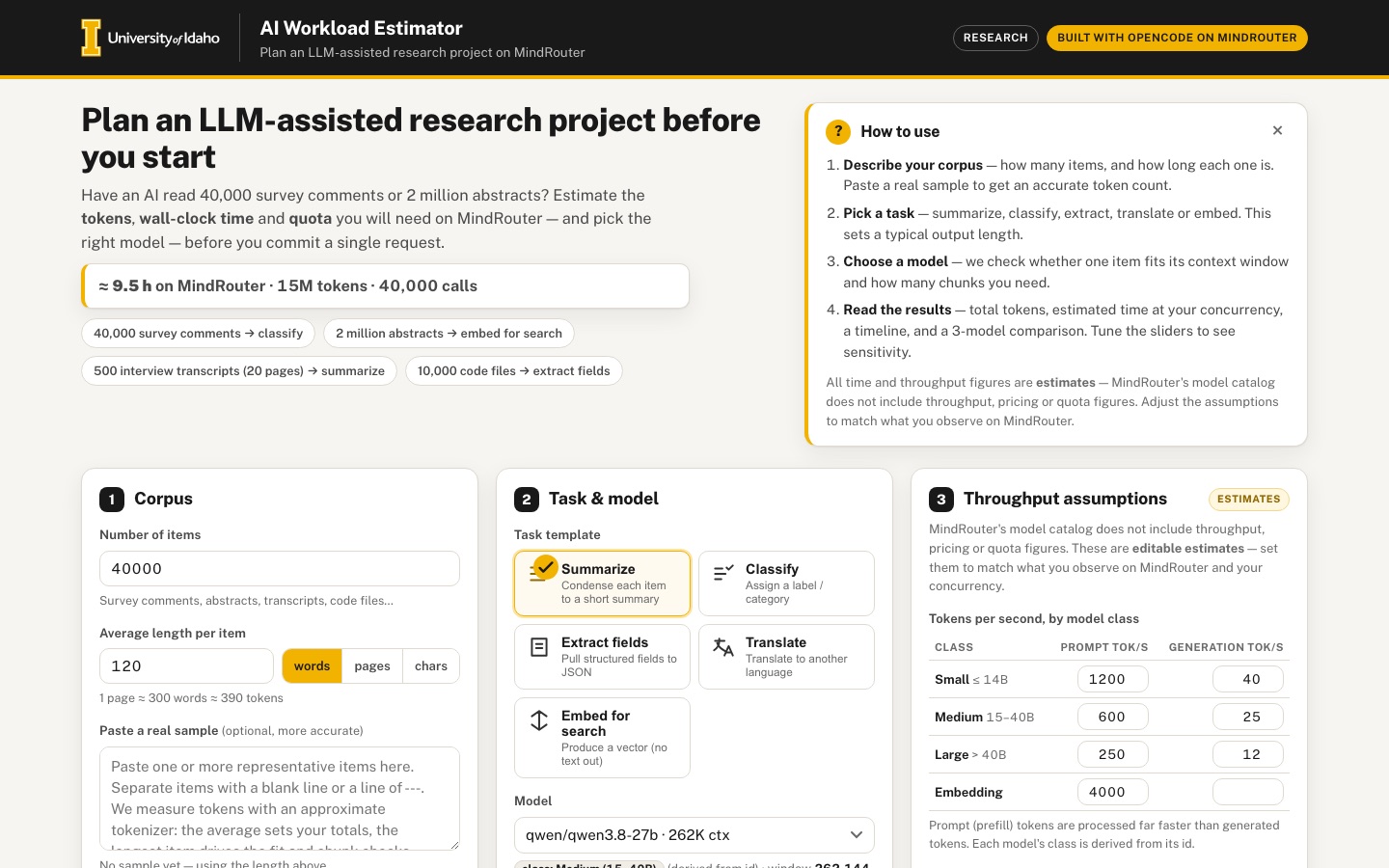 Desktop · click to enlarge

What it is ✎ blurb written by the AI critic
Plan a batch AI job on MindRouter before you run it. Describe your documents (or paste a sample), pick a task and a model from a snapshot of MindRouter's model catalog, and see estimated tokens, run time, quota use and how each item gets chunked to fit the model's context window. It also compares three models side by side and writes a ready-to-run Python batching script with your settings.
Try this
- Click the '500 interview transcripts (20 pages) → summarize' preset, then choose aya-expanse:8b as the model to see each transcript split into 2 chunks and compared with larger-context models.
- Paste a few real survey responses or abstracts into the sample box, separated by blank lines, and watch the token counts, fit check and chunk diagram update.
- Type a requests-per-minute limit in the Quota panel; if the job exceeds it, click 'apply' to set the highest concurrency that fits, then drag the Output length slider to see the time change.
Highlights ✎ written by the AI critic
- Model picker built from a 2026-09-13 snapshot of MindRouter's 73-entry model catalog, with context-window fit checks and chunk counts
- Live token, wall-clock and quota estimates with a worker timeline and a ±50% sensitivity (tornado) chart
- Chunking visualizer that draws the context window, the item split into chunks, and which window sizes fit
- Side-by-side comparison of any three models that flags models of the wrong type for the task
- Copyable Python script (OpenAI-compatible client, retries, chunking, batched embeddings) generated from your settings
Who it's for
Researchers planning to process documents, transcripts, survey responses or code with AI
Features
- Corpus description form: number of items, average length (words, pages or characters), with a paste-sample box that measures a real sample's tokens (approximate tokenizer in JS)
- Task templates (summarize, classify, extract fields to JSON, translate, embed for search) that set typical output lengths
- Model picker from the catalog snapshot with context-window fit checks (does one item fit? how many chunks?)
- Results: total input/output tokens, estimated time at chosen concurrency, and a Gantt-like timeline; sensitivity sliders
- Comparison table across 3 models and a chunking visualizer
- Copyable Python batching snippet that calls MindRouter's OpenAI-compatible endpoint with the chosen settings
Data & sources
- mindrouter.uidaho.edu — MindRouter model catalog snapshot, GET
- Throughput, wall-clock time and quota figures: user-editable estimates in the UI, labelled as estimates, not real University of Idaho figures
How it was built
Written by OpenCode 1.18.21 (opencode.ai) on qwen/qwen3.8-27b, served by MindRouter, the University of Idaho's on-premises AI platform.
Rounds by kind
| build | 1 |
| feedback | 7 |
| continue | 5 |
| critic | 2 |
Lines of code per file
| body html | 322 |
| app css | 505 |
| app js | 1,843 |
| scripts | 96 |
Critic scores ✎ scored by the independent AI critic, 1–10
Independent audits ✎ by the AI critic
Automated checks
Checked by critic-verify.
Data spot checks ✎ written by the AI critic
- qwen/qwen3.8-27b: UI 'window 262,144 tok · 5 replicas · vision, thinking, tools' vs raw context_length 262144, 5 backends, multimodal/thinking/tools true - match
- aya-expanse:8b: UI 'window 8,192 tok · arch max 8,192 · Q4_K_M · 5 replicas · tools' vs raw 8192 / model_max_context 8192 / Q4_K_M / 5 backends / tools true, thinking false - match
- granite3-dense:8b: UI 'window 4,096 tok · arch max 4,096 · Q4_K_M · 2 replicas' vs raw 4096 / 4096 / Q4_K_M / 2 backends - match
- Sources section '73 entries (63 models + 10 aliases)' vs raw data[] 73 entries with 10 is_alias:true; embedded models.json cross-checked field by field against raw: 0 mismatches
- Computed (independent Python): default 40,000 items x 120 words, Summarize, qwen3.8-27b -> 3.41 s/call, 34,100 s = 9.47 h; tokens 6.24M + 6.0M prompt + 2.4M out = 14.64M -> UI '9.5 h · 15M tokens · 40,000 calls', input tile 12M - match
Round-by-round timeline
Every harness round, in order. The prompts and FEEDBACK.md were written by the AI reviewer; the app code was written by the harness. Expand a round to see the exact prompt and the FEEDBACK.md the harness received.
-
Phone layout overflows horizontally (390 px wide). The page is 560 px wide instead of 390 px. The "Compare 3 models" table is 510 px wide, and it forces its panel and the whole results grid wider than the screen. That table's
overflow-xwrapper never gets a chance to scroll. Because of this, the right edge of every results panel is cut off on a phone: the Sensitivity value "40,000", the chunking subtitle "window 262,144 tok", and the OUT TOK and TIME columns. Expected: no horizontal page scroll at 390 px. The table should either scroll inside its own panel or reflow into stacked per-model cards. The results grid columns need to be allowed to shrink. -
Throughput is one number for every model, and prompt tokens are charged at generation speed. There is a single "40 tok/s" that applies to input and output tokens alike, so the "Input" bar dominates (for example, Input 33.9 days vs Output 5.1 days). In real LLM serving, prompt tokens (prefill) are processed many times faster than output tokens are generated. The spec also asks for "tokens/second per model class". Expected: an editable assumptions table, clearly badged as ESTIMATES, with one row per model class (for example small ≤ 14B, medium 15–40B, large 70B+, embedding). Each row needs a prompt-processing tok/s and a generation tok/s. Derive each catalog model's class from its id (size tags such as
:8b,-27b,-120b, and "embed"), show the derived class next to the selected model, and label it as derived. Use the class's rates in every time calculation. -
"Compare 3 models" is meaningless right now. All three rows show exactly the same time (for example 16.4 h, 16.4 h, 16.4 h), because every model uses the same throughput. The second and third models are auto-picked (the smallest-context model
granite3-dense:8bplus one other), and the user cannot choose them. Expected:-
The user can choose all three models, for example with three pickers or "add to comparison" chips.
-
Sensible defaults are three genuinely different models, for example a small fast one,
qwen/qwen3.8-27b, andopenai/gpt-oss-120b. -
Times differ by model class.
-
The table shows the context window and class, and whether one item fits or how many chunks it needs.
-
The best value in each column is highlighted, and clicking a row makes that model the selected one.
-
-
The "Timeline" is not a Gantt-like timeline. It is three horizontal bars labelled Input, Output and Overhead, with no time axis. Also, when a bar is narrow its white label overflows onto the light track and becomes unreadable (for example "6.9 h" on the 1.5 %-wide Overhead bar). Expected: a real Gantt-like SVG chart:
-
A time axis with readable ticks (minutes, hours or days, as appropriate).
-
One lane per parallel worker. When concurrency is high, group the workers into a few lanes and say so.
-
Batches of items drawn across the lanes over time, with milestone markers at 25 / 50 / 75 / 100 % of items done.
-
A "finishes around <date/time> if started now" note.
-
A hover tooltip on each bar.
-
Animation when settings change.
-
Labels must stay legible, drawn outside the bar when it is too narrow.
-
-
The Python snippet is not runnable and ignores the chosen task.
-
ITEMS = 2,000,000is a Python tuple, not a number (use2_000_000or no separators). -
chunk(...)andload_items()are called but never defined, so the script raises NameError. -
PROMPTis always "Summarize the following item: {text}", even when Classify, Extract fields or Translate is selected. -
With "Embed for search" the snippet still calls
client.chat.completions.createinstead of the embeddings endpoint. -
There is no
max_tokens, no retry or backoff on 429/5xx errors, and results are never saved. -
The
# commentsare ragged. Expected: a complete script that runs as is afterpip install openai: -
It reads items from a file (JSONL or one item per line) and defines a simple chunker that uses the app's chunk size.
-
It uses a task-specific prompt: a label list for classify, a JSON schema with
response_formatfor extract, a target language for translate. -
The embed task uses
client.embeddings.createwith batched inputs. -
It uses
max_tokensfrom the task's output length, a thread pool with the chosen concurrency, and retries with exponential backoff. -
It writes results to a JSONL file and prints progress. Light syntax colouring in the code block would make it look finished.
-
-
The spec's "quota" estimate is missing. The intro promises "tokens, wall-clock time and quota", but no quota figure appears anywhere. Expected:
-
A quota section or tile. The user enters their token budget (editable and clearly labelled as their own number, since quotas vary by group) and a requests-per-minute limit.
-
It shows the share of the budget the job uses, whether the job fits, and how many budget periods it would need.
-
It shows tokens per hour or per day and the request rate implied by the chosen concurrency, with a warning if that exceeds the RPM limit.
-
-
Task and model compatibility is never checked. With "Embed for search" selected, the chat model
qwen/qwen3.8-27bstays selected, and the fit check happily uses its 262K window. You can also pick the rerankerQwen/Qwen3-Reranker-8Bor the OCR modeldots.MOCRfor "Summarize" without any warning. Expected:-
Choosing Embed switches to, or strongly suggests, an embedding model (
Qwen/Qwen3-Embedding-8B/default-embedding). -
Text tasks warn when an embedding, reranker or OCR model is selected.
-
The model picker is grouped by class (General / Vision / Code / Embedding / Reranker & OCR / Aliases) rather than one flat list of 73.
-
-
The fit check reserves a fixed 2,048 tokens instead of the real output and prompt size. With
granite3-dense:8b(4,096 window), an item of 2,310 input tokens and 347 output tokens would fit in one call (2,657 < 4,096). The app nevertheless says "Needs 2 chunks" because it always subtracts 2,048. Expected: the space reserved per call = the task's output tokens per call + a prompt/instruction overhead (editable, for example 150 tokens). Show that breakdown in the fit message. Keep an optional safety margin if you like, but it must be visible and editable. -
The chunking visualizer barely visualizes anything. When an item fits it is one small 46 px square, and with 2 chunks it is two identical squares. The context window itself is never drawn. Expected: a to-scale SVG or HTML visual.
-
Show the selected model's context window as a long capacity bar, filled with the prompt overhead, the item's input tokens and the reserved output tokens.
-
When the item does not fit, show the item as a long bar cut into numbered chunks (with an optional, editable chunk overlap), each chunk sitting inside its own window.
-
Include a small "fits in 4K / 8K / 32K / 131K / 262K?" strip, so users see why the context window matters.
-
Animate changes and add tooltips with token counts.
-
-
The sensitivity section only duplicates the step-3 inputs and shows no sensitivity. It is three sliders that mirror existing inputs, plus one sentence. The Items slider tops out at 1,000,000, even though the spec's own example is 2 million abstracts. Typing 2,000,000 in step 1 leaves the slider pinned at its maximum. Expected:
-
A small chart that shows sensitivity, for example a tornado chart of how wall-clock time changes when each assumption moves ±50 %, or a curve of time vs parallel requests with the current point marked. It updates while you drag.
-
A logarithmic Items slider (1 to 10 million).
-
An output-length multiplier slider.
-
-
The paste-sample tokenizer is just characters ÷ 4, and the sample gives no insight. Expected:
-
A somewhat smarter approximate tokenizer: split into words, numbers and punctuation, break long words into sub-word pieces, and count non-Latin characters as roughly one token each.
-
A preview of the first ~40 tokens of the pasted text as alternating coloured chips, so users can see what a token is.
-
Several items can be pasted, separated by a blank line or
---. Report the count, average and longest item. Use the average for totals and the longest item for the fit and chunk checks. -
Show a helpful empty state inside the box area until something is pasted.
-
-
Quick-start presets are missing, and the hero wastes space. At 1440 px there is roughly 200 px of empty space under the intro paragraph, next to the tall How-to card. Expected: fill it with clickable scenario presets that set the whole form. Examples: "40,000 survey comments → classify", "2 million abstracts → embed for search", "500 interview transcripts (20 pages) → summarize", "10,000 code files → extract fields". Include a live headline figure, for example "≈ 16 h on MindRouter", that updates with the form.
-
The page does not feel alive. Results replace their text instantly, with no motion.
-
Tween the stat-tile numbers when they change and briefly highlight values that changed.
-
Let the Gantt and chunk bars transition smoothly.
-
Give the selected task card a clearer selected state; a checkmark or icon per task would help.
-
Switching the length unit (words / pages / chars) throws away the user's number and resets it to a default. Convert the value instead, and show the conversion assumption (for example "1 page ≈ 300 words ≈ 390 tokens").
-
-
Number formatting is noisy. Values like "694.00M" and "4.62B" carry pointless trailing zeros, and "1.1 yr" is hard to picture. Expected: "694M" and "4.6B", and durations such as "13 months (≈ 400 days)" or "3 d 4 h". Put
font-variant-numeric: tabular-numson all changing numbers. -
The phone layout needs care beyond the overflow.
-
At 390 px the Python snippet header wraps its title onto three lines ("Python / batching / snippet") beside the Copy button.
-
The sensitivity labels wrap onto two lines. Expected: on narrow screens, panel headers stack neatly (title, subtitle below, button right-aligned), sliders use a full-width row with the label and value above the track, and the step-3 assumptions table stays readable.
-
-
The generated Python script crashes on its first line of real work, for every task.
-
For Summarize, Classify, Extract and Translate,
main()containsfn = embed_item if undefined else process→NameError: name 'undefined' is not defined. -
For Embed it contains
fn = embed_item if true else process→NameError: name 'true' is not defined. The JavaScript boolean is pasted into Python verbatim. Other problems in the same script: -
response_format={"type": "json_object"}is sent for Summarize, Classify and Translate, although their prompts ask for plain text ("Reply with the label only"). -
For Extract it sends
{"type": "json_object", "schema": '<a JSON string>'}, which is not a valid OpenAIresponse_format. The valid form is{"type": "json_schema", "json_schema": {"name": ..., "schema": {<a dict>}}}; alternatively usejson_objectwith the schema described in the prompt. -
The Embed path sends one item per request (truncated to 8,000 characters) instead of batching many inputs per request.
-
The aligned
# commentsare still ragged (for exampleCHUNK_TOK = 261834 #). Expected: every task's script runs to completion as generated, emits PythonTrue/False(or simply defines the right function), usesresponse_formatonly for Extract, batches embedding inputs (for example 64 per request), and writes one result line per item. Please test the generated text by running it with Python, not justpy_compile.
-
-
Every Gantt lane is one identical full-width bar. At 4 parallel requests all 4 lanes are drawn from x=30 with width 602; at 32 parallel all 6 lanes are identical again. The chart therefore shows nothing beyond "total time".
-
The "100%" milestone label and the last axis tick ("2.9h") are clipped at the right edge.
-
Axis ticks mix units and odd values ("35.2m, 70.3m, 1.8h, 2.3h"). Expected:
-
Each lane is split into visible work blocks, for example 10 batches per lane with alternating shades. Each block shows its prompt-processing share and its generation share in two colours, with a small legend.
-
Lanes that get fewer items end earlier.
-
Ticks use "nice" steps in a single unit (0, 30 min, 1 h, 1.5 h …), and all labels stay inside the chart.
-
The hover tooltip on each block says which items it covers and when it starts and ends.
-
-
Chart text scales with the panel, so it is unreadable on phones and oversized on desktop. The Gantt, tornado and chunking SVGs use a fixed viewBox that is stretched to the panel width:
-
At 390 px the Gantt lane labels ("W1"), axis ticks and milestone labels are about 5 px tall, and the chunking labels are the same.
-
At 1440 px the tornado labels are about 18 px, bigger than the panel headings. Expected: charts are drawn at their container's real pixel width, re-rendered on resize, with labels at a constant 11–13 px on every screen. On a phone, show fewer ticks and let lane labels sit above the bars if needed.
-
-
The chunking visualizer is drawn wrongly and part of it is invisible.
-
The "fits in 4K / 8K / 32K / 131K / 262K" strip sits below the bottom of the SVG, so only its top edge shows.
-
With
granite3-dense:8b(4,096-token window) and a 7,800-token item, the "one item" bar is the same width as the window bar. The item is capped to the panel width, so a 7,800-token item looks exactly as big as a 4,096-token window. -
The capacity bar just fills solid teal, with no sign that the item overflows the window.
-
The "window 1 / window 2 / window 3" labels are dark text drawn over the teal fill, which is hard to read, and "window 3" collides with the fill edge.
-
There is no legend for teal, gold and grey.
-
With a 262K window and a 156-token item, the input is an invisible sliver in an empty beige bar. Expected:
-
Keep one consistent scale. When the item is larger than the window, the item spans the full width and the window bar is proportionally shorter.
-
Draw the overflow beyond the window edge, hatched or in red, labelled "3,124 tokens over".
-
Put labels outside the fills or in contrasting colours, add a legend, and make the fits strip fully visible.
-
When the item uses less than 1 % of the window, give segments a minimum visible width and add a callout such as "uses 0.4 % of the window".
-
-
Class derivation is wrong for aliases, MoE models and ids without a size.
-
default-agentis an alias ofqwen/qwen3.8-27b, yet it is classed "Large (70B+)" and estimates 4.5 h, while its identical target gets 2.1 h. -
mixtral:8x7bis classed "Small (≤ 14B)", although 8×7B is about 47B parameters. -
Ids with no size tag in their name (for example
dots.MOCR) fall back to the context window, so any model with a 262K window becomes "Large" whatever its real size. Expected: -
Aliases inherit their target's class, and the alias target is shown.
-
An
NxMbtag is treated as N×M. -
An unknown size becomes "Medium (size unknown — assumed)", visibly labelled.
-
-
Presets leave stale sample information on screen, and the Items slider does not follow. Steps: paste a 3-item sample, then click "2 million abstracts → embed for search". The textarea is cleared, but "3 items · avg 645 tok · longest 1,860 tok ✓ avg sets totals" and all 40 token chips stay visible. The log Items slider stays at 40,000, and its readout still says "40,000" while the form says 2,000,000. Expected: a preset resets the sample stats and chips to the empty state and syncs every slider and readout. Also make the Items slider snap to round numbers: dragging produced "1,995,262" items, where 2,000,000 or 2.0M would be better.
-
The "Generation tok/s ×" slider silently discards edits made in the rates table. Steps:
-
Set the slider to 1.5×.
-
Change Medium generation tok/s in the table to 100.
-
Move the slider back to 1.0×. Result: the wall-clock time jumps from 30.9 min to 55.3 min, because an old snapshot of the rates is restored, yet the table still shows 100. Expected: the multiplier always applies on top of the current table values, and a table edit is never overwritten.
-
-
The tornado chart is hard to read.
-
Bars are drawn proportional to absolute time on both sides instead of showing the change from the current estimate.
-
Only one end value is printed, there is no baseline label and no legend (what do purple and gold mean?), and rows are not sorted. Expected: a real tornado chart.
-
The centre line is the current estimate, labelled for example "now 9.5 h".
-
Bars extend left for faster and right for slower, by the change in time, with values at both ends (for example "−4 h 45 m" / "+9 h 30 m").
-
Rows are sorted by impact, with a small legend such as "assumption −50 % / +50 %".
-
-
The most important comparison column is hidden, even on desktop. At 1440 px the TIME column of "Compare 3 models" is cut off at the panel edge: you can only see "TIM", "6.3" and "9.5". On a phone only Model, Class and Window are visible, with no hint that the table scrolls. The three pickers list all 73 models in one flat list. Expected:
-
Time is visible without scrolling at desktop width. Drop or merge less important columns: In tok and Out tok are identical across models, so show them once above the table.
-
On a phone, each model is a compact card with the time in large type and a fit pill.
-
The pickers use the same grouped optgroups as the main model picker.
-
-
The quota panel is text only, and the defaults look like real figures. "100000000" is hard to read. Values like "11700%" and "448.5%" are noisy. The default scenario already shows a red "above your RPM limit" warning, but gives no concrete fix. Expected:
-
A visual budget meter: gold fill, with a red overflow segment past 100 %.
-
A formatted echo under the budget input ("= 100M tokens").
-
Labels saying the default budget and RPM are placeholders, not MindRouter quotas.
-
Whole-number percentages above 100 %, plus a "max concurrency within your RPM limit: N" suggestion, ideally with a one-click "apply".
-
-
The token-chip preview splits words at a fixed 6 characters, which looks broken. It shows "Respon | dents", "descri | bed", "advisi | ng", "bookin | g". Real BPE tokenizers keep common words whole. Expected: keep ordinary words of up to about 10 letters whole, and split longer words at plausible boundaries (common suffixes such as -ing, -ed, -tion, -ment, -ly, -ness). The token counts should stay consistent with that, roughly 1.3 tokens per English word.
-
Panel heights are unbalanced on desktop. The Timeline panel is short while the Sensitivity panel beside it is tall, leaving roughly 300 px of empty white card under the Gantt. Compare and Chunking have the same problem. Expected: give the Gantt its own full-width row (it deserves the width), or pair panels of similar height so there are no large empty card areas.
-
The generated Python script crashes on its first line of real work, for every task.
-
For Summarize, Classify, Extract and Translate,
main()containsfn = embed_item if undefined else process→NameError: name 'undefined' is not defined. -
For Embed it contains
fn = embed_item if true else process→NameError: name 'true' is not defined. The JavaScript boolean is pasted into Python verbatim. Other problems in the same script: -
response_format={"type": "json_object"}is sent for Summarize, Classify and Translate, although their prompts ask for plain text ("Reply with the label only"). -
For Extract it sends
{"type": "json_object", "schema": '<a JSON string>'}, which is not a valid OpenAIresponse_format. The valid form is{"type": "json_schema", "json_schema": {"name": ..., "schema": {<a dict>}}}; alternatively usejson_objectwith the schema described in the prompt. -
The Embed path sends one item per request (truncated to 8,000 characters) instead of batching many inputs per request.
-
The aligned
# commentsare still ragged (for exampleCHUNK_TOK = 261834 #). Expected: every task's script runs to completion as generated, emits PythonTrue/False(or simply defines the right function), usesresponse_formatonly for Extract, batches embedding inputs (for example 64 per request), and writes one result line per item. Please test the generated text by running it with Python, not justpy_compile.
-
-
Every Gantt lane is one identical full-width bar. At 4 parallel requests all 4 lanes are drawn from x=30 with width 602; at 32 parallel all 6 lanes are identical again. The chart therefore shows nothing beyond "total time".
-
The "100%" milestone label and the last axis tick ("2.9h") are clipped at the right edge.
-
Axis ticks mix units and odd values ("35.2m, 70.3m, 1.8h, 2.3h"). Expected:
-
Each lane is split into visible work blocks, for example 10 batches per lane with alternating shades. Each block shows its prompt-processing share and its generation share in two colours, with a small legend.
-
Lanes that get fewer items end earlier.
-
Ticks use "nice" steps in a single unit (0, 30 min, 1 h, 1.5 h …), and all labels stay inside the chart.
-
The hover tooltip on each block says which items it covers and when it starts and ends.
-
-
Chart text scales with the panel, so it is unreadable on phones and oversized on desktop. The Gantt, tornado and chunking SVGs use a fixed viewBox that is stretched to the panel width:
-
At 390 px the Gantt lane labels ("W1"), axis ticks and milestone labels are about 5 px tall, and the chunking labels are the same.
-
At 1440 px the tornado labels are about 18 px, bigger than the panel headings. Expected: charts are drawn at their container's real pixel width, re-rendered on resize, with labels at a constant 11–13 px on every screen. On a phone, show fewer ticks and let lane labels sit above the bars if needed.
-
-
The chunking visualizer is drawn wrongly and part of it is invisible.
-
The "fits in 4K / 8K / 32K / 131K / 262K" strip sits below the bottom of the SVG, so only its top edge shows.
-
With
granite3-dense:8b(4,096-token window) and a 7,800-token item, the "one item" bar is the same width as the window bar. The item is capped to the panel width, so a 7,800-token item looks exactly as big as a 4,096-token window. -
The capacity bar just fills solid teal, with no sign that the item overflows the window.
-
The "window 1 / window 2 / window 3" labels are dark text drawn over the teal fill, which is hard to read, and "window 3" collides with the fill edge.
-
There is no legend for teal, gold and grey.
-
With a 262K window and a 156-token item, the input is an invisible sliver in an empty beige bar. Expected:
-
Keep one consistent scale. When the item is larger than the window, the item spans the full width and the window bar is proportionally shorter.
-
Draw the overflow beyond the window edge, hatched or in red, labelled "3,124 tokens over".
-
Put labels outside the fills or in contrasting colours, add a legend, and make the fits strip fully visible.
-
When the item uses less than 1 % of the window, give segments a minimum visible width and add a callout such as "uses 0.4 % of the window".
-
-
Class derivation is wrong for aliases, MoE models and ids without a size.
-
default-agentis an alias ofqwen/qwen3.8-27b, yet it is classed "Large (70B+)" and estimates 4.5 h, while its identical target gets 2.1 h. -
mixtral:8x7bis classed "Small (≤ 14B)", although 8×7B is about 47B parameters. -
Ids with no size tag in their name (for example
dots.MOCR) fall back to the context window, so any model with a 262K window becomes "Large" whatever its real size. Expected: -
Aliases inherit their target's class, and the alias target is shown.
-
An
NxMbtag is treated as N×M. -
An unknown size becomes "Medium (size unknown — assumed)", visibly labelled.
-
-
Presets leave stale sample information on screen, and the Items slider does not follow. Steps: paste a 3-item sample, then click "2 million abstracts → embed for search". The textarea is cleared, but "3 items · avg 645 tok · longest 1,860 tok ✓ avg sets totals" and all 40 token chips stay visible. The log Items slider stays at 40,000, and its readout still says "40,000" while the form says 2,000,000. Expected: a preset resets the sample stats and chips to the empty state and syncs every slider and readout. Also make the Items slider snap to round numbers: dragging produced "1,995,262" items, where 2,000,000 or 2.0M would be better.
-
The "Generation tok/s ×" slider silently discards edits made in the rates table. Steps:
-
Set the slider to 1.5×.
-
Change Medium generation tok/s in the table to 100.
-
Move the slider back to 1.0×. Result: the wall-clock time jumps from 30.9 min to 55.3 min, because an old snapshot of the rates is restored, yet the table still shows 100. Expected: the multiplier always applies on top of the current table values, and a table edit is never overwritten.
-
-
The tornado chart is hard to read.
-
Bars are drawn proportional to absolute time on both sides instead of showing the change from the current estimate.
-
Only one end value is printed, there is no baseline label and no legend (what do purple and gold mean?), and rows are not sorted. Expected: a real tornado chart.
-
The centre line is the current estimate, labelled for example "now 9.5 h".
-
Bars extend left for faster and right for slower, by the change in time, with values at both ends (for example "−4 h 45 m" / "+9 h 30 m").
-
Rows are sorted by impact, with a small legend such as "assumption −50 % / +50 %".
-
-
The most important comparison column is hidden, even on desktop. At 1440 px the TIME column of "Compare 3 models" is cut off at the panel edge: you can only see "TIM", "6.3" and "9.5". On a phone only Model, Class and Window are visible, with no hint that the table scrolls. The three pickers list all 73 models in one flat list. Expected:
-
Time is visible without scrolling at desktop width. Drop or merge less important columns: In tok and Out tok are identical across models, so show them once above the table.
-
On a phone, each model is a compact card with the time in large type and a fit pill.
-
The pickers use the same grouped optgroups as the main model picker.
-
-
The quota panel is text only, and the defaults look like real figures. "100000000" is hard to read. Values like "11700%" and "448.5%" are noisy. The default scenario already shows a red "above your RPM limit" warning, but gives no concrete fix. Expected:
-
A visual budget meter: gold fill, with a red overflow segment past 100 %.
-
A formatted echo under the budget input ("= 100M tokens").
-
Labels saying the default budget and RPM are placeholders, not MindRouter quotas.
-
Whole-number percentages above 100 %, plus a "max concurrency within your RPM limit: N" suggestion, ideally with a one-click "apply".
-
-
The token-chip preview splits words at a fixed 6 characters, which looks broken. It shows "Respon | dents", "descri | bed", "advisi | ng", "bookin | g". Real BPE tokenizers keep common words whole. Expected: keep ordinary words of up to about 10 letters whole, and split longer words at plausible boundaries (common suffixes such as -ing, -ed, -tion, -ment, -ly, -ness). The token counts should stay consistent with that, roughly 1.3 tokens per English word.
-
Panel heights are unbalanced on desktop. The Timeline panel is short while the Sensitivity panel beside it is tall, leaving roughly 300 px of empty white card under the Gantt. Compare and Chunking have the same problem. Expected: give the Gantt its own full-width row (it deserves the width), or pair panels of similar height so there are no large empty card areas.
-
Gantt timeline: every work block is squeezed into the first few pixels.
-
Preset "40,000 survey comments → classify" (4 parallel, 2.9 h total): all 80 block rectangles sit between x=40 and x=45 and are about 1 px wide. The four lanes look like a single thin green tick at 0 min, and the other 99 % of each lane is empty up to a "…" at the right edge.
-
At 32 parallel (22 min total) the blocks are 1 px vertical lines scattered across only the first ~5 minutes of a 22-minute axis, so the chart looks as if the job ends at 5 min.
-
At 10,000,000 items the whole chart is a column of ticks at "0 d", even though the axis runs to 10 d. Expected: each lane's blocks run continuously from 0 to that lane's finish time. Each block covers, for example, 10 % of the lane's calls, is visibly wide, has a 1–2 px gap to its neighbour, and shows its prompt/generation split. The last block of every lane ends near the 100 % marker, with shorter lanes ending a little earlier.
-
-
Gantt labels collide and are unclear.
-
The legend ("prompt processing / generation") is drawn on top of the first axis tick label ("0 min" / "0 d"), on desktop and on phone.
-
The last tick reads "175.8 min" instead of a nice value in the same unit as the other ticks (for a 2.9 h job: 0, 30 min, 1 h … 3 h).
-
Every lane ends in an unexplained "…". Expected: put the legend above or below the chart with its own space, use nice rounded ticks throughout, and either remove the "…" or explain it in a tooltip.
-
-
The chunking visualizer still gets the scale wrong when the item is bigger than the window. With
granite3-dense:8b(4,096 window) and the "500 interview transcripts (20 pages)" preset (7,800-token item):-
The "context window (4,096 tok)" bar is teal across the full width. There is a black tick at ~52 %, but the teal keeps going past the window edge with no hatching.
-
The "one item → 3 chunks" bar hatches part of chunk 2 and all of chunk 3 as "3,704 tokens over". After chunking nothing overflows, so this suggests chunks 2–3 are lost. With overlap 300 it hatches chunks 3 and 4. Expected:
-
The window bar is a box that ends at the window edge (about 52 % of the width here). The un-chunked item is drawn at the same scale, and the part past the edge is hatched red with the "N tokens over" label.
-
The "→ 3 chunks" row shows the item cut into chunks with no overflow hatching, each chunk fitting its window, with overlap shaded where chunks share tokens.
-
-
Chunking labels overlap. The legend row (item input / output / prompt / overflow) is drawn over the bottom border of the "does one item fit?" boxes (4.1K ✕ … 262K ✓). On the phone the "window 1" label runs into the "does one item fit?" caption. Expected: leave clear vertical space between the rows and put the legend on its own line below the strip, at every width.
-
The generated Python still has correctness issues in two tasks.
-
Extract:
SCHEMA = {"fields": {"title": "string", ...}}is not a valid JSON Schema, so structured-output servers will not enforce it. Expected: a real schema such as{"type": "object", "properties": {"title": {"type": "string"}, "date": {"type": "string"}, "amount": {"type": "number"}}, "required": [...]}, with tidy indentation. -
Embed:
-
Items are silently cut to 8,000 characters (
it[:8000]) instead of being chunked toCHUNK_TOK, so long items lose text without warning. -
The final message prints the number of batches as "result lines": with 3 items it says "Wrote 1 result lines".
-
The embed script also carries unused leftovers (
process(),embed_item(),PROMPT = '{text}',MAX_TOKENS = 1). Expected: chunk long items (one vector per chunk, recorded with its item index and chunk number), count and print real result lines, and include only the functions the chosen task uses.
-
-
-
The tornado chart shows empty rows for the embed task. With "Embed for search", the "Gen tok/s" and "Output length" rows read "+0 s | +0 s" with no bars. Expected: hide rows that cannot affect the chosen task, or grey them out with a short "no effect for embeddings" note.
-
The Compare panel leaves a large empty area on desktop. At 1440 px the Compare 3 models card is about 200 px shorter than the Sensitivity card beside it, so there is a big blank area under the table. Expected: use that space for something useful and visual. For example, a small horizontal bar chart of the three models' estimated times (and chunks per item), with the selected model highlighted and the fastest labelled, animating when the pickers change.
-
The quota meter label is hard to read when over budget. When the budget is exceeded, the "449%" label is dark text on a saturated red bar. Expected: put the percentage label beside the bar, or use white text with enough contrast, and mark the 100 % point on the track.
-
Gantt timeline: every work block is squeezed into the first few pixels.
-
Preset "40,000 survey comments → classify" (4 parallel, 2.9 h total): all 80 block rectangles sit between x=40 and x=45 and are about 1 px wide. The four lanes look like a single thin green tick at 0 min, and the other 99 % of each lane is empty up to a "…" at the right edge.
-
At 32 parallel (22 min total) the blocks are 1 px vertical lines scattered across only the first ~5 minutes of a 22-minute axis, so the chart looks as if the job ends at 5 min.
-
At 10,000,000 items the whole chart is a column of ticks at "0 d", even though the axis runs to 10 d. Expected: each lane's blocks run continuously from 0 to that lane's finish time. Each block covers, for example, 10 % of the lane's calls, is visibly wide, has a 1–2 px gap to its neighbour, and shows its prompt/generation split. The last block of every lane ends near the 100 % marker, with shorter lanes ending a little earlier.
-
-
Gantt labels collide and are unclear.
-
The legend ("prompt processing / generation") is drawn on top of the first axis tick label ("0 min" / "0 d"), on desktop and on phone.
-
The last tick reads "175.8 min" instead of a nice value in the same unit as the other ticks (for a 2.9 h job: 0, 30 min, 1 h … 3 h).
-
Every lane ends in an unexplained "…". Expected: put the legend above or below the chart with its own space, use nice rounded ticks throughout, and either remove the "…" or explain it in a tooltip.
-
-
The chunking visualizer still gets the scale wrong when the item is bigger than the window. With
granite3-dense:8b(4,096 window) and the "500 interview transcripts (20 pages)" preset (7,800-token item):-
The "context window (4,096 tok)" bar is teal across the full width. There is a black tick at ~52 %, but the teal keeps going past the window edge with no hatching.
-
The "one item → 3 chunks" bar hatches part of chunk 2 and all of chunk 3 as "3,704 tokens over". After chunking nothing overflows, so this suggests chunks 2–3 are lost. With overlap 300 it hatches chunks 3 and 4. Expected:
-
The window bar is a box that ends at the window edge (about 52 % of the width here). The un-chunked item is drawn at the same scale, and the part past the edge is hatched red with the "N tokens over" label.
-
The "→ 3 chunks" row shows the item cut into chunks with no overflow hatching, each chunk fitting its window, with overlap shaded where chunks share tokens.
-
-
Chunking labels overlap. The legend row (item input / output / prompt / overflow) is drawn over the bottom border of the "does one item fit?" boxes (4.1K ✕ … 262K ✓). On the phone the "window 1" label runs into the "does one item fit?" caption. Expected: leave clear vertical space between the rows and put the legend on its own line below the strip, at every width.
-
The generated Python still has correctness issues in two tasks.
-
Extract:
SCHEMA = {"fields": {"title": "string", ...}}is not a valid JSON Schema, so structured-output servers will not enforce it. Expected: a real schema such as{"type": "object", "properties": {"title": {"type": "string"}, "date": {"type": "string"}, "amount": {"type": "number"}}, "required": [...]}, with tidy indentation. -
Embed:
-
Items are silently cut to 8,000 characters (
it[:8000]) instead of being chunked toCHUNK_TOK, so long items lose text without warning. -
The final message prints the number of batches as "result lines": with 3 items it says "Wrote 1 result lines".
-
The embed script also carries unused leftovers (
process(),embed_item(),PROMPT = '{text}',MAX_TOKENS = 1). Expected: chunk long items (one vector per chunk, recorded with its item index and chunk number), count and print real result lines, and include only the functions the chosen task uses.
-
-
-
The tornado chart shows empty rows for the embed task. With "Embed for search", the "Gen tok/s" and "Output length" rows read "+0 s | +0 s" with no bars. Expected: hide rows that cannot affect the chosen task, or grey them out with a short "no effect for embeddings" note.
-
The Compare panel leaves a large empty area on desktop. At 1440 px the Compare 3 models card is about 200 px shorter than the Sensitivity card beside it, so there is a big blank area under the table. Expected: use that space for something useful and visual. For example, a small horizontal bar chart of the three models' estimated times (and chunks per item), with the selected model highlighted and the fastest labelled, animating when the pickers change.
-
The quota meter label is hard to read when over budget. When the budget is exceeded, the "449%" label is dark text on a saturated red bar. Expected: put the percentage label beside the bar, or use white text with enough contrast, and mark the 100 % point on the track.
-
The Gantt timeline suggests all prompts run first and all generation afterwards. With the preset "40,000 survey comments → classify" (4 parallel, about 2.9 h), every lane is one long teal block from 0 to about 43 min, then one long gold block to 180 min. At 32 parallel it is the same shape. There are also about 11 one-pixel slivers crowded at the very start of every lane: the first blocks are one call wide, and the last block is stretched to the end. In reality every call does a little prompt processing followed by generation. Expected: split each lane into 10 equal batches (each 10 % of that lane's calls), drawn side by side with a 1–2 px gap so they span 0 → lane finish. Inside each batch, draw a teal part (its prompt-processing share) followed by a gold part (its generation share). The lane then shows a repeating teal/gold rhythm, with no slivers and no stretched final block. Keep the tooltip on each batch (item range, start–end time).
-
Segment colours in the context-window bar do not match the legend. With
granite3-dense:8band "500 interview transcripts (20 pages)", the "context window (4,096 tok)" bar shows dark teal, olive green, blue and light teal segments. The legend below says item input = teal, output = gold, prompt = grey. The colours look muddy, as if semi-transparent fills are blended over a coloured background, and there are no gold or grey segments anywhere. Expected: solid fills in exactly the legend colours (prompt grey, item input teal, output gold, safety margin a light neutral added to the legend) on a light empty-window background. Show a hover tooltip on each segment. Order the segments prompt → input → output → margin. -
The quota meter no longer shows the over-budget part. With the token budget set to 1,000,000, the job uses 449 %, but the meter is simply a full gold bar. The red overflow segment and the 100 % tick are not visible, and only the red "449%" text beside it hints at a problem. Expected: when usage exceeds 100 %, rescale the track so it represents the job's share. For example, the 100 % tick sits at 1/4.49 of the width, gold fills up to the tick, and red fills the remainder, with the tick labelled "budget". Under 100 % keep the current look.
-
The class ranges have a gap. The rates table labels classes "Medium 15–40B" and "Large 70B+", so a 41–69B model has no visible class.
mixtral:8x7b(≈56B) shows as "Large (70B+)". Expected: label the classes so they cover every size, for example "Small ≤ 14B", "Medium 15–40B", "Large > 40B", and use the same labels in the stat tile, model meta and comparison table. -
Small wording polish.
-
The sensitivity slider label "Generation tok/s (×/÷)" reads oddly. Use "Generation speed" with the multiplier as its value.
-
The chunker comment in the Python script says
# ~4 chars/token, but the line converts tokens to words. Say# ~0.75 words per token.
-
-
Console errors and empty Gantt lanes at many concurrency values. Set "Parallel requests" (step 3 input or Sensitivity slider) to 7, 8, 9, 13, 14, 20 or 25. Each change logs 40–80 console errors:
Error: <rect> attribute x: Expected length, "NaN".Error: <rect> attribute width: Expected length, "NaN".At 7 or 8 parallel the lanes are labelled W1×2 … W6×2, but W5 and W6 contain no blocks because their rectangles have NaN positions. At 13 and 14 parallel, W6×3 is empty. The grouping note is also arithmetically wrong. "7 workers grouped into 6 lanes (2 per lane)" would be 12 workers, and "32 workers grouped into 6 lanes (6 per lane)" would be 36. Expected:-
Every drawn lane has at least one worker and visible blocks.
-
Workers are split as evenly as possible (7 → 2, 1, 1, 1, 1, 1, or fewer lanes).
-
Lane labels name the real workers, for example "W1–2", "W3", and the note states the true counts.
-
There are zero console errors for every concurrency from 1 to 64. Please test that whole range.
-
-
The context-window bar is empty when the item does not fit. With
granite3-dense:8b(4,096 window) and the "500 interview transcripts (20 pages)" preset, the "context window (4,096 tok)" bar shows only the small grey prompt segment. The item-input, output and margin segments are not drawn at all, so the window looks almost empty while "3,704 tokens over" is hatched beside it. When the item fits (for exampleqwen/qwen3.8-27b) the segments do appear. Expected:-
Draw prompt, then item input filling the window up to its edge (clipped there), and hatch everything that does not fit beyond the edge.
-
The over-count matches the fit message: prompt + input + output + margin − window = 150 + 7,800 + 1,170 + 100 − 4,096 = 5,124 tokens over.
-
In the "each chunk inside its own window" row, also draw each window's reserved prompt, output and margin segments in the legend colours, so each window visibly shows what occupies it.
-
-
The chunking legend is clipped on phones. At 390 px the legend row under "does one item fit?" runs past the right edge of the card. "prompt · item input · output · safety margin" is visible, but the "overflow" entry is cut off. Expected: the legend wraps onto a second line on narrow screens so every entry is visible.
-
Chunking math breaks whenever a task's output does not fit beside the input, so estimates become absurd. The app reserves the whole item's output in every call. When that reserve is larger than the window, it leaves 0 input tokens per call and counts every input token as its own chunk. Reproduce: preset "500 interview transcripts (20 pages)", then change the task, model, length and item count as below.
-
Expected: when an item is split, each chunk produces its own share of the output. Output per call = the task's output ratio × that chunk's input (with the task's per-call minimum). The item's total output stays about the same as unchunked.
-
The input per chunk must satisfy prompt + chunk input + chunk output + margin ≤ window, which means chunk input ≤ (window − prompt − margin − per-call minimum output) ÷ (1 + output ratio). Example: Translate on the 8,192 window gives about 3,970 input tokens per chunk, so a 30-page (11,700-token) item needs 3 chunks, and 2,000 items need about 6,000 calls.
-
If the window cannot hold even the prompt, margin and minimum output, show a clear message such as "this model's window is too small for this task — pick a larger-context model" instead of millions of chunks.
-
Use the same corrected numbers everywhere: the fit message, stat tiles, timeline, comparison table and bar chart, tornado, quota, chunking visualizer (each window shows its chunk's own output share), and the Python script (
CHUNK_TOKand a per-callMAX_TOKENSthat match the chunk size). -
Large jobs freeze the browser tab. Rendering takes time proportional to the number of API calls:
-
granite3-dense:8b, 5,000 pages per item, 100,000 items: the tab was frozen for 192 seconds after typing the item count. -
1,000 pages × 1,000,000 items did not finish within 2 minutes.
-
Even 5,000 pages × 500 items took 1.1 s per keystroke. Expected: every update renders in well under 100 ms for any input the form accepts, up to 10,000,000 items and very long items. Compute lane and batch timings with arithmetic, never by looping over individual calls. Please time the extreme cases above after the fix.
-
-
The "window too small" state still shows misleading zeros elsewhere. To reproduce, pick
granite3-dense:8b, then set "Prompt / instruction overhead" to 5000. The chunking panel correctly says the window is too small, but:-
The "Est. wall-clock time" tile shows "0 s", and the Total tokens tile says "0 API calls". Check the hero headline under the intro as well.
-
The Timeline draws four empty lanes on a "0 s … 1 s" axis. Its milestone labels are piled on top of each other at the left edge, reading "100%50%25%". Expected: in this state the time tile and hero headline show "—" with a short note such as "window too small". The Timeline, and any other chart that depends on calls, shows a small friendly message ("No estimate — this model's window is too small for this task") instead of an empty chart. As soon as the user picks a model or overhead that fits, everything returns to normal.
-
-
CHUNK_TOKin the Python script is a long decimal. In the default view (Summarize,qwen/qwen3.8-27b), the script readsCHUNK_TOK = 227681.7391304348. With granite and 100 pages it reads3292.1739130434785. Expected: a whole number, rounded down (for example227681). Also keep the# commentson those constant lines aligned in one column. -
The first page load greets visitors with a red warning. With the default scenario (40,000 items, 4 parallel) and the placeholder limit of 60 requests per minute, the Quota panel immediately says "Above your RPM limit" in red. Expected: choose placeholder defaults so the default scenario does not trigger a warning on first load, for example a placeholder RPM of 120. Keep the warning and the "apply N" suggestion working exactly as now when the user's own numbers exceed the limit.
-
Empty state shows stale results underneath. Set "Number of items" to 0 (or the length to 0). The "Describe your corpus to see an estimate" card appears, but every old tile, chart and the snippet stay visible below it. The cause is
.results__body { display: flex; }insrc/app.css, which overrides thehiddenattribute. Fix: add[hidden] { display: none !important; }near the top ofsrc/app.css. -
The fit check uses the average sample item, not the longest item, although the UI says "longest drives fit". To reproduce:
-
Choose
aya-expanse:8band Summarize. -
Paste a short sentence, a blank line, then a 7,000-word item such as the word "research" repeated.
-
The fit panel says "Fits in one call. 3,504 input + 526 output …", and the chunk diagram says "one item (7,000 tok) → 1 chunk".
-
But the longest item needs 7,000 + 1,050 output + 150 + 100 = 8,300 tokens, which is more than 8,192, so it needs 2 chunks.
Cause:
estimate()callsfitFor(model, perItemInputTokens(), …), which uses the average. Fix: also compute a fit withlongestItemTokens(). Use that fit for: -
renderFit -
renderChunking, including the per-call output drawn in the diagram -
the comparison table's "Fits?" pill
Totals may stay on the average.
-
-
The Sensitivity tornado's "Output length" row is always "+0 s / +0 s" for every task, even Translate, where output dominates. Cause:
est2()inrenderSensitivityignoreso.outMul, becausefitFor()andoutForChunk()readstate.outMul. Fix: insideest2, setstate.outMul = o.outMul, compute, then restore the old value. You could instead pass the multiplier as a parameter. Expected: with the "500 interview transcripts" preset and Translate, ±50% output length changes the time by hours. -
Total tokens and the quota ignore the per-call prompt overhead and the chunk overlap, so the quota is badly underestimated.
-
In the default view, 40,000 calls × 150 prompt tokens is 6.0M tokens that are sent but never counted. The app says 8.6M; the real figure is about 14.6M.
-
Fix:
totalIn = items × inTok + calls × promptOverhead + items × (chunks − 1) × overlap. -
Use it in the tiles, the hero headline, the quota panel, the sensitivity readout and the comparison.
-
Change the input tile's sub-label to something like "156 / item + 150 prompt / call".
-
Chunk counts differ per model, so add a "Tokens" column to the comparison table and remove the "(same for all three)" line.
-
-
The embedding estimate disagrees with the generated script. The estimate assumes one API call per item, each with a 150-token instruction prompt and 0.5 s overhead. The "2 million abstracts" preset shows 2,000,000 calls, 402 req/min, and "Above your RPM limit" with no fix offered. The script, however, sends
EMBED_BATCH = 64inputs per request. Fix, for the Embed task only:-
Use no instruction-prompt overhead: treat it as 0 in
fitFor,estimateand the fit message. -
Set requests = ceil(items × chunks ÷ 64).
-
Set time per request = (64 × chunk input tokens) ÷ the embedding prompt rate + overhead.
-
Base the RPM check and the timeline on requests.
-
Show the Embedding row's "Generation tok/s" cell as "n/a" (a disabled input).
-
-
The comparison table compares the wrong kind of model. In the Embed task it shows chat models (e.g.
aya-expanse:8b"fits · 4 d 18 h") and can crown one "fastest". Fix: callcompatWarning(m)for each row. When it returns a warning, show a grey "wrong type" pill in the Fits? column and "—" for the time. Exclude that row from "fastest" and from the bar chart. Apply the same rule to embedding models under text tasks. -
The "window too small" state still shows nonsense values. To reproduce, choose
granite3-dense:8band set "Prompt / instruction overhead" to 5000. You get:-
Hero headline "≈ 0 s on MindRouter · … · 0 calls", time tile "0 s", "0 API calls".
-
Quota lines "Rate: 2583B tok/h" and "Within your RPM limit".
-
Timeline milestone labels piled up as "100%25%" at 0 s.
-
Every tornado bar "+0 s".
-
Python
CHUNK_TOK = 0, which would send one word per call.Fix: at the top of
update(), if the selected model's fit hastooSmall, render a no-estimate state: -
Hero: "No estimate — this model's window is too small for this task".
-
Time tile and API-calls sub-label: "—".
-
Quota readout: that one sentence instead of the rate and RPM lines.
-
#timelineand#tornado: a single<p>with that sentence instead of the SVGs. -
Snippet: only a Python comment saying the window is too small, and to pick a larger-context model.
Everything returns to normal when a fitting model or overhead is chosen.
-
-
Task output lengths contradict the snippet prompts.
-
Classify scales output with item length (
outRatio 0.02): a 20-page transcript gets 156 output tokens andMAX_TOKENS = 234, yet the prompt says "Reply with the label only". Fix: make Classify a fixed output withoutRatio: 0andminOut: 12. -
Summarize asks for "2-3 sentences" while budgeting 1,170 output tokens. Fix: generate the prompt as "Summarize the following item in about N words", where N = round(per-call output tokens × 0.75).
-
-
CHUNK_TOKin the Python snippet is an unrounded float (227681.7391304348). UseMath.floor(est.fit.avail), and keep the#comments aligned. -
The chunking diagram is blank for short items. In the default view (a 156-token item in a 262,144-token window), the "context window" bar and "window 1" are empty, because every segment is under one pixel wide. Fix: when prompt + input + output + margin is under 5% of the window, draw each used segment at least 6 px wide. Add the caption "(small segments enlarged to be visible — not to scale)".
-
The first page load shows a red "Above your RPM limit" warning based on an invented placeholder of 60. Make the RPM field empty by default (state.rpm = 0) with the placeholder text "e.g. 60". When it is empty, show only "Implied request rate: 70.4 req/min — enter your limit to check it." The warning and the "apply N" button keep working once the user enters a limit.
-
Wording and small visual nits:
-
(a) Replace "MindRouter does not publish tokens/second, pricing or quota data" in the How-to note, the card intro and the snippet's closing NOTE. Use "MindRouter's model catalog does not include throughput, pricing or quota figures". Replace "match your own cluster" with "match what you observe on MindRouter".
-
(b) Under "Parallel requests", add the hint "Assumes each request keeps its speed as concurrency rises — real servers slow down under heavy load."
-
(c) Use US spelling in How to use: "summarize".
-
(d) Timeline legend: on a 390 px phone the "generation" swatch touches the words "prompt processing". Start the second legend item at
left + 140. -
(e) On the phone, the gold "selected" bar in the comparison cards overlaps the "MODEL" label text. Give the card extra left padding, or move the bar outside the text.
-
-
The Sensitivity tornado is wrong whenever the "Output length" slider is not 1×, and it throws console errors. To reproduce, open the default view and drag the "Output length" slider to 2×:
-
The console shows
<rect> attribute width: A negative value is not valid. ("-36.7"). -
The Items row shows "−11 h 24 m ; −1.9 h", with both sides negative.
-
Gen tok/s shows "+0 s".
-
At 0.5×, the Concurrency "faster" side shows "+10.6 min".
Cause:
est2()inrenderSensitivitydoesvar outMul = o.outMul || 1; state.outMul = outMul;, which is an absolute multiplier. Rows that do not change output are computed at 1×, not at the slider's value. Fix:
-
-
The input tile does not add up with the total. The default view shows Total input 6.2M + Total output 2.4M, but Total tokens 15M. The input tile and the "In … · Out …" line above the comparison table leave out the prompt tokens. Fix: show input =
totalTok − totalOut, which is items × input + calls × prompt overhead + the re-sent overlap. Keep the sub-label "156 / item + 150 prompt / call". Expected default: Input 12M, Output 2.4M, Total 15M. -
The time format can print "3 d 24 h" or "10 h 60 m". "3 d 24 h" appeared in the tornado with 40-page items,
aya-expanse:8band overlap 300. InfmtTimeandfmtDelta:-
When the rounded hours (
hh2) reach 24, add one day and set the hours to 0. -
When the rounded minutes (
mm) reach 60, add one hour and set the minutes to 0.
-
-
Row 3 of the chunking diagram ("window 1") is still an empty bar in the default view (a 156-token item in a 262,144-token window). Row 1 now enlarges small segments. Apply the same rule to the per-chunk windows in row 3: when the used share is under 5%, draw the input, prompt, output and margin segments at least 6 px wide.
-
The caption is cut off on the phone. At 390 px, "context window (262,144 tok) (small segments enlarged to be visible — not to scale)" runs past the right edge. When the SVG is narrower than 560 px, draw "(small segments enlarged — not to scale)" as a second caption line below the first. You can shorten the note instead.
-
On the phone, the comparison card's gold selection bar still overlaps the "MODEL" label. It comes from
.cmp tbody tr.is-current td:first-child { box-shadow: inset 3px 0 0 var(--ui-pride-gold); }. Inside the phone@mediablock, setbox-shadow: nonefor that selector, since the gold card border already marks the selection. -
Small cleanups:
-
For the Embed task the hero headline says "8 calls" while the tile says "8 requests". Use "requests" in the hero for embeddings too.
-
Remove the duplicated
.pill--naand.cmp tbody tr.is-wrongrules insrc/app.css.
-
-
The Sensitivity tornado is wrong whenever the "Output length" slider is not 1×, and it throws console errors. To reproduce, open the default view and drag the "Output length" slider to 2×:
-
The console shows
<rect> attribute width: A negative value is not valid. ("-36.7"). -
The Items row shows "−11 h 24 m ; −1.9 h", with both sides negative.
-
Gen tok/s shows "+0 s".
-
At 0.5×, the Concurrency "faster" side shows "+10.6 min".
Cause:
est2()inrenderSensitivitydoesvar outMul = o.outMul || 1; state.outMul = outMul;, which is an absolute multiplier. Rows that do not change output are computed at 1×, not at the slider's value. Fix:
-
-
The input tile does not add up with the total. The default view shows Total input 6.2M + Total output 2.4M, but Total tokens 15M. The input tile and the "In … · Out …" line above the comparison table leave out the prompt tokens. Fix: show input =
totalTok − totalOut, which is items × input + calls × prompt overhead + the re-sent overlap. Keep the sub-label "156 / item + 150 prompt / call". Expected default: Input 12M, Output 2.4M, Total 15M. -
The time format can print "3 d 24 h" or "10 h 60 m". "3 d 24 h" appeared in the tornado with 40-page items,
aya-expanse:8band overlap 300. InfmtTimeandfmtDelta:-
When the rounded hours (
hh2) reach 24, add one day and set the hours to 0. -
When the rounded minutes (
mm) reach 60, add one hour and set the minutes to 0.
-
-
Row 3 of the chunking diagram ("window 1") is still an empty bar in the default view (a 156-token item in a 262,144-token window). Row 1 now enlarges small segments. Apply the same rule to the per-chunk windows in row 3: when the used share is under 5%, draw the input, prompt, output and margin segments at least 6 px wide.
-
The caption is cut off on the phone. At 390 px, "context window (262,144 tok) (small segments enlarged to be visible — not to scale)" runs past the right edge. When the SVG is narrower than 560 px, draw "(small segments enlarged — not to scale)" as a second caption line below the first. You can shorten the note instead.
-
On the phone, the comparison card's gold selection bar still overlaps the "MODEL" label. It comes from
.cmp tbody tr.is-current td:first-child { box-shadow: inset 3px 0 0 var(--ui-pride-gold); }. Inside the phone@mediablock, setbox-shadow: nonefor that selector, since the gold card border already marks the selection. -
Small cleanups:
-
For the Embed task the hero headline says "8 calls" while the tile says "8 requests". Use "requests" in the hero for embeddings too.
-
Remove the duplicated
.pill--naand.cmp tbody tr.is-wrongrules insrc/app.css.
-
1 build 10.4 min · 6 files changed, 2578 insertions(+), 3 deletions(-) Show prompt
Read AGENTS.md, SPEC.md and BRAND.md in this directory. Then build the complete app they describe, step by step: first write scripts in scripts/ that turn the raw data in data/raw/ (see data/raw/SOURCES.md — it is a snapshot of MindRouter's /v1/models catalog; read its field notes and caveats carefully) into compact JSON in data/embed/ and run them; then write src/body.html, src/app.css and src/app.js; run python3 build.py --check and fix any error it reports. Implement every required feature in SPEC.md with a polished, modern, responsive University of Idaho design. Throughput assumptions (tokens/second per model class, parallel requests) are not in the data: make them editable in the UI and clearly label them as estimates. Do not stop until python3 build.py --check succeeds and every feature is implemented.
2 feedback 31.1 min · 5 files changed, 2194 insertions(+), 606 deletions(-) Show prompt
Read FEEDBACK.md in this directory — it lists problems a reviewer found when testing index.html in a real browser. Fix every item, keeping everything that already works, then run python3 build.py --check.
Reviewer feedback — round 1 (tested index.html in Chromium at 1440×900 and 390×844)
Good: no console errors, no network requests, every control updates the results, the Data & sources section is honest, and the brand styling is clean. The problems below are what keeps it from being a useful, gallery-quality planning tool. Fix all of them, most important first, and keep everything that already works.
3 feedback 28.1 min · 1 file changed, 80 insertions(+), 82 deletions(-) Show prompt
Read FEEDBACK.md in this directory — it lists problems a reviewer found when testing index.html in a real browser. Fix every item, keeping everything that already works, then run python3 build.py --check.
Reviewer feedback — round 2 (tested index.html in Chromium at 1440×900 and 390×844)
Big improvement. The presets, per-class rates, quota panel, comparison pickers, task/model mismatch warning, multi-item sample with token chips and unit conversion all work. There are no console errors and no horizontal page scroll at 390 px. The items below are what I found by clicking through every feature and by actually running the generated Python script (against a stub openai module and a 3-item items.jsonl). Fix all of them and keep everything that already works.
4 continue 14.3 min · 4 files changed, 1142 insertions(+), 444 deletions(-) Show prompt
Read FEEDBACK.md in this directory — it lists problems a reviewer found when testing index.html in a real browser. Fix every item, keeping everything that already works, then run python3 build.py --check.
Reviewer feedback — round 2 (tested index.html in Chromium at 1440×900 and 390×844)
Big improvement. The presets, per-class rates, quota panel, comparison pickers, task/model mismatch warning, multi-item sample with token chips and unit conversion all work. There are no console errors and no horizontal page scroll at 390 px. The items below are what I found by clicking through every feature and by actually running the generated Python script (against a stub openai module and a 3-item items.jsonl). Fix all of them and keep everything that already works.
5 feedback 23.2 min · 3 files changed, 136 insertions(+), 158 deletions(-) Show prompt
Read FEEDBACK.md in this directory — it lists problems a reviewer found when testing index.html in a real browser. Fix every item, keeping everything that already works, then run python3 build.py --check.
Reviewer feedback — round 4 (tested index.html in Chromium at 1440×900 and 390×844)
Much better. All five generated Python scripts now run to completion; I ran them against a stub openai module. The rates-table/slider bug is fixed. Aliases inherit their class. Presets reset the sample and sync the sliders. The tornado chart reads well. The quota meter and the "apply N" button work, the phone comparison cards look good, and there is no page overflow at 390 px. The items below are what is left. Fix them all and keep everything that already works.
6 continue 5.7 min · 4 files changed, 442 insertions(+), 226 deletions(-) Show prompt
Read FEEDBACK.md in this directory — it lists problems a reviewer found when testing index.html in a real browser. Fix every item, keeping everything that already works, then run python3 build.py --check.
Reviewer feedback — round 4 (tested index.html in Chromium at 1440×900 and 390×844)
Much better. All five generated Python scripts now run to completion; I ran them against a stub openai module. The rates-table/slider bug is fixed. Aliases inherit their class. Presets reset the sample and sync the sliders. The tornado chart reads well. The quota meter and the "apply N" button work, the phone comparison cards look good, and there is no page overflow at 390 px. The items below are what is left. Fix them all and keep everything that already works.
7 feedback 2.6 min · 5 files changed, 116 insertions(+), 114 deletions(-) Show prompt
Read FEEDBACK.md in this directory — it lists problems a reviewer found when testing index.html in a real browser. Fix every item, keeping everything that already works, then run python3 build.py --check.
Reviewer feedback — round 6 (tested index.html in Chromium at 1440×900 and 390×844)
Nearly there. All five generated scripts run to completion and print correct result counts. The Extract schema is valid. The chunking overflow now sits outside the window edge, and the Compare bar chart fills the empty space nicely. There is no page overflow on the phone and no console errors. Only these few problems remain. Fix them and keep everything else exactly as it is.
8 feedback 2.7 min · 3 files changed, 167 insertions(+), 68 deletions(-) Show prompt
Read FEEDBACK.md in this directory — it lists problems a reviewer found when testing index.html in a real browser. Fix every item, keeping everything that already works, then run python3 build.py --check.
Reviewer feedback — round 7 (tested index.html in Chromium at 1440×900 and 390×844)
Very close. The Gantt now shows a proper teal/gold rhythm, the quota meter shows the budget tick with a red overflow, the embed tornado greys out rows that have no effect, the class labels cover every size, and all five Python scripts run. Three problems remain, one of which produces console errors. Fix them and change nothing else.
9 feedback 4.8 min · 3 files changed, 206 insertions(+), 87 deletions(-) Show prompt
Read FEEDBACK.md in this directory — it lists problems a reviewer found when testing index.html in a real browser. Fix every item, keeping everything that already works, then run python3 build.py --check.
Reviewer feedback — round 8 (tested index.html in Chromium at 1440×900 and 390×844)
Round 8 fixes verified. Concurrency 1–64 gives zero console errors with correct lane labels, the context-window bar fills correctly with "5,124 tokens over", and the phone legend wraps. One serious problem remains in the core estimate. It produces absurd results for ordinary long-document jobs and can freeze the browser tab. Fix it and change nothing else.
| Task | Model (window) | Length | Items | What the app shows now |
|---|---|---|---|---|
| Translate | aya-expanse:8b (8,192) | 30 pages | 2,000 | "Needs 11,701 chunks … leaving 0 for input", 23,402,000 API calls, 54.3 yr |
| Translate | granite3-dense:8b (4,096) | 10 pages | 2,000 | "Needs 3,901 chunks", 6.1 yr |
| Summarize | granite3-dense:8b (4,096) | 100 pages | 2,000 | "Needs 39,001 chunks", 78,002,000 calls, 90.8 yr |
| Translate | llama3.3:70b (32,768) | 100 pages | 2,000 | "Needs 39,001 chunks", 2009 yr |
10 feedback 3.4 min · 1 file changed, 8 insertions(+), 20 deletions(-) Show prompt
Read FEEDBACK.md in this directory — it lists problems a reviewer found when testing index.html in a real browser. Fix every item, keeping everything that already works, then run python3 build.py --check.
Reviewer feedback — round 9 (tested index.html in Chromium at 1440×900 and 390×844)
Excellent: the chunk math is now correct (Translate, 30 pages, aya-expanse:8b → 3 chunks, 6,000 calls), 10-million-item jobs render in about 25 ms, the "window too small" message works, there are zero console errors across all interactions and every concurrency 1–64, and all five Python scripts run. Only small polish items remain. Fix these and change nothing else.
11 continue 0.8 min · — Show prompt
Read FEEDBACK.md in this directory — it lists problems a reviewer found when testing index.html in a real browser. Fix every item, keeping everything that already works, then run python3 build.py --check.
12 continue 14.6 min · — Show prompt
Read FEEDBACK.md in this directory — it lists problems a reviewer found when testing index.html in a real browser. Fix every item, keeping everything that already works, then run python3 build.py --check.
13 critic 6.7 min · 5 files changed, 473 insertions(+), 166 deletions(-) Show prompt
Read FEEDBACK.md in this directory — it lists problems a reviewer found when testing index.html in a real browser. Fix every item, keeping everything that already works, then run python3 build.py --check.
Reviewer feedback — critic pass (tested index.html in Chromium at 1440×900 and 390×844)
The app looks good. It has zero console errors, and all five Python scripts parse. The main estimates match a hand calculation: the default is 9.5 h, 8.6M tokens and 40,000 calls. But a fresh review found real calculation bugs. Fix the items in order, since the most important come first. Keep everything else that works, and run python3 build.py --check at the end.
14 critic 19.0 min · 1 file changed, 23 insertions(+), 60 deletions(-) Show prompt
Read FEEDBACK.md in this directory — it lists problems a reviewer found when testing index.html in a real browser. Fix every item, keeping everything that already works, then run python3 build.py --check.
Reviewer feedback — critic pass 2 (tested index.html in Chromium at 1440×900 and 390×844)
Great work on round 13: all 12 items were verified in the browser. The empty state hides stale results, the longest item drives the fit check, embeddings are batched (31,250 requests), wrong-type rows are marked, the too-small state is clean, and the RPM field is optional. A few problems remain, including one new regression. Fix these in order, change nothing else, then run python3 build.py --check.
   var curOut = state.outMul || 1;
   var outMul = o.outMul !== undefined ? curOut * o.outMul : curOut;
The Output length row keeps passing 0.5 and 1.5 as relative factors. Also clamp both bar widths with Math.max(0, …) so a negative width can never be written.
15 continue 2.3 min · 3 files changed, 78 insertions(+), 30 deletions(-) Show prompt
Read FEEDBACK.md in this directory — it lists problems a reviewer found when testing index.html in a real browser. Fix every item, keeping everything that already works, then run python3 build.py --check.
Reviewer feedback — critic pass 2 (tested index.html in Chromium at 1440×900 and 390×844)
Great work on round 13: all 12 items were verified in the browser. The empty state hides stale results, the longest item drives the fit check, embeddings are batched (31,250 requests), wrong-type rows are marked, the too-small state is clean, and the RPM field is optional. A few problems remain, including one new regression. Fix these in order, change nothing else, then run python3 build.py --check.
   var curOut = state.outMul || 1;
   var outMul = o.outMul !== undefined ? curOut * o.outMul : curOut;
The Output length row keeps passing 0.5 and 1.5 as relative factors. Also clamp both bar widths with Math.max(0, …) so a negative width can never be written.
What the agent was asked
The full specification the harness received, rendered from the original Markdown.
Known limitations
Reported by the independent critic. ✎ written by the AI critic
- With a pasted sample of mixed lengths, the fit check and chunk diagram use the longest item, but totals and API calls use the average item (1 chunk). A sample whose longest item needs 2 chunks still shows calls = items.
- Throughput defaults (tok/s per model class) are illustrative estimates, and wall time assumes a request keeps the same speed as concurrency rises. Both are labeled in the UI.
- In the 'window too small' state, the 'In ... · Out ...' line above the comparison table still shows token totals, while the rest of the results show 'No estimate'.
- The disabled 'Generation tok/s' input for the Embedding row renders as an empty box, not as 'n/a' text.
- The Summarize prompt scales with item length (e.g. 'in about 878 words' for 20-page transcripts). It is consistent with the estimate, but long for a summary.
- Harness reliability: critic round 14 looped the same grep more than 143 times without edits and was killed; the identical prompt then succeeded as round 15 (continue) in 140 s.