Degree Pathways
Plan a four-year path through prerequisites
See a degree's whole prerequisite web at a glance, then drag courses into semesters and get instant warnings about missing prerequisites, overloaded terms and credits left to graduate.
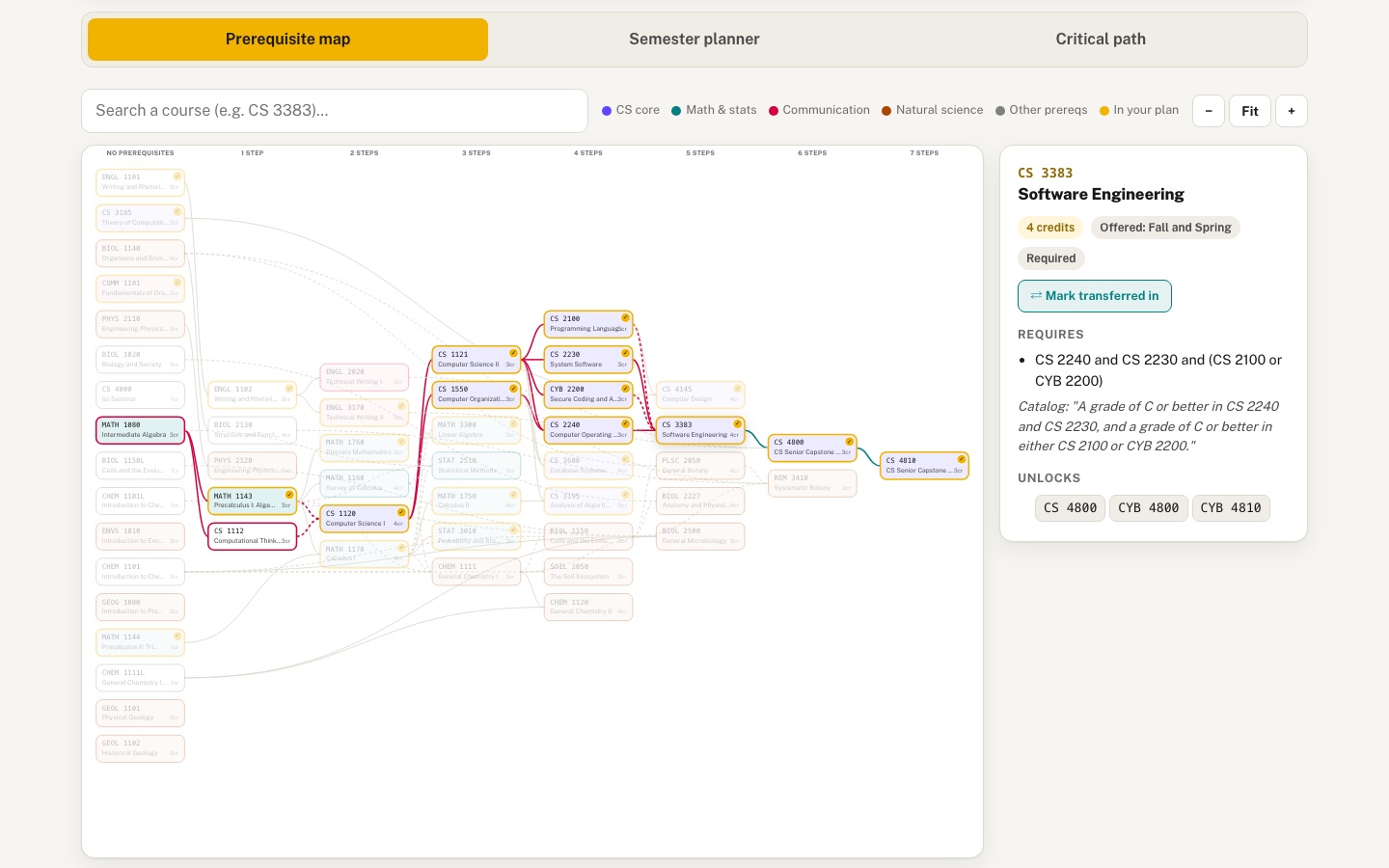 Desktop · click to enlarge
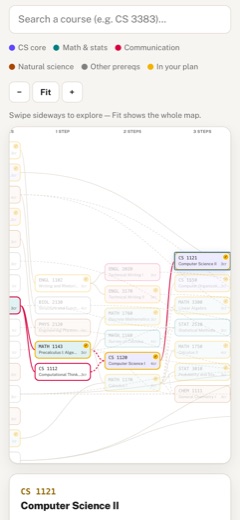
What it is ✎ blurb written by the AI critic
Explore the prerequisite web for the University of Idaho B.S. in Computer Science (2026-2027 catalog). Hover a course to see what it needs and what it unlocks, then build a four-year plan by dragging courses into semesters. The plan re-checks prerequisites, credit loads, term availability and degree requirements as you go, and you can try what-ifs like a failed or transferred course, share the plan by link, or print an advising sheet.
Try this
- Click 'Load the catalog's sample plan', then hover CS 3383 on the Prerequisite map to see its required courses light up in red and what it unlocks in teal.
- In the Semester planner, hover CS 1121 and press F to mark it failed, watch the errors cascade, then click 'Add retake in Fall 2' and see them clear.
- Open Critical path and press 'Show on map' on the CS 4810 chain to trace the six-semester sequence to the senior capstone, including the Fall-only CS 4800.
Highlights ✎ written by the AI critic
- A layered prerequisite map of 52 courses built from the real U of I catalog. Hovering a course highlights everything it requires and everything it unlocks.
- An eight-semester board with optional summer terms and a transfer-credit row. Problem cards are flagged with a short reason, such as 'needs CS 2240 first'.
- What-if planning: mark a course failed, add a retake, or mark it transferred in, and credits, requirements and errors update immediately.
- A critical-path view listing the longest chains, the term each course falls in on your plan, and Fall-only courses. One click highlights a chain on the map.
- Plans are saved in a shareable link, and a printable advising sheet has signature lines.
Who it's for
Undergraduates, academic advisors, department curriculum committees
Features
- Interactive prerequisite graph (layered DAG layout) with hover to highlight everything a course unlocks and everything it requires
- Eight-semester planner board with drag-and-drop course cards, credit totals per term, and summer terms
- Real-time validation: prerequisite order, co-requisites, credit caps, missing requirements, with friendly explanations
- 'Critical path' view showing the longest prerequisite chains (the courses that delay graduation if missed)
- What-if: mark a course failed or transferred-in and watch the plan re-validate
- Save/share plans via URL hash, and a printable advising sheet
Data & sources
How it was built
Written by OpenCode 1.18.21 (opencode.ai) on qwen/qwen3.8-27b, served by MindRouter, the University of Idaho's on-premises AI platform.
Rounds by kind
| build | 1 |
| continue | 4 |
| feedback | 8 |
| critic | 3 |
Lines of code per file
| body html | 145 |
| app css | 348 |
| app js | 2,163 |
| scripts | 453 |
Critic scores ✎ scored by the independent AI critic, 1–10
Independent audits ✎ by the AI critic
Automated checks
Checked by critic-verify.
Data spot checks ✎ written by the AI critic
- CS 3383 details panel: 4 credits, 'Offered: Fall and Spring', catalog prereq 'A grade of C or better in CS 2240 and CS 2230, and a grade of C or better in either CS 2100 or CYB 2200.' -- data/raw/courses-cs.html courseblock has 4 credits, identical text, 'Typically Offered: Fall and Spring'; parsed as CS 2240 AND CS 2230 AND (CS 2100 OR CYB 2200): correct
- Critical path 'CS 4810 minimum 6 semesters' (CS 1120>CS 1121>CS 2240>CS 3383>CS 4800>CS 4810) with a 'Fall only' badge on CS 4800 -- independent parse of the raw pages confirms each course is a hard prereq of the next (CS 4810<-CS 4800<-CS 3383<-CS 2240<-CS 1121<-CS 1120) and CS 4800 'Typically Offered: Fall': match
- Sample plan term totals on the board 17/16/12/16/16/16/12/15 -- raw sc_plangrid 'Hours' rows 17,16,12,16,16,16,12,15, 'Total Hours 120': match
- '33 upper-division credits' for the sample plan -- independent sum of raw plan-grid courses numbered >=3000 (STAT 3010 3, CS 3383 4, CS 3185 3, MATH 3300 3, CS 3600 4, CS 3195 3, ENGL 3170 3, CS 4145 4, CS 4800 3, CS 4810 3) = 33: match (the 4 upper-division elective slots are not counted)
- Computed what-if: marking CS 1121 (3 cr) failed shows '117 / 120' planned and '3 credits left'; 120 - 3 = 117: correct. Adding the retake returns 120 / 120 and CS First Year back to Complete
Round-by-round timeline
Every harness round, in order. The prompts and FEEDBACK.md were written by the AI reviewer; the app code was written by the harness. Expand a round to see the exact prompt and the FEEDBACK.md the harness received.
-
None of the three views is ever visible (blocker). On load, and after clicking "Prerequisite map", "Semester planner" or "Critical path", the page shows only the intro card, the tab bar and "Data & sources".
#view-map,#view-planand#view-criticalall staydisplay:none— the graph, the planner board and the critical-path list can never be seen (verified: every panel has zero height after each tab click). The gold tab highlight moves, butaria-selectedstays "true" on "Prerequisite map" whichever tab is active. Expected: the selected tab's panel is shown (with the fade transition), the others hidden,aria-selectedupdated, and the map view visible on first load. -
Prerequisite "or" alternatives are treated as all required. Loading the catalog's own sample plan produces false errors:
-
"CS 1120 is scheduled in Fall 1 but its prerequisite CS 1112 isn't in your plan yet." and "CS 1120 (Fall 1) comes before its prerequisite MATH 1170 (Spring 1)." — the catalog says "MATH 1143 … or CS 1112 …; or sufficiently high … placement score to qualify for MATH 1170". MATH 1170 is only mentioned inside the placement-score clause and is not a prerequisite at all.
-
"CS 4800 … its prerequisite ENGL 2020 isn't in your plan yet." — catalog: "ENGL 2020 or ENGL 3170".
-
CS 3383 requires "either CS 2100 or CYB 2200", but the app requires both. Expected: store each course's prerequisites as AND-groups of OR-alternatives (keep the verbatim catalog text too). A group is satisfied when any alternative is placed in an earlier term or transferred in. Courses named only in a placement/test-score clause are not prerequisites; when a placement alternative exists (e.g. MATH 1143 ← MATH 1080 "or placement test"), show a gentle info note ("needs MATH 1080 or a placement score") instead of a red error. After the fix, the catalog's own sample plan must show zero prerequisite-order errors. The same corrected edges must drive the graph and the critical path (see item 9).
-
-
Requirement areas count every option as required. After loading the sample plan the progress reads "21 of 39 required courses placed (54%)" and the warning lists "ENGL 2020, CS 4000, STAT 2510, BIOL 1140, BIOL 1150, BIOL 2227 and 12 more". Wrong because:
-
Communications = COMM 1101 and (ENGL 3170 or ENGL 2020) — not both English courses.
-
Statistics = one of STAT 3010 / STAT 2510.
-
Natural Science with Lab = two lecture+lab courses from two different disciplines chosen from the list (lab pairs such as "BIOL 1150 & 1150L" are one choice) — not all 15.
-
Upper-division Technical Electives = four upper-division CS/CYB courses — "CS 4000" is not a real course. Expected: a per-area requirement checklist (e.g. in the planner sidebar) showing each area's rule ("choose 1 of", "choose 2 from different disciplines", "4 upper-division CS/CYB electives") with a satisfied / partial / missing state, and a "missing requirements" message per area in friendly words.
-
-
The sample plan loses all placeholder slots, so credit totals are wrong. The catalog's plan has rows such as "Humanistic and Artistic Ways of Knowing Course 3", "Science with Lab Course from approved list 4", "Major Technical Elective Course (UPDV Computer Science or Cybersecurity) 3", "Elective Course(s) 1", "American Experience Course 3", "International Course 3". They are dropped, so terms show 7, 3 and 10 credits (catalog: 16, 12, 16) and the plan totals 79 credits instead of 120. Expected: placeholder "slot" cards (visually distinct, e.g. dashed border, with their credits) that count toward term and degree totals, satisfy the matching requirement area, and can be dragged/removed like courses. Also offer these slot types in the course tray.
-
"Credits left to graduate" is missing. SPEC asks for it. Expected: a prominent, always-visible summary on the planner — planned credits / 120, credits left to graduate, upper-division credits, number of problems — with an animated progress bar, updating instantly on every change.
-
Summer terms are in the wrong place. "Summer 1" and "Summer 2" appear after "Spring 4" at the end of the board, and the prerequisite check treats them as later than Spring 4. Expected: chronological order Fall 1, Spring 1, Summer 1, Fall 2, Spring 2, Summer 2, … (summers visually lighter/narrower and optional), with ordering checks using that chronology.
-
Hover does nothing on the graph. The intro says "hover any course to see what it requires and what it unlocks", but only a click changes the graph. Also the highlight only covers direct neighbours. Expected: on hover (and on keyboard focus) highlight everything the course requires (all ancestors, transitively) and everything it unlocks (all descendants), including the edges along those paths, dim the rest, and update the details panel; click pins the selection, clicking empty space or Esc clears it.
-
The map's search box does nothing to the map. Typing "CS 4810" in "Search a course…" only changes the hidden planner tray. Expected: matching nodes highlight, the best match is focused and scrolled into view in the graph.
-
Critical path is wrong and not visual. It reports "CS 4810 — 9 courses deep: MATH 1080 → MATH 1143 → CS 1112 → CS 1120 → …" — CS 1112 is an alternative to MATH 1143, not a step after it (item 2). Expected, after the prerequisite fix: the longest chains of required courses (don't let optional science choices like "REM 3410 Systematic Botany" dominate the list), shown both as the chain cards and highlighted on the graph (e.g. a "Show critical path" toggle on the map, or clicking a chain highlights it). For each chain say what it means for the student: minimum number of semesters, and flag chain courses in the current plan that are missing, failed or placed later than necessary ("CS 1121 in Fall 2 delays CS 4810 to Spring 5").
-
What-if doesn't re-validate downstream courses. Marking a course "Failed" only adds "X is marked failed"; courses that depend on it in later terms still count it as satisfied. Expected: a failed course no longer satisfies prerequisites, so dependants show errors ("MATH 1750 in Fall 2 needs MATH 1170, which you marked failed in Spring 1 — retake it first"), the graph marks the failed node and its blocked descendants, and the app suggests the earliest retake term. "Transferred in" should satisfy prerequisites from before Fall 1 and move the card to a "Transfer credit" area outside the terms. It should also be possible to mark a course transferred from the tray or the graph details panel, not only once it is on the board.
-
Moving courses on a phone is impossible. HTML5 drag-and-drop does not work with touch, and board cards cannot be moved between terms by tapping. Expected: a touch-friendly alternative on every card (e.g. a small "Move to…" menu listing terms) in addition to mouse drag-and-drop, and keyboard access to the same action.
-
Data & sources lists only 4 subject pages. The data also comes from the ENGL, COMM, BIOL, CHEM, PHYS, GEOL, GEOG, ENVS, PLSC, REM and SOIL course pages. List every page from data/raw/SOURCES.md with its link and the retrieval date (2026-09-13), next to the existing catalog-year and "confirm with your advisor" note.
-
Printable advising sheet is too thin. Include: student name / advisor / date lines, each term's courses with credits, the per-area requirement checklist, credits planned and credits left, every current validation issue, what-if marks (failed / transferred), the catalog year, and signature lines. It should fit on 1–2 Letter pages.
-
First impression is text-heavy. Above the tabs, add a compact stats strip (e.g. 120 credits to graduate, number of courses in the map, longest prerequisite chain in semesters, current plan status) so the page looks like a data product at a glance. Make sure the graph is the visual centerpiece on first load, with a color legend by requirement area (CS core, math/stats, communication, science, electives), layer labels ("no prerequisites", "1 step", …), and nodes that are readable without horizontal scrolling on a laptop.
-
None of the three views is ever visible (blocker). On load, and after clicking "Prerequisite map", "Semester planner" or "Critical path", the page shows only the intro card, the tab bar and "Data & sources".
#view-map,#view-planand#view-criticalall staydisplay:none— the graph, the planner board and the critical-path list can never be seen (verified in the browser: every panel has zero height after each tab click). The gold tab highlight moves, butaria-selectedstays "true" on "Prerequisite map" whichever tab is active. (The view switcher looks for adata-viewattribute on the panels, but the panels only have ids likeview-map.) Expected: the selected tab's panel is shown with the fade transition, the others hidden,aria-selectedupdated, and the map view visible on first load. -
Summer terms are in the wrong place. "Summer 1" and "Summer 2" appear after "Spring 4" at the end of the board, and the prerequisite-order check treats them as later than Spring 4. Expected: chronological order Fall 1, Spring 1, Summer 1, Fall 2, Spring 2, Summer 2, Fall 3, Spring 3, Summer 3, Fall 4, Spring 4 — summer columns visually lighter and marked optional, with the ordering checks, "click to place" suggestion and share links all using that chronology (keep old share links loading).
-
Hover does nothing on the graph, and highlighting is only one step deep. The intro says "hover any course to see what it requires and what it unlocks", but only a click changes the graph, and then only direct neighbours are highlighted. Expected: on mouse hover and on keyboard focus of a node, highlight everything the course requires (all ancestors, transitively, in the "requires" color) and everything it unlocks (all descendants, transitively, in the "unlocks" color), including the edges along those paths; dim everything else; update the details panel. Click pins the selection; clicking empty graph space or pressing Esc clears it. Re-rendering the whole SVG on every hover will flicker — toggle classes on the existing nodes/edges instead, with the 150–250 ms transitions already in the CSS.
-
The map's search box does nothing to the map. Typing "CS 4810" in "Search a course (e.g. CS 3383)…" only changes the planner's course tray. Expected: in the map view, matching nodes are highlighted, the best match is focused (same highlight as item 3) and scrolled into view inside the graph's scroll area; clearing the box clears the highlight. The planner's own "Filter…" box should keep filtering the tray independently.
-
The prerequisite map is squeezed into a tiny box and most courses cannot be reached (blocker). At 1440×900 the map view's grid puts the search box + legend in the wide left column, the graph in a 320 px right column, and the "Course details" card below the search box. The graph area is only about 320×150 px and shows just two node cards (BIOL 1020, BIOL 1140). The
<svg id="dp-graph">element measures 318×150 while the graph drawn inside it is 1670×1006 (a second<svg>is nested inside it), so the rest is clipped: the scroll container never scrolls, and hovering or clicking e.g. CS 2240 is impossible — the browser reports nothing under that node's position. Expected: the toolbar (search + legend) spans the full width above; below it the graph fills the wide column (about 900+ px wide on a laptop, roughly 60–70vh tall) with the details panel in a ~320 px column on the right; the drawn graph sets the real width/height of the scrollable SVG so every node can be scrolled to, hovered and clicked. Add small zoom controls (−, +, "Fit") so the whole web can be seen at once. At ≤ 900 px the details panel moves below the graph; at 390 px the graph is full-width, scrollable in both directions, and still hoverable/tappable (tap = pin selection). -
Map search still does nothing to the map, and it silently filters the planner's tray. Typing "CS 4810" in "Search a course (e.g. CS 3383)…" leaves every graph node unchanged. Worse, after that the Semester planner's "Course catalog" tray showed "Every course is placed. Clear a term to add more." while its own "Filter…" box was empty — the tray was being filtered by the map's query. Expected: the two boxes are independent. In the map, matching nodes are highlighted, the best match gets the same focus highlight as hover/click (requires + unlocks), and it is scrolled into view; Enter pins it; clearing the box clears the highlight. The tray is filtered only by its own box.
-
The semester board wraps mid-year and is extremely tall. The 11 terms flow through a 4-column grid, so rows are "Fall 1, Spring 1, Summer 1, Fall 2", then "Spring 2, Summer 2, Fall 3, Spring 3", then "Summer 3, Fall 4, Spring 4" — years don't line up and Fall 2 sits beside Summer 1. With the sample plan loaded the page is 3,170 px tall because every course card is ~90 px: code, title, credit pill, a row of "Failed"/"Transferred" buttons and a lone "×" on its own line. Expected: one row per academic year with a small "Year 1" … "Year 4" label and columns Fall | Spring | Summer (summer narrower and lighter), stacked to one column on phones. Compact cards: code and credits on one line, the title below, and the Failed / Transferred / remove actions as small icon buttons in one row (visible on hover or focus on desktop, always visible on touch), so a whole year fits on a laptop screen without scrolling.
-
The graph is hard to read at a glance. All nodes look the same. Expected: color-code nodes by requirement area using the brand series colors (e.g. CS core, math & statistics, communication & writing, natural science, other prerequisite courses that are not themselves degree requirements), with a matching legend; a small header above each column ("No prerequisites", "1 step", "2 steps", …); and a subtle gold fill for courses already in the plan, as the legend promises. Keep the requires/unlocks hover highlight working with the new colors.
-
The catalog sentences (verbatim, "|" = my reading of the groups) for the courses in the degree: CS 1120: "MATH 1143 with a grade of C or higher or CS 1112 with a grade of C or higher; or sufficiently high ACT, SAT, or Math Placement Test score to qualify for MATH 1170" → [MATH 1143 | CS 1112 | placement]
-
CS 1112: "MATH 1080 with a grade of C or better; or sufficiently high ACT, SAT, or Math Placement Test score to qualify for MATH 1143." → [MATH 1080 | placement]
-
MATH 1143: "Sufficient score on SAT, ACT, or math placement test; or MATH 1080 with grade of C or better." → [placement | MATH 1080]
-
MATH 1160: "Sufficient score on SAT, ACT, or math placement test, or MATH 1143 with a C or better." → [placement | MATH 1143]
-
MATH 1170: "MATH 1143 (with a grade of C or better) and MATH 1144 (concurrent enrollment in MATH 1144 is allowed …); or demonstrated proficiency through a sufficiently high score on the ACT, SAT, or math placement test." → [MATH 1143 | placement] AND [MATH 1144, same term allowed | placement]
-
MATH 1760: "MATH 1143 or sufficiently high score on SAT, ACT, or math placement test." → [MATH 1143 | placement]
-
MATH 1750: "MATH 1170 with a grade of C or better" → [MATH 1170]
-
MATH 3300: "MATH 1160 or MATH 1170" → [MATH 1160 | MATH 1170]
-
STAT 3010: "MATH 1170" → [MATH 1170]
-
STAT 2510: "MATH 1080 (with grade of C or better) or MATH 1143 or MATH 1160 or MATH 1170 or sufficient score on SAT, ACT, or math placement test" → [MATH 1080 | MATH 1143 | MATH 1160 | MATH 1170 | placement]
-
ENGL 1101: "Appropriate placement" → no course prerequisite
-
ENGL 1102: "ENGL 1101 or 1101P or Equivalent" → [ENGL 1101 | equivalent]
-
ENGL 2020: "ENGL 1102 or equivalent." → [ENGL 1102 | equivalent]
-
ENGL 3170: "ENGL 1102 or Equivalent; Sophomore standing." → [ENGL 1102 | equivalent] + note "Sophomore standing"
-
CS 1121: "CS 1120 with a grade of C or higher" → [CS 1120]; CS 1550: "CS 1120" → [CS 1120]
-
CS 2100, CS 2230, CYB 2200: "CS 1121" → [CS 1121]
-
CS 2240 and CS 3600: "CS 1121 and CS 1550" → [CS 1121] AND [CS 1550]
-
CS 3195: "MATH 1750 and CS 1121" → [MATH 1750] AND [CS 1121]
-
CS 3185: no prerequisites
-
CS 4145: "CS 2100 and CS 3185" → [CS 2100] AND [CS 3185]
-
CS 3383: "A grade of C or better in CS 2240 and CS 2230, and a grade of C or better in either CS 2100 or CYB 2200." → [CS 2240] AND [CS 2230] AND [CS 2100 | CYB 2200]
-
CS 4800: "CS 3383; ENGL 2020 or ENGL 3170, and Senior standing" → [CS 3383] AND [ENGL 2020 | ENGL 3170] + note "Senior standing"
-
CS 4810: "CS 4800" → [CS 4800]
-
PLSC 2050: "BIOL 1140 or BIOL 1150"; BIOL 2227: "BIOL 1020 or BIOL 1150"; SOIL 2050: "CHEM 1101 or CHEM 1111 or Instructor Permission"
-
REM 3410: "BIOL 1140 or BIOL 1150; and BIOL 2130 or PLSC 2050." → [BIOL 1140 | BIOL 1150] AND [BIOL 2130 | PLSC 2050]
-
PHYS 2120: "PHYS 2110" (co-requisite MATH 1750); PHYS 2110: co-requisite MATH 1170
-
Lab courses (BIOL 1150L, CHEM 1111L, CHEM 1120L, GEOL 1101L, …) are co-requisites of their lecture: same term (or lecture earlier). Note: the parsed prerequisite text of CHEM 1120L currently reads "CHEM 1111L Prereqs or" — the "Prereqs or Coreqs:" label is being split wrongly; treat it as "prerequisite or co-requisite".
-
Expected: embed the requirement rules and show a requirements checklist in the planner (a card beside or above the board, each area with a status chip: complete / in progress / missing, and what is still needed in plain words). The rules from the B.S.C.S. requirements table: Communications — COMM 1101 and one of ENGL 3170 / ENGL 2020.
-
Computer Science First Year — all of CS 1120, CS 1121, CS 1550.
-
CS & Cybersecurity Second Year — all of CS 2100, CS 2240, CS 2230, CYB 2200.
-
Computer Science Third Year — all of CS 3600, CS 3383, CS 3185, CS 3195.
-
Computer Science Fourth Year — all of CS 4145, CS 4800, CS 4810 (the catalog heading says "four courses" but lists these three).
-
Upper-division Technical Electives — 12 credits (four courses): "Complete any CS 3000-level or CS 4000-level or CYB 3000-level or CYB 4000-level course EXCEPT CS 3980, CS 4000, CS 4010, CS 4310, CS 4990, CYB 4000, CYB 4010, CYB 4800, CYB 4810, CYB 4980, or CYB 4990 for a total of 12 credits." Courses already required in areas 2–5 don't count. The raw CS page lists 48 upper-division CS courses and the CYB page 16; embed every eligible one (code, title, credits, prerequisites, typical term) so students can pick electives from the tray, grouped under an "Upper-division electives" heading.
-
Mathematics — all of MATH 1170, MATH 1750, MATH 1760, MATH 3300.
-
Statistics — one of STAT 3010 / STAT 2510.
-
Natural Science with Lab — two options from two different disciplines; an option with "&" needs both its lecture and lab planned. Options: Biology: BIOL 1140 · BIOL 1150 & BIOL 1150L · BIOL 2227 · BIOL 2500 & BIOL 2550; Botany: PLSC 2050 · REM 3410; Chemistry: CHEM 1111 & CHEM 1111L · CHEM 1120 & CHEM 1120L; Environmental Science: ENVS 1010 & ENVS 1020; Geography: GEOG 1000 & GEOG 1000L; Geology: GEOL 1101 & GEOL 1101L · GEOL 1102 & GEOL 1102L; Physics: PHYS 2110 & PHYS 2110L · PHYS 2120 & PHYS 2120L; Soils: SOIL 2050 & SOIL 2060. (Embed any of these lab courses that are missing.) If a lecture is planned without its lab, say so.
-
University requirements (regulation J-3) — shown via the sample plan's slots: ENGL 1101, ENGL 1102, 2 × Humanistic and Artistic Ways of Knowing, 2 × Social and Behavioral Ways of Knowing, American Experience, International.
-
Board totals after "Load the catalog's sample plan": Fall 1 14, Fall 2 7, Spring 2 12, Fall 3 10, Spring 3 10, Fall 4 7, Spring 4 3 — the catalog's are 17, 12, 16, 16, 16, 12, 15 (total 120). The dropped rows, by term: Fall 1: Humanistic and Artistic Ways of Knowing Course (3)
-
Fall 2: Science with Lab Course from approved list (4); Elective Course(s) (1)
-
Spring 2: Science with Lab Course from approved list (4)
-
Fall 3: Major Technical Elective Course (UPDV Computer Science or Cybersecurity) (3); Social and Behavioral Ways of Knowing Course (3)
-
Spring 3: Major Technical Elective Course (3); Humanistic and Artistic Ways of Knowing Course (3)
-
Fall 4: Elective Course(s) (2); American Experience Course (3)
-
Spring 4: Major Technical Elective Course (3) × 2; International Course (3); Social and Behavioral Ways of Knowing Course (3)
-
data/embed/courses.jsonis an object keyed by course code (77 entries), each value{"title", "credits", "prereq", "coreq", "offered", "prereq_codes", "coreq_codes"}, e.g."CS 3383": {"title": "Software Engineering", "credits": 4, "prereq": "A grade of C or better in CS 2240 and CS 2230 , and a grade of C or better in either CS 2100 or CYB 2200 .", "coreq": null, "offered": "Fall and Spring", "prereq_codes": ["CS 2100", "CS 2230", "CS 2240", "CYB 2200"], "coreq_codes": []}.prereqis the verbatim catalog sentence;prereq_codesis simply every course code found anywhere in that sentence (built inparse_course_blocks()inscripts/build_data.py), which is the root of item 1. -
In
src/app.js,prereqsOf[code]is built fromprereq_codesand drives validation, the graph edges, the details panel, "needs N" tray flags,suggestTerm()and the critical path. -
Expected: store each course's prerequisites as AND-groups of OR-alternatives (for example a new field such as
prereq_groups: a list of groups, each group listing its alternative course codes plus whether it also has a soft alternative — placement score, "or Equivalent", instructor permission), and non-course conditions ("Senior standing", "Sophomore standing") as notes. Keep the verbatimprereqtext for display. A group is satisfied when any course alternative is placed in an earlier term. -
An unsatisfied group with a soft alternative gives a grey info note, e.g. "CS 1120 assumes a math placement score — or take MATH 1143 or CS 1112 first" — never a red error.
-
An unsatisfied group without a soft alternative is a red error naming all alternatives: "CS 3383 needs CS 2100 or CYB 2200 in an earlier term."
-
A course mentioned only inside a placement clause ("…score to qualify for MATH 1170") is not a prerequisite.
-
Details panel "Requires": show groups as "CS 2240 and CS 2230 and (CS 2100 or CYB 2200)".
-
Graph: one edge per course alternative; draw edges from OR-alternatives dashed. Hover highlighting keeps working.
-
Tray "needs N" flag counts unsatisfied groups, not codes.
-
Parsing guide: split the sentence on ";" and on top-level " and " / "," into groups; inside a group, codes joined by "or" / "either … or" are alternatives; words like "placement", "ACT", "SAT", "test score", "Equivalent", "Permission" make the group soft; "standing" phrases are notes; "(concurrent enrollment … is allowed)" means that course may be in the same term. Verbatim sentences and the intended reading ("|" separates alternatives): CS 1120: "MATH 1143 with a grade of C or higher or CS 1112 with a grade of C or higher; or sufficiently high ACT, SAT, or Math Placement Test score to qualify for MATH 1170" → [MATH 1143 | CS 1112 | placement]
-
CS 1112: "MATH 1080 with a grade of C or better; or sufficiently high ACT, SAT, or Math Placement Test score to qualify for MATH 1143." → [MATH 1080 | placement]
-
MATH 1143: "Sufficient score on SAT, ACT, or math placement test; or MATH 1080 with grade of C or better." → [placement | MATH 1080]
-
MATH 1160: "Sufficient score on SAT, ACT, or math placement test, or MATH 1143 with a C or better." → [placement | MATH 1143]
-
MATH 1170: "MATH 1143 (with a grade of C or better) and MATH 1144 (concurrent enrollment in MATH 1144 is allowed …); or demonstrated proficiency through a sufficiently high score on the ACT, SAT, or math placement test." → [MATH 1143 | placement] AND [MATH 1144 (same term allowed) | placement]
-
MATH 1760: "MATH 1143 or sufficiently high score on SAT, ACT, or math placement test." → [MATH 1143 | placement]
-
MATH 1750: "MATH 1170 with a grade of C or better" → [MATH 1170]
-
MATH 3300: "MATH 1160 or MATH 1170" → [MATH 1160 | MATH 1170]
-
STAT 3010: "MATH 1170" → [MATH 1170]
-
STAT 2510: "MATH 1080 (with grade of C or better) or MATH 1143 or MATH 1160 or MATH 1170 or sufficient score on SAT, ACT, or math placement test" → [MATH 1080 | MATH 1143 | MATH 1160 | MATH 1170 | placement]
-
ENGL 1101: "Appropriate placement" → no course prerequisite
-
ENGL 1102: "ENGL 1101 or 1101P or Equivalent" → [ENGL 1101 | equivalent]
-
ENGL 2020: "ENGL 1102 or equivalent." → [ENGL 1102 | equivalent]
-
ENGL 3170: "ENGL 1102 or Equivalent; Sophomore standing." → [ENGL 1102 | equivalent] + note "Sophomore standing"
-
CS 1121: "CS 1120 with a grade of C or higher" → [CS 1120]; CS 1550: "CS 1120" → [CS 1120]
-
CS 2100, CS 2230, CYB 2200: "CS 1121" → [CS 1121]
-
CS 2240 and CS 3600: "CS 1121 and CS 1550" → [CS 1121] AND [CS 1550]
-
CS 3195: "MATH 1750 and CS 1121" → [MATH 1750] AND [CS 1121]
-
CS 3185: no prerequisites
-
CS 4145: "CS 2100 and CS 3185" → [CS 2100] AND [CS 3185]
-
CS 3383: "A grade of C or better in CS 2240 and CS 2230, and a grade of C or better in either CS 2100 or CYB 2200." → [CS 2240] AND [CS 2230] AND [CS 2100 | CYB 2200]
-
CS 4800: "CS 3383; ENGL 2020 or ENGL 3170, and Senior standing" → [CS 3383] AND [ENGL 2020 | ENGL 3170] + note "Senior standing"
-
CS 4810: "CS 4800" → [CS 4800]
-
PLSC 2050: "BIOL 1140 or BIOL 1150" → one group; BIOL 2227: "BIOL 1020 or BIOL 1150" → one group
-
SOIL 2050: "CHEM 1101 or CHEM 1111 or Instructor Permission" → [CHEM 1101 | CHEM 1111 | permission]
-
REM 3410: "BIOL 1140 or BIOL 1150; and BIOL 2130 or PLSC 2050." → [BIOL 1140 | BIOL 1150] AND [BIOL 2130 | PLSC 2050]
-
BIOL 2500: "BIOL 1150, BIOL 1150L and either CHEM 1101 and CHEM 1101L or CHEM 1111 and CHEM 1111L" → [BIOL 1150] AND [BIOL 1150L] AND [CHEM 1101 | CHEM 1111] (labs as notes is fine)
-
The parsed prerequisite text of CHEM 1120L reads "CHEM 1111L Prereqs or" — the catalog label "Prereqs or Coreqs:" is being split wrongly; that course's requirement may be taken earlier or in the same term.
-
data/embed/courses.json: object keyed by code; each value hastitle, credits, prereq, coreq, offered, prereq_codes, coreq_codes, prereq_groups, prereq_notes; each group is{"codes": [...], "soft": bool, "same_term": [...]}. -
data/embed/program.json:{name, degree, catalog, catalog_url, total_credits, areas, plan, note}.areas=[{label, courses: [{codes, title, hours} | {or: code} | {subheader: name}], note, hours}].plan=[{name: "Fall Term 1", hours, courses: [{codes: [...], hours} | {placeholder: "Elective Course(s)", hours: 1}]}]— the placeholder rows are already in the JSON;loadSample()insrc/app.jsjust skips them. -
scripts/build_data.py:load_all_courses()parses every course block of every subject page;parse_prereq_groups()splits a sentence on top-level ";" and " and ". -
The catalog's sample plan still shows a false red error and a nonsense note: "⚠ CS 1120 needs MATH 1143 or CS 1112 in an earlier term." and "ℹ CS 1120 assumes a placement score — or take MATH 1170 first." Cause: a clause that starts with "or" after ";" is being made its own AND-group, and codes inside "…to qualify for X" are being kept. Current vs expected groups: CS 1120 "MATH 1143 with a grade of C or higher or CS 1112 with a grade of C or higher; or sufficiently high ACT, SAT, or Math Placement Test score to qualify for MATH 1170" now
[MATH 1143|CS 1112] AND [MATH 1170 (soft)]→ expected one group[MATH 1143 | CS 1112 | soft], no MATH 1170. -
CS 1112 "MATH 1080 with a grade of C or better; or sufficiently high … score to qualify for MATH 1143." now
[MATH 1080] AND [MATH 1143 (soft)]→ expected[MATH 1080 | soft]. -
MATH 1143 "Sufficient score on SAT, ACT, or math placement test; or MATH 1080 with grade of C or better." now two soft groups, one with no codes → expected
[MATH 1080 | soft]. -
MATH 1170 "MATH 1143 (…) and MATH 1144 (concurrent enrollment in MATH 1144 is allowed …); or demonstrated proficiency … placement test." now
[MATH 1143] AND [MATH 1144 same-term] AND [soft, no codes]→ expected[MATH 1143 | soft] AND [MATH 1144 same-term | soft](the "; or placement" alternative applies to the whole expression before it). -
BIOL 2500 "BIOL 1150, BIOL 1150L and either CHEM 1101 and CHEM 1101L or CHEM 1111 and CHEM 1111L" now
[BIOL 1150|BIOL 1150L] AND [CHEM 1101] AND [CHEM 1101L|CHEM 1111] AND [CHEM 1111L]→ expected[BIOL 1150] AND [BIOL 1150L] AND [CHEM 1101 | CHEM 1111]. -
After loading the sample plan: "21 of 39 required courses placed (54%)" and "Required courses not yet placed: ENGL 2020, CS 4000, STAT 2510, BIOL 1140, BIOL 1150, BIOL 2227 and 12 more." "CS 4000" is a 1-credit seminar that is explicitly excluded, and most of the rest are alternatives. Expected: embed the rules and show a Requirements checklist card in the planner (beside or above the board): one row per area with a status chip (Complete / Planned with slots / Missing) and what is still needed in plain words. Rules from the B.S.C.S. requirements table: Communications — COMM 1101 and one of ENGL 3170 / ENGL 2020.
-
CS First Year — all of CS 1120, CS 1121, CS 1550.
-
CS & Cybersecurity Second Year — all of CS 2100, CS 2240, CS 2230, CYB 2200.
-
CS Third Year — all of CS 3600, CS 3383, CS 3185, CS 3195.
-
CS Fourth Year — all of CS 4145, CS 4800, CS 4810 (the heading says "four courses" but lists these three).
-
Upper-division Technical Electives — 12 credits: "Complete any CS 3000-level or CS 4000-level or CYB 3000-level or CYB 4000-level course EXCEPT CS 3980, CS 4000, CS 4010, CS 4310, CS 4990, CYB 4000, CYB 4010, CYB 4800, CYB 4810, CYB 4980, or CYB 4990 for a total of 12 credits." Courses required in areas 2–5 don't count. The CS page has 48 upper-division CS courses and the CYB page 16; keep every eligible one in
courses.json(the parser already reads them all) and list them in the tray under an "Upper-division electives" heading. They don't need to appear in the graph unless placed in the plan. -
Mathematics — all of MATH 1170, MATH 1750, MATH 1760, MATH 3300.
-
Statistics — one of STAT 3010 / STAT 2510.
-
Natural Science with Lab — two options from two different disciplines; an option with "&" needs both codes: Biology: BIOL 1140 · BIOL 1150 & BIOL 1150L · BIOL 2227 · BIOL 2500 & BIOL 2550; Botany: PLSC 2050 · REM 3410; Chemistry: CHEM 1111 & CHEM 1111L · CHEM 1120 & CHEM 1120L; Environmental Science: ENVS 1010 & ENVS 1020; Geography: GEOG 1000 & GEOG 1000L; Geology: GEOL 1101 & GEOL 1101L · GEOL 1102 & GEOL 1102L; Physics: PHYS 2110 & PHYS 2110L · PHYS 2120 & PHYS 2120L; Soils: SOIL 2050 & SOIL 2060. Make sure every listed lab is embedded. If a lecture is planned without its lab, say so.
-
University requirements (regulation J-3) — ENGL 1101, ENGL 1102, 2 × Humanistic and Artistic Ways of Knowing, 2 × Social and Behavioral Ways of Knowing, American Experience, International.
-
Map → click the CS 3383 node → in the Course details panel click the transfer button: nothing happens (the Transfer credit row stays empty). Same for the "Unlocks" chips: click CS 1121, then click the CS 2240 chip → the panel still shows CS 1121. Cause: clicking a node gives it keyboard focus; pressing the mouse on the panel button blurs the node, and the node's
blurlistener inrenderGraph()callsrenderDetail(), which replaces the panel HTML between mousedown and mouseup, so the click is lost. Expected: In the nodeblurlistener, do not re-render the detail panel when focus is moving into#dp-detail(checke.relatedTargetanddocument.getElementById("dp-detail").contains(e.relatedTarget)), and never re-render it if it already shows the focused course. -
The transfer button in
renderDetail()reads "⇄ Mark transferred in" when the course is not transferred and "Undo transfer" when it is. The hover version inrenderDetailFor()must use the same label logic (today it always says "Mark transferred in", andrenderDetail()wrongly says "Transferred in"). -
Clicking a chip focuses that course (panel shows it, map highlights it).
-
In the course catalog tray, the small card button should read "⇄ Mark transferred" (not "⇄ Transferred in").
-
Sample plan → Semester planner → hover CS 1121 (Spring 1) → click F. The list shows "CS 1121 is marked failed in Spring 1 … [Add retake in Fall 2]". Click it: a second CS 1121 card appears in Fall 2, but it is also styled failed, all six "needs CS 1121" errors and four "at risk" warnings stay, the button disappears, and the planned credits jump to 123 / 120. The only way out is un-clicking F on the original. Cause: failure is stored per course code in
state.status[code], and every check doese.status || state.status[e.code], so the retake (status null) falls back to "failed".findPlacement(code)also only ever finds the first copy. Expected model: Store failure on the plan entry:entry.failed = true. Usestate.statusonly for "transferred". When loading an old share link wherestate.status[code] === "failed", setfailed = trueon the first placed entry of that code and delete the status. -
Give every board card
data-termanddata-idx, and make its F, T, Move and × buttons act on that exact entry (not onfindPlacement(code)), so the F on the retake card toggles only the retake. -
Add helpers:
attempts(code)= all placed entries of the code with their term index;passIndex(code)= the term index of the earliest attempt that is not failed (−1 if transferred in,nullif none);isFailedCourse(code)= the code has attempts and none of them passes and it is not transferred. -
Prerequisite checks in
validate(),satisfiedSet(),isBlocked()and the graph's ✗ badge use these helpers: a prerequisite is met for a course in term T whenpassIndex(p) !== null && passIndex(p) < index of T(same-term rules stay as they are). -
Section 4 (failed courses): report "CS 1121 is marked failed in Spring 1" with the "Add retake in …" button only while the course has no passing attempt. Once a retake exists in Fall 2: dependants placed after Fall 2 are fine (their errors and blocked outlines disappear immediately); dependants placed in or before Fall 2 get one error: "CS 2100 (Fall 2) needs CS 1121 — its retake is in Fall 2; move CS 2100 to a later term."
-
The failed card keeps its pink ✗ style; the retake card has a small "retake" tag and normal styling.
-
Sample plan → drop CS 3383 into Fall 1. The CS 3383 card in Fall 1 looks completely normal; the three "CS 3383 needs … in an earlier term" errors only appear in the list below the board, about 2,170 px further down the page. Expected: Every board card that has an error gets a raspberry outline and a one-line reason under its title in small text, e.g. "needs CS 2240, CS 2230 first" (warnings: gold outline and the short reason, e.g. "typically Fall only"). Build a map
issuesByCodeinvalidate()(storecodeon each issue) and use it inrenderBoard(). -
Add a compact status bar directly above the board (inside
.dp-plan-grid's board column, before the Transfer credit row): "✓ No problems found" in teal, or "⚠ 3 errors · 1 warning — show list" in raspberry, where "show list" smoothly scrolls to#dp-validation. Keep it updated on every change. -
Sample plan → F on CS 1121 (Spring 1) → "Add retake in Fall 2" → on the retake card in Fall 2 click Move → Summer 1. Result: the failed Spring 1 card moves to Summer 1 and loses its failed mark, while the retake stays in Fall 2. Dragging the retake card does the same. Cause:
openMoveMenu(btn, code, slot)and the board carddragstartonly pass the course code. The drop and menu handlers then callplaceCourse(code, …), which usesfindPlacement(code)(the first copy) and pushes a fresh{code}without thefailed/retakeflags. Expected: Board cards:dragstartsets"entry:" + cardTerm + ":" + cardIdx; tray cards keep sending the plain code. -
Add
moveEntry(fromTerm, fromIdx, toTerm). It splices that exact entry object out ofstate.plan[fromTerm]and pushes the same object intostate.plan[toTerm], keepingfailedandretake. Use it for drops ofentry:data and for the Move menu. PasscardTermandcardIdxtoopenMoveMenu, whose "Remove" usesremoveEntry(cardTerm, cardIdx). -
Check: after the steps above, Spring 1 still shows the pink failed CS 1121, Summer 1 shows the retake card, and the "CS 2100 needs CS 1121 in an earlier term" error disappears, because the retake is now before Fall 2.
-
On first load the map is at 100 % zoom and shows only columns "No prerequisites" to "4 steps". CS 4800 and CS 4810 are off-screen, and a visitor sees a partial web. On a phone, "Fit" leaves an ~800 px empty white box under a tiny graph. Expected: The first time the map is shown, call
fitGraph()(insiderequestAnimationFramesoclientWidthis known). -
Desktop:
.dp-map-scrollheightmax(520px, calc(100vh - 160px)). -
Phones (window width < 520 px): the first zoom is 0.6, not a full fit (text would be unreadable). Show a one-line muted hint above the map: "Swipe sideways to explore — Fit shows the whole map".
-
After any zoom, if the scaled SVG is shorter than the box, shrink the box height to the SVG height + 2 px (no empty area).
-
It shows the chains, but nothing connects them to the plan or the map. Expected, in
renderCritical(): Under each course chip show a tiny line with the term where that course is planned ("Fall 3"), "transfer", "failed" (in raspberry) or "not planned" (muted). Use the earliest attempt that is not failed. -
If a chain course's
offeredis exactly "Fall" or exactly "Spring" (e.g. CS 4800 is Fall), add a small gold badge "Fall only" on its chip, and one sentence under the chain heading: "CS 4800 is offered in Fall only — if it slips, CS 4810 waits a full year." (name the next course in the chain). -
Add a "Show on map" button in each chain header. It switches to the map tab, stores the chain in
state.critChain, and gives the chain's nodes and the edges between consecutive chain courses the classis-crit(CSS for.node.is-critand.edge.is-critalready exists). All other nodes getis-dim. It also scrolls the chain's first node into view and shows the chain's last course in the details panel.renderGraph()re-appliesstate.critChainafter re-rendering. Esc or clicking empty map space clears it. Hovering a node still works. -
In
layoutGraph()each column is in alphabetical order. The first column lists 17 mostly-optional science courses (BIOL, CHEM, GEOG, GEOL …) above the CS and MATH courses, and edges criss-cross the whole map. Expected (crossing reduction, keep everything else about the layout): Column 0: required courses (REQUIRED_SET) first, then the others; within each group order by area (cs, math, comm, nat, other — seeareaClass()), then by code. -
Forward sweep, columns 1 … MAX_LAYER: sort each column by the average row index of the course's prerequisites in earlier columns. A course with none keeps its current relative order. Break ties by the same area/code rule.
-
Backward sweep, columns MAX_LAYER−1 … 0: sort by the average row index of the course's dependants in later columns. Courses with no dependants keep their current row index as the key.
-
Run one more forward sweep, then compute
graphGeomx/y exactly as today (columns vertically centered). -
fitGraph()andadjustMapBoxHeight()exist, but nothing callsfitGraph()on first show. On load the map is at 100 % and only the columns "No prerequisites" to "4 steps" are visible. Expected: InsetView(v), forv === "map": afterrenderGraph(); renderDetail();, if!state.mapFitted, setstate.mapFitted = trueand callrequestAnimationFrame(fitGraph). -
src/app.css: on screens ≥ 900 px,.dp-map-scroll { height: max(520px, calc(100vh - 160px)); }. -
src/body.html: directly above.dp-map-wrap, add<p class="dp-map-hint">Swipe sideways to explore — Fit shows the whole map.</p>. Style it small and muted, and show it only below 520 px (display:noneotherwise). -
renderCritical()currently prints a static list. Change it as follows (keep "minimum N semesters"): Each chain course chip becomes<span class="dp-chain__node"><span class="dp-chain__code">CS 4800</span><span class="dp-chain__term">Fall 4</span></span>. The term line comes frompassIndex(code): a term index givesTERMS[i].name, −1 gives "transfer", andnullgives "failed" (raspberry) whenattempts(code).length > 0, otherwise "not planned" (muted). Style.dp-chain__termas a tiny second line (0.68rem). -
If
course(code).offeredis exactly"Fall"or exactly"Spring", add<span class="dp-chain__season">Fall only</span>inside the chip (small gold pill). For the first such course that is not the last in the chain, add one sentence under the chain heading, e.g.<p class="dp-chain__note">CS 4800 is offered in Fall only — if it slips, CS 4810 waits a full year.</p>(name the next course in the chain). -
Add a button
<button class="btn btn--ghost btn--sm dp-chain__show" data-chain="…">Show on map</button>in each chain header (store the chain as the codes joined by "|"). On click:state.critChain = codes; state.focus = null; setView("map");then callapplyCritChain(). -
New
applyCritChain(): ifstate.critChainis set, addis-critto every.nodewhosedata-codeis in the chain, addis-dimto all other nodes, and addis-critto every.edgewhosedata-from/data-toare consecutive courses in the chain. Scroll the chain's first node into view (scrollIntoView({block:"nearest", inline:"start"})) and show the chain's last course withrenderDetailFor(lastCode). The CSS for.node.is-critand.edge.is-critalready exists. -
Call
applyCritChain()at the end ofrenderGraph()and at the end ofapplyHighlight(code)whencodeis null, so hovering and leaving a node keeps the chain highlight. -
The existing Esc handler and the click on empty map space also set
state.critChain = nulland removeis-crit/is-dim. -
layoutGraph()buildsbyLayerfromGRAPH_CODES, which is alphabetical. Column 0 lists 17 mostly optional science courses (BIOL, CHEM, GEOG, GEOL …) above CS/MATH, and edges criss-cross the map. Between buildingbyLayerand thefor (var l = 0; l <= MAX_LAYER; l++)geometry loop, reorder eachbyLayer[l]array: A helperareaRank(c)returns 0 forREQUIRED_SET[c]courses whoseareaClass(c)is "cs", 1 for other required courses, 2 for "math", 3 for "comm", 4 for "nat" and 5 for "other". Sort column 0 byareaRank, then by code. -
Keep a map
rowOf[code]= the course's index in its column, updated after every sort. -
Forward sweep,
l = 1 … MAX_LAYER: sortbyLayer[l]by the averagerowOfof the course's prerequisites (prereqsOf[c]) that are in earlier columns. With no such prerequisites, use its currentrowOf. Break ties byareaRank, then code. -
Backward sweep,
l = MAX_LAYER − 1 … 0: sort by the averagerowOfof the course's dependants (dependentsOf[c]) that are in later columns. With none, use its currentrowOf. -
One more forward sweep (step 3), then the existing geometry loop runs unchanged.
1 build 34.2 min · 1 file changed, 107 insertions(+) Show prompt
Read AGENTS.md, SPEC.md and BRAND.md in this directory. Then build the complete app they describe, step by step: first write scripts in scripts/ that turn the raw data in data/raw/ (see data/raw/SOURCES.md — the U of I 2026-2027 catalog page for the Computer Science B.S.C.S. plus the subject course-listing pages) into compact JSON in data/embed/ and run them; then write src/body.html, src/app.css and src/app.js; run python3 build.py --check and fix any error it reports. Implement every required feature in SPEC.md with a polished, modern, responsive University of Idaho design. Do not stop until python3 build.py --check succeeds and every feature is implemented.
2 continue 1.6 min · — Show prompt
Read AGENTS.md, SPEC.md and BRAND.md in this directory. Then build the complete app they describe, step by step: first write scripts in scripts/ that turn the raw data in data/raw/ (see data/raw/SOURCES.md — the U of I 2026-2027 catalog page for the Computer Science B.S.C.S. plus the subject course-listing pages) into compact JSON in data/embed/ and run them; then write src/body.html, src/app.css and src/app.js; run python3 build.py --check and fix any error it reports. Implement every required feature in SPEC.md with a polished, modern, responsive University of Idaho design. Do not stop until python3 build.py --check succeeds and every feature is implemented.
3 continue 8.8 min · 7 files changed, 5358 insertions(+), 7 deletions(-) Show prompt
Read AGENTS.md, SPEC.md and BRAND.md in this directory. Then build the complete app they describe.

Nothing has been built yet: scripts/ does not exist, and data/embed/ and src/ are still empty stubs. Two previous attempts spent all their time re-inspecting the raw HTML and never wrote a single file. Do NOT explore the raw pages at length — data/raw/SOURCES.md already documents their exact structure (course blocks, the non-breaking space in course codes, credit formats, Prereqs/Coreqs text, the B.S.C.S. requirements table and the plan-of-study grid). Use at most three quick commands to confirm what you need, then work in this order and write each file before moving on:
1. scripts/ — a Python 3 (standard library) script that turns the B.S.C.S. requirements, its sample four-year plan and the referenced courses (code, title, credits, prerequisites, co-requisites, typical terms, original prerequisite text) from data/raw/ into compact JSON in data/embed/. Run it. If a prerequisite sentence is hard to parse exactly, keep its original text and extract the course codes it mentions instead of getting stuck.
2. src/body.html
3. src/app.css
4. src/app.js
5. python3 build.py --check — fix any error it reports.

Implement every required feature in SPEC.md with a polished, modern, responsive University of Idaho design. Do not stop until python3 build.py --check succeeds and every feature is implemented.
4 feedback 18.6 min · 1 file changed, 100 insertions(+) Show prompt
Read FEEDBACK.md in this directory — it lists problems a reviewer found when testing index.html in a real browser. Fix every item, keeping everything that already works, then run python3 build.py --check.
Reviewer feedback — round 3 build (tested in headless Chromium at 1440×900, 820 px and 390×844)
No console errors and no external requests — good. But the app is not usable yet: the main views never appear, and the prerequisite/requirement logic reports many false errors on the catalog's own sample plan. Fix every item, most important first, keeping what already works.
5 continue 17.9 min · — Show prompt
Read FEEDBACK.md in this directory — it lists problems a reviewer found when testing index.html in a real browser. Fix every item, keeping everything that already works, then run python3 build.py --check.
6 continue 2.8 min · — Show prompt
Read FEEDBACK.md in this directory — it lists problems a reviewer found when testing index.html in a real browser. Fix every item, keeping everything that already works, then run python3 build.py --check.

Important — two previous attempts at this feedback got stuck re-running the same read-only inspection command (grep / python3 -c over data/embed/courses.json) dozens of times and never edited a file. You already have everything you need: FEEDBACK.md, data/raw/SOURCES.md, scripts/build_data.py, data/embed/*.json and src/*. So:
- Use at most five inspection commands in total, and never run a command you have already run.
- Start editing immediately and fix the items in order, beginning with item 1 (the views never become visible) — that is a small fix in src/app.js.
- After finishing each item, save the file(s) and run python3 build.py --check before moving to the next item, so progress is never lost.
- For items 2–4, change scripts/build_data.py so the JSON carries prerequisite AND-groups of OR-alternatives, requirement-area rules and plan placeholder slots, re-run it once, then update src/app.js to use them.
Do not stop until every item in FEEDBACK.md is fixed and python3 build.py --check succeeds.
7 feedback 1.8 min · 5 files changed, 265 insertions(+), 153 deletions(-) Show prompt
Read FEEDBACK.md in this directory — it lists problems a reviewer found when testing index.html in a real browser. Fix every item, keeping everything that already works, then run python3 build.py --check.

These items only need changes in src/app.js, src/app.css and src/body.html — read those three files and start editing. Do not run any python3, grep or other inspection commands on data/raw or data/embed (earlier attempts got stuck repeating such commands), and never run the same command twice. After each item, save and run python3 build.py --check.
Reviewer feedback — batch 1 of the round 3 review (tested in headless Chromium, 1440×900 and 390×844)
No console errors and no external requests — good. The reviewer found more issues; they will be sent in later batches. Work only on the four items below. All four are front-end fixes in src/app.js (plus small CSS/HTML touches). None of them needs any change to the data, scripts/ or data/embed/, so you do not need to inspect the data.
8 feedback 7.0 min · 5 files changed, 447 insertions(+), 141 deletions(-) Show prompt
Read FEEDBACK.md in this directory — it lists problems a reviewer found when testing index.html in a real browser. Fix every item, keeping everything that already works, then run python3 build.py --check.

These items only need changes in src/app.js, src/app.css and src/body.html — read those three files and start editing. Do not run any python3, grep or other inspection commands on data/raw or data/embed (earlier attempts got stuck repeating such commands), and never run the same command twice. After each item, save and run python3 build.py --check.
Reviewer feedback — batch 2 (tested in headless Chromium, 1440×900 and 390×844, after round 7)
Good progress: tabs now switch views and update aria-selected, summer terms are chronological and marked optional, drag-and-drop between tray and terms works, the overload and prerequisite-order warnings appear, the share link and the print sheet work, and there are no console errors. More issues will follow in later batches. Work only on the four items below — all are front-end changes in src/app.js, src/app.css and src/body.html; none needs any change to scripts/ or data/.
9 feedback 13.8 min · 1 file changed, 134 insertions(+), 42 deletions(-) Show prompt
Read FEEDBACK.md in this directory — it lists problems a reviewer found when testing index.html in a real browser. Fix every item, keeping everything that already works, then run python3 build.py --check.

FEEDBACK.md already quotes every catalog fact these items need (the exact prerequisite sentences and the degree's requirement rules), so you do not need to inspect data/raw or data/embed. Earlier attempts got stuck repeating the same grep / python3 -c inspection command dozens of times without editing anything — do not run any inspection command more than once, and use at most three in total. Work in this order: edit scripts/build_data.py (or add a small JSON-writing step to it) so the embedded JSON carries what FEEDBACK.md describes, run it once, then update src/app.js (and CSS/HTML as needed), and run python3 build.py --check after each item.
Reviewer feedback — batch 3 (tested in headless Chromium after round 8)
Round 8 was a big improvement: the map is readable, color-coded, zoomable and its hover/click/Esc/search highlighting works on desktop and phone; the board is organised by year. Work only on the items below. They are about the degree logic, so they need changes in scripts/build_data.py (and the JSON it writes) plus src/app.js. Every catalog fact you need is quoted here — you do not need to inspect data/raw or data/embed.
1. Prerequisites: "or" alternatives are treated as all required (false errors)
Loading the catalog's own sample plan shows six red errors that are all wrong, e.g. "CS 1120 is scheduled in Fall 1 but its prerequisite CS 1112 isn't in your plan yet.", "CS 1120 (Fall 1) comes before its prerequisite MATH 1170 (Spring 1).", "MATH 1143 is scheduled in Fall 1 but its prerequisite MATH 1080 isn't in your plan yet.", "MATH 3300 is scheduled in Fall 3 but its prerequisite MATH 1160 isn't in your plan yet.", "CS 4800 is scheduled in Fall 4 but its prerequisite ENGL 2020 isn't in your plan yet." The graph, the course details "Requires" list and the critical path use the same wrong edges.
Expected: each course's prerequisites are a list of AND-groups, each a list of OR-alternatives; a group may also contain a soft alternative (placement test score, "or Equivalent", instructor permission). Keep the verbatim text for display. A group is satisfied when any course alternative is placed in an earlier term (or transferred in / marked completed). If a group is unsatisfied but has a soft alternative, show a grey info note ("CS 1120 assumes a math placement score, or take MATH 1143 or CS 1112 first") — not a red error. Non-course conditions such as "Senior standing" / "Sophomore standing" are shown as notes, never as missing courses. A course named only inside a placement clause ("…score to qualify for MATH 1170") is not a prerequisite. Graph edges: draw one edge per course alternative (dashed for OR-alternatives), so the map stays truthful.
Use the same parsing rules for every other course (split on ";" and top-level "and"; "or" / "either … or" within a group).
Check: after this fix the catalog's sample plan must show zero red prerequisite errors (only grey placement / standing notes).
2. Requirement areas count every option as required
After loading the sample plan: "21 of 39 required courses placed (54%)" and "Required courses not yet placed: ENGL 2020, CS 4000, STAT 2510, BIOL 1140, BIOL 1150, BIOL 2227 and 12 more." "CS 4000" is not a requirement at all (it is a 1-credit seminar that is explicitly excluded).
Plus the degree total: 120 credits. The "missing requirements" validation message should list areas, not individual options ("Statistics: choose STAT 3010 or STAT 2510").
3. The sample plan drops its placeholder slots, so credits are wrong
Expected: these become slot cards (dashed border, a small "slot" label, their credits) that count toward term totals, the 120-credit total and the matching requirement area (a Science-with-Lab slot counts as a planned but unchosen science option; a Technical Elective slot counts 3 credits toward area 6), can be dragged, removed and re-added from a "Slots" group in the tray, and can be replaced by dropping a real course on them. The sample plan must then show 17 / 16 / 12 / 16 / 16 / 16 / 12 / 15 credits and 120 total.
4. "Credits left to graduate" is still missing
The planner's only summary is "21 of 39 required courses placed (54%)". Expected: a prominent summary bar at the top of the planner with planned credits / 120, credits left to graduate, upper-division credits (3000+ level), requirement areas complete (e.g. "8 of 10"), and counts of errors / warnings — each as a large number with a small label, the progress bar animating on change. With the sample plan it should read 120 of 120 credits, 0 left.
5. Critical path must use the corrected prerequisites
Currently: "CS 4810 — 9 courses deep: MATH 1080 → MATH 1143 → CS 1112 → CS 1120 → CS 1121 → CS 2100 → CS 3383 → CS 4800 → CS 4810" (CS 1112 is an alternative to MATH 1143, not a step after it), and the optional "REM 3410 Systematic Botany" is listed as the third most critical chain. Expected: compute chains over required courses using, for each OR-group, the shortest alternative (or the one the student has planned), skipping soft/placement alternatives; list the longest required chains (e.g. CS 1120 → CS 1121 → CS 2240 → CS 3383 → CS 4800 → CS 4810) with "minimum N semesters", and don't let optional science choices dominate the list.
6. Small: Math & statistics nodes use the wrong color
The legend has "Math & stats" (teal), but MATH 1170, MATH 1750, MATH 3300, STAT 3010 are drawn in the CS-core purple and MATH 1143/1080/1144 as grey. Math and statistics courses should use the teal series color.
10 feedback 7.6 min · 6 files changed, 1921 insertions(+), 317 deletions(-) Show prompt
Read FEEDBACK.md in this directory — it lists problems a reviewer found when testing index.html in a real browser. Fix every item, keeping everything that already works, then run python3 build.py --check.

Strict working rules for this round (three earlier attempts at this kind of change got stuck running the same `python3 -c "import json …"` inspection of data/embed/courses.json dozens of times and never edited a file):
- FEEDBACK.md describes the exact current JSON structure and quotes every catalog sentence you need. Do NOT inspect data/raw or data/embed at all — no python3 -c, grep, cat, head or Read on those files.
- Read only scripts/build_data.py and src/app.js (and src/app.css if needed), then edit.
- The only shell commands you may run are `python3 scripts/build_data.py` and `python3 build.py --check`. Run the first once after editing the script; run the second after each item.
Reviewer feedback — batch 3a (tested in headless Chromium after round 8)
Round 8 was a big improvement: the map is readable, color-coded, zoomable, and hover / click / Esc / search highlighting works on desktop and phone; the board is organised by year. Work only on the three items below. (Requirement areas, placeholder slots and "credits left" will come in the next batch — don't start them.)
Current data structure (so you don't need to inspect the files)
1. Prerequisites: "or" alternatives are treated as all required (false errors)
Loading the catalog's own sample plan shows six red errors that are all wrong, e.g. "CS 1120 is scheduled in Fall 1 but its prerequisite CS 1112 isn't in your plan yet.", "CS 1120 (Fall 1) comes before its prerequisite MATH 1170 (Spring 1).", "MATH 1143 is scheduled in Fall 1 but its prerequisite MATH 1080 isn't in your plan yet.", "MATH 3300 is scheduled in Fall 3 but its prerequisite MATH 1160 isn't in your plan yet.", "CS 4800 is scheduled in Fall 4 but its prerequisite ENGL 2020 isn't in your plan yet."
Check: after this fix the catalog's sample plan shows zero red prerequisite errors — only grey notes (placement for CS 1120 / MATH 1143, standing for ENGL 3170 / CS 4800). Moving CS 1121 into Fall 1 (same term as CS 1120) must still give a red error, and removing both CS 2100 and CYB 2200 must make CS 3383 red.
2. Critical path must use the corrected prerequisites
Currently: "CS 4810 — 9 courses deep: MATH 1080 → MATH 1143 → CS 1112 → CS 1120 → CS 1121 → CS 2100 → CS 3383 → CS 4800 → CS 4810" (CS 1112 is an alternative to MATH 1143, not a step after it), and the optional "REM 3410 Systematic Botany" is listed as the third most critical chain. Expected: chains over required degree courses only (the CS, CYB, MATH, STAT, COMM and ENGL courses the degree requires — not optional science choices), using for each OR-group the alternative the student has planned, otherwise the shortest one, and skipping placement/soft alternatives. The top chain should be like CS 1120 → CS 1121 → CS 2240 → CS 3383 → CS 4800 → CS 4810, shown with "minimum 6 semesters". Keep the current chain-card design.
3. Small: Math & statistics nodes use the wrong color
The legend has "Math & stats" (teal), but MATH 1170, MATH 1750, MATH 3300 and STAT 3010 are drawn in CS-core purple and MATH 1143 / 1080 / 1144 in grey. All MATH and STAT courses should use the teal series color.
11 feedback 6.4 min · 7 files changed, 1013 insertions(+), 340 deletions(-) Show prompt
Read FEEDBACK.md in this directory — it lists problems a reviewer found when testing index.html in a real browser. Fix every item, keeping everything that already works, then run python3 build.py --check.

Strict working rules for this round (earlier attempts at data changes got stuck running the same `python3 -c "import json …"` inspection of data/embed/courses.json dozens of times and never edited a file; the last round followed these rules and succeeded):
- FEEDBACK.md describes the exact current JSON structure and quotes every catalog fact you need. Do NOT inspect data/raw or data/embed at all — no python3 -c, grep, cat, head or Read on those files.
- Read only scripts/build_data.py, src/app.js, src/app.css and src/body.html, then edit.
- The only shell commands you may run are `python3 scripts/build_data.py` and `python3 build.py --check`. Run the first after editing the script; run the second after each item.
- Work through the items in order and save after each one.
Reviewer feedback — batch 4 (tested in headless Chromium after round 10)
Round 10 worked well: prereq_groups exist, the details panel reads "CS 2240 and CS 2230 and (CS 2100 or CYB 2200)", OR-edges are dashed, removing both CS 2100 and CYB 2200 correctly turns CS 3383 red, and putting CS 1121 in the same term as CS 1120 correctly gives a red error. No console errors. Work only on the items below. Every fact you need is quoted here — do not inspect data/raw or data/embed.
Current data structure (for reference)
1. A leading "; or …" clause must become an alternative to everything before it
Rules: a segment beginning with "or" (after ";" or ",") is an alternative to the preceding expression — if it is soft, mark every preceding group soft; codes after "to qualify for" are never prerequisites; drop groups that end up with no codes; "either A and B or C and D" is one OR-group of the lecture codes. Check: with the sample plan loaded there are zero red errors, and the only grey notes are placement notes for CS 1120 and MATH 1143 (worded "CS 1120: assumes a math placement score, or take MATH 1143 or CS 1112 first") and standing notes for ENGL 3170 / CS 4800.
2. Co-requisites taken earlier are flagged
After moving CS 1121 to Fall 1 the list shows "• CS 1121 and its co-requisite MATH 1760 are in different terms (Fall 1 vs Spring 1)." That warning is right here, but the rule says "different terms" — a co-requisite completed in an earlier term also satisfies it. Only warn when the co-requisite is missing or in a later term, and word it "CS 1121 needs MATH 1760 in the same or an earlier term."
3. Required MATH and STAT courses are still CS purple
MATH 1080/1143/1144/1160 are teal now, but MATH 1170, MATH 1750, MATH 1760, MATH 3300, STAT 2510 and STAT 3010 still have class node--cs (the "Mathematics" and "Statistics" areas are mapped to the CS class). All MATH/STAT nodes → teal.
4. Critical path still lists an optional science course
"REM 3410 — Systematic Botany, minimum 5 semesters" is the third card. Only courses the degree requires by name (areas Communications, CS First–Fourth Year, Mathematics) belong in the critical path; skip the Statistics and Natural Science choice areas. After item 1 the top chain should start at CS 1120 (MATH 1143 is only needed without a placement score): "CS 1120 → CS 1121 → CS 2240 → CS 3383 → CS 4800 → CS 4810 — minimum 6 semesters".
5. Requirement areas count every option as required
The "missing requirements" validation message lists areas, not options ("Statistics: choose STAT 3010 or STAT 2510").
6. The sample plan drops its placeholder slots, so credits are wrong
Board totals after "Load the catalog's sample plan": Fall 1 14, Fall 2 7, Spring 2 12, Fall 3 10, Spring 3 10, Fall 4 7, Spring 4 3. The catalog's are 17 / 16 / 12 / 16 / 16 / 16 / 12 / 15 = 120. The placeholder rows (already in program.json) must become slot cards: dashed border, a small "slot" label, the slot name and credits. They count toward term totals, the 120 total and the matching area (Science with Lab slot = one planned science option; Major Technical Elective slot = 3 credits toward area 6; Humanistic / Social / American Experience / International slots = area 10; Elective Course(s) = free electives). They can be dragged between terms and removed, re-added from a "Slots" group in the tray, replaced by dropping a real course onto them, and are saved in the share link.
7. "Credits left to graduate" is still missing
The planner's only summary is "21 of 39 required courses placed (54%)". Replace it with a summary strip at the top of the planner: large numbers with small labels for planned credits / 120, credits left to graduate, upper-division credits (3000+), requirement areas complete (e.g. "9 of 10") and errors / warnings, with the gold progress bar animating on change. With the sample plan it reads 120 of 120 credits, 0 left.
12 feedback 10.4 min · 7 files changed, 2872 insertions(+), 278 deletions(-) Show prompt
Read FEEDBACK.md in this directory — it lists problems a reviewer found when testing index.html in a real browser. Fix every item, keeping everything that already works, then run python3 build.py --check.

Strict working rules for this round (earlier attempts got stuck running the same `python3 -c "import json …"` inspection of data/embed/courses.json dozens of times and never edited a file; the last two rounds followed these rules and succeeded):
- FEEDBACK.md quotes every fact you need. Do NOT inspect data/raw or data/embed at all — no python3 -c, grep, cat, head or Read on those files.
- Read only scripts/build_data.py, src/app.js, src/app.css and src/body.html, then edit.
- The only shell commands you may run are `python3 scripts/build_data.py` and `python3 build.py --check`. Run the first after editing the script; run the second after each item.
- Work through the items in order and save after each one.
Reviewer feedback — batch 5 (tested in headless Chromium after round 11)
Round 11 was excellent: the catalog's sample plan now shows zero red errors, term totals match the catalog (17 / 16 / 12 / 16 / 16 / 16 / 12 / 15 = 120), the summary strip and requirements checklist look great on desktop and phone, slot cards work (dropping CYB 3100 onto a Technical Elective slot replaces it), share links keep slots, the critical path is right and math nodes are teal. No console errors. Work only on the items below, in order. Do not inspect data/raw or data/embed — everything needed is quoted here.
1. What-if "Failed" does not re-validate anything downstream
With the sample plan loaded, clicking "F" (Mark failed) on MATH 1170 in Spring 1 only adds "⚠ MATH 1170 is marked failed — it won't count toward the degree until retaken." MATH 1750 (Fall 2), STAT 3010 (Spring 2) and MATH 3300 (Fall 3) still treat MATH 1170 as satisfied, and the map is unchanged. Expected: a failed course satisfies no prerequisite and counts no credits toward the 120 or its requirement area. Each dependant in a later term gets a red error, e.g. "MATH 1750 (Fall 2) needs MATH 1170, which is marked failed in Spring 1 — retake it first." Courses blocked only transitively (CS 3195 needs MATH 1750) get a warning ("CS 3195 is at risk: it depends on MATH 1750, which is blocked"). The failed card turns raspberry with a ✗, and blocked cards get a thin raspberry outline. On the map the failed node and all its descendants get a raspberry "blocked" style. The failed error offers a button "Add retake in <next term>" (the next Fall/Spring term with room, or a summer term if that course is offered in summer) that places a second copy of the course. When the retake is placed before the dependants, the errors clear. Clicking "F" again un-fails it, and everything returns to normal.
2. What-if "Transferred in" should work like transfer credit
Clicking "T" (Transferred in) currently only recolors the card, and it stays inside its term. Expected: a transferred course moves to a "Transfer credit" row above Year 1. That row counts toward the 120 total and its requirement area, but not toward any term's load. It satisfies prerequisites for every term, and dependants re-validate instantly. Students can also mark a course "Transferred in" from its tray card and from the map's details panel (a small button), and drag it back into a term to undo. Show the row with an empty state ("Drop courses you've already earned credit for") even when it has no courses.
3. Checklist status ignores slots (and calls slot-only areas "Complete")
With the sample plan: "Natural Science with Lab — Missing — choose 2 options from 2 different disciplines" and "University requirements (J-3) — Missing — still need Humanistic and Artistic Ways of Knowing (2 more), …", even though the plan has two "Science with Lab Course" slots and all six J-3 slots. Meanwhile "Upper-division Technical Electives — Complete" although it only has four Technical Elective slots. The same two warnings appear in the validation list. Expected: three statuses — Complete (teal; real courses satisfy it), Planned (gold; satisfied only with slots — say "4 elective slots planned — pick courses from the tray"), Missing (raspberry). Slots of the right kind satisfy the area as Planned (Science with Lab slot = one science option, J-3 slots by name, Technical Elective slots 3 credits each). The summary strip says e.g. "7 complete · 3 planned of 10", and validation lists only truly missing areas.
4. Only 6 upper-division electives are offered
The tray's "Upper-division electives" group lists just CYB 3100, 3300, 3400, 3500, 3800 and 3810. The catalog's CS page has 48 upper-division CS courses (CS 3360, CS 3401, CS 3411, CS 3551, CS 4040, CS 4200, CS 4211, CS 4241, CS 4380, CS 4390, CS 4440, CS 4441, CS 4470, CS 4480, CS 4501, CS 4502, CS 4543, CS 4553, CS 4554, CS 4556, CS 4571, CS 4602, CS 4615, CS 4621, CS 4622, CS 4625, CS 4670, CS 4701, CS 4712, CS 4715, CS 4718, CS 4727, CS 4731, CS 4741, CS 4771, CS 4885, …) and the CYB page adds CYB 4040, CYB 4200, CYB 4400 and CYB 4442. load_all_courses() in scripts/build_data.py already parses all of them, but only referenced courses are kept in courses.json. Expected: also keep every CS/CYB 3000–4999 course except CS 3980, CS 4000, CS 4010, CS 4310, CS 4990, CYB 4000, CYB 4010, CYB 4800, CYB 4810, CYB 4980, CYB 4990 (and except the required CS 3185/3195/3383/3600/4145/4800/4810). List them in the tray's elective group sorted by code, with prerequisites, and validate them like other courses. Keep them out of the map unless placed in the plan.
5. The printable advising sheet is stale and wrong
In print preview, after loading the sample plan and dropping CYB 3100 on a slot, the sheet shows "Fall 1 … 14" (board says 17), no slot rows at all, "Fall 3 … 13" and "Required courses placed: 21 of 39" — the old counter that no longer exists in the app. Expected: a sheet built from the current state: a title with program and catalog year; blank lines for Student, Student ID, Advisor and Date; the summary numbers (planned credits, credits left, upper-division credits, areas complete/planned); a table per year (Fall | Spring | Summer) listing courses and slots with credits and term totals; the transfer credit row; the requirements checklist with statuses; all current errors, warnings and notes; failed/transferred marks; the "confirm with your advisor" note; and signature lines. Fit it on 1–2 Letter pages, and hide app chrome when printing.
6. Courses cannot be moved on a phone
HTML5 drag-and-drop doesn't work with touch, and board cards (courses and slots) have no other way to change term. Expected: each board card gets a small "Move" button that opens a compact menu of terms (plus "Transfer credit" and "Remove"), usable by touch and keyboard. The tray card tap-to-place keeps working.
7. Data & sources lists only 5 links
It links the B.S.C.S. page plus the CS, CYB, MATH and STAT course pages, but the app also uses the ENGL, COMM, BIOL, CHEM, PHYS, GEOL, GEOG, ENVS, PLSC, REM and SOIL course pages (URL pattern https://catalog.uidaho.edu/courses/<subject>/, lower-case subject). List all 15 subject pages compactly (for example as a wrapped row of small links), and add "Retrieved 2026-09-13" beside the catalog-year note.
8. Small: the first screen is all text
Above the tabs the intro card is only prose. Add a row of three or four compact stat chips inside it — "120 credits to graduate", "<N> courses mapped", "Longest chain: 6 semesters", "10 requirement areas" (computed from the data) — so the first screen reads like a data product.
13 feedback 4.7 min · 4 files changed, 254 insertions(+), 183 deletions(-) Show prompt
Read FEEDBACK.md in this directory — it lists problems a reviewer found when testing index.html in a real browser. Fix every item, keeping everything that already works, then run python3 build.py --check.

Strict working rules for this round (earlier attempts got stuck running the same inspection command dozens of times; the rounds that followed these rules succeeded):
- These items only need changes in src/app.js, src/app.css and src/body.html. Read those files and edit; do not read or inspect scripts/, data/raw or data/embed.
- The only shell command you may run is `python3 build.py --check` — run it after each item.
- Work through the items in order and save after each one.
Reviewer feedback — batch 6, final (tested in headless Chromium after round 12)
Round 12 delivered a lot. What-if "Failed" now re-validates dependants. The Transfer credit row works and survives the share link. All 47 electives are in the tray, and dropping CS 4440 validates it. The advising sheet is a real two-page document. Data & sources lists all 15 subject pages, and the intro has stat chips. No console errors. This is the last batch — fix exactly these eight items and keep everything else as it is. None of them needs scripts/ or data/ changes.
1. "Add retake" moves the failed course instead of adding a retake (the errors never clear)
Sample plan → "F" on MATH 1170 (Spring 1) → the error shows "Add retake in Summer 1". Clicking it moves the failed MATH 1170 card into Summer 1 (still marked failed). Spring 1 drops to 12 credits, the button now says "Add retake in Fall 2", and all dependant errors remain, so it's an endless loop. Expected: the failed attempt stays in Spring 1 with its ✗ (it counts no credits), and a new, not-failed MATH 1170 card is added to Summer 1 (label it "retake"). The retake satisfies MATH 1750 (Fall 2), STAT 3010 (Spring 2) and MATH 3300 (Fall 3), so their errors and the blocked/at-risk styling disappear at once. The failed error's button disappears once a retake exists.
2. Every blocked dependant is reported twice
After failing MATH 1170 the list shows both "⚠ MATH 1750 needs MATH 1170 in an earlier term." and "⚠ MATH 1750 (Fall 2) needs MATH 1170, which is marked failed in Spring 1 — retake it first." The same happens for STAT 3010 and MATH 3300. Show only the second, more specific message.
3. "Blocked" styling ignores OR-alternatives
After failing MATH 1170, the map paints BIOL 1150, CHEM 1111, CHEM 1120, BIOL 2227, BIOL 2500 and REM 3410 raspberry as blocked, although none of them strictly depends on MATH 1170. Their groups have other alternatives (e.g. MATH 1143, or placement). A course is blocked only if some prerequisite group has all of its course alternatives failed or blocked and no soft/placement alternative. Apply the same rule to the board's blocked outlines and the "at risk" warnings.
4. On a phone the "Move" menu opens far off-screen
At 390 px, tapping "Move" on CS 2100 (Fall 2) seems to do nothing: the menu of terms is rendered about 3,700 px further down the page, near the bottom of the board, not next to the card. Its buttons work when reached. Expected: the menu appears right under the tapped button (a small popover inside the card, or a bottom sheet fixed to the viewport on narrow screens). It stays fully on-screen, closes on outside tap or Esc, and returns focus to the Move button.
5. Science-with-Lab and J-3 slots are still counted as "Missing"
With the sample plan the checklist shows "Natural Science with Lab — Missing — choose 2 options from 2 different disciplines" and "University requirements (J-3) — Missing — still need Humanistic and Artistic Ways of Knowing (2 more), …". The plan contains two "Science with Lab Course from approved list" slots and all six J-3 slots (2 × Humanistic and Artistic Ways of Knowing Course, 2 × Social and Behavioral Ways of Knowing Course, American Experience Course, International Course), and ENGL 1101/1102 are placed. Only the Technical Elective slots are recognised. Expected: both areas show gold Planned. The summary strip and print sheet read "7 complete · 3 planned", and those two warnings disappear from the validation list. Match slots by their names as written above.
6. Intro chip and checklist disagree on the number of areas
The intro chip says "9 requirement areas" but the checklist and summary count 10. Use the same number everywhere (10).
7. The printed advising sheet shows an interactive button
In print, the Issues list contains the pink "Add retake in Summer 1" button. Hide buttons and other controls in the print sheet (plain text only).
8. With a plan loaded, the map turns almost entirely gold
After loading the sample plan the "in your plan" style gives most nodes a gold border and fill, so the area colors (CS core purple, math teal, communication raspberry, science leather) disappear. Keep each node's area color, and show "in your plan" as a small gold check badge in the node's top-right corner (plus a slightly bolder border), matching the legend.
14 critic 7.0 min · 4 files changed, 612 insertions(+), 186 deletions(-) Show prompt
Read FEEDBACK.md in this directory — it lists problems a reviewer found when testing index.html in a real browser. Fix every item, keeping everything that already works, then run python3 build.py --check.

Strict working rules for this round (earlier attempts got stuck running the same inspection command dozens of times and never edited a file; the rounds that followed these rules succeeded):
- These items only need changes in src/app.js, src/app.css and src/body.html. Read those files and edit; do not read or inspect scripts/, data/raw or data/embed.
- The only shell command you may run is `python3 build.py --check` — run it after each item.
- Work through the items in order (1 to 6) and save after each one.
Reviewer feedback — critic batch 1 (tested in headless Chromium, desktop 1440×900 and phone 390×844)
The app is in good shape: the hover highlighting on the map, the sample plan, the move menu, transfer row, share link and the printed advising sheet all work, with no console errors. Fix exactly these six items, in order, and keep everything else as it is. All of them are changes in src/app.js (and a little src/app.css). None needs scripts/ or data/.
Current state shape (for reference, do not inspect data files): state.plan[termId] = [ {code, status, retake} | {slot:true, name, hours} ], state.status[code] = "failed" | "transferred" | null. Term ids in order: f1 s1 su1 f2 s2 su2 f3 s3 su3 f4 s4, plus the special list state.plan.transfer.
1. The details-panel button and the "Unlocks" chips do nothing (mouse and touch)
2. Overloaded terms are not reported when slots are involved
Sample plan → Move CS 3383 from Fall 3 to Spring 3. The Spring 3 header turns red "20/18", but the validation list has no overload warning and the summary says "0 / 0" errors/warnings. Section 3 "Credit caps" in validate() sums only course codes. Expected: use termCredits(t.id) (courses and slots) so the warning "Spring 3 is overloaded: 20 credits (cap 18)." appears whenever a header is red. Same for summer terms (cap 9).
3. Catalog quotes have stray spaces before punctuation
The panel shows Catalog: "A grade of C or better in CS 2240 and CS 2230 , and a grade of C or better in either CS 2100 or CYB 2200 ." and MATH 1170 shows MATH 1170 );. When displaying c.prereq (and c.coreq) in renderDetail() / renderDetailFor(), tidy the text first: replace /\s+([,.;:)])/g with "$1", /\(\s+/g with "(", /\s*\/\s*/g with "/", and collapse multiple spaces. Expected: …CS 2230, and a grade of C or better in either CS 2100 or CYB 2200."
4. "Add retake" does not work: the retake copy is also marked failed
Check: sample plan → F on CS 1121 → Add retake in Fall 2 → errors remain only for CS 2100 (Fall 2); CS 2230, CS 2240, CYB 2200 (Spring 2) and later courses are no longer errors or at-risk.
5. A failed course still counts as credit and as a completed requirement
Sample plan → F on CS 1121: the summary still reads "120 / 120 planned credits", "0 credits left", and the checklist still says "CS First Year — Complete". Expected: a failed attempt earns nothing. Planned credits, credits left, upper-division credits, the progress bar, the requirements checklist and the print sheet count only entries that are not failed (use one helper, e.g. earnedSet()). After F on CS 1121: "117 / 120", "3 credits left", and "CS First Year — Missing — still need CS 1121 (failed — add a retake)". After adding the retake in Fall 2: back to "120 / 120" and "CS First Year — Complete".
6. Warnings are shown about 2,000 px away from the course that caused them
15 critic 6.4 min · 5 files changed, 432 insertions(+), 262 deletions(-) Show prompt
Read FEEDBACK.md in this directory — it lists problems a reviewer found when testing index.html in a real browser. Fix every item, keeping everything that already works, then run python3 build.py --check.

Strict working rules for this round (earlier attempts got stuck running the same inspection command dozens of times and never edited a file; the rounds that followed these rules succeeded):
- These items only need changes in src/app.js, src/app.css and src/body.html. Read those files and edit; do not read or inspect scripts/, data/raw or data/embed.
- The only shell command you may run is `python3 build.py --check` — run it after each item.
- Work through the items in order (1 to 9) and save after each one.
Reviewer feedback — critic batch 2 (tested in headless Chromium after round 14)
Round 14 worked well. The details-panel button and chips now work, and overloads count slots. Catalog quotes are tidy. A failed course no longer earns credit, and a retake clears the downstream errors. The status bar above the board is useful too. Fix exactly these nine items, in order, and keep everything else as it is. All are changes in src/app.js, src/app.css and src/body.html. None needs scripts/ or data/.
1. Flagged board cards show no reason text
Sample plan → drop CS 3383 into Fall 1. The card gets the raspberry outline, but no reason line appears under its title. Cause: inside renderBoard() there is an inner function shortReason(code) that shadows the top-level shortReason(msg). The card code calls shortReason(<message>), which runs the inner function, finds nothing and returns null. Delete the inner function so the top-level shortReason(msg) is used. Expected: under "Software Engineering" the card reads "needs CS 2240 first" (or all its missing prerequisites), in small raspberry text on one line (use white-space: nowrap; overflow: hidden; text-overflow: ellipsis).
2. Move and drag on a retake card move the failed original instead
3. "Undo transfer" puts the course in the wrong term
Sample plan → Map → click CS 3383 → "⇄ Mark transferred in" → "Undo transfer". CS 3383 lands in Summer 2, which also causes a "typically offered Fall and Spring, not Summer" warning. It came from Fall 3. Expected: every "mark transferred" path records where the card came from: {code, status:"transferred", from:"f3"}. The paths are the details-panel button, the T button, the Move menu's "Transfer credit" and dropping on the Transfer row. Every undo path (details-panel "Undo transfer", T on the transfer card) puts the course back in from when present, otherwise in suggestTerm(code), skipping summer terms. Use one pair of helpers, transferEntry(termId, idx) / untransfer(code), instead of the five copies of this logic.
4. The "requirement areas" summary card wraps onto three lines
With the sample plan the card reads "7 complete · 3 planned of 10" in large type, wrapping to 2 lines on desktop and 3 on a phone. Expected: the big number is "7 / 10" and the label stays "requirement areas complete". When planned > 0, add a small muted line under the number: "+3 planned". Also color the errors/warnings number raspberry when there are errors, and gold when there are only warnings.
5. The requirements checklist makes the planner page very long
The checklist takes about 500 px before the board starts, and the planner page is about 4,000 px tall on desktop. Expected: at widths ≥ 900 px, lay the checklist rows out in two columns (display:grid; grid-template-columns: 1fr 1fr; column-gap: 32px on a wrapper around the rows, heading stays full width). Keep one column on phones.
6. Printed advising sheet: empty first column
Each year table on the print sheet starts with an empty column (a blank <th></th> and <td></td> in every row, including the totals row). Remove that column in renderPrintSheet() and label the totals row cells like "17 cr".
7. The map opens un-fitted and hides the capstone courses
8. Critical path view is a static list
9. Map columns are sorted alphabetically, so edges cross a lot
Check: in the fitted map the CS core chain CS 1120 → CS 1121 → CS 2240 → CS 3383 → CS 4800 → CS 4810 reads roughly as a horizontal band, and the optional science courses sit together at the top or bottom.
16 critic 2.0 min · 5 files changed, 407 insertions(+), 156 deletions(-) Show prompt
Read FEEDBACK.md in this directory — it lists problems a reviewer found when testing index.html in a real browser. Fix every item, keeping everything that already works, then run python3 build.py --check.

Strict working rules for this round (earlier attempts got stuck running the same inspection command dozens of times and never edited a file; the rounds that followed these rules succeeded):
- These items only need changes in src/app.js, src/app.css and src/body.html. Read those files and edit; do not read or inspect scripts/, data/raw or data/embed.
- The only shell command you may run is `python3 build.py --check` — run it after each item.
- Work through the items in order (1 to 4) and save after each one. Do not stop before item 4 is done: the last round stopped early and the final items were never started.
Reviewer feedback — critic batch 3 (tested in headless Chromium after round 15)
Round 15 fixed a lot, and I verified all of it in the browser. Flagged cards now say "needs CS 2240 first", and Move/drag on a retake moves the right card. Undo transfer returns a course to its original term, the "7 / 10 +3 planned" card fits, the checklist uses two columns, and the print tables have no empty column. This is the last batch: fix exactly these four items, in order, and keep everything else as it is. They are changes in src/app.js, src/app.css and src/body.html only. The last two items from batch 2 (critical path, column ordering) were not started, so they are repeated here with more detail.
1. transferEntry and untransfer are defined twice
src/app.js contains two identical copies of function transferEntry(termId, idx) and function untransfer(code) (right after moveEntry). Delete the second copy of each.
2. The map still opens un-fitted
Check: reload at 1440×900 → all eight columns are visible without pressing Fit, from "No prerequisites" through CS 4810 in "7 steps".
3. Make the Critical path view interactive
Check: Critical path → "Show on map" on the CS 4810 chain → the map tab opens with CS 1120, CS 1121, CS 2240, CS 3383, CS 4800 and CS 4810 outlined in leather-brown with dashed connecting edges, everything else dimmed. Esc clears it.
4. Order each map column to reduce edge crossings
Sort a copy with a stable comparator and store the result back into byLayer[l]. layoutGraph() is called on every render, so keep it cheap (52 nodes, three sweeps). Check: in the fitted map the CS core courses sit together in a band, and the optional science courses are grouped at the bottom of each column.
What the agent was asked
The full specification the harness received, rendered from the original Markdown.
Known limitations
Reported by the independent critic. ✎ written by the AI critic
- BIOL 2500's prerequisite ('BIOL 1150, BIOL 1150L and either CHEM 1101 and CHEM 1101L or CHEM 1111 and CHEM 1111L') is still parsed into the wrong AND/OR groups by scripts/build_data.py. It is an optional science course, so the effect is minor.
- The upper-division credits card excludes the four 'Major Technical Elective (UPDV)' slots: the sample plan shows 33 where the planned total including those slots is 45.
- When a course sits in the same term as its retake, the error is the generic 'CS 2100 needs CS 1121 in an earlier term.' It does not name the retake term. The error is accurate, just less specific than it could be.
- In column 0 the crossing-reduction sweep interleaves optional science courses with required courses instead of grouping them at the bottom. Same-span edge crossings still fell from 42 to 15.
- When the map is fitted to a 1440 px desktop, node labels are about 7 px (readable, but small). On phones the map opens at 60% zoom and needs horizontal swiping. Touch has no drag-and-drop; Move and tap-to-place replace it.
- Minor: adding the 'Elective Course(s)' slot from the tray always gives it 2 credits, taken from the last matching placeholder. The two-column checklist rows misalign when one side has a sub-line. renderGraph re-adds a document keydown listener on every render, with no visible effect in tests.