Data Management Plan Builder
Guided NSF / NIH data management and sharing plans
Answer a short guided interview about your project's data and get a well-structured Data Management and Sharing Plan in the section order NSF and NIH reviewers expect — with storage, security and repository choices spelled out.
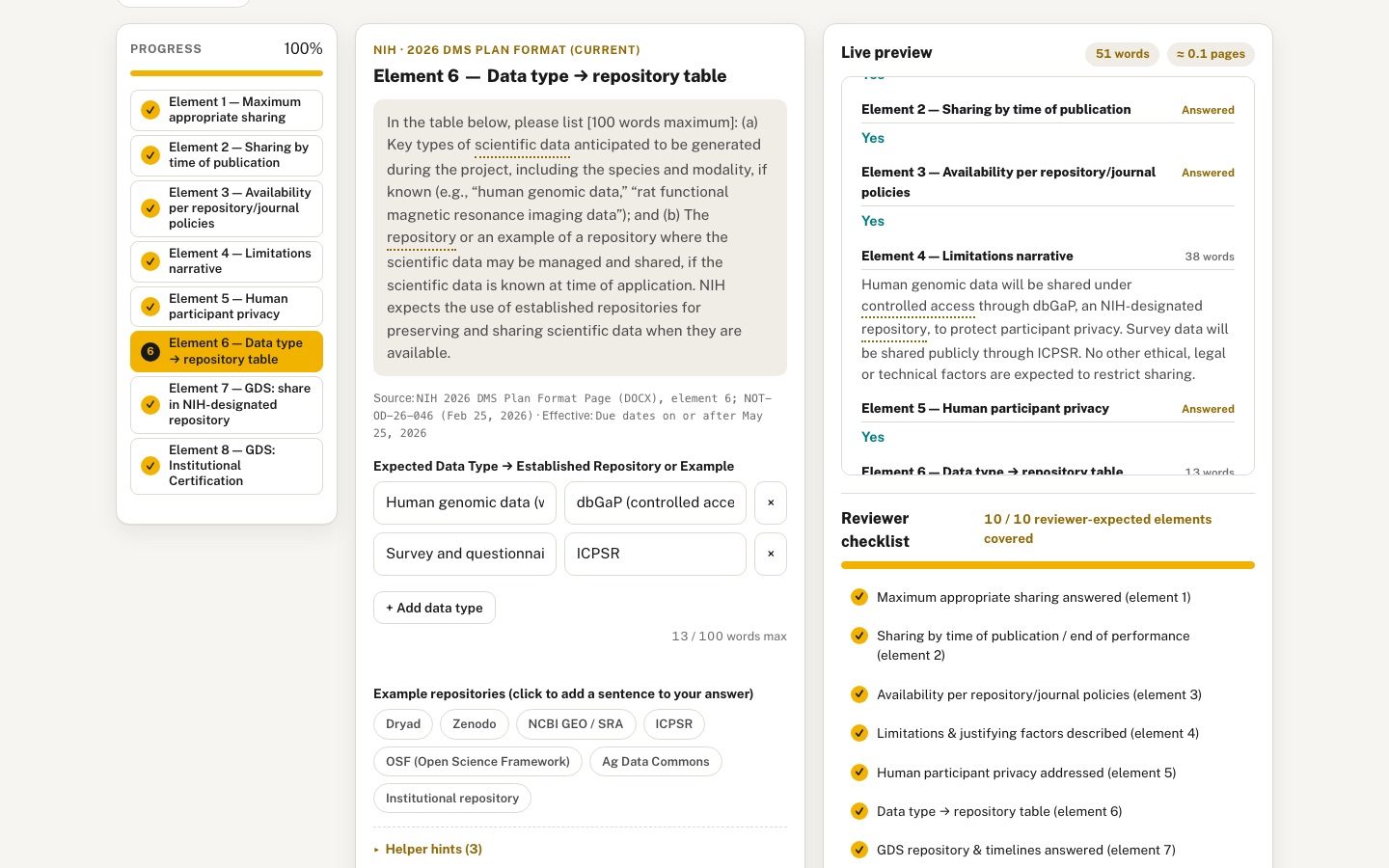 Desktop · click to enlarge
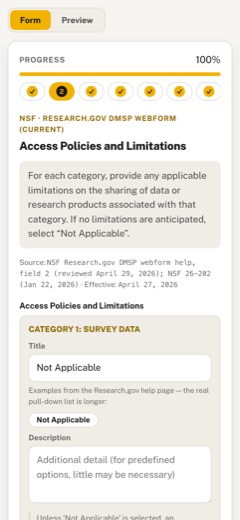
What it is ✎ blurb written by the AI critic
Pick NSF, NIH or USDA-NIFA and answer a step-by-step interview to draft a data management and sharing plan in that sponsor's current format. NSF uses the 2026 Research.gov webform with one entry per data category; NIH uses the 2026 eight-element format. A live preview counts words and estimates pages, a reviewer checklist shows what is still missing, and drafts save in your browser and export to Markdown or a print view. A labelled example plan shows what a finished plan looks like.
Try this
- Start with NSF, add two categories in step 1, then on Public Archiving set 'Apply to' to one category and click a repository card
- Switch to NIH, answer No to element 2 and see element 4 become required in the wizard and the checklist
- Click Load example, then open Print view to see a finished, clearly labelled sample plan
Highlights ✎ written by the AI critic
- Section prompts quoted from NSF's 2026 Research.gov webform help, NIH's 2026 DMS Plan format (NOT-OD-26-046) and NIFA's guidance, each with its source and effective date
- NSF plans are built per data or research product category, with a repository and storage/security picker that applies to one category or all of them
- Live preview with per-section word counts, NIH word limits, NIFA's two-page limit and a page estimate
- Reviewer checklist and completion panel that jump to missing steps; NIH element 4 becomes required when you answer No
- Illustrative example plans for all three sponsors, glossary tooltips, Markdown export and a print view
Who it's for
Faculty writing proposals, graduate students, research data librarians
Features
- Step-by-step wizard with progress rail, validation and the ability to jump between steps
- Sponsor switch (NSF / NIH / USDA-NIFA generic) that changes sections and wording
- Live two-pane preview that updates as you type, with word counts per section and a page-length estimate
- Checklist score showing which reviewer-expected elements are still missing
- Save/restore drafts in the browser, export Markdown and a print-ready view
- Glossary tooltips for terms like 'metadata standard', 'embargo', 'controlled access'
Data & sources
How it was built
Written by Goose 1.50.0 (github.com) on qwen/qwen3.8-27b, served by MindRouter, the University of Idaho's on-premises AI platform.
Rounds by kind
| build | 1 |
| feedback | 7 |
| continue | 7 |
| critic | 5 |
Lines of code per file
| body html | 180 |
| app css | 747 |
| app js | 1,895 |
| scripts | 831 |
Critic scores ✎ scored by the independent AI critic, 1–10
Independent audits ✎ by the AI critic
Automated checks
Checked by critic-verify.
Data spot checks ✎ written by the AI critic
- NSF 'Effective: April 27, 2026' = NSF 26-202 raw: 'The Research.gov tool ... will be released on April 27, 2026' (match)
- NSF eight Research.gov section headings (General Information, Access Policies and Limitations, Data Standards and Metadata, Provenance, Public Archiving, Timeline for Public Accessibility, Data Availability, Accountability) and the notes 'Unless Not Applicable is selected...' / 'less than two years after project completion' = Research.gov DMSP help raw (match)
- NIH 'Due dates on or after May 25, 2026', 'Release Date: February 25, 2026', '[300 words maximum]', '[100 words maximum]' = NOT-OD-26-046 raw; element prompts = 2026 DMS Plan Format Page DOCX raw (match)
- NIH element 5 access-controls wording is in NOT-OD-26-046 but not in the 2026 DOCX; the hint now attributes it to NOT-OD-26-046 (fixed in round 19)
- NIFA 'Page last updated: March 25, 2026' = NIFA DMP page raw; 'limited to two pages' and 'Last Updated April 16, 2026' = U of I Library NIFA guide raw (match); component headings labelled as the Sept 26, 2019 edition
Round-by-round timeline
Every harness round, in order. The prompts and FEEDBACK.md were written by the AI reviewer; the app code was written by the harness. Expand a round to see the exact prompt and the FEEDBACK.md the harness received.
-
Fatal error on every step render. Clicking "Start building my plan", Next, a rail step, or changing the sponsor throws
TypeError: Cannot set properties of undefined (setting 'textContent')atrenderStep(src/app.js lines 280–281, the two lines that fill the "Source: … · Effective: …"<code>elements). Those lines index[0]and[1]into the result of a lookup that returns ONE element, not a list, so both are undefined. Everything after that point in renderStep (and in renderAll) never runs. That causes items 2–9 below. 23 uncaught page errors were recorded in one short session. -
Live preview is an empty bordered box. After typing ~25 words into the first step's textarea, the "Live preview" pane stayed empty and
#preview-statsstayed blank. Expected: the preview shows every section of the selected sponsor/format in order, with headings, and fills in as you type (every keystroke). Each section shows its word count, and the header shows the total words and a page-length estimate (e.g. "412 words · ≈0.9 page"). Before anything is typed, show a friendly empty state ("Your plan appears here as you answer…"), not a blank box. -
Reviewer checklist is empty. The heading shows, but the score, bar and list are blank. Expected: a score like "3 / 9 reviewer-expected elements covered" with an animated progress bar. List every element with a ✓/missing state, and keep it updating as answers change. Clicking a missing item should jump to the wizard step that covers it.
-
Yes/No questions have no visible choices. NIH 2026 elements 1, 2, 3, 5, 7 and 8 render two tiny empty pill outlines with no "Yes" / "No" / "Not applicable" text. Users cannot tell what they are choosing. Expected: large, clearly labelled choice buttons or radios with a selected (gold) state, keyboard operable.
-
Blank labels and hints. Every step shows "Source: · Effective:" with nothing after the colons. The textarea label is empty. Opening "Helper hints (2)" should show the hint text (please verify it is not empty paragraphs).
-
No validation. On an empty step, pressing Next shows no message and nothing marks the step as incomplete. Expected: an inline, polite message on required fields (e.g. "Answer this before the plan is complete — or continue and come back later"), the step marked incomplete in the rail, and a warning when a word limit is exceeded (NIH element 4 has a 300-word maximum; the element 6 table has a 100-word maximum).
-
Progress rail shows no progress. The rail is a row of pills with no completed/incomplete state and no overall percent. On NIH its 8 pills wrap into 4 rows with truncated labels ("Maximum appropriate shar…", "GDS: Institutional Certi…"). Expected: a real progress rail. Answered steps get a check mark, the current step is highlighted, and there is an overall progress bar or percent. Full step titles should be readable: on desktop, a vertical stepper beside the form; on phone, a horizontally scrollable strip or a compact "Step 3 of 8" dropdown.
-
Glossary tooltips never appear. The glossary section says to hover the dotted terms in the wizard or preview, but there are no dotted terms anywhere in the wizard or preview (0 found). Expected: terms such as "metadata standard", "embargo", "controlled access", "repository" and "persistent identifier" are underlined wherever they occur in prompts, hints and the preview. Hover, keyboard focus and tap show a small tooltip with the definition. Make sure those terms really occur in the prompts or hints of the relevant steps.
-
Save / restore loses the answers. Steps: type an answer → "Save draft" (localStorage key
uidaho-dmp-draft-v1is written) → reload → "Resume saved draft". The preview and the textarea come back empty. Expected: sponsor, format, current step and all answers are restored. Show a small "Saved · 2 s ago" status so users see that autosave works. -
Print view is blank. "Print view" calls window.print(), but rendering the page with print media gives a completely blank page. Expected: a clean print-ready document containing a title block (plan title, sponsor, format, date) and every section in order with the user's answers (the NIH element 6 table as a real table), and nothing else: no toolbar, wizard, glossary or header chips. An on-screen print preview overlay with "Print" and "Close" buttons would also be good.
-
Format selector goes stale when the sponsor changes. After switching Sponsor to USDA-NIFA, the Format select still showed "PAPPG 24-1 narrative (legacy / helper)" (an NSF format), while the step header said "USDA-NIFA · Five DMP components (verified 2019 edition)". Expected: the Format options are rebuilt for the chosen sponsor, and the selector is hidden if that sponsor has only one format.
-
Storage, security and repository choices must be easy to spell out. The SPEC asks for them explicitly. On the archiving and sharing steps (NSF "Public Archiving", NIH element 6 table, NIFA "Data storage and preservation" and "Data sharing, protection, and public access"), show clickable cards: example repositories (Dryad, Zenodo, NCBI GEO/SRA, ICPSR, OSF, each with a one-line "good for…") and generic storage/backup/security options (e.g. institutional storage with 3-2-1 backups, encrypted storage for sensitive data, access controls). Picking one adds clear wording to the plan and the preview. Label them as examples, and refer users to U of I Research Computing and Data Services and the Library for institution-specific services.
-
Sponsor switch should feel deliberate. Changing the sponsor currently swaps everything silently. Expected: a segmented NSF / NIH / USDA-NIFA switch with a short smooth transition. A one-line summary of what changed ("NIH 2026 format: 8 elements, 300-word limitations narrative…") should appear. Answers already typed must be kept when you switch back.
-
Layout polish (desktop). The yellow-bordered format note under the toolbar is only ~60% of the width, leaving an awkward empty area to its right. Make it span the full width. The preview pane should stay visible (sticky) while long steps scroll. Put toolbar buttons into clear groups (Save / Load | Export .md / Print | Reset), and use a confirmation before Reset clears everything.
-
Phone (390 px). No horizontal overflow — good. After the fix, check that the preview, checklist and rail are usable at 390 px. An option is a "Form / Preview" toggle so users do not scroll past the whole wizard to see the preview.
-
Printing produces a blank page. Clicking "Print view" → "Print" (or pressing Ctrl+P) and rendering the page with print media gives a completely empty page. Cause: the print rule hides every direct child of
<body>except#print-overlay, but the overlay is inside<main id="app">(body.html is inserted inside main), so the rule hides it together with main. Expected: printing shows only the plan document (title block, every section and answer, the NIH table) in black on white, with no header, footer, toolbar, wizard or glossary. Headings should not be left alone at the bottom of a page. -
The Format selector is still stale for USDA-NIFA (item 11 last round is not fixed). Switch NSF → NIH → USDA-NIFA. The Format group stays visible and still lists "2026 DMS Plan format (current)" and "2023 six-element format (legacy)", which are NIH's formats. Meanwhile the step header says "USDA-NIFA · Five DMP components". Expected: the options are rebuilt for each sponsor (NSF shows its two formats, NIH shows its two), and the Format group is hidden for USDA-NIFA, which has one format.
-
The NIH 2026 checklist can never reach 100 %. With the NIH "2026 DMS Plan format (current)" selected, I answered all 8 elements. The checklist still showed "Standards for data & metadata (2023 element 3)" and "Oversight: who monitors compliance (2023 element 6)" as missing, because the 2026 format has no step where they can be answered. Expected: every counted checklist item for the selected format can be satisfied by a step in that format. Either list those two as optional "good practice" items that are not counted in the score, or add an optional step for them.
-
Glossary terms look like boxed buttons. Every annotated term ("embargo", "Metadata", "controlled access" …) has a gray rectangular border on all four sides (the browser's default button border) in addition to the dotted underline. Expected: only the dotted gold underline (plus the subtle hover tint), no box, and the text should look exactly like the surrounding text.
-
Terms are annotated in headings, and too often. "DATA MANAGEMENT" in the preview plan title is annotated. So are step titles ("Data Standards and Metadata", "Element 6 — Data type → repository table"), preview section headings, and the table column header "Established Repository or Example". The NIH element 6 prompt marks "scientific data" 4 times and "repository" 5 times, which is very noisy. Expected: annotate only running body text (prompts, hints and answer text in the preview), never titles, headings, labels or buttons, and only the first occurrence of each term in each block.
-
Repository cards and option chips insert a bare name, not wording. On NSF "Public Archiving", I typed "Existing sentence about archiving." and clicked the Zenodo card, then the "University-managed research storage…" chip. The answer became
Existing sentence about archiving. Zenodo University-managed research storage (see U of I Research Computing and Data Services). That is not a usable sentence. Expected: each choice adds a complete sentence suited to the step, on its own line (e.g. "Data will be deposited in Zenodo, a general-purpose repository that assigns DOIs, and made publicly available at the time of publication."), and the preview updates. Clicking a selected card or chip again removes its sentence. Chips get a visible selected state, like the cards. -
The archiving/sharing step is extremely long. 7 repository cards and 17 option chips make the step about 1,800 px tall in the narrow column, so Next is far below. Expected: a compact layout, e.g. smaller 2-line repository cards in a 2-column grid, and the storage / backup / security / preservation chip groups as collapsible sections (closed by default, each showing "2 selected").
-
On desktop the question is below the fold. The 8-row stepper (~370 px tall) sits above the question, so at 1440×900 the prompt starts around y=680 and the answer box is off-screen. Expected: the current question and its answer field are visible without scrolling. For example, use compact stepper rows (~30 px) or place the stepper as a narrow sticky column to the left of the question, while keeping the full step titles readable.
-
The print preview "Close" button is invisible. In the black print-preview bar, "Close" looks like an empty outlined box because it has dark text on black. Expected: readable white text and a light outline.
-
Validation is nearly invisible. Pressing Next on an empty step silently moves on. The only sign is a thin red line on that rail item, and the
.field__errortext stays empty. Expected: a short visible message when you leave a required step empty (e.g. an inline note or toast "Step 2 left blank — you can come back to it"), a clear "!" icon on that rail step, and an inline message next to the field when you return to it. (The red "320 / 300 words max" counter for word limits is good; keep it.) -
Phone (390 px): the Format select overflows its card. The text "Research.gov DMSP webform (current" is cut off at the card's right edge. Expected: the label above a full-width select that fits inside the card.
-
"1 words". Section word counts in the preview and the answer counter say "1 words" (e.g. a Yes/No answer). Expected "1 word".
-
Make the landing screen more inviting. It is the first thing gallery visitors see, and it is a text-only card. Expected: keep the lede and the four how-to steps, and add three clickable sponsor cards (NSF, NIH, USDA-NIFA). Each card shows the current format's name, its number of sections, its effective date and the first few section names. Clicking a card starts the wizard with that sponsor already selected. A subtle entrance animation is welcome.
-
Link labels must match their targets. In "Data & sources", the link text "U of I Research Computing and Data Services" points to https://www.lib.uidaho.edu/services/data/, which is the Library's Data Services page. The same mismatch appears in the storage notes. Expected: label that link "U of I Library Data Services" (it is also good to link the Library's Data Management Guide, https://www.lib.uidaho.edu/services/data/data-management/). Mention Research Computing and Data Services by name as a place to ask, without inventing a URL for it.
-
Printing produces a blank page. Clicking "Print view" → "Print" (or pressing Ctrl+P) and rendering the page with print media gives a completely empty page. Cause: the print rule hides every direct child of
<body>except#print-overlay, but the overlay is inside<main id="app">(body.html is inserted inside main), so the rule hides it together with main. Expected: printing shows only the plan document (title block, every section and answer, the NIH table) in black on white, with no header, footer, toolbar, wizard or glossary. Headings should not be left alone at the bottom of a page. -
The Format selector is still stale for USDA-NIFA (item 11 last round is not fixed). Switch NSF → NIH → USDA-NIFA. The Format group stays visible and still lists "2026 DMS Plan format (current)" and "2023 six-element format (legacy)", which are NIH's formats. Meanwhile the step header says "USDA-NIFA · Five DMP components". Expected: the options are rebuilt for each sponsor (NSF shows its two formats, NIH shows its two), and the Format group is hidden for USDA-NIFA, which has one format.
-
The NIH 2026 checklist can never reach 100 %. With the NIH "2026 DMS Plan format (current)" selected, I answered all 8 elements. The checklist still showed "Standards for data & metadata (2023 element 3)" and "Oversight: who monitors compliance (2023 element 6)" as missing, because the 2026 format has no step where they can be answered. Expected: every counted checklist item for the selected format can be satisfied by a step in that format. Either list those two as optional "good practice" items that are not counted in the score, or add an optional step for them.
-
Glossary terms look like boxed buttons. Every annotated term ("embargo", "Metadata", "controlled access" …) has a gray rectangular border on all four sides (the browser's default button border) in addition to the dotted underline. Expected: only the dotted gold underline (plus the subtle hover tint), no box, and the text should look exactly like the surrounding text.
-
Terms are annotated in headings, and too often. "DATA MANAGEMENT" in the preview plan title is annotated. So are step titles ("Data Standards and Metadata", "Element 6 — Data type → repository table"), preview section headings, and the table column header "Established Repository or Example". The NIH element 6 prompt marks "scientific data" 4 times and "repository" 5 times, which is very noisy. Expected: annotate only running body text (prompts, hints and answer text in the preview), never titles, headings, labels or buttons, and only the first occurrence of each term in each block.
-
Repository cards and option chips insert a bare name, not wording. On NSF "Public Archiving", I typed "Existing sentence about archiving." and clicked the Zenodo card, then the "University-managed research storage…" chip. The answer became
Existing sentence about archiving. Zenodo University-managed research storage (see U of I Research Computing and Data Services). That is not a usable sentence. Expected: each choice adds a complete sentence suited to the step, on its own line (e.g. "Data will be deposited in Zenodo, a general-purpose repository that assigns DOIs, and made publicly available at the time of publication."), and the preview updates. Clicking a selected card or chip again removes its sentence. Chips get a visible selected state, like the cards. -
The archiving/sharing step is extremely long. 7 repository cards and 17 option chips make the step about 1,800 px tall in the narrow column, so Next is far below. Expected: a compact layout, e.g. smaller 2-line repository cards in a 2-column grid, and the storage / backup / security / preservation chip groups as collapsible sections (closed by default, each showing "2 selected").
-
On desktop the question is below the fold. The 8-row stepper (~370 px tall) sits above the question, so at 1440×900 the prompt starts around y=680 and the answer box is off-screen. Expected: the current question and its answer field are visible without scrolling. For example, use compact stepper rows (~30 px) or place the stepper as a narrow sticky column to the left of the question, while keeping the full step titles readable.
-
The print preview "Close" button is invisible. In the black print-preview bar, "Close" looks like an empty outlined box because it has dark text on black. Expected: readable white text and a light outline.
-
Validation is nearly invisible. Pressing Next on an empty step silently moves on. The only sign is a thin red line on that rail item, and the
.field__errortext stays empty. Expected: a short visible message when you leave a required step empty (e.g. an inline note or toast "Step 2 left blank — you can come back to it"), a clear "!" icon on that rail step, and an inline message next to the field when you return to it. (The red "320 / 300 words max" counter for word limits is good; keep it.) -
Phone (390 px): the Format select overflows its card. The text "Research.gov DMSP webform (current" is cut off at the card's right edge. Expected: the label above a full-width select that fits inside the card.
-
"1 words". Section word counts in the preview and the answer counter say "1 words" (e.g. a Yes/No answer). Expected "1 word".
-
Make the landing screen more inviting. It is the first thing gallery visitors see, and it is a text-only card. Expected: keep the lede and the four how-to steps, and add three clickable sponsor cards (NSF, NIH, USDA-NIFA). Each card shows the current format's name, its number of sections, its effective date and the first few section names. Clicking a card starts the wizard with that sponsor already selected. A subtle entrance animation is welcome.
-
Link labels must match their targets. In "Data & sources", the link text "U of I Research Computing and Data Services" points to https://www.lib.uidaho.edu/services/data/, which is the Library's Data Services page. The same mismatch appears in the storage notes. Expected: label that link "U of I Library Data Services" (it is also good to link the Library's Data Management Guide, https://www.lib.uidaho.edu/services/data/data-management/). Mention Research Computing and Data Services by name as a place to ask, without inventing a URL for it.
-
Excellent progress. There are no console errors, and all of this now works; keep it: sponsor cards on the landing screen
-
the compact stepper with check marks and error states
-
the "left blank" toast plus the inline message on return
-
the live preview with word counts and page estimate
-
the checklist, which reaches 8/8 on NIH 2026, with legacy items marked "good practice, not counted"
-
repository cards and chips that add or remove full sentences
-
save/resume, Markdown export, Reset confirmation
-
the print overlay and a clean printed plan
-
the phone Form/Preview toggle
-
accurate link labels
-
Desktop: the question is still below the fold. At 1440×900 after starting (NIH), the step title is at y≈695 and the first answer control at y≈944, so users must scroll before they can answer anything. Above it sit the toolbar, a two-line format note and the 8-row stepper. Expected: the current question and its answer field are visible without scrolling. For example, at widths ≥ 1200 px use three columns (a narrow sticky stepper column of ~230 px | question | preview). Alternatively, fold the format note into a small "About this format" disclosure next to the Format selector.
-
"Finish ✓" does nothing useful. On the last step, Finish only repeats the "left blank" toast (or does nothing when the step is answered). Expected: Finish opens a completion panel. It shows the checklist score, the missing elements as links that jump to their step, the total words and page estimate, and big "Export .md" and "Print view" buttons. A short, tasteful success animation should play when the score is complete.
-
Selected states use three different colours. A selected repository card is solid teal, a selected storage/security chip is solid brown (Leather) with white text, and yes/no pills and the current step are gold. Expected: one consistent selected style everywhere (e.g. Pride Gold fill with black text, or a gold border plus a check icon), with the same hover and focus treatment.
-
The collapsible option groups are unstyled. On archiving/sharing steps, "Storage during the project", "Backup & redundancy", "Security & privacy" and "Preservation" use the browser's default black ▼ triangle and a larger default font. They look unlike the rest of the app. Expected: styled group headers (small, bold, with a rotating chevron and a "2 selected" count), closed by default. Also, repository card descriptions are cut off with an ellipsis ("supports many file types, software an…"); show the full text (3 lines or a tooltip).
-
USDA-NIFA still shows a Format selector with only one option ("Five DMP components (verified 2019 edition)"). Expected: hide the selector for a sponsor with one format and show the format name as plain text.
-
"Good practice, not counted" checklist items look like errors. On NIH 2026 they show the same red "!" icon as missing required elements. Expected: a neutral grey "optional" icon, listed under a small "Good practice (not scored)" sub-heading.
-
Yes/No sections show "1 word" in the preview. Word counts make no sense for a Yes/No/Not applicable answer. Expected: show "Answered" (or nothing) for those sections. Word counts stay on narrative and table sections.
-
The preview does not follow the step being edited. The preview pane scrolls internally. While editing Element 6 or step 7, the matching preview section is out of view, so typing there shows no visible change. Expected: when you change step or type, the preview smoothly scrolls to that section and briefly highlights it (a soft gold flash), so the live update is obvious.
-
Phone: the toolbar is too tall. At 390 px, Save draft, Load draft, Export .md and Print view are stacked as four full-width buttons with Reset below. That is about 400 px before the form starts. Expected: a compact 2-column grid of smaller buttons, or one "Actions ▾" menu, with the sponsor switch and format still on top.
-
Phone: the page is ~12,000 px tall. The 12 fully expanded glossary cards and the long sources lists make up most of it. Expected: on phone the glossary is an accordion (term visible, definition on tap) or a filterable list, and the three source groups are collapsible. Desktop can keep the current card grid.
-
The app looks great and has no console errors. The last round's work all checks out; keep it: the 3-column desktop layout
-
the "Your plan is ready" completion panel
-
consistent gold selected states
-
styled option groups
-
neutral "good practice" checklist items
-
"Answered" on Yes/No sections
-
the preview that scrolls to and flashes the section being edited
-
the compact phone toolbar
-
the glossary and sources accordions
-
Regression: the progress rail is gone below 1200 px. At 1024×768, 820×1180 and 390×844,
#pane-railhas zero size (display: none). The 3-column layout only shows it at ≥ 1200 px, and the smaller layouts no longer include it. Users on laptops, tablets and phones get no step list, no check marks, no progress % and no way to jump to a step. The only sign of progress is "Step 1 of 8" beside the Next button. Expected: the rail is available at every width.-
1024 px (2 columns): the progress bar and stepper sit above the question inside the wizard column, compact.
-
Phone and 820 px: a horizontally scrollable strip of numbered step chips with check marks, plus the progress bar, above the question. Alternatively, a "Step 3 of 8 ▾" button that opens the step list.
Jumping to a step and the done/error states must work there too.
-
-
USDA-NIFA shows the format twice. On desktop and phone, after choosing USDA-NIFA the toolbar shows both the Format select (one option, "Five DMP components (verified 2019 edition)") and the same name again as plain text next to it. Expected: for a sponsor with a single format, show only the plain text, not the select. The select probably needs to be hidden in a way the CSS does not override.
-
Desktop stepper titles are cut off. In the 230 px stepper column most titles end in an ellipsis: "Element 1 — Maximum…", "Element 6 — Data typ…", "Data or Research Prod…", "Data Availability (rete…". Expected: readable titles. Let them wrap to 2 lines, or drop the redundant "Element N —" prefix, since the number badge already shows it. The full title should also appear on hover.
-
Unselected pill and chip text is off-centre. Unselected "Yes", "No" and "Not applicable" pills, and unselected storage/security chips, leave an empty gap on the left where the check icon appears when selected, so their text looks shifted right. Expected: centred text when unselected; the check icon only takes space when the item is selected.
-
The app looks great and has no console errors. The last round's work all checks out; keep it: the 3-column desktop layout
-
the "Your plan is ready" completion panel
-
consistent gold selected states
-
styled option groups
-
neutral "good practice" checklist items
-
"Answered" on Yes/No sections
-
the preview that scrolls to and flashes the section being edited
-
the compact phone toolbar
-
the glossary and sources accordions
-
Regression: the progress rail is gone below 1200 px. At 1024×768, 820×1180 and 390×844,
#pane-railhas zero size (display: none). The 3-column layout only shows it at ≥ 1200 px, and the smaller layouts no longer include it. Users on laptops, tablets and phones get no step list, no check marks, no progress % and no way to jump to a step. The only sign of progress is "Step 1 of 8" beside the Next button. Expected: the rail is available at every width.-
1024 px (2 columns): the progress bar and stepper sit above the question inside the wizard column, compact.
-
Phone and 820 px: a horizontally scrollable strip of numbered step chips with check marks, plus the progress bar, above the question. Alternatively, a "Step 3 of 8 ▾" button that opens the step list.
Jumping to a step and the done/error states must work there too.
-
-
USDA-NIFA shows the format twice. On desktop and phone, after choosing USDA-NIFA the toolbar shows both the Format select (one option, "Five DMP components (verified 2019 edition)") and the same name again as plain text next to it. Expected: for a sponsor with a single format, show only the plain text, not the select. The select probably needs to be hidden in a way the CSS does not override.
-
Desktop stepper titles are cut off. In the 230 px stepper column most titles end in an ellipsis: "Element 1 — Maximum…", "Element 6 — Data typ…", "Data or Research Prod…", "Data Availability (rete…". Expected: readable titles. Let them wrap to 2 lines, or drop the redundant "Element N —" prefix, since the number badge already shows it. The full title should also appear on hover.
-
Unselected pill and chip text is off-centre. Unselected "Yes", "No" and "Not applicable" pills, and unselected storage/security chips, leave an empty gap on the left where the check icon appears when selected, so their text looks shifted right. Expected: centred text when unselected; the check icon only takes space when the item is selected.
-
The progress-rail bar never fills. I answered 3 of 8 NSF steps. The rail header correctly says "38%" (and "63%" or "100%" later), but the bar under it stays an empty gray track at every width. This affects both the side rail (≥ 1200 px) and the compact rail (below 1200 px). The gold fill element inside it has zero size.
-
Measured in the browser:
#rail-baris 200×6 px with the gray track colour. Its fill child is not visible. -
The reviewer-checklist bar right next to it works:
#checklist-bar-fillis 44 % wide and gold. -
Likely cause: the markup gives the fill element the class
rail-bar__fill(double underscore), in both rails (src/body.html lines ~76 and ~88), while src/app.css only styles.rail-bar-fill(single hyphen, line ~158). The fill div never gets its height or gold background.Expected: the gold fill grows smoothly (width transition) to the same percentage as the label, in both rails.
-
-
Four glossary entries say "NIH (NOT-OD-21-013, Section II): …" but the text is NOT what Section II says. Replace the
deffor these four with the exact official text (fromdata/raw/nih_NOT-OD-21-013_final-dms-policy.html): scientific data: "The recorded factual material commonly accepted in the scientific community as of sufficient quality to validate and replicate research findings, regardless of whether the data are used to support scholarly publications. Scientific data do not include laboratory notebooks, preliminary analyses, completed case report forms, drafts of scientific papers, plans for future research, peer reviews, communications with colleagues, or physical objects, such as laboratory specimens." -
metadata: "Data that provide additional information intended to make scientific data interpretable and reusable (e.g., date, independent sample and variable construction and description, methodology, data provenance, data transformations, any intermediate or descriptive observational variables)."
-
data management: "The process of validating, organizing, protecting, maintaining, and processing scientific data to ensure the accessibility, reliability, and quality of the scientific data for its users."
-
data sharing: "The act of making scientific data available for use by others (e.g., the larger research community, institutions, the broader public), for example, via an established repository."
-
The wizard shows each prompt as the official wording, with a source line. Two NIH 2026 prompts contain sentences the app added:
nih-e4: remove "If you plan to hold data back for a period (an embargo) or to share it only under controlled access, explain the length and the reason." frompromptand put it inhintsinstead. -
nih-e6: remove "Use the example repository and storage/security cards below to name a specific repository and the protection measures you will use." frompromptand put it inhintsinstead. -
The NIH 2026 format says Element 4 is needed "If you answered 'no' to elements 1, 2, or 3, or if you anticipate that sharing will be limited", and elements 7 and 8 say "If 'no,' address in element 4." If any of elements 1, 2, 3, 7 or 8 is "No" and Element 4 is empty, the Element 4 checklist item is missing, with the label "Limitations required — you answered No to element 2" (list the element numbers).
-
On the Element 4 step, show a gold notice box above the textarea listing those answers.
-
If none of them is "No", an empty Element 4 counts as covered, with the label "Limitations (not needed — no 'No' answers)".
-
USDA-NIFA: the DMP is limited to two pages. Show the page chip as "≈ 0.4 of 2 pages"; turn it red and add a checklist warning "Over the 2-page limit" when the estimate is above 2.
-
NIH: when Element 4 is over 300 words or Element 6 is over 100 words, add a red checklist warning "Element 4 is over the 300-word limit" and list it in the Finish panel.
-
Yes/No answers currently count as 1 word in the total (e.g. 30 typed words show as "33 words"). Count only typed words in the totals and page estimate.
-
Context budget (the previous attempt crashed with "maximum context length"): never
cata whole source file.src/app.js(1230 lines) andscripts/build_data.py(973 lines) are too big. Usegrep -nto find a spot, thensed -n 'A,Bp'for at most 80 lines, and never read the same range twice. Where things are (approximate line numbers):scripts/build_data.py: NIH 2026 promptsnih-e4andnih-e6≈ lines 213–290; glossary list ≈ lines 705–780. -
src/app.js:renderTableRows≈ 413;nextStep≈ 603;openDonePanel≈ 620;toast≈ 683;renderPreview≈ 699;wordsOf≈ 812;renderChecklist≈ 823;renderSponsorCards/startWizard≈ 956–987;saveDraft/loadDraft/flashNote≈ 992–1046;planMarkdown≈ 1048;buildPrintHtml≈ 1090;boot≈ 1149. -
src/app.css: toolbar ≈ 66; checklist ≈ 403; toast ≈ 565; phone rules@media (max-width: 640px)≈ 597. -
Four glossary entries say "NIH (NOT-OD-21-013, Section II): …" but the text is NOT what Section II says. Replace the
deffor these four with the exact official text (fromdata/raw/nih_NOT-OD-21-013_final-dms-policy.html): scientific data: "The recorded factual material commonly accepted in the scientific community as of sufficient quality to validate and replicate research findings, regardless of whether the data are used to support scholarly publications. Scientific data do not include laboratory notebooks, preliminary analyses, completed case report forms, drafts of scientific papers, plans for future research, peer reviews, communications with colleagues, or physical objects, such as laboratory specimens." -
metadata: "Data that provide additional information intended to make scientific data interpretable and reusable (e.g., date, independent sample and variable construction and description, methodology, data provenance, data transformations, any intermediate or descriptive observational variables)."
-
data management: "The process of validating, organizing, protecting, maintaining, and processing scientific data to ensure the accessibility, reliability, and quality of the scientific data for its users."
-
data sharing: "The act of making scientific data available for use by others (e.g., the larger research community, institutions, the broader public), for example, via an established repository."
-
The wizard shows each prompt as the official wording, with a source line. Two NIH 2026 prompts contain sentences the app added:
nih-e4: remove "If you plan to hold data back for a period (an embargo) or to share it only under controlled access, explain the length and the reason." frompromptand put it inhintsinstead. -
nih-e6: remove "Use the example repository and storage/security cards below to name a specific repository and the protection measures you will use." frompromptand put it inhintsinstead. -
The NIH 2026 format says Element 4 is needed "If you answered 'no' to elements 1, 2, or 3, or if you anticipate that sharing will be limited", and elements 7 and 8 say "If 'no,' address in element 4." If any of elements 1, 2, 3, 7 or 8 is "No" and Element 4 is empty, the Element 4 checklist item is missing, with the label "Limitations required — you answered No to element 2" (list the element numbers).
-
On the Element 4 step, show a gold notice box above the textarea listing those answers.
-
If none of them is "No", an empty Element 4 counts as covered, with the label "Limitations (not needed — no 'No' answers)".
-
USDA-NIFA: the DMP is limited to two pages. Show the page chip as "≈ 0.4 of 2 pages"; turn it red and add a checklist warning "Over the 2-page limit" when the estimate is above 2.
-
NIH: when Element 4 is over 300 words or Element 6 is over 100 words, add a red checklist warning "Element 4 is over the 300-word limit" and list it in the Finish panel.
-
Yes/No answers currently count as 1 word in the total (e.g. 30 typed words show as "33 words"). Count only typed words in the totals and page estimate.
-
Do NOT read whole files and do NOT sweep through a file chunk by chunk. You do not need an overview: each item below names the exact function and line range. Run
sed -n 'A,Bp' src/app.jsfor THAT range once, edit it right away with the text editor, then go to the next item. -
Never re-read a range you have already read. Never cat or grep
index.html. No test harnesses, no git. -
Run
python3 build.py --checkonce at the end. -
Do NOT read whole files and do NOT sweep through files chunk by chunk. Each item names the exact lines. Run
sed -n 'A,Bp'for THAT range once, edit right away, then move on. Never re-read a range. -
Never cat or grep
index.html. Do not touchscripts/ordata/. No test harnesses, no git. -
Line numbers are for the current files (
src/app.js1252 lines,src/body.html177,src/app.css652) and shift as you edit, so find a function again withgrep -n "function NAME" src/app.js. -
Run
python3 build.py --checkonce at the end. -
The NIH 2026 format says Element 4 is needed "If you answered 'no' to elements 1, 2, or 3", and elements 7 and 8 say "If 'no,' address in element 4." Add a helper
nihNoAnswers()that returns the element numbers (1, 2, 3, 7, 8) whose answers (nih-e1,nih-e2,nih-e3,nih-e7,nih-e8) are "no". -
In
renderChecklistandopenDonePanel, special-case the item whosematchcontains"nih-e4":-
Element 4 empty and no "No" answers: count it as covered, with the label "Limitations (element 4) — not needed, no 'No' answers".
-
Element 4 empty and some "No" answers: missing, with the label "Limitations required — you answered No to element 2, 3" (list the numbers).
-
Element 4 written: covered, keep the normal label.
-
-
In
renderStep(line 302): when the section id isnih-e4andnihNoAnswers()is not empty, insert a notice box right before the "Your answer" field (thehtml +=at line 330): "You answered No to element 2 — explain the limitation and its reason here." CSS.notice: background var(--surface-2); border-left: 3px solid var(--ui-pride-gold); border-radius: 6px; padding: 8px 12px; font-size: .85rem; margin: 0 0 12px. -
First-time visitors have no quick way to see what a finished plan looks like.
src/body.html: add<button type="button" class="btn btn--ghost" id="btn-example">See an example plan</button>after the Start button (line 22), and<button type="button" class="btn btn--ghost btn--sm" id="example-btn" title="Fill every section with an illustrative example">Load example</button>after the Load draft button (line 49). -
src/app.js: add anEXAMPLESobject keyed by format id for the three current formats only:nsf-2026(8 text sections),nih-2026(nih-e1..nih-e3= "yes",nih-e5= "yes",nih-e7andnih-e8= "na",nih-e4a short limitations text,nih-e6a table with 2 rows), andnifa-2019(5 text sections). Write 1–3 plain sentences per section about a clearly FICTIONAL project: NSF: a soil-moisture sensor network with data in Zenodo; NIH: a survey study with de-identified participant data in ICPSR under controlled access; NIFA: extension workshop evaluation data in the USDA Ag Data Commons. Use only the generic repositories and practices already in the app. Do NOT invent University of Idaho service names, people, dollar amounts or statistics. -
A
loadExample()function: if the current format has no example (a legacy format), first switch to that sponsor's current format. If any answers exist, askconfirm("Replace your current answers with the example plan?"). Then set the answers,state.step = 0,state.example = true,renderAll()andtoast("Example plan loaded — replace it with your own answers.", "ok").#btn-exampleshows the wizard (likestartWizard) and then loads the example;#example-btnjust loads it. Wire both inboot(line 1172). -
While
state.exampleis true,renderPreview(line 712) puts a banner at the top of the preview:<div class="preview__example">Illustrative example — a fictional project. Replace it with your own answers.</div>(CSS: background rgba(241,179,0,.18); border: 1px solid var(--ui-pride-gold); border-radius: 8px; padding: 6px 10px; font-size: .8rem; font-weight: 700; margin-bottom: 12px).resetAll(line 1154) setsstate.example = false. The Print view and Markdown export start with the line "Illustrative example — fictional project" whenstate.exampleis true. -
Working notes Section templates, checklist, glossary and sources are generated by
scripts/build_data.pyintodata/embed/*.json. Change the Python data there, runpython3 scripts/build_data.py, thenpython3 build.py --check. -
Do not grep or cat
index.html(it contains one 40 KB line of embedded JSON). Readsrc/andscripts/. -
Official headings below are quoted exactly from the saved documents — use them verbatim.
-
Work through the items in order and rebuild after each one.
-
Change: Delete the
nsf-legacyandnih-2023formats and their sections (nsfL-1…nsfL-5,nih23-e1…nih23-e6) from TEMPLATES, and remove every checklist reference to them (the optional itemsnih-c9,nih-c10, and thensfL-*/nih23-*ids inside other items'matchlists). -
Every sponsor now has exactly one format: hide the Format
<select>for all three sponsors and show the format name as plain text (the code path USDA-NIFA already uses). -
In the NSF and NIH "About this format" notes add one short sentence and nothing more about old formats: "Older solicitations may still require the previous format (NSF: PAPPG 24-1 two-page PDF upload / NIH: the 2023 six-element format) — check your funding opportunity."
-
Remove the hints that start with "Legacy PAPPG 24-1 wording:" from the NSF steps (they are also on the wrong fields: "types of data" sits under Provenance and "re-use, re-distribution" under Data Availability).
-
A saved draft whose
formatIdisnsf-legacyornih-2023must still load, into the current format, without errors. -
Change: Step 1 lets the user add one or more categories (like the NIH table's "+ Add data type" rows). Each category has a Title input and a Description textarea. At least one category is needed.
-
Steps 2–8 show one small block per category from step 1, headed with that category's title, each with a Title input and a Description textarea for that field.
-
Offer these example titles as clickable chips (or a
<datalist>) that fill the Title; users can type their own. Label them "Examples from the Research.gov help page — the real pull-down list is longer". Use only these:-
Access Policies and Limitations: "Not Applicable"
-
Data or Research Product Provenance: "New Data Collection", "Data reuse", "Shared facility"
-
Public Archiving: "Institutional Repository" plus the existing repository names (Dryad, Zenodo, NCBI GEO/SRA, ICPSR, OSF, Ag Data Commons)
-
Timeline for Public Accessibility: "At the time of publication"
-
Data Availability: "Determined by the policies of the repository"
-
Accountability: no presets (on Research.gov the choices are prepopulated from the proposal's Senior Personnel); the Title is the person's name or role.
-
-
Keep the storage/backup/security chips on Public Archiving; they add their sentence to that category's Description.
-
Show the official notes under their fields and apply them:
-
Access Policies and Limitations: "Unless 'Not Applicable' is selected, an explanation and justification of the concern must be provided below." → Description required unless the Title is "Not Applicable".
-
Data or Research Product Provenance: "If data is coming from an existing dataset or existing data resource, it must be identified below." → Description required unless the Title is "New Data Collection".
-
Data Availability: "If the availability of the data is less than two years after project completion, a justification must be provided below." If the Title is "Determined by the policies of the repository", no further information is required.
-
-
A step counts as answered when every category has a Title for that field (and a Description where required above).
-
Preview, Markdown export and print view group the NSF plan by category: "Category 1: <title>", then the field headings, each showing "Title — Description".
-
Headings must match Research.gov exactly: "Data or Research Product Category General Information" (no dash), "Access Policies and Limitations", "Data Standards and Metadata", "Data or Research Product Provenance", "Public Archiving", "Timeline for Public Accessibility", "Data Availability" (drop "(retention)"), "Accountability".
-
Accountability prompt is inaccurate: the official text asks who among the Senior Personnel "will be responsible for the sharing of data or research products associated with the category" (not "implementing the plan").
-
NSF "About this format" note: add the form intro "Complete the Data Management and Sharing Plan for the primary Directorate you are applying to, or provide a justification if a detailed Data Management and Sharing Plan is not needed." and NSF 26-202: "Proposals must include a DMSP created using the tool implemented on Research.gov." and "Recipients are required to share all data supporting NSF funded publications at the time of publication. Exceptions to this sharing requirement must be described and justified within the DMSP."
-
NSF 26-202 struck the two-page limit. Keep the NSF word count and page estimate, but label it "no page limit (Research.gov webform)".
-
Change the NSF checklist to these 8 items, using the rules from item 2: At least one data or research product category named
-
Access policies and limitations for each category ("Not Applicable" or a justification)
-
Data standards and metadata for each category
-
Provenance for each category (existing datasets or resources identified)
-
Public archiving location for each category
-
Timeline for public accessibility for each category
-
Data availability for each category ("determined by the policies of the repository" or a duration)
-
Responsible Senior Personnel member for each category
-
Change: Element 4 checklist item is satisfied when Element 4 has text, OR when none of elements 1, 2, 3, 7, 8 is "No". When one of them is "No" and Element 4 is empty, the item is missing and reads "Element 4 required — you answered No to element N".
-
On the Element 4 step show whether it is required ("Required: you answered No to element 2") or optional ("Optional: no 'No' answers so far — if no other limits apply you may write 'No limitations are anticipated.'").
-
Do not mark Element 4 as blank/error in the rail when it is optional.
-
Add two checklist items: "Element 4 within 300 words" and "Element 6 table within 100 words" (missing when over the limit).
-
Change: Format label: "NIFA Data Management Plan (current guidance)". Effective line: "NIFA DMP page updated March 25, 2026".
-
The NIFA "About this format" note and each NIFA step's source line say, briefly: "NIFA's DMP guidance page (updated March 25, 2026) links a March 2026 guidance PDF that could not be downloaded (retried 2026-09-13), so the five component headings come from the most recent retrievable edition (Sept 26, 2019). Check them against your Request for Applications." Also: "The DMP is limited to two pages and is not part of the project narrative." (U of I Library NIFA guide, updated April 16, 2026: "In March 2026, NIFA updated their Grants Application Guide, including the DMP requirements. The DMP document is limited to two pages that are not considered part of the project narrative.")
-
Keep the five headings exactly: "Expected data type", "Data format", "Data storage and preservation", "Data sharing, protection, and public access", "Roles and responsibilities".
-
Two-page limit: when the NIFA page estimate is over 2 pages, the page stat turns red and says "over NIFA's 2-page limit"; add a checklist item "Within NIFA's 2-page limit" (NIFA DMP FAQ: "only the first two pages will be considered for review").
-
Data & sources, USDA-NIFA group: relabel the 2019 PDF "NIFA DMP guidance, Sept 26, 2019 edition (archived copy — used for the component headings because the March 2026 PDF could not be downloaded)", and add "NIFA DMP guidance, March 2026 (linked from NIFA's page; not retrievable on 2026-09-13)" → https://www.nifa.usda.gov/sites/default/files/2026-03/Data%20Management%20Plan%20for%20Research%2C%20Education%2C%20and%20Extension%20Projects.pdf
-
"embargo": its NIH sentence quotes the superseded 2020 wording ("no later than the time of an associated publication or the end of the performance period, whichever comes first"). Replace it with the 2026 element 2 wording — NIH asks whether data "will be shared by the time of publication, or for other findings, by the end of the period of performance, which includes no-cost extensions" — source "Generic definition; cf. NOT-OD-26-046 element 2 and NSF 26-202".
-
"controlled access": source → "Generic definition; cf. NOT-OD-26-046 element 5 ('whether any scientific data will be shared using access controls')".
-
"persistent identifier (PID / DOI)": drop the NOT-OD-21-014 clause; source "NSF 26-202 (XI.D.2.c)".
-
Add "data or research product category" (Research.gov: "Each distinct category should receive its own entry … it is sufficient simply to specify each high-level category."; source "Rese
-
Now: the NSF note and the NIH note both say "(NSF: PAPPG 24-1 two-page PDF upload / NIH: the 2023 six-element format)". Fix: NSF note: "Older solicitations may still require the previous format (a two-page PDF upload under PAPPG 24-1) — check your funding opportunity."
-
NIH note: "Older solicitations may still require the previous format (the 2023 six-element format, NOT-OD-21-014) — check your funding opportunity."
-
USDA-NIFA: no such sentence.
-
The NSF steps "Data Standards and Metadata", "Data or Research Product Provenance", "Public Archiving" and "Data Availability" show "Source: … PAPPG 24-1 II.D.2.i(ii) (May 20, 2024)". Those fields come from the Research.gov form, not from the 2024 text (NSF 26-202 struck its list). Use "NSF Research.gov DMSP webform help, field N (reviewed April 29, 2026); NSF 26-202 (Jan 22, 2026)" for all NSF steps, including "Access Policies and Limitations".
-
Glossary "metadata standard": source "Generic definition; cf. NIFA 'Data format' component and PAPPG 24-1 item 2" → "Generic definition; cf. Research.gov 'Data Standards and Metadata' and NIFA 'Data format' component".
-
Now: the NSF note and the NIH note both say "(NSF: PAPPG 24-1 two-page PDF upload / NIH: the 2023 six-element format)". Fix: NSF note: "Older solicitations may still require the previous format (a two-page PDF upload under PAPPG 24-1) — check your funding opportunity."
-
NIH note: "Older solicitations may still require the previous format (the 2023 six-element format, NOT-OD-21-014) — check your funding opportunity."
-
USDA-NIFA: no such sentence.
-
The NSF steps "Data Standards and Metadata", "Data or Research Product Provenance", "Public Archiving" and "Data Availability" show "Source: … PAPPG 24-1 II.D.2.i(ii) (May 20, 2024)". Those fields come from the Research.gov form, not from the 2024 text (NSF 26-202 struck its list). Use "NSF Research.gov DMSP webform help, field N (reviewed April 29, 2026); NSF 26-202 (Jan 22, 2026)" for all NSF steps, including "Access Policies and Limitations".
-
Glossary "metadata standard": source "Generic definition; cf. NIFA 'Data format' component and PAPPG 24-1 item 2" → "Generic definition; cf. Research.gov 'Data Standards and Metadata' and NIFA 'Data format' component".
-
What happened: Category 3 now also shows "Human subjects". The saved draft (localStorage key uidaho-dmp-draft-v1) shows that only the first category has an id. Both added categories have no id, so their field answers are all stored under the single key "undefined".
-
The exported Markdown and the print view repeat the same answers under Category 2 and Category 3. The last category typed into wins every field.
-
Deleting category 2 in step 1 also erased category 3's answers.
-
After Save draft, reload and "Resume saved draft", the migration gives the id-less categories new ids. The answers stored under "undefined" are orphaned: the NSF checklist dropped from 8 / 8 to 1 / 8.
-
What happened: NIH shows "3 / 10 reviewer-expected elements covered" at 0% progress. The ticked items are "Limitations & justifying factors described (element 4)", "Element 4 within 300 words" and "Element 6 table within 100 words".
-
USDA-NIFA shows "1 / 6" because "Within NIFA's 2-page limit" is ticked.
-
The completion panel inherits the same counts.
-
Expected: an empty plan scores 0. A word or page limit item counts only once the section or plan it measures has content. Until then, show it as not yet checked rather than as a green tick.
-
The element 4 item counts as covered only when element 4 has text, or when elements 1, 2, 3, 7 and 8 have all been answered and none is "No".
-
What happened: Every category with an empty Title got the Title "Zenodo".
-
The sentences were toggled in every category's Description. With the bug in item 1, clicking once even added the sentence to one category and removed it from another.
-
A researcher cannot pick ICPSR for "Survey data" and Zenodo for "Analysis code".
-
What happened: The preview scrolled so that the "Category 1" heading sat about 40 px above the preview's visible top edge.
-
It never moves to the category being edited.
-
On step 1 the plan title "DATA MANAGEMENT AND SHARING PLAN" is scrolled out of view.
-
Expected: The preview scrolls to the field of the current step inside the category block that has focus (or the first category when none has focus), with its heading fully visible, and flashes that field.
-
On step 1 it shows the top of the plan.
-
SPEC.md requires "word counts per section and a page-length estimate". NIH and NIFA show a word count on every section heading. NSF shows none.
-
NSF's stats show "no page limit (Research.gov webform)" instead of an estimate, while the completion panel does show "≈ 0.5 pages" for NSF.
-
Expected: Each NSF category heading shows that category's word count.
-
The NSF stats show total words and an approximate page estimate together with the note that Research.gov has no page limit.
-
There is no way to see what a finished plan looks like without typing everything. Add a "Load example" action, on the intro screen and in the toolbar, that fills a realistic sample plan for the current sponsor: NSF: at least two categories with every field.
-
NIH: all eight elements, including a table with two rows.
-
NIFA: all five components.
-
NSF format note: "8 fields per data or research product category" is not how the Research.gov help page describes it. The page lists eight sections, and the first one is the category's own General Information. Say, for example, "eight sections for each data or research product category".
-
The Timeline for Public Accessibility source line lacks "(reviewed April 29, 2026)", which every other Research.gov source line has.
-
NIH element 5, first hint: it says "The guidance page adds" the access-controls wording. In data/raw that wording ("including whether any scientific data will be shared using access controls") appears in NOT-OD-26-046 element 5 itself, while the 2026 DMS Plan Format Page DOCX omits it. Attribute it to NOT-OD-26-046.
-
What happens in the browser: A. On the intro screen, clicking the "Start with NIH" card does nothing. The intro stays on screen, the app never opens, and the console shows "noEls is not defined".
-
B. After opening the app with NSF and switching to NIH in the toolbar, the NIH wizard appears, but the Reviewer checklist still lists the NSF items and the NSF score, because the checklist render aborts.
-
C. On NIH with element 1 answered "No", clicking "Finish ✓" on step 8 does not open the completion panel.
-
Expected: When element 4 is not satisfied because an element was answered No, the label names the first element answered No.
-
When it is not satisfied only because elements are still unanswered, the item keeps its normal label.
-
Nothing throws.
-
Expected: With "All categories", a click adds the sentence to every titled category that lacks it, and fills an empty Title with the repository name as before.
-
If every category already has the sentence, the click removes it from all of them.
-
The card or chip shows as picked only when every category has the sentence.
-
Also: Style the "Apply to" select like the other inputs. It is currently a small unstyled native control.
-
Hide it when there is only one category.
-
At 1440 px the toolbar is forced onto one row. As a result: Button labels break into two lines ("Save / draft", "Load / draft", "Export / .md", "Print / view").
-
The sponsor button "USDA- / NIFA" is hyphen-broken.
-
The format name "Research.gov DMSP webform (current)" wraps.
-
"Saved · just now" wraps into two lines.
-
The NIH example lists "Human genomic data (whole-genome sequencing)" and "Survey and questionnaire data" in element 6, yet it answers: element 5 (human participant privacy) "Not applicable";
-
elements 7 and 8 (Genomic Data Sharing Policy) "Not applicable";
-
element 4 "No limitations are anticipated".
-
Human genomic and survey data come from human participants, so these answers teach visitors the wrong thing. Make the example internally consistent. Choose one of: (a) non-human data types, for example mouse RNA-seq gene expression data in NCBI GEO, so "Not applicable" for elements 5, 7 and 8 is correct;
-
(b) keep human data and answer element 5 Yes and elements 7 and 8 Yes, with element 4 explaining controlled access through an NIH-designated repository such as dbGaP.
1 build 45.0 min · 10 files changed, 3335 insertions(+), 3 deletions(-) Show prompt
Read AGENTS.md, SPEC.md and BRAND.md in this directory. Then build the complete app they describe, step by step: first write a script in scripts/ (Python 3 standard library only) that writes compact JSON into data/embed/ — the section templates for each sponsor (NSF, NIH, USDA-NIFA) with their prompts and helper hints, the reviewer checklist items, the glossary terms and the example repositories — using the official wording quoted in data/raw/SOURCES.md (read its "READ THIS FIRST" section about which formats are current and label each template with its source and effective date; the original HTML/DOCX files are in data/raw/ if you want to parse them), and run it; then write src/body.html, src/app.css and src/app.js; run python3 build.py --check and fix any error it reports. The app's "Data & sources" section should link the official source pages listed in data/raw/SOURCES.md. Implement every required feature in SPEC.md with a polished, modern, responsive University of Idaho design. Do not stop until python3 build.py --check succeeds and every feature is implemented.
2 feedback 14.7 min · 7 files changed, 992 insertions(+), 300 deletions(-) Show prompt
Read FEEDBACK.md in this directory — it lists problems a reviewer found when testing index.html in a real browser. Fix every item, keeping everything that already works, then run python3 build.py --check.
Reviewer findings — round 1 build, tested in real Chromium (desktop 1440×900 and phone 390×844)
The intro card, glossary cards, Data & sources section, sponsor/format templates and Markdown export already look good — keep them. But the wizard is broken by one JavaScript error, and most features never finish rendering.
Important: this error happens in the real browser as soon as you click "Start building my plan". A hand-written DOM mock in Node did not behave like the browser and hid the cause. Check your fix by opening the built index.html in a browser (or by reasoning about the real DOM API), not by editing a mock.
3 feedback 28.9 min · 9 files changed, 785 insertions(+), 288 deletions(-) Show prompt
Read FEEDBACK.md in this directory — it lists problems a reviewer found when testing index.html in a real browser. Fix every item, keeping everything that already works, then run python3 build.py --check.
Reviewer findings — round 2 build, tested in real Chromium (desktop 1440×900, phone 390×844)
Big improvement, thank you. There are no console errors, and these now work: the live preview with word counts and page estimate, the checklist score, the vertical stepper with progress %, the segmented sponsor switch, yes/no pills, the NIH table, save/resume, Markdown export, the print overlay, Reset with confirmation, and the phone Form/Preview toggle. Keep all of that. Remaining problems, most important first:
4 continue 19.4 min · — Show prompt
Read FEEDBACK.md in this directory — it lists problems a reviewer found when testing index.html in a real browser. Fix every item, keeping everything that already works, then run python3 build.py --check.
5 continue 18.7 min · 1 file changed, 6 insertions(+) Show prompt
Read FEEDBACK.md in this directory — it lists problems a reviewer found when testing index.html in a real browser. Fix every item, keeping everything that already works, then run python3 build.py --check.
Reviewer findings — round 2 build, tested in real Chromium (desktop 1440×900, phone 390×844)
Big improvement, thank you. There are no console errors, and these now work: the live preview with word counts and page estimate, the checklist score, the vertical stepper with progress %, the segmented sponsor switch, yes/no pills, the NIH table, save/resume, Markdown export, the print overlay, Reset with confirmation, and the phone Form/Preview toggle. Keep all of that. Remaining problems, most important first:
Working note (two previous sessions stalled on this): do notgrep,catorsedthe builtindex.htmlor any browser DOM dump. They contain single lines of 25–35 KB (embedded JSON data and the base64 font). One matching line floods your context, and the session hangs. Read and edit onlysrc/body.html,src/app.css,src/app.js,scripts/anddata/embed/(search those files withgrep -n), and usepython3 build.py --checkas the check. Some items below may already be fixed in the source; if so, confirm insrc/quickly and move on.
6 feedback 6.9 min · 5 files changed, 805 insertions(+), 193 deletions(-) Show prompt
Read FEEDBACK.md in this directory — it lists problems a reviewer found when testing index.html in a real browser. Fix every item, keeping everything that already works, then run python3 build.py --check.
Reviewer findings — current build, tested in real Chromium (desktop 1440×900, phone 390×844)
The remaining items are polish, most important first.
Working note (earlier sessions stalled on this): do notgrep,catorsedthe builtindex.htmlor any browser DOM dump. They contain single lines of 25–35 KB (embedded JSON and the base64 font), and one match floods your context. Work only insrc/body.html,src/app.css,src/app.js,scripts/anddata/embed/, and usepython3 build.py --checkas the check.
7 feedback 11.3 min · 1 file changed, 38 insertions(+), 57 deletions(-) Show prompt
Read FEEDBACK.md in this directory — it lists problems a reviewer found when testing index.html in a real browser. Fix every item, keeping everything that already works, then run python3 build.py --check.
Reviewer findings — current build, tested in real Chromium (1440×900, 1024×768, 820×1180, 390×844)
Only a few problems remain, most important first.
Working note (earlier sessions stalled on this): do notgrep,catorsedthe builtindex.htmlor any browser DOM dump. They contain single lines of 25–35 KB (embedded JSON and the base64 font). Work only insrc/body.html,src/app.css,src/app.js,scripts/anddata/embed/, and usepython3 build.py --checkas the check.
8 continue 5.5 min · 4 files changed, 140 insertions(+), 34 deletions(-) Show prompt
Read FEEDBACK.md in this directory — it lists problems a reviewer found when testing index.html in a real browser. Fix every item, keeping everything that already works, then run python3 build.py --check.
Reviewer findings — current build, tested in real Chromium (1440×900, 1024×768, 820×1180, 390×844)
Only a few problems remain, most important first.
Working note (earlier sessions stalled on this): do notgrep,catorsedthe builtindex.htmlor any browser DOM dump. They contain single lines of 25–35 KB (embedded JSON and the base64 font). Work only insrc/body.html,src/app.css,src/app.js,scripts/anddata/embed/, and usepython3 build.py --checkas the check.
9 feedback 0.2 min · 3 files changed, 19 insertions(+), 2 deletions(-) Show prompt
Read FEEDBACK.md in this directory — it lists problems a reviewer found when testing index.html in a real browser. Fix every item, keeping everything that already works, then run python3 build.py --check.
Reviewer findings — current build, tested in real Chromium (1440×900 and 390×844)
The app is in very good shape and has no console errors. Keep everything as it is. There is one visible bug left.
Working note (earlier sessions stalled on this): do notgrep,catorsedthe builtindex.htmlor any browser DOM dump. They contain single lines of 25–35 KB. Work only insrc/body.html,src/app.cssandsrc/app.js, and usepython3 build.py --checkas the check.
10 critic 9.8 min · 1 file changed, 76 insertions(+) Show prompt
Read FEEDBACK.md in this directory — it lists problems a reviewer found when testing index.html in a real browser. Fix every item, keeping everything that already works, then run python3 build.py --check.
FEEDBACK — critic review (browser-tested at 1440, 820 and 390 px)
Fix every item, in order. Edit src/app.js, src/app.css, src/body.html and (for data text) scripts/build_data.py, then run python3 scripts/build_data.py and python3 build.py --check. Working notes: do NOT grep or cat index.html (it is one huge generated file); do NOT write your own DOM mocks or test harnesses; do NOT use git. Make the edits directly.
1. Data honesty: glossary quotes must match the source word for word
Any other glossary entry that is not a verbatim quote must not look like one: start it with no agency prefix and set src to "Plain-language summary; see …".
2. Data honesty: official prompts must be verbatim
3. Bug: the checklist mixes formats and legacy formats can never reach 100%
Tested: NIH "2023 six-element (legacy)" with all 6 steps answered shows 6 / 8 (elements 7 and 8 exist only in the 2026 format). NSF "PAPPG 24-1 narrative (legacy)" with all 5 steps answered shows 5 / 9. Also, after answering only 2 steps of the NSF 2026 webform, the checklist showed 5 / 9 because answers typed earlier in the legacy format were counted. Fix: score the checklist for the current format only. For each item, keep only the match ids that are in currentSections(); hide items with no matching section in this format; only answers to sections of the current format count. The same rule applies to the Finish panel. Expected: answering every step of ANY format gives 100% and "Your plan is ready".
4. Bug: Save / Load / Reset / sponsor-switch messages are invisible
flashNote() writes to #draft-note, which sits inside the intro section that is hidden once the wizard starts. Clicking "Save draft" shows nothing. Show these messages with the toast instead (neutral style: a gold ✓ icon, not the "!"), and add a small "Saved · just now" status next to the Save button (the #saved-status element that updateSavedStatus() looks for does not exist).
5. Bug: the Element 6 table word counter does not update while typing
With rows "human survey responses → ICPSR" and "rat fMRI imaging data → OpenNeuro", the field shows "4 / 100 words max" while the preview correctly says 9 words. Update #table-count (and its .over class) on every input event, without re-rendering the inputs (keep focus and caret).
6. Bug: the toast covers the Finish panel and the phone controls
When Finish is clicked on a blank last step, the "left blank" toast appears on top of the completion panel (z-index 120 > 110) and on a 390 px phone it covers the "Keep editing" button; it also covers the Next button and the preview for 4 s. Fix: do not show the blank-step toast when the Finish panel opens; give the toast a z-index below the overlays; at ≤640 px, show it as a slim bar at the top of the viewport (top: 12px, left/right: 12px, border-radius 12px, font-size .8rem), and hide it after 2.5 s.
7. Usefulness: NIH "No" answers must require Element 4
8. Usefulness: sponsor-aware length checks and honest word totals
9. Gallery: "Load example plan"
First-time visitors have no quick way to see a finished plan. Add a "See an example plan" button on the landing card (next to "Start building my plan") and a "Load example" button in the toolbar. It fills every section of the current sponsor and format with a short, realistic, fictional example (NSF: soil-moisture sensor network; NIH: survey study with de-identified human participant data in ICPSR; NIFA: extension workshop evaluation data in Ag Data Commons). While example content is loaded, show a gold banner at the top of the preview: "Illustrative example — a fictional project. Replace it with your own answers." Use only the generic repositories and options already in the app; no invented University of Idaho services, names or numbers. If the user has answers, ask with confirm() before replacing them.
10. Phone: the question is ~700 px below the top
At 390 px the header plus the toolbar fill the whole first screen. At ≤640 px, make the toolbar compact: sponsor segmented control and format select on one row each, then the action buttons in ONE row of small buttons (font-size .75rem, padding 6px 8px) that scrolls horizontally, with Reset at the end. The progress chips should be visible without scrolling after tapping a sponsor card.
11. Print view and Markdown keep line breaks
Sentences added by the repository/storage cards are on separate lines in the preview but merge into one paragraph in the print view. In buildPrintHtml(), render each non-empty line as its own <p>; in planMarkdown(), separate lines with a blank line. Escape "|" inside Markdown table cells.
11 continue 18.4 min · 5 files changed, 40 insertions(+), 23 deletions(-) Show prompt
Read FEEDBACK.md in this directory — it lists problems a reviewer found when testing index.html in a real browser. Fix every item, keeping everything that already works, then run python3 build.py --check.

IMPORTANT: a previous attempt at this same FEEDBACK.md crashed because it ran out of context by printing whole files. Follow the "Context budget" note in FEEDBACK.md exactly: never cat src/app.js, src/app.css or scripts/build_data.py in full; use grep -n plus sed -n ranges of at most 80 lines, using the line numbers listed there; never re-read a range you already read; start editing right away, one item at a time.
FEEDBACK — critic review (browser-tested at 1440, 820 and 390 px)
Fix every item, in order. Edit src/app.js, src/app.css, src/body.html and (for data text) scripts/build_data.py, then run python3 scripts/build_data.py and python3 build.py --check. Working notes: do NOT grep or cat index.html (it is one huge generated file); do NOT write your own DOM mocks or test harnesses; do NOT use git. Make the edits directly.
Work item by item: read only the lines for that item, edit, move on. Run python3 scripts/build_data.py once after items 1–2, and python3 build.py --check at the end.
1. Data honesty: glossary quotes must match the source word for word
Any other glossary entry that is not a verbatim quote must not look like one: start it with no agency prefix and set src to "Plain-language summary; see …".
2. Data honesty: official prompts must be verbatim
3. Bug: the checklist mixes formats and legacy formats can never reach 100%
Tested: NIH "2023 six-element (legacy)" with all 6 steps answered shows 6 / 8 (elements 7 and 8 exist only in the 2026 format). NSF "PAPPG 24-1 narrative (legacy)" with all 5 steps answered shows 5 / 9. Also, after answering only 2 steps of the NSF 2026 webform, the checklist showed 5 / 9 because answers typed earlier in the legacy format were counted. Fix: score the checklist for the current format only. For each item, keep only the match ids that are in currentSections(); hide items with no matching section in this format; only answers to sections of the current format count. The same rule applies to the Finish panel. Expected: answering every step of ANY format gives 100% and "Your plan is ready".
4. Bug: Save / Load / Reset / sponsor-switch messages are invisible
flashNote() writes to #draft-note, which sits inside the intro section that is hidden once the wizard starts. Clicking "Save draft" shows nothing. Show these messages with the toast instead (neutral style: a gold ✓ icon, not the "!"), and add a small "Saved · just now" status next to the Save button (the #saved-status element that updateSavedStatus() looks for does not exist).
5. Bug: the Element 6 table word counter does not update while typing
With rows "human survey responses → ICPSR" and "rat fMRI imaging data → OpenNeuro", the field shows "4 / 100 words max" while the preview correctly says 9 words. Update #table-count (and its .over class) on every input event, without re-rendering the inputs (keep focus and caret).
6. Bug: the toast covers the Finish panel and the phone controls
When Finish is clicked on a blank last step, the "left blank" toast appears on top of the completion panel (z-index 120 > 110) and on a 390 px phone it covers the "Keep editing" button; it also covers the Next button and the preview for 4 s. Fix: do not show the blank-step toast when the Finish panel opens; give the toast a z-index below the overlays; at ≤640 px, show it as a slim bar at the top of the viewport (top: 12px, left/right: 12px, border-radius 12px, font-size .8rem), and hide it after 2.5 s.
7. Usefulness: NIH "No" answers must require Element 4
8. Usefulness: sponsor-aware length checks and honest word totals
9. Gallery: "Load example plan"
First-time visitors have no quick way to see a finished plan. Add a "See an example plan" button on the landing card (next to "Start building my plan") and a "Load example" button in the toolbar. It fills every section of the current sponsor and format with a short, realistic, fictional example (NSF: soil-moisture sensor network; NIH: survey study with de-identified human participant data in ICPSR; NIFA: extension workshop evaluation data in Ag Data Commons). While example content is loaded, show a gold banner at the top of the preview: "Illustrative example — a fictional project. Replace it with your own answers." Use only the generic repositories and options already in the app; no invented University of Idaho services, names or numbers. If the user has answers, ask with confirm() before replacing them.
10. Phone: the question is ~700 px below the top
At 390 px the header plus the toolbar fill the whole first screen. At ≤640 px, make the toolbar compact: sponsor segmented control and format select on one row each, then the action buttons in ONE row of small buttons (font-size .75rem, padding 6px 8px) that scrolls horizontally, with Reset at the end. The progress chips should be visible without scrolling after tapping a sponsor card.
11. Print view and Markdown keep line breaks
Sentences added by the repository/storage cards are on separate lines in the preview but merge into one paragraph in the print view. In buildPrintHtml(), render each non-empty line as its own <p>; in planMarkdown(), separate lines with a blank line. Escape "|" inside Markdown table cells.
12 critic 0.9 min · 5 files changed, 147 insertions(+), 118 deletions(-) Show prompt
Read FEEDBACK.md in this directory — it lists problems a reviewer found when testing index.html in a real browser. Fix every item, keeping everything that already works, then run python3 build.py --check.

IMPORTANT: the last two attempts crashed with "maximum context length" because they read src/app.js and src/app.css over and over in chunks. This time: do NOT read any file from top to bottom and do NOT re-read anything. For each item, read ONLY the line range FEEDBACK.md names (once), edit it immediately, then move to the next item. There are only 6 small items; the whole job needs about 15 tool calls.
FEEDBACK — critic review, part 2 (browser-tested at 1440 and 390 px)
The glossary and prompt wording fixes from the last round are done and correct; do not touch scripts/build_data.py or data/embed/ again. Six small bugs remain, all in src/app.js (plus a few CSS lines). Fix them in order.
Context budget (READ FIRST: the last two attempts crashed with "maximum context length")
Line numbers below are for the current src/app.js (1230 lines) before your edits. They shift as you edit, so use grep -n "function NAME" to find a function again.
1. Checklist must be scored for the current format only (renderChecklist lines 823–863, openDonePanel lines 620–676)
Bug: the checklist data lists section ids from ALL formats of a sponsor. So NIH "2023 six-element (legacy)" with all 6 steps answered shows 6 / 8, and NSF "PAPPG 24-1 narrative (legacy)" with all 5 answered shows 5 / 9. Answers typed in another format also count (the NSF 2026 webform showed 5 / 9 with only 2 of its steps answered). Fix, in BOTH functions: for each checklist item, keep only the match ids for which sectionIndex(id) > -1. If none remain, skip the item entirely (not rendered, not counted, not listed as missing). ok = one of the remaining ids is answered. Careful in renderChecklist: it attaches click handlers by index (items[i]), so build the filtered list first and loop over it. Expected: answering every step of any format gives 100% and "Your plan is ready".
2. Save / Load / Reset / sponsor-switch messages are invisible (flashNote lines 1041–1046, toast lines 683–691)
Bug: flashNote() writes into #draft-note, which is inside the intro section that is hidden once the wizard starts. Clicking "Save draft" shows nothing. Fix: make flashNote(msg) call the toast, and give toast(msg, kind) a second argument. kind === "ok" shows a gold "✓" icon instead of the "!". Also add <span id="saved-status" class="toolbar__saved"></span> right after the Save draft button in src/body.html (line 47); updateSavedStatus() already fills it. Style: font-size .75rem, color var(--muted).
3. The Element 6 table word counter does not update while typing (renderTableRows lines 413–447)
Bug: with rows "human survey responses → ICPSR" and "rat fMRI imaging data → OpenNeuro", the field says "4 / 100 words max" while the preview correctly says 9 words. The count (lines 439–446) runs only when rows are re-rendered. Fix: move the count code into a small function and also call it from the two input handlers on lines 431–432. Do not re-render the rows on input, so focus stays in the field.
4. The toast covers the Finish panel and the phone controls (nextStep lines 603–617; CSS .toast in src/app.css ≈ line 565)
Bug: clicking "Finish ✓" on a blank last step shows the "left blank" toast ON TOP of the completion panel (toast z-index 120 > panel 110). On a 390 px phone it covers the panel's "Keep editing" button and, during the wizard, the Next button. Fix: in nextStep, do not call toast() when the step is the last one (the panel already lists what is missing). In CSS, set the toast z-index: 90 (below both overlays). Inside the existing @media (max-width: 640px) block (≈ line 597), put the toast at the top: top: 12px; bottom: auto; left: 12px; right: 12px; transform: none; max-width: none; border-radius: 12px; font-size: .8rem; padding: 8px 12px; and .toast.show { transform: none; }.
5. Yes/No answers count as words (wordsOf lines 812–818)
Bug: 30 typed words plus three Yes/No answers show "33 words" in the preview header and the Finish panel. Fix: wordsOf returns 0 for yesno / yesno_na sections. The per-section "Answered" label stays as it is.
6. Print view and Markdown lose line breaks (buildPrintHtml line 1112, planMarkdown lines 1064 and 1067)
Bug: sentences added by the repository/storage cards are on separate lines in the preview, but the print view merges them into one paragraph. Fix: in buildPrintHtml, split the answer text on "\n" and output each non-empty line as its own <p> (still passed through esc). In planMarkdown, join the non-empty lines with a blank line between them, and replace "|" with "\|" inside table cells (line 1064).
13 critic 14.8 min · 1 file changed, 52 insertions(+), 51 deletions(-) Show prompt
Read FEEDBACK.md in this directory — it lists problems a reviewer found when testing index.html in a real browser. Fix every item, keeping everything that already works, then run python3 build.py --check.

IMPORTANT: earlier attempts crashed with "maximum context length" because they read src/app.js and src/app.css over and over. Do NOT read any file from top to bottom and do NOT re-read anything. For each item, read ONLY the line range FEEDBACK.md names (once), edit it immediately, then move to the next item. There are 4 items; the last round finished 6 similar items in about 15 tool calls.
FEEDBACK — critic review, part 3 (browser-tested at 1440 and 390 px)
All six items from part 2 are fixed and verified in the browser: legacy formats now reach 100%, the Save toast and "Saved · just now" show, the table counter is live, the toast no longer covers the Finish panel, and print/Markdown keep line breaks. Four items remain. Fix them in order.
Context budget (READ FIRST: two earlier attempts crashed with "maximum context length")
1. Bug: answers from another format still count (src/app.js line 849 in renderChecklist, line 636 in openDonePanel)
The items are now filtered, but ok still checks every match id. So after answering the NSF legacy narrative and switching back to the NSF 2026 webform with only 2 of its 8 steps answered, the checklist shows 5 / 9. Fix, on both lines: ok is true only if an id with sectionIndex(id) > -1 is answered.
2. Phone regression: the empty "saved" status takes a grid cell (src/app.css line 575 and the @media (max-width: 640px) block at line 599)
On a 390 px phone the new #saved-status span sits in the 2-column button grid, so "Save draft" is alone on row 1 next to an empty cell. Fix: add .toolbar__saved:empty { display: none; } at line 575, and inside the 640 px block add .toolbar__saved { grid-column: 1 / -1; order: 99; text-align: center; }.
3. NIH: "No" answers must require Element 4
4. Gallery: "See an example plan"
14 continue 7.3 min · 1 file changed, 13 insertions(+), 50 deletions(-) Show prompt
Read FEEDBACK.md in this directory — it lists problems a reviewer found when testing index.html in a real browser. Fix every item, keeping everything that already works, then run python3 build.py --check.

IMPORTANT: there are only two tiny edits (two lines in src/app.js, two CSS rules in src/app.css). Read only the line ranges FEEDBACK.md names, make the edits, run the build check once, and stop. Do not explore the project, do not read SPEC.md, AGENTS.md or whole files, and never repeat a command.
FEEDBACK — two tiny fixes (about 6 tool calls total)
The previous attempt got stuck repeating sed -n '1252,1252p' src/app.js hundreds of times. Do NOT read the end of the file, do NOT read whole files, do NOT re-run a command you already ran. Read only the lines named below, edit, done. Never cat or grep index.html. Do not touch scripts/ or data/. No git, no tests. Run python3 build.py --check once at the end.
1. Answers from another format still count (src/app.js, exactly two lines)
Line 636 (inside openDonePanel) and line 849 (inside renderChecklist) both read: var ok = it.match.some(function (id) { return isAnswered(findSection(id)); }); On BOTH lines, only count ids that belong to the current format: ok is true only when sectionIndex(id) > -1 AND that section is answered. (Bug seen: NSF 2026 webform with 2 of 8 steps answered showed 5 / 9 because answers typed in the NSF legacy format were counted.)
2. Phone: the empty "saved" status takes a grid cell (src/app.css)
After line 575 (.toolbar__saved { … }), add .toolbar__saved:empty { display: none; }. Inside the @media (max-width: 640px) block that starts at line 599, add .toolbar__saved { grid-column: 1 / -1; order: 99; text-align: center; }. (Bug seen: on a 390 px phone "Save draft" sits alone on its row next to an empty cell.)
15 feedback 13.1 min · 9 files changed, 1569 insertions(+), 616 deletions(-) Show prompt
Read FEEDBACK.md in this directory — it lists changes the project owner decided on and problems a reviewer found when testing index.html in a real browser. Make every change, keeping everything that already works, then run python3 build.py --check.
FEEDBACK — owner decision (2026-09-13): the current 2026 formats only
The project owner decided that the app uses the CURRENT formats as the default and only templates: NIH per NOT-OD-26-046 (2026 DMS Plan format), NSF per NSF 26-202 including the Research.gov DMSP webform structure, and USDA-NIFA per its current (March 2026) guidance as far as it could be obtained (see item 5). SPEC.md records the decision. A reviewer tested index.html in Chromium at 1440 px and compared every section against the saved official documents (data/raw/SOURCES.md).
Everything else works — keep it: landing cards, wizard + progress rail, live preview, checklist, save/load, Markdown export, print view, glossary tooltips, repository/storage chips, phone layout, 0 console errors.
1. Remove the pre-2026 formats as selectable templates (a short note only)
Now: the Format menu offers "PAPPG 24-1 narrative (legacy / helper)" for NSF and "2023 six-element format (legacy)" for NIH.
2. NSF: model the Research.gov DMSP webform structure
Source: data/raw/nsf_research-gov_dmsp-tool-help.html (form released April 27, 2026 per NSF 26-202). The official form is filled in once per data or research product category — "Each distinct category should receive its own entry … it is sufficient simply to specify each high-level category" — and every field has a Title (a predefined pull-down choice, or a custom one via "Add New") and a Description ("provide additional detail … for predefined options, little additional detail may be necessary").
Now: 8 steps, each one free-text box for the whole plan; no categories, no Title/Description.
3. NSF reviewer checklist: one item per 2026 field
Now: it contains "Re-use / re-distribution / derivatives provisions" (a PAPPG 24-1 item struck by NSF 26-202, mapped to Data Availability) and nothing for Provenance.
Clicking an item still jumps to its step.
4. NIH 2026: Element 4 is conditional, and the word limits count
Official (NOT-OD-26-046 and the 2026 DMS Plan Format Page): Element 4 applies "If you answered “no” to elements 1, 2, or 3, or if you anticipate that sharing will be limited in some other way"; elements 7 and 8 say "If “no,” address in element 4." Element 4 is "[300 words maximum]"; the element 6 table is "[100 words maximum]".
Now: with elements 1–3 = Yes, 5/7/8 = Not applicable and the table filled, the checklist shows 7 / 8 because an empty Element 4 counts as missing. A 330-word Element 4 scores 8 / 8; the overflow only turns the counter red.
5. USDA-NIFA: present the current NIFA DMP honestly, and flag the two-page limit
Now: the landing card, format name and every step say "Five DMP components (verified 2019 edition)" / "Effective: Sept 26, 2019". 1,200 words (≈ 2.7 pages) gives no warning.
6. Glossary and sources: cite the current documents
16 feedback 8.1 min · 1 file changed, 70 insertions(+), 158 deletions(-) Show prompt
Read FEEDBACK.md in this directory — it lists changes the project owner decided on and problems a reviewer found when testing index.html in a real browser. Make every change, keeping everything that already works, then run python3 build.py --check.
FEEDBACK — round 2 of the 2026-formats change
Great work on the last round. A reviewer re-tested index.html in Chromium (1440 px and 390 px). These now work and must be kept: legacy formats removed, Format menu hidden, NSF categories with a Title and a Description per field, example chips, official notes under the fields, NSF checklist 8/8, preview/print/export grouped by category, "no page limit (Research.gov webform)", NIH Element 4 required/optional logic and the 300/100-word checklist items, the NIFA note, source lines and the red "over NIFA's 2-page limit", glossary additions, old drafts loading without errors, no phone overflow, 0 console errors.
Working notes: template/checklist/glossary text lives in scripts/build_data.py → run python3 scripts/build_data.py, then python3 build.py --check. Do not grep or cat index.html (one 40 KB line of embedded JSON). Work through the items in order.
1. BUG (data loss): renaming an NSF category erases all of its answers in steps 2–8
Repro: NSF → step 1: categories "Survey data" and "Analysis code" → fill steps 2–8 for both (checklist 8 / 8) → back to step 1 → change "Survey data" to "Survey responses" (or type " v2" at the end of "Analysis code"). Result: that category's Title/Description in steps 2–8 are empty and the checklist drops to 1 / 8. Cause: a.fields is keyed by the category title; onCategoryTitleChanged looks up the NEW title, finds nothing and replaces the answers with empty ones. Every keystroke in the title does this.
Fix: give each category a stable id when it is created (e.g. { id: "cat-" + Date.now() + random, title, desc }) and key fields by that id everywhere (isAnswered, renderCategoryFieldBlocks, wordsOf, preview, print, Markdown export, storage-chip sentences). Removing a category removes only its own field answers. When a saved draft has categories without an id, assign ids on load and move any title-keyed field answers to the new ids.
2. An untitled category row blocks the whole NSF plan
Repro: with the complete plan above, click "+ Add category" in step 1 and leave the new row empty. Result: the checklist falls to 1 / 8, and every step gets an extra empty "Category 3" block. Fix: a category without a title is not a category yet. Ignore untitled rows in steps 2–8, the rail, the checklist, preview, print and export. In step 2–8, if there are untitled rows, show one short line: "Untitled categories are ignored — give them a title in step 1."
3. Switching sponsor in the toolbar hides the official format note
Repro: start with NSF, then click NIH (or USDA-NIFA) in the toolbar and open "About this format". Result: it only says "NIH format: 8 sections, 2 word-limited fields — 2026 DMS Plan format (current)."; the real note (NOT-OD-26-046 dates, the "Older solicitations…" sentence, and for NIFA the "March 2026 PDF could not be downloaded" disclosure) is gone until the page reloads. (Entering through a landing card still shows the real note.) Fix: "About this format" must always contain the current format's note. If you keep the one-line summary, put it before the note, never instead of it (switchSponsor currently calls setFormatNote(sponsorSummary(key)) after renderAll()).
4. NSF Data Availability: a duration title must not require a description
Official (Research.gov help): "In many cases, the retention duration will be determined by the policies of the repository. If that is the case, the radio button for that option should be selected and no further information is required. If no such policy is applicable, then the researcher can provide the information via the usual pulldown and 'Add New' mechanism." The note "If the availability of the data is less than two years after project completion, a justification must be provided below." only asks for a justification in that case. Now: Title "10 years after project completion" with an empty Description leaves the step and checklist item missing. Fix: remove desc_required_unless from nsf-availability (any Title completes the field); keep the note text under the field. Access Policies and Provenance keep their description rules.
5. Each "About this format" note should name only its own previous format
6. Source lines still cite the struck 2024 PAPPG text
17 continue 4.1 min · 5 files changed, 184 insertions(+), 127 deletions(-) Show prompt
Read FEEDBACK.md in this directory — it lists changes the project owner decided on and problems a reviewer found when testing index.html in a real browser. Make every change, keeping everything that already works, then run python3 build.py --check.
FEEDBACK — round 2 of the 2026-formats change
Great work on the last round. A reviewer re-tested index.html in Chromium (1440 px and 390 px). These now work and must be kept: legacy formats removed, Format menu hidden, NSF categories with a Title and a Description per field, example chips, official notes under the fields, NSF checklist 8/8, preview/print/export grouped by category, "no page limit (Research.gov webform)", NIH Element 4 required/optional logic and the 300/100-word checklist items, the NIFA note, source lines and the red "over NIFA's 2-page limit", glossary additions, old drafts loading without errors, no phone overflow, 0 console errors.
Working notes: template/checklist/glossary text lives in scripts/build_data.py → run python3 scripts/build_data.py, then python3 build.py --check. Do not grep or cat index.html (one 40 KB line of embedded JSON). Work through the items in order.
1. BUG (data loss): renaming an NSF category erases all of its answers in steps 2–8
Repro: NSF → step 1: categories "Survey data" and "Analysis code" → fill steps 2–8 for both (checklist 8 / 8) → back to step 1 → change "Survey data" to "Survey responses" (or type " v2" at the end of "Analysis code"). Result: that category's Title/Description in steps 2–8 are empty and the checklist drops to 1 / 8. Cause: a.fields is keyed by the category title; onCategoryTitleChanged looks up the NEW title, finds nothing and replaces the answers with empty ones. Every keystroke in the title does this.
Fix: give each category a stable id when it is created (e.g. { id: "cat-" + Date.now() + random, title, desc }) and key fields by that id everywhere (isAnswered, renderCategoryFieldBlocks, wordsOf, preview, print, Markdown export, storage-chip sentences). Removing a category removes only its own field answers. When a saved draft has categories without an id, assign ids on load and move any title-keyed field answers to the new ids.
2. An untitled category row blocks the whole NSF plan
Repro: with the complete plan above, click "+ Add category" in step 1 and leave the new row empty. Result: the checklist falls to 1 / 8, and every step gets an extra empty "Category 3" block. Fix: a category without a title is not a category yet. Ignore untitled rows in steps 2–8, the rail, the checklist, preview, print and export. In step 2–8, if there are untitled rows, show one short line: "Untitled categories are ignored — give them a title in step 1."
3. Switching sponsor in the toolbar hides the official format note
Repro: start with NSF, then click NIH (or USDA-NIFA) in the toolbar and open "About this format". Result: it only says "NIH format: 8 sections, 2 word-limited fields — 2026 DMS Plan format (current)."; the real note (NOT-OD-26-046 dates, the "Older solicitations…" sentence, and for NIFA the "March 2026 PDF could not be downloaded" disclosure) is gone until the page reloads. (Entering through a landing card still shows the real note.) Fix: "About this format" must always contain the current format's note. If you keep the one-line summary, put it before the note, never instead of it (switchSponsor currently calls setFormatNote(sponsorSummary(key)) after renderAll()).
4. NSF Data Availability: a duration title must not require a description
Official (Research.gov help): "In many cases, the retention duration will be determined by the policies of the repository. If that is the case, the radio button for that option should be selected and no further information is required. If no such policy is applicable, then the researcher can provide the information via the usual pulldown and 'Add New' mechanism." The note "If the availability of the data is less than two years after project completion, a justification must be provided below." only asks for a justification in that case. Now: Title "10 years after project completion" with an empty Description leaves the step and checklist item missing. Fix: remove desc_required_unless from nsf-availability (any Title completes the field); keep the note text under the field. Access Policies and Provenance keep their description rules.
5. Each "About this format" note should name only its own previous format
6. Source lines still cite the struck 2024 PAPPG text
18 critic 3.4 min · — Show prompt
Read FEEDBACK.md in this directory. It lists problems a reviewer found when testing index.html in a real browser, in priority order. Item 1 is a data-loss bug and must be fixed first. Make every change in src/app.js, src/app.css, src/body.html and data/embed as needed, keeping everything that already works, then run python3 build.py --check and make sure it succeeds.
19 continue 3.4 min · 6 files changed, 542 insertions(+), 96 deletions(-) Show prompt
Read FEEDBACK.md in this directory and fix its items. The previous attempt ran out of output space because it printed every source file in full and then made no change at all. Work in small steps this time:

- Do not print whole files. Use grep to find the function named below, print only the lines around it, then make a small targeted edit to those lines. Never rewrite a whole file in one step.
- Run python3 build.py --check after each item. It must succeed.

Work in this order and finish each item before starting the next:

1. Item 1 (data loss) in src/app.js. Find the click handler for the add-cat button inside renderStep. It must give the new category row an id from newCatId, the same way answer and categories already do. Then, in migrateCategories, move field answers stored under the key "undefined" onto the first category that had no id, instead of dropping them.
2. Item 2: checklistItemOk in src/app.js. Word and page limit items count only when the section or plan they measure has content. The element 4 conditional item counts only when element 4 has text, or when elements 1, 2, 3, 7 and 8 are all answered and none is No.
3. Item 3: storagePickerHtml and wireStoragePicker in src/app.js, for category_field sections. The picker must act on one chosen category at a time, with "All categories" as an explicit choice.
4. Items 4 and 5: the NSF branch of renderPreview in src/app.js. Scroll to the category and field being edited. Add per-category word counts and a page estimate next to the no-page-limit note.
5. Items 7 and 8: toolbar rules in src/app.css.
6. Item 9: wording in data/embed/templates.json. If scripts/build_data.py generates that file, change the same text there too so the two stay in sync.
7. Item 6 (example plan) last.
Reviewer findings (critic re-review after round 17)
Tested index.html in headless Chromium at 1440x900 and 390x844. No console errors. The items below are ordered by priority. Fix every item, keep everything that already works (the rename-keeps-answers fix, the NIH element 4 required/optional logic, the NIFA disclosure note, sources and glossary), then run python3 build.py --check.
1. CRITICAL: NSF categories added with "+ Add category" share one answer slot and lose data
What I did: NSF, step 1. Typed "Survey data" in the first category row, clicked "+ Add category" twice and typed "Interview transcripts" and "Analysis code". On step 2 I typed "Human subjects" as the Title for category 2 only, went to step 3 and back.
Cause: in src/app.js, the click handler for the "+ Add category" button (in renderStep) adds a new category row without calling newCatId(). The default row created in answer() and categories() does get an id.
Expected: every category row gets its own stable id when it is created, so answers stay separate per category through preview, export, print, delete, save and reload. When a saved draft holds field answers under the key "undefined", attach them to the first category that had no id rather than silently dropping them.
2. Reviewer checklist shows elements as covered on an empty plan
What I did: opened each sponsor with no answers.
3. NSF Public Archiving picker applies to every category at once
What I did: NSF with three categories. On step 5 (Public Archiving) I clicked the Zenodo card and one storage chip.
Expected: the repository cards and storage/backup/security chips act on one category at a time. Examples: a picker inside each category block, or a clear "Apply to" category choice above the picker, with "All categories" as one explicit option. The picked/unpicked state and the "N selected" counts must reflect the chosen category. Keep the chip groups collapsible so the step does not become very long with several categories.
4. NSF live preview always scrolls to Category 1 and hides its heading
What I did: NSF with three categories. Moved to step 3 and typed in category 3's block.
5. NSF preview has no per-section word counts and no page estimate
6. Add a clearly labelled example plan for first-time visitors
Label it everywhere it appears (toast, preview subtitle, export and print header) as an illustrative example, not a real University of Idaho project. It must not invent U of I service names, statistics or prices. Loading it must ask for confirmation when the current plan already has answers, and Reset must clear it.
7. Phone (390 px): empty cell next to "Save draft"
In the toolbar at 390 px the empty "Saved" status span takes a grid cell, so "Save draft" sits alone on the first row with a blank space beside it. Hide the status element while it is empty, or place it on its own line under the buttons, so the six controls form even rows.
8. Desktop (1440 px): toolbar wastes a row
At 1440 px the toolbar wraps into two rows: sponsor switch and format name on the first, the action buttons on the second, with the right half of both rows empty. There is room for one row at 1200 px and wider. Keep the actions on the same row as the sponsor switch there, and let them wrap only on narrower screens.
9. Wording and attribution nits (check against data/raw)
20 critic 0.8 min · 3 files changed, 88 insertions(+), 52 deletions(-) Show prompt
Read FEEDBACK.md in this directory and fix its five items in order. Item 1 is a crash that stops the NIH path from working and must be fixed first.

Work in small steps, as you did last round:
- Do not print whole files. Use grep to find the named function, print only the lines around it, and make small targeted edits.
- Run python3 build.py --check after each item. It must succeed.

Keep everything that already works: stable category ids, the empty-plan checklist behaviour, per-category word counts, the preview scroll, the example plan and the phone toolbar.
Reviewer findings (critic re-check after round 19)
Round 19 fixed the category ids, the empty-plan checklist, per-category word counts, the preview scroll, the wording nits and the phone toolbar. It also added the example plan. Thank you, all verified in the browser.
It also introduced one crash that breaks the whole NIH path. Fix the items below in order, keep everything else working, and run python3 build.py --check after each item.
1. CRITICAL regression: "noEls is not defined" breaks NIH
Where: src/app.js, checklistItemOk, in the branch for the conditional element 4 item. The round rewrote that branch with the names otherEls, allAnswered and anyNo. The line that builds the "Element 4 required — you answered No to element N" label still reads the old variable noEls, which no longer exists. The page throws a ReferenceError every time the element 4 item is not satisfied, which is the case for every NIH plan that is not finished.
Check all three scenarios A, B and C after the fix, starting from a cleared browser storage.
2. "Apply to: All categories" only changes Category 1
Where: src/app.js, wireStoragePicker. When the choice is "All categories", targetCat returns the first category.
What I did: NSF with two categories, step 5 Public Archiving, "Apply to" left at "All categories", clicked the Zenodo card.
What happened: only Category 1 got the Title "Zenodo" and the sentence. Category 2 stayed empty. Picking a single category works correctly.
3. Desktop toolbar: every button label now wraps onto two lines
This looks worse than the previous two-row layout. Expected: no toolbar button, sponsor button or status text ever wraps inside itself. If everything does not fit on one line at the current width, let the action buttons move to a second row, aligned to the right, as before. One-line labels matter more than a single row.
4. NIH example plan gives answers that contradict its own table
Likewise, the NSF example's "Interview transcripts" category uses "Not Applicable" for Access Policies and Limitations. Interview data usually carries a privacy limitation, so show a limitation Title (for example "Human subjects") with a short justification in the Description. That demonstrates how the justification field is used.
5. Phone: the saved status takes a grid cell again after saving
At 390 px the six toolbar buttons now form even rows while nothing is saved. After "Save draft", the "Saved · just now" text appears as a seventh grid cell and the rows become uneven again. On narrow screens, show the saved status on its own full-width line below the buttons.
What the agent was asked
The full specification the harness received, rendered from the original Markdown.
Known limitations
Reported by the independent critic. ✎ written by the AI critic
- On a 390 px phone, after saving, the 'Saved · just now' line sits between Save draft and Load draft, leaving Save draft and Reset each alone on a row.
- The completion panel lists 'Element 4 within 300 words (0 words)' and 'Element 6 table within 100 words (0 words)' as missing before those sections have text.
- Load example replaces the answers for every sponsor, not just the current one (the confirm dialog says so).
- Toasts appear over the page header on phones.
- Carried over: NIFA component headings still come from the 2019 edition, because the March 2026 PDF could not be downloaded (the app and SOURCES.md say so). The Research.gov pull-down lists are not in the saved help page, so only the official examples plus free text are offered. Checklist items are presence checks. No verified RCDS link. Print checked with the on-screen overlay and emulation only.
- Harness history in this re-review: round 18 (critic) was spoiled when Goose hit the model output-token limit after printing app.js twice. Round 19 (continue) fixed all 9 items but introduced a ReferenceError that broke 'Start with NIH'. Round 20 (critic) fixed that and 4 more items in 46 s.