Grant Budget Builder
Multi-year sponsored-project budgets
Build a five-year federal grant budget the way sponsors want to see it — personnel with annual escalation, fringe, travel, equipment, participant support, subawards and indirect costs on the correct base — and export it for your proposal.
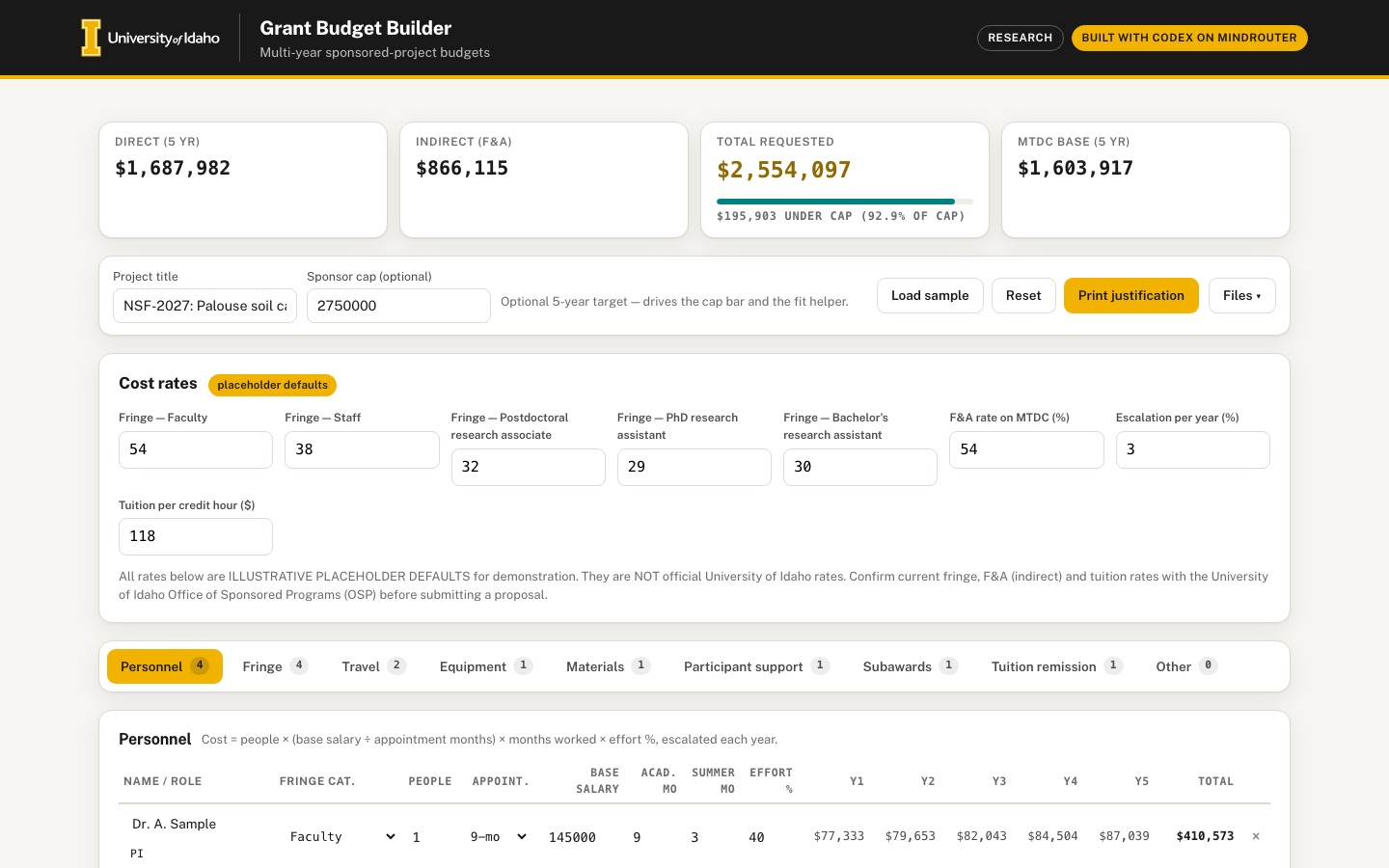 Desktop · click to enlarge

What it is ✎ blurb written by the AI critic
Build a five-year federal grant budget: add personnel with effort and appointment months, then add travel, equipment, materials, participant support, subawards, tuition and other costs. The app escalates salaries, applies fringe, and computes indirect costs on the correct MTDC base, with a panel showing exactly what was excluded and why. You can compare scenarios, solve for the effort that fits a sponsor cap, and export JSON, CSV or a printable budget justification.
Try this
- Click 'Load sample', then set Sponsor cap to 2,000,000 and press 'Solve for effort' in Fit to sponsor cap to see how much everyone's effort must shrink
- Open 'Compare without...' in Scenario compare and pick J. Postdoc to see what the postdoc costs over five years, including fringe and indirect costs
- On the Subawards tab, raise Year 1 of the partner-lab subaward to 60,000 and watch the MTDC panel exclude the amount above $50,000
Highlights ✎ written by the AI critic
- Live MTDC and F&A engine that follows 2 CFR 200.1, including the $50,000-per-subaward rule, with a year-by-year exclusion table
- Stacked bar chart by year and a donut of the 5-year total that update as you type
- 'Fit to sponsor cap' solves for personnel effort, caps anyone at 100%, and lands within about $1 of the target
- One-click 'Compare without' scenarios show the marginal cost of a person
- Printable NSF-style budget justification (sections A-J) with editable one-line justifications, plus JSON/CSV export and auto-save
Who it's for
Principal investigators, research administrators, department grant staff
Features
- Tabbed budget sheet: Personnel (people × effort % × base salary, calendar/academic/summer months), Fringe, Travel, Equipment, Materials, Participant support, Subawards, Other
- Year 1…5 columns with automatic escalation; live totals per category and year
- Correct MTDC and F&A computation with an explanation panel showing what was excluded and why
- Stacked bar chart of cost categories by year and a donut of the total
- Scenario compare (e.g. with vs without a postdoc) and a 'fit to sponsor cap' helper that solves for the effort that hits a target total
- Save/load to browser storage, JSON import/export, CSV export and a print-friendly budget-justification view
Data & sources
- No downloaded datasets — the app's rates are user-editable illustrative placeholders (data/raw/SOURCES.md)
- www.ecfr.gov — 2 CFR 200.1 MTDC definition —
- www.ecfr.gov — 2 CFR 200.414 Indirect (F&A) costs —
- www.uidaho.edu — University of Idaho Office of Sponsored Programs (contact section) —
- www.uidaho.edu — University of Idaho Budget & Planning consolidated fringe rates —
How it was built
Written by Codex CLI 0.154.0 (github.com) on qwen/qwen3.8-27b, served by MindRouter, the University of Idaho's on-premises AI platform.
Rounds by kind
| build | 1 |
| feedback | 8 |
| critic | 2 |
Lines of code per file
| body html | 211 |
| app css | 615 |
| app js | 2,268 |
| scripts | 138 |
Critic scores ✎ scored by the independent AI critic, 1–10
Independent audits ✎ by the AI critic
Automated checks
Checked by critic-verify.
Data spot checks ✎ written by the AI critic
- MTDC definition shown in the app vs data/raw/SOURCES.md verbatim 2 CFR 200.1 text: identical (equipment, participant support, tuition remission and each subaward's amount above $50,000 excluded); app's $50,000 applies per subaward over the whole award, as in SOURCES.md
- De minimis rate cited in app ('up to 15% of MTDC', 2 CFR 200.414(f)) vs SOURCES.md: match. All default rates (fringe 54/38/32/29/30%, F&A 54%, escalation 3%, tuition $118/credit) are labeled ILLUSTRATIVE PLACEHOLDER DEFAULTS, not U of I figures, with a note to confirm with OSP; no invented figures presented as real UI rates
- Sample budget, independent Python recompute (indep_calc.py) vs app: direct $1,687,982 = $1,687,982; MTDC $1,603,917 = $1,603,917; F&A $866,115 = $866,115; total $2,554,097 = $2,554,097
- Subaward $18,000/$18,540/$19,096/$19,669/$20,259 (total $95,564): hand calc $50,000 in MTDC, $45,564 excluded, crossing in Year 3 with $5,636 excluded that year; app shows the same
- PI $145,000 on a 9-mo appointment, 9 academic + 1.5 summer months at 12.5% effort: hand calc $21,145.83; app Y1 $21,146. Tuition 1 student x 18 credits x $118: hand calc $2,124 Y1 / $2,188 Y2 at 3%; app shows the same and excludes it from MTDC
Round-by-round timeline
Every harness round, in order. The prompts and FEEDBACK.md were written by the AI reviewer; the app code was written by the harness. Expand a round to see the exact prompt and the FEEDBACK.md the harness received.
-
Typing in any budget-table cell loses focus after the first character (critical). Personnel tab → "+ Add person" → click the Name cell → type "Dana Postdoc". Only "D" stays in the field; the remaining keystrokes go nowhere because the whole panel is re-rendered on every keystroke and the input is replaced. Same for numbers: typing 61000 into Base salary leaves "60". This happens in every tab's table (Personnel, Travel, Equipment, Materials, Participant support, Subawards, Tuition, Other) and in the Fringe rate cells. Expected: you can type normally; totals, charts and the summary strip update live while the cursor stays in the field (don't rebuild the row/input being edited).
-
Page error when toggling a month checkbox with more than one person. Load sample → Personnel tab → click any month checkbox on the 2nd–4th row. Console:
Uncaught TypeError: Cannot read properties of undefined (reading 'v'), and the months of the wrong person change. Expected: each person's month controls affect only that person, no errors. -
Phone layout blows out after "Load sample" (390 px). With sample data the Personnel panel becomes ~890 px wide inside a 358 px column; the document becomes 919 px wide, so mobile browsers zoom the whole page out: the black header covers only part of the width, the page scrolls sideways, and in the phone screenshot the toolbar buttons appear as empty white boxes with their labels off-screen. Expected: nothing wider than the screen; wide tables scroll horizontally inside their own card (or reflow into stacked row cards on phones), and the page itself never scrolls sideways at 390 px.
-
Non-personnel costs are wrongly repeated every year, and line tables have no Year 1…5 columns. The sample's single $12,000 "Soil sampling equipment" (Year charged = Y1) appears in every year: Budget by year shows Equipment $12,000 / $12,360 / $12,731 / $13,113 / $13,506 = $63,710. Same for the 2 conference trips and the participant stipends. Expected: each line in Travel, Equipment, Materials, Participant support and Other shows editable Year 1 … Year 5 amount columns plus a line total, with a quick way to fill a recurring cost (e.g. "repeat with escalation" from a start year) and one-time purchases (equipment) charged only in the year entered. The per-category table in each tab should show Y1…Y5 and total.
-
Personnel model does not match the spec (people × effort % × base salary, calendar/academic/summer months). Currently each person has 10 tiny checkboxes (Sept…May, "Summer (3 mo)") and the cost is salary × effort × months/12, so a 9-month academic-year faculty salary of $145,000 at 40% effort costs only $43,500 instead of $58,000. Expected per row: Name, Role, Fringe category, # of people (e.g. 2 undergrads), Appointment basis (Calendar 12-mo / Academic 9-mo), Base salary for that basis, Academic/calendar months and Summer months (numeric inputs, person-months shown), Effort %, and Y1…Y5 cost columns. Cost = people × base salary ÷ appointment months × months worked × effort % (summer months priced at the academic monthly rate), escalated each year. Also: the Base salary input is too narrow — "145000" is cut off ("1450"), and the Fringe-category select shows only "Fa"/"Po".
-
Donut chart has a large empty gap; charts disagree; empty-chart axis is broken. With sample data the "Share of total" donut is missing roughly a third of the ring (from ~8 o'clock to 12 o'clock) because its percentages are of total incl. F&A but no F&A slice is drawn; legend says Personnel 36% while the bar-chart legend says Personnel 53%. Expected: include Indirect (F&A) as its own series in both charts (top segment of each stacked bar, and a donut slice), so the donut closes and both legends agree. On a blank budget the bar chart shows y-axis labels "$1, $1, $1, $0, $0, $0" over an empty plot — show a friendly empty state instead ("Add costs to see the chart").
-
Project title field is not refreshed after Load sample, Import JSON or Reset: the field still shows the placeholder although the print view already says "Budget Justification — Imported Test Budget". Same for the Sponsor cap field. Expected: all toolbar fields reflect the loaded budget.
-
CSV export is malformed. The Direct, MTDC base, Indirect F&A and TOTAL rows are each split over three lines (label on one line, the five year values on the next, the total on a third), e.g.
Direct/133592,157100,…/790841. Expected: one row per lineDirect,133592,157100,161813,166668,171668,790841. The CSV should also include every line item (travel, equipment, materials, participant support, subawards, tuition, other) with Y1…Y5 and totals, plus the rates used (fringe by category, F&A %, escalation %). -
"Fit to sponsor cap" needs work. (a) The toolbar "Sponsor cap (optional)" field does nothing visible — expected: it drives the fit helper's target and the summary strip shows remaining headroom / amount over cap with a progress bar that turns red when over. (b) The solver always scales everyone; expected a selector "Solve effort for: all personnel / a specific person (e.g. PI)". (c) Results show unrounded effort such as 85.3152090461181% in the table, print view and CSV — round to 0.1% and show a small before → after effort table before applying. (d) If the budget is under the cap it only says "no change needed" — it should also be able to scale effort up to reach the target.
-
Scenario compare. (a) Each snapshot stores a full copy of the state including all earlier snapshots, so the exported JSON grows with nested
scenariosinside every snapshot — store snapshots without nested scenarios. (b) Negative deltas render as "$-230,947"; use "−$230,947". (c) Make the spec's example one click: e.g. a per-person "include in scenario" toggle or a "Compare without…" menu that creates the with/without pair automatically. (d) Add a small visual (e.g. horizontal bars of each scenario's total with the delta) and a way to delete a single scenario. -
MTDC explanation panel should show the actual exclusions, not just a total. The per-year table has one "Excluded" column. Expected: for each year, the excluded amount broken down by reason — Equipment, Participant support, Tuition remission, Subaward amounts above the first $50,000 (name the subaward and when it crosses $50k) — with the 2 CFR 200.1 reason next to each, and a simple visual (e.g. Direct → minus exclusions → MTDC → × F&A rate = Indirect). The "Excluded from the base" list currently repeats itself and doubles parentheses: "Equipment — Equipment (capital expenditures) is excluded … (2 CFR 200.1 (MTDC definition))".
-
Print justification is just tables. Clicking it goes straight to the browser print dialog. Expected: an on-screen, print-friendly Budget Justification preview (modal or view) with a Print button, organised by category (A. Senior personnel, B. Other personnel, C. Fringe, D. Equipment, E. Travel, F. Participant support, G. Other direct costs incl. materials/subawards/tuition, H. Total direct, I. Indirect, J. Total), listing each line item with its Y1…Y5 amounts and an editable one-sentence justification per line (add a "Justification" text field to every row), plus the rates used and the placeholder-rate/OSP note.
-
Subawards: entering "Total (5-yr)" $90,000 produces $95,564 in the budget because it is split evenly and then escalated. Expected: enter subaward amounts per year (Y1…Y5); the budget total equals what was typed, and the row shows how much is in the MTDC base vs excluded each year.
-
First-visit guidance and toolbar. The "How to use" hint is collapsed at the very bottom of the page, where a first-time visitor will not see it. Expected: a short, dismissible 3-step hint near the top (above the sheet). On a phone the six toolbar buttons stack full-width and fill the whole first screen — group Import / Export JSON / Export CSV into a compact menu or a two-column grid so the summary and budget sheet are visible sooner.
-
Polish / accessibility. Animate chart changes (bars growing, donut arcs) and the summary numbers when values change; the tab panel needs
role="tabpanel"and the tabs should support Left/Right arrow keys; give the stacked bars keyboard-focusable tooltips or a visible data table link. -
BLOCKER — the app cannot be used at all: the Budget Justification modal is open on page load and cannot be closed. On first load an empty dialog "Budget Justification —" with Print / Close covers the page (desktop and phone) over a dark backdrop. Clicking Close does nothing: the backdrop keeps
hidden=truebut its computed style is stilldisplay:flex, full-screen, so it intercepts every click — Load sample, tabs, inputs, everything. The same root cause affects every element toggled with thehiddenattribute whose CSS sets adisplayvalue: the Files ▾ menu panel and the "Compare without…" panel are permanently visible on load, and the gold first-visit hint cannot be dismissed with its ✕ (computeddisplay:flexwhilehidden=true). Note the page has no global[hidden]{display:none}rule. Expected: modal, menus and hint are hidden until opened, and Close / ✕ / clicking outside really hide them. -
Typing in budget-table cells still loses focus after one character (critical, unchanged from round 1). Personnel → "+ Add person" → click Name → type "Dana Postdoc" → field contains "D". Base salary: type 61000 → field contains "6". Travel → Year 2 amount: type 2500 → "2". The panel is still rebuilt on every keystroke (
#gb-panelis emptied and redrawn), so the focused input is destroyed. Expected: you can type a full value normally with the cursor staying in the field while totals, the summary strip and charts update live (e.g. do not rebuild the table oninput; update only the computed cells, or rebuild onchange/blur while updating the totals live). -
Uncaught page error on every render with personnel:
Uncaught TypeError: sel.children.push is not a function(app.js ~line 1153). It fires after Load sample and on every edit. A visible consequence: the Fit-to-cap "Solve effort for" select only ever contains "All personnel" — the individual people are never added. Expected: no console errors; the select lists All personnel plus each person by name. -
Fit to cap gives the wrong result. Sample budget (total $2,532,742), sponsor cap 1,200,000 → Solve for effort says "To hit $1,200,000, scale effort 23.3% of current (≈ $1,200,000)" and shows before → after efforts (40% → 9.3%, 100% → 23.3% …). After Apply effort change, Total requested becomes $809,206, not $1,200,000. Expected: after applying, the 5-year total equals the target (within a few dollars), for both "All personnel" and a single selected person; if the target is unreachable (e.g. non-personnel costs alone exceed it) say so clearly.
-
Fit-to-cap target is not prefilled from the sponsor cap. With "Sponsor cap" = 1,200,000 in the toolbar, the "Target total (defaults to cap)" field stays empty. Expected: it shows the cap value (and follows cap changes until the user types their own target).
-
Files ▾ menu does not open. (With item 1 fixed, the panel is hidden.) Clicking "Files ▾" leaves
aria-expanded="false"and the panel hidden, so Import JSON…, Export JSON and Export CSV are unreachable. Expected: click opens the menu, choosing an item runs it and closes the menu; Escape and outside-click close it. -
Justification preview tables overflow the dialog. Desktop: the "A. Senior personnel" table (with the Justification column) extends ~180 px past the right edge of the white dialog, and the whole page behind becomes 1758 px wide (sideways scroll). Phone: the "Budget by year" table runs off the right edge of the dialog. Expected: wide tables scroll horizontally inside the dialog (or wrap); nothing sticks out of the dialog and the page never scrolls sideways.
-
Stacked bar chart is tiny and two series share a color. On desktop the "Cost categories by year" SVG only fills about half the card width with axis labels around 5–6 px tall ($1.0M, $800K … barely legible); same on phone. Expected: the bar chart fills the card width with readable 11–12 px axis labels. Also Travel and Indirect (F&A) are both gold in both charts and legends, so the big F&A slice looks like travel. Expected: every series has a distinct color (use the brand series palette; F&A could be a neutral/steel or hatched fill).
-
Year amount cells show fractional values cut off. Travel → "repeat w/ escalation" fills Y3–Y5 with values like "6789." / "6993." / "7203." (decimals truncated by the narrow input). Expected: amounts rounded to whole dollars and the Y1–Y5 inputs wide enough to show 6-digit amounts (e.g. 125000) without clipping.
-
New personnel rows start with a blank "Summer mo" and zero salary; when Appointment is Academic the summer field is empty rather than 0. Expected: sensible defaults (e.g. Academic 9 + Summer 0, Calendar 12) and every numeric cell shows a number.
-
Phone scroll affordances. At 390 px only 3 of 9 category tabs are visible and the Personnel table shows only Name and Role; both scroll sideways but nothing tells the user. Expected: a visible cue (edge fade/shadow or "scroll →" hint) on the tab strip and wide tables; consider pinning the Name column.
-
MTDC "Excluded from the base" list layout is cramped: the citation "2 CFR 200.1 (MTDC definition)" is squeezed into a narrow middle column that wraps to three lines between the label and the explanation. Expected: label and amount on one line, explanation below, citation as a small chip.
-
First-visit hint on phone has a large empty area under the three steps (the ✕ sits on its own row). Expected: compact card with the ✕ in the top-right corner.
-
CRITICAL NEW REGRESSION — every card is wider than the screen and the right side is cut off. The page column now grows to fit its widest content: on a 390 px phone every card (hint, summary strip, toolbar, Cost rates, tabs, panel, Budget by year, MTDC, charts, Scenario, Fit, Data & sources) is 557 px wide even on an empty budget and 1,386 px wide after Load sample; on a 1440 px desktop, after Load sample with the Personnel tab open, every card is 1,590 px wide inside the 1,100 px column (right edges at x≈1778). Because
overflow-x: hiddenwas added to html/body, nothing scrolls — the content is simply clipped: on the phone the "Indirect (F&A)" and "MTDC base" tiles, half of the toolbar buttons (the gold Print justification button shows no label) and the right half of every table are invisible and unreachable; on desktop the Personnel table's Y5/Total columns and the right edge of every card are cut off. Expected: the page column never grows beyond the viewport (grid/flex children must be allowed to shrink), wide tables scroll horizontally inside their own card, and nooverflow-x:hiddenband-aid is needed on html/body. Check at 390 px and 1440 px, with the empty budget and with the sample on the Personnel tab. -
Typing in table cells still loses focus after one character (3rd report). Personnel → "+ Add person" → click Name → type "Dana Postdoc" → field shows "D". Base salary: type 61000 → "6". Travel → Year 2: type 2500 → "2".
renderPanel()still empties#gb-paneland rebuilds every row on eachinputevent, and there is no logic that skips the rebuild while an input inside the panel has focus. Expected: a user can type multi-character values in every table cell while totals, strip and charts update live. -
Uncaught TypeError: sel.children.push is not a functionstill fires on every render (3rd report). It is still inbuildFitWho()(src/app.jsline ~1231:sel.children.push(op);). Consequences: the "Solve effort for" select only lists "All personnel", and the rest of each render after that call is skipped. Expected: no console errors; the select lists each person by name. -
Fit to cap still misses the target. Sample budget, sponsor cap 1,200,000 → Solve says "To hit $1,200,000, scale effort 23.3% of current (≈ $1,200,000)" → Apply effort change → Total requested = $810,771. Expected: after applying, the total equals the target within a few dollars (all personnel and a single person). Show resulting efforts rounded to 0.1% (currently "9.34%", "23.34%").
-
Justification dialog shifts sideways when typing a justification. Open Print justification, click the first "One-sentence justification" field in section A and type: the dialog's whole content scrolls horizontally — the title becomes "…on — Imported Test Budget", the Summary and Budget-by-year tables lose their left columns, and the page behind shifts left too. Expected: only the wide table scrolls inside its own container; the dialog header and other sections stay put.
-
Fit target field: with a sponsor cap set, the "Target total" input stays empty (placeholder "uses sponsor cap") while the solver silently uses the cap. Expected: show the cap value in the field (or placeholder text with the actual number, e.g. "1,200,000 (sponsor cap)") so the user sees what is being solved.
-
New personnel row: "Summer mo" is still blank (value ""), and salary starts at 0. Expected: Summer 0 shown, and a sensible starting salary or a clear empty-state hint in the cell.
-
MTDC "Excluded from the base" list: each item's red "−" bullet now sits alone on its own line above the label (desktop). Expected: bullet, label and citation chip on one line, explanation underneath.
-
Typing in table cells still loses focus after one character (4th report). Steps: Load sample → Personnel → "+ Add person" → click the new row's Name cell → type "Dana Postdoc" → the cell contains only "D". Base salary: type 61000 → "6". Travel tab → a row's Year 2 amount: type 2500 → "2". The round-4 "keep the live row" change does not take effect: after the first keystroke the input element the user was typing in is removed from the document (a brand-new input replaces it), so focus goes to
<body>and further keystrokes are lost. It must work in every table: Personnel, Travel, Equipment, Materials, Participant support, Subawards, Tuition, Other, and the Fringe rate cells. Acceptance check you can simulate without a browser: after aninputevent on any table cell, that very same input element must still be connected to the document (isConnected === true) and must still bedocument.activeElement, while the row's Y1–Y5/Total cells, the Budget-by-year table, the summary strip and the charts show the new numbers. -
Phone layout: tables spill out of their cards and widen the whole page (new regression). At 390 px wide: with the empty budget, the "Budget by year" table extends to x=463 and the page becomes 570 px wide; after Load sample, the Personnel table extends to x=1,399 and the page becomes 1,400 px wide. In mobile emulation the browser then lays the page out 1,400 px wide and zooms out, so everything is tiny, and taps on the tabs land on the header instead. The tables are no longer contained by their horizontal-scroll wrappers (the ≤640 px rule that sets table min-width to 0 appears to let them escape). Expected: at 390 px, with the empty budget and with the sample on every tab,
document.documentElement.scrollWidthis 390; each wide table scrolls sideways inside its own card. -
Fit to cap predicts the wrong effort. Load sample (total $2,542,821) → Target total 1,200,000 → Solve for effort → preview "scale effort 23% … (≈ $1,200,000)" with efforts 40→9.2%, 100→23.1%, 100→23.1%, 25→5.8% → Apply effort change → the table shows exactly those efforts, but Total requested = $814,497, not $1,200,000. So applying works; the solver's prediction is wrong. Expected: the previewed "≈ total" is computed with the same budget calculation used by the summary strip (e.g. compute the total at 0% and at 100% of the selected people's current effort and solve the straight line between them, or iterate), so that applying lands within a few dollars of the target, for "All personnel" and for a single person. Show the resulting total in the preview.
-
Justification dialog still shifts sideways when you type a justification. Print justification → click the first "One-sentence justification" field in section A → type: the dialog's content scrolls horizontally — the section heading shows "…ostdocs)", the Summary/Budget-by-year tables lose their left columns, Basis cells show "emic"/"dar". Expected: focusing a field inside a wide table only scrolls that table's own wrapper (or the justification field is placed below the numbers so no sideways scroll is needed); headings and other tables stay put.
-
Summer months cell shows grey placeholder text "Summer" (truncated) instead of a number for Calendar-basis rows and new rows. Expected: the value 0 is shown.
-
Typing in category-panel table cells still loses focus — now on the first keystroke even though the input is kept. Measured in Chrome: click an existing cell and type one character →
-
Personnel "Dr. A. Sample" name cell: value becomes "Dr. A. Sam7ple", the input is still in the document (
isConnected: true) butdocument.activeElementis now<body>. -
Personnel salary cell (62000 → "620007"): same, focus goes to
<body>. -
Travel Year 2 cell (6592 → "65927"): same.
-
Fringe tab, Faculty rate cell (54 → "547"): same.
-
Control: the F&A rate input in the Cost rates card (outside the panel) keeps focus correctly. So the second character is always lost. In real browsers, removing and re-inserting (moving) a focused element or any of its ancestors — the row, tbody or table — blurs it, even when it is the very same DOM node (appendChild/insertBefore/replaceChildren on an ancestor all do this). jsdom does not emulate that blur, which is why a jsdom check passes while Chrome fails. Expected: while the user is typing, the row/table that contains the focused input is not detached or moved at all; only the computed cells (row Y1–Y5/Total, Budget-by-year table, strip, MTDC, charts) change their text. A full rebuild of the panel may happen on
change/blur, or when a row is added/removed. Verify by typing "Dana Postdoc" into a Name cell and 61000 into a salary cell: the complete text must end up in the field.
-
-
Effort values after "Apply effort change" are not rounded. After fitting to $1,200,000 the justification preview shows Effort % "16.26876100194338%", "40.67190250485845%", "10.167975626214613%" (the Personnel table and CSV also carry the long decimals), while the fit preview's AFTER column shows whole numbers "16%", "41%", "10%" next to BEFORE values with one decimal ("40.0%"). Expected: effort shown with one decimal everywhere (table cell, preview, justification, CSV), e.g. 16.3%; after Apply the total may differ from the target by a few hundred dollars because of that rounding — say so in the result message ("≈ $1,199,870 after rounding to 0.1%").
-
Stacked bar chart readability. The chart is drawn in a fixed 760-unit-wide SVG that is scaled down, so the axis and year labels render at about 8 px on desktop and about 5 px on a 390 px phone (unreadable). The y-axis also runs to $1.0M while the tallest bar is $529K, leaving the top half empty. Expected: labels render at 11–12 px on both desktop and phone (size the SVG to its container or scale the font inversely), a tighter "nice" maximum (e.g. $600K), and value labels on top of every bar, not only Year 5.
-
Toast covers controls. After Load sample the black "Sample loaded" toast sits at bottom-center over the gold "Print justification" button on the phone and over table headers on desktop for ~2.5 s. Expected: a smaller toast that does not cover primary controls (e.g. top-right on desktop, above the bottom safe area on phone, with
pointer-events: none). -
Phone polish. At 390 px the Personnel table shows only Name and Role; the other 13 columns need a sideways swipe and no "scroll →" cue is visible. Expected: a visible cue (fade edge or "Swipe for Y1–Y5 →" label) on every wide table on phones.
-
CRITICAL REGRESSION —
Uncaught ReferenceError: livePerson is not defined.src/app.jsuses a variablelivePerson(around lines 509, 537, 785 and 814) that is never declared anywhere (onlyliveRowis declared, around line 1883). Because the script runs in strict mode, every render that reaches the Personnel code throws. What a user sees:-
Click Load sample → the summary strip stays at $0 / $0 / $0 / $0 and the Project title stays empty.
-
The Personnel tab body is completely empty — no table, no rows, no "+ Add person" button, no empty-state message (only the "Personnel — Cost = people × …" heading).
-
Equipment tab: the row's Total cell is blank; Fringe tab: the Base (Y1), Y1 and 5-yr columns are blank.
-
Reload the page → the budget is gone (project title empty, total $0), so autosave is broken too.
-
The error fires 4× on desktop and 2× on phone during a normal session. Expected: no console errors; Load sample fills the strip, the title and every tab exactly as in round 5; autosave restores the budget after reload.
-
-
Focus while typing — finish the job once item 1 is fixed. Keep the in-place update that now works in the Travel table and make sure it also holds for: Personnel Name ("Dana Postdoc" typed into a new row's Name cell must end up complete), Personnel Base salary (type 61000 → field shows 61000), Personnel Effort %, and the Fringe tab rate cells (Faculty 54 → type 7 → "547" with the cursor still in the cell). In each case the focused input must remain
document.activeElementafter every keystroke while the row's Y1–Y5/Total, the Budget-by-year table, the summary strip and the charts update. -
Re-test in a clean page before finishing. The round-6 summary said 18/18 checks passed, but the delivered index.html throws on Load sample. After
python3 build.py --check, run the builtindex.html(not a copy of the source) through this sequence and confirm zero errors: open page → Load sample → strip shows $2,5xx,xxx → Personnel tab shows 4 rows → type into a Name and a salary cell → Equipment and Fringe tabs show their computed columns → reload → the sample budget is restored. -
Computed text cells inside the category tables are blank. Measured cell text right after Load sample (inputs shown in [brackets]):
-
Personnel:
[Dr. A. Sample] | … | [40] | $77,333 | $79,653 | $82,043 | $84,504 | $87,039 | (blank) | ×— the Total column is empty for every person (Y1–Y5 are filled). -
Fringe tab:
Faculty | [54] | (blank) | (blank) | (blank)— Base (Y1), Y1 and 5-yr are empty for all five categories, so the Fringe tab shows no fringe dollars at all. -
Travel:
[Domestic conference (2 trips/yr)] | [6400] | [6592] | [6790] | [6993] | [7203] | (blank) | …— the line Total is empty; same for Equipment ($12,000 purchase shows an empty Total) and the other item tabs. -
Subawards:
… | [20259] | (blank) | (blank) | (blank) | ×— Total, In MTDC and Excluded are all empty, so the per-subaward MTDC split is invisible. In round 5 these cells showed values (e.g. Fringe Faculty "$77,333 / $41,760 / $221,710", Subaward "$95,564 / $50,000 / $45,564"). Expected: every computed cell shows its dollar value on first render, after switching tabs, and updates live while typing.
-
-
Adding a person and typing into the new row duplicates rows and loses input. Load sample → Personnel → "+ Add person" (5 rows) → click the new row's Name and type "Dana Postdoc" → click its Base salary, select all and type 61000. Result: the panel now has 8 rows (duplicated rows appear), the new row's salary still shows 0, and Total requested does not change ($2,635,823 before and after). Expected: exactly 5 rows; the typed salary is kept, and the row's Y1–Y5/Total, the summary strip and charts update. Check the same flow for "+ Add travel", "+ Add equipment" and "+ Add subaward" (type a description, then a Year 1 amount).
-
REGRESSION — focus is lost on the first keystroke again, in every category-table cell. In round 7 (commit "round 7 (feedback) by codex", 9d2b803) Chrome kept focus in all of these; in round 8 none of them do. Measured in Chrome (click the cell, type one character, check
document.activeElement):-
Personnel "Dr. A. Sample" name → value "Dr. A. Sam7ple", focus moved to
<body>. -
Personnel salary (38000 → "380007"), Personnel Effort % (25 → "257"), Travel Year 2 (6592 → "65927"), Fringe Faculty rate (54 → "547"): focus moved to
<body>every time. -
Control: the F&A input in the Cost rates card keeps focus. The round-8
renderPanel"builds a fresh table as a sibling of the kept wrapper, then merges the kept row into the fresh table" — moving the focused row into another table is exactly what blurs it in a real browser (jsdom does not show this). Expected: combine round 7's focus behaviour with round 8's computed-cell sync. The rule that must hold: while an input inside#gb-panelhas focus, its row, tbody, table and wrapper are never inserted, moved, re-parented or removed; only the text of computed cells (in all rows) is updated in place.
-
-
Adding a row and typing into it corrupts another row. Load sample → Personnel → "+ Add person" (5 rows, blank row at the bottom) → click the new row's Name, type "Dana Postdoc" → only "D" is kept → click the new row's Base salary, select all, type 61000. Result: the panel shows 4 rows — the new person row is gone — and the keystroke landed in U. Undergrads' Base salary, which is now 6 (Fringe tab: Bachelor's research assistant drops to $2; Total requested falls from $2,542,821 to $2,473,749). The same add-and-type flow on Travel, Equipment and Subawards ("+ Add …", type "Probe line", then 5000 in Year 1) keeps only "P" and "5". Expected: the new row stays, keeps every typed character, and no other row's data changes. Row count after the flow: Personnel 5, Travel 3, Equipment 2, Subawards 2.
-
Open "Print justification", then print (I used Chromium
page.pdf()with print media): the PDF is 1 page and stops right after the heading "A. Senior personnel". Sections A–J, "Rates used" and all justification text are cut off. -
Cause:
.gb-modal { max-height: 92vh; overflow-y: auto }(app.css ~line 481) is not reset inside@media print(app.css ~515–516), andbody.gb-modal-open { overflow: hidden }(line 511) also clips..gb-justif-scroll { overflow-x: auto }clips wide tables in print too. -
Also: printing with the modal CLOSED (Ctrl/Cmd+P from the page) gives a blank page, because
.gb-shellis hidden and.gb-printisdisplay:none !important(line 524) in print. -
Fix: in
@media printset.gb-modal, .gb-justif, .gb-justif-scroll { max-height:none; overflow:visible; },body.gb-modal-open { overflow: visible; }, tableswidth:100%; font-size:9pt; table-layout:auto,section { break-inside: avoid-page }for small sections. Addwindow.addEventListener('beforeprint', ...)that builds the justification and shows it for print even when the modal is closed (e.g. add a class that makes#justif-backdropprint as a static block). -
Check: printed output (modal open or closed) is ≥ 2 pages and contains "J. Total budget" and "Rates used".
-
"J. Total budget" row reads
<strong>Total requested</strong>and<strong>$2,542,821</strong>as text. -
Cause: app.js ~lines 1801–1802 pass HTML strings to
jTd()/jNum(), which usetextContent. -
Check:
#justif-bodyinnerText contains no<character. -
Typing effort
12.5stores13; typing Summer mo1.5stores2(checked in localStorage). 1.5 summer months is very common in NSF budgets, and the fit helper itself writes 0.1% effort values that the user can then no longer type. -
Cause:
numCell()(app.js ~line 827) doesMath.round(parseFloat(...))for every field. -
Fix: keep
peopleandsalaryas whole numbers; storeeffortrounded to 0.01 andacadMonths/sumMonthsrounded to 0.01. Clamp effort to 0–100 and months so acad+summer ≤ 12 for every row (not only whenlivePerson === obj), and onchange/blur write the clamped value back into the input (today typing50100in Effort shows "50100" while the state is 100). -
Check: PI row with salary 145000, Academic (9-mo), Acad mo 9, Summer mo 1.5, effort 12.5 shows Y1 = $21,146 (145000/9 × 10.5 × 0.125).
-
Sample budget, target $3,000,000: the table says J. Postdoc and S. PhD go from 100.0% → 143.7%, and the message says "scale effort to 143.7% of current". Applying actually caps them at 100% and raises only the PI (57.5%) and undergrads.
-
Fix: "After" =
min(100, before × factor)with a small "capped at 100%" tag on capped rows; reword the message to "Effort multiplied by ×1.437 (2 people capped at 100%)". If every selected person would be capped and the target is still out of reach, say it is unreachable by effort alone. -
Precision: after "Apply" with target $1,400,000 the total is $1,398,540 ($1,460 short) because
applyFitrounds effort to 0.1%. Once item 3 allows 0.01%, round to 0.01% inapplyFitand in the table. Check: applied total within ±$300 of the target. -
CHART_SERIES(app.js ~lines 36 and 43) gives bothfringeandotherSERIES[4](rgb(3,68,65)). With an Other line the legend shows two identical dark-green swatches. -
Fix: give Other its own colour, visibly different from every other series and from the grey F&A hatch (e.g. Silver
#808080or a light Clearwater tint#7FBFBF). -
Check: the 10 series fills are all different.
-
At 1440×900 the page content is only 1100px wide (
.gb-shell { max-width: 1100px }, app.css line 5) while the personnel table hasmin-width: 1150px(line 423). The table is cut off after "Effort %", so the Y1–Y5 and Total columns (the answer) need sideways scrolling. The Fringe cat. select is 54px wide and shows "Fac", "Pos", "PhD"; the Appointment select is 81px and shows "Academ:", "Calend:". The tab bar also wraps "Tuition remission" and "Other" onto a second row. -
Fix: use the available width (
#appallows 1320px: set.gb-shellmax-width to 1320px) and make the personnel table fit: short option labels ("Faculty", "Staff", "Postdoc", "PhD RA", "Undergrad RA"; "12-mo", "9-mo"), selects wide enough for their label, narrower number inputs for People / Acad mo / Summer mo / Effort (~64px). -
Check at 1440 width with the sample: the personnel
.gb-table-wraphasscrollWidth <= clientWidth, and each select'sclientWidthis at least its selected label's text width + 24px. -
At 390px a grey vertical gradient band sits over the Role column text in Personnel (about 70px from the card's right edge) and over the numbers in the Scenario compare table.
-
Cause:
.gb-table-wrap__fade(app.css ~402–406) is a floated sticky element with a fixedheight:180px; margin-top:-180px, so it lands wherever the float ends up, not at the table's right edge. -
Fix: remove the separate fade element and draw the edge shadow on
.gb-table-wrapitself, or wrap the table-wrap in aposition:relativebox and position the fadeabsolute; top:0; bottom:0; right:0. -
Check: the fade's bounding box has the same top, bottom and right as its
.gb-table-wrap(±2px). -
"Sample loaded" / "Compared: …" appears top-right over the "BUILT WITH CODEX ON MINDROUTER" chip on desktop and over the modal title on phone.
-
Fix: show the toast bottom-centre (e.g.
bottom: 20px; left: 50%; transform: translateX(-50%)). -
Check: the toast rectangle does not intersect
.ui-headeror.gb-modal__head. -
Changing Tuition per credit from 118 to 999 changes no number anywhere; the Tuition tab only takes typed per-year amounts. Every control must do real work.
-
Fix: each tuition line gets Students and Credits / yr inputs; its Y1–Y5 amounts are
students × credits × tuition rate × (1 + escalation)^year. Keep lines imported with typed per-year amounts and no credits working as before. Label the rate "Tuition per credit hour ($)". Add a tuition line to the sample (1 PhD student × 18 credits). -
Check: 1 student × 18 credits at $118 gives Y1 tuition $2,124; changing the rate to 500 gives $9,000, and the MTDC table's "− Tuition" column shows it excluded from the base.
-
Section "A. Senior personnel (PI & postdocs)" includes J. Postdoc (app.js ~line 1620,
isSenior). On NSF and most federal budget forms postdoctoral scholars go under "B. Other personnel". -
Fix: senior = faculty category only; heading "A. Senior / key personnel"; postdocs, staff and students in B.
-
Snapshot "With postdoc", then Compare without → J. Postdoc gives 3 columns: "With postdoc", "Baseline" (identical) and "Without J. Postdoc".
-
Fix: if the last scenario's snapshot equals the current budget, reuse it as the baseline instead of pushing another. On phone the scenario bar value wraps as "(−" / "$669,132)"; put the delta on its own line or give the value column more room.
-
At 1440×900 the personnel tables in the modal have 14 columns and the "Justification" input is to the right of the visible area; you must scroll the table sideways to type a justification.
-
Fix: render each line's justification input on its own full-width row under the line (
<tr><td colspan=...>), so it is visible at any width and prints as a sentence under the line. -
Measured with the sample loaded: 1440×900: all 16 personnel
tds are 75px wide (.gb-table--personnel { table-layout: fixed }, app.css line 413; the per-columnth:nth-childwidths at lines 573–582 exist only inside the phone media query).td { overflow: hidden; text-overflow: ellipsis }(line 417) then clips the controls:-
the Name input (150px) shows "Dr. A. Sa" and the Role input shows "Postdoct"
-
the Y1 cell needs 77px and shows "$77,3…"; Total needs 86px and shows "$410,…"
-
the 60px number inputs in 75px cells render a stray "‥" beside People, Acad mo, Summer mo and Effort
-
the "Undergrad RA" select is 84px but its label needs 93px
-
-
390×844: Y1–Y5 and Total
tds are 31px wide (the phone widths add up to more than the 700px min-width, so the year columns get the leftover). The costs show as "$…" even after swiping. -
Fix:
-
Remove
overflow:hidden; text-overflow:ellipsisfrom the personneltds. Never clip numbers. -
Make the table fit at desktop width. Wrap clientWidth is 1194px at 1440, so budget about 1150px:
-
put Role as a second, smaller input under Name in the same cell (saves a whole column)
-
hide number spinners (
appearance: textfield) -
use compact 4–5px cell padding
-
approximate widths:
-
-
-
On phones, let the table keep its natural width and scroll sideways with the sticky Name column, rather than squeezing columns. Use
table-layout: auto, or fixed widths that include the year columns, withmin-widthset to their sum. -
Check:
-
At 1440×900, the personnel
.gb-table-wraphasscrollWidth <= clientWidth. -
At 1440×900 and at 390×844, every personnel
tdhasscrollWidth <= clientWidth + 1. -
No personnel
tdhas computedtext-overflow: ellipsis. -
The Name input's
scrollWidth <= clientWidthfor "Dr. A. Sample". -
At 390px, after scrolling the wrap to the right, the Y1 cell's full text "$77,333" is inside the wrap's visible rectangle.
-
-
.gb-table-wrap__cueand.gb-table-wrap__fadeare nowposition:absolute(app.css lines 395–406). They are inserted as siblings after the wrap (app.js ~lines 415–432), and their parents (#gb-panel,.gb-card) areposition: static, so theiroffsetParentis BODY. -
Result at 390×844: three "swipe Y1–Y5 →" chips stack at the top-right of the page over the black University of Idaho header (rect 283,4 → 380,26). Three full-height 28×844px grey fade stripes cover the right edge of the first screen, far from any table (the tables start at y = 1882, 2321 and 4465).
-
Fix (choose one):
-
(a) Delete the cue/fade elements. Draw the edge shadow with CSS scroll-shadow backgrounds on
.gb-table-wrapitself (background-attachment: local, scroll). Show a small normal-flow note "Swipe for Y1–Y5 →" above the table, only atmax-width: 760px. -
(b) Give the host
position: relativeand set the fade'stop/heightfrom the wrap'soffsetTop/offsetHeight. -
Either way, don't re-parent a wrap that may contain the focused input.
-
-
Check at 390×844 with the sample loaded:
-
No cue or fade rectangle intersects
.ui-header. -
Every fade/cue rectangle lies within its own
.gb-table-wraprectangle (±2px).
-
-
Typing
150in Effort and pressing Tab leaves the input showing "150" while the state is 100. -
Cause: the
changehandler innumCell()(app.js ~line 940) only writes backif (document.activeElement === inp ...). Whenchangefires on commit/blur, focus has already moved, so the condition is false. -
Fix: in the
changehandler, writeinp.value = obj[field]whenever it differs (drop the activeElement test).changeonly fires on commit, so this never interferes with typing. -
Check: type 150 in Effort, press Tab → the input shows 100.
1 build 18.2 min · 6 files changed, 3672 insertions(+), 3 deletions(-) Show prompt
Read AGENTS.md, SPEC.md and BRAND.md in this directory. Then build the complete app they describe, step by step.

This app has no downloaded datasets. data/raw/SOURCES.md lists the reference documents (2 CFR 200.1 MTDC definition, 2 CFR 200.414 indirect costs, University of Idaho Office of Sponsored Programs and the U of I Budget & Planning fringe-rate page) that the app's visible "Data & sources" section must cite with links. First write a small Python script in scripts/ that produces compact JSON in data/embed/ with the app's reference data (the placeholder default rates clearly marked as illustrative placeholders, the MTDC exclusion rules with their 2 CFR citations, and the source links) and run it. Then write src/body.html, src/app.css and src/app.js; run python3 build.py --check and fix any error it reports.

Implement every required feature in SPEC.md with a polished, modern, responsive University of Idaho design. Do not stop until python3 build.py --check succeeds and every feature is implemented.
2 feedback 23.3 min · 5 files changed, 2582 insertions(+), 763 deletions(-) Show prompt
Read FEEDBACK.md in this directory — it lists problems a reviewer found when testing index.html in a real browser. Fix every item, keeping everything that already works, then run python3 build.py --check.
Reviewer feedback — round 1 (tested in real Chromium at 1440×900 and 390×844)
Most important first. Keep everything that already works (sample budget, MTDC subaward $50k-per-subaward logic, localStorage autosave, JSON export, invalid-JSON toast, fit solver math, scenario table, Data & sources card).
3 feedback 18.8 min · 4 files changed, 533 insertions(+), 219 deletions(-) Show prompt
Read FEEDBACK.md in this directory — it lists problems a reviewer found when testing index.html in a real browser. Fix every item, keeping everything that already works, then run python3 build.py --check.
Reviewer feedback — round 2 (tested in real Chromium at 1440×900 and 390×844)
Round 2 added a lot of good work. KEEP all of this (verified working once the blocker in item 1 is bypassed): Y1–Y5 line items with "repeat w/ escalation" and one-time equipment; personnel model (people, appointment basis, academic + summer months, Y1–Y5 + total); F&A as its own chart series; cap strip "Over cap by …"; MTDC flow card (Direct − exclusions = MTDC × rate = Indirect) with per-year exclusion columns and the subaward note; "Compare without…" scenarios with bars and deltas; justification preview with per-line justification inputs; Left/Right arrow keys on tabs; no horizontal page overflow at 390 px; localStorage persistence.
Most important first:
Please re-test in a real browser flow before finishing: load → Load sample → type full values into a name, a salary and a Year 2 cell → Files ▾ → Export CSV → Print justification → Close → Fit to cap with a cap set → Apply, and check the console stays free of errors.
4 feedback 15.3 min · 4 files changed, 204 insertions(+), 118 deletions(-) Show prompt
Read FEEDBACK.md in this directory — it lists problems a reviewer found when testing index.html in a real browser. Fix every item, keeping everything that already works, then run python3 build.py --check.
Reviewer feedback — round 3 (tested in real Chromium at 1440×900 and 390×844)
Good progress. VERIFIED WORKING NOW — keep all of it: modal/menus/hint hidden on load; Close + Escape close the justification dialog; Files ▾ opens and closes on outside click; Export JSON (no nested scenarios), Export CSV (61 well-formed lines), Import JSON (title refreshes), invalid-JSON toast, reload persistence; F&A hatched series with distinct colors and agreeing legends; bar tooltip; cap strip "Over cap by …"; Compare without… + manual snapshots; arrow-key tabs; justification preview with per-line inputs; MTDC flow card and per-year exclusion columns.
IMPORTANT: the round-3 summary said items 2, 3 and 4 below were fixed, but the delivered src/app.js does not contain those fixes and the browser shows the same failures. Please re-open the file and confirm each change is really in it.
Before finishing, run the actual flow in a browser-like check if you can, and at minimum re-read src/app.js to confirm items 2–4 are really changed: Load sample → type "Dana Postdoc" into a new person's Name → type 61000 into Base salary → Fit to cap with cap 1,200,000 → Apply → total must be $1,200,000 → no console errors.
5 feedback 29.9 min · 4 files changed, 662 insertions(+), 443 deletions(-) Show prompt
Read FEEDBACK.md in this directory — it lists problems a reviewer found when testing index.html in a real browser. Fix every item, keeping everything that already works, then run python3 build.py --check.
Reviewer feedback — round 4 (tested in real Chromium at 1440×900 and 390×844, incl. mobile emulation)
VERIFIED FIXED IN ROUND 4 — keep: no console errors at all; "Solve effort for" lists every person; fit target is prefilled from the sponsor cap; desktop cards stay inside the 1,100 px column; MTDC exclusion list layout (bullet, label, citation chip on one line). Everything from earlier rounds still works (modal/menus/hint, exports, import, persistence, charts, scenarios, cap strip, arrow-key tabs, justification preview).
Four problems remain. Items 1–3 are the most important things left in the app.
Re-check before finishing: items 1–3 have been reported as fixed before without changing browser behavior — please verify each one against the acceptance conditions above, not just by reading the code.
6 feedback 18.3 min · 4 files changed, 459 insertions(+), 418 deletions(-) Show prompt
Read FEEDBACK.md in this directory — it lists problems a reviewer found when testing index.html in a real browser. Fix every item, keeping everything that already works, then run python3 build.py --check.
Reviewer feedback — round 5 (tested in real Chromium at 1440×900 and 390×844, incl. mobile emulation)
VERIFIED FIXED IN ROUND 5 — keep: Fit to cap now lands exactly on the target ($1,200,000 after Apply, also for a single person); no page overflow at 390 px with the sample on every tab; Summer months shows 0; no console errors; justification dialog tables scroll inside their own wrappers. All earlier features still pass (exports, import, persistence, charts, scenarios, cap strip, modal/menus/hint, arrow-key tabs).
7 feedback 3.1 min · 3 files changed, 40 insertions(+), 43 deletions(-) Show prompt
Read FEEDBACK.md in this directory — it lists problems a reviewer found when testing index.html in a real browser. Fix every item, keeping everything that already works, then run python3 build.py --check.
Reviewer feedback — round 6 (tested in real Chromium at 1440×900 and 390×844)
Round 6 got closer on the focus bug — typing into a Travel Year 2 cell now keeps focus ("2500" typed in full) — and fit-to-cap rounding works (single-person solve shows "16.2% → 15.4%"; after Apply the total is $1,199,891 with the "after rounding" note). Phone layout still has no overflow. But round 6 introduced a crash that breaks the core of the app. Please fix it first, then re-verify everything below.
8 feedback 29.7 min · 3 files changed, 233 insertions(+), 108 deletions(-) Show prompt
Read FEEDBACK.md in this directory — it lists problems a reviewer found when testing index.html in a real browser. Fix every item, keeping everything that already works, then run python3 build.py --check.
Reviewer feedback — round 7 (tested in real Chromium at 1440×900 and 390×844)
Big step forward. VERIFIED WORKING — keep all of it: focus is kept while typing in Personnel name/salary/effort, Travel year cells and Fringe rate cells; no console errors; Load sample, autosave/reload, Fit to cap (lands within ~$1,000 of the target with the rounding note), Compare without…/snapshots, Export JSON/CSV, Import, justification dialog, hint/menus, arrow-key tabs, readable stacked chart (large labels on phone, $640K max), toast top-right, no page overflow at 390 px.
Two defects remain, both from the round-6 in-place row rebuild. They are visible right after Load sample.
Please re-check both items on the built index.html by reading back the cell text of every table after Load sample, and by counting #gb-panel tbody tr rows after the add-and-type flow.
9 feedback 13.2 min · 3 files changed, 257 insertions(+), 282 deletions(-) Show prompt
Read FEEDBACK.md in this directory — it lists problems a reviewer found when testing index.html in a real browser. Fix every item, keeping everything that already works, then run python3 build.py --check.
Reviewer feedback — round 8 (tested in real Chromium at 1440×900 and 390×844)
FIXED IN ROUND 8 — keep: every computed cell now shows its value after Load sample — Personnel Total ($410,573 / $329,166 / $268,996 / $34,509), Fringe Base/Y1/5-yr (Faculty $77,333 / $41,760 / $221,710), Travel line totals ($33,978, $18,826), Equipment total ($12,000), Subaward Total/In MTDC/Excluded ($95,564 / $50,000 / $45,564). No console errors; exports, import, autosave, fit to cap, scenarios, justification dialog, charts and the phone layout all still work.
But round 8 re-broke what round 7 had fixed, and made adding rows corrupt data. These two items are the only things left before this app is finished.
Please verify both on the built index.html: after each keystroke the same input must still be document.activeElement, the row count must not change while typing, and every other row's inputs must keep their values.
10 critic 9.6 min · 4 files changed, 769 insertions(+), 206 deletions(-) Show prompt
Read FEEDBACK.md in this directory — it lists problems a reviewer found when testing index.html in a real browser (Chromium, 1440x900 and 390x844). Fix every item, keeping everything that already works (especially: typing in table inputs must keep focus), then run python3 build.py --check.
Reviewer findings — tested in real Chromium at 1440×900 and 390×844
The math is right: I recomputed the "Load sample" budget independently (direct $1,676,706, MTDC $1,603,917, F&A $866,115, total $2,542,821 all match). Do NOT change the compute engine except where an item below says so, and keep the focus behaviour of table inputs exactly as it is (typing in a Personnel/Travel cell must keep the same element as document.activeElement).
You cannot open a browser, so each item gives the cause and a condition you can check in code.
1. HIGH — Printing the budget justification loses almost everything
2. HIGH — Literal <strong> tags shown in the justification
3. HIGH — Decimal effort and months are silently rounded to whole numbers
4. HIGH — Fit to cap shows effort above 100% that it never applies
5. MEDIUM — Fringe and Other have the same chart colour
6. MEDIUM — Desktop Personnel table hides its results and truncates its dropdowns
7. MEDIUM — The scroll "fade" draws a grey bar through the middle of tables on phones
8. LOW — Toast covers the header
9. MEDIUM — "Tuition per credit" rate changes nothing
10. LOW — Postdocs listed as senior personnel in the justification
11. LOW — "Compare without…" adds a duplicate Baseline
12. LOW — Justification column is off-screen in the justification modal
11 critic 4.3 min · 4 files changed, 240 insertions(+), 210 deletions(-) Show prompt
Read FEEDBACK.md in this directory — it lists the problems a reviewer still found when testing index.html in a real browser (Chromium, 1440x900 and 390x844); two are regressions from your last change. Fix every item, keeping everything that already works (especially: typing in table inputs must keep focus, print, fit-to-cap, tuition and the justification view), then run python3 build.py --check.
Reviewer findings (round 2 of review) — tested in real Chromium at 1440×900 and 390×844
Good work: 20 of 24 checks now pass in a real browser. Print (3 pages, A–J), the <strong> fix, decimal effort/months, fit-to-cap (hits $1,400,001 and caps at 100%), distinct chart colours, tuition per credit, postdocs in section B, no duplicate Baseline, justification rows and the bottom toast all work, and typing still keeps focus. Keep all of that. Only the items below remain. Two are regressions from the last change.
The rule that still applies: never remove, move or re-parent an element that contains the focused input (moving a focused input blurs it in Chrome, even though jsdom does not show this).
1. HIGH (regression) — The Personnel table now clips every cell, so the costs can't be read
| Column | Width |
|---|---|
| Name/Role | 140px |
| Fringe | 116px (fits "Undergrad RA") |
| People | 46px |
| Appt | 72px |
| Base salary | 80px |
| Acad/Summer/Effort | 52px each |
| Y1–Y5 | 64px each (.78rem mono) |
| Total | 76px |
| Delete | 28px |
2. HIGH (regression) — On phones the "swipe Y1–Y5 →" chip and the fade stripes float over the page header
3. LOW — The clamped value is still not written back into the input
What the agent was asked
The full specification the harness received, rendered from the original Markdown.
Known limitations
Reported by the independent critic. ✎ written by the AI critic
- Role and tuition-description inputs clip long text inside the field (e.g. 'PhD research assista'), and the 'Undergrad RA' dropdown label touches its arrow on desktop
- On phones the Personnel and scenario tables need a sideways swipe to reach Y1-Y5 (an edge shadow and a swipe note show this)
- The toast is now bottom-centre and briefly covers page content for about 2.4 s
- Codex tests only in jsdom (no browser in its sandbox) and again reported fixes as verified when they were not: critic round 10 claimed the personnel table fixed, but in real Chromium every cell was clipped and the swipe cue floated over the page header. Round 11 fixed both.