Extension Atlas
U of I Extension across Idaho's counties
One map of University of Idaho Extension's statewide presence: county offices, research and Extension centers, and program areas — searchable, filterable, and ready for planning conversations.
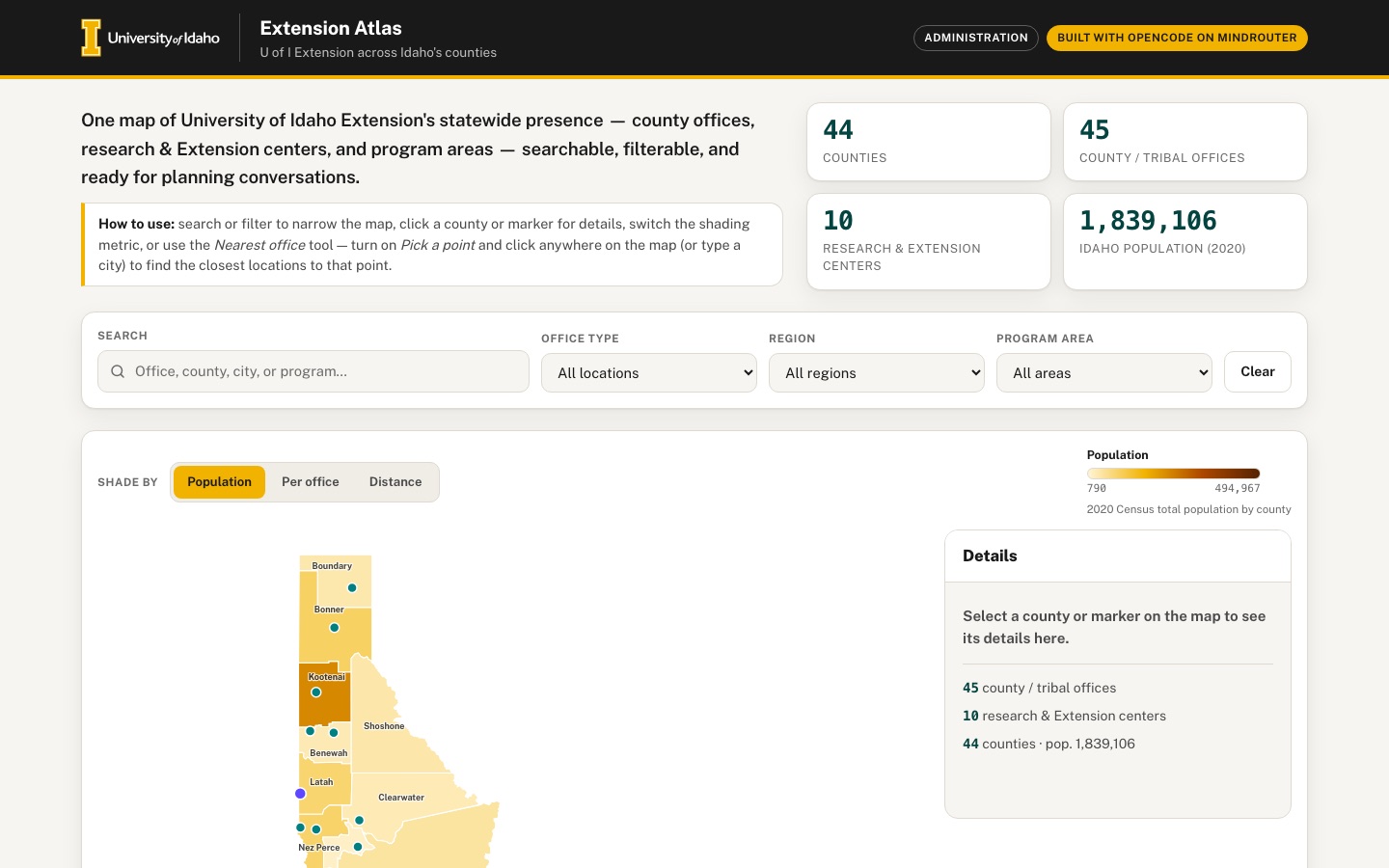 Desktop · click to enlarge
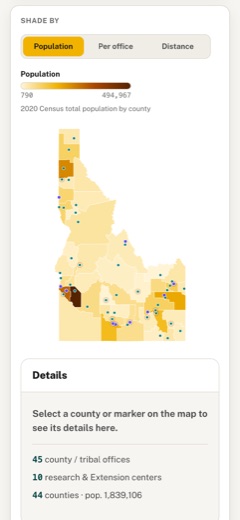
What it is ✎ blurb written by the AI critic
A map of University of Idaho Extension across Idaho's 44 counties: 45 county and tribal offices and 10 research and Extension centers, taken from the university's public pages and placed with the Census Bureau geocoder. Shade counties by 2020 population, population per office or distance to the nearest office, filter by region or program area, and click a county, marker or table row to see an address and a link to the office's page. Type a town or click the map to list the five closest locations by straight-line distance, then export the table as CSV or the map as PNG.
Try this
- Type 'Stanley' under Nearest office, press Find nearest, and look at the dashed lines drawn to the five closest locations
- Switch 'Shade by' to Distance, then click Shoshone County (it has no office of its own) to see its three nearest locations and their distances
- Choose 'Natural resources' under Program area, then click one of the three table rows to jump to that office on the map
Highlights ✎ written by the AI critic
- SVG map of all 44 Idaho counties with 55 office and center markers; the 14 approximately placed locations are marked and explained
- Three shading modes: 2020 Census population, population per office, and distance to the nearest office
- Nearest-office tool: type one of 235 Idaho cities or census places, or click the map, to list the five closest locations with mileage and lines on the map
- Search plus office-type, region and program-area filters, kept in sync across the map, region cards and a sortable table
- CSV export of the filtered table and PNG export of the map with title, legend and data credit
Who it's for
Extension administrators and educators, county partners, the public
Features
- Hand-drawn SVG choropleth of Idaho's 44 counties (projection coded in JS), with office and center markers
- Search box and filters (office type, region), and a side panel with details and a link to the office's public page
- Choropleth metric switcher (population, population per office, distance to nearest office computed from centroids)
- 'Nearest office' tool: click anywhere or enter a city to find the closest locations with straight-line distances
- Regional summary cards and a sortable table synced with the map
- Export the table as CSV and the map as PNG
Data & sources
- tigerweb.geo.census.gov — U.S. Census Bureau TIGERweb State_County, Counties layer (Jan 1 2026 vintage): 44 Idaho county polygons
- U.S. Census Bureau 2020 Census total population (POP100) by county via TIGERweb tigerWMS_Census2020 layer 82 (Census Data API now requires a key)
- U.S. Census Bureau TIGERweb Places (Incorporated Places + Census Designated Places): internal points for city search and approximate town locations
- geocoding.geo.census.gov — U.S. Census Bureau Geocoder (Public_AR_Current benchmark): coordinates for the 55 published office/center addresses (47 matched)
- www.uidaho.edu — University of Idaho Extension county locations directory, source of district/region classes, and 45 county/tribal office pages (addresses, phones, program areas)
- www.uidaho.edu — University of Idaho Idaho Agricultural Experiment Station Research and Extension centers page and 10 center pages
How it was built
Written by OpenCode 1.18.21 (opencode.ai) on qwen/qwen3.8-27b, served by MindRouter, the University of Idaho's on-premises AI platform.
Rounds by kind
| build | 1 |
| continue | 6 |
| feedback | 7 |
| critic | 1 |
Lines of code per file
| body html | 198 |
| app css | 386 |
| app js | 1,297 |
| scripts | 464 |
Critic scores ✎ scored by the independent AI critic, 1–10
Independent audits ✎ by the AI critic
Automated checks
Checked by critic-verify.
Data spot checks ✎ written by the AI critic
- Ada County population: app shows 494,967 (table, legend max); raw tigerweb_census2020 POP100 = 494,967
- Clark County population: app shows 790 (legend min, first row when sorted by pop); raw POP100 = 790
- Idaho population card 1,839,106; sum of raw POP100 over 44 counties = 1,839,106 (0 of 44 counties differ)
- North region card: 10 counties, 12 locations, Pop. 363,642; independent recompute from embed + raw = 10 / 12 / 363,642 (South 845,395, Central 219,067, East 411,002 also match)
- Adams County office address: app shows '203 S Galena, Council ID 83612'; raw uidaho_county_pages/adams.html header reads '208-253-4279 | 203 S Galena, Council ID 83612'; geocoder match 203 GALENA ST at (-116.43709, 44.73106) = embed coords
Round-by-round timeline
Every harness round, in order. The prompts and FEEDBACK.md were written by the AI reviewer; the app code was written by the harness. Expand a round to see the exact prompt and the FEEDBACK.md the harness received.
-
"Nearest office: click anywhere" does not work on the map.
-
Clicking inside any county (for example the middle of Custer County) opens the detail panel. The "Nearest office" results never change, because county clicks never reach the nearest tool. Only clicks on the empty margin around Idaho are used.
-
Clicks that are used get the wrong coordinates. The SVG is letter-boxed inside a card much wider than its 720×820 viewBox, and the click→lat/lon conversion ignores that. Clicking near the Shoshone County border drew the red "clicked point" ring far to the east in Montana, reported as (47.509, -114.893). Clicking the empty right part of the map card did nothing.
-
Expected: the user can pick any point on the map, including on top of a county, e.g. with an obvious "Pick a point" toggle or by making clicks both select the county and set the point. The red ring must appear exactly under the pointer. The 5 nearest locations are then listed with straight-line distances, and lines from the point to those locations or a highlight on them would help.
-
-
The city search in the Nearest office tool only knows the ~50 towns that have an office.
-
"Nampa", "Meridian", "Ketchum", "McCall" and "Coeur d'Alene" (typed with a straight apostrophe) all answer
No match for "…". -
Expected: any Idaho city or census-designated place works.
data/raw/tigerweb_idaho_incorporated_places.jsonanddata/raw/tigerweb_idaho_census_designated_places.jsonhave internal-point lat/lon for 235 Idaho places; see SOURCES.md section 3. -
Matching should ignore case, curly vs straight apostrophes, and "St." vs "Saint", and the suggestion list (datalist) should offer these places.
-
-
The "Dist. to nearest office" metric is computed wrongly.
-
It only looks at offices inside the same county, so Boise County and Shoshone County are grey "no data" — exactly the two counties that have no office, which are the ones planners care about.
-
Expected: the distance from each county's centroid to the nearest Extension office anywhere in Idaho, so every county gets a value. Add a one-line caption under the legend explaining each metric, e.g. "Straight-line distance from county centroid to the nearest office".
-
"Pop. per office" is also grey for Boise and Shoshone, and its legend range (790–494,967) is identical to Population, so the metric looks like a duplicate. Boise County is served by the "Gem and Boise Counties" office, so count that office for both counties or explain the rule. Shoshone County should use its nearest office. No county should be grey.
-
-
Counties without an office make a false claim. Clicking Boise County opens a panel saying "No Extension office or center is located in this county. The nearest office is shown on the map", but nothing is highlighted on the map and the nearest-office list does not change. Expected: the panel names the nearest office(s) with distances, and for Boise County the Gem office that serves it, each with a link. Those markers are highlighted on the map.
-
The desktop layout wastes space, and the detail panel covers the controls.
-
At 1440 px the map is only about 400 px wide in the middle of a 1270 px card, with large empty areas on both sides.
-
Details slide in as a fixed overlay on the right third of the window, covering the Program area filter and part of the map.
-
Expected: a two-column map area. On the left, a larger map filling roughly 700 px of height. On the right, a persistent side panel that shows details for the selected county or location. With nothing selected, the panel shows a friendly empty state ("Select a county or marker…") plus summary facts.
-
On phones the panel can become a bottom sheet or sit below the map.
-
-
The PNG export is broken visually.
-
In the downloaded
extension-atlas-map.png, every office and center marker is solid black: marker colors come from CSS variables that do not resolve in the exported image. -
The image also has no title, no legend for the active metric, no marker key and no source credit.
-
Expected: the PNG looks like the on-screen map (teal offices, lupine centers, dashed rings for approximate locations, the nearest-point ring if present). It includes the title, the current metric's legend, the marker key and a "Data: U.S. Census Bureau; University of Idaho Extension" line.
-
-
Missing empty states.
-
When search or filters match nothing (e.g. search "zzqx"), the "All locations" table shows only its header row. It needs a helpful message with a "Clear filters" button.
-
Pressing "Find nearest" with an empty box shows
No match for "".It should instead ask the user to type a city or click the map.
-
-
The Nearest office city input is unstyled. It renders as a tiny native text box, about 150 px wide with small default-font text and a thin gray border, next to a large gold button. It should match the styled Search field (same height, padding, radius and focus ring) and fill the column width.
-
The tooltip gets stuck on touch devices. On a phone, after tapping a marker, the black hover tooltip ("University of Idaho Extension in Butte County · Arco · County office · approx.") stays on screen on top of the detail panel and hides the Program areas. Hide the tooltip on tap/click, when the panel opens and on scroll.
-
County labels are hard to read.
-
Labels such as "Kootenai", "Nez Perce", "Madison" and "Canyon" sit under markers and are cut off.
-
The "Ada" label is dark text on the darkest brown fill and is unreadable.
-
Expected: label color adapts to the fill (light text on dark fills), labels of tiny counties are hidden or moved, and labels do not collide with markers. On the phone map the labels are illegibly small, so hide them there and rely on the tooltip or panel.
-
-
Table and map should feel synced both ways.
-
Hovering a table row should highlight that marker on the map.
-
Selecting a marker or county should highlight its row and scroll it into view in the table.
-
Hovering a region card should outline that region's counties on the map.
-
Add smooth transitions so the map visibly responds.
-
-
Approximate locations are under-reported.
-
SOURCES.md section 6 lists 6 geocoder matches whose matched address differs from the published address: Caribou County, Jerome County, Kimberly R&E Center, Twin Falls R&E Center, Owyhee County, and Bannock County. These should also be flagged "approximate", with a short note saying why, in the table, the panel and the CSV.
-
The regions of the Nimiipuu and Schitsu'umsh reservation offices are inferred from the county they sit in. Say so in their detail panels.
-
-
Accessibility.
-
When the detail panel is closed it is only moved off-screen, so keyboard Tab still walks into its hidden close button and link. Make it unfocusable when closed, and move focus into it when it opens.
-
The metric legend is
aria-hidden, so screen-reader users never hear the scale. Give it a text alternative.
-
-
Phone polish at 390 px. The three "Shade by" buttons wrap into two-line pills of uneven height. Use a compact segmented control that fits on one row, e.g. shorter labels "Population / Per office / Distance". The map could also be taller or allow pinch/zoom so the dense southern-Idaho markers can be tapped individually.
-
"Nearest office: click anywhere" does not work on the map.
-
Clicking inside any county (for example the middle of Custer County) opens the detail panel. The "Nearest office" results never change, because county clicks never reach the nearest tool. Only clicks on the empty margin around Idaho are used.
-
Clicks that are used get the wrong coordinates. The SVG is letter-boxed inside a card much wider than its 720×820 viewBox, and the click→lat/lon conversion ignores that. Clicking near the Shoshone County border drew the red "clicked point" ring far to the east in Montana, reported as (47.509, -114.893). Clicking the empty right part of the map card did nothing.
-
Expected: the user can pick any point on the map, including on top of a county, e.g. with an obvious "Pick a point" toggle or by making clicks both select the county and set the point. The red ring must appear exactly under the pointer. The 5 nearest locations are then listed with straight-line distances, and lines from the point to those locations or a highlight on them would help.
-
-
The city search in the Nearest office tool only knows the ~50 towns that have an office.
-
"Nampa", "Meridian", "Ketchum", "McCall" and "Coeur d'Alene" (typed with a straight apostrophe) all answer
No match for "…". -
Expected: any Idaho city or census-designated place works.
data/raw/tigerweb_idaho_incorporated_places.jsonanddata/raw/tigerweb_idaho_census_designated_places.jsonhave internal-point lat/lon for 235 Idaho places; see SOURCES.md section 3. -
Matching should ignore case, curly vs straight apostrophes, and "St." vs "Saint", and the suggestion list (datalist) should offer these places.
-
-
The "Dist. to nearest office" metric is computed wrongly.
-
It only looks at offices inside the same county, so Boise County and Shoshone County are grey "no data" — exactly the two counties that have no office, which are the ones planners care about.
-
Expected: the distance from each county's centroid to the nearest Extension office anywhere in Idaho, so every county gets a value. Add a one-line caption under the legend explaining each metric, e.g. "Straight-line distance from county centroid to the nearest office".
-
"Pop. per office" is also grey for Boise and Shoshone, and its legend range (790–494,967) is identical to Population, so the metric looks like a duplicate. Boise County is served by the "Gem and Boise Counties" office, so count that office for both counties or explain the rule. Shoshone County should use its nearest office. No county should be grey.
-
-
Counties without an office make a false claim. Clicking Boise County opens a panel saying "No Extension office or center is located in this county. The nearest office is shown on the map", but nothing is highlighted on the map and the nearest-office list does not change. Expected: the panel names the nearest office(s) with distances, and for Boise County the Gem office that serves it, each with a link. Those markers are highlighted on the map.
-
The desktop layout wastes space, and the detail panel covers the controls.
-
At 1440 px the map is only about 400 px wide in the middle of a 1270 px card, with large empty areas on both sides.
-
Details slide in as a fixed overlay on the right third of the window, covering the Program area filter and part of the map.
-
Expected: a two-column map area. On the left, a larger map filling roughly 700 px of height. On the right, a persistent side panel that shows details for the selected county or location. With nothing selected, the panel shows a friendly empty state ("Select a county or marker…") plus summary facts.
-
On phones the panel can become a bottom sheet or sit below the map.
-
-
The PNG export is broken visually.
-
In the downloaded
extension-atlas-map.png, every office and center marker is solid black: marker colors come from CSS variables that do not resolve in the exported image. -
The image also has no title, no legend for the active metric, no marker key and no source credit.
-
Expected: the PNG looks like the on-screen map (teal offices, lupine centers, dashed rings for approximate locations, the nearest-point ring if present). It includes the title, the current metric's legend, the marker key and a "Data: U.S. Census Bureau; University of Idaho Extension" line.
-
-
Missing empty states.
-
When search or filters match nothing (e.g. search "zzqx"), the "All locations" table shows only its header row. It needs a helpful message with a "Clear filters" button.
-
Pressing "Find nearest" with an empty box shows
No match for "".It should instead ask the user to type a city or click the map.
-
-
The Nearest office city input is unstyled. It renders as a tiny native text box, about 150 px wide with small default-font text and a thin gray border, next to a large gold button. It should match the styled Search field (same height, padding, radius and focus ring) and fill the column width.
-
The tooltip gets stuck on touch devices. On a phone, after tapping a marker, the black hover tooltip ("University of Idaho Extension in Butte County · Arco · County office · approx.") stays on screen on top of the detail panel and hides the Program areas. Hide the tooltip on tap/click, when the panel opens and on scroll.
-
County labels are hard to read.
-
Labels such as "Kootenai", "Nez Perce", "Madison" and "Canyon" sit under markers and are cut off.
-
The "Ada" label is dark text on the darkest brown fill and is unreadable.
-
Expected: label color adapts to the fill (light text on dark fills), labels of tiny counties are hidden or moved, and labels do not collide with markers. On the phone map the labels are illegibly small, so hide them there and rely on the tooltip or panel.
-
-
Table and map should feel synced both ways.
-
Hovering a table row should highlight that marker on the map.
-
Selecting a marker or county should highlight its row and scroll it into view in the table.
-
Hovering a region card should outline that region's counties on the map.
-
Add smooth transitions so the map visibly responds.
-
-
Approximate locations are under-reported.
-
SOURCES.md section 6 lists 6 geocoder matches whose matched address differs from the published address: Caribou County, Jerome County, Kimberly R&E Center, Twin Falls R&E Center, Owyhee County, and Bannock County. These should also be flagged "approximate", with a short note saying why, in the table, the panel and the CSV.
-
The regions of the Nimiipuu and Schitsu'umsh reservation offices are inferred from the county they sit in. Say so in their detail panels.
-
-
Accessibility.
-
When the detail panel is closed it is only moved off-screen, so keyboard Tab still walks into its hidden close button and link. Make it unfocusable when closed, and move focus into it when it opens.
-
The metric legend is
aria-hidden, so screen-reader users never hear the scale. Give it a text alternative.
-
-
Phone polish at 390 px. The three "Shade by" buttons wrap into two-line pills of uneven height. Use a compact segmented control that fits on one row, e.g. shorter labels "Population / Per office / Distance". The map could also be taller or allow pinch/zoom so the dense southern-Idaho markers can be tapped individually.
-
Great progress. These now work and must keep working: Two-column map with a Details panel
-
"Pick a point" mode with dashed lines to the nearest locations
-
City search covering all Idaho places (Nampa, Ketchum, McCall, St. Anthony…)
-
The distance metric with a caption
-
Detail panels for counties without an office (Boise, Shoshone)
-
Empty states
-
Approximate flags and notes
-
Row hover and region-card hover highlighting
-
Keyboard focus handling
-
The PNG title, legend and credit
-
No console errors
-
The PNG export crops the map. In the downloaded
extension-atlas-map.pngthe image is cut off at the bottom and the right. Everything south of roughly Jerome/Bannock (Twin Falls, Cassia, Owyhee's southern half, Oneida, Franklin, Bear Lake) and the eastern edge (Teton) are missing. The map also sits far to the right with a large empty area on the left.-
Expected: the whole state fits inside the image with even margins, below the title/legend block.
-
In the key row, the text "Research & Extension center" overlaps the dashed-ring icon of "Approximate location". Give the key items enough spacing.
-
-
On a phone, tapping a marker throws the user far down the page. At 390 px I scrolled to the map (scrollY ≈ 1170) and tapped a marker. The page jumped to the "All locations" table (scrollY ≈ 6000), and the Details panel, which sits right under the map, ended up about 4,200 px above the viewport.
-
Expected: after a tap the user stays at the map and the details are visible right away. Either scroll smoothly to the Details panel directly below the map, or show the details as a bottom sheet.
-
Only scroll the table row into view when the table is already on screen (e.g. on desktop), never pull the page away from the map.
-
-
Old highlights are not cleared.
-
Clicking Shoshone County highlights its 3 nearest markers (Benewah, Schitsu'umsh, Kootenai). If you then click Ada County, those 3 markers stay highlighted next to the newly selected Ada marker.
-
A hover highlight also stays on a marker (Palouse center) after the pointer has left it.
-
Expected: every new selection, closing the panel and Escape reset all nearest/hover highlights.
-
-
The "City or town" input in the Nearest office card is still unstyled. Last round's item 8 was not done. It is still a tiny native box, about 153×21 px, with small default text and a thin black border, next to a big gold button. On the phone it is about half the card width.
-
Expected: it looks exactly like the Search field at the top (same height of about 44 px, padding, radius, border color, font size and gold focus ring) and spans the full width of its column.
-
Keep the datalist suggestions.
-
-
County labels still collide with markers on the desktop map.
-
Office dots sit on top of the county names "Kootenai" (reads "K•otenai"), "Bonner", "Nez Perce", "Lewis", "Madison", "Canyon" and "Jerome", which become unreadable. The same happens in the PNG.
-
Expected: labels are offset away from markers, e.g. placed at the county's internal point but nudged when a marker is within about 12 px, or hidden for the smallest counties. They must be readable on every fill.
-
-
The locations table is hard to use on a phone. At 390 px the table is 832 px wide inside a 314 px scroll area. Only Location, Type and County are visible, each name wraps onto 5 lines ("University of / Idaho / Extension in / Bear Lake / County"), and nothing tells the user they can scroll sideways.
-
Expected: under about 640 px, show each row as a compact card. The card has the name on 1–2 lines, the type chip, "County · Region · City", the population, program chips and the page link.
-
Keep the sort control available, e.g. a small "Sort by" select above the cards.
-
-
Clicking a Nearest-office result leaves the app. Each result name is a link to the office's uidaho.edu page, styled as heavy underlined gold text. Clicking it opens the external page instead of showing that location on the map.
-
Expected: clicking a result selects that location, highlights its marker and fills the Details panel.
-
Put a small separate "Page ↗" link on the right side of the result, and use normal dark text for the names.
-
-
Desktop map card spacing.
-
At 1440 px Idaho is drawn only about 400 px wide on the left of an 860 px column, leaving a wide empty gap before the Details panel. Make the map noticeably larger, e.g. let the SVG use the full column height of about 820 px, and/or narrow that column so map and panel sit together.
-
The idle Details panel shows a "×" close button although nothing is selected. Hide it until something is selected.
-
-
"Per office" metric: Shoshone County is still flat grey with no explanation. Either compute it from the nearest office, like the distance metric, or add a grey "No office serving this county" swatch to the legend.
-
A stray blue focus bracket appears on the map. After clicking counties, part of the browser's default blue focus rectangle appears as a small blue corner bracket, e.g. near Lemhi/Custer. Remove the default outline on SVG counties and markers for mouse clicks, and show a clear gold stroke only for keyboard focus (
:focus-visible). -
Pick-a-point mode needs a visible hint. When "Pick a point" is on, the cursor becomes a crosshair but nothing else changes. Show a small banner on the map ("Click anywhere on the map to set a point · Esc to exit") and a "Clear point" button that removes the red ring and the dashed lines.
-
Very close now. All of these work and must keep working: PNG export of the whole state with title, key and credit
-
Pick-a-point banner and the "Clear point" button
-
The styled city input
-
Phone tap scrolling to the details
-
Phone table cards
-
Cleared highlights
-
County panels for Boise and Shoshone
-
The distance and per-office metrics with legend notes
-
Empty states
-
No console errors
-
A literal HTML entity is shown in the Nearest office results. Every result row shows the text
Page &neararr;as-is, e.g. after searching "Ketchum". The entity is escaped instead of rendered. Show a real arrow character (↗) or an inline SVG icon, e.g. "Page ↗". Check every other place that builds link text the same way. -
County labels still collide with office/center dots on the desktop map and in the PNG.
-
A dot sits inside the county name in "Koo●ai" (Kootenai), "●enewah" (Benewah), "B●nner" (Bonner), "Ma●son" (Madison), "B●ngham" (Bingham), "Po●er" (Power), "●erome" (Jerome) and "F●klin" (Franklin). "Canyon" is hidden under markers.
-
Expected: every county name is fully readable. Measure each label's real text box (e.g.
getBBox()) and move the label above or below the nearest marker when they overlap. Draw labels with a thin light halo (a white stroke painted behind the text) so they stay legible over fills and lines. Hide a label only if it cannot be placed.
-
-
Phone table cards are missing information. At 390 px each card shows the name, the type chip, a bare number such as "8,734" on the right with no label, the program chips and "Page →". The "County · Region · City" line is missing.
-
Expected: add the line "Clearwater County · North · Orofino", and label the number, e.g. "County pop. 8,734".
-
Tapping a card should select that location on the map and show its details, like clicking a table row on desktop.
-
-
The "How to use" hint is out of date. It says "use the Nearest office tool to find the closest locations to any point" but does not mention the new "Pick a point" button. Update it to name that button and what it does.
-
Last round's fixes work and must keep working: "Page ↗" in the nearest-office results
-
County labels no longer overlap markers
-
Phone cards show "County · Region · City" and "County pop."
-
The updated How-to hint
-
Clicking a nearest result selects that location
-
Regression: the phone-card extras now appear in the desktop table. At 1440 px the "All locations" table has:
-
an extra 9th column with no header, repeating the location's "Bingham County · East · Aberdeen" line to the right of "Page →";
-
the text "County pop." inside every County pop. cell, which makes the numbers wrap onto two lines ("County pop. / 47,992").
Expected: above 640 px the table looks as before — 8 columns, each with its header, and just the right-aligned number in the population column. Show the sub-line and the "County pop." label only in the phone card layout.
-
-
The label halo breaks labels on dark fills, and some labels overlap each other.
-
"Ada" and "Canyon" are white text with a white halo, so on the dark brown fills they read as a smeared white blob, both on screen and in the exported PNG. Use a dark halo, or none, for light text on dark fills, and a light halo for dark text on light fills.
-
The "Nez Perce" and "Lewis" labels are drawn on top of each other ("Nez Lewis Perce"). Labels must avoid other labels as well as markers.
-
-
Clicking a table row or tapping a phone card gives no visible result. The location is selected: the row turns gold and the marker is selected on the map. But the map and the Details panel are about 4,500 px further up the page, so the user sees nothing happen.
-
Expected: after a row click or card tap, smoothly scroll up so the selected marker and its details are visible (on a phone, the Details panel under the map), the same way a marker tap already works.
-
Optionally add a small "Back to list" link in the Details panel that returns to that row.
-
-
Phone card order. In each card the "Page →" link comes before the "County · Region · City" line, which ends up alone at the very bottom. Put the County · Region · City line directly under the location name and type chip, then the population and program chips, and the Page link last, bottom-right.
-
These now work and must keep working: Row click / card tap scrolls to the map and details, with "Back to list"
-
Phone card order
-
"County pop." shown only on phones
-
Dark halo on the Ada/Canyon labels in the exported PNG
-
Everything from earlier rounds
-
The desktop table still has a 9th column.
-
At 1440 px the "All locations" table has 8 header cells, but every body row still has 9 visible cells. The last one shows the sub-line (e.g. "Bingham County · East · Blackfoot") to the right of "Page →", with no header above it.
-
The cell has a real width at desktop sizes, so it is not hidden by any rule that applies there.
-
Expected: above 640 px that cell does not display at all (rows have exactly 8 visible cells). Only the phone card layout shows the sub-line.
-
-
On the live map, the "Ada" and "Canyon" labels are still white text with a white halo.
-
In the on-screen SVG, the computed style of the "Ada"
<text>isfill: rgb(255,255,255); stroke: rgb(255,255,255); stroke-width: 2.5px. It reads as a white smudge on the dark brown county. "Canyon" is the same. -
The exported PNG is correct (white text, dark halo), so the per-label halo color is being set but a stylesheet rule for the labels wins over it on screen.
-
Expected: on screen, light label text on dark fills gets a dark halo, exactly like the PNG.
-
-
The "Nez Perce" and "Lewis" labels still overlap each other on screen and in the PNG ("Nez Lewis Perce"): their text boxes intersect. "Gem" and "Payette" also touch.
-
Expected: no two visible county labels overlap. When a label cannot be placed without touching another label or a marker, move it to a free spot (for example outside the small county with a thin leader line) or hide it; its name is still in the tooltip.
-
-
"Back to list ↑" is squeezed against the bottom edge of the Details panel. After clicking a table row at 1440 px, the link sits on the panel's bottom border with its text partly clipped. Give it normal padding inside the panel, like the other rows.
-
Fixed and must stay fixed: The desktop table has exactly 8 columns.
-
The "Ada" and "Canyon" labels have a dark halo on screen.
-
Everything from earlier rounds works: map, filters, metrics, pick-a-point, nearest-office tool, region cards, table/cards, exports, phone layout, and no console errors.
-
"Nez Perce" and "Lewis" still print on top of each other. You can see it on screen and in the exported PNG: the two labels read "Nez Lewis Perce". Measured in the live page, their text boxes overlap by about 24 px horizontally and 7 px vertically. Moving labels around has not solved this in three attempts, so use a simple, reliable rule instead:
-
After all labels are placed, check every pair of visible labels.
-
If two boxes still intersect, hide the label of the county with the smaller land area, e.g. Lewis. That county's name is still shown in its tooltip and details.
-
Apply the same rule in the PNG export.
-
Expected result: no two visible labels touch anywhere, on screen or in the PNG.
-
-
The Madison label has moved into the wrong county. "Madison" is now drawn inside Fremont County, directly under the "Fremont" label, and the two boxes overlap by about 4 px. "Gem" and "Payette" also touch by about 4 px. A label must stay inside its own county; if it cannot fit there without touching another label or marker, hide it using the rule in item 1.
-
"Back to list ↑" is still clipped at the bottom of the Details panel. At 1440×900, click any row in the All locations table. The page scrolls up and the Details panel opens, but the "Back to list ↑" link sits on the panel's bottom border with the lower part of its letters cut off. Expected: the link is fully visible with normal spacing below the gold "Visit the public page" button. Either let the panel grow to fit its content or leave enough bottom padding inside its scroll area.
-
In the live page, all 44
<text class="county-label">elements have the attributedisplay="none". This happens at 1440 px and at 1024 px, before any interaction. -
The exported PNG also has no county names.
-
In the previous version about 44 labels were visible, and only 3 pairs touched: Nez Perce/Lewis, Gem/Payette and Fremont/Madison.
-
The new "label must sit inside its own county" test rejects every label, even big counties such as Idaho, Owyhee, Custer and Lemhi, where the name obviously fits. The point-in-county check is probably comparing a label box in SVG pixel coordinates with county outlines in longitude/latitude, or the other way round. Both must be in the same coordinate system.
-
Expected: Labels are visible again for practically all counties, as before: at least the 40 or so that fit inside their county at the current map size.
-
Only a label that would overlap another label or a marker is hidden. When two labels collide, hide the one for the county with the smaller land area. Nez Perce/Lewis, Gem/Payette and Fremont/Madison must not touch.
-
No label sits inside a different county. For example, "Madison" must not appear inside Fremont County.
-
The PNG export shows the same labels as the screen.
-
In the live page, all 44
<text class="county-label">elements have the attributedisplay="none". This happens at 1440 px and at 1024 px, before any interaction. -
The exported PNG also has no county names.
-
In the previous version about 44 labels were visible, and only 3 pairs touched: Nez Perce/Lewis, Gem/Payette and Fremont/Madison.
-
The new "label must sit inside its own county" test rejects every label, even big counties such as Idaho, Owyhee, Custer and Lemhi, where the name obviously fits. The point-in-county check is probably comparing a label box in SVG pixel coordinates with county outlines in longitude/latitude, or the other way round. Both must be in the same coordinate system.
-
Expected: Labels are visible again for practically all counties, as before: at least the 40 or so that fit inside their county at the current map size.
-
Only a label that would overlap another label or a marker is hidden. When two labels collide, hide the one for the county with the smaller land area. Nez Perce/Lewis, Gem/Payette and Fremont/Madison must not touch.
-
No label sits inside a different county. For example, "Madison" must not appear inside Fremont County.
-
The PNG export shows the same labels as the screen.
-
Measured at a 1440x900 window, after scrolling to the map section:
#map-svgis 862 px wide x 820 px tall, but the drawn Idaho shape only spans x=294..770 (476 px wide). There is a ~210 px empty band between Idaho and the Details panel, and ~190 px empty on the left. -
.atlas__mapwrapis 995 px tall, taller than the 900 px window, so the "Shade by" tabs, the whole map and the "Pick a point / Export map" buttons can never be seen at the same time. -
The legend (
#legend) sits at the far right of.atlas__mapbar, 670 px away from the map. -
Fix: In src/app.js, compute the viewBox width from the projected bounds instead of the fixed 720: after computing
s, setVB.w = Math.ceil((maxLon - minLon) * kx * s + 2 * VB.pad)(recompute offX with the new width) and set the svgviewBoxattribute to0 0 VB.w VB.hin buildMap(). The PNG export already reads VB.w/VB.h, so check it still centres the map. -
In src/app.css (desktop only, min-width 1100px):
#map-svg { height: calc(100vh - 190px); max-height: 760px; width: auto; max-width: 100%; margin: 0 auto; }and change.atlas__mapcolstogrid-template-columns: auto minmax(360px, 1fr)so the Details column takes the freed width. -
Move
#legendout of.atlas__mapbarinto the top of the right-hand column, directly above#detail(same column, 12 px gap), so the legend sits next to the map. -
Target: at 1440x900 with the map section scrolled to the top, the tabs, the full Idaho shape and the map footer buttons are all inside the 900 px window, and the gap between Idaho's right edge and the right column is under 60 px.
-
Phone (390 px) must stay as it is now: map full width, legend and Details below it.
1 build 18.8 min · 1 file changed, 107 insertions(+) Show prompt
Read AGENTS.md, SPEC.md and BRAND.md in this directory. Then build the complete app they describe, step by step: first write scripts in scripts/ that turn the raw data in data/raw/ (see data/raw/SOURCES.md — it has detailed format notes for every file: county GeoJSON, 2020 Census population, Census places for city lookups and approximate locations, the Census geocoder bundle with office/center coordinates and published address lines, and the saved uidaho.edu pages for regions, program areas and page links) into compact JSON in data/embed/ and run them. The saved HTML pages are large (150 KB to 1 MB each), so never print them whole; extract what you need with Python regular expressions. Then write src/body.html, src/app.css and src/app.js; run python3 build.py --check and fix any error it reports. Implement every required feature in SPEC.md with a polished, modern, responsive University of Idaho design. Do not stop until python3 build.py --check succeeds and every feature is implemented.
2 continue 17.9 min · 8 files changed, 2807 insertions(+), 7 deletions(-) Show prompt
Read AGENTS.md, SPEC.md and BRAND.md in this directory. Then build the complete app they describe, step by step: first write scripts in scripts/ that turn the raw data in data/raw/ (see data/raw/SOURCES.md — it has detailed format notes for every file: county GeoJSON, 2020 Census population, Census places for city lookups and approximate locations, the Census geocoder bundle with office/center coordinates and published address lines, and the saved uidaho.edu pages for regions, program areas and page links) into compact JSON in data/embed/ and run them. The saved HTML pages are large (150 KB to 1 MB each), so never print them whole; extract what you need with Python regular expressions. Then write src/body.html, src/app.css and src/app.js; run python3 build.py --check and fix any error it reports. Implement every required feature in SPEC.md with a polished, modern, responsive University of Idaho design. Do not stop until python3 build.py --check succeeds and every feature is implemented.
3 feedback 19.3 min · 1 file changed, 47 insertions(+) Show prompt
Read FEEDBACK.md in this directory — it lists problems a reviewer found when testing index.html in a real browser. Fix every item, keeping everything that already works, then run python3 build.py --check.
Reviewer findings — tested index.html in Chrome at 1440×900 and 390×844
The app builds, loads with no console errors and no network requests, and search, filters, sorting, row selection, region cards and CSV export work. Fix the problems below, most important first, and keep everything that already works.
4 continue 15.9 min · — Show prompt
Read FEEDBACK.md in this directory — it lists problems a reviewer found when testing index.html in a real browser. Fix every item, keeping everything that already works, then run python3 build.py --check.
5 continue 28.2 min · 8 files changed, 1135 insertions(+), 323 deletions(-) Show prompt
Read FEEDBACK.md in this directory — it lists problems a reviewer found when testing index.html in a real browser. Fix every item, keeping everything that already works, then run python3 build.py --check.

Working style for this round (important — earlier attempts got stuck re-running the same inspection command over and over without editing anything):
- You already know this codebase: read src/app.js, src/app.css, src/body.html and scripts/build_data.py once, then start editing right away.
- Do NOT use long `python3 -c "..."` one-liners to inspect data, and never run the same command twice. If you need new data (for example the Census places for the city search), add it to scripts/build_data.py, run that script once, and check the output file size.
- Work through FEEDBACK.md in order, one item at a time: make the edit, run python3 build.py --check, then move on to the next item.
Reviewer findings — tested index.html in Chrome at 1440×900 and 390×844
The app builds, loads with no console errors and no network requests, and search, filters, sorting, row selection, region cards and CSV export work. Fix the problems below, most important first, and keep everything that already works.
6 feedback 4.0 min · 5 files changed, 379 insertions(+), 93 deletions(-) Show prompt
Read FEEDBACK.md in this directory — it lists problems a reviewer found when testing index.html in a real browser. Fix every item, keeping everything that already works, then run python3 build.py --check.

Working style for this round (important — earlier attempts got stuck re-running the same inspection command over and over without editing anything):
- You already know this codebase: read src/app.js, src/app.css, src/body.html and scripts/build_data.py once, then start editing right away.
- Do NOT use long `python3 -c "..."` one-liners to inspect data, and never run the same command twice. If you need new data (for example the Census places for the city search), add it to scripts/build_data.py, run that script once, and check the output file size.
- Work through FEEDBACK.md in order, one item at a time: make the edit, run python3 build.py --check, then move on to the next item.
Reviewer findings (round 2) — tested index.html in Chrome at 1440×900 and 390×844
Remaining problems, most important first:
7 feedback 2.5 min · 5 files changed, 131 insertions(+), 82 deletions(-) Show prompt
Read FEEDBACK.md in this directory — it lists problems a reviewer found when testing index.html in a real browser. Fix every item, keeping everything that already works, then run python3 build.py --check.

Working style for this round (important — earlier attempts got stuck re-running the same inspection command over and over without editing anything):
- You already know this codebase: read src/app.js, src/app.css, src/body.html and scripts/build_data.py once, then start editing right away.
- Do NOT use long `python3 -c "..."` one-liners to inspect data, and never run the same command twice. If you need new data (for example the Census places for the city search), add it to scripts/build_data.py, run that script once, and check the output file size.
- Work through FEEDBACK.md in order, one item at a time: make the edit, run python3 build.py --check, then move on to the next item.
Reviewer findings (round 3) — tested index.html in Chrome at 1440×900 and 390×844
Please fix these last items:
8 feedback 3.6 min · 4 files changed, 140 insertions(+), 71 deletions(-) Show prompt
Read FEEDBACK.md in this directory — it lists problems a reviewer found when testing index.html in a real browser. Fix every item, keeping everything that already works, then run python3 build.py --check.

Working style for this round (important — earlier attempts got stuck re-running the same inspection command over and over without editing anything):
- You already know this codebase: read src/app.js, src/app.css, src/body.html and scripts/build_data.py once, then start editing right away.
- Do NOT use long `python3 -c "..."` one-liners to inspect data, and never run the same command twice. If you need new data (for example the Census places for the city search), add it to scripts/build_data.py, run that script once, and check the output file size.
- Work through FEEDBACK.md in order, one item at a time: make the edit, run python3 build.py --check, then move on to the next item.
Reviewer findings (round 4) — tested index.html in Chrome at 1440×900 and 390×844
There is one regression plus a few last polish items:
9 feedback 2.3 min · 4 files changed, 71 insertions(+), 32 deletions(-) Show prompt
Read FEEDBACK.md in this directory — it lists problems a reviewer found when testing index.html in a real browser. Fix every item, keeping everything that already works, then run python3 build.py --check.

Working style for this round (important — earlier attempts got stuck re-running the same inspection command over and over without editing anything):
- You already know this codebase: read src/app.js, src/app.css, src/body.html and scripts/build_data.py once, then start editing right away.
- Do NOT use long `python3 -c "..."` one-liners to inspect data, and never run the same command twice. If you need new data (for example the Census places for the city search), add it to scripts/build_data.py, run that script once, and check the output file size.
- Work through FEEDBACK.md in order, one item at a time: make the edit, run python3 build.py --check, then move on to the next item.
Reviewer findings (round 5) — tested index.html in Chrome at 1440×900 and 390×844
Three items from last round are still not fixed in the live page. Check each one in the browser, not just in the code:
10 feedback 2.0 min · 4 files changed, 197 insertions(+), 27 deletions(-) Show prompt
Read FEEDBACK.md in this directory — it lists problems a reviewer found when testing index.html in a real browser. Fix every item, keeping everything that already works, then run python3 build.py --check.

Working style for this round (important — earlier attempts got stuck re-running the same inspection command over and over without editing anything):
- You already know this codebase: read src/app.js, src/app.css, src/body.html and scripts/build_data.py once, then start editing right away.
- Do NOT use long `python3 -c "..."` one-liners to inspect data, and never run the same command twice. If you need new data (for example the Census places for the city search), add it to scripts/build_data.py, run that script once, and check the output file size.
- Work through FEEDBACK.md in order, one item at a time: make the edit, run python3 build.py --check, then move on to the next item.
Reviewer findings (round 6) — tested index.html in Chrome at 1440×900
Only these small map/panel blemishes remain:
11 feedback 11.9 min · 1 file changed, 15 insertions(+), 13 deletions(-) Show prompt
Read FEEDBACK.md in this directory — it lists problems a reviewer found when testing index.html in a real browser. Fix every item, keeping everything that already works, then run python3 build.py --check.

Working style for this round (important — earlier attempts got stuck re-running the same inspection command over and over without editing anything):
- You already know this codebase: read src/app.js, src/app.css, src/body.html and scripts/build_data.py once, then start editing right away.
- Do NOT use long `python3 -c "..."` one-liners to inspect data, and never run the same command twice. If you need new data (for example the Census places for the city search), add it to scripts/build_data.py, run that script once, and check the output file size.
- Work through FEEDBACK.md in order, one item at a time: make the edit, run python3 build.py --check, then move on to the next item.
Reviewer findings (round 7) — tested index.html in Chrome at 1440×900 and 1024×768
Fixed, keep as is: "Back to list ↑" is now fully visible below the gold button, and everything else still works: table, cards, row-click scrolling, the nearest-office tool, metrics, exports, phone layout, and no console errors.
Regression (most important): every county name has disappeared from the map.
Please check the result in the browser itself: count the county labels that do not have display="none". There should be 40 or more, with no two overlapping.
12 continue 2.0 min · 2 files changed, 30 insertions(+), 62 deletions(-) Show prompt
Read FEEDBACK.md in this directory — it lists problems a reviewer found when testing index.html in a real browser. Fix every item, keeping everything that already works, then run python3 build.py --check.

Working style for this round (important — earlier attempts got stuck re-running the same inspection command over and over without editing anything):
- You already know this codebase: read src/app.js, src/app.css, src/body.html and scripts/build_data.py once, then start editing right away.
- Do NOT use long `python3 -c "..."` one-liners to inspect data, and never run the same command twice. If you need new data (for example the Census places for the city search), add it to scripts/build_data.py, run that script once, and check the output file size.
- Work through FEEDBACK.md in order, one item at a time: make the edit, run python3 build.py --check, then move on to the next item.
Reviewer findings (round 7) — tested index.html in Chrome at 1440×900 and 1024×768
Fixed, keep as is: "Back to list ↑" is now fully visible below the gold button, and everything else still works: table, cards, row-click scrolling, the nearest-office tool, metrics, exports, phone layout, and no console errors.
Regression (most important): every county name has disappeared from the map.
Please check the result in the browser itself: count the county labels that do not have display="none". There should be 40 or more, with no two overlapping.
13 critic 0.1 min · 1 file changed, 28 insertions(+) Show prompt
Read FEEDBACK.md in this directory — it lists problems a reviewer found when testing index.html in a real browser. Fix every item, keeping everything that already works, then run python3 build.py --check.

Working style for this round (important — earlier attempts got stuck re-running the same inspection command over and over without editing anything):
- You already know this codebase: read src/app.js, src/app.css, src/body.html once, then start editing right away.
- Do NOT use long `python3 -c "..."` one-liners to inspect data, and never run the same command twice. Do not re-run build.py --check more than once per item.
- Do not touch the county label placement code (buildMap label candidates, resolveLabelCollisions).
- Work through FEEDBACK.md in order, one item at a time: make the edit, run python3 build.py --check, then move on to the next item. When all 5 items are done, stop.
Reviewer feedback (critic pass)
Everything else works in the browser — keep it: search, filters, region cards, sortable table, nearest-office tool, pick-a-point, CSV and PNG export, county labels. Do NOT change the label placement code in buildMap()/resolveLabelCollisions().
1. Desktop map composition (most important)
2. "Per office" legend caption
41 of 44 counties have exactly one office, so the Per office map looks identical to Population (same 790 – 494,967 range). Append to the per-office caption in metricCaption(): " Only Bannock, Benewah and Nez Perce have two offices, so most counties equal their population; Shoshone has none (grey)." Compute the county names from the data (counties with 2+ serving offices, and counties with 0) rather than hard-coding them.
3. Distance caption wording
The distance is measured from each county's Census internal point (c.intpt), not its centroid. Change the distance caption (legend and PNG header) to "Straight-line distance from the county's Census internal point to the nearest county office".
4. Program-area chips vs "Programming" text
Adams County's "Programming" text lists Agriculture, but it has no Agriculture chip and is excluded by the Agriculture filter. The chips are the program sub-pages linked from each office's page. In the location Details panel, under the Program areas chips, add a small muted note: "Program sub-pages linked from this office's page." Also add title="Program sub-pages linked from each office's public page" to the Program area filter label.
5. Phone table header
At 390 px, "55 of 55 locations" wraps onto two lines and the "Export CSV" button wraps its text onto two lines. Make .table__actions wrap as a flex row with white-space: nowrap on the count and on the button text, so each stays on one line.
14 continue 0.2 min · — Show prompt
Read FEEDBACK.md in this directory — it lists problems a reviewer found when testing index.html in a real browser. Fix every item, keeping everything that already works, then run python3 build.py --check.

Working style for this round (important — earlier attempts got stuck re-running the same inspection command over and over without editing anything):
- You already know this codebase: read src/app.js, src/app.css, src/body.html once, then start editing right away.
- Do NOT use long `python3 -c "..."` one-liners to inspect data, and never run the same command twice. Do not re-run build.py --check more than once per item.
- Do not touch the county label placement code (buildMap label candidates, resolveLabelCollisions).
- Work through FEEDBACK.md in order, one item at a time: make the edit, run python3 build.py --check, then move on to the next item. When all 5 items are done, stop.
15 continue 0.1 min · — Show prompt
Read FEEDBACK.md in this directory — it lists problems a reviewer found when testing index.html in a real browser. Fix every item, keeping everything that already works, then run python3 build.py --check.

Working style for this round (important — earlier attempts got stuck re-running the same inspection command over and over without editing anything):
- You already know this codebase: read src/app.js, src/app.css, src/body.html once, then start editing right away.
- Do NOT use long `python3 -c "..."` one-liners to inspect data, and never run the same command twice. Do not re-run build.py --check more than once per item.
- Do not touch the county label placement code (buildMap label candidates, resolveLabelCollisions).
- Work through FEEDBACK.md in order, one item at a time: make the edit, run python3 build.py --check, then move on to the next item. When all 5 items are done, stop.
What the agent was asked
The full specification the harness received, rendered from the original Markdown.
Known limitations
Reported by the independent critic. ✎ written by the AI critic
- Desktop map layout: at 1440x900 the map box is 862x820 px but Idaho is drawn only 476 px wide, leaving a ~210 px empty band before the Details panel. The map section is 995 px tall, so the Shade-by tabs, the whole map and the Pick a point / Export buttons never fit on one screen, and the legend sits far to the right of the map.
- Critic rounds 13-15 made no changes. OpenCode exited after 4-11 s each time with no output: its log shows the session being created, then no prompt processing or model request and no error. MindRouter was up (401), and other OpenCode apps ran normally at the same time. FEEDBACK.md (5 items: map layout, per-office caption, distance caption wording, program-area note, phone table header) was never applied.
- The 'Per office' shading looks almost identical to 'Population', with the same 790-494,967 range, because 41 of 44 counties have exactly one office. No caption explains this.
- The Distance caption says 'from county centroid', but distances are measured from each county's Census internal point (the difference is tiny).
- Program-area chips come from each office page's program sub-pages, so they don't always match the 'Programming' text. Adams County lists Agriculture but has no Agriculture chip and is left out by the Agriculture filter. Nothing in the UI explains where the chips come from.
- Canyon (second most populous county), Madison, Lewis and Payette labels are hidden on desktop to avoid collisions, and all county labels are hidden on phones. Names still appear in tooltips and details.
- At 390 px the table header's '55 of 55 locations' count and the 'Export CSV' button text each wrap onto two lines.