River Pulse
Idaho streamflow explorer
Explore decades of daily streamflow on Idaho rivers U of I scientists study — the Clearwater, the Snake, the Salmon and Paradise Creek on the Moscow campus — and see how this year compares with history.
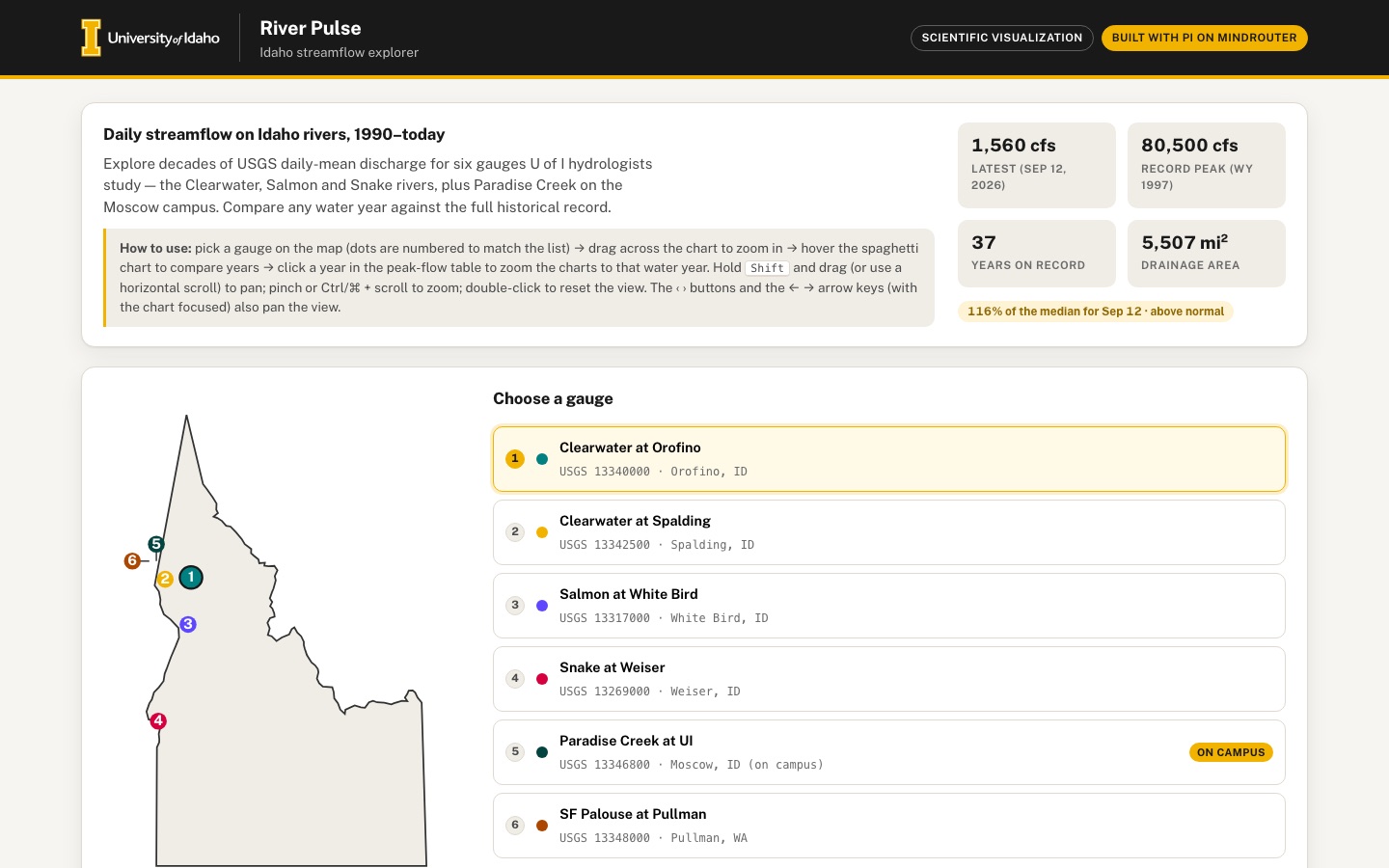 Desktop · click to enlarge
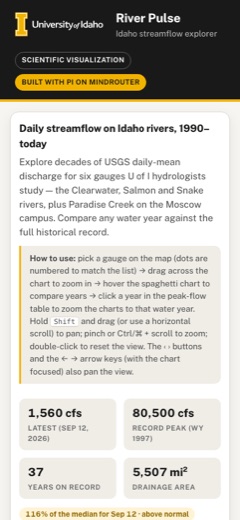
What it is ✎ blurb written by the AI critic
River Pulse charts 37 years of real USGS daily streamflow for six Idaho gauges, from the Snake River at Weiser to Paradise Creek on the Moscow campus. Pick a gauge on the map, drag across the hydrograph to zoom into a flood, and compare any water year with the median and 10–90th percentile range of all the others. A sortable peak-flow table ranks every year, and you can export the visible date range as CSV.
Try this
- Pick Clearwater at Orofino, click WY 1997 in the peak-flow table, and hover the May 17, 1997 flood (80,500 cfs) in both charts.
- Choose Paradise Creek at UI and switch the scale to Log to see summer trickles and winter storm peaks on one chart.
- Drag across a few years of the main chart to zoom in, then press Export CSV to download exactly that date range.
Highlights ✎ written by the AI critic
- Six USGS gauges, October 1989 to September 2026, embedded exactly as USGS published them
- Brush-to-zoom hydrograph that keeps every one-day flood peak visible at any zoom level
- Year-over-year chart: every water year as a faint line, the selected year in gold, with median and 10–90th percentile band
- Sortable annual peak-flow table with ranks; clicking a year zooms both charts to it
- cfs / m³/s and linear / log toggles, plus CSV export of the visible range
Who it's for
Hydrology researchers, water-resources classes, Extension agents
Features
- Gauge picker with a small inline SVG map of Idaho showing gauge locations
- Main time-series chart (canvas or SVG) with brush-to-zoom and a smooth zoom/pan
- Year-over-year 'spaghetti' overlay: every water year as a faint line, the selected year bold, with a median line and 10–90th percentile band
- Peak-flow table: annual peak discharge and date, sortable, with the rank of the current year
- Unit toggle cfs ↔ m³/s, and a CSV export of the visible range
- Clear source/citation panel with the USGS site numbers and the download date
Data & sources
- waterservices.usgs.gov — USGS NWIS Water Services daily values API (parameter 00060 discharge, statistic 00003 daily mean), JSON, sites 13340000 Clearwater R at Orofino, 13342500 Clearwater R at Spalding, 13317000 Salmon R at White Bird, 13269000 Snake R at Weiser, 13346800 Paradise Cr at University of Idaho (Moscow), 13348000 SF Palouse R at Pullman —
- waterservices.usgs.gov — USGS NWIS Site Service expanded site metadata (sites.rdb: lat/lon, drainage area) —
- tigerweb.geo.census.gov — U.S. Census Bureau TIGERweb State_County layer, Idaho state boundary GeoJSON —
How it was built
Written by Pi 0.84.4 (pi.dev) on qwen/qwen3.8-27b, served by MindRouter, the University of Idaho's on-premises AI platform.
Rounds by kind
| build | 1 |
| continue | 7 |
| feedback | 6 |
| critic | 3 |
Lines of code per file
| body html | 130 |
| app css | 235 |
| app js | 1,067 |
| scripts | 102 |
Critic scores ✎ scored by the independent AI critic, 1–10
Independent audits ✎ by the AI critic
Automated checks
Checked by critic-verify.
Data spot checks ✎ written by the AI critic
- Clearwater at Orofino latest: app shows 1,560 cfs on Sep 12, 2026; raw dv_13340000 2026-09-12 = 1560 (qualifier P). MATCH
- Orofino record peak: stat tile shows 80,500 cfs (WY 1997), and the main-chart tooltip on May 17, 1997 shows 80,500 cfs; raw 1997-05-17 = 80500. MATCH
- Orofino peak table, WY 2026: app shows 32,700, Mar 14, rank 34 of 37; independent Python ranking gives 32,700 on 2026-03-14, rank 34 of 37. MATCH
- Orofino '% of median': app shows 116%; independent median of all Sep 12 values = 1,350, so 1560/1350 = 116%. MATCH
- Paradise Creek latest: before critic the app showed 0.60 cfs and 120% of median, but raw 2026-07-07 = 0.64 (the embed rounded to 0.1 cfs, altering 7,920 of 13,429 values). After round 16 it shows 0.64 cfs and 128%, and gauges.json equals the raw files exactly for all 6 gauges (0 mismatches). FIXED
Round-by-round timeline
Every harness round, in order. The prompts and FEEDBACK.md were written by the AI reviewer; the app code was written by the harness. Expand a round to see the exact prompt and the FEEDBACK.md the harness received.
-
The m³/s unit toggle breaks both charts (critical). Click "m³/s". The stat tiles and table convert correctly, but in the main chart the line collapses to a flat trace along the bottom edge. The y-axis labels pile on top of each other at the bottom left ("2.27k / 0.00" overprinted). The water-year chart has the same problem: every line is squashed flat at y=0 with labels "85.0 / 600 / 000" overprinted. The y scale seems to stay in cfs while the plotted values are converted. Expected: in m³/s both charts look exactly like the cfs view (same shape filling the plot) with nicely rounded m³/s tick labels (0, 500, 1,000, 1,500, 2,000 …). The tooltips should use m³/s too.
-
There is no way to pan, and zooming is not smooth (required: "brush-to-zoom and a smooth zoom/pan"). Dragging always draws a new brush. Shift-drag and horizontal trackpad scrolling only zoom in further. The wheel zooms in instantly with no animation. The hint text says "Scroll or pinch to pan", which is not true. Expected:
-
an overview/navigator strip under the main chart showing the full record, with the visible window drawn as a highlighted gold rectangle. Drag the rectangle to pan, drag its edges to resize, drag on the empty strip to brush a new window. It must work with mouse and touch.
-
zoom changes (brush, wheel, reset, gauge change, presets) animate smoothly over ~250 ms.
-
horizontal wheel / shift+wheel pans.
-
a few quick range presets next to the chart, e.g. "Current water year", "Last 5 years", "All".
-
the How-to-use text and the note under the chart describing exactly what works.
-
-
X-axis labels are wrong or unreadable.
-
Desktop, full record: years repeat and skip ("2007 2008 2008", "2011 2012 2012", "2015 2016 2016", "2019 2020 2020", "2023 2024 2024"). The ticks do not fall on Jan 1.
-
Phone (390 px), full record: roughly 37 year labels overprint into an unreadable smear ("1990199219…"). Expected: ticks aligned to real calendar boundaries (Jan 1, or month starts when zoomed in), with a step of 1/2/5/10 years chosen so labels never overlap at any width. The water-year chart at 390 px has the same crowding: month labels run together ("FebMar", "Oct Nov Dec"). Show every other month when narrow.
-
-
Gauge map labels overlap and are illegible. Five of the six gauges sit in north-central Idaho. Their labels print on top of each other ("SPaRadiseCreek", "ClClearwater"). The two Clearwater dots and the Paradise Creek/SF Palouse dots overlap, and the selected-dot ring hides its neighbours. The map is also small inside a large card with a lot of empty space below it. Expected: a legible map with non-overlapping labels (e.g. numbered markers matching numbered list items, or labels offset with leader lines, or an enlarged inset of the Moscow–Lewiston–Orofino cluster). Hovering or focusing a dot should show a small tooltip (name, USGS site number, latest flow). Give the selected gauge a gentle pulse/halo so the map feels alive. Hovering a gauge in the list should highlight its dot, and hovering a dot should highlight its list item.
-
Partial water years are ranked as if they were complete. For SF Palouse at Pullman the record starts May 25 2001, so "WY 2001" shows a 25 cfs peak ranked "26 of 26" (sort by Rank, first row). WY 2026 is still in progress for every gauge; for Paradise Creek it ends Jul 7 2026. Expected: incomplete years get a clear "partial" badge. The partial first year is excluded from ranking (show "—"). The current year's rank is labelled "to date" (e.g. "WY 2026 (to date): rank 34 of 37"), and the rank of the current year stays easy to find.
-
The "Daily / Water years" toggle does nothing useful. "Water years" only scrolls the page to the next card, and the buttons stay toggled. A control that looks like a view switch but isn't is confusing. Either make it really change the main chart, or remove it.
-
Peak-flow table on the phone is enormous. At 390 px every cell wraps onto 2–3 lines ("32,700 / cfs", "Mar / 14, / 2026"), so the table alone is about 3,000 px tall. Expected: compact single-line rows (unit in the column header, e.g. "Peak (cfs)", a short date like "Mar 14"). Also give the table a sensible maximum height with a scrolling body and a sticky header (or "Show all 37 years"), on desktop too.
-
Touch: the charts trap page scrolling on phones. Both canvases use
touch-action: none, so a user who puts a finger on a chart (it fills most of the screen width) cannot scroll the page. Expected: vertical swipes scroll the page, and horizontal drags brush/pan the chart (the navigator strip from item 2 is the main touch control). -
"How does this year compare with history" is not answered at a glance. This is the app's main promise. Add a headline comparison for the selected gauge near the stat tiles, e.g. "Today: 1,560 cfs — 85% of the 1990–2025 median for Sep 12" and "WY 2026 peak so far: 32,700 cfs, rank 34 of 37". Also fix the stat tile layout: on desktop the four tiles wrap 3 + 1, leaving an orphan tile, and the "LATEST (SEP 12, 2026)" label wraps. Use a tidy 2×2 or single-row grid.
-
Add a Linear / Log y-scale toggle for both charts. On Paradise Creek and SF Palouse one flood spike (3,090 cfs on Mar 14 2026 at Pullman) squashes everything else into a flat line at the bottom. Base flows, the median line and the 10–90th band become invisible. Hydrologists routinely use a log axis for this.
-
Connect the views. Clicking a row in the peak table (or choosing a year in the "Selected year" menu) should also zoom the main chart to that water year with the smooth animation and mark the peak day with a labelled marker. Today it only changes the spaghetti chart.
-
Data & sources polish.
-
The station names are mis-capitalised: "Clearwater River At Orofino Id", "South Fork Palouse River At Pullman, Wa". They should read "Clearwater River at Orofino, ID" and "South Fork Palouse River at Pullman, WA".
-
Each gauge's "USGS site page" link points to
waterdata.usgs.gov/nwis/plot?site=…. Link instead to the station pagehttps://waterdata.usgs.gov/monitoring-location/<site>/and also to the exact daily-values API request used for that gauge (the URLs are listed in data/raw/SOURCES.md). -
Say the Paradise Creek record currently ends Jul 7 2026 (latest value USGS has published).
-
-
Accessibility.
-
The sortable table headers have no
aria-sort. -
The canvases have no text alternative describing what is shown. Give each an
role="img"label or a visually hidden summary that updates, e.g. "Clearwater at Orofino, Oct 1989–Sep 2026, peak 80,500 cfs". -
The main chart cannot be zoomed or panned from the keyboard. When it has focus, arrow keys should pan, +/- zoom and 0 reset, with a visible focus ring.
-
-
Make it feel alive. Switching gauges or units redraws instantly with no transition. Animate the line (e.g. a quick morph or fade/draw-in), and animate the selected-year line in the spaghetti chart when the year changes. The spaghetti chart could also highlight the faint line under the cursor and name its year in the tooltip.
-
The m³/s unit toggle breaks both charts. Click "m³/s". In the main chart the line collapses to a flat trace along the bottom edge, and the y-axis labels overprint at the bottom left ("2.27k / 0.00"). The water-year chart is squashed flat the same way ("85.0 / 600 / 000" overprinted). The y scale seems to stay in cfs while the plotted values are converted. Expected: in m³/s both charts have the same shape as in cfs, filling the plot, with rounded m³/s tick labels.
-
X-axis year labels repeat and overlap. On desktop, full record, years repeat ("2011 2012 2012", "2015 2016 2016", "2023 2024 2024"). At 390 px all 37 year labels overprint into an unreadable smear. Expected: ticks on real Jan 1 (or month-start) boundaries, using a 1/2/5/10-year step chosen so labels never overlap at any width. In the water-year chart at 390 px the month labels also run together ("FebMar"). Show every other month when narrow.
-
There is no way to pan, and zoom is not smooth (the spec requires "a smooth zoom/pan"). A drag always draws a new brush, and the wheel zooms instantly. Expected: dragging with Shift held (and horizontal wheel / shift+wheel) pans the visible window. Zoom and reset animate over about 250 ms. The hint text ("Scroll or pinch to pan") and the note under the chart should describe exactly what works.
-
Gauge map labels overlap and cannot be read. Five gauges sit close together in north-central Idaho, and their labels print on top of each other ("SPaRadiseCreek", "ClClearwater"). Expected: readable, non-overlapping labels (for example, number the dots 1–6 to match numbered items in the gauge list), plus a small tooltip with the gauge name when hovering over a dot.
-
The "Daily / Water years" toggle does nothing. "Water years" only scrolls the page, and the toggle stays switched. Remove it.
-
Partial water years are ranked as if complete. Pick "SF Palouse at Pullman" and sort the peak table by Rank. "WY 2001" shows a 25 cfs peak ranked "26 of 26", but that gauge's record only starts May 25 2001. WY 2026 is still in progress for every gauge (Paradise Creek's record ends Jul 7 2026). Expected: a small "partial" badge on years that do not cover the full Oct 1–Sep 30 period. A partial first year shows "—" instead of a rank and is left out of the "N of M" count. The current year keeps its rank but is labelled "to date" (for example, the note reads "WY 2026 (to date): rank 34 of 37").
-
Phones cannot scroll past the charts or pan them. Both canvases have
touch-action: none, so on a phone a finger on a chart (which spans almost the full screen width) cannot scroll the page. Phones also cannot Shift-drag, so there is no way to pan. Expected:-
vertical swipes on the charts scroll the page.
-
a slim overview strip under the main chart (about 50 px tall) showing the whole record as a small area chart. The visible window is a gold-outlined rectangle that you can drag to pan and whose edges you can drag to resize, with mouse or touch. It stays in sync when you brush, wheel, Shift-drag or reset the main chart.
-
-
The peak-flow table is far too long, especially on phones. At 390 px every cell wraps onto 2–3 lines ("32,700 / cfs", "Mar / 14, / 2026"), so the table is about 3,000 px tall. On desktop its 37 rows are about 1,400 px. Expected: single-line rows (put the unit in the column header, "Peak (cfs)", and use a shorter date such as "Mar 14"). Give the table body a maximum height of about 420 px with internal scrolling and a sticky header row.
-
"How does this year compare with history?" is not answered at a glance. This is the app's main promise. Near the stat tiles, add a headline sentence for the selected gauge, for example "Sep 12, 2026: 1,560 cfs — 85% of the 1990–2025 median for this date" and "WY 2026 peak so far: 32,700 cfs (Mar 14), rank 34 of 37". Color the percentage by whether flow is below, near or above normal. Also fix the tiles: on desktop the four stat tiles wrap 3 + 1, leaving an orphan tile, and "LATEST (SEP 12, 2026)" wraps onto two lines. Use a tidy 2 × 2 grid.
-
Four map dots still overlap. Dots 1, 2, 5 and 6 (Clearwater ×2, Paradise Creek, SF Palouse) sit on top of each other in north-central Idaho, so they are hard to tell apart or click. The map is also small, with a lot of empty card space below it. Expected: a larger map plus an enlarged inset box of the Moscow–Pullman–Lewiston– Orofino area, where these four dots are clearly separated and clickable. Give the selected dot a gentle pulsing halo.
-
Partial water years are ranked as if complete. Pick "SF Palouse at Pullman" and sort the peak table by Rank. "WY 2001" shows a 25 cfs peak ranked "26 of 26", but that gauge's record only starts May 25 2001. Expected: a year whose data does not start on Oct 1 gets a small "partial" badge, shows "—" instead of a rank, and is left out of the ranking count. The in-progress current year keeps its rank, but the note above the table says "to date", for example "WY 2026 (to date): rank 34 of 37".
-
The peak-flow table is far too tall. At 390 px wide every cell wraps onto 2–3 lines ("32,700 / cfs", "Mar / 14, / 2026"), so the table is about 3,000 px tall. On desktop its 37 rows take about 1,400 px. Expected: one line per row. Put the unit in the column header ("Peak (cfs)") instead of every cell, and use a short date like "Mar 14". Give the table area a maximum height of about 420 px, scroll the rows inside it, and keep the header row sticky.
-
The stat tiles wrap badly, and "this year vs history" is not stated. On desktop the four stat tiles wrap 3 + 1, leaving an orphan tile, and the label "LATEST (SEP 12, 2026)" wraps onto two lines. Expected: a tidy 2 × 2 grid. Below the tiles, add one headline sentence comparing the latest value with the historical median for the same calendar day, for example "Sep 12, 2026: 1,560 cfs — 85% of the median for this date". Show the percentage in a colored pill: below normal, near normal, above normal.
-
Stat tile labels overflow their tiles. Labels are now forced onto one line, so they spill out. "RECORD PEAK · WY 1997" runs past the right edge of its tile on desktop and phone, and on the phone "WATER YEARS ON RECORD" is cut off as "WATER YEARS ON RECOR". Expected: every label fits inside its tile (shorter labels such as "Record peak (1997)" and "Years on record" are fine, or allow wrapping). The comparison sentence under the tiles also breaks badly: "Sep 12, 2026: 1,560 cfs —" on one line, the pill on the next line and "(above normal)" after it. Expected: one clean line or a neat two-line block, e.g. "Sep 12, 2026 · 1,560 cfs" on the first line and the pill containing "116% of median for this date · above normal" on the second.
-
The peak table is cut off on phones. At 390 px only "Water year", "Peak" and part of "Peak date" are visible. The Rank column, the most important one, is off-screen and needs sideways scrolling. Expected: all four columns fit at 390 px without horizontal scrolling (for example headers "Year", "Peak (cfs)", "Date", "Rank", less cell padding on narrow screens, and "2026" instead of "WY 2026" in the first column when narrow). Also the header reads "PEAK ( CFS )" with stray spaces; it should read "PEAK (CFS)".
-
Phones cannot scroll past the charts. Both chart canvases have
touch-action: none, so on a phone a vertical swipe that starts on a chart (which spans almost the whole screen width) does not scroll the page. Expected: vertical swipes on either chart scroll the page normally; a horizontal drag on the main chart still brushes to zoom. -
Small accessibility and citation fixes.
-
The sortable table headers need
aria-sort("ascending", "descending" or "none") that updates when the sort changes. -
In "Data & sources" the station names are mis-capitalised: "Clearwater River At Orofino Id", "South Fork Palouse River At Pullman, Wa". They should read "Clearwater River at Orofino, ID", "South Fork Palouse River at Pullman, WA", etc.
-
Each "USGS site page" link points to
waterdata.usgs.gov/nwis/plot?site=…. Point it tohttps://waterdata.usgs.gov/monitoring-location/<site number>/instead.
-
-
The gauge map is too small, and four dots overlap. In the "Choose a gauge" card the Idaho outline takes up only about a third of the card's height, with a large empty area below it. Dots 5 (Paradise Creek) and 6 (SF Palouse) draw on top of each other and read as "65". Dot 2 (Clearwater at Spalding) touches them, and dot 1 is very close. They are hard to tell apart and to click. Expected:
-
make the map fill its column (roughly as tall as the gauge list next to it on desktop).
-
add an enlarged inset box in the empty lower-left area of the map, zooming in on the Moscow–Pullman–Lewiston–Orofino area, where dots 1, 2, 5 and 6 are drawn again, clearly apart and each clickable. Draw a thin rectangle on the main map showing where the inset is, and give the inset a small caption (e.g. "Palouse & Clearwater detail").
-
give the selected gauge a gentle pulsing halo (a CSS animation) on the main map and in the inset.
-
-
Table header spacing. The peak column header still reads "PEAK ( CFS )" with a space inside each parenthesis, on desktop and on the phone. It should read "PEAK (CFS)", and "PEAK (M³/S)" in metric units.
-
The map inset is broken. The new "Palouse & Clearwater detail" box (bottom-left of the map) is an empty white rectangle. The enlarged copies of dots 1, 2, 5 and 6 that belong inside it are drawn outside the box instead: dots 6 and 5 float in empty space above-left of the Idaho panhandle, dot 2 sits on the panhandle edge, and dot 1 floats in empty space to the right of the panhandle. In the small dashed rectangle on the main map, dots 6 and 5 still overlap ("65"). Expected: the inset box shows the enlarged Moscow–Pullman–Lewiston– Orofino area. That means the part of the Idaho outline (and the Washington border line) that falls in that area, plus dots 1, 2, 5 and 6 drawn clearly apart inside the box, each clickable, hoverable and showing the pulsing halo when selected. Positions inside the box must use the same area as the dashed rectangle, scaled up to the box size. Nothing from the inset may be drawn outside the box. The main map keeps its original small dots.
-
The Peak column header is duplicated. On desktop it reads "PEAK ( CFS ) ( CFS )". On a 390 px phone it reads "( CFS ) PEAK ( CFS )", which makes the table wider than the screen, so the Rank column is cut off again. Expected: exactly one header, "PEAK (CFS)" with no spaces inside the parentheses ("PEAK (M³/S)" in metric units), on both desktop and phone, and all four columns fit at 390 px again.
-
Remove the unfinished map inset. The "Palouse & Clearwater detail" box at the bottom-left of the map is an empty white rectangle. Extra copies of dots 1, 2, 5 and 6 float outside the Idaho outline (above-left of the panhandle and to its right), and a dashed rectangle sits over the Moscow–Lewiston area. Expected: delete the inset box, its caption, the dashed rectangle and all the extra dot copies, so the map shows the Idaho outline with exactly one numbered dot per gauge (six dots in total) at its real location, as it did before. Keep the tooltips, the click and keyboard selection, and the pulsing halo on the selected dot. Dots 5 (Paradise Creek) and 6 (SF Palouse) sit almost on top of each other and read as "65". Draw these two slightly offset from each other (about 10 px apart) with a short thin line from each offset dot to its true location, so both numbers are readable and clickable.
-
The Peak column header is duplicated. On desktop it reads "PEAK ( CFS ) ( CFS )". On a 390 px phone it reads "( CFS ) PEAK ( CFS )", which makes the table wider than the screen, so the Rank column is cut off. Expected: exactly one header, "PEAK (CFS)" with no spaces inside the parentheses ("PEAK (M³/S)" in metric units), on desktop and phone, with all four columns fitting at 390 px.
-
The Peak column header in the annual peak table is duplicated. On desktop the header reads "PEAK ( CFS ) ( CFS )". On a 390 px phone it reads "( CFS ) PEAK ( CFS )", which makes the table wider than the screen, so the Rank column is cut off. The cause is in the
<th>fordata-sort="peak"insrc/body.html: the " (cfs)" unit text appears twice, once after the full label and once after the narrow label, and both copies show on every screen size. Expected: exactly one header, "PEAK (CFS)" with no spaces inside the parentheses ("PEAK (M³/S)" in metric units), on desktop and phone, with all four columns fitting at 390 px. Then runpython3 build.py --check. -
The map inset is broken; remove it. In the "Choose a gauge" card, the "Palouse & Clearwater detail" box at the bottom-left of the map is an empty white rectangle. Extra copies of dots 1, 2, 5 and 6 float outside the Idaho outline (above-left of the panhandle and to its right), and a dashed rectangle sits over the Moscow–Lewiston area. Expected: the map shows only the Idaho outline and exactly one numbered dot per gauge (six in total) at its real location, as it did before the inset was added. The dot tooltips, click and keyboard selection, and the pulsing halo on the selected dot keep working.
Where the inset lives:
-
src/app.js, gauge picker section: theINSETconstant, the "Inset: zoomed view of the Palouse / Clearwater cluster" block insidebuildMap()(the dashedinset-regionrectangle, themap-insetgroup with its frame, dots and caption), the secondinsetSites.forEachloop that adds halos inside the inset, and the.map-insetspecial case inupdateGaugeSelection(). -
src/app.css: theinset-region,inset-frameandinset-captionrules. Keep thegauge-halorules.The map's SVG
viewBoxwas also made taller (0 0 340 430) to make room for the inset, leaving empty space above the state. Set it back so the Idaho outline fills the map area.Then run
python3 build.py --check.
-
-
Map dots 5 and 6 draw on top of each other. In the "Choose a gauge" map, dot 5 (Paradise Creek, Moscow) and dot 6 (SF Palouse, Pullman) are only about 7 px apart, so they read as "65". Dot 2 (Clearwater at Spalding) touches them. This happens on desktop and on a 390 px phone. Expected: all six numbered dots are readable and clickable on their own. For example, draw dot 6 about 12 px to the left and dot 5 about 12 px up, each with a thin grey line back to its true location. The dots, their numbers and their pulsing halos are placed in
buildMap()insrc/app.js: the threeGAUGES.forEachloops that callmapProj(g.lon, g.lat). Apply the same offset in all three so a dot, its number and its halo stay together. Tooltips, click/keyboard selection and the halo must keep working. -
The Peak column header has spaces inside the parentheses. It reads "PEAK ( CFS )" on desktop and phone. It should read "PEAK (CFS)", and "PEAK (M³/S)" in metric units. The header is the
<th>withdata-sort="peak"insrc/body.html(look for extra spaces or padding around therp-unitspan). -
The main chart drops flood peaks. In
drawMain(), section// series line (decimate if many points), the loopfor (let i = i0; i <= i1; i += stride)draws only everystride-th day. That is every 5th day at 1440 px and every 26th day on a phone, so one-day floods fall between samples. Examples at full-record zoom:-
Desktop: Clearwater at Spalding's record peak of 98,300 cfs (Jun 13, 2022) is drawn no higher than 81,400.
-
Desktop: Clearwater at Orofino's Dec 1, 1995 flood of 73,200 cfs is drawn at 34,600.
-
Phone: Paradise Creek's record of 755 cfs is drawn at 299, while the y axis still goes up to 755.
Expected: every day's high and low stays visible at every zoom level. Fix: when there are more days than pixels, group the visible days into one bucket per pixel column. For each bucket, add both its minimum day and its maximum day to the path, in date order, instead of skipping days. Keep the area fill and the final point.
-
-
The Year over year chart shifts Jan–Sep by one day in water years that follow a leap year. In
getYearSeries(), the day-of-water-year for Jan–Sep dates isdayOfYear(y, m, dd) + (365 - dayOfYear(wy - 1, 10, 1)). Whenwy - 1is a leap year (WY 1993, 1997, 2001, 2005, 2009, 2013, 2017, 2021, 2025),dayOfYear(wy - 1, 10, 1)is 274. Dec 31 and Jan 1 then both get day 91, and every Jan–Sep day lands one day early. The month gridline loop indrawYear()uses the same formula. As a result the median band mixes neighbouring days: at Clearwater at Orofino, the May 15 median shows 24,900 cfs, but the true median of the 37 years on day 226 is 26,000 cfs. Fix: in both places, use whole days since Oct 1 of the previous calendar year:Math.round((Date.UTC(y, m - 1, dd) - Date.UTC(wy - 1, 9, 1)) / DAY)(for Oct–Dec dates this gives the same result as today). -
The Year over year tooltip shows the wrong day's value and makes up values after the record ends.
-
Wrong day: in the
yearCanvas.addEventListener("pointermove", …)handler,const p = selA[Math.min(j + 1, selA.length - 1)]takes the point after the hovered day, so the value does not belong to the date in the tooltip title. At Clearwater at Orofino with WY 1997 selected, hovering "May 17, 1997" shows 64,000 cfs. USGS reports 80,500 cfs on May 17; 64,000 is the May 19 value. -
Made-up values: past the last observation, the tooltip repeats the last value. With WY 2026 selected, "Sep 25, 2026" shows 1,560 cfs, which is the Sep 12 value; there is no data after Sep 12. Paradise Creek WY 2026 at "Aug 20, 2026" shows 0.60 cfs, but that gauge's record ends Jul 7, 2026.
Fix: round the hovered position to a whole day and use that same day for the tooltip title. Look up the selected year's point with exactly that day. If there is none, show "No data" in the WY row (keep the Median and 10–90th rows). Also in
drawYear(), in the median/percentile loop: a year may only contribute for days between its first and last observation. Today, whenj === a.length - 1, a year that has ended still counts its last value all the way to Sep 30.
-
-
Small-stream flows are rounded to 0.1 cfs, so the displayed numbers are wrong. In
scripts/process_data.py,load_series()doescfs.append(round(float(raw), 1)). USGS publishes small flows with two decimals, so at Paradise Creek 7,920 of 13,429 daily values change, 3,375 of them by more than 5%, and 65 nonzero flows become 0. The app shows "0.60 cfs" and "120% of the median" for Jul 7, 2026, while USGS reports 0.64 cfs (128%). SF Palouse shows 3.20 cfs; USGS reports 3.23. The CSV export repeats the rounded numbers. Fix: keep the USGS value exactly as published: store an int when it is a whole number (so"1560"stays1560), otherwisefloat(raw)with no rounding. Then runpython3 scripts/process_data.pyto regeneratedata/embed/gauges.json, thenpython3 build.py --check. -
The Idaho map is stretched sideways and small.
mapProjinsrc/app.js(section "gauge picker + map") uses the same scale for a degree of longitude as for a degree of latitude. At Idaho's latitude a degree of longitude is only about 0.70 as long, so the outline is drawn about 1.4 times too wide: its width/height is 0.89, but Idaho's real shape is about 0.62, clearly taller than wide. Fix: multiply longitude differences byMath.cos(45.5 * Math.PI / 180)(≈ 0.701), both in the scale computation(maxLon - minLon)and in the x coordinate(lon - minLon). The shape then becomes tall and narrow, so give it a tall drawing area:-
set
MAP_W = 260andMAP_H = 360 -
change the
<svg id="rp-map">viewBox insrc/body.htmlto0 0 260 360 -
in
src/app.css, inside@media (max-width: 860px), give.rp-picker__map svgamin-height: 400pxKeep the numbered dots, the dot 5/6 offsets with leader lines, the halos and the tooltips working.
-
-
Rank sorting puts the worst rank and the partial year first. In the
.rp-thclick handler,state.sort = { key, dir: key === "year" ? 1 : -1 }makes the first click on "Rank" sort descending, so "37 of 37" is on top. InbuildPeakTable()'s comparator, partial years such as SF Palouse WY 2001 (rank shown as "—") havep.rankundefined, so they stay at the top of every rank sort. Expected: the first click on Rank shows "1 of N" first, and partial rows always sort to the bottom in every sort, whichever direction. -
The CSV export and the range label disagree by a day. After zooming, the range label read "Oct 30, 1997 – Aug 17, 1998", but the exported CSV ran from 1997-10-31 to 1998-08-18. The view edges are fractional days: the label floors them with
ms2d(), and the CSV handler'si1 = lowerBound(pre.ms, d1, pre.n)is the first day after the view. Fix: in both the CSV handler and therp-rangelabel indrawMain(), use the same two indices: the first day withms >= d0and the last day withms <= d1. Showg.datesof those indices in the label, and use them in the CSV rows and file name. The label, the chart and the file then agree. -
Clicking a peak-table row should also zoom the main chart to that water year. Today it only updates the Year over year chart. In the row click handler in
buildPeakTable(), and in theyearSelect"change" handler, also call the existinganimateDomain([Date.UTC(year - 1, 9, 1), Date.UTC(year, 8, 30)]); it already clamps to the record. In the "How to use" hint insrc/body.html, change "click a year in the peak-flow table to highlight it" to "click a year in the peak-flow table to zoom the charts to that water year". -
The Peak and Peak date columns now sort smallest/oldest first. The
.rp-thclick handler insrc/app.jshasstate.sort = { key, dir: key === "year" ? 1 : 1 }, so the first click on every column sorts ascending. Clicking "Peak (cfs)" lists the smallest annual peak first. Expected: the first click on Peak or Peak date sorts descending (largest / most recent first). The first click on Water year or Rank stays ascending. Usedir: (key === "peak" || key === "date") ? -1 : 1. Keep partial rows at the bottom. -
Phones and keyboards cannot pan the main chart. Shift-drag and horizontal scrolling only work with a mouse or trackpad.
-
Buttons: in
src/body.html, add two buttons with the existingbtnclass to the main chart toolbar, just before "Reset zoom":‹witharia-label="Pan earlier"and›witharia-label="Pan later". Each shifts the visible window by half its width and keeps the width the same. Computespan = d1 - d0,shift = ∓span / 2, and clampshiftso thatd0 + shift >= pre.minMsandd1 + shift <= pre.maxMs. Then call the existinganimateDomain([d0 + shift, d1 + shift]). When the full record is visible, the buttons do nothing. -
Keyboard: give
<canvas id="rp-chart">tabindex="0". In akeydownlistener, ArrowLeft/ArrowRight do the same as the buttons, and+/-zoom in / out by 25% around the centre of the view withanimateDomain(). CallpreventDefault()for those keys. -
Mention the ‹ › buttons and the arrow keys in the chart note
#rp-chartnote.
-
-
Add a Linear / Log scale toggle. On flashy small streams one flood squashes everything else. Paradise Creek's Year over year axis runs to 800 cfs, so its median line and 10–90th band are squeezed into the bottom few pixels.
-
Markup: in
src/body.html, right after the units.seggroup, add a second group<div class="seg" role="group" aria-label="Scale">with twoseg__btnbuttons:data-scale="linear"(text "Linear",is-active,aria-pressed="true") anddata-scale="log"(text "Log"). -
State: add
scale: "linear". Clicking a scale button togglesis-active/aria-pressedlike the unit buttons, then callsdrawMain()anddrawYear(). -
When
state.scale === "log", in bothdrawMain()anddrawYear():-
y0= the smallest positive value in view (display units), rounded down to a power of 10:10 ** Math.floor(Math.log10(min)).y1= the largest value × 1.2. -
Y = v => top + (1 - (Math.log10(Math.max(v, y0)) - Math.log10(y0)) / (Math.log10(y1) - Math.log10(y0))) * ph. Values of 0 or below draw aty0. -
Y-axis ticks at each power of 10 between
y0andy1, plus 2× and 5× ticks when the range spans fewer than 3 powers of 10. Label them withfmtVal. -
The area fill under the main line still closes at the bottom of the plot.
-
-
Linear mode must look exactly as it does now. Tooltips and the hover dot already use the chart's
Yfunction, so keep using it.
-
-
Scrolling the page with a mouse wheel or trackpad over the main chart zooms the chart instead. A first-time visitor scrolling down the page gets stuck zooming. In the
wheellistener onmainCanvas:-
Handle vertical wheel events only when
e.ctrlKey || e.metaKeyis true. This also covers trackpad pinch, which Chrome and Safari send as a wheel event withctrlKey. -
Otherwise return without
preventDefault(), so the page scrolls. -
Keep horizontal wheel (or Shift + wheel) panning as it is.
-
In the "How to use" hint
#rp-hintand in#rp-chartnote, replace "scroll to zoom" with "pinch or Ctrl/⌘ + scroll to zoom".
-
-
The summary card repeats the latest value. Under the four stat tiles, the line "Sep 12, 2026 · 1,560 cfs" repeats the "Latest" tile directly above it. In
buildStats(), remove the<span class="rp-compare__line">…</span>and keep only the pill. Change the pill text to${pct}% of the median for ${fmtDateShort(latestDate)} · ${word}(for example "116% of the median for Sep 12 · above normal").
1 build 2.6 min · 1 file changed, 107 insertions(+) Show prompt
Read AGENTS.md, SPEC.md and BRAND.md in this directory. Then build the complete app they describe, step by step: first write scripts in scripts/ that turn the raw data in data/raw/ (see data/raw/SOURCES.md — six USGS daily-discharge JSON files, a USGS site metadata RDB file and an Idaho boundary GeoJSON) into compact JSON in data/embed/ and run them; then write src/body.html, src/app.css and src/app.js; run python3 build.py --check and fix any error it reports. Implement every required feature in SPEC.md with a polished, modern, responsive University of Idaho design. Do not stop until python3 build.py --check succeeds and every feature is implemented.
2 continue 6.0 min · 7 files changed, 2178 insertions(+), 7 deletions(-) Show prompt
Read AGENTS.md, SPEC.md and BRAND.md in this directory. Then build the complete app they describe, step by step: first write scripts in scripts/ that turn the raw data in data/raw/ (see data/raw/SOURCES.md — six USGS daily-discharge JSON files, a USGS site metadata RDB file and an Idaho boundary GeoJSON) into compact JSON in data/embed/ and run them; then write src/body.html, src/app.css and src/app.js; run python3 build.py --check and fix any error it reports. Implement every required feature in SPEC.md with a polished, modern, responsive University of Idaho design. Do not stop until python3 build.py --check succeeds and every feature is implemented.
3 feedback 29.8 min · 1 file changed, 99 insertions(+) Show prompt
Read FEEDBACK.md in this directory — it lists problems a reviewer found when testing index.html in a real browser. Fix every item, keeping everything that already works, then run python3 build.py --check.
Reviewer feedback — round 2 build, tested in Chromium at 1440x900 and 390x844
Overall: a strong start. Data pipeline, gauge list, brush-to-zoom, spaghetti chart, table sorting and CSV export all work and there are no console errors. The items below are what keeps it from being a polished, gallery-quality data product. Most important first. Keep everything that already works.
4 continue 19.3 min · — Show prompt
Read FEEDBACK.md in this directory — it lists problems a reviewer found when testing index.html in a real browser. Fix every item, keeping everything that already works, then run python3 build.py --check.
5 feedback 2.8 min · 5 files changed, 351 insertions(+), 223 deletions(-) Show prompt
Read FEEDBACK.md in this directory — it lists problems a reviewer found when testing index.html in a real browser. Fix every item, keeping everything that already works, then run python3 build.py --check.
Reviewer feedback — tested index.html in Chromium at 1440x900 and 390x844
The app works well overall and has no console errors. Fix these five problems, most important first. Make focused edits to the existing files. Do not rewrite everything, and keep all features that work today.
6 feedback 19.6 min · 1 file changed, 33 insertions(+), 23 deletions(-) Show prompt
Read FEEDBACK.md in this directory — it lists problems a reviewer found when testing index.html in a real browser. Fix every item, keeping everything that already works, then run python3 build.py --check.
Reviewer feedback — round 5 build, tested in Chromium at 1440x900 and 390x844
The last round's fixes work: m³/s charts, calendar-aligned ticks, animated zoom, Shift-drag pan and the numbered map dots. Fix these five remaining problems, most important first. Make focused edits to the existing files. Do not rewrite everything, and keep all features that work today.
7 continue 6.4 min · 5 files changed, 163 insertions(+), 64 deletions(-) Show prompt
Read FEEDBACK.md in this directory — it lists problems a reviewer found when testing index.html in a real browser. Fix every item, keeping everything that already works, then run python3 build.py --check.
Reviewer feedback — tested index.html in Chromium at 1440x900 and 390x844
The app works well. Fix these three problems. Make small, focused edits to the existing files (do not rewrite whole files) and keep everything that works today.
8 feedback 4.9 min · 7 files changed, 151 insertions(+), 54 deletions(-) Show prompt
Read FEEDBACK.md in this directory — it lists problems a reviewer found when testing index.html in a real browser. Fix every item, keeping everything that already works, then run python3 build.py --check.
Reviewer feedback — tested index.html in Chromium at 1440x900 and 390x844
The last round's fixes work: partial-year badges, "to date" ranking, the capped table with a sticky header, and the median comparison. Fix these four small problems. Make small, focused edits to the existing files (do not rewrite whole files) and keep everything that works today.
9 feedback 19.4 min · 5 files changed, 335 insertions(+), 117 deletions(-) Show prompt
Read FEEDBACK.md in this directory — it lists problems a reviewer found when testing index.html in a real browser. Fix every item, keeping everything that already works, then run python3 build.py --check.
Reviewer feedback — tested index.html in Chromium at 1440x900 and 390x844
The last round's fixes work: the stat tiles fit, the median sentence reads well, all four table columns fit on a phone, and swipes scroll past the charts. Fix these two remaining problems. Make small, focused edits to the existing files (do not rewrite whole files) and keep everything that works today.
10 continue 19.4 min · 1 file changed, 16 insertions(+), 15 deletions(-) Show prompt
Read FEEDBACK.md in this directory — it lists problems a reviewer found when testing index.html in a real browser. Fix every item, keeping everything that already works, then run python3 build.py --check.
Reviewer feedback — tested index.html in Chromium at 1440x900 and 390x844
The previous round was interrupted while it was working on the map inset, and it left two visible bugs. Fix exactly these two things with small, focused edits. Do not rewrite whole files, and keep everything else as it is.
11 continue 19.6 min · 1 file changed, 15 insertions(+), 15 deletions(-) Show prompt
Read FEEDBACK.md in this directory — it lists problems a reviewer found when testing index.html in a real browser. Fix every item, keeping everything that already works, then run python3 build.py --check.
Reviewer feedback — tested index.html in Chromium at 1440x900 and 390x844
An earlier round was interrupted while adding a map inset, and it left two visible bugs. Fix them with small, focused edits: mostly deleting the unfinished inset code. Do not rewrite whole files, and keep everything else as it is.
12 continue 0.2 min · 3 files changed, 10 insertions(+), 19 deletions(-) Show prompt
Read FEEDBACK.md in this directory — it lists problems a reviewer found when testing index.html in a real browser. Fix every item, keeping everything that already works, then run python3 build.py --check.
Reviewer feedback — tested index.html in Chromium at 1440x900 and 390x844
Fix exactly one small bug. It is a one-line change in src/body.html. Do not change anything else.
13 continue 0.8 min · 5 files changed, 32 insertions(+), 181 deletions(-) Show prompt
Read FEEDBACK.md in this directory — it lists problems a reviewer found when testing index.html in a real browser. Fix every item, keeping everything that already works, then run python3 build.py --check.
Reviewer feedback — tested index.html in Chromium at 1440x900 and 390x844
Fix exactly one bug: remove an unfinished map inset. This is mostly deleting code. Do not change anything else.
14 feedback 1.7 min · 5 files changed, 59 insertions(+), 27 deletions(-) Show prompt
Read FEEDBACK.md in this directory — it lists problems a reviewer found when testing index.html in a real browser. Fix every item, keeping everything that already works, then run python3 build.py --check.
Reviewer feedback — tested index.html in Chromium at 1440x900 and 390x844
The app works well. Fix exactly two small visual bugs with small, focused edits. Do not change anything else.
Then run python3 build.py --check.
15 critic 0.7 min · 3 files changed, 113 insertions(+), 30 deletions(-) Show prompt
Read FEEDBACK.md in this directory — it lists problems a reviewer found when testing index.html in a real browser. Fix every item, keeping everything that already works, then run python3 build.py --check.
Reviewer feedback — tested index.html in Chromium at 1440x900 and 390x844
The app looks good and most features work. A check against the raw USGS files found three chart bugs that show wrong numbers. Fix exactly these three with focused edits in src/app.js. Do not change anything else.
Then run python3 build.py --check.
16 critic 1.0 min · 7 files changed, 95 insertions(+), 66 deletions(-) Show prompt
Read FEEDBACK.md in this directory — it lists problems a reviewer found when testing index.html in a real browser. Fix every item, keeping everything that already works, then run python3 build.py --check.
Reviewer feedback — tested index.html in Chromium at 1440x900 and 390x844
The previous three chart fixes work: every flood peak is drawn, and the year tooltip matches USGS. Fix exactly the five items below with small, focused edits. Do not change anything else.
Then run python3 scripts/process_data.py and python3 build.py --check.
17 critic 1.8 min · 4 files changed, 308 insertions(+), 81 deletions(-) Show prompt
Read FEEDBACK.md in this directory — it lists problems a reviewer found when testing index.html in a real browser. Fix every item, keeping everything that already works, then run python3 build.py --check.
Reviewer feedback — tested index.html in Chromium at 1440x900 and 390x844
The last two rounds work: data now matches USGS exactly, the map has the right shape, and table rows zoom the charts. Fix the five items below with focused edits. Keep everything else as it is.
Then run python3 build.py --check.
What the agent was asked
The full specification the harness received, rendered from the original Markdown.
Known limitations
Reported by the independent critic. ✎ written by the AI critic
- Pan direction is inverted: the ‹ ('Pan earlier') button and the ← key move the main chart to LATER dates, and › / → move it earlier. This came in with round 17 and is a one-sign bug in panBy() in src/app.js (`let shift = -dir * span / 2` should be `dir * span / 2`). It was not fixed because the 3 critic rounds were used up; the wording of my feedback ('∓span / 2') likely invited it.
- No drag or swipe panning on touch screens; phones pan only through the ‹ › buttons (inverted, see above). Brush-zoom, double-tap reset and row-click zoom all work on phones.
- The Year over year chart has a tooltip but no hover crosshair or marker dot (the main chart has both).
- Wheel/pinch zoom, Shift-drag pan and unit/gauge/scale switches redraw instantly without animation; only brush zoom, reset, row-click zoom and the pan buttons animate.
- Log-axis labels mix formats ('0.10', '1.00', '10.0', '100'), and for Paradise Creek the log floor reaches 0.01 cfs, which spreads the band over 5 decades.
- The 'Years on record' tile counts the partial first year (SF Palouse shows 26, while ranks are out of 25).
- Paradise Creek's latest USGS value is Jul 7, 2026. The app shows that date but does not flag that the gauge is not currently reporting.
- On phones the Idaho map is about 330×450 px and pushes the gauge list below the fold.