Two-Time-Zone Meeting Finder
Schedule across Moscow, Boise, Idaho Falls and beyond
Idaho spans two time zones — Moscow and Coeur d'Alene run on Pacific time while Boise and Idaho Falls run on Mountain. Paste everyone's availability and find the meeting slots that work for the most people, shown in each person's local time.
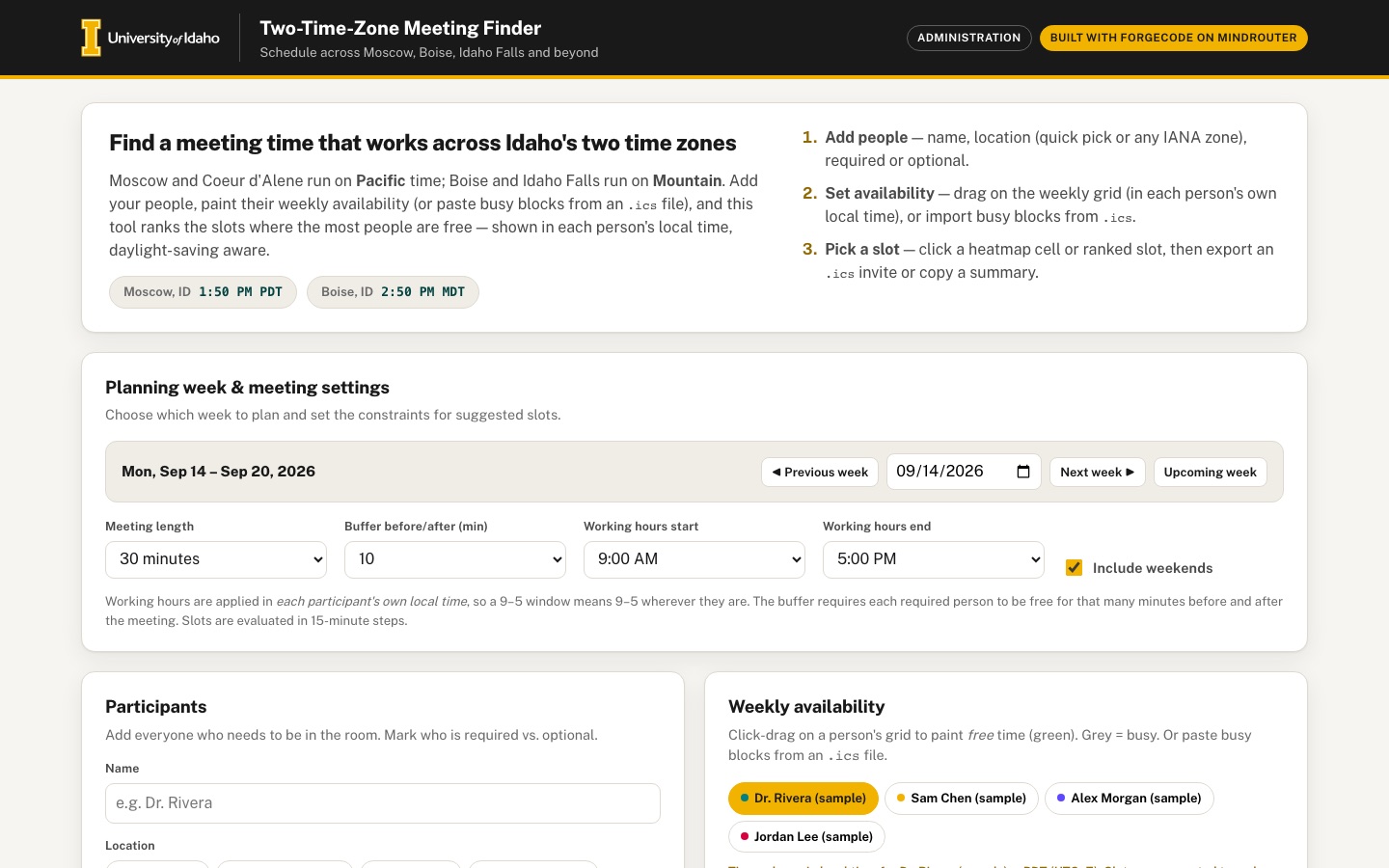 Desktop · click to enlarge
What it is ✎ blurb written by the AI critic
Plan a meeting for people split between Idaho's Pacific-time north (Moscow, Coeur d'Alene) and Mountain-time south (Boise, Idaho Falls, Twin Falls), or anywhere else. Add participants, paint each person's free hours in their own local time or paste busy blocks from a calendar .ics file. The app then shows a heatmap of who is free when and ranks the best slots. Every suggestion is shown in each person's local time, with daylight saving handled, and the chosen slot can be downloaded as a calendar invite or copied as a text summary.
Try this
- Click 'Load a sample team (illustrative data)', then hover the heatmap cells to see who is free at each half hour in Pacific and Mountain time.
- Set the meeting length to 2 hours and click a heatmap cell in the early afternoon. The Chosen slot panel shows who can't attend and why, then you can export the .ics invite.
- Jump to the week of Oct 26, 2026 with the date picker, add a participant in America/Phoenix, and pick a slot. Then go to the next week and see Phoenix's one-hour gap to Boise close after the clocks change.
Highlights ✎ written by the AI critic
- All time math uses the browser's built-in time-zone data, so meetings in the week clocks change (e.g. Nov 1, 2026) show correct local times for Moscow, Boise and Phoenix
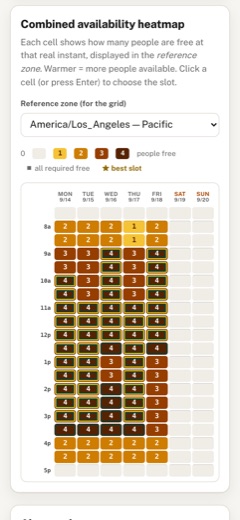
- Heatmap of combined availability: hover or tab to a cell to see who is free and who is busy
- Paint availability by click-dragging, or import busy blocks from .ics text, including weekly repeating events
- Best slots are ranked all-required-first, then by most optional people, and each is shown in every person's local time
- One click exports a calendar invite (.ics) or copies a plain-text summary of the chosen slot
Who it's for
Committee chairs, statewide Extension teams, multi-campus research groups
Features
- Participant list with name, location/time zone (quick picks for U of I centers: Moscow, Coeur d'Alene, Boise, Idaho Falls, Twin Falls, plus any IANA zone) and required/optional flag
- Paint-your-availability weekly grid per person (click-drag), or paste busy blocks from an .ics file
- Heatmap of combined availability with best-slot ranking (all required present, most optional)
- Every suggested slot shown simultaneously in each participant's local time, with DST-aware dates
- Working-hours constraints and meeting length / buffer settings
- Export the chosen slot as an .ics invite and a copyable plain-text summary
Data & sources
- data.iana.org — IANA Time Zone Database zone1970.tab (tzdb 2026d)
- data.iana.org — IANA tzdb version file
- www.uidaho.edu — University of Idaho location pages, cited as links only:
- www.rfc-editor.org — RFC 5545 iCalendar (IETF)
- MDN Intl.DateTimeFormat and Intl.supportedValuesOf, reference; all time-zone math uses the browser's Intl support
How it was built
Written by ForgeCode 2.13.21 (forgecode.dev) on qwen/qwen3.8-27b, served by MindRouter, the University of Idaho's on-premises AI platform.
Rounds by kind
| build | 1 |
| feedback | 8 |
| critic | 3 |
Lines of code per file
| body html | 213 |
| app css | 468 |
| app js | 2,001 |
| scripts | 37 |
Critic scores ✎ scored by the independent AI critic, 1–10
Independent audits ✎ by the AI critic
Automated checks
Checked by critic-verify.
Data spot checks ✎ written by the AI critic
- Chosen slot 'Mon, Sep 14 10:15-10:45 AM PDT' is displayed as UTC 17:15Z and 11:15 AM MDT for the Boise and Idaho Falls people. Python zoneinfo gives 2026-09-14 10:15 America/Los_Angeles = 17:15Z = 11:15 AM MDT in America/Boise. Match.
- DST: for Nov 2 2026, 1:00 PM PST the app shows 21:00Z, Boise 2:00 PM MST and Phoenix 2:00 PM MST. For Oct 26, 1:00 PM PDT it shows Boise 2:00 PM MDT and Phoenix 1:00 PM MST. zoneinfo gives the same offsets (PST UTC-8, PDT UTC-7, MST UTC-7, MDT UTC-6; Phoenix is UTC-7 all year). Match.
- The DST notice 'DST changes this week in: America/Los_Angeles, America/Boise' appears for Oct 26-Nov 1 and not for Nov 2-8. zoneinfo puts the transitions at 2026-11-01 09:00Z (LA) and 08:00Z (Boise). Match.
- Exporting Mon Sep 14 11:00-11:30 AM PDT gives DTSTART:20260914T180000Z and DTEND:20260914T183000Z. zoneinfo: 11:00 PDT = 18:00Z. Match.
- .ics import: an event with TZID=America/Los_Angeles, Wed 13:00-15:00, marks slots 52-59 (1-3 PM). A weekly MO-FR RRULE at 16:00Z for 30 min marks 9:00-9:30 AM PDT on Mon-Fri. 16:00Z = 9:00 AM PDT. Match.
Round-by-round timeline
Every harness round, in order. The prompts and FEEDBACK.md were written by the AI reviewer; the app code was written by the harness. Expand a round to see the exact prompt and the FEEDBACK.md the harness received.
-
CRITICAL — suggested slots show different real-world instants for different people (no time-zone conversion). Clicked "Load a sample team". Best slot card reads:
Mon · 9:15 AM–9:45 AM (America/Los_Angeles),UTC: 2026-09-07 16:15 – 16:45 Z, thenDr. Rivera (sample) 9:15 AM–9:45 AM PDTandSam Chen (sample) 9:15 AM–9:45 AM MDT. 9:15 MDT is 15:15 UTC — an hour earlier than the meeting. The same wrong times appear in the copied plain-text summary. Expected for that meeting: Rivera 9:15–9:45 AM PDT, Chen 10:15–10:45 AM MDT. The combining is also wrong: I painted Alice (Moscow) free Mon 9:00 AM–12:00 PM in her grid and Bob (Boise) free Mon 10:00 AM–1:00 PM in his grid — those are the same three real hours — but the app treats grid rows as identical clock times across people, so it computes only a 2-hour overlap at the wrong time. Expected: each person's grid is painted in their own local time (label it, e.g. "Times shown in Boise time — MDT"); before combining, every person's free/busy slots and their working hours are converted to real instants (UTC), and the heatmap/ranking are computed on real instants and displayed in the reference zone. Every suggested slot must then show the same instant in each person's local time (Pacific + 1 h = Mountain, + 3 h = Eastern). -
CRITICAL — click-drag painting only paints the first cell. In Alice's grid I pressed the mouse on Mon 9:00 AM and dragged down to Mon 11:45 AM (15 mouse-move events, button held). Only the 9:00 cell turned green (free cells 0 → 1). Same for Bob and Carol. It looks like the first cell captures the pointer so the other cells never see the drag. Expected: every cell the pointer passes over while the button is held gets painted (dragging across days too), the first cell decides paint vs. erase, and it also works with touch on a phone.
-
CRITICAL — no way to choose the week; the fixed week is already over and dates disagree. The grid is locked to
Mon 9/7 – Sun 9/13(today is Sun 9/13/2026, so every suggestion is in the past). Nobody can plan next week or a week that crosses a daylight-saving change (DST ends Sun 2026-11-01; starts Sun 2027-03-14). On the phone test (browser zone America/Boise) a card titled "Mon" showedUTC: 2026-09-06 17:00— that is Sunday, Sept 6. Expected: a week picker (◀ previous / next ▶ buttons plus a date input) defaulting to the upcoming week; day headers with real dates; day labels, dates and UTC instants that agree in every browser time zone; slots in a DST week use the correct offset on each day (PDT before the change, PST after), with a small "DST changes this week" notice. -
HIGH — .ics import marks the wrong times. Imported a test file for Carol (America/New_York) containing: a UTC event Mon 2026-09-14 16:00–18:00Z;
DTSTART;TZID=America/Boise:20260915T130000to 15:00; an all-dayDTSTART;VALUE=DATE:20260917; aTRANSP:TRANSPARENTevent; and a weeklyRRULE:FREQ=WEEKLY;BYDAY=TU,FR8–9 AM Pacific starting 9/1. Result: "225 busy slot(s) imported" and every day Mon–Sun 9 AM–5 PM turned hatched-busy — the one all-day Thursday event blocked all seven days. Expected: an all-day event blocks only its own date(s); events are placed by their real date into whichever week is displayed (the 9/14–9/17 events appear when that week is shown); TZID times are interpreted in that zone and UTCZtimes as UTC; weekly RRULEs (BYDAY, COUNT/UNTIL) are expanded into the displayed week; transparent/cancelled events are skipped; busy blocks are drawn on the person's grid in their local time; a result message like "Imported 5 busy events (1 skipped)". -
HIGH — "paste busy blocks" is missing, and the import button looks disabled. The spec says users can paste busy blocks from an .ics file, but there is only a file picker. Expected: a textarea (per person) where .ics text can be pasted and applied, plus the file picker / drag-and-drop, plus a "Clear imported busy blocks" action. The current "Import busy blocks from .ics…" control is light grey text on a grey dashed box and reads as disabled — make it a clear, obviously clickable secondary button / drop zone.
-
HIGH — the availability grid is enormous and mostly blank. At 1440 px it renders all 24 hours in 15-minute rows, about 2,900 px tall, with midnight–9 AM and 5 PM–midnight as empty white space. Expected: show only the working-hours window (plus maybe an hour on each side), compact rows, sticky day header, hour labels, and helper buttons such as "Fill weekdays within working hours" and "Clear". On the 390 px phone only about three day columns are visible and the rest are cut off at the card's right edge with no hint; make it scroll horizontally with a visible cue (or offer a day selector) so all seven days are reachable.
-
HIGH — the heatmap is unreadable and 3,300 px tall. Every one of the 672 cells prints a tiny "0"; when the maximum is 1, a free cell is dark brown with dark text so the number disappears; the best slot is not visibly marked. Expected: a compact heatmap limited to the relevant hours (the union of everyone's working hours in the reference zone) that fits on one desktop screen; no "0" clutter; count text with enough contrast on every shade; a legend with real counts (0 … N people); the best slot(s) outlined in gold with a ★; cells where all required people are free clearly distinguished; hover/focus tooltip listing by name who is free and who is missing.
-
HIGH — you cannot choose a slot. Clicking a heatmap cell only shows a toast like "Mon 2:00 PM (America/Los_Angeles)" and scrolls the page; nothing becomes selected. Expected: clicking (or pressing Enter on) any heatmap cell or ranked card makes it the chosen slot: highlight it, show a "Chosen slot" panel with the meeting in every participant's local time and who can/can't attend, and make "Export .ics invite" and "Copy summary" act on that chosen slot.
-
MEDIUM — the ranking is repetitive. With the sample team, all 8 suggestions are consecutive 15-minute starts on Monday morning (9:15, 9:30, 9:45, 10:00 …), and each says "1/2 optional" even though both optional people painted the same hours as the required ones. Expected: correct counts, and varied suggestions (e.g. the best start per distinct window/day, or merge adjacent equal-score starts into "Mon 9:15–11:30, any start"), each showing who is missing.
-
MEDIUM — buffer does not behave like a buffer. Changing buffer 10 → 30 minutes did not change the results text. Expected: a slot needs each required person free for the buffer minutes before and after the meeting (not directly adjacent to a busy/imported block), so larger buffers visibly remove tightly packed slots.
-
MEDIUM — export content is generic. The .ics always has
SUMMARY:Meeting (Two-Time-Zone Finder)and no participants. Expected: a meeting title field (and optional location/notes) used in the .ics SUMMARY/DESCRIPTION and in the text summary; the DESCRIPTION lists each participant with their local time; show the plain-text summary in a visible read-only box next to the Copy button, with a "Copied ✓" confirmation. -
MEDIUM — the "IANA time zone" text box is always visible in the participant form, even when "Choose a quick pick…" or "Boise" is selected. Expected: it appears only for "Any IANA zone…". Nicer: one-click quick-pick chips (Moscow · Coeur d'Alene · Boise · Idaho Falls · Twin Falls, each showing Pacific/Mountain) plus a searchable zone input that previews the current offset.
-
MEDIUM — participant rows are static. Expected: toggle required/optional directly on the row, show each person's current local time ("10:42 AM in Boise"), and give each person a consistent color/initial used in their grid tab, heatmap tooltip and result cards.
-
POLISH — every suggested slot needs DST-aware dates per person. Cards show only times + abbreviation. Expected: "Mon, Sep 14 · 10:15–10:45 AM MDT" for each person (dates can differ across zones for early/late meetings, e.g. with a participant in Asia/Tokyo).
-
POLISH — layout. The page is one very long stack (about 6,000 px once a team is loaded), so the heatmap and best slots are far below the inputs. Expected: a more app-like layout on desktop (e.g. inputs on the left, heatmap/best slots on the right, or step tabs), a small live "two clocks" strip (Moscow vs Boise now) in the intro, and smooth 150–250 ms transitions when results update. Must still work cleanly at 390 px wide with no horizontal page scroll.
-
CRITICAL — every date is off by one day. On 2026-09-13 (a Sunday) the week bar reads
Mon, Sep 13 – Sep 19, 2026and the grid/heatmap headers readMON 9/13 … SUN 9/19. Sep 13 2026 is a Sunday; the upcoming week is Mon Sep 14 – Sun Sep 20. The mismatch shows up everywhere:-
I painted Alice free under the column headed
MON 9/13, 9:00–11:45 AM; the heatmap shows the 3-people cells underTUE 9/14. -
Best-slot card title
Tue, Sep 14 · 9:15 AM–9:45 AMwhile the per-person lines under it sayMon, Sep 14 · 9:15 AM PDT. -
Clicking the heatmap cell
MON 9/1310:00 AM gives a chosen panel titledMon, Sep 13 · 10:00 AMwhose person rows saySun, Sep 13 · 10:00 AM PDT … Not available, and the exported invite hasDTSTART:20260913T170000Z(a Sunday). -
The date input shows
09/13/2026; selecting a date, then re-selecting the date the input displays, jumps a week back (picking 2026-10-28 then re-applying the shown date landed on "Mon, Oct 18 – Oct 24"). Expected: grid day 0 is the real Monday in the reference zone and every label (week bar, date input, grid headers, heatmap headers, card titles, per-person dates, UTC line, .ics DTSTART) agrees. Please verify with the browser set to America/Los_Angeles, America/Boise and a zone east of UTC (e.g. Europe/Berlin): the default week must be Mon Sep 14 – Sun Sep 20, 2026 in all of them.
-
-
CRITICAL — dragging paints no visible cells. In Alice's grid (Moscow/Pacific) I pressed on MON 9:00 AM and dragged down to 11:45 AM with the button held. No cell turned green (free cells 0 → 0; screenshot shows the whole grid still grey), yet the heatmap afterwards counted her as free (on the wrong day, see item 1). Dragging again starting on the same cells did not erase anything either. Expected: each cell turns green the moment the pointer passes over it and stays green; a drag that starts on a green cell turns cells grey; the grid, heatmap and ranking always agree with what the user painted.
-
HIGH — ranked slots cannot be chosen. The "Best slots" cards contain no button at all (0 buttons inside
#results-body) and clicking a card does nothing, although the heading text says "click a heatmap cell or ranked slot". Expected: each card has a visible "Choose this slot" button (and/or the whole card is clickable and keyboard focusable) that fills the Chosen slot panel. Also, as soon as results exist, pre-select the #1 slot so the Chosen panel and Export/Copy buttons are immediately useful instead of showing an empty state. -
HIGH — the ranked list is still eight near-identical cards. For the week of Oct 26 with everyone filled 9–5, all 8 cards are the same day at 15-minute offsets (
Tue, Oct 26 · 11:00,11:15,11:30,11:45,12:00…). The promised merging of adjacent equal-score starts does not happen. Expected: one card per distinct window, e.g.Mon, Oct 26 · any start 11:00 AM–1:30 PM (Pacific), and suggestions spread across different days; at most ~5 cards, compact. -
HIGH — weekly recurring .ics events land one day late. Pasted the test calendar into Carol (America/New_York). Correct: UTC event Mon 12:00–2:00 PM EDT, TZID Boise event Tue 3:00–5:00 PM EDT, all-day Thursday, transparent event skipped. Wrong:
RRULE:FREQ=WEEKLY;BYDAY=TU,FRwithDTSTART;TZID=America/Los_Angeles:20260901T080000(8–9 AM Pacific) was drawn on Wednesday and Saturday 11 AM–12 PM instead of Tuesday and Friday 11 AM–12 PM EDT. Expected: BYDAY days are honored exactly, in the event's own time zone. -
HIGH — the participant form is broken in the two-column layout (desktop 1440 px). Inside the narrow Participants card the five location chips render as tall narrow circles stacked vertically (text wraps to "Coeur / d'Alene / Pacific"), the Name input is squeezed to ~85 px (placeholder cut to "e.g. Dr. R"), a tiny stray select arrow sits next to it, the "Twin Falls" chip overlaps the "IANA time zone" label, and "Add person" wraps onto two lines. Expected: in a narrow card stack the fields full-width: Name, then a wrapping row of pill-shaped chips (Moscow · Coeur d'Alene · Boise · Idaho Falls · Twin Falls · Other zone…), then the Required toggle and a full-width Add button. Remove the duplicate quick-pick select (the chips replace it).
-
HIGH — the "IANA time zone" box is still always visible. It shows before anything is chosen and after clicking "Boise". Expected: hidden until the user picks "Other zone…" (the element's
hiddenattribute is being overridden by a display style — make hidden really hide it). -
MEDIUM — chosen-slot score hides unavailable people. The chosen panel for a slot where all three people are marked "Not available" reports
0/0 required · 0/0 optional. Expected:0/2 required · 0/1 optional, with each person's reason ("busy", "outside working hours", "not painted"). -
MEDIUM — heatmap still taller than needed. At 1440 px the heatmap is ~1,370 px tall and starts at 5:00 AM with four empty hours before anyone works. Expected: rows only for the union of participants' working hours in the reference zone (Pacific + Mountain + Eastern 9–5 → about 6 AM–5 PM Pacific), so it fits on one screen; consider 30-minute rows with 15-minute precision in the tooltip.
-
MEDIUM — heatmap tooltip is clipped on the phone. Hovering/tapping a cell on the 390 px screen shows the tooltip cut off at the left edge (
, Sep 14 · 12:15 PM (PDT)/e: Dr. Rivera (sample), Sam Chen (sample), Alex Morgan (s). Expected: the tooltip stays fully inside the viewport (flip/clamp it), with names wrapping. -
MEDIUM — the Meeting settings card is mostly empty space. In the desktop two-column row it is stretched to the height of the Participants card, leaving ~700 px of blank white below the settings. Expected: no large empty area — e.g. put the week picker and settings together in one card, or let cards size to their content.
-
MEDIUM — avatar initials show punctuation. "Dr. Rivera (sample)" shows
D(, "Sam Chen (sample)" showsS(. Expected: letters only (DR,SC). For custom zones the row reads2:23 PM in EDT; prefer the city (in New York). -
POLISH — the sample team should look like a real Idaho scenario. It currently has only Pacific and Boise people with identical 9–5 availability, so the heatmap is a solid block. Expected (still labelled as illustrative sample data): people in Moscow, Coeur d'Alene, Boise and Idaho Falls with a few different busy blocks (e.g. a class Tue/Thu morning, a Friday afternoon off) so the heatmap, ranking and "missing" names demonstrate something interesting.
-
POLISH — DST week check. After the week fix, the week Mon Oct 26 – Sun Nov 1 2026 should show the DST notice, and in the week Mon Nov 2 – Sun Nov 8 all times must read PST/MST/EST (never PDT/MDT/EDT), with Pacific and Mountain still exactly 1 hour apart.
-
POLISH — keep it lively at 390 px. On the phone the availability grid shows 4 of 7 days with a scroll arrow (good); make the day header row and time column sticky while scrolling sideways/down, and make sure the toast never covers the Export/Copy buttons.
-
HIGH — weekly recurring .ics events are no longer imported at all. Pasted the test calendar into Carol (America/New_York). The event
DTSTART;TZID=America/Los_Angeles:20260901T080000,DTEND;TZID=America/Los_Angeles:20260901T090000,RRULE:FREQ=WEEKLY;BYDAY=TU,FR(8–9 AM Pacific every Tue and Fri since Sep 1) should block Tue Sep 15 and Fri Sep 18, 11:00 AM–12:00 PM EDT in the week of Sep 14. Round 2 drew it on the wrong days; now nothing is drawn on any day (busy cells: Mon 8, Tue 8, Thu 32 — the Tue and Fri 11–12 blocks are missing), although the toast says "Imported 4 busy event(s) (1 skipped)". Expected: recurring weekly events appear on exactly the BYDAY days of whatever week is shown, in the event's own time zone, honoring COUNT/UNTIL; also works when navigating to later weeks. -
HIGH — the desktop page scrolls sideways once people are added. At 1440 px wide, before any participants, the page width is exactly 1440. After "Load a sample team" (or adding people) the document becomes 1460 px wide: every card (intro, planning week, availability, chosen slot, best slots, data & sources) extends to x=1460, so the right edge of each card and the "Upcoming week" button are cut off and a horizontal scrollbar appears. It seems the two-column row grows to fit the availability grid's content. At 1024 and 768 px there is no overflow. Expected: no horizontal page scroll at any width; the availability grid scrolls inside its own card if it needs more room.
-
MEDIUM — location names are wrong after choosing Coeur d'Alene, Idaho Falls or Twin Falls. In the sample team Sam Chen (Coeur d'Alene) is listed as "Moscow (main campus)"; editing Alex Morgan and clicking the Twin Falls chip saves but the row still says "Boise". Several locations share a time zone, so the label seems to be guessed from the zone. Expected: store and show the location the user picked (Coeur d'Alene, Idaho Falls, Twin Falls …), and have Edit pre-select that same chip.
-
MEDIUM — ranked cards have no visible "Choose" control. Clicking a card does choose it (good), but nothing on the card says so: there is no button inside
#results-bodyand no hover affordance. Expected: a visible "Choose this slot" button on each card (the currently chosen card shows "✓ Chosen"), plus a hover/focus style on the card. -
MEDIUM — adjacent starts are still listed as separate suggestions. With the sample team the top two cards are
Mon, Sep 14 · 10:15–10:45 AMandMon, Sep 14 · 10:30–11:00 AM— the same free window. Expected: consecutive starts with the same score on the same day merge into one card such asMon, Sep 14 · start any time 10:15–11:30 AM(choosing it picks the earliest start), so the five cards show five genuinely different options. -
MEDIUM — impossible working hours give no explanation. Setting Working hours start 11:00 PM and end 11:00 PM (or start 5:00 PM, end 9:00 AM) empties the availability grid and the results say only "No slots satisfy the current constraints…". Expected: prevent it (end must be after start — e.g. disable earlier end options or auto-adjust) or show a clear inline warning next to the two selects ("End must be later than start").
-
MEDIUM — big blank area in the Participants card on desktop. With three people added, the Participants card is stretched to the height of the Weekly availability card beside it, leaving ~650 px of empty white below the list. Expected: cards sized to their content (align to the top) or a layout that keeps both columns filled.
-
MEDIUM — heatmap tooltip on the phone wraps one word per line. At 390 px the tooltip is a narrow black column ("Free: Dr. / Rivera / (sample), / Sam Chen / … / Busy/outsid / e hours:") that covers several cells. Expected: a tooltip at least ~240 px wide (or the full card width on phones), text wrapping at word boundaries, positioned so it stays inside the screen.
-
LOW — avatar initials use "(sample)". "Dr. Rivera (sample)" →
DS, "Sam Chen (sample)" →SS, "Alex Morgan (sample, edited)" →AE. Expected: ignore anything in parentheses and punctuation →DR,SC,AM. -
LOW — grid note uses a title as the name. Selecting Dr. Rivera's tab shows "Times shown in Dr.'s local time". Expected: the full display name ("Times shown in Dr. Rivera's local time — PDT").
-
LOW — custom-zone hint repeats the offset. Typing Asia/Tokyo shows "✓ Asia/Tokyo — now UTC+9 GMT+9". Expected: show the offset once (and a friendly place name if known, e.g. "Tokyo · UTC+9").
-
POLISH — the .ics import button still has a dashed, faint outline next to the solid "Fill weekdays" and "Clear" buttons, so it looks like a placeholder. Make it a normal secondary button (it can still accept dropped files), and put the paste box on its own full-width row beneath the buttons so the toolbar lines up neatly.
-
HIGH (third report) — weekly recurring .ics events still do not appear. Paste this into any person (e.g. Carol, America/New_York), with the week Mon Sep 14 – Sun Sep 20, 2026 selected:
-
HIGH (third report) — the "Choose this slot" button never shows up on ranked cards. There are 0 buttons inside the Best slots list; under each card's "Missing: …" line there is nothing. Clicking the card works, but users cannot tell. Expected: every ranked card visibly ends with a primary "Choose this slot" button (the chosen card shows "✓ Chosen" instead), and cards get a hover/focus highlight.
-
MEDIUM — phone heatmap tooltip is cut off on the left. At 390 px, tapping/hovering a cell in the Mon or Tue column shows the tooltip starting off-screen: its text reads "00 PM–12:30 PM (PDT)" / "sample), Sam Chen (sample)," with the start of every line missing. Expected: the whole tooltip is visible inside the screen (clamp it to the card's left and right edges, or show the details in a fixed panel under the heatmap on small screens).
-
LOW — custom-zone hint has no separator. Typing Asia/Tokyo shows "✓ TokyoUTC+9". Expected "✓ Tokyo · UTC+9".
-
LOW — heatmap header wraps on the phone. At 390 px the first column header shows "MON" and "9/14" on two lines while the other headers are on one line. Keep all day headers on one line (e.g. slightly smaller text or "Mon 14").
-
HIGH (fourth report) — weekly recurring .ics events are still not drawn. Paste this into Carol (America/New_York), week Mon Sep 14 – Sun Sep 20, 2026 selected:
-
HIGH — importing an .ics makes the availability grid full-day and very tall. Before import Carol's grid shows about 8:00 AM–6:00 PM (compact, good). After pasting the test calendar (which also has an all-day Thursday event) the grid expands to 12:00 AM–11:00 PM: about 15 empty, unclickable hour rows above and below working hours, and the card grows to roughly 2,500 px tall on desktop. Expected: the grid keeps the compact working-hours window (± 1 hour) regardless of imported events; busy blocks outside working hours don't need rows (optionally mention them in the "N busy events imported" note).
-
MEDIUM — phone heatmap tooltip is still cut off on the left. At 390 px, hovering/tapping a Wednesday cell shows the tooltip's left edge off-screen: lines read "ed, Sep 16 · 12:00 PM–12:30 PM (PDT)", "ree: Dr. Rivera (sample)…", "usy/outside hours: Jordan Lee (sample)", "ll required people free". Expected: the full text visible with at least 16 px margin on both sides of the screen (e.g. a panel fixed to the bottom of the screen on phones, or position clamped to the viewport).
-
MEDIUM — phone heatmap day headers are now truncated. At 390 px the headers read "MON …", "TUE …", "WED …", "THU …", "FRI 9…", "SAT …", "SUN …" — the dates are hidden. Expected: a compact but complete label in every column, e.g. "Mon" on one line and "14" (or "9/14") on a second line, or "M 14".
-
HIGH — phone heatmap tooltip collapsed into a one-letter-wide strip. At 390 px, hovering/tapping a heatmap cell (e.g. Wednesday 10:00 AM) shows a black vertical bar about 40 px wide running down the middle of the heatmap, with the text stacked one letter per line ("r / e / d / p / e / o / p / l / e / f / r / e / e"). It covers the Wednesday column and is unreadable. Expected on phones: a readable panel — full width minus 16 px margins (e.g. fixed near the bottom of the screen), normal word wrapping, 3–4 short lines (date · time, Free: names, Busy: names).
-
MEDIUM — the phone page is very long (~21,000 px with the sample team). Each of the five "Best slots" cards stacks four tall grey person boxes (name on one line, date/time on the next, ~130 px each), and the UTC line wraps so the final "Z" sits alone on its own line. Expected on narrow screens: compact rows — avatar + name on the left, local time + zone abbreviation on the right (one line each, e.g. "Dr. Rivera · 9:15–9:45 AM PDT"); keep the UTC line on one line (smaller mono text); in card titles show the short zone name ("Pacific" / "PDT") instead of "America/Los_Angeles". Desktop can keep the current boxes.
-
LOW — import note uses jargon. After importing, the note reads "4 busy event(s) imported for Carol NYC (56 slot(s) outside visible hours)". Expected plain language, e.g. "4 busy events imported · some busy time falls outside working hours and isn't shown".
-
LOW — phone availability grid headers are inconsistent. In the Weekly availability grid at 390 px the first header wraps to "MON / 9/14" while the others read "TUE 9/15", "WED 9/16" on one line. Use the same two-line style for every day header, like the heatmap now does.
-
HIGH — on the phone the result cards no longer show the meeting times. At 390 px, each compact person row in the "Best slots" cards shows the name on the left and only the date on the right — "Tue, Sep 15", and for Dr. Rivera just "Wed, Sep 1" — the actual local time and zone abbreviation (e.g. "9:15–9:45 AM PDT") are pushed past the card's right edge and are invisible. Expected: every row visibly shows the local time + abbreviation. Since the card title already has the date, the phone row can show only "9:15–9:45 AM PDT" (add "+1 day"/the date only when it differs from the title's date), or put the time on a second line under the name.
-
HIGH — phone heatmap tooltip is still a thin vertical strip. At 390 px, hovering/tapping any heatmap cell shows a black bar about 20 px wide and 2,200 px tall at the right side of the heatmap, text one letter per line ("p / l / e / )"). Measured in the browser: the tooltip's computed style is
position: fixed; left: 16px; right: 16px; bottom: 16px, but its rendered box is 20 px wide and starts 2,116 px above the cell. The hovered heat cell hastransform: scale(1.05)— a transformed ancestor makesposition: fixedresolve against that 37 px cell instead of the screen, so the "full-width" panel is squeezed into the cell. Expected: a readable panel (screen width minus 32 px, near the bottom of the screen) on phones. -
MEDIUM — desktop tooltip is cut off for the first and last columns. At 1440 px, hovering Mon 9/14 10:00 AM shows the tooltip centered over the cell and clipped by the heatmap card's left edge: its lines read "on, Sep 14 · 10:00 AM–10:30 AM (PDT)", "ree: Alice Moscow, Bob Boise, Carol NYC", "usy/outside hours: —". Expected: the tooltip stays fully inside the heatmap area — shifted right for the leftmost columns and left for the rightmost (Sat/Sun) columns.
-
HIGH — on the phone, person rows are wider than their card, so the times are cut off. At 390 px, in both the Chosen slot panel and every Best slots card, the rows read e.g. "Dr. Rivera (sample) … 7:30 AM–8:00" and "Sam Chen (sample) … 11:15 AM–11:" — the end of the time range and the zone abbreviation (PDT/MDT) are hidden past the card's right edge. Measured in the browser: the card spans x=33–357 with
overflow: hidden; the person-row container (.slot__times, a grid) is 322 px wide, but its single grid column is 384.5 px, so every row is 385 px wide and ends at x=431. Expected: rows never wider than the card — the column shrinks to the available width; the name may truncate with an ellipsis (or wrap), and the full time range with its zone abbreviation is always visible (put it on a second line under the name if it does not fit beside it). -
LOW — phone summary box divider wraps. In the Chosen slot panel at 390 px the plain-text summary's "=====" underline is longer than the box and wraps onto a second line ("======"). Keep the divider no wider than the box on phones (a shorter line of "=" characters in the text is fine).
-
The heatmap tooltip always describes the wrong cell. Hovering or keyboard-focusing ANY heatmap cell (Mon 8:00 AM, Tue 12:00 PM, Fri 3:00 PM, Thu 10:00 AM…) always shows "Sun, Sep 20 · 5:00 PM–5:30 PM (PDT) · Free: —". This happens on desktop and on phone. Cause: in
renderHeat()the listener IIFE is(function (dd, ss) { … showHeatTip(cell) … })(d1, s0). It capturesdd/ss, butcellis the function-scopedvar cell, which after the loop is the LAST cell built. Pass the element in, e.g.(function (dd, ss, cellEl) { … })(d1, s0, cell), and usecellElin every handler: mouseenter, focus, click and keydown. With "Include weekends" unchecked, the last cell is an empty weekend cell, so an empty black box appears on hover.showHeatTipshould also do nothing whendataset.tipis empty. -
The sample team loads out of date. Right after clicking "Load a sample team", the heatmap tops out at 3, but it should be 4. The Chosen panel says "Jordan Lee (sample) (optional) — Not available (not painted free)", and the ranked cards say "0/1 optional · Missing: Jordan Lee (sample)". Everything only corrects itself after the user changes a setting. Cause:
loadSample()callsaddPerson()(which renders) BEFORE filling that person's free slots, and never renders at the end. Fix: setstate.chosen = nulland callrenderAll()once after all sample people are filled. -
The heatmap does not outline the chosen slot on first render. After loading the sample there are 0
.heat-cell.is-chosencells.renderAll()runsrenderHeat()beforerenderResults()pre-selects the #1 slot. Pre-select the best slot before drawing the heatmap, or redraw the heatmap after pre-selecting, so the chosen cell is outlined immediately. -
"Can attend" contradicts the score for longer meetings. Set the meeting length to 2 hours, then click heatmap Wed Sep 16, 12:30 PM (Pacific). The header says "2/3 required", but all four rows say "Can attend". Alex Morgan is busy 2–3 PM MDT, inside the meeting. The row status only checks the start instant (
isFreeInstant(p, ps)). Use the same full-duration test as the score for each row's status, reason and red background. The test is: every 15-minute step of [start, end) is inside working hours and free. Also list people who are outside working hours under "Missing:". Right now they are silently left out. -
Phone (390 px): person rows overflow their cards, so the times are cut off. In the Chosen panel and in every Best-slots card, each
.slot__timerow is 385 px wide inside a 324 px card. The card hasoverflow:hidden, so the time reads "10:15 AM–10:" and the zone abbreviation is missing. The last attempt (min-width:0on.slot__times) did not change the measurement. Cause: at ≤560 px the grid usesgrid-template-columns: 1fr, and a1frtrack's minimum is the row's min-content width: the nowrap name plus the nowrap time. Fix both parts. First, usegrid-template-columns: minmax(0, 1fr)and give.slot__timeitselfmin-width: 0. Second, on phones stack each row as two lines (name + avatar on line 1, the full time "10:15 AM–10:45 AM PDT" on line 2) instead of one squeezed line. Check in a 390 px viewport that each row's right edge is inside its card and that the whole time string is visible. -
Phone: the "=====" divider in the plain-text summary box still wraps onto a second line. The box is about 296 px wide, about 40 monospace characters at .7rem. Cap the divider at 28 characters.
-
Desktop: availability-grid day headers read "MON9/14", "TUE9/15" (day and date run together). The heatmap stacks them correctly. Give
.avail-grid .ghthe samedisplay:flex; flex-direction:column; line-height:1.2at ALL widths, not only in the phone media query. -
Phone: hour labels wrap in the 44 px label column. "10:00 AM", "11:00 AM" and "12:00 PM" break onto two lines in both the availability grid and the heatmap. Those rows grow taller, which leaves visibly uneven gaps between rows. On phones use compact labels ("9a", "10a", "12p", "1p") with
white-space: nowrap. -
Desktop layout: large empty area. In the two-column section the Participants card (≈820 px) sits next to the Weekly availability card (≈1400 px), leaving ~580 px of blank page under Participants. Make the availability card more compact. Suggestions: 14 px cells on desktop, and hide the .ics paste textarea until "Import busy blocks from .ics…" / a "Paste .ics text" toggle is clicked. Or rebalance the columns so neither side has a big hole.
-
Wording. Change "Times shown in Dr. Rivera (sample)'s local time" to "Times shown in local time for Dr. Rivera (sample)". "Jordan Lee (sample) (optional)" has doubled parentheses. In slot rows, cards and the summary, show optional as "· optional" or a small pill instead.
-
Painting feedback for zones ahead of the reference zone. Add a participant in Asia/Tokyo and drag over Monday 9–11 AM on their grid. No cells turn green during the drag, although the slots are saved and appear after a re-render.
applyPaint()colors the cell withisFreeInstant(...), which returns false when the instant falls before the reference week start. Color the painted cell fromp.free/p.icsdirectly, the same wayrenderAvail()does. -
Phone page is very long (~9,500 px with the sample team). Show the top 3 Best-slot cards on phones with a "Show more slots" button. Keep the .ics paste textarea hidden until requested (see item 9).
-
CRITICAL: the Chosen slot panel is blank on every device. Every render throws
ReferenceError: lenMs is not defined. InrenderChosen()the new linespersonFreeFor(p, ps, lenMs)andunavailReasonFor(p, ps, lenMs)uselenMs, butlenMsis only declared insidechosenInfo(),findSlots()andrenderResults(), never inrenderChosen(). As a result the panel shows only its heading. The slot, the per-person local times, Export .ics invite, Copy summary and the summary box are all missing. Fix: declarevar lenMs = info.endMs - info.startMs;(orstate.settings.length * 60000) at the top ofrenderChosen(). -
CRITICAL, phone ≤560 px: the heatmap, Best slots and Chosen panel never render. It throws
ReferenceError: compactHourLabel is not defined.compactHourLabel()is defined INSIDErenderAvail()but is also called fromrenderHeat(), where it is not in scope. MovecompactHourLabel()out to the shared time-helper section (next tofmtHM()) so both grids can use it. -
After fixing 1 and 2, make sure these round-10 changes actually work. The crashes hid them from testing:
-
Phone: every person row in the Chosen panel and in each Best-slots card is two lines (name, then the full time such as "10:15 AM–10:45 AM PDT"), and no row is wider than its card.
-
Phone: the "=====" divider in the plain-text summary box fits on one line.
-
Set the meeting length to 2 hours and click heatmap Wed Sep 16, 12:30 PM (Pacific). Alex Morgan (sample) must show "Not available (busy …)" and the header must show 2/3 required.
-
Phone: Best slots shows 3 cards plus a working "Show more slots" button.
-
-
Minor: the new "optional" pill sits right against the name, so the text reads "Jordan Lee (sample)optional". Put a space text node before the pill and give the pill a small left margin.
-
The .ics paste area is still visible by default.
renderAvail()setspasteWrap.hidden = true, but the CSS rule.ics-paste { display: flex; … }overrides the browser's[hidden]style, so the textarea and the "Apply pasted .ics" button always show. The "Paste .ics text" toggle therefore appears to do nothing on the first click. Add.ics-paste[hidden] { display: none !important; }to app.css. This is the same pattern.loc-custom[hidden]already uses. -
Blank bands in the Weekly availability grid.
visibleRange()shows working hours ±1 hour, but the out-of-hours cells are transparent. The result is two empty ~90 px bands at the top ("8:00 AM" row) and bottom ("5:00 PM" row) of the grid on desktop and phone. Give.cell.is-outa faint visible style instead oftransparent, e.g.repeating-linear-gradient(45deg, var(--surface-2) 0 4px, transparent 4px 8px), plus the legend entry "Outside working hours". Make the rows look intentional. -
Desktop: the availability card is much taller than the Participants card beside it (≈1,410 px vs ≈820 px), leaving a big blank area under Participants. On desktop (min-width 561 px) set
.cell { height: 12px; }and tighten the grid gap to 1 px so the card is roughly the height of the Participants card. Keep the phone cell height as it is. -
Desktop: participant names are cut off in the Chosen panel and Best-slots cards ("Jordan Lee (sample) …"). The
white-space: nowrap; text-overflow: ellipsisrule on.slot__time .whoapplies at every width. Let names wrap normally above 560 px, keeping only the phone rule inside the ≤560 px media query. -
Phone: the plain-text summary box adds ~600 px to an already long page. On phones only, put the summary box inside a
<details>element with the summary "Show plain-text summary". Keep it always visible on desktop. Copy summary must keep working in both cases.
1 build 7.2 min · 6 files changed, 3209 insertions(+), 3 deletions(-) Show prompt
Read AGENTS.md, SPEC.md and BRAND.md in this directory. Then build the complete app they describe, step by step: first write a small script in scripts/ that turns the IANA zone list in data/raw/zone1970.tab (see data/raw/SOURCES.md for its format and for the U of I center time zones and references) into compact JSON in data/embed/ for a searchable "any IANA zone" picker, and run it; then write src/body.html, src/app.css and src/app.js; run python3 build.py --check and fix any error it reports. All time-zone and daylight-saving math must use the browser's Intl.DateTimeFormat (no network requests). Credit every source listed in data/raw/SOURCES.md, with links, in a visible "Data & sources" section, and clearly label any example participants as sample data. Implement every required feature in SPEC.md with a polished, modern, responsive University of Idaho design. Do not stop until python3 build.py --check succeeds and every feature is implemented.
2 feedback 15.6 min · 5 files changed, 2370 insertions(+), 854 deletions(-) Show prompt
Read FEEDBACK.md in this directory — it lists problems a reviewer found when testing index.html in a real browser. Fix every item, keeping everything that already works, then run python3 build.py --check.
Reviewer feedback — round 1 (tested index.html in headless Chromium, 1440×900 and 390×844)
Good: no console errors, no network requests, brand shell intact, How-to-use and Data & sources sections are clear, the participant form adds people, .ics export downloads a valid file, Copy summary fills the clipboard. Keep all of that. The problems below are ordered by importance — the first three break the app's core purpose.
3 feedback 22.3 min · 5 files changed, 499 insertions(+), 296 deletions(-) Show prompt
Read FEEDBACK.md in this directory — it lists problems a reviewer found when testing index.html in a real browser. Fix every item, keeping everything that already works, then run python3 build.py --check.
Reviewer feedback — round 2 (tested index.html in headless Chromium; desktop 1440×900 with browser time zone America/Los_Angeles, phone 390×844 with America/Boise)
Real progress: people in different zones now line up (best slot shows Alice 9:15 AM PDT = Bob 10:15 AM MDT = Carol 12:15 PM EDT), the week picker, quick-pick chips, paste box, "Clear imported busy blocks", chosen-slot panel, meeting title in the .ics, visible summary box, avatars and the two-clocks strip all exist, and there are still no console errors. Keep all of that. Remaining problems, most important first:
4 feedback 25.8 min · 4 files changed, 304 insertions(+), 179 deletions(-) Show prompt
Read FEEDBACK.md in this directory — it lists problems a reviewer found when testing index.html in a real browser. Fix every item, keeping everything that already works, then run python3 build.py --check.
Reviewer feedback — round 3 (headless Chromium; desktop 1440×900 in America/Los_Angeles, 1024 and 768 px, phone 390×844 in America/Boise, plus Europe/Berlin)
Big improvement — these now work and must keep working: correct Monday-based week (Mon Sep 14 – Sun Sep 20) in LA, Boise and Berlin browsers; drag paint and drag erase; heatmap on real instants (30-minute rows); same-instant local times for every person; Chosen-slot panel pre-selected, with "Not available (outside working hours)" reasons and correct 0/3 scores; ranked cards clickable and keyboard Enter on heatmap cells; required/optional toggle; reference-zone switch; weekends toggle; Other zone… with Asia/Tokyo showing next-day dates; Remove; .ics UTC/TZID/all-day/transparent handling; paste + file import + clear; .ics export with title/description; copy summary; DST notice for Oct 26 – Nov 1 and PST/MST/EST in the week of Nov 2; chips layout; no console errors. Remaining problems, most important first:
5 feedback 20.0 min · 4 files changed, 116 insertions(+), 82 deletions(-) Show prompt
Read FEEDBACK.md in this directory — it lists problems a reviewer found when testing index.html in a real browser. Fix every item, keeping everything that already works, then run python3 build.py --check.
Reviewer feedback — round 4 (headless Chromium; desktop 1440×900 in America/Los_Angeles, 1024/768 px, phone 390×844 in America/Boise, Europe/Berlin)
Fixed and verified this round — keep them: no horizontal page scroll at 1440/1024/768/390; location names stored per person (Coeur d'Alene, Idaho Falls, Twin Falls) and pre-selected on Edit; initials DR/SC/AM/JL; ranked list now shows merged "start any time …" windows spread over five days; grid note uses the full name; Participants card no longer stretches; .ics toolbar tidy with a full-width paste box; end-hour options before the start hour are disabled. Everything else from earlier rounds (week dates in every browser zone, drag paint/erase, same-instant local times, chosen panel, export/copy, DST weeks, keyboard Enter on heatmap cells) still works with no console errors.
Only a few problems remain — please fix all of them:
   BEGIN:VCALENDAR
   VERSION:2.0
   BEGIN:VEVENT
   UID:t5@test
   DTSTART;TZID=America/Los_Angeles:20260901T080000
   DTEND;TZID=America/Los_Angeles:20260901T090000
   RRULE:FREQ=WEEKLY;BYDAY=TU,FR
   SUMMARY:Weekly standup Tue/Fri 8-9 Pacific
   END:VEVENT
   END:VCALENDAR
What happens: the toast says it imported the event, but no cell anywhere turns hatched-busy. Expected: Carol's grid shows busy Tue 9/15 and Fri 9/18, 11:00 AM–12:00 PM EDT (8:00 AM PDT = 15:00 UTC = 11:00 AM EDT), nothing on other days; for a Pacific person the same event shows 8:00–9:00 AM. It must also appear in later weeks (Next week ▶ → Tue 9/22 and Fri 9/25) and respect COUNT/UNTIL. Please test the result in the browser, not just the date arithmetic.
6 feedback 3.3 min · 4 files changed, 109 insertions(+), 84 deletions(-) Show prompt
Read FEEDBACK.md in this directory — it lists problems a reviewer found when testing index.html in a real browser. Fix every item, keeping everything that already works, then run python3 build.py --check.
Reviewer feedback — round 5 (headless Chromium; desktop 1440×900 in America/Los_Angeles, phone 390×844 in America/Boise)
Fixed and verified — keep them: "Choose this slot" buttons on ranked cards #2–#5 and "✓ Chosen" on the selected card; "✓ Tokyo · UTC+9" hint; everything from earlier rounds (week dates in every browser zone, drag paint/erase, same-instant local times, merged windows, chosen panel, export/copy, DST weeks, location labels, no page overflow, no console errors).
Remaining problems:
   BEGIN:VCALENDAR
   VERSION:2.0
   BEGIN:VEVENT
   UID:t5@test
   DTSTART;TZID=America/Los_Angeles:20260901T080000
   DTEND;TZID=America/Los_Angeles:20260901T090000
   RRULE:FREQ=WEEKLY;BYDAY=TU,FR
   SUMMARY:Weekly standup Tue/Fri 8-9 Pacific
   END:VEVENT
   END:VCALENDAR
Nothing is marked busy on any day, in this week or the next (Next week ▶, Tue 9/22 / Fri 9/25 also empty). A diagnostic run in the previous round printed the occurrence instants the app computes for this week as 2026-09-15T22:00:00Z and 2026-09-18T22:00:00Z. Those are 7 hours late: 8:00 AM PDT is 15:00 UTC (2026-09-15T15:00:00Z), which is 11:00 AM EDT for Carol. At 22:00 UTC (6 PM EDT) the blocks fall outside working hours, so nothing is drawn. It looks like the event zone's UTC offset is applied in the wrong direction (or twice) when a recurrence's local wall-clock time is turned into an instant. Expected after the fix: Carol's grid shows hatched busy cells Tue 9/15 and Fri 9/18, 11:00 AM–12:00 PM EDT (4 cells each) and no other recurrence cells; a Pacific person sees them at 8:00–9:00 AM; the next week shows Tue 9/22 and Fri 9/25. Please check the result in the browser grid.
7 feedback 2.5 min · 4 files changed, 118 insertions(+), 54 deletions(-) Show prompt
Read FEEDBACK.md in this directory — it lists problems a reviewer found when testing index.html in a real browser. Fix every item, keeping everything that already works, then run python3 build.py --check.
Reviewer feedback — round 6 (headless Chromium; desktop 1440×900 in America/Los_Angeles, phone 390×844 in America/Boise)
Fixed and verified — keep them: weekly recurring .ics events now land exactly right (Carol, New York: Tue 9/15 and Fri 9/18 11:00 AM–12:00 PM EDT, and Tue 9/22 / Fri 9/25 in the next week); the availability grid stays compact (working hours ± 1 h) after importing; phone heatmap headers show "MON / 9/14" on two lines. All earlier features still pass (week dates in LA/Boise/Berlin browsers, drag paint/erase, same-instant local times, merged windows with Choose buttons, chosen panel, export/copy, DST weeks, location labels, no page overflow, no console errors).
Remaining problems:
8 feedback 2.5 min · 4 files changed, 207 insertions(+), 96 deletions(-) Show prompt
Read FEEDBACK.md in this directory — it lists problems a reviewer found when testing index.html in a real browser. Fix every item, keeping everything that already works, then run python3 build.py --check.
Reviewer feedback — round 7 (headless Chromium; desktop 1440×900 in America/Los_Angeles, phone 390×844 in America/Boise)
Fixed and verified — keep them: phone page with the sample team shrank from ~21,000 px to ~9,500 px; card titles use short zone names ("· Pacific"); UTC line on one line; plain-language import note; two-line day headers in both grids on the phone. All earlier features still pass (recurring .ics, compact grid, week dates in LA/Boise/Berlin browsers, drag paint/erase, same-instant local times, merged windows + Choose buttons, chosen panel, export/copy, DST weeks, no overflow, no errors).
Three problems remain:
9 feedback 0.6 min · 4 files changed, 36 insertions(+), 32 deletions(-) Show prompt
Read FEEDBACK.md in this directory — it lists problems a reviewer found when testing index.html in a real browser. Fix every item, keeping everything that already works, then run python3 build.py --check.
Reviewer feedback — round 8 (headless Chromium; desktop 1440×900 in America/Los_Angeles, phone 390×844 in America/Boise)
Fixed and verified — keep them: the phone heatmap tooltip is now a readable full-width panel at the bottom of the screen (358 px wide, fully on screen); the desktop tooltip stays inside the heatmap for the Monday column; person rows now show just the local time + zone, with "+1 day" when the date differs (Asia/Tokyo shows "2:15 AM–2:45 AM GMT+9 +1 day"). Everything else still passes: recurring .ics, compact grid, week dates in LA/Boise/Berlin browsers, drag paint/erase, same-instant local times, merged windows + Choose buttons, chosen panel, export/copy, DST weeks, no page overflow, no errors.
Two problems remain, both only on narrow (phone) screens:
10 critic 4.2 min · 4 files changed, 331 insertions(+), 92 deletions(-) Show prompt
Read FEEDBACK.md in this directory — it lists problems a reviewer found when testing index.html in a real browser. Fix every item, keeping everything that already works, then run python3 build.py --check.
Reviewer feedback (tested index.html in Chromium at 1440×900 and 390×844)
Fix every item, keep everything that already works, then run python3 build.py --check. Items are in priority order. Items 1–4 are wrong behavior; please fix those first.
11 critic 2.2 min · 4 files changed, 73 insertions(+), 95 deletions(-) Show prompt
Read FEEDBACK.md in this directory — it lists problems a reviewer found when testing index.html in a real browser. Fix every item, keeping everything that already works, then run python3 build.py --check.
Reviewer feedback, round 2 (tested index.html in Chromium at 1440×900 and 390×844)
The last round fixed a lot: tooltips now describe the right cell, the sample team loads correctly, the chosen cell is outlined, desktop day headers are stacked, and painting works for Tokyo. But it introduced two JavaScript crashes that break the app. Please fix these first, keep everything else that now works, then run python3 build.py --check.
Before finishing, check every function you changed. Each variable and helper it uses must be declared in that function or at the top level of the IIFE, not inside a different function.
12 critic 1.0 min · 4 files changed, 83 insertions(+), 35 deletions(-) Show prompt
Read FEEDBACK.md in this directory — it lists problems a reviewer found when testing index.html in a real browser. Fix every item, keeping everything that already works, then run python3 build.py --check.
Reviewer feedback, round 3 (tested index.html in Chromium at 1440×900 and 390×844)
Everything now works correctly: no JavaScript errors, correct tooltips, correct sample team, correct DST times, and working export and copy. Please do not change any time-zone, slot-finding, ranking, .ics or tooltip logic. These are small visual-polish items only. When you finish, check that every variable and helper each changed function uses is declared in that function or at the IIFE top level, then run python3 build.py --check.
What the agent was asked
The full specification the harness received, rendered from the original Markdown.
Known limitations
Reported by the independent critic. ✎ written by the AI critic
- If a required person's working hours never overlap with the others (e.g. Asia/Tokyo 9-5 alongside Pacific 9-5), Best slots only says 'No slots satisfy the current constraints' instead of ranking the best partial matches.
- The phone page is still long with the sample team, about 8,500 px (down from 9,500).
- The exported .ics uses METHOD:REQUEST without ORGANIZER or ATTENDEE, and the long DESCRIPTION line is not folded at 75 octets as RFC 5545 requires. Common calendar apps import it, but strict clients may complain.
- Edge case: during the fall-back week, the last hour of Sunday Nov 1 falls outside the grid week.
- Desktop: the availability card is still about 200 px taller than the Participants card next to it. The heatmap's gold best-slot and green all-required outlines look heavy when most cells qualify.