Recall
Spaced-repetition flashcards for any course
Import a CSV or paste notes, study with a proven spaced-repetition schedule, and see exactly what you know — all stored privately in your own browser.
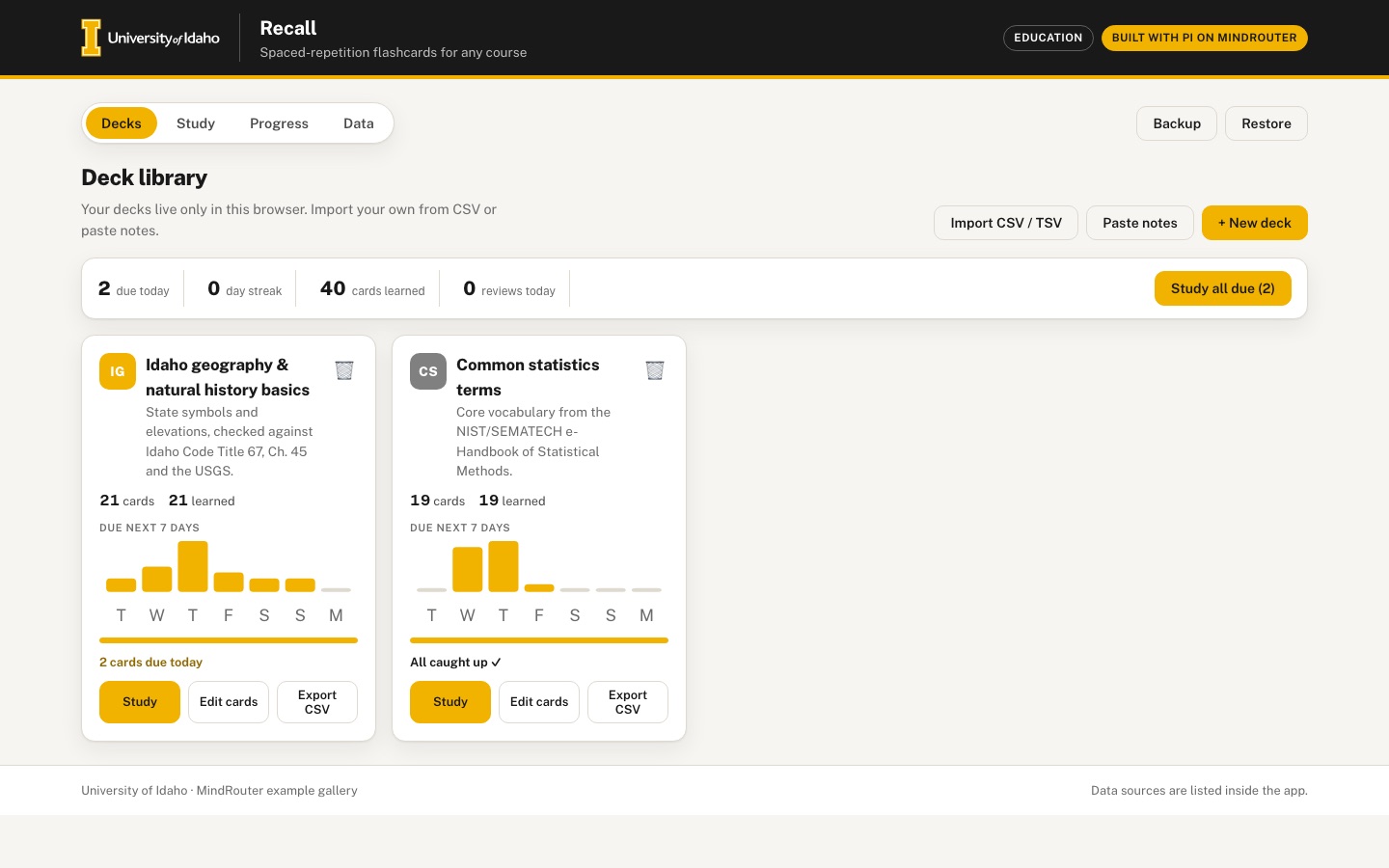 Desktop · click to enlarge
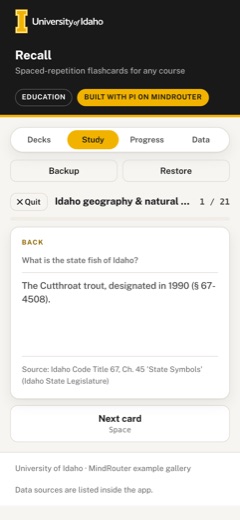
What it is ✎ blurb written by the AI critic
Recall is a flashcard app that schedules your reviews with the SM-2 spaced-repetition method and keeps all decks and progress in your own browser. Start with two starter decks (Idaho state symbols and elevations checked against the Idaho Code and USGS, and statistics terms from the NIST/SEMATECH e-Handbook) or make your own by importing a CSV file or pasting 'term — definition' notes. A progress dashboard shows the review forecast for the next 16 weeks, an estimated retention curve, your streak and your hardest cards.
Try this
- Open the Idaho geography deck, press Space to flip each card and grade it with keys 1-4, then open the Progress tab
- Click 'Paste notes' and paste a few 'term — definition' lines from one of your own classes to build a deck in seconds
- Start a 'Test me' quiz on Common statistics terms and type an answer in your own words instead of picking an option
Highlights ✎ written by the AI critic
- 3D flip cards graded Again / Hard / Good / Easy with keyboard shortcuts; each button shows the card's real next SM-2 interval
- Import CSV/TSV or paste notes, export any deck back to CSV, and back up or restore everything as a JSON file
- Card editor with Markdown and simple math ($x^2$, fractions, square roots, Greek letters), tag filters, search and bulk tag / move / delete
- Progress dashboard: 16-week forecast heatmap with a next-7-days list, retention curve, day streak and hardest cards
- Cram mode and a 'Test me' quiz (pick one of four answers or type your own) that leave your schedule untouched
Who it's for
Students in memorization-heavy courses (anatomy, languages, law, pharmacology), instructors sharing decks
Features
- Deck library with import from CSV/TSV (front, back, tags) and paste-to-cards (one 'term — definition' per line)
- Study session with 3D flip animation, keyboard shortcuts, Again/Hard/Good/Easy grading and SM-2 scheduling
- Card editor with Markdown and math (simple inline formatting), tags, search and bulk edit
- Progress dashboard: retention curve, review forecast calendar heatmap, streaks, hardest cards
- Cram and 'test me' modes, and export back to CSV
- Everything persisted to localStorage with backup/restore JSON
Data & sources
- legislature.idaho.gov — Idaho Code Title 67, Chapter 45 'State Symbols' — Idaho State Legislature —
- pubs.usgs.gov — Elevations and Distances in the United States (rev. 2001) — U.S. Geological Survey —
- www.itl.nist.gov — NIST/SEMATECH e-Handbook of Statistical Methods §1.3.5.1 Measures of Location —
- www.itl.nist.gov — NIST/SEMATECH e-Handbook of Statistical Methods §1.3.5.6 Measures of Scale —
- www.itl.nist.gov — NIST/SEMATECH e-Handbook of Statistical Methods §7.1.3 What are statistical tests? —
- www.itl.nist.gov — NIST/SEMATECH e-Handbook of Statistical Methods §7.1.3.1 Critical values and p values —
How it was built
Written by Pi 0.84.4 (pi.dev) on qwen/qwen3.8-27b, served by MindRouter, the University of Idaho's on-premises AI platform.
Rounds by kind
| build | 1 |
| continue | 4 |
| feedback | 4 |
| critic | 3 |
Lines of code per file
| body html | 254 |
| app css | 485 |
| app js | 1,691 |
| scripts | 310 |
Critic scores ✎ scored by the independent AI critic, 1–10
Independent audits ✎ by the AI critic
Automated checks
Checked by critic-verify.
Data spot checks ✎ written by the AI critic
- State gem card: app shows 'The star garnet, designated in 1967 (§ 67-4505)'; Idaho Code T67CH45 PDF reads '67-4505. STATE GEM DESIGNATED. The star garnet ... [67-4505, added 1967, ch. 33, sec. 1, p. 56.]' - match
- Highest/lowest point cards: app shows 'Borah Peak, 12,662 ft, in Custer County' and 'The Snake River, 710 ft, in Nez Perce County'; USGS elvadist table row = Idaho | Borah Peak | Custer | 12,662 | Snake River | Nez Perce | 710 - match
- Elevation range card (derived, and labelled as a subtraction on the Data tab): app 11,952 ft; independent 12,662 - 710 = 11,952 - match
- State sport card: app 'Hunting, designated in 2026, ch. 53 (§ 67-4517)'; PDF '[67-4517, added 2026, ch. 53, sec. 2, p. 243.]' - match
- Geographic center card: app 'In Custer County, at Custer, southwest of Challis'; USGS geographic-centers table row = Idaho | Custer | At Custer, southwest of Challis - match
Round-by-round timeline
Every harness round, in order. The prompts and FEEDBACK.md were written by the AI reviewer; the app code was written by the harness. Expand a round to see the exact prompt and the FEEDBACK.md the harness received.
-
"Import CSV / TSV" button does nothing — the import dialog never opens (page error). Clicked "Import CSV / TSV" in the Deck library. Expected the import modal to open. Nothing appears, and the page throws, every click:
TypeError: Cannot set properties of null (setting 'textContent') at HTMLButtonElement.importCsvModalimportCsvModal()writes to an element#csv-errorthat does not exist in the markup, so it stops before the modal opens. CSV/TSV import (a required feature) is unreachable for users. When the file input is set directly, parsing works (4 cards, quoted commas OK), so fix the dialog and give it a visible error/success message area. Also show a preview of the parsed rows (the first few front/back/tags) with a "Import N cards" confirm button, rather than importing the moment a file is chosen. -
"Test me" mode is identical to Study mode. Chose Study → "Test me" → Start session. Expected a real test: type your answer (or pick from multiple choice), have it checked, then see a score at the end. It shows the same flip card with Again/Hard/Good/Easy buttons. Make "Test me" a quiz: show the front, give a text box (Enter submits) or 4 multiple-choice options drawn from other cards' backs. Mark the answer correct or incorrect with a clear green/red state and reveal the right answer. End with a score summary (e.g. 14/20 = 70%) and a "retry missed cards" button. Test answers should not change the SM-2 schedule (or say clearly if they do). Cram mode should say in the UI that it doesn't affect scheduling.
-
No math rendering in the card editor or on cards. Typed
x^2,H_2Oand$\sqrt{x}$into Back. The preview shows the raw text. SPEC asks for "Markdown and math (simple inline formatting)". Support at least:x^2/x^{10}→ superscript,H_2O/a_{ij}→ subscript,\sqrt{x}→ √x,\frac{a}{b}→ a stacked or slashed fraction, and Greek/operators such as\alpha \beta \sigma \mu \Sigma \pm \le \ge \ne \approx \times, inside$...$. Also support-bullet lists and line breaks. Render the same way on the study card, the editor preview and the Test-me feedback. Put a short formatting cheat-sheet near the editor ("bold, italic,code, $x^2$, $H_2O$, $\sqrt{x}$"). -
The review-forecast heatmap is unreadably tiny. Progress tab: the heatmap SVG has viewBox 1458×141 but is drawn 560 px wide and 54 px tall, so the cells are about 4 px and the day/week labels are illegible (see the "Review forecast" card; it's worse on a phone). Make it a real calendar heatmap: week columns × weekday rows with cells at least 12–14 px, readable month and weekday labels, and a colour legend (0 → max) using the warm sequential scale from BRAND.md. Show a tooltip on hover/tap with the date and number of cards due. Let it span the full width of the dashboard (its own row), and scroll horizontally inside its own container on phones.
-
Retention curve and Hardest cards stay empty after studying. Graded about 8 cards (a mix of Again, Hard, Good and Easy), then opened Progress for that deck. "Retention curve" says "Review a few cards to see the curve", and "Hardest cards" says "No learned cards yet", even though the KPIs show 4 learned and 60% retention. Expected: (a) The retention curve should render with today's data alone. Draw a proper SVG line/area chart with axes, gridlines, % tick labels and point tooltips. A good option is estimated recall probability vs. days since review (a forgetting curve based on each card's interval/ease), with today's actual Good+Easy share as a point. (b) Hardest cards should include any card graded Again or Hard, ranked by lapses / low ease / % Again. Show the front text, the number of lapses and ease, and a button to study just those cards.
-
Tabs are clipped on a phone. At 390 px the tab bar shows "Decks Study Progress Data & sourc", with the last tab cut off at the right edge and no visible way to reach it. All four tabs should be fully visible (e.g. shorter labels or icons+labels, a 2×2 grid, or a bottom tab bar), and tapping each should work.
-
Welcome hint shows on every tab, above the study card. The yellow "Welcome to Recall…" box sits above the study session and the progress dashboard, pushing the flashcard down (on a phone the card starts around 430 px down). Show the hint only on the Deck library until it is dismissed. During a study session, keep the card, progress bar and grade buttons visible without scrolling on a 390×844 phone.
-
The back of the card hides the question. After flipping, only the answer is shown, so the user cannot compare it with the prompt. Show the front text small and muted at the top of the back face. Also show the keyboard shortcut legend (Space flip · 1 Again · 2 Hard · 3 Good · 4 Easy · Esc quit) under the grade buttons on desktop.
-
Study view has no deck chooser once a session ends, and there's no session summary chart. Add a short summary after a session: counts per grade shown as a small bar, time spent, and next due date. Keep the existing "Study again / View progress / Deck library" buttons.
-
Empty deck is misleading. Created "Empty deck" via + New deck and closed the editor. The deck card says "All caught up ✓" and has an enabled Study button. Expected: a helpful empty state on the card ("No cards yet — add cards, paste notes or import a CSV") with an Add cards button, and Study disabled. Pressing Study on a deck with nothing due should offer "Cram all cards" instead of an empty session.
-
Bulk edit is only "Tag selected" via a browser prompt() plus delete. Replace the native prompt with an inline bulk bar that appears when cards are checked: add tag, remove tag, move to another deck, reset scheduling, delete. Show "N selected", with Select all / Select none. Show each card's tags as chips in the list, and let a tag chip click filter the list.
-
Duplicate deck names on import. Importing
sample.csvand thensample.tsvcreates two decks both named "sample". Pre-fill the name field from the file name and make it editable in the import preview; if the name already exists, append " (2)". -
Polish / "feel alive". The library cards and dashboard are clean but static. Add subtle transitions: hover lift on deck cards, modal fade/scale-in, count-up on KPI numbers, grade-button press feedback, and a brief confetti or checkmark animation when a session is finished. Give each deck card a mini "due in the next 7 days" sparkline or ring showing % learned. Respect
prefers-reduced-motion. -
"Import CSV / TSV" button does nothing — the import dialog never opens (page error). Clicked "Import CSV / TSV" in the Deck library. Expected the import modal to open. Nothing appears, and the page throws, every click:
TypeError: Cannot set properties of null (setting 'textContent') at HTMLButtonElement.importCsvModalimportCsvModal()writes to an element#csv-errorthat does not exist in the markup, so it stops before the modal opens. CSV/TSV import (a required feature) is unreachable for users. When the file input is set directly, parsing works (4 cards, quoted commas OK), so fix the dialog and give it a visible error/success message area. Also show a preview of the parsed rows (the first few front/back/tags) with a "Import N cards" confirm button, rather than importing the moment a file is chosen. -
"Test me" mode is identical to Study mode. Chose Study → "Test me" → Start session. Expected a real test: type your answer (or pick from multiple choice), have it checked, then see a score at the end. It shows the same flip card with Again/Hard/Good/Easy buttons. Make "Test me" a quiz: show the front, give a text box (Enter submits) or 4 multiple-choice options drawn from other cards' backs. Mark the answer correct or incorrect with a clear green/red state and reveal the right answer. End with a score summary (e.g. 14/20 = 70%) and a "retry missed cards" button. Test answers should not change the SM-2 schedule (or say clearly if they do). Cram mode should say in the UI that it doesn't affect scheduling.
-
No math rendering in the card editor or on cards. Typed
x^2,H_2Oand$\sqrt{x}$into Back. The preview shows the raw text. SPEC asks for "Markdown and math (simple inline formatting)". Support at least:x^2/x^{10}→ superscript,H_2O/a_{ij}→ subscript,\sqrt{x}→ √x,\frac{a}{b}→ a stacked or slashed fraction, and Greek/operators such as\alpha \beta \sigma \mu \Sigma \pm \le \ge \ne \approx \times, inside$...$. Also support-bullet lists and line breaks. Render the same way on the study card, the editor preview and the Test-me feedback. Put a short formatting cheat-sheet near the editor ("bold, italic,code, $x^2$, $H_2O$, $\sqrt{x}$"). -
The review-forecast heatmap is unreadably tiny. Progress tab: the heatmap SVG has viewBox 1458×141 but is drawn 560 px wide and 54 px tall, so the cells are about 4 px and the day/week labels are illegible (see the "Review forecast" card; it's worse on a phone). Make it a real calendar heatmap: week columns × weekday rows with cells at least 12–14 px, readable month and weekday labels, and a colour legend (0 → max) using the warm sequential scale from BRAND.md. Show a tooltip on hover/tap with the date and number of cards due. Let it span the full width of the dashboard (its own row), and scroll horizontally inside its own container on phones.
-
Retention curve and Hardest cards stay empty after studying. Graded about 8 cards (a mix of Again, Hard, Good and Easy), then opened Progress for that deck. "Retention curve" says "Review a few cards to see the curve", and "Hardest cards" says "No learned cards yet", even though the KPIs show 4 learned and 60% retention. Expected: (a) The retention curve should render with today's data alone. Draw a proper SVG line/area chart with axes, gridlines, % tick labels and point tooltips. A good option is estimated recall probability vs. days since review (a forgetting curve based on each card's interval/ease), with today's actual Good+Easy share as a point. (b) Hardest cards should include any card graded Again or Hard, ranked by lapses / low ease / % Again. Show the front text, the number of lapses and ease, and a button to study just those cards.
-
Tabs are clipped on a phone. At 390 px the tab bar shows "Decks Study Progress Data & sourc", with the last tab cut off at the right edge and no visible way to reach it. All four tabs should be fully visible (e.g. shorter labels or icons+labels, a 2×2 grid, or a bottom tab bar), and tapping each should work.
-
Welcome hint shows on every tab, above the study card. The yellow "Welcome to Recall…" box sits above the study session and the progress dashboard, pushing the flashcard down (on a phone the card starts around 430 px down). Show the hint only on the Deck library until it is dismissed. During a study session, keep the card, progress bar and grade buttons visible without scrolling on a 390×844 phone.
-
The back of the card hides the question. After flipping, only the answer is shown, so the user cannot compare it with the prompt. Show the front text small and muted at the top of the back face. Also show the keyboard shortcut legend (Space flip · 1 Again · 2 Hard · 3 Good · 4 Easy · Esc quit) under the grade buttons on desktop.
-
Study view has no deck chooser once a session ends, and there's no session summary chart. Add a short summary after a session: counts per grade shown as a small bar, time spent, and next due date. Keep the existing "Study again / View progress / Deck library" buttons.
-
Empty deck is misleading. Created "Empty deck" via + New deck and closed the editor. The deck card says "All caught up ✓" and has an enabled Study button. Expected: a helpful empty state on the card ("No cards yet — add cards, paste notes or import a CSV") with an Add cards button, and Study disabled. Pressing Study on a deck with nothing due should offer "Cram all cards" instead of an empty session.
-
Bulk edit is only "Tag selected" via a browser prompt() plus delete. Replace the native prompt with an inline bulk bar that appears when cards are checked: add tag, remove tag, move to another deck, reset scheduling, delete. Show "N selected", with Select all / Select none. Show each card's tags as chips in the list, and let a tag chip click filter the list.
-
Duplicate deck names on import. Importing
sample.csvand thensample.tsvcreates two decks both named "sample". Pre-fill the name field from the file name and make it editable in the import preview; if the name already exists, append " (2)". -
Polish / "feel alive". The library cards and dashboard are clean but static. Add subtle transitions: hover lift on deck cards, modal fade/scale-in, count-up on KPI numbers, grade-button press feedback, and a brief confetti or checkmark animation when a session is finished. Give each deck card a mini "due in the next 7 days" sparkline or ring showing % learned. Respect
prefers-reduced-motion. -
Review-forecast heatmap is now gigantic on desktop, and its legend is cut off. Progress tab at 1366 px: the heatmap SVG (viewBox 0 0 246 165) is stretched to the full card width, 1234 × 828 px. Each cell is about 70 px, the "Sep / Oct / Nov" and "Mon / Wed / Fri" labels are about 48 px tall, and the page is 1,700 px long. The legend's "0" and "21" labels are clipped at the bottom edge, because they are drawn below the viewBox height. At 1024 px it is still 938 × 629. Expected: draw it at its natural pixel size, without scaling to the container (14–16 px cells, 11–12 px labels, so about 250–300 px wide), left-aligned inside the card. It can scroll horizontally on narrow phones. Fit the legend fully inside the SVG, labelled "fewer … more" or "0 … 21 cards". Also add a styled tooltip, not just the native
<title>: on hover, focus or tap, show a small dark bubble near the cell with "Sun, Sep 13 — 21 cards due", and make it work by tap on a phone. Consider 16 weeks so it reads as a real calendar. -
The retention curve shows almost total forgetting within 5 days, even for cards graded Good. I graded 20 of 21 Idaho cards Good or Easy. The chart then drops from 100% to about 2% by day 5 and stays at 0% to day 30, which would tell a student that SM-2 study is useless. The formula in use,
exp(-t / (iv*ef*0.55)), is far too steep. Expected: model recall so that a card is at about 90% when it comes due at its scheduled interval (the SM-2 target). For example, R(t) = 0.9^(t / interval) per card, averaged over learned cards and plotted over 0–30 days. Label the y-axis "estimated recall", mark the 90% target line, and keep today's actual Good+Easy share as a dot. Once reviews span 2 or more days, also plot actual daily retention (Good+Easy share per day) as a second series with a small legend. -
A malformed CSV fails silently. I imported a one-column file (
just one column/nothing else). No error text appears, the preview is hidden, and "Import cards" stays disabled with no explanation. The#csv-errorelement stays empty. Expected: a visible red inline message such as "No cards found — each row needs at least a front and a back column (front, back, tags, source)". Show the same kind of message for an empty file, and "Skipped N rows with no back" when some rows are incomplete. -
Progress layout leaves an empty third column. At 1366 px, "Retention curve" and "Hardest cards" sit in a 3-column grid with the right third blank, and the retention chart is small (375 × 180). Expected: these two panels share the row 50/50, or 60/40, with the chart at least 280 px tall. The heatmap panel sits above or beside them without large blank areas.
-
Study-setup deck picker is an unstyled native select. In Study → "Start a session", the deck dropdown is about 18 px tall with a thin black border and small text, which doesn't match the rest of the design. Style it like the other fields: about 44 px tall, rounded,
--lineborder, gold focus ring, full width on phone. Also show the selected deck's due, new and total counts as small chips under it. -
Session summary bars are flat grey. After a Study session the Again/Hard/Good/Easy bars are all grey. Colour them by grade from the brand palette (for example Again = Raspberry, Hard = Leather, Good = Clearwater, Easy = Pride Gold), consistent with the grade buttons. After a Test me session, replace "Nothing scheduled yet" with a short list of the missed questions and their correct answers.
-
The deck-card "7-day sparkline" is unreadable, and the deck icons look random. On each deck card the sparkline is a row of tiny grey dashes next to "learned", which looks like a rendering glitch. Replace it with a small labelled bar chart, "Due next 7 days", with day initials and bar heights you can see (at least 24 px tall), or remove it. The emoji icons don't match their decks (a microscope and a balance scale on Idaho geography and statistics, a test tube on an anatomy import) and change between reloads. Use a consistent badge instead: the deck's initials on a colour from
--series-1…8, chosen from the deck name so it stays the same. -
Typed answers in Test me need forgiving matching and to show what you typed. Typing "potato" for the star garnet card correctly says "Not quite", but the full answers are long sentences (e.g. "The monarch butterfly, designated in 1992 (§ 67-4509)."). Make sure typing the key phrase ("monarch butterfly", "star garnet", "Borah Peak") counts as correct: ignore case, accents, punctuation and filler words, and accept it when the typed words appear in the answer. After an answer, show "Your answer: …" above the correct answer, plus a small "I was right" override button. In Test me, let keys 1–4 pick the multiple-choice options.
-
Deck library needs an at-a-glance summary. Above the deck grid, add a slim stats strip across all decks: cards due today, current day streak, cards learned and reviews today, with a primary "Study all due" button that starts a session with due cards from every deck. At 1440 px the two starter cards sit on the left with a lot of empty space; the strip makes the first screen feel alive.
-
Progress has no "All decks" view. The deck dropdown on Progress lists single decks only. Add an "All decks" option (the default) that aggregates KPIs, the forecast heatmap, retention and hardest cards across every deck. Show the deck name next to each hardest card in that view.
-
The library stats strip always shows 0 due, so "Study all due" is permanently disabled. Fresh load: the deck cards say "21 cards due today" and "19 cards due today", but the strip says "0 due today" and "Study all due" is greyed out. After a study session it still says "0 due today", even with 21 Idaho cards due. It correctly shows "19 reviews today" and "17 cards learned". Expected: "due today" = the sum of due cards across all decks (40 on a fresh load), the button enabled whenever that is > 0, and clicking it starts a session with the due cards from every deck.
-
The deck-card "Due next 7 days" chart overflows its card and the page on a phone. On each deck card the SVG (
.rc-duebars) is 320 px wide. At 1366 px its dashes run past the right edge of the card into the gap. At 390 px it runs 79 px past the screen, so the whole page scrolls sideways (verify reports 79 px horizontal overflow). There is only one day label ("S"), under the first bar. The "DUE NEXT 7 DAYS" caption sits below the chart, level with that label. Expected: the chart fits inside the card at every width (width 100%, max-width of the card). Draw 7 visible bars (a small stub for 0) with a day initial under each (S M T W T F S) and the count above non-zero bars, caption on top, about 60–80 px tall overall. No horizontal page overflow at 390 px. -
Heatmap legend labels overlap. Under the forecast heatmap, "fewer" and "more (21 cards)" are drawn on top of each other, which reads as "mfeweer(21 cards)". This happens at 1366 px and at 390 px. Expected: "fewer" left of the 4 legend swatches and "more (21 cards)" right of them, on one line, not overlapping, fully inside the SVG.
-
Session-summary bars are still flat grey. The bars have classes
rc-done__bar--again/--hard/--good/--easy, but every bar's computed background isrgb(128,128,128). Give them the grade colours used by the grade buttons (e.g. Again = Raspberry #D7003F, Hard = Leather #AB4700, Good = Clearwater #008080, Easy = Pride Gold #F1B300), with a short grow-in animation. -
Study-setup deck picker is still an unstyled native select. In Study → "Start a session",
#study-deckis 21 px tall with a thin dark border. It does not match the Progress deck dropdown, which is styled. Give it the same style as#progress-deck(about 44 px tall, rounded,--lineborder, gold focus ring), full width on a phone. The due/new/total chips under it are good. -
Keys 1–4 don't pick options in Test me. In a Test me question, pressing "2" types "2" into the auto-focused answer box instead of choosing option 2. Expected: don't auto-focus the text box. Keys 1–4 choose options (show a small 1/2/3/4 badge on each option), and "/" or clicking the box starts typing. Enter still submits a typed answer and moves to the next card. Also show "Your answer: …" after a correct typed answer, not only after a wrong one.
-
Hardest cards are unreadable on a phone. At 390 px each row shows just "W.." or "W" for the question, because the deck chip, "1 lapse · ease 2.5" and "0%" take all the width. Expected: on narrow screens put the question on its own line (wrap to 2 lines) with the deck chip and stats on a second line below it.
-
Retention-chart labels are tiny on a phone. At 390 px the axis ticks (100%, 75%, 0d, 5d …), "90% target" and "estimated recall" render at about 6 px because the whole SVG is scaled down. Keep axis text at least 11 px on phones: use a narrower viewBox for small screens, or HTML labels.
-
The forecast card is mostly empty on desktop. At 1366 px the heatmap (314 px wide) sits at the left of a 1272 px card, leaving about 900 px blank. Fill the space beside it with a compact "Upcoming" summary: reviews due today, tomorrow, in the next 7 days and the next 30 days, the busiest upcoming day, and a small bar list per deck. On phones this stacks under the heatmap.
-
"Study all due" is always disabled because the library strip shows 0 due. Deck library on a fresh load: the deck cards say "21 cards due today" and "19 cards due today", but the stats strip says "0 due today" and the
#study-all-duebutton is disabled. It stays that way after studying, although "reviews today" and "cards learned" update correctly. Look atlibraryStats()insrc/app.js(the "due today" value). Expected: it equals the sum of the per-deck due counts shown on the deck cards (40 on a fresh load), the button is enabled when that is > 0, and clicking it starts a session with the due cards from all decks. -
The "Due next 7 days" mini chart on each deck card overflows its card and the phone screen. The SVG from
dueBarsSVG()(class.rc-duebars) is 320 px wide and never shrinks. Insrc/app.cssit hasflex: none. At 1366 px its bars and dashes stick out past the right edge of the deck card. At 390 px they run 79 px past the screen, so the whole page scrolls sideways. Only one day letter ("S") is drawn, under the first bar. Expected: the chart scales to the card's width (never wider than its container) at every screen size, with a day letter under each of the 7 bars and no horizontal page scroll at 390 px. -
Heatmap legend labels overlap. Progress tab: under the review-forecast heatmap, "fewer" and "more (21 cards)" are drawn on top of each other, which reads as "mfeweer(21 cards)". This happens on desktop and phone. The two
<text>elements are near the "fewer" / "more (" strings in the heatmap function insrc/app.js. Expected: "fewer" to the left of the 4 colour swatches, "more (N cards)" to the right of them, on the same line, not overlapping, and fully inside the SVG (widen the SVG if needed). -
Session-summary bars are all grey. After a Study session the Again/Hard/Good/Easy bars all compute to
rgb(128,128,128). The colour rules.rc-done__bar--again/--hard/--good/--easyinsrc/app.cssexist, but the bars are<i>elements and the more specific.rc-done__bar irule wins. Expected: each bar shows its grade colour (Again raspberry, Hard leather, Good gold, Easy clearwater). -
The Study-tab deck dropdown is unstyled. Study → "Start a session":
<select id="study-deck">is 21 px tall with a thin dark border. The shared select styling insrc/app.cssonly targets.rc-selectwrap selectand.rc-field select, and this select is inside neither. Expected: it looks like the Progress deck dropdown (about 44 px tall, rounded, same border and focus ring) and is full width on a phone. -
Deck-card "Due next 7 days" chart overflows its card (desktop and phone).
dueBarsSVG()insrc/app.jsdraws a 132-unit viewBox, but.rc-duebarsinsrc/app.csshasflex: noneand no width, so it renders about 268 px wide and starts 130 px into the card. On desktop the bars cross into the neighbouring deck card and the last card's bars run past the page edge. On a 390 px phone they stick out 79 px, which makes the whole page scroll sideways (a real phone then zooms the entire app out to 469 px). Also only the first day letter is drawn:dayNamesis a single string for today, sodayNames[i]is empty for i > 0. Expected: put the label above the chart, give the SVGwidth: 100%; max-width: 100%; height: auto, and draw one weekday letter under each of the 7 bars (compute the letter foraddDays(new Date(), i)). -
Library strip always says "0 due today" and "Study all due" is disabled. In
libraryStats()a card withsm === null(never studied) is not counted as due, butdueCards()counts it. Fresh load: the deck cards say 21 and 19 due, the strip says 0. Expected: count due cards exactly likedueCards()(40 on a fresh load), so the button reads "Study all due (40)" and starts a session. -
Card editor is unusable on a phone. At 390 px the editor's side column and form are 507 px wide inside a 437 px modal panel; card titles, the text boxes and the "Save card" button are cut off at the right edge.
.rc-editorbecomesgrid-template-columns: 1frat ≤720 px, but the grid items keep their min-content width. Expected: at phone width every editor element fits inside the panel (useminmax(0, 1fr)andmin-width: 0on.rc-editor__side/.rc-editor__main, let the footer buttons wrap), with no sideways scrolling. -
Test me accepts a single word as a correct typed answer.
answerMatches()returns true when every typed word appears in the answer. For "Symmetric distribution" typing justcoincideis marked "✓ Correct!"; for the state bird, typing1931ordesignatedwould be too. Expected: a typed answer is correct only when it covers most of the answer's key words (for example at least 60% of the non-filler words, or an exact/near match of the main term before the first comma/parenthesis). Picking the right option stays correct. -
Test me keyboard and feedback. The answer box is auto-focused, so pressing
1–4types digits into it instead of choosing an option, although the hint says "1–4 pick an option". After picking a wrong option the result does not show which option you picked ("Your answer" only appears for typed answers). Expected: do not auto-focus the input (or let 1–4 pick an option while the input is empty), and after any answer show "Your answer" with the option text you picked. -
Grade button hints do not match the scheduler. The buttons say Again "< 1 min", Hard "~ 1 day", Good "~ 3 days", Easy "~ 7 days", but
sm2()schedules every new card 1 day out whatever the grade (verified in localStorage), and an Again card is not shown again in the session. Expected: each button shows the real next interval for the current card, computed from a copy of itssmwith the same SM-2 rule (e.g. "1d", "6d", "15d"), and the hint for Again says "1d" (or re-queue Again cards at the end of the session). -
Forecast heatmap puts counts on the wrong dates. In
svgHeatmap()the grid starts on the Sunday of the current week, butcounts[d]is indexed from today. With the clock set to Wednesday 16 Sep, the 40 cards due today are drawn on the cell labelled "Sun, Sep 13". Expected: celldshows the count foraddDays(start, d)(usecounts[d - todayOffset], where todayOffset is today's weekday), past days in the first column show 0, and the tooltip date matches the count. -
Heatmap legend labels overlap. "fewer" and "more (21 cards)" are drawn on top of each other ("mfeweer(21 cards)") because the "more" text is right-aligned at the end of the swatches. Expected: "fewer" left of the 4 swatches and "more (N cards)" right of them on one line, inside the SVG. On desktop the heatmap sits in the left third of a full-width card; make the cells larger (or add an "Upcoming 7 days" list beside it) so the card is not mostly empty.
-
Day streak ignores earlier days.
computeStreak()andlibraryStats()only use each card'ssm.lastReviewed, so re-reviewing the same cards on a second day erases the first day. Test: study 21 cards on Wed, the same 21 on Thu → streak shows 1 (expected 2). Expected: build the set of study days from everysm.history[].dentry. -
Session summary bars are all grey. After a Study session the Again/Hard/Good/Easy bars all compute to
rgb(128,128,128): the.rc-done__bar irule overrides.rc-done__bar--again/--hard/--good/--easy. Expected: raspberry / leather / gold / clearwater bars (e.g..rc-done__bar i.rc-done__bar--again). -
Paste notes rejects separators its hint promises, and "+ New card" leaves blank cards.
-
Paste hint: "an em dash, --, : or = also works". Of these 6 lines only the first 3 became cards:
Mitochondrion — powerhouse of the cell,ATP -- adenosine triphosphate,Osmosis : diffusion of water,Ribosome: makes proteins,pH = negative log of H+ concentration,Neuron—nerve cell. Expected: all 6 (colon with or without a space before it,=, and an em dash without spaces). -
Editor: clicking "+ New card" then "Close card" saves an empty card (blank front and back) into the deck, and it then appears in Study. Expected: an unsaved new card with an empty front is discarded on close.
-
-
Small layout leftovers.
-
Study tab → Start a session:
<select id="study-deck">renders 21 px tall with a thin dark border (the.rc-study__deckpick selectrule is not applied). Expected: 44 px, rounded, like the Progress deck dropdown. -
Phone Progress tab: retention-chart axis text renders about 7 px (SVG is scaled down); hardest-card questions shrink to 13–20 px wide ("W.."). Expected: axis labels ≥ 11 px on a phone, and each hardest card shows its question on its own line (stack the deck chip and stats below it at ≤ 720 px).
-
-
Test me still accepts one word (or part of a word) as a correct typed answer. In
answerMatches()the new "main term" check usesmainTerm.includes(tStr). When the answer has no comma or parenthesis, the main term is the whole sentence, andincludesalso matches partial words. Measured withanswerMatches(typed, answer)in the page:-
coincideandfolded→ true for "A distribution that can be folded about an axis so that the two sides coincide." (should be false) -
data→ true for "The sum of the data points divided by the number of data points: …" (should be false) -
blue→ true for "The Mountain Bluebird (Sialia currucoides), designated in 1931 …" (should be false) -
These must stay true:
mountain bluebird,Borah Peak(answer "Borah Peak, 12,662 ft, in Custer County."),square root of the variance,folded about an axis so the two sides coincide. Expected: compare whole words, not substrings; accept the main-term route only when the typed words equal the main term's key words (ignoring "the/a/an") and the main term is short (at most 4 key words); otherwise require the 60% key-word coverage rule.
-
-
A blank card is still saved when the editor is closed without "Close card". "+ New card" then pressing
Esc(or the ✕ button, or clicking the backdrop) leaves the empty card in the deck; the next action that callssaveState()stores it (seen in localStorage: 1 card with an empty front). Expected: whenever the editor modal closes (Esc, ✕, backdrop, "← Decks"), discard an_unsavedcard whose front is empty — put the discard logic in one helper and call it from all of those paths. -
Study tab deck dropdown is still 21 px tall.
#study-deckgets the 44 px rule from.rc-study__deckpick select, but the older rule.rc-study__deckrow select { flex: 1; min-width: 200px; }(around line 96 ofsrc/app.css) also applies, and.rc-study__deckpickis a column flexbox, soflex: 1(flex-basis 0) shrinks the height to 21 px. Expected: 44 px tall on desktop and phone (e.g. give.rc-study__deckpick selectflex: none, or removeflex: 1from the old rule). -
Phone Progress page now scrolls sideways by 122 px (regression from round 10). The new
.rc-retention { min-width: 340px; }inside@media (max-width: 720px)makes the one-column progress grid 458 px wide on a 390 px screen, so the KPI panel, heatmap card and hardest-cards list all run past the right edge (a phone then zooms the page out to 512 px). Expected: no horizontal page scroll at 390 px. Remove that min-width; usegrid-template-columns: minmax(0, 1fr)for.rc-progressat ≤ 900 px; keep the heatmap scrolling inside its own.rc-heatwrap; and for readable axis labels on a phone draw the retention chart with a narrower viewBox (for exampleW = 340whenwindow.innerWidth < 720) instead of a min-width. -
Heatmap legend "fewer" is clipped, and the desktop forecast card is two-thirds empty. In
svgHeatmap()"fewer" is drawn right-aligned atx = left - 10, so it starts left of the SVG and shows as "ewer". Expected: legend row = "fewer", then the 4 swatches, then "more (N cards)", all starting atx = leftand fully inside the SVG. On desktop the 16-week grid fills only the left ~40% of the full-width card: add an "Upcoming" list to the right of the heatmap (flex row that stacks below it at ≤ 720 px) showing the next 7 days, e.g. "Today — 19 cards", "Mon 14 Sep — 21 cards", using the same counts as the heatmap. -
Unlabelled percentage in Hardest cards. Each row ends with a gold "0%" that has no label or tooltip (it is the share of Good/Easy grades). Expected: show it as "0% good" (or add a column header /
title) so a visitor can tell what it means. -
Heatmap legend: "fewer" is hidden behind the colour swatches. In
svgHeatmap()the "fewer"<text>is now atx = leftand the 4 swatch<rect>s also start atx = left + k * (swatch + 4), so the swatches cover the word (only a sliver shows, desktop and phone). Expected, on one line and fully inside the SVG: "fewer" atx = left, then the swatches starting about 36 px to the right of it (x = left + 36 + k * (swatch + 4)), then "more (N cards)" 8 px after the last swatch. -
The "Upcoming" list sits under the heatmap and uses gold text on white.
svgHeatmap()returns the<ul class="rc-upcoming">right after the</svg>, so it ends up inside.rc-heatwrap(the scrolling box) below the grid, and the right half of the full-width forecast card stays empty on desktop. Also.rc-upcoming b { color: var(--ui-pride-gold) }puts Pride Gold text on a white card, which BRAND.md forbids (and it fails contrast). Expected:svgHeatmap()returns only the SVG; build the Upcoming list in a small helper and place it inrenderProgress()as the second child of.rc-heatrow, so on desktop it is a column to the right of the heatmap (give it a heading "Next 7 days" andflex: 1; max-width: 320px) and at ≤ 720 px it stacks below. Colour the countsvar(--ui-gold-ink)(orvar(--text)), and show days with 0 cards invar(--muted). -
Retention chart draws a misleading "actual" line. In
svgRetentionChart()the x-axis is "days since review" (0d–30d), but the red "actual" series places each calendar day atx(span - …). After studying on two consecutive days (all Again on day 1, all Good on day 2) it draws a near-vertical red line from 0% at "0d" to 100% at "1d", which reads as nonsense. The legend ("estimated", "actual") is also drawn on top of the "90% target" label. Expected: remove the red actual-retention series and its legend from this chart (keep the estimated curve, the 90% target line and the gold "today" dot), and instead add a short line under the chart, e.g. "Last 14 days: 62% of reviews graded Good or Easy (84 reviews)", computed fromretentionSeries(). -
Retention chart labels are small on a phone. When
W = 340the SVG is drawn about 320 px wide, so the 10-unit axis and target labels render at about 9 px. Expected: whenW = 340, use font-size 12 for the tick labels, the "estimated recall" label and "90% target" (≈ 11 px on screen).
1 build 27.9 min · 6 files changed, 3172 insertions(+), 3 deletions(-) Show prompt
Read AGENTS.md, SPEC.md and BRAND.md in this directory. Then build the complete app they describe, step by step. First write a script in scripts/ (Python 3 standard library only) that produces compact JSON in data/embed/ with the two starter decks ('Idaho geography & natural history basics' and 'Common statistics terms', about 20-30 cards each, with tags and a per-card source). The facts on those cards must come from the reference files in data/raw/ — read data/raw/SOURCES.md, which lists exactly which facts each file supports and how to parse it; parse the files where practical, and do not put facts on a card that those files do not back up. Run the script. Then write src/body.html, src/app.css and src/app.js; run python3 build.py --check and fix any error it reports. Implement every required feature in SPEC.md with a polished, modern, responsive University of Idaho design, including a visible "Data & sources" section that credits and links the reference sources in data/raw/SOURCES.md. Do not stop until python3 build.py --check succeeds and every feature is implemented.
2 continue 29.4 min · 3 files changed, 34 insertions(+), 28 deletions(-) Show prompt
Read AGENTS.md, SPEC.md and BRAND.md in this directory. Then build the complete app they describe, step by step. First write a script in scripts/ (Python 3 standard library only) that produces compact JSON in data/embed/ with the two starter decks ('Idaho geography & natural history basics' and 'Common statistics terms', about 20-30 cards each, with tags and a per-card source). The facts on those cards must come from the reference files in data/raw/ — read data/raw/SOURCES.md, which lists exactly which facts each file supports and how to parse it; parse the files where practical, and do not put facts on a card that those files do not back up. Run the script. Then write src/body.html, src/app.css and src/app.js; run python3 build.py --check and fix any error it reports. Implement every required feature in SPEC.md with a polished, modern, responsive University of Idaho design, including a visible "Data & sources" section that credits and links the reference sources in data/raw/SOURCES.md. Do not stop until python3 build.py --check succeeds and every feature is implemented.
3 feedback 28.6 min · 1 file changed, 85 insertions(+) Show prompt
Read FEEDBACK.md in this directory — it lists problems a reviewer found when testing index.html in a real browser. Fix every item, keeping everything that already works, then run python3 build.py --check.
Reviewer findings — round 2 build, tested in Chromium at 1366×900 and 390×844
Most important first. Keep everything that already works: 3D flip, Space/1–4 keys, SM-2 fields in localStorage, paste-to-cards, editor search, bulk tag, Export CSV, Backup/Restore, reload persistence, no external requests, no horizontal overflow at 390 px.
4 continue 22.7 min · 4 files changed, 1667 insertions(+), 313 deletions(-) Show prompt
Read FEEDBACK.md in this directory — it lists problems a reviewer found when testing index.html in a real browser. Fix every item, keeping everything that already works, then run python3 build.py --check.
Reviewer findings — round 2 build, tested in Chromium at 1366×900 and 390×844
Most important first. Keep everything that already works: 3D flip, Space/1–4 keys, SM-2 fields in localStorage, paste-to-cards, editor search, bulk tag, Export CSV, Backup/Restore, reload persistence, no external requests, no horizontal overflow at 390 px.
5 feedback 28.4 min · 5 files changed, 866 insertions(+), 304 deletions(-) Show prompt
Read FEEDBACK.md in this directory — it lists problems a reviewer found when testing index.html in a real browser. Fix every item, keeping everything that already works, then run python3 build.py --check.
Reviewer findings — round 4 build, tested in Chromium at 1366×900, 1024×800 and 390×844
Great progress: every item from the previous list was verified working, with no console or page errors and no external requests. Keep all of this working: CSV/TSV import with preview and "Import N cards", duplicate name suffixes, paste notes, 3D flip with the question on the back, keys Space/1–4/Esc and the legend, SM-2 scheduling, the Cram and Test me quizzes ("no scheduling"), score and "Retry missed cards", math + Markdown preview with the cheat-sheet, the inline bulk bar (add/remove tag, move, reset, delete, select all/none), tag chip filter, Export CSV, Backup/Restore, the empty-deck state, phone tabs, and grade buttons visible on a phone. Remaining problems, most important first:
6 feedback 8.2 min · 1 file changed, 57 insertions(+), 73 deletions(-) Show prompt
Read FEEDBACK.md in this directory — it lists problems a reviewer found when testing index.html in a real browser. Fix every item, keeping everything that already works, then run python3 build.py --check.
Reviewer findings — round 5 build, tested in Chromium at 1366×900 and 390×844
Verified working, keep all of it: CSV/TSV import with preview, and the bad-CSV and "Skipped N rows" messages; initials badges; "All decks" progress with deck names on hardest cards; the natural-size heatmap with its styled tooltip on hover and tap; the 0.9^(t/interval) retention curve with the 90% target; progress rows that fill the width; Test me with forgiving typed matching, "I was right", a missed-questions list and a score; Cram; SM-2 study with keys; the question on the back; math/Markdown; the bulk bar; export; backup/restore; no console errors; no external requests. Remaining problems, most important first:
7 continue 4.6 min · — Show prompt
Read FEEDBACK.md in this directory — it lists problems a reviewer found when testing index.html in a real browser. Fix every item, keeping everything that already works, then run python3 build.py --check.
8 feedback 7.6 min · 1 file changed, 34 insertions(+), 57 deletions(-) Show prompt
Read FEEDBACK.md in this directory — it lists problems a reviewer found when testing index.html in a real browser. Fix every item, keeping everything that already works, then run python3 build.py --check.
Reviewer findings — round 5 build (re-checked), Chromium 1366×900 and 390×844
Five small, focused fixes. Everything else was verified working; don't restructure or rewrite files. Make targeted edits only in the places named below, then run python3 build.py --check.
9 continue 18.9 min · — Show prompt
Read FEEDBACK.md in this directory — it lists problems a reviewer found when testing index.html in a real browser. Fix every item, keeping everything that already works, then run python3 build.py --check.
10 critic 3.2 min · 4 files changed, 256 insertions(+), 70 deletions(-) Show prompt
Read FEEDBACK.md in this directory. It lists 12 problems a reviewer found when testing index.html in a real browser. Fix them in order, starting with item 1. For each item: read only the function or CSS rule it names (use grep/read with line ranges, the files are large), then change it with small targeted edits. Never rewrite src/app.js, src/app.css or src/body.html as a whole, and keep everything that already works. Run python3 build.py --check after every two or three items and fix any error it reports. Keep going until all 12 items are fixed, then run python3 build.py --check a final time.
Reviewer findings — critic pass (Chromium 1440×900 and 390×844 phone)
Everything not listed here works: SM-2 values are correct, CSV/TSV import, export, backup/restore, editor search/tags/markdown/math, bulk edit, cram, progress KPIs, sources tab. Do not rewrite or restructure any file. Make small targeted edits (edit tool, not full-file rewrites) in the functions named below, in this order, and run python3 build.py --check after every two or three items.
11 critic 1.3 min · 4 files changed, 162 insertions(+), 132 deletions(-) Show prompt
Read FEEDBACK.md in this directory. It lists 6 problems a reviewer still found when testing index.html in a real browser after your last round. Fix them in order, starting with item 1. For each item: read only the function or CSS rule it names (use grep/read with line ranges, the files are large), then change it with small targeted edits. Never rewrite src/app.js, src/app.css or src/body.html as a whole, and keep everything that already works. Run python3 build.py --check after every two items and fix any error it reports. Keep going until all 6 items are fixed, then run python3 build.py --check a final time.
Reviewer findings — critic re-check after round 10 (Chromium 1440×900 and 390×844 phone)
Round 10 fixed most items (deck due-bars, "Study all due", phone editor, grade hints, heatmap dates, streak, summary colours, paste separators, test-me keys). Six problems remain. Do not rewrite or restructure any file: make small targeted edits in the places named, in this order, and run python3 build.py --check after every two items.
12 critic 1.1 min · 4 files changed, 122 insertions(+), 137 deletions(-) Show prompt
Read FEEDBACK.md in this directory. It lists 4 polish problems a reviewer still found on the Progress tab when testing index.html in a real browser after your last round. Fix them in order, starting with item 1. For each item: read only the function or CSS rule it names (use grep/read with line ranges, the files are large), then change it with small targeted edits. Never rewrite src/app.js, src/app.css or src/body.html as a whole, and keep everything that already works. Run python3 build.py --check after every two items and fix any error it reports. Keep going until all 4 items are fixed, then run python3 build.py --check a final time.
Reviewer findings — critic re-check after round 11 (Chromium 1440×900 and 390×844 phone)
Round 11 fixed all six items (typed-answer matching, blank cards, study dropdown, phone Progress overflow, "% good" label). Four polish problems remain, all on the Progress tab. Do not rewrite or restructure any file: make small targeted edits in the places named, in this order, and run python3 build.py --check after every two items.
What the agent was asked
The full specification the harness received, rendered from the original Markdown.
Known limitations
Reported by the independent critic. ✎ written by the AI critic
- The retention summary is labelled 'Last 14 days' but counts every review ever made (139 reviews in testing, when the last 14 days held 14).
- A card graded Again is not shown again later in the same session; it simply comes back the next day.
- The grade buttons are visible before the card is flipped, and pressing 1-4 on the front grades the card without showing the answer.
- The paste-notes splitter now splits on every colon, so a line such as 'Meeting: 10:30' gets the back '10 — 30'.
- The retention chart picks its phone or desktop size when the Progress tab renders; resizing the browser window does not re-layout it until the tab is re-opened.
- The 'recent retention' KPI uses the last day that had any reviews, which can be a single review several days ago.
- Harness note: Pi rounds 6-9 produced no app changes (empty exits or stalls). The three critic rounds (193 s, 78 s, 69 s) each applied every listed fix with small targeted edits.