Classroom Utilization Explorer
Where and when is teaching space actually used?
Load a semester's section schedule and instantly see which rooms sit empty, which are overbooked, and which classes are in rooms far too big — the evidence space-planning decisions need.
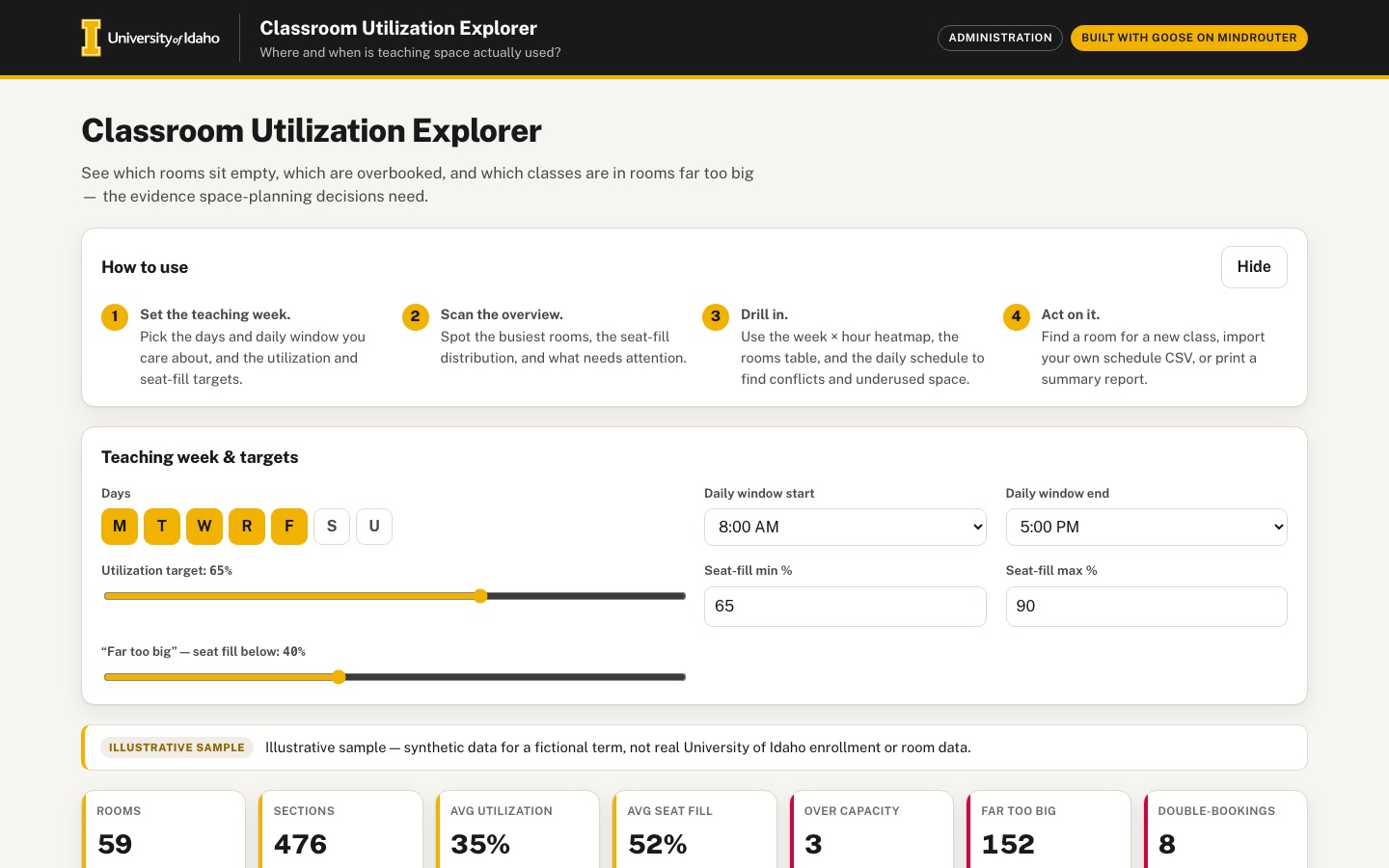 Desktop · click to enlarge

What it is ✎ blurb written by the AI critic
See which classrooms sit empty, which are double-booked and which classes are in rooms far too big. It opens with a clearly labeled synthetic sample term and can load your own schedule CSV, with column mapping and validation done entirely in your browser. Set the teaching week and targets, then explore a week-by-hour heatmap, a sortable rooms table, daily schedules per building, a find-a-room tool and a printable summary report.
Try this
- Open Schedule, pick Palouse Hall and Tuesday, then click a conflict under 'Conflicts on this day' to highlight the two double-booked sections.
- In Find a room, ask for 100 seats on TR at 1:00 PM for 75 minutes, then click 'View in schedule' on the best fit.
- On Import CSV, click 'Try an example CSV' and then 'Load data'. Messy day codes and times are normalized, a TBA row is counted as unscheduled and two bad rows are rejected.
Highlights ✎ written by the AI critic
- Week × hour heatmap of rooms in use, filterable by building and room type; clicking a cell opens that day's schedule
- Rooms table comparing hours used with hours available, with utilization and seat-fill bars against adjustable targets and flags for unused, over-capacity, too-big and double-booked rooms
- Daily schedule per building that puts double-booked sections on separate red lanes and lists every conflict
- Find a room: enter seats, meeting pattern, start time and duration to get free rooms ranked by best fit
- CSV import with automatic column mapping, day and time normalization (M W F, TuTh, 0930, 12:50 p.m.) and a validation report, plus a one-click print-ready summary
Who it's for
Registrar and space-planning staff, facilities, department schedulers
Features
- CSV import with column mapping and validation (days like MWF/TR, 12/24-hour times)
- Week × hour heatmap of occupied rooms campus-wide, filterable by building and room type
- Room-by-room utilization table: hours used vs available, seat-fill % (enrollment ÷ capacity), with sorting and targets
- Gantt-style daily schedule per building with conflict (double-booking) detection
- 'Find a room' tool: required seats + time slot → free rooms that fit best
- Summary cards and a one-click PDF-ready summary report
Data & sources
- No external downloads. data/raw/SOURCES.md, prepared and checked by the data-prep workflow (verdict ready-after-repair), explains that the app runs on the user's own schedule CSV.
- Synthetic sample for a fictional term, generated by the harness-written scripts/generate_sample.py (fixed seed 20260913) into data/embed/sample_schedule.json. It is illustrative, not real University of Idaho data.
How it was built
Written by Goose 1.50.0 (github.com) on qwen/qwen3.8-27b, served by MindRouter, the University of Idaho's on-premises AI platform.
Rounds by kind
| build | 1 |
| feedback | 8 |
| continue | 2 |
| critic | 3 |
Lines of code per file
| body html | 239 |
| app css | 367 |
| app js | 1,352 |
| scripts | 324 |
Critic scores ✎ scored by the independent AI critic, 1–10
Independent audits ✎ by the AI critic
Automated checks
Checked by critic-verify.
Data spot checks ✎ written by the AI critic
- Leather Field House 396: displayed 26h 30m used, 59% util, 44% seat fill. An independent Python pass on data/embed/sample_schedule.json (Mon-Fri 8-5, overlaps merged) gives 1590 min; 1590/2700 = 58.9%; mean enrollment/capacity over its 8 sections = 44.5%.
- Heatmap: displayed Tue 4 PM '47 of 59 rooms in use' and Mon 10 AM 30. Python distinct-room counts are 47 (the grid maximum) and 30.
- Summary cards: displayed 476 scheduled / 25 unscheduled, 35% avg util, 52% avg seat fill, 3 over capacity, 152 far too big, 8 double-bookings, 3 unused. Python gives 476 / 25 / 34.57% / 52.29% / 3 / 152 / 8 / 3.
- Report: displayed 'BIO 220 04 - Huckleberry Hall 180 - 165/155 (106%)'. The raw record is MWF 500-550, enrollment 165, capacity 155.
- Conflict list: displayed 'Palouse Hall 417 CHEM 320 01 (3:00 PM) <-> CHEM 320 02 (3:34 PM)'. The raw TR sections run 900-975 and 934-1009.
Round-by-round timeline
Every harness round, in order. The prompts and FEEDBACK.md were written by the AI reviewer; the app code was written by the harness. Expand a round to see the exact prompt and the FEEDBACK.md the harness received.
-
Page error on load; Summary report is empty. Every page load (desktop and phone) throws the uncaught error
conflicts.slice is not a function. The Report tab shows only the title "Summary report", the subtitle and the "Print / save as PDF" button: no metrics, no tables. In print media (the PDF the button produces) the page contains only the hero sentence and the "Summary report" heading, and the rest of the page is blank. Expected: a complete one-page-style report that includes:-
the illustrative-sample label, or the imported file name
-
the summary metrics and the teaching-week assumptions
-
the most- and least-used rooms, sections over capacity, sections in rooms far too big, and the list of double-bookings
-
a small week×hour heatmap snapshot and a short methodology note
The print stylesheet should hide the site header, hero, tabs and other panels and print only the report, legibly on Letter paper.
-
-
The synthetic sample is too thin to be convincing. It has only 81 sections across 67 rooms. The busiest room is booked 29% of the week, the heatmap peaks at 11 rooms, and many rooms have zero hours. Expected: regenerate it with the script so a planner sees realistic patterns (the term stays fictional and clearly labelled):
-
about 500–700 sections in about 50–60 rooms
-
MWF 50-minute and TR 75-minute patterns, a few labs of 2–3 hours, and some evening classes (days roughly 7:30 AM–9:00 PM)
-
a mid-morning peak
-
utilization spread from a few nearly empty rooms up to some at 70–90%
-
a realistic spread of seat fill, a handful of deliberate over-capacity sections, a few rooms far too big for their classes, and about 5–10 deliberate double-bookings
-
-
The Rooms table has no "targets" (a required feature). The panel has only Building and Room type selects. Expected:
-
editable targets: a room-hours utilization target (e.g. 65% of available hours) and a seat-fill target range (e.g. 65–90%)
-
Util % and Seat fill cells shown with small inline bars, a target tick mark and below/on/above-target colouring
-
a count of rooms meeting, below and above target
-
the ability to sort by distance from target
The teaching week also cannot be changed. The footer says "45 h available per room" and the Data & sources panel says hours available is "the teaching week you set", but there is no control. Add teaching-week settings (days, and daily start and end times) that recompute hours available everywhere.
-
-
The CSV importer misses common headers. My test file had the headers
Subject Course,Sect,Mtg Days,Begin Time,End Time,Bldg,Rm,Enrl,Room Cap,Room Type.Room Capwas not suggested for Capacity andRoom Typewas not suggested for Type (both showed "— not present —"). After loading, every room showed capacity "—" and the Avg seat fill card showed "0%". Expected:-
alias matching for Cap / Room Cap / Capacity / Seats / Max Seats and Type / Room Type
-
"—" or "n/a" instead of 0% when capacity is missing
-
a Load button that stays disabled or warns while a required field is unmapped
-
-
After import, the Schedule (Gantt) is empty. With my file loaded (BIOL 101 01 and 02 both MWF 9:30–10:20 in "Test Hall 101", i.e. a double-booking), the Schedule tab with "All buildings" + "Mon" showed only the time axis: no bars and no conflicts. The summary card meanwhile said "Conflicts 2". Expected: every view (heatmap, rooms, Gantt, find-a-room, report, filter dropdowns) is rebuilt from the imported data, and the imported double-bookings appear on the Gantt.
-
Import validation is too thin, and there is no way back. Warnings appear as one red sentence ("Row 8: invalid day code 'MXF'. Row 9: end time not after start time."), and it is unclear whether those rows were loaded. Expected:
-
a validation summary with counts (rows loaded, unscheduled TBA/ARR rows, rows rejected) and a small table of problem rows (row #, column, value, reason)
-
before loading, a preview of the first rows after normalization (days as MWF/TR, times as 24h/12h)
-
an "Try with an example CSV" button that loads a small built-in messy CSV (mixed
M W F/TuTh,9:30 AM/13:00/0930, a TBA row, one bad row) into the mapper, so visitors without a file can see the importer workAfter an import, the only "Use built-in sample" button is hidden. Put a visible "Back to sample" action in the data banner.
-
-
The layout wastes the first screen. On desktop there is a large blank area (about 300 px tall) under the intro text beside the tall "How to use" card. On phone there is a blank gap of about 250 px between the intro paragraph and the How-to-use card. The tab panels start about 790 px down at 1440×900, so clicking a tab changes nothing visible above the fold. Also, the hero h2 repeats the header subtitle word for word. Expected:
-
a compact intro and a How-to-use strip (e.g. 4–6 short steps in a horizontal row that can be collapsed)
-
no dead space
-
tabs that stay visible (sticky) and scroll the chosen panel into view
-
-
Heatmap readability and interactivity. At 1440 px the SVG scales up so the hour labels are about 24 px and the day labels about 28 px bold, which looks oversized. Only 8:00–16:00 is shown, the empty Sat/Sun rows take 2/7 of the chart, and hovering a cell shows no tooltip. Expected:
-
fixed readable label sizes (12–14 px)
-
the full teaching day (e.g. 7:00–21:00), with weekend rows hidden when empty
-
a hover/tap tooltip (day, hour, rooms in use out of the filtered total, % occupied, a few courses)
-
clicking a cell opens the Schedule tab for that day with that hour highlighted
-
a toggle between "rooms in use" and "% of rooms in use"
-
a legend with labelled min/max
-
-
The Overview "Top rooms by utilization" bars clip their labels. The text is cut off on the left: "uckleberry 178", "aspberry Co 401", "orth Scienc 462". At 390 px the whole chart shrinks to about 6 px text. Expected: full or neatly abbreviated room names that are never clipped, readable at every width, plus a "least used rooms" view (a toggle or a second list).
-
The Gantt is unreadable on phone, and conflicts are not marked in it. At 390 px the SVG shrinks so the room labels and course names are about 4 px tall. On desktop, bar labels overflow their bars ("MATH 220 0", "GEOL 210 05" spilling past the bar end). The axis uses 24-hour labels (13:00) while the lists use "1:00 PM". Expected:
-
fixed-size text in a horizontally scrollable container on narrow screens, with the room column sticky
-
labels truncated inside bars, with a hover/tap tooltip (course, section, time, enrollment/capacity)
-
overlapping (double-booked) bars highlighted directly on the Gantt (raspberry outline/stripes), with each conflict list item scrolling to or highlighting its bars
-
consistent 12-hour time labels
-
-
The Rooms table on phone. At 390 px only 4 of 9 columns fit, and "Clearwater Library Annex" wraps onto 3 lines in every row. Expected: a horizontally scrollable table with a sticky first column, or a compact card per room, with utilization and seat-fill bars visible.
-
Find a room should support real meeting patterns. The Day select allows only one day, but classes meet MWF or TR. Expected:
-
day-pattern choices (MWF, TR, MW, single days), with a room returned only if it is free on every selected day
-
an optional room-type filter
-
a fit indicator (spare seats as a small bar)
-
a "view in schedule" link on each result
Minor: the "Required seats" input box sits a few pixels higher than the other fields in the form row.
-
-
Phone tabs wrap onto 3 rows (Overview/Heatmap/Rooms/Schedule, then Find a room/Import CSV/Report, then Data & sources). Expected: one horizontally scrollable tab row with the active tab visible.
-
Make it feel alive. Switching tabs pops content in with no transition, and numbers and bars appear instantly. Expected:
-
subtle fade/slide on panel change
-
summary-card numbers that count up when data changes
-
bars and heatmap cells that ease in
-
clear hover/focus states on heatmap cells, Gantt bars and table rows
-
a summary card for "rooms below utilization target" that updates when targets change
-
-
The previous two attempts stalled in a loop, repeating the same
greponindex.htmlor the samepython3check more than 100 times after reading very large files. To avoid that:-
Never
cat/sedtemplate.htmlorindex.html. They contain a large embedded base64 font, and you never need to edit them. -
Do not
catall ofsrc/app.jsat once. Usegrep -nonsrc/files, then view only the line ranges you need. -
If a command gives the same output twice, move on. Do not run it again.
-
-
Work item by item: fix one item, run
python3 build.py --check, then go to the next item. -
scripts/generate_sample.pyanddata/embed/sample_schedule.jsonwere already regenerated (59 rooms, 501 sections, 7:30–21:00). Keep that scale. -
Page error on load; the Summary report is empty. Every page load (desktop and phone) throws the uncaught error
conflicts.slice is not a function. The Report tab shows only its title, the subtitle "Sample Term (fictional) · illustrative sample" and the "Print / save as PDF" button. In print media the page shows only the intro sentence and the "Summary report" heading. Expected: the report contains:-
the illustrative-sample label, or the imported file name
-
the summary metrics and the teaching-week assumption
-
the 10 most-used and 10 least-used rooms
-
sections over capacity, and sections in rooms far too big
-
the double-booking list
-
a short methodology note
Add a print stylesheet that hides the site header, intro, tabs and the other panels and prints only the report.
-
-
Too many double-bookings in the new sample. The regenerated sample has 126 conflicting section pairs in 36 of the 59 rooms, so conflicts look like the norm rather than something to find. Expected: a sample where ordinary sections never overlap in a room and only about 6–10 deliberate double-bookings are planted. Keep everything else in the new sample (501 sections, evening classes, 7 over-capacity sections, and so on), then rerun the script.
-
The Rooms table has no "targets" (a required SPEC feature), and the teaching week is fixed. Expected:
-
editable targets above the table: a utilization target (default 65% of available hours) and a seat-fill target range (default 65%–90%)
-
Util % and Seat fill cells shown with small inline bars, a target tick mark and below/on/above-target colouring
-
a summary line such as "12 rooms meet the utilization target · 30 below · 17 above"
-
editable teaching-week settings (days Mon–Fri, start 8:00, end 17:00 by default) that recompute "Hrs avail" and utilization everywhere; today the footer says "45 h available per room" but nothing can change it
-
-
The CSV importer misses common headers. Test headers:
Subject Course,Sect,Mtg Days,Begin Time,End Time,Bldg,Rm,Enrl,Room Cap,Room Type.Room Capwas not auto-mapped to Capacity andRoom Typewas not mapped to Type (both showed "— not present —"). Every room then showed capacity "—" and the Avg seat fill card showed "0%". Expected:-
alias matching for Cap / Room Cap / Capacity / Seats / Max Seats and for Type / Room Type
-
"—" instead of "0%" when capacity is missing
-
-
After import, the Schedule (Gantt) shows no bars. After loading the test CSV (BIOL 101 01 and BIOL 101 02 both MWF 9:30–10:20 in "Test Hall 101"), the Schedule tab with "All buildings" + "Mon (M)" showed only the time axis, with no bars and no conflict list, while the Conflicts summary card said "2". Expected:
-
every view and every filter dropdown (heatmap, rooms, schedule, find-a-room, report) is rebuilt from the imported data
-
imported double-bookings appear on the Gantt and in its conflict list
-
a visible "Back to sample" button in the data banner after an import (the only "Use built-in sample" button is currently hidden)
-
-
The layout wastes the first screen. On desktop there is a blank area about 300 px tall under the intro text beside the tall "How to use" card. On phone there is a blank gap of about 250 px between the intro paragraph and the How to use card. The tab panels start about 790 px down at 1440×900, so clicking a tab changes nothing visible. Expected:
-
a compact intro with How to use as a short horizontal strip of steps that can be collapsed
-
no dead space
-
tabs that stay visible at the top while scrolling
-
clicking a tab scrolls its panel into view
-
-
Three earlier attempts stalled. Each time the agent ran the same search command more than 100 times in a row instead of editing. Rules for this round:
-
Never read
template.htmlorindex.html(they contain a large embedded font, and you never edit them). -
Search at most once or twice for any item. Then view the relevant line range of the
src/file once and make the edit. -
If you notice you are about to run a command you already ran, stop searching and write the change.
-
-
This round has only three items. Do them in order. After each item, run
python3 build.py --check. -
The Rooms table needs "targets" (a required SPEC feature) and an adjustable teaching week. Today the panel has only Building and Room type selects, and "Hrs avail" is fixed at 45 h for every room. Expected:
-
Target controls above the table:
-
a utilization target (default 65% of available hours)
-
a seat-fill target range (default 65%–90%)
-
-
Table cells: Util % and Seat fill show small inline bars with a target tick mark, coloured below / on / above target.
-
Summary line: a line such as "12 rooms meet the utilization target · 30 below · 17 above", updated live as targets change.
-
Teaching-week settings: days (Mon–Fri by default) and daily start and end times (8:00 and 17:00 by default). Changing them recomputes Hrs avail and Util % in the table, the Overview charts and the summary cards.
-
-
The CSV importer misses common headers and has no way back to the sample. I imported a file with the headers
Subject Course,Sect,Mtg Days,Begin Time,End Time,Bldg,Rm,Enrl,Room Cap,Room Type.-
Room Capwas not auto-suggested for Capacity, andRoom Typewas not suggested for Type; both showed "— not present —". After loading, every room showed capacity "—" and the "Avg seat fill" card showed "0%". -
Expected: header alias matching for Cap / Room Cap / Capacity / Seats / Max Seats and Type / Room Type. Show "—" instead of "0%" when capacity is missing.
-
After an import, the data banner reads "Your data — test-schedule.csv…", but no visible button returns to the built-in sample (the "Use built-in sample" button stays hidden). Expected: a visible "Back to sample" button in the data banner.
-
After that import, the Schedule tab with "All buildings" and "Mon (M)" showed only the time axis, with no bars. The file had BIOL 101 01 and BIOL 101 02, both MWF 9:30–10:20 in Test Hall 101. Expected: the imported sections, and their double-booking, appear on the Gantt and in its conflict list, and all filter dropdowns list the imported buildings.
-
-
The Report tab is empty, and there is a page error on load. Every page load throws the uncaught error
conflicts.slice is not a function. The Report tab shows only its title, the subtitle and the "Print / save as PDF" button, and the print preview is blank apart from the intro sentence. Expected: the report renders completely:-
the illustrative-sample label, or the imported file name
-
the summary metrics and the teaching-week setting
-
the 10 most-used and 10 least-used rooms
-
sections over capacity, and sections in rooms far too big
-
the list of double-bookings (up to 10)
-
a short methodology note
Add print styles so printing hides the site header, intro, tabs and other panels and prints only the report.
-
-
Four earlier attempts to patch the existing code stalled. Each time the agent ran the same grep more than 80 times in a row and never edited anything. So do not search the code this round:
-
Read
src/body.html,src/app.cssandsrc/app.jsonce each. Never readtemplate.htmlorindex.html; they hold a large embedded font. -
Write complete new versions of the files that need changes with the write tool. Keep every feature that already works: the Overview charts and attention list, heatmap filters, table sorting, the Gantt conflict list, Find a room, the sample banner and Data & sources.
-
To change the sample data, rewrite and rerun
scripts/generate_sample.py.
-
-
Then run
python3 build.py --checkand fix any error it reports. -
The Rooms table has no targets (a required SPEC feature), and the teaching week can't be changed. Today the Rooms panel has only Building and Room type selects, and "Hrs avail" is fixed at 45 h. Expected:
-
Target controls above the table: a utilization target (default 65% of available hours) and a seat-fill target range (default 65%–90%).
-
Table cells: Util % and Seat fill show small inline bars with a target tick, coloured below / on / above target.
-
Summary line: a live line such as "12 rooms meet the utilization target · 30 below · 17 above".
-
Teaching-week settings: days (default Mon–Fri) and daily start and end times (default 8:00 and 17:00). Changing them recomputes Hrs avail and Util % everywhere: the table, the Overview charts and the summary cards.
-
-
The CSV importer misses common headers and has no way back to the sample. I imported a file with the headers
Subject Course,Sect,Mtg Days,Begin Time,End Time,Bldg,Rm,Enrl,Room Cap,Room Type.-
Room Capwas not suggested for Capacity, andRoom Typewas not suggested for Type (both showed "— not present —"). Every room then showed capacity "—" and the "Avg seat fill" card showed "0%". Expected: alias matching for Cap / Room Cap / Capacity / Seats / Max Seats and Type / Room Type, and "—" instead of "0%" when capacity is missing. -
After an import, no visible button returns to the built-in sample. Expected: a "Back to sample" button in the data banner.
-
After the import, the Schedule tab with "All buildings" + "Mon (M)" showed only the time axis, with no bars. The file had BIOL 101 01 and BIOL 101 02, both MWF 9:30–10:20 in Test Hall 101. Expected: imported sections and their double-booking appear on the Gantt and in the conflict list, and every filter dropdown lists the imported buildings.
-
-
The Report tab is empty, and there is a page error on load. Every load throws the uncaught error
conflicts.slice is not a function. The Report tab shows only its title and the "Print / save as PDF" button. Expected: a complete report with:-
the illustrative-sample label, or the imported file name
-
the summary metrics and the teaching week
-
the 10 most-used and 10 least-used rooms
-
sections over capacity, and sections in rooms far too big
-
up to 10 double-bookings
-
a short methodology note
Print styles should hide the site header, intro, tabs and other panels so that only the report prints.
-
-
The layout wastes the first screen. On desktop there is a blank area about 300 px tall under the intro text next to the tall "How to use" card. On phone there is a blank gap of about 250 px between the intro and the How to use card. Tab panels start about 790 px down at 1440×900, so clicking a tab shows no visible change. The intro heading repeats the header subtitle word for word. Expected:
-
a compact intro, with How to use as a short horizontal row of numbered steps that can be collapsed
-
no dead space
-
tabs that stay visible at the top while scrolling, and a click on a tab scrolls its panel into view
-
on phone, one horizontally scrollable row of tabs (they currently wrap onto 3 rows)
-
-
The sample has far too many double-bookings. The regenerated sample has 126 conflicting section pairs in 36 of its 59 rooms, so conflicts look normal rather than something to find. Expected: ordinary sections never overlap in a room, and only about 6–10 deliberate double-bookings are planted. Keep the rest of the sample as it is (501 sections, 7:30–21:00, evening classes, 7 over-capacity sections).
-
Several attempts to patch the old code stalled with the same search command repeated 35–160 times. Do not search or re-read old code. Write the three
src/files fresh. -
src/app.jswill be long. Write it in two or three steps: write the first part with the write tool, then append the rest. Section comments help. Then runpython3 build.py --check. -
If a command's output is the same as last time, do not run it again. Move on to the next file or feature.
-
startandendare minutes after midnight (800 = 1:20 PM). Meetings run from 7:30 AM to 9:00 PM. -
daysuses M T W R F. 25 sections are unscheduled: their days value isARR,ONLINEorTBA, and start/end arenull. -
The sample plants 8 double-bookings. 3 rooms have no sections at all.
-
Intro and layout. The previous build had a large blank area beside a tall How to use card, and the tab panels started below the fold. Expected:
-
a compact intro; do not repeat the header subtitle
-
How to use as a short, collapsible row of numbered steps
-
the illustrative-sample banner, then the summary cards
-
a tab bar that stays visible at the top while scrolling; clicking a tab scrolls its panel into view with a subtle fade
-
on phone, one horizontally scrollable tab row (the old tabs wrapped onto 3 rows), and no dead space anywhere
-
-
Summary cards. Rooms, sections (scheduled / unscheduled), average utilization, average seat fill, sections over capacity, rooms far too big, and double-bookings. Numbers count up when data or settings change.
-
Teaching week and targets (the old build had none). A settings row, used everywhere:
-
teaching days (default Mon–Fri) and daily window (default 8:00 AM–5:00 PM); hours available = days × window
-
utilization target (default 65%)
-
seat-fill target range (default 65%–90%)
-
a "far too big" threshold (seat fill below 40%)
Changing any setting recomputes every card, chart, table and the report.
-
-
Week × hour heatmap.
-
Rows are days and columns are hours, 7 AM–9 PM. Hide weekend rows when they are empty.
-
Filters: building and room type.
-
Toggle: "rooms in use" vs "% of rooms in use".
-
Use the warm sequential scale from BRAND.md, and a legend with labelled min and max.
-
Hover or tap shows a tooltip: day, hour, rooms in use out of the filtered total, and a few course codes.
-
Clicking a cell opens the Schedule tab for that day.
-
Label text keeps a fixed readable size (12–14 px). In the old build the SVG scaled up so the hour labels were about 24 px.
-
-
Rooms table. Columns: building, room, type, capacity, sections, hours used, hours available, Util %, Seat fill %, flags.
-
Util % and Seat fill are inline bars with a target tick, coloured below / on / above target.
-
All columns sort on click, with a visible sort indicator.
-
Filters: building and type.
-
A summary line such as "12 rooms meet the utilization target · 30 below · 17 above".
-
Flags: Unused, Over capacity, Too big, Double-booked.
-
At 390 px the table scrolls horizontally with a sticky first column. The old build wrapped building names onto 3 lines.
-
-
Gantt daily schedule. Selects for building and day. One row per room, bars at their times, and a 12-hour time axis (e.g. 9 AM).
-
Bar labels are truncated inside the bar and never spill out.
-
Hover or tap shows course, section, time and enrollment/capacity.
-
Double-booked bars are highlighted directly on the chart (raspberry outline or stripes).
-
A conflict list below; clicking an item highlights its bars.
-
On phone, the chart keeps readable fixed-size text inside a horizontally scrollable container. The old build shrank to about 4 px text.
-
-
Find a room.
-
Inputs: required seats, meeting pattern (MWF, TR, MW, or a single day), start time, duration, optional building and room type.
-
Results: only rooms free on every day of the pattern, best fit first (fewest spare seats), each with a small fit bar and a "View in schedule" button.
-
A helpful empty state when nothing fits.
-
-
CSV import with column mapping and validation.
-
Drop zone plus file picker, and a "Try an example CSV" button that loads a small built-in messy CSV into the mapper. The example should include headers like
Subject Course,Sect,Mtg Days,Begin Time,End Time,Bldg,Rm,Enrl,Room Cap,Room Type, day codesM W F/TuTh/mwf, times9:30 AM/13:00/0930, one TBA row, one bad day code and one row whose end is before its start. -
Auto-suggest mappings with header aliases. In the old build
Room CapandRoom Typewere not recognised. Aliases:
-
-
Before loading, show a preview of the first rows after normalization.
-
After loading, show a validation summary: rows loaded, unscheduled rows, rows rejected, plus a table of problems (row #, column, value, reason).
-
Day codes and times follow data/raw/SOURCES.md.
-
Every view and every filter dropdown is rebuilt from the imported data. The old build's Gantt showed no bars after an import.
-
The data banner shows the file name and a visible "Back to sample" button.
-
Where capacity is missing, show "—" rather than 0%.
-
Summary report, and its PDF. A Report tab that renders the full report. The old build threw
conflicts.slice is not a functionand the report was empty. The report contains:-
the data label (the illustrative-sample warning or the file name)
-
the settings and targets
-
the summary metrics
-
a small heatmap snapshot
-
the 10 most-used and 10 least-used rooms
-
sections over capacity, and sections in rooms far too big
-
the double-bookings
-
a methodology note
A "Print / save as PDF" button calls
window.print(). Print styles hide the site header, intro, tabs and other panels so only the report prints, cleanly on Letter paper.
-
-
Overview.
-
A "most used rooms" bar chart with a toggle to "least used". Full room labels ("Palouse Hall 475") must never be clipped; the old build cut off the first letters.
-
A seat-fill histogram with a target band.
-
An attention list (double-bookings, over capacity, far too big, unused).
-
-
Data & sources panel. Keep the wording about the synthetic sample (generated by scripts/generate_sample.py with a fixed seed, not real U of I data), about user data processed locally, and the methodology. Link to the in-page How to use.
-
Quality.
-
No console errors and no network requests.
-
Works at 390 px with no horizontal page scroll.
-
Visible focus states, labelled inputs,
aria-selectedon tabs. -
150–250 ms transitions, and hover states on bars, cells and rows.
-
-
The rebuild is a big step forward, so keep everything that works: settings that recompute the whole app
-
heatmap filters, % toggle, tooltip, and click-through to Schedule
-
table sorting and inline target bars
-
Gantt conflict highlighting and bar tooltips
-
Find a room patterns and "View in schedule"
-
example CSV, preview, validation table and "Back to sample"
-
the complete report and its print styles
-
count-up numbers and panel fade
-
Earlier rounds got stuck running the same search, or the same
node -edebug script, 18 to 160 times in a row. This round:-
Read
src/body.html,src/app.cssandsrc/app.jsonce each. Never readtemplate.htmlorindex.html. -
Write complete new versions of the files that need changes.
-
Do not write or run test/debug scripts (node, python checks). I test in a real browser.
-
Run
python3 build.py --check, fix any error it reports, and stop.
-
-
The "Teaching week & targets" panel appears twice. One copy is above the data banner and one is below the summary cards, and both use the same element ids (
set-days,set-util,set-fill-lo, and so on).-
The second copy has an empty "Teaching days" row, and its seat-fill and "far too big" sliders overlap each other.
-
Expected: exactly one settings panel, the one with the M–U day buttons and the seat-fill number inputs.
-
In that panel at 1440 px, the "65%" value under "Utilization target" overlaps the clock icon of the end-time input. Give the fields enough room.
-
-
Utilization can exceed 100%, because hours used ignores the teaching days and window.
-
With only S and U selected as teaching days, the card shows "AVG UTILIZATION 136.2%". Clearwater Library Annex 279 shows 15.8 h used of 18 h available (88%), although it has no weekend classes.
-
Switching from Mon–Fri to Mon–Thu 8 AM–9 PM leaves every "Hours used" value unchanged.
-
Expected: hours used counts only meeting minutes on the selected days and inside the daily window (overlaps counted once), so utilization is never above 100%.
-
-
The target summary line doesn't add up. By default it reads "7 rooms meet the utilization target · 49 below · 7 at/above". That sums to 63 while there are 59 rooms, and "meet" and "at/above" mean the same thing. Expected:
-
utilization counts that add up to the rooms shown, e.g. "7 at or above 65% · 49 below · 3 unused"
-
a matching seat-fill line: "N rooms in the 65–90% band · N below · N above"
-
-
The heatmap counts more rooms than exist. Hovering Thursday 4 PM shows "61 of 59 rooms in use", and the legend max is "61 rooms". Expected:
-
count distinct rooms that have a meeting during that hour, with a double-booked room counted once
-
never more than the filtered room total
-
in % mode, the maximum is 100%
-
-
The heatmap uses only half its panel. At 1440 px the grid is about 600 px wide inside a 1166 px panel, leaving an empty area on the right, and the "Wednesday" row label is clipped to "ednesday". Expected:
-
the grid fills the panel width with bigger cells, keeping labels 12–14 px
-
short day labels (Mon, Tue, …) that are fully visible
-
on phone, keep the horizontal scroll (it works) and add a small "scroll →" hint
-
-
Import validation misses bad day codes. In my test file, row 7 has days
MXF. It loaded without any warning: the summary said "9 rows loaded · 1 unscheduled · 1 rejected" and listed only row 9 (end before start). In the built-in example CSV, the preview showsINVALIDin the Days column for PHYS 102 01 and an end before start for PHYS 102 02, with no highlight. Expected, per data/raw/SOURCES.md:-
an unknown day letter rejects the row, and it appears in the problems table (row 7, column days, value MXF, reason)
-
problem cells in the preview table are highlighted in red
-
-
The data banner repeats itself. It reads "Illustrative sample. Illustrative sample — synthetic data for a fictional term…". Expected: say it once.
-
Phone layout (390 px).
-
The intro block is 320 px tall for a 4-line paragraph, leaving a blank gap of about 180 px before "How to use".
-
In Find a room, the Meeting pattern select and the Duration input stick out 30 px past the right edge of the screen, so the page scrolls sideways.
-
In the Report tab, the heatmap snapshot sticks out 23 px past the right edge, so the page scrolls sideways.
Expected: no gap, form fields that fit the screen (one column is fine), and a report snapshot that scales to the width.
-
-
The "Most used rooms" labels cut off the room number. Two rows both read "Garnet Engineering Hall 4…", so you cannot tell them apart. Expected: the room number is always visible; abbreviate or wrap the building name instead.
-
The How to use card is an empty box on desktop. Collapsed, it is an 80 px tall white card with only "▶ How to use" in the corner, and the steps are hidden from first-time visitors. Expected: steps visible on first load as a compact row of 4 numbered steps with a "Hide" toggle, or, when collapsed, a slim bar with no empty space.
-
The Data & sources "How to use" links go to
#, which jumps to the top of the page. Expected: they scroll to the How to use section and open it. -
The Schedule's default view is an unreadable wall. "All buildings" draws 59 rows (about 1900 px tall), and almost every bar label is truncated to "HIST …". Expected: the Schedule opens on a single building (keep "All buildings" as an option), so bars are wider and labels readable. Also, in the Rooms table nearly every Util % bar is raspberry (below target), which makes the whole table look alarming. Use a calmer colour for "below target" and keep raspberry for flags.
-
Do not open the existing
src/files,template.html,index.htmlor the JSON data file. Write newsrc/body.html,src/app.cssandsrc/app.js. -
Write each file once, completely.
app.jsis long: write the first half with the write tool, then append the rest in one or two more steps.-
Do not add a section to
body.htmla second time. FIX: the previous version had the settings panel twice.
-
-
Do not write or run test or debug scripts (node, python). Earlier rounds got stuck running the same one 18+ times. Run
python3 build.py --check, fix any error it reports, and stop. -
Rooms: 59, in 8 buildings. Types: lab, lecture, seminar, studio.
-
Sections: 501.
-
Times:
startandendare minutes after midnight (800 = 1:20 PM). Meetings run 7:30 AM–9:00 PM. -
Days: use M T W R F. 25 sections are unscheduled: their days value is
ARR,ONLINEorTBA, and start/end arenull. -
Planted issues: 8 double-bookings. 3 rooms have no sections.
-
Layout.
-
A compact intro heading and a one-sentence description. FIX: on phone the intro box was 320 px tall and left a gap of about 180 px. No fixed heights, no dead space.
-
"How to use" visible on first load as a compact row of 4 numbered steps (stacked on phone) with a Hide/Show toggle. FIX: when collapsed it was an empty 80 px white box.
-
Then exactly one "Teaching week & targets" panel, the data banner, and the summary cards.
-
A tab bar that stays visible at the top while scrolling (one horizontally scrollable row on phone). Clicking a tab scrolls its panel into view with a subtle fade.
-
Tabs: Overview, Week × hour, Rooms, Schedule, Find a room, Import CSV, Report, Data & sources.
-
-
Data banner.
-
With the sample loaded, it shows the label sentence once. FIX: it read "Illustrative sample. Illustrative sample — …".
-
After an import, it shows the file name and a "Back to sample" button.
-
-
Summary cards. Rooms; sections (scheduled / unscheduled); average utilization; average seat fill; sections over capacity; sections in rooms far too big; double-bookings. Numbers count up when values change.
-
Teaching week and targets (one panel).
-
Day toggle buttons M T W R F S U (default Mon–Fri).
-
Daily window start and end (default 8:00 AM–5:00 PM).
-
Utilization target slider (default 65%).
-
Seat-fill target range as two number inputs (default 65–90%).
-
A "far too big" threshold (default: seat fill below 40%).
-
Lay the fields out so labels never overlap inputs. FIX: the "65%" label overlapped the time input.
-
Every change recomputes all cards, charts, tables, find results and the report.
-
FIX: hours used must count only meeting minutes on the selected days and inside the daily window, with overlapping meetings in one room counted once. Utilization can never exceed 100%; with only Sat+Sun selected the old version showed 136%.
-
Hours available = number of selected days × window length.
-
-
Week × hour heatmap.
-
Rows are the selected teaching days, labelled Mon, Tue, … in full. FIX: "Wednesday" was clipped.
-
Columns are hours from 7 AM to 9 PM.
-
Cell value = number of distinct rooms with a meeting during that hour, with a double-booked room counted once. It can never exceed the filtered room count. FIX: the old version showed "61 of 59 rooms in use".
-
Filters: building and room type. A toggle between "Rooms in use" and "% of rooms".
-
Warm sequential colour scale, and a legend labelled 0 → max (or 0% → 100%).
-
Hover or tap shows a dark tooltip: day, hour, "N of M rooms in use", and up to 4 course codes.
-
Clicking a cell opens the Schedule tab for that day.
-
FIX: the grid must fill the panel width (it used only 600 of 1166 px). Keep 12–13 px labels.
-
On phone the grid scrolls horizontally, with a small "scroll →" hint.
-
-
Rooms table.
-
Columns: building (sticky on phone), room, type, capacity, sections, hours used, hours available, Util %, Seat fill %, flags.
-
Util % and Seat fill % show an inline bar with a target tick, coloured by status: below target in a calm colour (silver or leather), on target in Clearwater, above the seat-fill range in Raspberry.
-
Flags as small pills: Unused, Over capacity, Too big, Double-booked.
-
Every header sorts on click, with an ▲/▼ indicator.
-
Filters: building and type.
-
FIX: two summary lines whose counts add up to the rooms shown:
-
"7 rooms at or above the 65% utilization target · 49 below · 3 unused"
-
"12 rooms within the 65–90% seat-fill band · 40 below · 4 above"
-
-
-
Schedule (Gantt).
-
Selects for building and day. Days are the selected teaching days.
-
FIX: open on the first building, not "All buildings" (keep "All buildings" as an option). The all-buildings view had 59 rows and unreadable labels.
-
One row per room. Bars are positioned by time on a 12-hour axis (7 AM–9 PM), with course and section labels truncated inside the bar.
-
Hover or tap shows course, section, time, enrollment/capacity and the room.
-
Double-booked bars get a raspberry outline and sit on separate lanes.
-
Below the chart, "Conflicts on this day" lists the conflicts. Clicking an item highlights its two bars.
-
On phone the chart scrolls horizontally, with readable fixed-size text.
-
-
Find a room.
-
Inputs: required seats, meeting pattern (MWF, TR, MW, Mon … Fri), start time, duration in minutes, building (any), room type (any), and a Find rooms button.
-
Results: "N rooms free for MWF at 10:30 AM (50 min)". Only rooms with enough seats that are free on every day of the pattern, sorted by fewest spare seats. Each result shows the room, type and spare seats, a fit bar, and a "View in schedule" button that opens that building and day.
-
A helpful empty state when nothing fits.
-
FIX: on phone the form is one column that fits the screen; the old selects stuck out 30 px.
-
-
CSV import.
-
A drop zone, a hidden file input, and a "Try an example CSV" button. The built-in messy example has headers
Subject Course,Sect,Mtg Days,Begin Time,End Time,Bldg,Rm,Enrl,Room Cap,Room Type, daysM W F/TuTh/mwf, times9:30 AM/13:00/0930, a TBA row, a bad day code and an end-before-start row. -
Column mapper with header aliases:
-
-
A preview table of the first 8 rows after normalization. FIX: highlight invalid cells in red.
-
Day normalization: upper-case; strip spaces, commas and slashes; TU→T, TH→R, SA→S, SU→U.
-
FIX: any other letter (e.g.
MXF) rejects the row. The old version silently loaded it. -
Times: 12-hour or 24-hour,
0930,12:00 PM= noon,12:30 AM= 00:30. The end must be after the start. -
TBA/ARR/ONLINE/blank days = unscheduled.
-
After "Load data": a validation summary ("N rows loaded · N unscheduled · N rejected") and a problems table (row, column, value, reason).
-
Every view and filter is then rebuilt from the imported data. A missing capacity shows "—", not 0%.
-
Report.
-
A "Print / save as PDF" button that calls
window.print(). -
Report contents:
-
the data label
-
the settings and targets
-
the summary metrics in two columns
-
a small week×hour snapshot
-
the 10 most-used and 10 least-used rooms
-
sections over capacity
-
sections in rooms far too big (first 15, then "… and N more")
-
the double-bookings
-
a methodology note
-
-
Print styles hide the header, intro, settings, tabs and other panels.
-
FIX: the snapshot scales to the width on phone; it stuck out 23 px.
-
-
Overview.
-
A bar chart of the 10 most-used rooms with a Most used / Least used toggle, showing hours used. FIX: the room number must always be visible ("Garnet Engineering Hall 4…" hid it); wrap or abbreviate the building name instead.
-
A seat-fill histogram in 10% bins with the target band shaded.
-
A "Needs attention" row of four cards: double-bookings, over capacity, far too big, unused rooms.
-
-
Data & sources.
-
The synthetic sample: generated by scripts/generate_sample.py with a fixed seed; a fictional term; not real University of Idaho enrollment, schedule or room data.
-
Your data: an imported CSV is processed locally and nothing is uploaded.
-
Methodology definitions.
-
FIX: the "How to use" link must scroll to and open the How to use steps; the old link went to
#.
-
-
Quality.
-
No console errors and no network requests.
-
No horizontal page scroll at 390 px.
-
Visible focus rings, labelled inputs,
aria-selectedon tabs. -
150–250 ms transitions, and hover states on bars, cells and rows.
-
U of I brand per BRAND.md: Pride Gold for fills and selected states, never gold text on white.
-
-
I tested the last version in Chromium at 1440×900 and 390×844. Its design is good; keep that look and structure: U of I gold and black styling
-
the How to use row of 4 steps with a Hide button
-
one Teaching week & targets panel
-
the data banner and summary cards
-
sticky pill tabs
-
Overview bars with a bold room number over an abbreviated building name
-
the Rooms table with inline bars, target ticks, flags and two summary lines
-
the Gantt with rooms as rows ("131 / seminar · cap 28"), raspberry conflict bars on separate lanes and a conflict list
-
Find a room result cards with fit bars
-
the import preview with red invalid cells
-
the two-column report and print styles
-
the Data & sources text
-
Do not open the existing
src/files,template.html,index.htmlor the JSON data file. Write newsrc/body.html,src/app.cssandsrc/app.js. -
Write each file once, completely.
app.jsis long: write the first half with the write tool, then append the rest in one or two steps. -
Do not write or run test or debug scripts. Run
python3 build.py --check, fix any error it reports, and stop. -
Rooms: 59 rooms in 8 buildings. Room types: lab, lecture, seminar, studio.
-
Sections: 501 in total.
-
Times:
startandendare minutes after midnight (800 = 1:20 PM). -
Days: codes are M T W R F. The 25 unscheduled sections have days
ARR,ONLINEorTBA, withnulltimes. -
Known issues in the sample: 8 double-bookings and 3 unused rooms. For reference, 476 sections are scheduled, their average seat fill is 52%, and 152 of them are below 40% seat fill.
-
Layout.
-
Order: the intro (heading and one sentence), How to use (4 numbered steps in a row, stacked on phone, with a Hide/Show button), one settings panel, the data banner, the summary cards, a sticky tab bar, then the panels.
-
Tabs: Overview, Week × hour, Rooms, Schedule, Find a room, Import CSV, Report, Data & sources.
-
Clicking a tab scrolls its panel into view with a short fade.
-
FIX: the old page painted a pale gold band with a dashed bottom line across the full viewport width. It ran from under the header down through the How to use card, the dashed line struck through the step descriptions, and on phone it tinted the black header brown. The intro must not paint anything outside its own box or over other content.
-
-
Summary cards.
-
Cards: Rooms, Sections scheduled / unscheduled, Avg utilization, Avg seat fill, Sections over capacity, Sections in rooms far too big, Double-bookings.
-
Numbers count up when they change.
-
FIX: the Rooms card showed "NaN". It must show 59 for the sample.
-
-
Teaching week & targets (one panel).
-
Controls:
-
day buttons M T W R F S U (default Mon–Fri)
-
daily window start and end (default 8:00 AM–5:00 PM)
-
a utilization target slider (default 65%)
-
seat-fill target minimum and maximum number inputs (default 65–90%)
-
a "far too big" slider (seat fill below 40%)
-
-
Hours used counts only meeting minutes on the selected days and inside the window, with overlaps in a room counted once. Utilization is at most 100%. The last version did this correctly.
-
-
Seat fill.
-
Section seat fill = enrollment ÷ capacity.
-
FIX: a room's seat fill used its highest section. Clearwater Library Annex 131 showed 96%, although its 9 sections average 62%. North Science Hall 183 showed 100%, although its average is 51%. That pushed "Avg seat fill" to 84%.
-
A room's seat fill = the average of its scheduled sections.
-
The Avg seat fill card = the average over all scheduled sections (about 52% for the sample).
-
"Far too big" counts sections below the threshold (152 at 40%). The old page counted rooms and showed 1.
-
-
Week × hour heatmap.
-
FIX: on desktop and phone the heatmap rendered as a long vertical list: the hour labels stacked in one centred column, and every cell stretched into a full-width stripe under each day name. It must be a real grid:
-
hour labels 7 AM–8 PM across the top
-
one row per selected day, with "Mon", "Tue", … on the left
-
14 cells side by side in each row
-
filling the panel width on desktop, and scrolling horizontally on phone with a "scroll →" hint
The report's small snapshot already rendered correctly as a grid.
-
-
Cell value = distinct rooms in use during that hour, never more than the filtered room total.
-
Filters: building and type. Toggle: "Rooms in use" / "% of rooms". Legend: 0 → max.
-
The hover tooltip shows day, hour, "N of M rooms in use" and up to 4 course codes.
-
FIX: clicking any cell opened the Schedule on Monday (e.g. clicking "Tuesday 9 AM" showed Monday). It must open the clicked day.
-
-
Rooms table.
-
Columns: building, room, type, capacity, sections, hours used, hours available, Util %, Seat fill %, flags.
-
Bars show a target tick. Colours: below target in a calm colour, within target in Clearwater, above the seat-fill range in Raspberry.
-
Flags: Unused, Over capacity, Too big, Double-booked.
-
Headers sort with ▲/▼. Filters: building and type.
-
Summary lines whose counts add up to the rooms shown: "N rooms at or above the 65% utilization target · N below · N unused" and "N rooms within the 65–90% seat-fill band · N below · N above".
-
On phone the table scrolls horizontally.
-
-
Schedule (Gantt).
-
Building and day selects. It opens on the first building, and "All buildings" is an option.
-
The 12-hour axis runs 7 AM–9 PM. Room rows are labelled with the room number and "type · cap". Bars show truncated labels and a tooltip. Conflicting bars are raspberry, on separate lanes.
-
FIX: on phone the chart squeezed into about 150 px: the hour labels overlapped into an unreadable smear and the bars showed single letters. Give the chart a fixed minimum width of about 900 px inside a horizontal scroll container, so the text stays readable.
-
FIX: the "Conflicts on this day" items could not be clicked. Clicking an item must switch the Building select to that room's building and briefly highlight its two bars.
-
-
Find a room.
-
Inputs: seats, meeting pattern (MWF, TR, MW, Mon–Fri, single days), start time, duration, building, type.
-
Results: "N rooms free for MWF at 10:30 AM (50 min)", then cards with room, type · cap · spare seats, a fit bar and "View in schedule".
-
A friendly empty state when nothing fits.
-
FIX: "View in schedule" always opened the first building on Monday, e.g. for Garnet Engineering Hall 329 found with pattern TR. It must open the result's building on the first day of the searched pattern.
-
-
CSV import.
-
Drop zone, "Choose file" and "Try an example CSV" (a built-in messy example).
-
FIX: the column mapper listed only capacity, enrollment, building, room, type, start, end and days, so course and section could not be mapped. Show all ten fields in this order: course, section, days, start, end, building, room, enrollment, capacity, type (optional).
-
Aliases:
-
course: course, subject course
-
section: section, sect
-
days: days, mtg days
-
start: start, begin, begin time
-
end: end, end time
-
building: bldg, building
-
room: rm, room
-
enrollment: enrl, enrolled, enrollment
-
capacity: cap, room cap, capacity, seats, max seats
-
type: type, room type
-
-
A preview of the first 8 normalized rows, with invalid cells in red.
-
Days: upper-case the value and strip spaces, commas and slashes. Map TU→T, TH→R, SA→S, SU→U. Any other letter rejects the row.
-
FIX: 3–4 digit 24-hour times such as
0830and0920showed as "NaN:NaN AM", and that row was silently dropped. Parse them (0830 = 8:30 AM). Accept9:30 AM,9:30am,13:00,12:00 PM(noon) and12:30 AM(00:30). An unparseable time, or an end not after the start, rejects the row with a reason. -
FIX: after "Load data", the summary text ran straight into the "Map columns" heading ("2 rejectedMap columns") and the mapper stayed open. After loading:
-
collapse the mapper
-
show a validation card with the line "N rows loaded · N unscheduled · N rejected"
-
show a problems table under it (row, column, value, reason)
-
-
Every view and filter is then rebuilt from the imported data. The banner shows the file name and a "Back to sample" button.
-
-
Report.
-
A "Print / save as PDF" button that calls
window.print(). -
Contents:
-
the data label
-
settings and targets in two columns
-
summary metrics in two columns
-
the week×hour snapshot
-
the 10 most-used and 10 least-used rooms
-
sections over capacity
-
sections in rooms far too big (first 15, then "… and N more")
-
double-bookings
-
a methodology note
-
-
FIX: "Rooms" in Summary metrics printed "[object Object]" 59 times. It must be the number 59.
-
Print styles hide everything except the report.
-
-
Overview.
-
The 10 most-used rooms, with a Most/Least toggle and hours used.
-
A seat-fill histogram of sections in 10% bins, with the target band shaded.
-
"Needs attention" cards: double-bookings, over capacity, far too big (sections), unused rooms.
-
-
Data & sources.
-
The synthetic sample: scripts/generate_sample.py, fixed seed, fictional term, not real U of I data.
-
Your data: processed locally.
-
Methodology.
-
A "Jump to the How to use steps" link that scrolls to and opens How to use. The last version did this correctly.
-
-
Quality.
-
No console errors and no network requests.
-
No horizontal page scroll at 390 px.
-
Focus rings, labelled inputs,
aria-selectedon tabs. -
150–250 ms transitions and hover states.
-
Brand rules from BRAND.md.
-
-
What I see: a translucent teal band with dashed top and bottom edges covers the full width of the viewport. It runs from under the header through the intro and the How to use steps, and the dashed line crosses the step text. On phone it also tints the black header.
-
Why: in the browser, the histogram's target-band element (
.hist__band) has a bounding box 1440 px wide and 270 px tall, positioned against the page. The histogram container is not its positioning context. -
Also:
#ov-histitself has the classhist, and the rendered markup puts a second.histplus the caption paragraph inside it. The result:-
the bars are squeezed into a narrow strip on the left of the card,
-
the "Seat fill of 476 scheduled sections…" caption sits beside the bars,
-
the header caption reads "Distribution of the 0 scheduled sections" (it should say 476).
-
-
Expected:
-
The shaded band sits only inside the histogram's plot area, behind the bars, between the seat-fill min % and max % (65–90% by default).
-
The bars span the full card width, about 240 px tall.
-
The x labels are readable (0%, 10%, … 90%+).
-
There is one caption, below the chart, that says 476.
-
-
Where: the Util % and Seat fill % columns in the Rooms table, and the fit bar on each Find a room card.
-
What I see: only the grey track and the black target tick. The coloured fill is invisible for every row.
-
Why: the fill elements are inline
<span>s, so their width and height are ignored. -
Expected:
-
Util % bars are gold, with width equal to the utilization.
-
Seat-fill bars are coloured by status: calm grey below the min, Clearwater within the band, Raspberry above the max. Width equals the seat fill, capped at 100%.
-
Find a room fit bars are visible.
-
-
Preview: after choosing a file or clicking "Try an example CSV", the "Preview (first 8 rows)" card never appears. It is un-hidden and then immediately hidden again. Show it, with invalid cells in red, and refresh it whenever a mapping dropdown changes.
-
Mapper after Load data: "Map columns" stays open even though the mapper has the
hiddenattribute, because a CSSdisplayrule overrideshidden. After Load it should collapse, leaving a small "Edit mapping" button. -
A second file: reading another file must show the mapper again. Today it keeps the
hiddenattribute. -
Unscheduled count is always 0:
-
The example CSV has an ONLINE row, yet the summary reads "9 rows loaded · 0 unscheduled · 0 rejected".
-
With my own file containing a TBA row, it read "5 rows loaded · 0 unscheduled · 3 rejected", while the Sections card said "1 unscheduled".
-
Rows whose days are blank, TBA, ARR or ONLINE must count as unscheduled in this line.
-
-
Unmapped required fields: my file used the headers
Meeting DaysandStart Time, which auto-mapping missed. Load data still went ahead, and every row silently became unscheduled.-
Add
meeting daysandstart timeto the auto-mapping aliases. -
Block Load data with a clear message naming any unmapped required field (course, days, start, end, building, room, enrollment, capacity).
-
-
Missing capacity: a blank capacity currently rejects the row. Instead, load the row, show "—" for its seat fill, and add a warning to the problems table.
-
About 12 rows, including: days written
M W F,TuThandmwf -
times written
9:30 AM,13:00,0930and12:50 p.m. -
one
TBArow with blank times -
one bad day code,
MXF -
one row whose end time is before its start time
-
two sections double-booked in the same room
-
Default building: the Schedule tab opens on "All buildings" with 59 rows. Open it on the first building in the list instead, keeping "All buildings" as an option.
-
Row labels: rows are labelled with the room number only. Five room numbers exist in two buildings (131, 172, 286, 389, 462), so the rows look identical. In the All buildings view, show the building under the room number, e.g. "131 · Lupine Arts Center · studio · cap 22".
-
Tooltip: a bar's tooltip shows only course, time and enrollment. Add the building and room, and enrollment ÷ capacity (e.g. "34 / 232 seats").
-
Conflict highlighting: clicking a conflict in "Conflicts on this day" highlights every bar in that room. In Palouse Hall 417 on Tuesday it lights up 3 bars. Highlight only the two conflicting sections, and scroll them into view.
-
What I see: the flag appears on 52 of the 56 rooms that have classes, because it fires when any single section is below 40%. That makes it noise.
-
Expected: show the count in the pill, e.g. "3 too-big", so rooms can be told apart. Make the pill's title say "3 sections below 40% seat fill".
-
The histogram card is half empty next to the tall 10-room list. Once item 1 is fixed, make the chart taller so the two cards look balanced.
-
Add a small legend chip for the shaded target band, e.g. "▢ target 65–90%".
-
Read each of the three
src/files once, then make the edits. Do not repeat the same search or command. If a search finds nothing, move on. -
Do not write or run test or debug scripts; the reviewer tests in a browser.
-
Run
python3 build.py --check, fix any error it reports, and stop. -
What I see: a translucent teal band with dashed top and bottom edges covers the full width of the viewport. It runs from under the header through the intro and the How to use steps, and the dashed line crosses the step text. On phone it also tints the black header.
-
Why: in the browser, the histogram's target-band element (
.hist__band) has a bounding box 1440 px wide and 270 px tall, positioned against the page. The histogram container is not its positioning context. -
Also:
#ov-histitself has the classhist, and the rendered markup puts a second.histplus the caption paragraph inside it. The result:-
the bars are squeezed into a narrow strip on the left of the card,
-
the "Seat fill of 476 scheduled sections…" caption sits beside the bars,
-
the header caption reads "Distribution of the 0 scheduled sections" (it should say 476).
-
-
Expected:
-
The shaded band sits only inside the histogram's plot area, behind the bars, between the seat-fill min % and max % (65–90% by default).
-
The bars span the full card width, about 240 px tall.
-
The x labels are readable (0%, 10%, … 90%+).
-
There is one caption, below the chart, that says 476.
-
-
Where: the Util % and Seat fill % columns in the Rooms table, and the fit bar on each Find a room card.
-
What I see: only the grey track and the black target tick. The coloured fill is invisible for every row.
-
Why: the fill elements are inline
<span>s, so their width and height are ignored. -
Expected:
-
Util % bars are gold, with width equal to the utilization.
-
Seat-fill bars are coloured by status: calm grey below the min, Clearwater within the band, Raspberry above the max. Width equals the seat fill, capped at 100%.
-
Find a room fit bars are visible.
-
-
Preview: after choosing a file or clicking "Try an example CSV", the "Preview (first 8 rows)" card never appears. It is un-hidden and then immediately hidden again. Show it, with invalid cells in red, and refresh it whenever a mapping dropdown changes.
-
Mapper after Load data: "Map columns" stays open even though the mapper has the
hiddenattribute, because a CSSdisplayrule overrideshidden. After Load it should collapse, leaving a small "Edit mapping" button. -
A second file: reading another file must show the mapper again. Today it keeps the
hiddenattribute. -
Unscheduled count is always 0:
-
The example CSV has an ONLINE row, yet the summary reads "9 rows loaded · 0 unscheduled · 0 rejected".
-
With my own file containing a TBA row, it read "5 rows loaded · 0 unscheduled · 3 rejected", while the Sections card said "1 unscheduled".
-
Rows whose days are blank, TBA, ARR or ONLINE must count as unscheduled in this line.
-
-
Unmapped required fields: my file used the headers
Meeting DaysandStart Time, which auto-mapping missed. Load data still went ahead, and every row silently became unscheduled.-
Add
meeting daysandstart timeto the auto-mapping aliases. -
Block Load data with a clear message naming any unmapped required field (course, days, start, end, building, room, enrollment, capacity).
-
-
Missing capacity: a blank capacity currently rejects the row. Instead, load the row, show "—" for its seat fill, and add a warning to the problems table.
-
About 12 rows, including: days written
M W F,TuThandmwf -
times written
9:30 AM,13:00,0930and12:50 p.m. -
one
TBArow with blank times -
one bad day code,
MXF -
one row whose end time is before its start time
-
two sections double-booked in the same room
-
Default building: the Schedule tab opens on "All buildings" with 59 rows. Open it on the first building in the list instead, keeping "All buildings" as an option.
-
Row labels: rows are labelled with the room number only. Five room numbers exist in two buildings (131, 172, 286, 389, 462), so the rows look identical. In the All buildings view, show the building under the room number, e.g. "131 · Lupine Arts Center · studio · cap 22".
-
Tooltip: a bar's tooltip shows only course, time and enrollment. Add the building and room, and enrollment ÷ capacity (e.g. "34 / 232 seats").
-
Conflict highlighting: clicking a conflict in "Conflicts on this day" highlights every bar in that room. In Palouse Hall 417 on Tuesday it lights up 3 bars. Highlight only the two conflicting sections, and scroll them into view.
-
What I see: the flag appears on 52 of the 56 rooms that have classes, because it fires when any single section is below 40%. That makes it noise.
-
Expected: show the count in the pill, e.g. "3 too-big", so rooms can be told apart. Make the pill's title say "3 sections below 40% seat fill".
-
The histogram card is half empty next to the tall 10-room list. Once item 1 is fixed, make the chart taller so the two cards look balanced.
-
Add a small legend chip for the shaded target band, e.g. "▢ target 65–90%".
-
Read each of the three
src/files once, then make the edits. Do not repeat the same search or command. If a search finds nothing, move on. -
Do not write or run test or debug scripts; the reviewer tests in a browser.
-
Run
python3 build.py --check, fix any error it reports, and stop. -
I re-tested the current build in Chromium at 1440×900 and 390×844. The last round fixed a lot: the teal stripe across the top of the page is gone
-
the inline bars now show their fill
-
the import preview appears, and the new header aliases work
-
unmapped required fields now block loading
-
Delete the rows from
CHEM 101,04throughCHEM 101,29. -
The example should end up with exactly the header plus the first 11 rows, from
CHEM 101,01toMATH 121,02. -
Then add one more row that double-books a room, e.g.
ENGL 102,01,MWF,11:00 AM,11:50 AM,Garnet Engineering Hall,329,20,35,seminar. -
Example CSV: the result reads "35 rows loaded · 0 unscheduled · 2 rejected", although the file has a
TBArow and the Sections card says "1 unscheduled". -
My own file: a TBA row also gave "0 unscheduled".
-
Why: rows whose days are blank, TBA, ARR or ONLINE are detected as unscheduled, but they are never marked unscheduled, so the count stays 0.
-
Expected: those rows count in "N unscheduled".
-
What I see: after Load data the mapper grid is still fully visible, with the new Edit mapping button next to it.
-
Why: in the browser the mapper has the
hiddenattribute, but its computeddisplayis stillgrid. The.mapperCSS rule overrideshidden, and there is no.mapper[hidden]rule. -
Expected: after Load the grid collapses, leaving the Load data / Edit mapping buttons. Edit mapping opens it again.
-
Width: the bars and band fill only the left half of the card (about 290 of 586 px). This is because
#ov-histhas the classhistand its content creates another.histinside it. Remove the classhistfrom the#ov-histcontainer insrc/body.html, so the chart spans the full card width. -
Band direction: seat-fill % is the x-axis of this chart. The shaded target band is currently a horizontal strip positioned by bar height (bottom 65%, height 25% of the chart). It should be a vertical column behind the bins from 65% to 90% on the x-axis. With the defaults it shades the 60–70%, 70–80% and 80–90% bins, with left and right dashed edges. It must update when seat-fill min or max changes.
-
Default building: open the Schedule tab on the first building in the list, "Clearwater Library Annex", instead of "All buildings". Keep "All buildings" as an option.
-
Row labels: in the All buildings view, include the building on the row label, e.g. "131 · Lupine Arts Center". Room numbers 131, 172, 286, 389 and 462 each exist in two buildings.
-
Tooltip: add the building and room, and enrollment ÷ capacity. Example: "MATH 401 03 · 4:15–5:30 PM · Palouse Hall 172 · 34 / 232 seats".
-
Conflict highlighting: clicking an item in "Conflicts on this day" highlights every bar in that room (3 bars in Palouse Hall 417 on Tuesday). Highlight only the two sections named in the item.
-
What I see: the best fit (room 279, 30 seats needed, capacity 32) has the shortest bar, and the worst fit (capacity 304) has the longest.
-
Expected: the bar width is seats needed ÷ capacity. Room 279 should be about 94%; the room with capacity 304 should be about 10%.
-
What I see: an imported row with a blank capacity is loaded with capacity 0, so the Rooms table shows capacity 0 and seat fill 0%.
-
Expected: show "—" for capacity and seat fill, and leave such sections out of the seat-fill averages and the histogram.
-
Use only the text editor tool: view to read, str_replace to edit.
-
Do not repeat an edit, and never append rows one at a time.
-
The only shell command allowed is
python3 build.py --check, once, at the end.
1 build 7.1 min · 6 files changed, 3279 insertions(+), 3 deletions(-) Show prompt
Read AGENTS.md, SPEC.md and BRAND.md in this directory. Then build the complete app they describe, step by step: this app has no raw downloads (data/raw/SOURCES.md explains why and gives the CSV schema, parsing rules and labelling requirements), so first write a script in scripts/ (Python 3 standard library only, fixed random seed) that generates the clearly labeled synthetic sample schedule for a fictional term with plausible U of I-style building names, rooms, room types, capacities and sections, writes it as compact JSON to data/embed/, and run it; then write src/body.html, src/app.css and src/app.js; run python3 build.py --check and fix any error it reports. Implement every required feature in SPEC.md with a polished, modern, responsive University of Idaho design. Do not stop until python3 build.py --check succeeds and every feature is implemented.
2 feedback 28.4 min · 4 files changed, 254 insertions(+), 88 deletions(-) Show prompt
Read FEEDBACK.md in this directory — it lists problems a reviewer found when testing index.html in a real browser. Fix every item, keeping everything that already works, then run python3 build.py --check.
Reviewer feedback — round 1 build, tested in Chromium at 1440×900 and 390×844
Priority order: fix 1–6 first. Keep what already works (tabs, sorting, filters, find-a-room results, sample banner, Data & sources).
3 continue 19.1 min · — Show prompt
Read FEEDBACK.md in this directory — it lists problems a reviewer found when testing index.html in a real browser. Fix every item, keeping everything that already works, then run python3 build.py --check.
4 feedback 9.9 min · 1 file changed, 33 insertions(+), 69 deletions(-) Show prompt
Read FEEDBACK.md in this directory — it lists problems a reviewer found when testing index.html in a real browser. Fix every item, keeping everything that already works, then run python3 build.py --check.
Reviewer feedback — tested index.html in Chromium at 1440×900 and 390×844
Working notes (read first)
Items (most important first)
5 feedback 5.8 min · 1 file changed, 26 insertions(+), 36 deletions(-) Show prompt
Read FEEDBACK.md in this directory — it lists problems a reviewer found when testing index.html in a real browser. Fix every item, keeping everything that already works, then run python3 build.py --check.
Reviewer feedback — tested index.html in Chromium at 1440×900 and 390×844
Working notes (read first)
Items
6 feedback 5.6 min · 4 files changed, 154 insertions(+), 104 deletions(-) Show prompt
Read FEEDBACK.md in this directory — it lists problems a reviewer found when testing index.html in a real browser. Earlier attempts to patch the existing code got stuck repeating the same search, so this time do not search the code: read src/body.html, src/app.css and src/app.js once each (never template.html or index.html), then write complete new versions of the files that need changes, fixing every FEEDBACK.md item while keeping every feature that already works (see SPEC.md). Then run python3 build.py --check and fix any error it reports.
Reviewer feedback — tested index.html in Chromium at 1440×900 and 390×844
Working notes (read first)
Items
7 feedback 10.5 min · 5 files changed, 3011 insertions(+), 2823 deletions(-) Show prompt
Read AGENTS.md, SPEC.md, BRAND.md and FEEDBACK.md in this directory. The current src/ files have bugs and missing features, and several attempts to patch them got stuck repeating the same search, so rebuild the app's front end from scratch instead: do not open the existing src/ files, template.html, index.html or the JSON data file (FEEDBACK.md describes the data format). The sample data in data/embed/sample_schedule.json is already correct — do not change it or scripts/. Write complete new src/body.html, src/app.css and src/app.js that implement every required feature in SPEC.md and every item in FEEDBACK.md with a polished, modern, responsive University of Idaho design. Run python3 build.py --check and fix any error it reports. Do not stop until it succeeds and every feature is implemented.
Reviewer feedback — requirements for rebuilding the front end
I tested the previous build of index.html in Chromium at 1440×900 and 390×844. It had the problems listed below.
Working notes (read first)
Data format (already embedded; read it with JSON.parse(document.getElementById('data-sample_schedule').textContent))
{ "term": "Sample Term (fictional)",
  "label": "Illustrative sample — synthetic data for a fictional term, not real University of Idaho enrollment or room data.",
  "generated_by": "scripts/generate_sample.py (fixed seed 20260913)",
  "rooms":    [ {"building": "Palouse Hall", "room": "475", "type": "lecture", "capacity": 185}, ... ],   // 59 rooms; types lab, lecture, seminar, studio; 8 buildings
  "sections": [ {"course": "PHYS 102", "section": "01", "days": "MWF", "start": 800, "end": 850,
"building": "Lupine Arts Center", "room": "131", "type": "studio", "enrollment": 16, "capacity": 22}, ... ] } // 501 sectionsRequired behaviour (all of SPEC.md, plus fixes for what failed before)
| Field | Aliases |
|---|---|
| capacity | cap, room cap, capacity, seats, max seats |
| enrollment | enrl, enrolled, enrollment |
| building | bldg, building |
| type | type, room type |
8 feedback 5.1 min · 1 file changed, 65 insertions(+), 112 deletions(-) Show prompt
Read FEEDBACK.md in this directory — it lists problems a reviewer found when testing index.html in a real browser. Earlier rounds got stuck repeating the same search or the same debug script, so work this way: read src/body.html, src/app.css and src/app.js once each (never template.html or index.html), then write complete new versions of the files that need changes, fixing every FEEDBACK.md item while keeping every feature that already works. Do not write or run test or debug scripts — the reviewer tests in a browser. Run python3 build.py --check, fix any error it reports, and stop.
Reviewer feedback — round 7 rebuild, tested in Chromium at 1440×900 and 390×844
Working notes
Items (most important first)
9 feedback 8.1 min · 5 files changed, 3678 insertions(+), 3005 deletions(-) Show prompt
Read AGENTS.md, SPEC.md, BRAND.md and FEEDBACK.md in this directory. FEEDBACK.md is the reviewer's complete requirements list for this app's front end — what the previous version got right plus the bugs it had (marked FIX). Attempts to edit the existing code keep getting stuck repeating searches, so rebuild the front end from scratch: do not open the existing src/ files, template.html, index.html or the JSON data file (FEEDBACK.md describes the data format), and do not change data/ or scripts/. Write complete new src/body.html, src/app.css and src/app.js that implement every item in FEEDBACK.md and every required feature in SPEC.md with a polished, modern, responsive University of Idaho design. Do not write or run test or debug scripts — the reviewer tests in a browser. Run python3 build.py --check, fix any error it reports, and stop.
Reviewer feedback — complete requirements for the front end
I tested the previous version in Chromium at 1440×900 and 390×844. It got most features right. It also had the bugs listed below, marked FIX. Every attempt to edit that code got stuck repeating searches, so this is the full list of what the rebuilt front end must do.
Working notes (read first)
Data format (already embedded)
Read it with JSON.parse(document.getElementById('data-sample_schedule').textContent):
{ "term": "Sample Term (fictional)",
  "label": "Illustrative sample — synthetic data for a fictional term, not real University of Idaho enrollment or room data.",
  "generated_by": "scripts/generate_sample.py (fixed seed 20260913)",
  "rooms":    [ {"building": "Palouse Hall", "room": "475", "type": "lecture", "capacity": 185}, ... ],
  "sections": [ {"course": "PHYS 102", "section": "01", "days": "MWF", "start": 800, "end": 850,
"building": "Lupine Arts Center", "room": "131", "type": "studio", "enrollment": 16, "capacity": 22}, ... ] }Requirements
| Field | Aliases |
|---|---|
| capacity | cap, room cap, capacity, seats, max seats |
| enrollment | enrl, enrolled, enrollment |
| building | bldg, building |
| room | rm, room |
| type | type, room type |
| start | begin, begin time, start, start time |
| end | end, end time |
| days | days, mtg days, meeting days |
10 feedback 7.5 min · 5 files changed, 3342 insertions(+), 3200 deletions(-) Show prompt
Read AGENTS.md, SPEC.md, BRAND.md and FEEDBACK.md in this directory. FEEDBACK.md is the reviewer's complete requirements list for this app's front end — the design to keep plus the bugs the last version had (marked FIX). Edits to the existing code keep getting stuck repeating searches, so rebuild the front end from scratch: do not open the existing src/ files, template.html, index.html or the JSON data file (FEEDBACK.md describes the data format), and do not change data/ or scripts/. Write complete new src/body.html, src/app.css and src/app.js that implement every item in FEEDBACK.md and every required feature in SPEC.md with a polished, modern, responsive University of Idaho design. Do not write or run test or debug scripts — the reviewer tests in a browser. Run python3 build.py --check, fix any error it reports, and stop.
Reviewer feedback — complete requirements for the front end (final pass)
It also had bugs, marked FIX below. Edits to that code keep getting stuck, so rebuild the front end so that it meets this whole list.
Working notes (read first)
Data format (already embedded)
Read it with JSON.parse(document.getElementById('data-sample_schedule').textContent):
{ "term": "Sample Term (fictional)",
  "label": "Illustrative sample — synthetic data for a fictional term, not real University of Idaho enrollment or room data.",
  "generated_by": "scripts/generate_sample.py (fixed seed 20260913)",
  "rooms":    [ {"building": "Palouse Hall", "room": "475", "type": "lecture", "capacity": 185}, ... ],
  "sections": [ {"course": "PHYS 102", "section": "01", "days": "MWF", "start": 800, "end": 850,
"building": "Lupine Arts Center", "room": "131", "type": "studio", "enrollment": 16, "capacity": 22}, ... ] }Requirements
11 critic 0.2 min · 1 file changed, 87 insertions(+) Show prompt
Read AGENTS.md and FEEDBACK.md in this directory. The app in src/ already works; FEEDBACK.md lists 12 specific bugs found by a reviewer testing it in a browser. Fix every item with small, targeted edits to src/body.html, src/app.css and src/app.js — do NOT rebuild the files from scratch, and do not change data/, scripts/, template.html or build.py. Work efficiently: view each of the three src files once, then edit; never run the same search or command twice in a row, and do not write or run test or debug scripts (the reviewer tests in a browser). When all 12 items are done, run python3 build.py --check, fix any error it reports, and stop.
Reviewer feedback — critic pass on the current version
I tested the current build in Chromium at 1440×900 and 390×844. Most of it works well: the numbers are right, and the heatmap, report and Find a room behave as they should. Keep the current design and code. Fix only the problems below, with small targeted edits to src/body.html, src/app.css and src/app.js. Do not rebuild from scratch. Do not change data/ or scripts/.
The items are in priority order.
1. FIX — Teal stripe across the top of every page (seat-fill histogram)
2. FIX — Inline bars never show their fill
3. FIX — Import panel: preview hidden, mapper won't collapse
4. FIX — Import validation counts and required columns
5. FIX — "Try an example CSV" is too clean to demonstrate validation
The built-in example should show off the normalization. Use these headers:
Subject Course,Sect,Mtg Days,Begin Time,End Time,Bldg,Rm,Enrl,Room Cap,Room Type
The validation line should then read something like "10 rows loaded · 1 unscheduled · 2 rejected".
6. FIX — Schedule opens on "All buildings" (59 rows), and room numbers repeat
7. FIX — Gantt time axis wraps "9 PM" onto a second line
The axis has 15 hour labels (7 AM … 9 PM) in a 14-column row, so "9 PM" drops onto a second line and the header is two rows tall. Keep the axis on one line, with each label aligned to its gridline and 9 PM at the right edge.
8. FIX — Gantt tooltip and conflict highlighting
9. FIX — Rooms table "Too big" flag is on almost every room
10. FIX — Day toggle buttons wrap at 1440 px
In "Teaching week & targets", the "U" (Sunday) button wraps onto a second line at 1440 px. All 7 day buttons should fit on one row on desktop; wrapping on phone is fine.
11. FIX — Nested <main>
src/body.html has a <main class="panels">, but the template already wraps the body in <main id="app">. Use a <div> for the panels container.
12. Polish — Overview balance
Working rules
12 continue 5.2 min · — Show prompt
Read AGENTS.md and FEEDBACK.md in this directory. The app in src/ already works; FEEDBACK.md lists 12 specific bugs found by a reviewer testing it in a browser. Fix every item with small, targeted edits to src/body.html, src/app.css and src/app.js — do NOT rebuild the files from scratch, and do not change data/, scripts/, template.html or build.py. Work efficiently: view each of the three src files once, then edit; never run the same search or command twice in a row, and do not write or run test or debug scripts (the reviewer tests in a browser). When all 12 items are done, run python3 build.py --check, fix any error it reports, and stop.
13 critic 11.9 min · 4 files changed, 192 insertions(+), 66 deletions(-) Show prompt
Read FEEDBACK.md in this directory. The app in src/ already works; FEEDBACK.md lists 12 specific bugs a reviewer found in a browser. Fix them with targeted edits to src/body.html, src/app.css and src/app.js. Do not rebuild the files from scratch and do not change data/, scripts/, template.html or build.py.

Tool rules (important: previous attempts got stuck running the same grep 70+ times):
1. Do NOT use shell commands to search or read files: no grep, sed, cat, head, tail, rg, node or python. Use only the text editor tool: "view" to read and "str_replace" to edit.
2. Never open index.html. It is generated by build.py, so it does not help.
3. View src/body.html once and src/app.css once. View src/app.js in about four ranges of 350 lines, each range once.
4. Then fix the items in order, 1 to 12. After each str_replace, go straight on to the next item. Do not re-read or re-check what you just changed.
5. If a str_replace fails because the text is not found, view only that small range once, retry once, then move on.
6. The only shell command you may run is python3 build.py --check, once all 12 items are done. If it reports an error, fix it, run the check again, and stop.
Reviewer feedback — critic pass on the current version
I tested the current build in Chromium at 1440×900 and 390×844. Most of it works well: the numbers are right, and the heatmap, report and Find a room behave as they should. Keep the current design and code. Fix only the problems below, with small targeted edits to src/body.html, src/app.css and src/app.js. Do not rebuild from scratch. Do not change data/ or scripts/.
The items are in priority order.
1. FIX — Teal stripe across the top of every page (seat-fill histogram)
2. FIX — Inline bars never show their fill
3. FIX — Import panel: preview hidden, mapper won't collapse
4. FIX — Import validation counts and required columns
5. FIX — "Try an example CSV" is too clean to demonstrate validation
The built-in example should show off the normalization. Use these headers:
Subject Course,Sect,Mtg Days,Begin Time,End Time,Bldg,Rm,Enrl,Room Cap,Room Type
The validation line should then read something like "10 rows loaded · 1 unscheduled · 2 rejected".
6. FIX — Schedule opens on "All buildings" (59 rows), and room numbers repeat
7. FIX — Gantt time axis wraps "9 PM" onto a second line
The axis has 15 hour labels (7 AM … 9 PM) in a 14-column row, so "9 PM" drops onto a second line and the header is two rows tall. Keep the axis on one line, with each label aligned to its gridline and 9 PM at the right edge.
8. FIX — Gantt tooltip and conflict highlighting
9. FIX — Rooms table "Too big" flag is on almost every room
10. FIX — Day toggle buttons wrap at 1440 px
In "Teaching week & targets", the "U" (Sunday) button wraps onto a second line at 1440 px. All 7 day buttons should fit on one row on desktop; wrapping on phone is fine.
11. FIX — Nested <main>
src/body.html has a <main class="panels">, but the template already wraps the body in <main id="app">. Use a <div> for the panels container.
12. Polish — Overview balance
Working rules
14 critic 2.6 min · 5 files changed, 129 insertions(+), 182 deletions(-) Show prompt
Read FEEDBACK.md in this directory. The app in src/ works; FEEDBACK.md lists 12 remaining bugs found by a reviewer in a browser. Fix them with targeted edits to src/body.html, src/app.css and src/app.js. Do not rebuild the files from scratch, and do not change data/, scripts/, template.html or build.py.

Tool rules. These matter: previous attempts got stuck repeating the same grep 70+ times, then appended the same CSV row 26 times.
1. Do NOT use shell commands to search or read files. That means no grep, sed, cat, head, tail, rg, node or python. Use only the text editor tool: "view" to read and "str_replace" to edit.
2. Never open index.html. It is generated.
3. View src/body.html once and src/app.css once. View src/app.js in about four ranges of 350 lines, each range once.
4. Fix the items in order, 1 to 12, with one str_replace per change. After each edit, go straight to the next item. Do not re-read or re-verify it. Never make the same kind of edit twice in a row.
5. Item 1 is a deletion. Replace the whole block of duplicate CHEM 101 rows 04–29 with a single ENGL 102 row, in ONE str_replace. Do not add any other rows.
6. If a str_replace fails, view only that small range once, retry once, then move on.
7. The only shell command you may run is python3 build.py --check, after item 12. If it reports an error, fix it, run the check again, and stop.
Reviewer feedback — final critic pass
Keep all of that. Fix only the items below, with small targeted edits. Do not rebuild files from scratch, and do not change data/ or scripts/. The items are in priority order.
1. FIX — The example CSV has 26 duplicate rows (and 351 fake conflicts)
In EXAMPLE_CSV in src/app.js, the rows CHEM 101,04 through CHEM 101,29 are all the same class: MWF 0830–0920 in Palouse Hall 101. After "Try an example CSV" → Load data, the Double-bookings card shows 351 conflicting pairs.
That makes 12 data rows in total. Do not add any other rows.
2. FIX — Import validation still says "0 unscheduled"
3. FIX — "Map columns" still stays open after Load data
4. FIX — Seat-fill histogram: half width, and the band is in the wrong direction
5. FIX — Schedule opens on "All buildings" (59 rows), and room numbers repeat
6. FIX — Gantt time axis wraps "9 PM" onto a second line
The axis has 15 hour labels (7 AM … 9 PM) in a 14-column row, so "9 PM" drops onto a second line and the axis is 60 px tall. It should be one line, about 30 px tall.
7. FIX — Day toggle buttons wrap at 1440 px
In Teaching week & targets, "U" wraps onto a second row at 1440 px. All 7 buttons should fit on one row on desktop. For example, give the Days field two grid columns, or make the buttons 34 px wide.
8. FIX — Gantt tooltip and conflict highlighting
9. FIX — Rooms table "Too big" pill is on nearly every room
It shows on 52 of 56 rooms that have classes. Show the number of too-big sections in the pill, e.g. "3 too-big", with a title such as "3 sections below 40% seat fill".
10. FIX — Find a room fit bar is reversed
11. FIX — Nested <main>
src/body.html wraps the panels in <main class="panels">, but the template already has <main id="app">. Change the inner one to a <div>.
12. FIX — A missing capacity shows "0%" instead of "—"
Working rules
What the agent was asked
The full specification the harness received, rendered from the original Markdown.
Known limitations
Reported by the independent critic. ✎ written by the AI critic
- After importing a CSV and clicking 'Back to sample', the building dropdowns keep the imported file's buildings (e.g. Clearwater Library Annex is missing), and Schedule stays on All buildings until the page is reloaded.
- Phone Gantt: the 190 px room-label column leaves only about 150 px of timeline visible, so the chart needs horizontal scrolling and bar labels are truncated (e.g. 'GEOL 102 0').
- Overview: the seat-fill histogram card is half empty next to the taller 10-room list, and the target band's dashed edge crosses the '60%' axis label.
- The synthetic sample is realistic but flat against the default targets. No room reaches the 65% utilization target and only 2 rooms fall inside the 65-90% seat-fill band, so most table bars are grey and most rooms carry a too-big pill.
- Harness behaviour during the critic rounds: round 11 returned an empty model response (13 s, no change). Round 12 ran the same grep 71 times and was killed. Round 13 fixed 5 of 12 items, then looped appending duplicate CSV rows until killed (the 26 duplicates were deleted in round 14). Round 14 completed on its own and fixed all 12 remaining items.