Snowpack Watch
SNOTEL snow-water equivalent tracker
Track this winter's snowpack at Idaho SNOTEL stations against the long-term median and the record years — the numbers that decide Idaho's summer water supply.
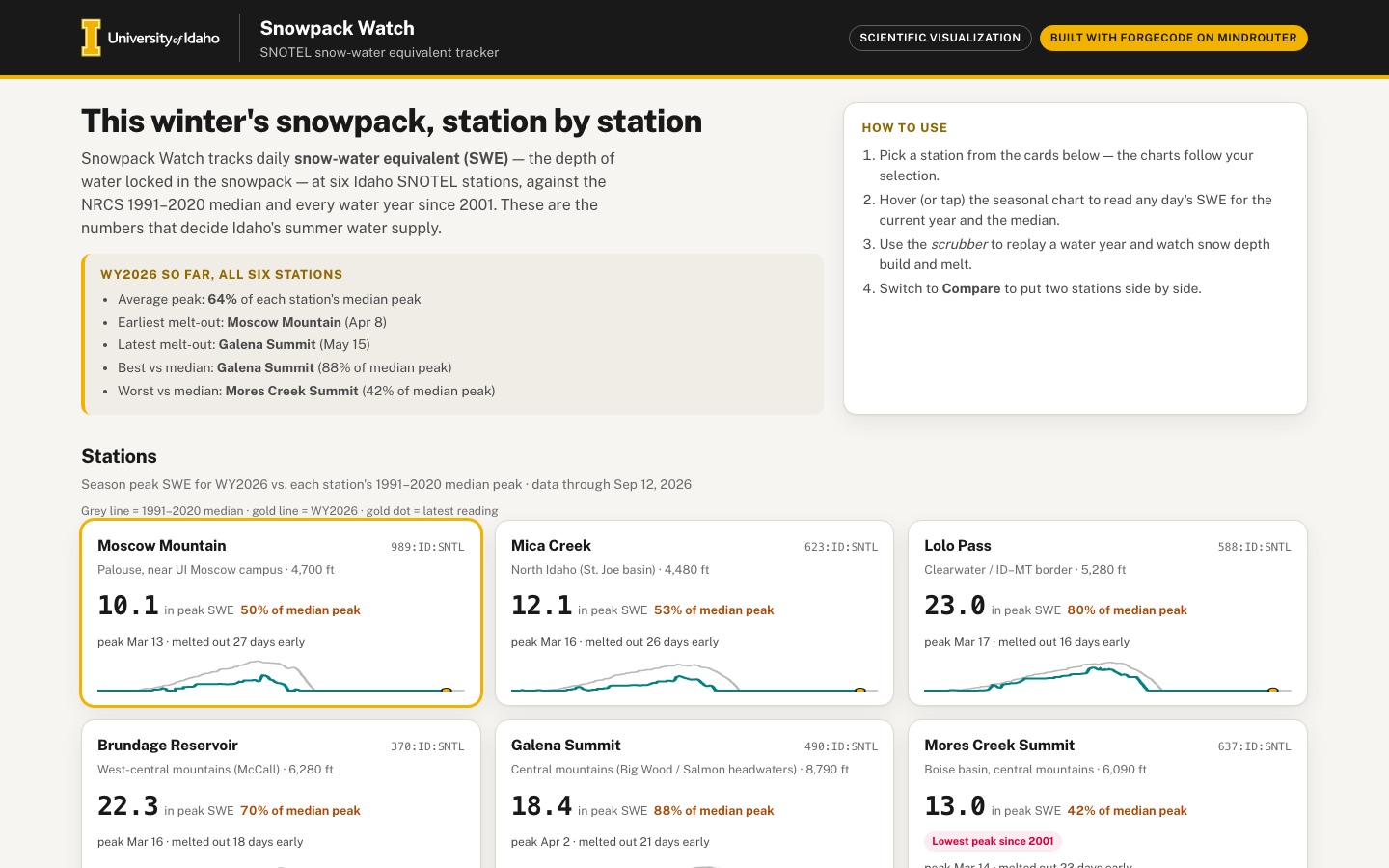 Desktop · click to enlarge
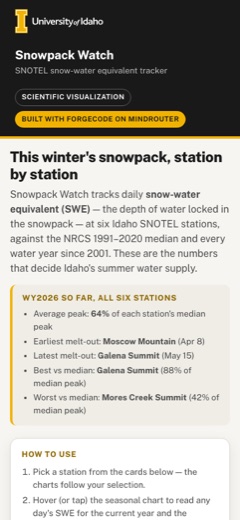
What it is ✎ blurb written by the AI critic
Snowpack Watch tracks snow-water equivalent at six Idaho SNOTEL stations, from Moscow Mountain to Galena Summit, using real USDA NRCS daily data since 2001. Compare this winter against the 1991-2020 median and every past year, see when snowpack peaked and melted out, put two stations side by side, and replay a season day by day.
Try this
- Click the Mores Creek Summit card: WY2026 is the lowest peak since 2001 there, far below the median curve.
- On the Seasonal curve, click the WY2017 chip, then hover March to compare that big year with this winter and the record range.
- Open the Snow-depth scrubber, pick Mores Creek Summit and WY2006, and press Play at 4x to watch 99 inches of snow build and melt.
Highlights ✎ written by the AI critic
- Real NRCS SNOTEL daily SWE and snow depth for six Idaho stations, WY2001-2026, with sources and access date shown
- Seasonal chart with every past year, the 1991-2020 median, the min-max envelope, record years and a tap-or-hover tooltip
- Peak-day and melt-out-day histograms in weekly bins, plus a per-year table linked to the bars
- Compare mode with synchronized hover across two stations for any water year
- Snow-depth scrubber that replays a water year at three speeds with a snow stake and SWE timeline
Who it's for
Water supply forecasting, forestry and ecology students, anyone who skis
Features
- Station cards with current SWE, % of median and a tiny sparkline
- Seasonal curve chart (Oct 1 → Sep 30): every past water year faint, median bold, min/max envelope shaded, current year highlighted
- 'Peak day' and 'melt-out day' estimates per year with a histogram
- Compare mode: two stations side by side
- Animated 'snow depth' water-year scrubber
- Source/citation panel
Data & sources
- wcc.sc.egov.usda.gov — USDA NRCS National Water and Climate Center, AWDB REST API v1 /stations: metadata for the 6 Idaho SNOTEL stations (989, 623, 588, 370, 490, 637).
- wcc.sc.egov.usda.gov — USDA NRCS NWCC, AWDB REST API v1 /data, one file per station: daily WTEQ (snow water equivalent) with the NRCS 1991-2020 daily median, plus daily SNWD (snow depth), 2000-10-01 to 2026-09-12.
- wcc.sc.egov.usda.gov — USDA NRCS NWCC, AWDB REST API v1 /reference-data: element, duration and unit definitions.
How it was built
Written by ForgeCode 2.13.21 (forgecode.dev) on qwen/qwen3.8-27b, served by MindRouter, the University of Idaho's on-premises AI platform.
Rounds by kind
| build | 1 |
| feedback | 7 |
| continue | 3 |
| critic | 3 |
Lines of code per file
| body html | 193 |
| app css | 279 |
| app js | 1,803 |
| scripts | 216 |
Critic scores ✎ scored by the independent AI critic, 1–10
Independent audits ✎ by the AI critic
Automated checks
Checked by critic-verify.
Data spot checks ✎ written by the AI critic
- Moscow Mountain card: WY2026 peak 10.1 in on Mar 13, 50% of median peak. Raw WTEQ 2026-03-13 = 10.1 (max of WY2026); NRCS medianPeak 20.2; 10.1/20.2 = 50%. Match.
- Galena Summit scrubber, Mar 20 2017: depth 87 in, SWE 31.3 in. Raw SNWD 2017-03-20 = 87, WTEQ = 31.3. Compare tooltip the same day: median 18.2 in, 172% of median. Raw median 18.2; 31.3/18.2 = 172%. Match.
- Mores Creek Summit scrubber, Apr 5 2006: depth 99 in, SWE 42.6 in. Raw 99 / 42.6 (the dataset maximum SWE). Match.
- Melt-out vs median (computed): Moscow Mountain melted out Apr 8 vs NRCS median May 5, so 27 days early; Galena Summit May 15 vs Jun 5, 21 days early. Independent Python gives 27 and 21, matching the app after round 12. Before the critic rounds every station read one day short (26, 20).
- Hero summary average peak 64% (computed): per-station 50, 53, 80, 70, 88, 42, mean 63.8, displayed 64%. Match.
Round-by-round timeline
Every harness round, in order. The prompts and FEEDBACK.md were written by the AI reviewer; the app code was written by the harness. Expand a round to see the exact prompt and the FEEDBACK.md the harness received.
-
Month labels are wrong on every date axis (seasonal chart, both compare charts, both histograms). The seasonal chart's x-axis reads
Oct Nov Dec Feb Mar Apr May Jun Jul Aug Sep Oct: January is missing, and every label from January on is one month late (the tick at Jan 1 says "Feb", and the tick at Sep 1 says "Oct"). The tick positions are also slightly off: October is laid out as 30 days. Hovering the seasonal chart where the axis says "Apr" gives a tooltip of "Mar 6, 2026". The histograms start at "Dec" where they should say "Nov", and the histogram range (meant to be Nov 1 → Jul 31) actually starts on Dec 1. Expected: 12 labelsOct Nov Dec Jan Feb Mar Apr May Jun Jul Aug Sep, each at the first day of its month, agreeing with the tooltip date under the cursor, on every chart. -
Melt-out day is computed wrongly. It is currently "the last day of the water year with SWE > 0.5 in", so early-autumn snow counts as the melt-out. Examples from data/embed: Mica Creek WY2017 melt-out = day 354 (Sep 19, 2017), but the snowpack actually melted out on 2017-05-24. Galena Summit WY2017 = day 363 (Sep 28) instead of 2017-06-15. Days outside the histogram range are silently clamped into the edge bins (Brundage's melt-out histogram has bars in late August). Expected: melt-out = the first day after the season's peak on which SWE falls to ≤ 0.5 in (no September values). Say the rule in the Data & sources text.
-
Leap water years are misaligned.
years[wy].swe/depthhave 366 entries in leap water years (WY2004, 2008, 2012, 2016, 2020, 2024). The median array has 366 entries in leap-year indexing. The charts and the scrubber still assume 365 days (n = 365, "day 1 / 365"), so after Feb 28 the median is read one day early, and the last day (Sep 30) of the median and of leap years is dropped. Expected: every series lines up by calendar date (Feb 29 handled), and the scrubber shows "/ 366" in leap years. -
Station cards never show "% of median" for most of the year. It is September, so all six cards say
0.0 in SWE snow-free, and the card's headline number (% of median) is absent. That makes the most important row of the page uninformative. Expected: whenever the pack is gone (or whenever the median for today is ~0), the card should switch to a season summary. Show WY2026 peak SWE, its peak date, peak as % of the NRCS median peak (the station'smedianPeakvalue, colour-coded above/below), and melt-out date vs the median melt-out date (e.g. "melted out 23 days early"). Keep "current SWE + % of median today" for snowy dates. The sparkline has no context: add a faint median line behind the WY2026 line and a dot at the latest value. -
Phone (390 px): the page scrolls horizontally, and the charts are unreadable.
-
The two-column card grid is 18 px wider than the screen. The right-hand card buttons end at x = 408, so the page scrolls sideways. Station names wrap onto three lines, and "WY2026 sparkline / peak 22.3 in" wraps. Expected: no horizontal scroll at 390 px. Use one card per row, or a compact horizontal scroll-snap strip that is clearly scrollable.
-
Every chart uses a fixed wide viewBox (960 px) scaled down, so axis labels render ~4 px tall on the seasonal chart and ~6 px on the histograms and compare charts at 390 px. Expected: draw charts for the actual container width (re-render on resize) so tick labels stay ≥ 11 px on a phone. Use fewer x ticks when narrow (e.g. every other month), and give the seasonal chart a sensible phone height.
-
The four tabs are squeezed into one row. "Seasonal curve" wraps to two lines and "Snow-depth scrubber" to three. Expected: single-line tab labels, via a horizontally scrollable tab strip or a tidy 2×2 grid.
-
-
The snow-depth scrubber scene looks broken. At deep snow (Galena Summit WY2017, day 176, 89 in), the "snow" is a white copy of the ridge shape shifted upward. It fills most of the sky and hides the sun, and it sits above the mountain instead of on it (screenshot: white band over the top half of the scene, grey rock below). Expected: a snowpack that visibly builds on the slopes and ground, and a snow stake / depth ruler with inch marks so the depth reads at a glance (SNOTEL sites use a snow depth sensor over a pillow, and a stake works well). Also:
-
Playback is very slow. At the default 2× it advances 2 days per second, so a full year takes 3 minutes. Expected: a year plays in ~20–30 s by default, with faster/slower options and smooth (not jumpy) motion.
-
It opens on WY2026 at Oct 1 with 0 in and an empty scene. Open on a snowy moment instead, or make it obvious to press Play.
-
Add a small SWE/depth timeline for the chosen year under the scene, with a moving playhead that you can click or drag to jump. It should show where in the season you are, including the peak and melt-out markers.
-
On desktop the right column has a large empty area below the controls.
-
-
Compare mode says "on a shared scale" but the scales differ. Brundage Reservoir's chart runs 0–40 in and Moscow Mountain's runs 0–20 in, so the two lines look similar when Brundage has twice the snow. Expected: both charts use the same y-axis maximum. Add a side-by-side stats table under the charts (elevation, WY2026 peak SWE and date, peak % of median peak, melt-out date vs median, today's SWE) and a synchronized hover crosshair: hovering one chart shows the same date and values on both. It would also help to be able to pick the water year to compare (default WY2026).
-
Seasonal chart: add the record years and let people explore past years. SPEC asks to compare this winter "against the long-term median and the record years". Right now the faint past years cannot be identified. Expected:
-
Label the record-high and record-low peak years since 2001 (e.g. highlighted lines with "WY2011 — record high since 2001" annotations or legend entries).
-
Let the user highlight any past water year, by hovering or clicking a faint line or via a year picker or chips. The highlighted year gets a distinct colour and is named in the legend.
-
The hover tooltip should also show the min–max envelope for that day (with the years that set them) and the highlighted year's value.
-
Mark the latest data point of WY2026 ("Sep 12") with a dot and label. The gold line currently runs visually to the end of the axis.
-
The y-axis has only 3 labels (0 / 20 / 40) for Lolo Pass. Use 5–8 gridlines.
-
-
Peak & melt-out panel needs per-year estimates and labelling. SPEC: "'Peak day' and 'melt-out day' estimates per year with a histogram". The histograms have no titles or axis titles; you cannot tell the teal one is "peak day" and the rust one is "melt-out day" without hovering. Expected:
-
Chart titles and axis titles ("Date of peak SWE", "Number of water years").
-
A marker for the NRCS median peak / median melt-out date and for WY2026 on each histogram.
-
Bar tooltips that list the water years in that bin.
-
A per-year view of the estimates (e.g. a compact table or a dumbbell/timeline chart: one row per water year from peak date to melt-out date, with peak SWE). Hovering a year should highlight it in the histograms.
-
WY2026 is drawn as "incomplete" (rust) in the scatter, but its snow season is fully recorded. Treat it as a normal (current) year. Only years with real data gaps in the snow season (Mica Creek WY2019) should be marked incomplete, with a legend entry explaining the rust colour.
-
-
Card grid layout on desktop. At 1440 px the six cards sit in a 5-column grid, leaving Mores Creek Summit alone on a second row. Expected: a balanced layout (6 across, or 3 × 2).
-
Selections don't carry across views. Clicking a station card updates the seasonal and peak views, but the Compare tab's Station A and the scrubber's Station stay on their old values. Expected: selecting a card also sets Compare's Station A and the scrubber station. Each panel should name the selected station clearly in its heading.
-
Desktop hero has a large empty area under the intro paragraph (left column, beside the How-to-use card). Use it for a short live summary of WY2026 across the six stations, e.g. average peak as % of median, the earliest and latest melt-out, and which station fared best/worst. Keep it computed from the embedded data.
-
Accessibility: the station cards are
<button role="listitem">, which removes their button semantics for screen readers. Expected: a list whose items contain real buttons (keeparia-pressed). Also make the chart tooltips work with tap on touch screens. The How-to text says "Hover", so mention "tap" too. -
Month labels are wrong on every date axis (seasonal chart, both compare charts, both histograms). The seasonal chart's x-axis reads
Oct Nov Dec Feb Mar Apr May Jun Jul Aug Sep Oct: January is missing, and every label from January on is one month late (the tick at Jan 1 says "Feb", and the tick at Sep 1 says "Oct"). The tick positions are also slightly off: October is laid out as 30 days. Hovering the seasonal chart where the axis says "Apr" gives a tooltip of "Mar 6, 2026". The histograms start at "Dec" where they should say "Nov", and the histogram range (meant to be Nov 1 → Jul 31) actually starts on Dec 1. Expected: 12 labelsOct Nov Dec Jan Feb Mar Apr May Jun Jul Aug Sep, each at the first day of its month, agreeing with the tooltip date under the cursor, on every chart. -
Melt-out day is computed wrongly. It is currently "the last day of the water year with SWE > 0.5 in", so early-autumn snow counts as the melt-out. Examples from data/embed: Mica Creek WY2017 melt-out = day 354 (Sep 19, 2017), but the snowpack actually melted out on 2017-05-24. Galena Summit WY2017 = day 363 (Sep 28) instead of 2017-06-15. Days outside the histogram range are silently clamped into the edge bins (Brundage's melt-out histogram has bars in late August). Expected: melt-out = the first day after the season's peak on which SWE falls to ≤ 0.5 in (no September values). Say the rule in the Data & sources text.
-
Leap water years are misaligned.
years[wy].swe/depthhave 366 entries in leap water years (WY2004, 2008, 2012, 2016, 2020, 2024). The median array has 366 entries in leap-year indexing. The charts and the scrubber still assume 365 days (n = 365, "day 1 / 365"), so after Feb 28 the median is read one day early, and the last day (Sep 30) of the median and of leap years is dropped. Expected: every series lines up by calendar date (Feb 29 handled), and the scrubber shows "/ 366" in leap years. -
Station cards never show "% of median" for most of the year. It is September, so all six cards say
0.0 in SWE snow-free, and the card's headline number (% of median) is absent. That makes the most important row of the page uninformative. Expected: whenever the pack is gone (or whenever the median for today is ~0), the card should switch to a season summary. Show WY2026 peak SWE, its peak date, peak as % of the NRCS median peak (the station'smedianPeakvalue, colour-coded above/below), and melt-out date vs the median melt-out date (e.g. "melted out 23 days early"). Keep "current SWE + % of median today" for snowy dates. The sparkline has no context: add a faint median line behind the WY2026 line and a dot at the latest value. -
Phone (390 px): the page scrolls horizontally, and the charts are unreadable.
-
The two-column card grid is 18 px wider than the screen. The right-hand card buttons end at x = 408, so the page scrolls sideways. Station names wrap onto three lines, and "WY2026 sparkline / peak 22.3 in" wraps. Expected: no horizontal scroll at 390 px. Use one card per row, or a compact horizontal scroll-snap strip that is clearly scrollable.
-
Every chart uses a fixed wide viewBox (960 px) scaled down, so axis labels render ~4 px tall on the seasonal chart and ~6 px on the histograms and compare charts at 390 px. Expected: draw charts for the actual container width (re-render on resize) so tick labels stay ≥ 11 px on a phone. Use fewer x ticks when narrow (e.g. every other month), and give the seasonal chart a sensible phone height.
-
The four tabs are squeezed into one row. "Seasonal curve" wraps to two lines and "Snow-depth scrubber" to three. Expected: single-line tab labels, via a horizontally scrollable tab strip or a tidy 2×2 grid.
-
-
The snow-depth scrubber scene looks broken. At deep snow (Galena Summit WY2017, day 176, 89 in), the "snow" is a white copy of the ridge shape shifted upward. It fills most of the sky and hides the sun, and it sits above the mountain instead of on it (screenshot: white band over the top half of the scene, grey rock below). Expected: a snowpack that visibly builds on the slopes and ground, and a snow stake / depth ruler with inch marks so the depth reads at a glance (SNOTEL sites use a snow depth sensor over a pillow, and a stake works well). Also:
-
Playback is very slow. At the default 2× it advances 2 days per second, so a full year takes 3 minutes. Expected: a year plays in ~20–30 s by default, with faster/slower options and smooth (not jumpy) motion.
-
It opens on WY2026 at Oct 1 with 0 in and an empty scene. Open on a snowy moment instead, or make it obvious to press Play.
-
Add a small SWE/depth timeline for the chosen year under the scene, with a moving playhead that you can click or drag to jump. It should show where in the season you are, including the peak and melt-out markers.
-
On desktop the right column has a large empty area below the controls.
-
-
Compare mode says "on a shared scale" but the scales differ. Brundage Reservoir's chart runs 0–40 in and Moscow Mountain's runs 0–20 in, so the two lines look similar when Brundage has twice the snow. Expected: both charts use the same y-axis maximum. Add a side-by-side stats table under the charts (elevation, WY2026 peak SWE and date, peak % of median peak, melt-out date vs median, today's SWE) and a synchronized hover crosshair: hovering one chart shows the same date and values on both. It would also help to be able to pick the water year to compare (default WY2026).
-
Seasonal chart: add the record years and let people explore past years. SPEC asks to compare this winter "against the long-term median and the record years". Right now the faint past years cannot be identified. Expected:
-
Label the record-high and record-low peak years since 2001 (e.g. highlighted lines with "WY2011 — record high since 2001" annotations or legend entries).
-
Let the user highlight any past water year, by hovering or clicking a faint line or via a year picker or chips. The highlighted year gets a distinct colour and is named in the legend.
-
The hover tooltip should also show the min–max envelope for that day (with the years that set them) and the highlighted year's value.
-
Mark the latest data point of WY2026 ("Sep 12") with a dot and label. The gold line currently runs visually to the end of the axis.
-
The y-axis has only 3 labels (0 / 20 / 40) for Lolo Pass. Use 5–8 gridlines.
-
-
Peak & melt-out panel needs per-year estimates and labelling. SPEC: "'Peak day' and 'melt-out day' estimates per year with a histogram". The histograms have no titles or axis titles; you cannot tell the teal one is "peak day" and the rust one is "melt-out day" without hovering. Expected:
-
Chart titles and axis titles ("Date of peak SWE", "Number of water years").
-
A marker for the NRCS median peak / median melt-out date and for WY2026 on each histogram.
-
Bar tooltips that list the water years in that bin.
-
A per-year view of the estimates (e.g. a compact table or a dumbbell/timeline chart: one row per water year from peak date to melt-out date, with peak SWE). Hovering a year should highlight it in the histograms.
-
WY2026 is drawn as "incomplete" (rust) in the scatter, but its snow season is fully recorded. Treat it as a normal (current) year. Only years with real data gaps in the snow season (Mica Creek WY2019) should be marked incomplete, with a legend entry explaining the rust colour.
-
-
Card grid layout on desktop. At 1440 px the six cards sit in a 5-column grid, leaving Mores Creek Summit alone on a second row. Expected: a balanced layout (6 across, or 3 × 2).
-
Selections don't carry across views. Clicking a station card updates the seasonal and peak views, but the Compare tab's Station A and the scrubber's Station stay on their old values. Expected: selecting a card also sets Compare's Station A and the scrubber station. Each panel should name the selected station clearly in its heading.
-
Desktop hero has a large empty area under the intro paragraph (left column, beside the How-to-use card). Use it for a short live summary of WY2026 across the six stations, e.g. average peak as % of median, the earliest and latest melt-out, and which station fared best/worst. Keep it computed from the embedded data.
-
Accessibility: the station cards are
<button role="listitem">, which removes their button semantics for screen readers. Expected: a list whose items contain real buttons (keeparia-pressed). Also make the chart tooltips work with tap on touch screens. The How-to text says "Hover", so mention "tap" too. -
Big improvement. These now work well and must be kept: melt-out fixed
-
leap years
-
envelope tooltip with record years
-
year chips
-
"WY2026 · Sep 12" marker
-
6-across cards with median sparkline
-
compare shared scale + stats table + synchronized hover
-
scrubber timeline + faster playback
-
per-year peak table
-
no horizontal page scroll on phone
-
readable chart text on phone
-
Month labels are STILL wrong on every date axis. This is item 1 from last time, and it was not fixed.
-
The seasonal chart reads
Nov Dec Feb Mar Apr May Jun Jul Aug Sep Oct. The Oct 1 tick at the left edge has no label, there is no "Jan", and the label "Oct" is printed at the Sep 1 tick. -
Both compare charts and the scrubber timeline show the same wrong sequence.
-
The histograms read
Dec Feb Mar Apr May Jun Jul Aug. -
Proof: in Compare, hovering exactly on the gridline labelled "Apr" gives a tooltip for "Mar 2, 2026".
Every label from January on is one month too late, because the month name for the Jan–Sep ticks is looked up one position too far along the month-name list. Expected, for a non-leap year with water-year day 1 = Oct 1:
-
-
NaN / null / "—" everywhere because the median peak and melt-out fields are read with the wrong names. In
data/embed/snowpack.jsoneach station has"medianPeak": {"month": 4, "day": 21, "value": 20.8}and"medianMeltout": {"month": 6, "day": 5}, but the app reads them as if the keys werem,dandv. Symptoms:-
Console errors, 1 set on page load and 8 more after clicking the cards and tabs:
Error: <line> attribute y1: Expected length, "NaN".,Error: <line> attribute y2: Expected length, "NaN".andError: <text> attribute y: Expected length, "NaN". -
Every station card says "melted out NaN days late".
-
Hero summary: "Average peak: 0% of each station's median peak". "Best vs median: Moscow Mountain (null% of median peak)" and "Worst vs median: Moscow Mountain (null% of median peak)" name the same station for best and worst.
-
Compare table: "Peak % of median peak: —" and "Melt-out vs median: May 14 (NaNd late)".
-
Peak scatter: the label says "median peak — in", and the dashed median line is drawn above the plot, outside the axes.
-
The NRCS median peak / median melt-out markers are missing from the histograms.
Expected: real numbers everywhere. For example, Moscow Mountain WY2026 peak 10.1 in vs median peak 20.2 in gives "50% of median peak". Melt-out Apr 8 vs median May 5 gives "melted out 27 days early".
-
-
Station cards: wrong badge and cramped layout.
-
Next to the peak value every card shows a bold "no peak yet" badge, even though the peak exists ("peak Mar 13"). Expected: the colour-coded "% of median peak" badge.
-
At 1440 px the cards are ~200 px wide, so names wrap to two or three lines ("Mores / Creek / Summit"). The footer "WY2026 · grey = median / peak 10.1 in" wraps into two ragged lines, and the peak value is repeated in the footer. Expected: tidy cards. A 3 × 2 grid with wider cards at desktop is fine, and so are shorter footers (e.g. a small legend once above the cards instead of in every card).
-
The section subtitle still says "Current SWE as of Sep 12, 2026 · % of the 1991–2020 median for that day" while the cards show season peaks. Make the subtitle match what the cards show.
-
-
The scrubber scene still looks broken.
-
Galena Summit WY2017 at Feb 27 (96 in): the white "snow" is still a copy of the ridge shifted upward. It fills the top of the scene, hides half the sun, and sits above the rock instead of on it.
-
The snow stake floats in the middle of the grey rock face, not planted on the ground.
-
The red depth pointer sits beside the stake at ~90, but no snow reaches the stake, so the stake does not show the depth.
-
On the phone at 33 in, the snow is a thin white band floating above the mountain outline.
Expected: the snow surface builds up from the ground and slopes. The stake stands in the foreground on the ground, and the snow surface visibly reaches the stake mark equal to the depth (96 in reaches just below the 100 mark). Sky and sun stay visible.
-
-
Scrubber day count and timeline details.
-
Non-leap years offer a day 366: WY2001 at "366 / 366" shows "Oct 1, 2001 · WY2001", which belongs to WY2002. The phone shows "164 / 365" for WY2026, while desktop shows "150 / 366" for WY2017; both are non-leap years. Expected: 365 days in non-leap years and 366 in leap years, never a date outside the water year.
-
Timeline y-axis labels overlap into an unreadable stack ("20 17.5 15 12.5 10 7.5 5 2.5 0" in ~60 px). Expected: 2–3 ticks.
-
On the phone the "peak" and "melt-out" labels overprint as "peakelt-out" when the dates are close. Expected: offset them.
-
On the phone the snow-stake numbers are ~6 px tall. Expected: ≥ 11 px.
-
-
Record years are not visually distinct on the seasonal chart. The legend lists "WY2002 — record high since 2001" and "WY2005 — record low since 2001" for Moscow Mountain. Both use the same grey swatch as the other past years, and in the chart they cannot be told apart from the faint lines. Expected: distinct colours from the secondary palette, e.g. Clearwater for the record high and Raspberry for the record low. Give each a slightly thicker line and a small year label at its peak, with legend swatches that match.
-
Peak & melt-out panel polish.
-
The "WY2026" marker label on the melt-out histogram overprints the tallest bar (Lolo Pass). Expected: a label with a white halo, or placed above the plot.
-
The chart titles "Peak day" / "Melt-out day" collide with the top y-axis label "15".
-
The per-year table has 26 rows and makes the panel ~1,600 px tall. Expected: show the most recent ~8 years plus a "Show all 26 years" toggle, or a max-height scroll area with a sticky header.
-
-
Phone tab strip gives no hint that more tabs exist. At 390 px the strip scrolls horizontally, but "Snow-depth scrubber" starts at x = 406, entirely off-screen, with no cue. Expected: a visible affordance (fade or arrow at the edge, or scrolling the active tab into view), or a 2 × 2 grid of tabs.
-
Big improvement. These now work well and must be kept: melt-out fixed
-
leap years
-
envelope tooltip with record years
-
year chips
-
"WY2026 · Sep 12" marker
-
6-across cards with median sparkline
-
compare shared scale + stats table + synchronized hover
-
scrubber timeline + faster playback
-
per-year peak table
-
no horizontal page scroll on phone
-
readable chart text on phone
-
Month labels are STILL wrong on every date axis. This is item 1 from last time, and it was not fixed.
-
The seasonal chart reads
Nov Dec Feb Mar Apr May Jun Jul Aug Sep Oct. The Oct 1 tick at the left edge has no label, there is no "Jan", and the label "Oct" is printed at the Sep 1 tick. -
Both compare charts and the scrubber timeline show the same wrong sequence.
-
The histograms read
Dec Feb Mar Apr May Jun Jul Aug. -
Proof: in Compare, hovering exactly on the gridline labelled "Apr" gives a tooltip for "Mar 2, 2026".
Every label from January on is one month too late, because the month name for the Jan–Sep ticks is looked up one position too far along the month-name list. Expected, for a non-leap year with water-year day 1 = Oct 1:
-
-
NaN / null / "—" everywhere because the median peak and melt-out fields are read with the wrong names. In
data/embed/snowpack.jsoneach station has"medianPeak": {"month": 4, "day": 21, "value": 20.8}and"medianMeltout": {"month": 6, "day": 5}, but the app reads them as if the keys werem,dandv. Symptoms:-
Console errors, 1 set on page load and 8 more after clicking the cards and tabs:
Error: <line> attribute y1: Expected length, "NaN".,Error: <line> attribute y2: Expected length, "NaN".andError: <text> attribute y: Expected length, "NaN". -
Every station card says "melted out NaN days late".
-
Hero summary: "Average peak: 0% of each station's median peak". "Best vs median: Moscow Mountain (null% of median peak)" and "Worst vs median: Moscow Mountain (null% of median peak)" name the same station for best and worst.
-
Compare table: "Peak % of median peak: —" and "Melt-out vs median: May 14 (NaNd late)".
-
Peak scatter: the label says "median peak — in", and the dashed median line is drawn above the plot, outside the axes.
-
The NRCS median peak / median melt-out markers are missing from the histograms.
Expected: real numbers everywhere. For example, Moscow Mountain WY2026 peak 10.1 in vs median peak 20.2 in gives "50% of median peak". Melt-out Apr 8 vs median May 5 gives "melted out 27 days early".
-
-
Station cards: wrong badge and cramped layout.
-
Next to the peak value every card shows a bold "no peak yet" badge, even though the peak exists ("peak Mar 13"). Expected: the colour-coded "% of median peak" badge.
-
At 1440 px the cards are ~200 px wide, so names wrap to two or three lines ("Mores / Creek / Summit"). The footer "WY2026 · grey = median / peak 10.1 in" wraps into two ragged lines, and the peak value is repeated in the footer. Expected: tidy cards. A 3 × 2 grid with wider cards at desktop is fine, and so are shorter footers (e.g. a small legend once above the cards instead of in every card).
-
The section subtitle still says "Current SWE as of Sep 12, 2026 · % of the 1991–2020 median for that day" while the cards show season peaks. Make the subtitle match what the cards show.
-
-
The scrubber scene still looks broken.
-
Galena Summit WY2017 at Feb 27 (96 in): the white "snow" is still a copy of the ridge shifted upward. It fills the top of the scene, hides half the sun, and sits above the rock instead of on it.
-
The snow stake floats in the middle of the grey rock face, not planted on the ground.
-
The red depth pointer sits beside the stake at ~90, but no snow reaches the stake, so the stake does not show the depth.
-
On the phone at 33 in, the snow is a thin white band floating above the mountain outline.
Expected: the snow surface builds up from the ground and slopes. The stake stands in the foreground on the ground, and the snow surface visibly reaches the stake mark equal to the depth (96 in reaches just below the 100 mark). Sky and sun stay visible.
-
-
Scrubber day count and timeline details.
-
Non-leap years offer a day 366: WY2001 at "366 / 366" shows "Oct 1, 2001 · WY2001", which belongs to WY2002. The phone shows "164 / 365" for WY2026, while desktop shows "150 / 366" for WY2017; both are non-leap years. Expected: 365 days in non-leap years and 366 in leap years, never a date outside the water year.
-
Timeline y-axis labels overlap into an unreadable stack ("20 17.5 15 12.5 10 7.5 5 2.5 0" in ~60 px). Expected: 2–3 ticks.
-
On the phone the "peak" and "melt-out" labels overprint as "peakelt-out" when the dates are close. Expected: offset them.
-
On the phone the snow-stake numbers are ~6 px tall. Expected: ≥ 11 px.
-
-
Record years are not visually distinct on the seasonal chart. The legend lists "WY2002 — record high since 2001" and "WY2005 — record low since 2001" for Moscow Mountain. Both use the same grey swatch as the other past years, and in the chart they cannot be told apart from the faint lines. Expected: distinct colours from the secondary palette, e.g. Clearwater for the record high and Raspberry for the record low. Give each a slightly thicker line and a small year label at its peak, with legend swatches that match.
-
Peak & melt-out panel polish.
-
The "WY2026" marker label on the melt-out histogram overprints the tallest bar (Lolo Pass). Expected: a label with a white halo, or placed above the plot.
-
The chart titles "Peak day" / "Melt-out day" collide with the top y-axis label "15".
-
The per-year table has 26 rows and makes the panel ~1,600 px tall. Expected: show the most recent ~8 years plus a "Show all 26 years" toggle, or a max-height scroll area with a sticky header.
-
-
Phone tab strip gives no hint that more tabs exist. At 390 px the strip scrolls horizontally, but "Snow-depth scrubber" starts at x = 406, entirely off-screen, with no cue. Expected: a visible affordance (fade or arrow at the edge, or scrolling the active tab into view), or a 2 × 2 grid of tabs.
-
Much better. These are now correct and must be kept: zero console errors
-
no NaN/null text
-
station cards ("50% of median peak · melted out 25 days early")
-
hero summary
-
keyboard card selection
-
record-high/low colours and labels
-
year chips (legend shows "WY2011 (highlighted)")
-
tooltip with envelope years
-
compare stats table
-
"Show all 26 years" toggle
-
tab-strip fade on phone
-
no horizontal scroll at 390 px
-
Month labels are STILL wrong on every date axis, and now shifted further than before. This is the third time this item has been reported. Measured in the browser:
-
Seasonal chart and both Compare charts:
Feb Mar May Jun Jul Aug Sep Oct Nov Dec Jan.-
"Feb" is at the Nov 1 tick, "Mar" at Dec 1 and "May" at Jan 1.
-
There is no "Apr".
-
The Oct 1 tick at the left edge has no label, and a "Jan" label is drawn at the far right (the Sep 1 position).
-
Proof: hovering the chart where the axis says "Aug" gives the tooltip "Mar 27, 2026".
-
-
Peak/melt-out histograms:
Mar May Jun Jul Aug Sep Oct Nov. Moscow Mountain's peaks (really mid-March) appear under "Jul/Aug", and melt-outs (really April–May) under "Sep". -
Scrubber timeline: the same wrong sequence (
Feb Mar May … Dec Jan).Two separate things are wrong in src/app.js:
-
(a) Positions: the month/day → day-of-water-year lookup numbers the October–December entries as months 9, 10 and 11, with the day counts of Sep/Oct/Nov. January–September use the real months 1–9. So October's entries are overwritten by September's (both are "9"), November is looked up as "10", and so on. Every lookup by real calendar month (Oct = 10, Nov = 11, Dec = 12, the same numbering as
medianPeak.monthin the data) lands in the wrong place. The Oct 1 tick ends up at the Sep 1 position. -
(b) Names: the month-start list mixes 0-based and 1-based month numbers, and the name lookup then adds another offset.
Expected: use real calendar month numbers (1–12) consistently. Oct = 10 with 31 days, Nov = 11 with 30, Dec = 12 with 31, then Jan = 1 … Sep = 9. Take each tick's label directly from its real month number. With water-year day 1 = Oct 1 (leap-indexed, Feb 29 = day 152), the ticks must be:
-
-
The first label at the left edge of every seasonal-type chart must be "Oct", and the last "Sep". Self-check after the fix: Hovering the gridline labelled "Mar" must give a tooltip date of Mar 1.
-
The peak-day histogram for Moscow Mountain must have its bars under Mar/Apr.
-
The median peak marker (Mar 14) must sit just right of the "Mar" tick.
-
Leap years are inverted in the scrubber.
-
WY2017 (Oct 2016 – Sep 2017, no Feb 29) has a slider max of 366, and day 366 shows "Oct 1, 2017 · WY2017 · no data". Oct 1, 2017 is not in WY2017.
-
WY2016 (it contains Feb 29, 2016) only goes to 365, so Sep 30, 2016 cannot be reached.
Cause: a water year
wycontains Feb 29 when the calendar yearwyis a leap year (WY2016, WY2020, WY2024), but the app testswy − 1. Expected: 366 days for WY2004/2008/2012/2016/2020/2024 and 365 for all others. The last day is always Sep 30 of that water year, and the "N / 365|366" counter matches.
-
-
The scrubber scene still looks broken (Moscow Mountain WY2026, Mar 13, 33 in, desktop and phone).
-
The "snow" is still a white copy of the ridge shifted upward. It floats above the grey rock, with a gap of sky-coloured white between them, and covers the lower sky.
-
The snow stake floats in the middle of the rock face.
-
The red depth pointer sits beside the stake at ~30 with no snow surface touching the stake, so the stake does not show the depth.
Expected: a simple, clear foreground scene. Draw a flat or gently sloping ground strip at the bottom, the mountains behind it, and the snow stake planted in the foreground ground with its 0 mark at ground level. Draw a white snowpack rectangle/drift in the foreground that rises from the ground to exactly the stake mark equal to the current depth (33 in → just above the 30 mark). Snow caps on the peaks can grow with depth, but must sit ON the rock. On the phone the stake numbers are 7 px tall; make them ≥ 11 px.
-
-
Compare mode ignores the chosen water year in two table rows. With Station A = Brundage Reservoir, B = Moscow Mountain and Water year = WY2011:
-
"WY2011 peak SWE" correctly changes to 38.6 in / 26.1 in.
-
"Peak date" still shows the WY2026 dates (Mar 16 / Mar 13).
-
"Melt-out vs median" still shows WY2026 (May 14 (16d early) / Apr 8 (25d early)).
-
"Today's SWE" is shown for a past year.
-
The subtitle still says "WY2026 SWE against each station's…".
Expected: every row, the subtitle and both charts use the selected water year. Hide "Today's SWE" unless the current year is selected.
-
-
Tooltips overlap or clip.
-
In Compare, hovering the left chart draws the Moscow Mountain (right-chart) tooltip on top of the Brundage tooltip over the left chart, so two dark boxes overlap and one is unreadable. Expected: each chart shows its own station's tooltip inside its own chart, or one combined tooltip listing both stations.
-
In the seasonal chart the tooltip is cut off at the right edge of the card ("0.8 (WY2015) – 35.4 (W"). Expected: flip the tooltip to the left of the cursor when it would overflow.
-
-
Histogram marker labels collide. On the Moscow Mountain peak-day histogram, the "median" and "WY2026" labels sit on top of each other at the top of the plot and over the bars. Expected: stagger the two labels vertically (or put them in a small legend under the chart title) so both are readable.
-
Uncaught error on page load (desktop and phone):
-
seasonSummarywas changed to take(station, wy), but two callers still pass only the station: the station-card renderer (renderCards, src/app.js ~line 279) -
the hero "WY2026 so far" summary (src/app.js ~line 1477)
-
So
wyis undefined andstation.years[undefined].peakthrows. Becauseinit()stops there: there are 0 station cards -
the hero summary is an empty grey bar
-
the Stations subtitle says "data through —"
-
the seasonal chart panel is blank, showing only "—"
-
the Compare selects have no options
-
the scrubber readouts show "—"
-
the page is 1,225 px tall instead of ~2,100 px
-
Once the page loads again, the round-7 fixes must actually show. I could not test them because of the crash:
-
Month ticks (all date axes: seasonal, both Compare charts, both histograms, scrubber timeline):
-
Labels read
Oct Nov Dec Jan Feb Mar Apr May Jun Jul Aug Sepfrom left to right. -
Each label sits at the first day of its month. With leap-indexed water-year days (Oct 1 = 1, Feb 29 = 152) the positions are: Oct 1, Nov 32, Dec 62, Jan 93, Feb 124, Mar 153, Apr 184, May 214, Jun 245, Jul 275, Aug 306, Sep 337.
-
Hovering the gridline labelled "Mar" gives a tooltip dated Mar 1.
-
Moscow Mountain's peak-day histogram bars sit under Mar/Apr.
-
The histograms' Nov→Aug axis starts with "Nov".
-
-
Leap years in the scrubber: WY2016, 2020 and 2024 (and 2004/2008/2012) have 366 days. WY2017 and every other year have 365. The last day is always Sep 30 of that water year, never "Oct 1".
-
Scrubber scene:
-
The mountains sit behind a foreground ground strip, with the snow stake planted in the ground (0 mark at ground level).
-
A white snowpack rises from the ground exactly to the stake mark for the current depth.
-
Snow caps sit on the rock, not floating above it.
-
Stake numbers are ≥ 11 px on the phone.
-
-
Compare with Water year = WY2011: "Peak date", "Melt-out vs median", the subtitle and both charts all show WY2011. "Today's SWE" is hidden for past years.
-
Tooltips: in Compare, the two station tooltips never overlap each other. The seasonal tooltip flips left instead of being cut off at the right edge.
-
Histogram markers: the "median" and "WY2026" labels are staggered and both readable.
-
-
Keep everything that worked in round 6:
-
station cards with "% of median peak" and "melted out N days early"
-
hero summary numbers
-
keyboard card selection
-
record-high/low colours
-
year chips
-
envelope tooltip
-
compare stats table
-
"Show all 26 years" toggle
-
phone tab-strip fade
-
no horizontal scroll at 390 px
-
-
The page loads with zero errors and the round-7/8 fixes work. The app is close to done, so change only what the items below require. Everything else must stay exactly as it is: month axes (Oct … Sep, correct positions)
-
non-leap years (WY2017 matches the raw data on every day checked)
-
station cards
-
hero summary
-
seasonal chart with record years, chips and tooltips
-
histograms and per-year table
-
Compare (shared scale, per-chart tooltips, water-year table)
-
scrubber timeline and playback
-
phone layout
-
Leap water years show the wrong day's values in the scrubber. Galena Summit, WY2016 (a leap water year). Scrubber readout vs the raw AWDB data:
-
The scrubber scene still looks unfinished. Galena Summit WY2017, Mar 25 (89 in), desktop and phone:
-
The snow caps are separate white triangles floating above the two peaks, with a band of sky between each cap and the rock. Expected: the caps sit on the rock, following the ridge lines down from each summit, and grow downward as depth increases.
-
The snowpack is a flat, full-width white rectangle with no edge, shading or texture. It covers the bottom of the mountains and reads as "a white box". Expected: a soft snow-drift silhouette (gently undulating top edge) with a light blue-grey outline or shadow, so it reads as snow. Optionally, add two or three simple conifer trees in the foreground that get buried as the depth rises.
-
The snow-stake numbers are still 9 px tall at 390 px wide. Expected: ≥ 11 px.
-
-
Histogram marker labels overlap. On Moscow Mountain's peak-day histogram, the "median" and "WY2026" labels are drawn on top of each other and over the top of the tallest bar. Expected: both labels are readable and never cover bars. For example, show them in one row above the plot ("┆ median Mar 14 │ WY2026 Mar 13") or offset them horizontally.
-
Zero errors, and most of the app is in good shape. Change only what these three items require. Everything else must keep working exactly as it does now: month axes
-
cards and hero summary
-
seasonal chart, record years, chips and tooltips
-
histograms (except the label row) and per-year table
-
Compare with the water-year table
-
scrubber timeline and playback
-
phone layout
-
The day→slot convention disagrees between the data script and the app, so the scrubber shows the wrong day's values. Round 8 had non-leap years right; round 9 broke them.
What the data file actually contains:
scripts/build_data.py(doy_to_leap_idxand the median loop) treats slot 61 as Feb 29 ("return doy if doy < 61 else doy + 1"). But slot 61 of a water year (Oct 1 = slot 1) is Nov 30. As a result, indata/embed/snowpack.jsonevery non-leap water year has a null at slot 61 (Nov 30), and every value from Nov 30 onward sits one slot later than a Feb 29 = slot 152 layout would put it. The median curve has an invented, interpolated value at slot 61 instead of at Feb 29. Checked against the raw AWDB files: 5,512 SWE and 7,348 depth entries in non-leap years do not match a Feb 29 = slot 152 layout. Leap years match.What the app shows now (Galena Summit), compared with the raw data:
-
Expected: one convention everywhere. Use Feb 29 = slot 152 (Oct 1 = slot 1 … Feb 28 = slot 151, Feb 29 = slot 152, Mar 1 = slot 153 … Sep 30 = slot 366). In
scripts/build_data.py: non-leap water years leave slot 152 null. The median's missing Feb 29 value goes in slot 152, interpolated from Feb 28 and Mar 1. -
Re-run the script to regenerate
data/embed/snowpack.json. -
In
src/app.js: every conversion between slider/hover day and slot uses the same rule. For non-leap years, day of water year ≤ 151 → the same slot; day ≥ 152 → slot + 1. For leap years, day = slot. -
Keep peak/melt-out/completeness logic consistent with it: the "snow season Oct 1 – Jun 30" = slots 1–274.
-
Histogram marker labels now overprint each other.
-
On Moscow Mountain's peak-day histogram, "median Mar 14" and "WY2026 Mar 13" are drawn at the same spot in one row and render as an unreadable jumble.
-
On the melt-out histogram, "WY2026 Apr 8" runs into "median May 5".
Expected: both labels are always fully readable. For example, put them in a small legend line under each chart title ("┆ median Mar 14 · │ WY2026 Mar 13") instead of at the marker positions. Alternatively, when the two markers are closer than the label width, place the labels on two separate rows.
-
-
Scrubber scene: the snow caps still float, and the phone stake text is still small.
-
Galena Summit WY2017, Mar 25 (desktop and phone): the two snow caps are still separate white triangles hovering above the peaks, with a band of sky between each cap and the rock. Expected: each cap is drawn as part of the mountain. It starts at the summit point and follows the mountain's own left and right slopes down to a jagged snowline, so there is no sky between cap and rock.
-
The snow-stake numbers are still 9 px tall at 390 px wide. Expected: ≥ 11 px on the phone. Increase the stake label size for narrow screens; the SVG scales down on phones, so a 14-unit font is not enough.
-
-
Feb 29 gap in non-leap years on the seasonal and Compare charts. Non-leap water years have a null in slot 152 (Feb 29), which is correct in the data, but the charts treat it as a real day:
-
On the seasonal chart (desktop and phone) there is a thin white vertical slit through the min–max envelope at the Mar 1 gridline, and the WY2026 (gold), record-high and record-low lines each have a visible break there.
-
Hovering that one-pixel spot shows a tooltip for a date that does not exist: "Feb 29 · WY2026 | Current — in | Range since 2001 13.3 (WY2024) – 27.6 (WY2008)" (the range comes only from leap years). The same happens in both Compare charts ("Moscow Mountain · Feb 29 | WY2026 | — in"). Expected: when drawing a non-leap year's line, skip the empty Feb 29 slot and connect Feb 28 straight to Mar 1 (no break). The envelope ignores nulls at that slot (no slit). When the hovered/current water year is not a leap year, the hover snaps from the Feb 29 slot to Feb 28 or Mar 1 instead of showing "Feb 29".
-
-
Phone: the year-chip list is too long. At 390 px the 26 year chips wrap into 7 rows (~450 px) between the legend and the chart, pushing the chart below the fold. Expected: on narrow screens (≤ 560 px) show a compact "Highlight a year"
<select>(with the record-high and record-low years first, plus "None") instead of the chip grid; keep the chips on wider screens. Both must drive the same highlight. -
Phone: the "WY2026 · Sep 12" marker label is cut off at the right edge of the seasonal chart ("WY2026 · Sep"). Expected: when the label would overflow the plot, anchor it to the left of the dot (text-anchor end) so it is fully visible.
-
Phone: snow-stake numbers are still 9 px tall (reported three times). The scene SVG is scaled down on phones, so raising the font size in SVG units has not been enough. Expected: at ≤ 560 px wide, the stake numbers (0/30/60/90/120) and "in" render at ≥ 11 px — e.g. use a larger SVG font size only on narrow screens, or show every other tick label in a bigger size.
-
Measured: at 1×, 2× and 4× the animation advances exactly 61 days in 2 seconds, one day per 33 ms tick. Cause, in src/app.js section 7: (a)
startScrubcomputes the next day asMath.ceil(state.scrubDoy + daysPerTick).daysPerTickis below 1, so that always adds exactly one day. -
(b)
state.speedstarts at 18, but the speed menu's change handler sets it to 1, 2 or 4. -
Fix: Keep a fractional play position (a float) in state, separate from the integer day that is displayed.
-
On every tick, add (days per second ÷ 30) to it and display
Math.floorof it. -
Define the menu values as 1× = 15 days/s, 2× = 30 days/s, 4× = 60 days/s. Derive the speed from the selected menu value everywhere, including the initial 2×.
-
Dragging the slider or clicking the timeline must reset the fractional position to that day.
-
In the Seasonal chart, these lines all have a 2–3 px gap at the Feb 29 slot, just left of the Mar gridline: the gold WY2026 line
-
the record-high and record-low lines
-
every grey past-year line
-
About 20 grey lines break at the same x, so every station shows a white vertical slit through the envelope. Both Compare charts have the same gap. Cause: the path loops reset their "started" flag whenever a slot is null, and slot 152 (0-based index 151) is null by design in non-leap water years. The affected loops are the current year and past years in
drawSeasonal, and the selected year indrawCompare. Fix: In those loops, when the index is 151 and the water year is not a leap year (isLeapWy), skip that slot without resetting the started flag. -
Keep breaking the line on every other null (real data gaps such as Mica Creek WY2019).
-
Cause: the
MD2DOYlookup at the top of src/app.js skips Feb 29 while counting, so it gives Mar 1 = 152. But the per-year arrays and thepeak.doy/meltout.doyfields use leap-year slots, where Feb 29 = 152 and Mar 1 = 153. Fix: MakeMD2DOYcount Feb 29 as slot 152, so Oct 1 = 1, Feb 28 = 151, Feb 29 = 152, Mar 1 = 153 and Sep 30 = 366. This is exactly the convention in scripts/build_data.py. -
The same fix moves the Mar–Sep month gridlines and labels, and the dashed median markers in the histograms, onto the correct day.
-
Keep
MONTH_STARTS,HIST_LO/HIST_HIandseasonSummaryusingMD2DOYconsistently. -
Three stations are wrong because scripts/build_data.py skips slot 152 and averages Feb 28 and Mar 1. Its comment says no leap water year exists in the record, which is false. Fix, in the median loop of scripts/build_data.py: Map every row with
doy_to_leap_idx(doy_of(d), wy_of(d)), the same mapping the per-year arrays use, so slot 152 is filled from a Feb 29 row. -
Delete the interpolation line and the wrong comment.
-
Run
python3 scripts/build_data.py, thenpython3 build.py --check. No other value in data/embed may change. -
WY2026's 13.0 in is the lowest peak since 2001 at Mores Creek Summit. Right now: the legend shows a separate raspberry entry "WY2026 — record low since 2001", but no raspberry line exists
-
the first chip is "WY2026 (record low)", and clicking it highlights nothing
-
the phone "Highlight a year" select lists that entry too
-
Fix (in
renderSeasonal,buildYearChipsanddrawSeasonal): Whenrec.hiorrec.lobelongs to the current water year, do not add a record legend entry, chip or select option for it. -
Instead, change the gold current-year legend label to "WY2026 (current) — lowest peak since 2001" (or "highest peak since 2001").
-
Add a short "lowest peak since 2001" note to that station's card, after "42% of median peak".
-
When the current year is not a record, nothing changes. Moscow Mountain must still show WY2002 as record high and WY2005 as record low.
-
Select Mica Creek, then click the "WY2019" chip. The legend says "WY2019 (highlighted)", but no purple line appears. Cause:
drawSeasonalskips every incomplete year before drawing, including the highlighted one. Fix: Always draw the highlighted year (purple, width 2.5), even when it is incomplete, and leave its real data gap as a break in the line. -
Keep excluding incomplete years from the faint grey lines and from the envelope.
-
When the highlighted year is incomplete, label its legend entry "WY2019 (highlighted, data gap)".
-
Measured: at 1× the day does not advance at all (0 days in 2 s). 2× (30 days/s) and 4× (60 days/s) are correct. Cause:
setScrubDaynow setsstate.scrubPos = doy. -
The play timer calls
setScrubDay(Math.floor(state.scrubPos))on every tick. At 1× each tick adds 0.5, soscrubPosis floored back to the same day before the next half-day can accumulate. -
Fix: Remove the
state.scrubPos = doyline fromsetScrubDay. -
Set
state.scrubPosexplicitly wherever the user picks a day or a new year:-
the slider input handler
-
the timeline jump function in
buildScrubTimeline -
the scrubber station and year change handlers
-
selectStation
-
-
In
startScrub, setstate.scrubPos = state.scrubDoybefore starting the timer. -
After your
pointerdownchange, a tap fills the tooltip, but it is hidden immediately. Tested at 390×844 with a touch tap: the tooltip text is set, but theis-visibleclass is gone. A touch pointer always firespointerleaveright afterpointerup. Fix, in the overlaypointerleavehandlers ofdrawSeasonalanddrawCompare: Whenev.pointerType === "touch", return without hiding, so the tooltip and crosshair stay visible. -
Hide them instead when the user taps anywhere outside that chart: one
pointerdownlistener ondocument, added once, that hides the seasonal and compare tooltips and crosshairs when the target is not inside their chart. -
Hovering Galena Summit on Apr 2 renders "12.4 (WY2001) – 33.3 (WY2017)" past the right edge of the black tooltip:
.tooltiphasmax-width: 260pxandwhite-space: nowrap. Fix: Replace that one row with two rows: "Lowest since 2001" → "12.4 in (WY2001)", and "Highest since 2001" → "33.3 in (WY2017)". -
Raise
.tooltipmax-widthto 300px. -
"· lowest peak since 2001" wraps onto its own line, starting with a stray bold "·". Fix: Render the note as a small pill badge on its own line, with no leading dot. Text "Lowest peak since 2001". Raspberry text (var(--ui-raspberry)) on a light raspberry background (rgba(215,0,63,.08)), font-size .7rem, weight 700, padding 2px 8px, border-radius 999px.
-
Use clearwater colours for "Highest peak since 2001".
-
Twelve bins of about 23 days spread over Nov 1 – Jul 31, so each station's data sits in 3 or 4 bars with large empty areas. The tooltip's "± 2 wk" is also wrong (a bin is ±11 days). Fix, in
histBinsanddrawDayHist: Use 7-day bins. -
Give each histogram its own range: from the 1st of the month containing its earliest value (or its median or current-year marker, if earlier) to the last day of the month containing its latest value or marker.
-
Draw month labels only inside that range.
-
Tooltip title: the exact bin dates, e.g. "Apr 9 – Apr 15", followed by the count and the list of water years.
-
highlightHistYearmust compute the bin index with the same range and bin width as the drawn bars, for example by storing them on the SVG element when drawing. -
a. The snow caps never appear. In
capPath, the L list and the R list walk the same ridge points in opposite directions, so the polygon has zero area. Rebuild each cap as the part of the mountain above a snowline:-
Start at the summit, (200,95) or (330,70).
-
Go down the left slope to the x where the ridge reaches y = summit_y + capHeight (
ridgeYAtgives the slope heights). -
Cross to the matching x on the right slope with a jagged edge of 4 small zigzags (±5 px).
-
Go back up to the summit.
capHeight = 10 + depth_in × 0.4 px, capped at 55 px. At zero depth, draw no cap.
-
-
b. The stake labels overlap. The "in" unit label at the top of the stake overlaps the "120" label. Move "in" to the left of the stake top (text-anchor end, x = STAKE_X − 8, same y as the 120 tick).
-
c. Phone layout (≤ 640px). The three readout boxes (Snow depth, SWE, Day of year) wrap to 2 + 1, and the Speed menu drops onto its own line. Keep the three boxes in one row (
grid-template-columns: repeat(3, 1fr), value font-size 1rem, label .62rem). Keep Play, the slider and Speed on one row. -
At 390px the cells break ("10.1 / in", "Mar / 13", "MELT- / OUT DATE"). Fix, at ≤ 560px: Use short headers: "WY", "Peak (in)", "Peak date", "Melt-out", "Days".
-
Show plain numbers in the Peak and Days cells (no " in" or " days" suffix). Keep the full header text and units on wider screens.
-
Set the table to font-size .76rem, cell padding 5px 6px,
white-space: nowrap, so every row fits on one line. -
What goes wrong for the left peak (200,95): The snowline is at y = 140.
-
capPathwalks right from the summit untilridgeYAt(x) >= 140. -
The saddle at (260,130) never gets that low, so the walk continues past the 330 peak and stops near x = 500.
-
The path then closes with a straight line from x = 500 back to the summit.
-
Fix, in
capPath/capsPath: Each cap must stay on its own peak. GivecapPaththe x-limits of that peak's two neighbouring ridge vertices: -
Clamp capHeight per peak so the snowline is never lower (larger y) than the higher of those two vertices, minus 4. For example, the snowline is at most y = 126 for both peaks, because the saddle at y = 130 is the higher vertex in both cases.
-
Stop each slope search at that vertex's x.
-
Close the path back up along the ridge itself: add the ridge points (x,
ridgeYAt(x)) every 4 px from the right snowline x back to the summit. Do not use a straight line.
1 build 5.8 min · 6 files changed, 2687 insertions(+), 3 deletions(-) Show prompt
Read AGENTS.md, SPEC.md and BRAND.md in this directory. Then build the complete app they describe, step by step: first write scripts in scripts/ that turn the raw data in data/raw/ (see data/raw/SOURCES.md) into compact JSON in data/embed/ and run them; then write src/body.html, src/app.css and src/app.js; run python3 build.py --check and fix any error it reports. Implement every required feature in SPEC.md with a polished, modern, responsive University of Idaho design. Do not stop until python3 build.py --check succeeds and every feature is implemented.
2 feedback 1.0 min · 1 file changed, 100 insertions(+) Show prompt
Read FEEDBACK.md in this directory — it lists problems a reviewer found when testing index.html in a real browser. Fix every item, keeping everything that already works, then run python3 build.py --check.
Reviewer feedback — round 1 build (tested in headless Chromium at 1440×900 and 390×844)
Good start: no console errors, no external requests, every tab renders, the embedded SWE values match the raw AWDB files exactly, and peak-day values are correct. The problems below are listed most important first.
3 continue 4.2 min · — Show prompt
Continue where you left off: re-read SPEC.md, AGENTS.md and FEEDBACK.md in this directory. FEEDBACK.md lists 13 problems a reviewer found when testing index.html in a real browser; none of them has been fixed yet (src/ and scripts/ are unchanged). Fix every item in order — edit scripts/build_data.py and re-run it where the data logic is wrong, then update src/body.html, src/app.css and src/app.js — keeping everything that already works. Do not stop until every item is fixed and python3 build.py --check succeeds.
4 continue 14.2 min · 6 files changed, 1776 insertions(+), 388 deletions(-) Show prompt
Continue where you left off. FEEDBACK.md in this directory lists 13 problems a reviewer found in index.html; none are fixed yet. The analysis is already done: FEEDBACK.md states the facts (you already confirmed the melt-out examples in the last session), so do NOT run more exploratory python checks on the data. Start editing files right away and work through FEEDBACK.md in this order, running python3 build.py --check after each step:
Step 1 — scripts/build_data.py: melt-out = first day after the season peak with SWE <= 0.5 in (item 2); keep leap-year arrays consistent (item 3); mark only years with real snow-season gaps as incomplete and treat WY2026 as a normal current year (item 9). Re-run the script.
Step 2 — src/app.js: fix the month labels and tick positions on every date axis and make all charts align by calendar date including Feb 29 (items 1 and 3).
Step 3 — station cards season summary, sparkline median line, balanced card grid, list/button semantics (items 4, 10, 13).
Step 4 — responsive charts drawn at container width with readable phone text, no horizontal scroll at 390 px, single-line tabs (item 5).
Step 5 — scrubber scene, snow stake, timeline with playhead, faster playback (item 6).
Step 6 — compare mode shared scale, stats table, synchronized hover (item 7).
Step 7 — seasonal chart record years, year highlighting, richer tooltip, last-data marker (item 8); peak & melt-out titles, markers, per-year view (item 9).
Step 8 — shared selection across views and the hero summary (items 11 and 12).
Keep everything that already works. Do not stop until every item is fixed and python3 build.py --check succeeds.
Reviewer feedback — round 1 build (tested in headless Chromium at 1440×900 and 390×844)
Good start: no console errors, no external requests, every tab renders, the embedded SWE values match the raw AWDB files exactly, and peak-day values are correct. The problems below are listed most important first.
5 feedback 10.6 min · 1 file changed, 78 insertions(+), 86 deletions(-) Show prompt
Read FEEDBACK.md in this directory — it lists problems a reviewer found when testing index.html in a real browser. Fix every item, keeping everything that already works, then run python3 build.py --check. FEEDBACK.md already states the facts and the expected results, so start editing src/app.js, src/app.css and src/body.html right away instead of running exploratory checks, work through the items in order, and do not stop until every item is fixed and python3 build.py --check succeeds.
Reviewer feedback — round 4 build (tested in headless Chromium at 1440×900 and 390×844)
Remaining problems, most important first.
| Day | Label |
|---|---|
| 1 | Oct |
| 32 | Nov |
| 62 | Dec |
| 93 | Jan |
| 124 | Feb |
| 152 | Mar |
| 183 | Apr |
| 213 | May |
| 244 | Jun |
| 274 | Jul |
| 305 | Aug |
| 336 | Sep |
That is exactly 12 labels, and it applies to every chart, including the Nov→Aug histogram axis. After the fix, hovering on a month gridline must give the 1st of that month in the tooltip.
6 continue 5.1 min · 4 files changed, 244 insertions(+), 102 deletions(-) Show prompt
Continue where you left off. FEEDBACK.md in this directory lists 8 problems a reviewer found in index.html. None of them is fixed yet: in the last session you read the files and then spent every request printing single values from data/embed/snowpack.json with python, and changed nothing. FEEDBACK.md already contains every data fact you need, so in this session do NOT run python, cat, grep or any other shell command to inspect data — the only shell command you may run is python3 build.py --check. Use your file read and edit tools only.
Work through FEEDBACK.md strictly in order and make a real edit for each item before moving on:
1. Item 2 first (quickest win): in src/app.js every use of medianPeak and medianMeltout must read the keys that actually exist in the embedded data — month, day and value — instead of m, d and v. That removes the NaN/null text and the console errors. Run python3 build.py --check.
2. Item 1: fix the month-name lookup for every date axis (seasonal chart, compare charts, histograms, scrubber timeline) so the labels read Oct Nov Dec Jan Feb Mar Apr May Jun Jul Aug Sep at the first day of each month. Run python3 build.py --check.
3. Then items 3, 4, 5, 6, 7 and 8 in that order, editing src/app.js, src/app.css and src/body.html, with python3 build.py --check after each item.
Keep everything that already works. Do not stop until all 8 items are fixed and python3 build.py --check succeeds.
Reviewer feedback — round 4 build (tested in headless Chromium at 1440×900 and 390×844)
Remaining problems, most important first.
| Day | Label |
|---|---|
| 1 | Oct |
| 32 | Nov |
| 62 | Dec |
| 93 | Jan |
| 124 | Feb |
| 152 | Mar |
| 183 | Apr |
| 213 | May |
| 244 | Jun |
| 274 | Jul |
| 305 | Aug |
| 336 | Sep |
That is exactly 12 labels, and it applies to every chart, including the Nov→Aug histogram axis. After the fix, hovering on a month gridline must give the 1st of that month in the tooltip.
7 feedback 3.4 min · 4 files changed, 230 insertions(+), 186 deletions(-) Show prompt
Read FEEDBACK.md in this directory — it lists problems a reviewer found when testing index.html in a real browser. Fix every item, keeping everything that already works, then run python3 build.py --check. FEEDBACK.md already contains every fact you need (including the exact expected month tick positions), so do NOT run python, cat, grep or other shell commands to inspect data — the only shell command you may run is python3 build.py --check. Use your file read and edit tools on src/app.js, src/app.css and src/body.html, work through the items strictly in order, make a real edit for each item before moving on, and do not stop until all 6 items are fixed and python3 build.py --check succeeds.
Reviewer feedback — round 6 build (tested in headless Chromium at 1440×900 and 390×844)
Remaining problems, most important first.
| Month | Day |
|---|---|
| Oct | 1 |
| Nov | 32 |
| Dec | 62 |
| Jan | 93 |
| Feb | 124 |
| Mar | 153 |
| Apr | 184 |
| May | 214 |
| Jun | 245 |
| Jul | 275 |
| Aug | 306 |
| Sep | 337 |
8 feedback 0.6 min · 3 files changed, 59 insertions(+), 86 deletions(-) Show prompt
Read FEEDBACK.md in this directory — it lists problems a reviewer found when testing index.html in a real browser. Fix every item, keeping everything that already works, then run python3 build.py --check. Item 1 is a crash on page load caused by a changed function signature: fix it first by updating every call site. FEEDBACK.md already contains every fact you need, so do NOT run python, cat, grep or other shell commands to inspect data — the only shell command you may run is python3 build.py --check. Use your file read and edit tools on src/app.js, src/app.css and src/body.html. Whenever you change a function's parameters, search src/app.js for every call of that function and update each one. Do not stop until every item is fixed and python3 build.py --check succeeds.
Reviewer feedback — round 7 build (tested in headless Chromium at 1440×900 and 390×844)
The round-7 changes broke the page: it now crashes while loading. Nothing below the intro works. Fix item 1 first, then confirm each remaining item in the browser-visible result.
   TypeError: Cannot read properties of undefined (reading 'peak')
       at seasonSummary (index.html:781)
       at renderCards (index.html:798)
at init (index.html:2046)Expected: every call passes the water year it means (the current water year for the cards and the hero summary, the selected year in Compare). The page loads with zero console or page errors. Before finishing, check every call site of any function whose parameters you change. python3 build.py --check only checks syntax; it cannot catch this.
9 feedback 2.0 min · 4 files changed, 217 insertions(+), 91 deletions(-) Show prompt
Read FEEDBACK.md in this directory — it lists problems a reviewer found when testing index.html in a real browser. Fix every item, keeping everything that already works, then run python3 build.py --check. The app is nearly finished: change only what the three items require and do not rewrite or reorganize anything else. FEEDBACK.md already contains every fact you need, so do NOT run python, cat, grep or other shell commands to inspect data — the only shell command you may run is python3 build.py --check. Use your file read and edit tools on src/app.js, src/app.css and src/body.html. Whenever you change a function's parameters, find every call of that function in src/app.js and update each one. Do not stop until all three items are fixed and python3 build.py --check succeeds.
Reviewer feedback — round 8 build (tested in headless Chromium at 1440×900 and 390×844)
| Slider day | Date shown | Shown (depth / SWE) | Raw data for that date |
|---|---|---|---|
| 61 | Nov 30, 2015 | 19 in / 4.1 in | 18 in / 4.1 in |
| 62 | Dec 1, 2015 | 18 in / 4.1 in | 19 in / 4.1 in |
| 152 | Feb 29, 2016 | 56 in / 18.0 in | 57 in / 17.9 in |
| 153 | Mar 1, 2016 | 57 in / 18.0 in | 56 in / 18.0 in |
| 366 | Sep 30, 2016 | no data / — in | 0 in / 0.0 in |
The same five days in WY2017 (non-leap) are all correct. Cause: the code in src/app.js that converts between the leap-indexed data slots and the day of the water year treats 61 as the Feb 29 slot. 61 is Feb 29's day number in a year that starts on Jan 1. In these water-year arrays (Oct 1 = slot 1), Feb 29 is slot 152, and slot 61 is Nov 30. Expected: for every day of a leap water year, the scrubber (and any tooltip that reads a leap year) shows the value recorded on the date it displays. Day 366 of a leap year is Sep 30 with its real value. Non-leap years keep working as they do now.
10 feedback 2.9 min · 5 files changed, 128 insertions(+), 135 deletions(-) Show prompt
Read FEEDBACK.md in this directory — it lists problems a reviewer found when testing index.html in a real browser. Fix every item, keeping everything that already works, then run python3 build.py --check. The app is nearly finished: change only what the three items require and do not rewrite or reorganize anything else. Item 1 needs an edit to scripts/build_data.py (then run python3 scripts/build_data.py) and matching edits in src/app.js. FEEDBACK.md already contains every fact you need, so do NOT run exploratory python, cat or grep commands on the data — the only shell commands you may run are python3 scripts/build_data.py and python3 build.py --check. Use your file read and edit tools. Whenever you change a function's parameters, find every call of that function and update each one. Do not stop until all three items are fixed and python3 build.py --check succeeds.
Reviewer feedback — round 9 build (tested in headless Chromium at 1440×900 and 390×844)
| Water year | Slider day | Date shown | Shown (depth / SWE) | Raw data for that date |
|---|---|---|---|---|
| WY2017 | 61 | Nov 30, 2016 | no data / — | 10 in / 2.9 in |
| WY2017 | 62 | Dec 1, 2016 | 10 in / 2.9 in | 9 in / 2.9 in |
| WY2017 | 150 | Feb 27, 2017 | 98 in / 28.3 in | 96 in / 28.3 in |
| WY2017 | 151 | Feb 28, 2017 | 96 in / 28.3 in | 95 in / 28.4 in |
| WY2016 | 152 | Feb 29, 2016 | 56 in / 18.0 in | 57 in / 17.9 in |
| WY2016 | 153 | Mar 1, 2016 | 57 in / 18.0 in | 56 in / 18.0 in |
| WY2016 | 366 | Sep 30, 2016 | no data / — | 0 in / 0.0 in |
After the fix, every row of the table above must show the raw value, and so must all other days.
11 feedback 2.4 min · 5 files changed, 171 insertions(+), 65 deletions(-) Show prompt
Read FEEDBACK.md in this directory — it lists problems a reviewer found when testing index.html in a real browser. Fix every item, keeping everything that already works, then run python3 build.py --check. This is a final polish round: change only what the four items require, do not edit scripts/ or data/embed/, and do not rewrite or reorganize anything else. FEEDBACK.md already contains every fact you need, so do NOT run python, cat, grep or other shell commands to inspect data — the only shell command you may run is python3 build.py --check. Use your file read and edit tools on src/app.js, src/app.css and src/body.html. Whenever you change a function's parameters, find every call of that function and update each one. Do not stop until all four items are fixed and python3 build.py --check succeeds.
Reviewer feedback — round 10 build (tested in headless Chromium at 1440×900 and 390×844)
Excellent — the data is now correct on every day checked, the scrubber matches the raw AWDB values, and the histogram legend lines read well. This is a final polish round. Change only what these four small items require; do not touch scripts/build_data.py, data/embed/, or any other behaviour.
12 critic 3.4 min · 5 files changed, 248 insertions(+), 69 deletions(-) Show prompt
Read FEEDBACK.md in this directory — it lists 8 bugs a reviewer found when testing index.html in a real browser, each with its exact cause and fix. Fix every item strictly in order, keeping everything that already works; change only what each item requires and do not rewrite or reorganize anything else. Item 5 is an edit to scripts/build_data.py (then run python3 scripts/build_data.py); all other items are edits to src/app.js (touch src/app.css or src/body.html only if an item needs it). FEEDBACK.md already contains every fact you need, so do NOT run python, node, cat or grep shell commands to inspect data or code — the only shell commands you may run are python3 scripts/build_data.py and python3 build.py --check. Use your file read, search and edit tools. Make a real edit for each item before moving to the next, and run python3 build.py --check after each item. Whenever you change a function's parameters, find every call of that function and update each one. Do not stop until all 8 items are fixed and python3 build.py --check succeeds.
Reviewer feedback: 8 correctness bugs (tested in a real browser)
Fix them in this order. Every fact and number below was already checked against data/raw, so no data inspection is needed.
1. Snow-depth scrubber: the Speed menu does nothing
Expected: a full water year plays in about 24 s at 1×, 12 s at 2× and 6 s at 4×.
2. "Show all 26 years" under the per-year table needs two clicks
On the Peak & melt-out tab, the first click only turns the chip gold. Still 8 rows, and the label still says "Show all 26 years". Cause: in renderPerYear, the click handler sets open to the negation of the return value of classList.toggle(...). But toggle returns true exactly when the class was just added, which is when the table should open. Fix: remove the negation. The first click shows all 26 rows and relabels the button "Show 8 most recent". The second click collapses it again.
3. Lines break at Feb 29 in every non-leap year (visible white slit near "Mar")
Check: the d attribute of the gold WY2026 path must contain exactly one "M" command.
4. "Melted out N days early" is one day too small everywhere
This affects the station cards and the Compare table's "Melt-out vs median" row. Correct WY2026 values, from the raw NRCS data:
| Station | Melt-out | NRCS median | Correct | App shows |
|---|---|---|---|---|
| Moscow Mountain | Apr 8 | May 5 | 27 days early | 26 |
| Mica Creek | Apr 21 | May 17 | 26 days early | 25 |
| Lolo Pass | May 10 | May 26 | 16 days early | 15 |
| Brundage Reservoir | May 14 | Jun 1 | 18 days early | 17 |
| Galena Summit | May 15 | Jun 5 | 21 days early | 20 |
| Mores Creek Summit | May 4 | May 27 | 23 days early | 22 |
5. The Feb 29 median is interpolated instead of the NRCS value
The raw files do contain Feb 29 rows (2004-02-29, 2008-02-29 … 2024-02-29), and each carries the NRCS published median:
| Station | NRCS Feb 29 median | Current data/embed value |
|---|---|---|
| Moscow Mountain | 18.8 | (matches) |
| Mica Creek | 19.8 | 19.9 |
| Lolo Pass | 23.4 | 23.6 |
| Brundage Reservoir | 23.1 | 23.3 |
| Galena Summit | 15.7 | (matches) |
| Mores Creek Summit | 24.6 | (matches) |
6. Mores Creek Summit: the current year is the record low, and the UI mislabels it
7. Highlighting a year with a data gap draws nothing
8. Phone: tapping a chart shows no tooltip
"How to use" says "Hover (or tap)", but at 390×844 a touch tap on the Seasonal chart leaves the tooltip hidden. Cause: the chart overlays in drawSeasonal and drawCompare only listen for pointermove, and a tap fires pointerdown/pointerup without any pointermove. Fix: register the same handler for pointerdown as well, and keep pointermove for dragging. A tap should show the crosshair and tooltip for the tapped day.
13 critic 4.5 min · 4 files changed, 416 insertions(+), 198 deletions(-) Show prompt
Read FEEDBACK.md in this directory — it lists 9 problems a reviewer found when testing index.html in a real browser after your last round, each with its cause and the exact fix. Fix every item strictly in order, keeping everything that already works (the last round's fixes are correct — do not undo them); change only what each item requires and do not rewrite or reorganize anything else. All edits are in src/app.js, src/app.css and src/body.html; do not edit scripts/ or data/embed/. FEEDBACK.md already contains every fact you need, so do NOT run python, node, cat or grep shell commands to inspect data or code — the only shell command you may run is python3 build.py --check. Use your file read, search and edit tools. Make a real edit for each item before moving to the next, and run python3 build.py --check after each item. Whenever you change a function's parameters or what it returns, find every call of that function and update each one. Do not stop until all 9 items are fixed and python3 build.py --check succeeds.
Reviewer feedback, round 2: 9 items (tested in a real browser after your last fixes)
The last round fixed items 2–7 correctly: melt-out days, Feb 29 medians, record labels, Show all, the continuous gold line and incomplete-year highlighting. Keep all of that. Fix the items below in order. Every fact was already checked, so no data inspection is needed.
1. Regression: the scrubber at 1× speed is frozen
Expected: from day 30, 2 s of play advances about 30 days at 1×, 60 at 2× and 120 at 4×.
2. Phone: the chart tooltip vanishes as soon as the finger lifts
3. There is still a white vertical slit at Mar 1, now inside the min–max envelope
The lines are continuous now. But the shaded envelope has a deep V-notch at the Feb 29 slot at every station, because only the 6 leap years have a value there:
| Station | Envelope top (Feb 28 / Feb 29 / Mar 1), in | Envelope bottom (Feb 28 / Feb 29 / Mar 1), in |
|---|---|---|
| Galena Summit | 28.4 / 19.8 / 28.5 | 10.5 / 12.4 / 10.5 |
| Mores Creek Summit | 35.0 / 30.1 / 35.2 | 13.0 / 21.4 / 13.0 |
| Moscow Mountain | 30.0 / 27.6 / 30.0 | 5.4 / 13.3 / 5.4 |
Fix: in drawSeasonal, where the envelope path is built, skip index 151 in both the hi pass and the lo pass. The envelope then bridges Feb 28 directly to Mar 1.
4. The seasonal tooltip's "Range since 2001" row overflows the tooltip box
5. The Mores Creek Summit card's record note looks broken
6. The peak-day and melt-out histograms are too coarse
7. Snow-depth scrubber scene
8. The Compare table's "Today's SWE" is unclear in September
It shows "0.0 in (— of median)". When the median for that day is ≤ 0.05 in, show "0.0 in · snow-free (median 0.0 in)". Otherwise keep "X in (NN% of median)".
9. Phone: the per-year table cells wrap to two lines
14 critic 1.1 min · 4 files changed, 70 insertions(+), 91 deletions(-) Show prompt
Read FEEDBACK.md in this directory — it lists 2 small problems a reviewer found when testing index.html in a real browser, each with its cause and the exact fix. Fix both, keeping everything that already works (every other fix from the previous rounds is verified correct — do not undo or reorganize anything). Item 1 is in the snow-cap functions (capPath / capsPath) in section 7 of src/app.js; item 2 is one CSS rule in src/app.css. Do not edit scripts/ or data/embed/. FEEDBACK.md already contains every fact you need, so do NOT run python, node, cat or grep shell commands to inspect data or code — the only shell command you may run is python3 build.py --check. Use your file read, search and edit tools. Whenever you change a function's parameters, find every call of that function and update each one. Do not stop until both items are fixed and python3 build.py --check succeeds.
Reviewer feedback, round 3: 2 items (everything else from the last round is verified correct; keep it)
1. At high snow depth the snow caps become large white wedges floating in the sky
Tested: Mores Creek Summit, WY2011, Apr 29 (depth 88 in, so capHeight = 45).
The result is a white triangle across the sky over the whole range. At depth 33 in the caps look correct.
| Summit | Left vertex | Right vertex |
|---|---|---|
| (200,95) | (130,150) | the saddle (260,130) |
| (330,70) | the saddle (260,130) | (400,140) |
The cap is then exactly the part of the mountain above the snowline, with a jagged lower edge, and never covers sky.
2. Phone: the "Day of year" readout wraps onto two lines
At 390px, "164 / 365" breaks into "164 /" and "365". Fix: in the ≤ 640px media rule, add white-space: nowrap to .scrub-stat and reduce its font-size to .95rem, so all three readout values stay on one line.
What the agent was asked
The full specification the harness received, rendered from the original Markdown.
Known limitations
Reported by the independent critic. ✎ written by the AI critic
- Snow-depth scrubber scene is still simple: at high depth a flat white drift covers the lower slopes and the conifers, and the snow caps are angular.
- Melt-out is the first day after peak with SWE at or below 0.5 in, while the NRCS median melt-out date is compared against it; the definitions may differ by a few days (the threshold is stated in Data & sources).
- Histogram marker legend text (median / WY2026 date) is small, about 10 px.
- Moscow Mountain's NRCS median covers a station that only began in WY2001; the method could not be confirmed (stated in the UI).