Citation Constellation
Co-author and topic networks from BibTeX
Drop in a BibTeX or RIS export from Zotero, Google Scholar or Web of Science and watch your literature become an interactive map of co-authorship clusters, keyword themes and publication timelines.
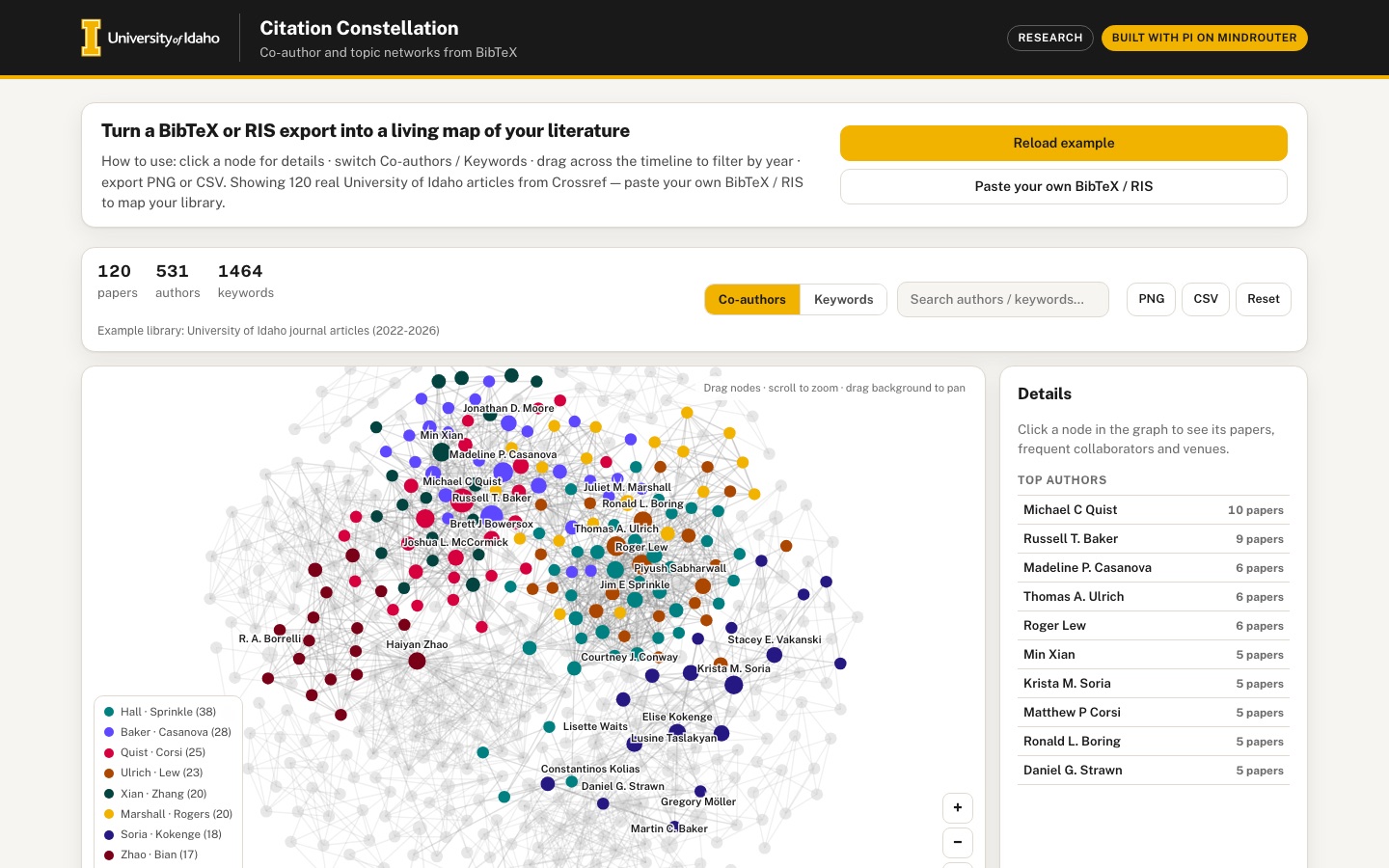 Desktop · click to enlarge

What it is ✎ blurb written by the AI critic
Citation Constellation turns a BibTeX or RIS export into an interactive co-author network and keyword map, with a publications-per-year timeline that filters both. It opens with 120 real University of Idaho journal articles from Crossref (2022-2026). Click an author to see their collaborators, venues and DOI links, or paste or drop your own library, which is parsed entirely in your browser.
Try this
- Click 'Russell T. Baker' in the Top authors list, then click the 'Madeline P. Casanova' collaborator chip to jump across the network
- Drag across 2023 to 2025 in the Publications per year chart to shrink the network to those years, then press CSV to download that period's author list
- Switch to Keywords, click 'nuclear' and follow its co-occurring keyword chips, or click 'Paste your own BibTeX / RIS' to map your own library
Highlights ✎ written by the AI critic
- Parses BibTeX (including @string macros, # concatenation and @comment blocks) and RIS in the browser, from pasted text, a chosen file or drag and drop
- Co-author network of 531 authors from 120 Crossref-listed University of Idaho articles, with drag, zoom, pan, search and a clickable, named cluster legend
- Switchable keyword co-occurrence network built from terms derived from titles and abstracts
- Drag across the publications-per-year timeline in either direction to filter both networks
- Author panel with frequent collaborators, venues and DOI links; export the graph as PNG or the year-filtered author list as CSV
Who it's for
Research groups, grant teams building collaboration narratives, doctoral students doing literature reviews
Features
- Robust in-browser BibTeX and RIS parser (authors, year, title, venue, keywords/abstract terms, DOI)
- Force-directed co-author network on canvas: node size = papers, edge weight = joint papers, community coloring, drag/zoom/pan, search to highlight an author
- Keyword/topic co-occurrence network (switchable with the co-author view)
- Publications-per-year timeline that cross-filters the networks when brushed
- Author detail drawer: papers, frequent collaborators, venues, DOI links
- Export the graph as PNG and the author list as CSV
Data & sources
- api.crossref.org — Crossref REST API —
How it was built
Written by Pi 0.84.4 (pi.dev) on qwen/qwen3.8-27b, served by MindRouter, the University of Idaho's on-premises AI platform.
Rounds by kind
| build | 1 |
| feedback | 12 |
| continue | 21 |
| critic | 4 |
Lines of code per file
| body html | 129 |
| app css | 241 |
| app js | 1,516 |
| scripts | 269 |
Critic scores ✎ scored by the independent AI critic, 1–10
Independent audits ✎ by the AI critic
Automated checks
Checked by critic-verify.
Data spot checks ✎ written by the AI critic
- Timeline bars 2022=23, 2023=26, 2024=28, 2025=26, 2026=17 match an independent Python recount of data/raw (DOI-deduped, at least one 'University of Idaho' affiliation, 121 found, first 120 kept).
- Russell T. Baker: drawer shows 9 papers; venues International Journal of Sports Physical Therapy 5 plus 4 others at 1; top collaborator Madeline P. Casanova 6. Raw: 9 papers, same venue counts, Casanova 3 as 'Madeline P.' + 3 as 'Madeline P' = 6.
- Brushed 2023-2025 shows '80 papers' (raw recount 80). The exported authors-2023-2025.csv lists Michael C Quist with 8 papers; raw has 8 Quist papers in that range (years 2024-2025).
- 531 authors and 1993 co-author edges in the app match a raw recount using the app's identity key (family name + full first given name); raw has 557 distinct spellings and 43 connected components.
- Paper 'Evaluating Evidentiary Standards in the Realm of Citizen Policy Evaluation': 7 authors, Social Science Quarterly, 2026, DOI 10.1111/ssqu.70128. All match the raw Crossref record.
Round-by-round timeline
Every harness round, in order. The prompts and FEEDBACK.md were written by the AI reviewer; the app code was written by the harness. Expand a round to see the exact prompt and the FEEDBACK.md the harness received.
-
The empty state never goes away, and the empty dashboard shows before loading. On first load, the "No library loaded yet" card and, below it, an empty toolbar, a blank 936×558 canvas card, an empty "Details" card and an empty "Publications per year" card are all visible at once. After clicking "Load example library" the graph appears, but the "No library loaded yet" card stays on screen above it (at both desktop and phone widths). The
hiddenattribute on#cc-empty/#cc-dashis overridden by the CSSdisplayrules. Expected: only one of them is ever visible. -
The first screen does not show the product. A first-time gallery visitor sees only the intro card and the empty state; the graph is two screens down. Expected: load the bundled example library automatically on first visit, with a compact banner such as "Showing the example library: 120 University of Idaho journal articles (Crossref, 2022–2026) · Load your own", so the constellation is visible above the fold at 1440×900. Keep the short "How to use" hint, but make it compact (for example a dismissible strip or a small "?" popover). Keep a real empty state reachable, for example with a "Clear library" button, and show it when an import yields 0 papers.
-
The keyword network is an unreadable hairball. The Keywords tab shows 818 nodes, all the same teal ("cluster 1 (769)" in the legend), with a dense gray mesh and a few overlapping labels ("filtrationwastewater", "biocharnuclear"). The terms are single generic title words such as "idaho", "high", "large", "associated", "scale", "effect", "time". The embedded BibTeX has no
keywordsfield on any of the 120 entries, so the app falls back to splitting titles. Expected:-
scripts/ writes a
keywords = {…}field for each entry with about 5–8 meaningful terms derived from the title and abstract. Include two-word phrases (for example "snake river", "machine learning", "nuclear power") and filter generic words. -
The app parses that field.
-
The keyword view shows only the top ~60–100 terms by paper count (an adjustable "top N" or minimum-papers control would be a good addition).
-
Links need a minimum co-occurrence weight.
-
Labels do not overlap and are readable.
-
Themes get distinct community colors (see item 4).
-
-
The community coloring is not really community coloring, and the legend is confusing and covers the graph.
-
Colors are connected components, and the palette wraps around, so different clusters share a color. The legend shows "cluster 7 (58)" and "cluster 19 (42)" both dark purple, and "cluster 3", "cluster 11" and "cluster 23" all Lupine. In keyword mode there is only one component.
-
Expected: real community detection (for example label propagation or Louvain modularity), with distinct brand series colors for the largest ~8 communities and neutral gray for the rest.
-
Legend entries should be named by each community's most-connected member, for example "Quist et al. · 23 authors" or "salmon · fisheries · 14 terms", instead of "cluster 7 (58)". Clicking a legend entry should highlight that community.
-
The legend box currently sits on top of the nodes in the bottom-left corner of the canvas. On the phone it covers about a third of the canvas width. Expected: make it collapsible or place it outside the drawing area, and collapse it by default on narrow screens.
-
-
The graph is not fitted to the view, and there are no zoom controls. After the layout settles, clusters are cut off at all four canvas edges at desktop size, and the phone shows only a small part of the network. Expected:
-
Auto "zoom to fit" once the layout settles, and again after switching views, brushing the timeline or importing.
-
Visible on-canvas buttons for zoom in, zoom out and fit. These are needed on touch devices, which have no wheel.
-
Wheel zoom should stay as it is.
-
-
The timeline is wrong at its right edge.
-
The 2026 bar (17 papers) is clipped to a thin sliver at the far right, so only 2022–2025 are readable (desktop and phone).
-
Brushing can never include the last year: dragging from the 2023 bar to the last bar selects only 2023–2025 ("80 in range").
-
There is no obvious way to clear the brush except the global Reset button.
-
Expected: all years fully visible with their counts, brushable to any year including the last, a small "Clear selection" control near the chart, and the selected range spelled out (for example "2023–2026 · 97 papers").
-
A thin baseline and an axis title would help.
-
Every timeline re-render currently adds another window mousemove/mouseup listener. Those listeners accumulate while brushing, so attach them once.
-
-
Touch interaction is broken on phones.
-
Tapping a node on the canvas throws an uncaught error:
Cannot read properties of undefined (reading 'clientX'). The touchend handler readsev.touches[0], which is empty on touchend. -
Touch-dragging across the timeline bars does nothing (it stays "120 in range").
-
Pinch-zoom on the canvas is not supported.
-
Expected: no errors. Tap selects, one-finger drag on a node moves it, drag on the background pans, and pinch zooms. The timeline can be brushed by touch, and tapping a bar selects that year.
-
-
The PNG export is corrupted. "PNG" downloads
citation-constellation-authors.pngat 1872×1116. The graph is drawn at 1× in the top-left quarter over a solid black rectangle, and the rest of the image shows a different, un-scaled drawing on white. Expected: a clean 2× image of exactly what is on screen (current view, filter, highlights) on a white background, with a small title/caption (for example "Citation Constellation — co-author network · 2022–2026 · 120 papers") and the legend. -
The author drawer's "Frequent collaborators" list is wrong.
-
The selected author appears in their own list: Sarah Thompson's drawer lists "thompson s 1".
-
Names are shown as lower-case internal keys ("bassing s", "ausband d", "koffi k") instead of display names ("Sarah B. Bassing").
-
The kind line reads "AUTHOR · 1 PAPERS" (it should be "1 paper").
-
Expected: display names, excluding the author themself, sorted by joint papers. Clicking a collaborator chip selects that author in the graph and opens their drawer.
-
When nothing is selected, the tall Details card is mostly empty white space. Show a ranked, clickable "Top authors" list there (or "Top keywords" in keyword view). This also gives keyboard users a way into the graph.
-
-
Search highlights nothing the user can see.
-
Typing "Quist" dims every node, but the Michael C Quist node is off-screen, so the canvas looks faded and empty.
-
There is no match count.
-
Typing "zzzznotfound" gives no "no matches" message.
-
Pressing Enter does nothing, and the drawer keeps showing the previous author.
-
Expected: a small suggestions list or match count under the input. Enter or choosing a suggestion zooms/centers the graph on the match, selects it and opens its drawer. Clearing the field restores the view.
-
-
The BibTeX parser is not robust. Pasting the sample below gave "1 papers / 2 authors". It should give 3 papers, with Smith, Doe and Müller each on 2 papers:
-
Expected: nested braces inside values
-
bare numbers (
year = 2021) -
@stringmacros and#concatenation -
quoted values
-
trailing commas
-
@comment/@preambleignored -
LaTeX accents converted (
{\"u},\"{u}→ ü), braces removed from display text -
"Family, Given" and "Given Family" forms of the same person merged ("Smith, John A." = "John A. Smith")
-
keywordssplit on;or, -
abstractused to derive terms when no keywords exist -
a
https://doi.org/prefix stripped from DOIs -
a status message such as "Parsed 3 entries (0 skipped)"
-
The RIS parser keeps the "- " separator and misses common tags. Pasting the sample below produced the title "- Salmon telemetry in Idaho", venue "- Fisheries", DOI link "doi:- 10.1111/fish.1" and author "John A. - Smith". The second record, which uses T1/A1/JO/Y1, was dropped:
-
There is no way to "drop in" a file. The SPEC says "Drop in a BibTeX or RIS export", but only a paste box exists: there is no file input and no drop target, and dropping a
.risfile on the page does nothing. Expected: a "Choose file" button (accept.bib,.bibtex,.ris,.txt) and a drop zone. Ideally the whole page accepts a dropped file, with a clear highlight while dragging. After loading, show the file name and the parse summary, and show a helpful error for a file with no entries. -
CSV export and stats.
-
The CSV always exports all 524 authors, ignoring the year brush.
-
Expected: export the authors in the current view/filter, with columns name, papers, joint-paper collaborators (count), community, venues and DOIs.
-
The stats row should make clear what "in range" means; showing the selected years is enough.
-
-
Visual polish.
-
Node labels overlap each other ("Daniel G. Strawn" is cut by the canvas hint; "Ronald L. Borin" is cut by "Roger Lew").
-
The canvas hint text "Drag nodes · scroll to zoom · drag background to pan" overlaps nodes in the top-right corner. Give it a translucent background, or hide it after the first interaction.
-
Add gentle hover and selection animation, for example growing the hovered node and fading unrelated edges, so the graph feels alive.
-
At 390 px, the four stats wrap into a loose row taller than needed. Make it a compact 2×2 or single-row layout.
-
Keep everything working at 390 px with no horizontal scrolling.
-
-
The empty state never goes away, and the empty dashboard shows before loading. On first load, the "No library loaded yet" card and, below it, an empty toolbar, a blank canvas card, an empty "Details" card and an empty "Publications per year" card are all visible together. After clicking "Load example library" the graph appears, but the "No library loaded yet" card stays on screen above it (desktop and phone). The
hiddenattribute on#cc-empty/#cc-dashis overridden by the CSSdisplayrules on.cc-empty/.cc-dash. Expected: only one of them is visible at a time. For example, add[hidden]{display:none !important}in app.css. -
The keyword network is an unreadable hairball. The Keywords tab shows 818 nodes, all teal ("cluster 1 (769)"), under a dense gray mesh with overlapping labels ("filtrationwastewater", "biocharnuclear"). The terms are single generic title words ("idaho", "high", "large", "associated", "scale", "effect"). The embedded BibTeX in
data/embed/library.bib.jsonhas nokeywordsfield on any of the 120 entries, so the app falls back to splitting titles. Expected:-
scripts/build_data.pywrites akeywords = {…}field for each entry with about 5–8 meaningful terms derived from title + abstract. Include two-word phrases such as "snake river", "machine learning" or "nuclear power", and filter generic words. -
Re-run the script.
-
The keyword view shows only the top ~80 terms by paper count, with a minimum co-occurrence of 2 for links unless that leaves fewer than ~40 links, and labels on the larger nodes.
-
Different themes get different colors. Connected components are useless here because everything is one component, so use simple community detection such as label propagation.
-
-
The timeline is wrong at its right edge.
-
The 2026 bar (17 papers) is clipped to a thin sliver at the far right, so only 2022–2025 are readable. Bars are laid out on
max − minslots formax − min + 1years. -
Brushing can never include the last year: dragging from the 2023 bar to the last bar selects only 2023–2025 ("80 in range").
-
Expected: all years fully visible with counts, brushable to any year including the last, and a small "Clear selection" control next to the chart title. The stats should spell out the selected range, for example "2023–2026 · 97 papers".
-
Every
renderTimeline()call adds anotherwindowmousemove/mouseup listener, so listeners pile up while brushing. Attach them once.
-
-
Touch interaction on phones is broken.
-
Tapping a node on the canvas throws the uncaught error
Cannot read properties of undefined (reading 'clientX'). The touchend handler readsev.touches[0], which is empty on touchend; usechangedTouches. -
Touch-dragging across the timeline bars does nothing (it stays "120 in range").
-
Expected: no errors. Tap selects, one-finger drag on a node moves it, and drag on the background pans the canvas without scrolling the page. Two-finger pinch zooms. On the timeline, touch-drag brushes and tapping a bar selects that year.
-
Add visible on-canvas zoom-in, zoom-out and "fit" buttons, since touch devices have no wheel.
-
-
The PNG export is corrupted. "PNG" downloads
citation-constellation-authors.pngat 1872×1116. The graph is drawn at 1× in the top-left quarter over a solid black rectangle, while the rest of the image shows a different, un-scaled drawing on white.draw()callsctx.setTransform(dpr,…), which wipes out the export'sscale(2,2), andclearRecterases the white fill. Expected: a clean 2× image of exactly what is on screen (current view, filter, highlights) on a white background, with a one-line caption such as "Citation Constellation — co-author network · 2022–2026 · 120 papers". -
The BibTeX parser is not robust. Pasting this sample gave "1 papers / 2 authors". It should give 3 papers, with Smith, Doe and Müller each on 2 papers:
-
Expected support: nested braces inside values
-
bare numbers (
year = 2021) -
@stringmacros and#concatenation -
quoted values
-
trailing commas
-
@comment/@preambleignored -
LaTeX accents (
{\"u}and\"{u}→ ü), with braces removed from display text -
"Family, Given" and "Given Family" forms of one person merged ("Smith, John A." = "John A. Smith")
-
keywordssplit on;or, -
abstractused to derive terms when there are no keywords -
a
https://doi.org/prefix stripped from DOIs -
a status message such as "Parsed 3 entries (0 skipped)"
-
The RIS parser keeps the "- " separator and misses common tags. Pasting this sample produced the title "- Salmon telemetry in Idaho", venue "- Fisheries", DOI link "doi:- 10.1111/fish.1" and author "John A. - Smith". The second record, which uses T1/A1/JO/Y1, was dropped:
-
There is no way to "drop in" a file. The SPEC says "Drop in a BibTeX or RIS export", but only a paste box exists: there is no file input and no drop target, and dropping a
.risfile on the page does nothing. Expected: a "Choose file" button (accept.bib,.bibtex,.ris,.txt) and a drop zone. Ideally the whole page accepts a dropped file, with a clear highlight while dragging. After loading, show the file name and the parse summary. For a file with no entries, show a helpful error and keep the previous library. -
How to work: fix these items one at a time with small, targeted edits to the existing files (use the edit tool on the relevant function or rule). Do not rewrite
src/app.jsorsrc/app.cssfrom scratch. Runpython3 build.py --checkafter each item. Keep your context small: Do not openindex.html. It is generated output (~150 KB, including an embedded base64 font and the full BibTeX library), and everything in it comes fromsrc/,data/embed/andtemplate.html. Edit onlysrc/*,scripts/*and the files they generate. -
Do not read
data/raw/*.jsondirectly: each is a single 1.3 MB line. If you need to inspect the raw data, run a shortpython3 -cthat prints only the few fields you need. -
Start editing right away with item 1. Keep what already works: the co-author graph with cluster colors, drawer DOI links, pan/drag, and the Data & sources section. More findings will follow in a later batch.
-
The empty state never goes away, and the empty dashboard shows before loading. On first load, the "No library loaded yet" card and, below it, an empty toolbar, a blank canvas card, an empty "Details" card and an empty "Publications per year" card are all visible together. After clicking "Load example library" the graph appears, but the "No library loaded yet" card stays on screen above it (desktop and phone). The
hiddenattribute on#cc-empty/#cc-dashis overridden by the CSSdisplayrules on.cc-empty/.cc-dash. Expected: only one of them is visible at a time. For example, add[hidden]{display:none !important}in app.css. -
The keyword network is an unreadable hairball. The Keywords tab shows 818 nodes, all teal ("cluster 1 (769)"), under a dense gray mesh with overlapping labels ("filtrationwastewater", "biocharnuclear"). The terms are single generic title words ("idaho", "high", "large", "associated", "scale", "effect"). The embedded BibTeX in
data/embed/library.bib.jsonhas nokeywordsfield on any of the 120 entries, so the app falls back to splitting titles. Expected:-
scripts/build_data.pywrites akeywords = {…}field for each entry with about 5–8 meaningful terms derived from title + abstract. Include two-word phrases such as "snake river", "machine learning" or "nuclear power", and filter generic words. -
Re-run the script.
-
The keyword view shows only the top ~80 terms by paper count, with a minimum co-occurrence of 2 for links unless that leaves fewer than ~40 links, and labels on the larger nodes.
-
Different themes get different colors. Connected components are useless here because everything is one component, so use simple community detection such as label propagation.
-
-
The timeline is wrong at its right edge.
-
The 2026 bar (17 papers) is clipped to a thin sliver at the far right, so only 2022–2025 are readable. Bars are laid out on
max − minslots formax − min + 1years. -
Brushing can never include the last year: dragging from the 2023 bar to the last bar selects only 2023–2025 ("80 in range").
-
Expected: all years fully visible with counts, brushable to any year including the last, and a small "Clear selection" control next to the chart title. The stats should spell out the selected range, for example "2023–2026 · 97 papers".
-
Every
renderTimeline()call adds anotherwindowmousemove/mouseup listener, so listeners pile up while brushing. Attach them once.
-
-
Touch interaction on phones is broken.
-
Tapping a node on the canvas throws the uncaught error
Cannot read properties of undefined (reading 'clientX'). The touchend handler readsev.touches[0], which is empty on touchend; usechangedTouches. -
Touch-dragging across the timeline bars does nothing (it stays "120 in range").
-
Expected: no errors. Tap selects, one-finger drag on a node moves it, and drag on the background pans the canvas without scrolling the page. Two-finger pinch zooms. On the timeline, touch-drag brushes and tapping a bar selects that year.
-
Add visible on-canvas zoom-in, zoom-out and "fit" buttons, since touch devices have no wheel.
-
-
The PNG export is corrupted. "PNG" downloads
citation-constellation-authors.pngat 1872×1116. The graph is drawn at 1× in the top-left quarter over a solid black rectangle, while the rest of the image shows a different, un-scaled drawing on white.draw()callsctx.setTransform(dpr,…), which wipes out the export'sscale(2,2), andclearRecterases the white fill. Expected: a clean 2× image of exactly what is on screen (current view, filter, highlights) on a white background, with a one-line caption such as "Citation Constellation — co-author network · 2022–2026 · 120 papers". -
The BibTeX parser is not robust. Pasting this sample gave "1 papers / 2 authors". It should give 3 papers, with Smith, Doe and Müller each on 2 papers:
-
Expected support: nested braces inside values
-
bare numbers (
year = 2021) -
@stringmacros and#concatenation -
quoted values
-
trailing commas
-
@comment/@preambleignored -
LaTeX accents (
{\"u}and\"{u}→ ü), with braces removed from display text -
"Family, Given" and "Given Family" forms of one person merged ("Smith, John A." = "John A. Smith")
-
keywordssplit on;or, -
abstractused to derive terms when there are no keywords -
a
https://doi.org/prefix stripped from DOIs -
a status message such as "Parsed 3 entries (0 skipped)"
-
The RIS parser keeps the "- " separator and misses common tags. Pasting this sample produced the title "- Salmon telemetry in Idaho", venue "- Fisheries", DOI link "doi:- 10.1111/fish.1" and author "John A. - Smith". The second record, which uses T1/A1/JO/Y1, was dropped:
-
There is no way to "drop in" a file. The SPEC says "Drop in a BibTeX or RIS export", but only a paste box exists: there is no file input and no drop target, and dropping a
.risfile on the page does nothing. Expected: a "Choose file" button (accept.bib,.bibtex,.ris,.txt) and a drop zone. Ideally the whole page accepts a dropped file, with a clear highlight while dragging. After loading, show the file name and the parse summary. For a file with no entries, show a helpful error and keep the previous library. -
Keep your context small: Do not open
index.html. It is generated output (~180 KB, including an embedded base64 font and the full BibTeX library). Edit onlysrc/*,scripts/*and the files they generate. -
Do not read
data/raw/*.jsondirectly: each is a single 1.3 MB line. Use a shortpython3 -cthat prints only what you need. -
Start editing right away with item 1.
-
The BibTeX parser still fails on a real multi-entry export. Each entry below parses when pasted alone, but:
-
(a) Any text that contains the line
@string{jfm = "Journal of Fish Management"}gives "No papers found in that text.", even though a valid@articlefollows it. -
(b) The full 3-entry sample below gives only "1 papers" (just doe2023). smith2021, which comes after
@stringand usesjournal = jfm, and muller2022, which comes after@comment{ignored}, are lost. -
(c) The status line "No papers found in that text." stays visible in the import panel even after a later import succeeds.
Expected:
-
3 papers, with Smith, Doe and Müller on 2 papers each.
-
@stringmacros resolved and@comment/@preambleskipped, without breaking the entries around them. -
A visible confirmation such as "Parsed 3 entries (0 skipped)" after every import (file, drop or paste).
-
"Smith, John A." and "John A. Smith" treated as the same person.
-
-
The PNG export is still unusable. The downloaded
citation-constellation-authors.png(1872×1116) has 85% fully transparent pixels (alpha 0) and no background. Most image viewers show that as black, which hides the dark node labels and the caption. Expected: an opaque white background under the whole image, filled after all transforms are set (or drawn as a white rectangle covering the full canvas before drawing the graph), with legible dark labels and caption. It should show exactly the current on-screen view. -
The keyword network has no themes. The Keywords view now shows ~80 scattered, mostly isolated dots; only 3 links are visible at 1440×900. The labels are generic words: "through", "case", "exploring", "factors", "comparison", "estimating", "project", "growth", "mechanical", "integrated". The generated
keywordsfields indata/embed/library.bib.jsoncontain fragments that cross phrase boundaries ("evaluating evidentiary", "inward academic", "advisors mental", "student remote", "realm", "vivo", "psfs") and generic words ("exploring", "white", "spring", "systems", "project", "effect", "through"). Expected:-
Each paper's keywords are real topic terms: domain nouns and noun phrases such as "sage grouse", "cutthroat trout", "white sturgeon", "nuclear power", "dairy manure", "biochar", "wastewater", "catalytic oxidation".
-
A much larger stopword list covering generic research verbs, adjectives and filler.
-
Singular/plural merged.
-
The keyword view shows themes: terms that appear together on papers are linked, so that fisheries terms (trout, sturgeon, steelhead, harvest, angler…) form one cluster and nuclear/power-plant terms form another.
-
Labels on the larger nodes, and isolated one-off terms hidden or de-emphasized.
-
Label the stats honestly, for example "854 terms · top 80 shown", because "818 keywords" currently does not match what is drawn.
-
-
The graph is not fitted to the view. On load, after switching Co-authors/Keywords, and after brushing, nodes and whole clusters are cut off at the canvas edges: the left, top and right in the co-author view, and the left and right in the keyword view. The Fit button works only when clicked. Expected: fit automatically, with a small margin, once the layout settles, and again after every view switch, brush and import.
-
Community colors and the legend.
-
Colors still repeat for different clusters: "cluster 7 (58)" and "cluster 19 (42)" are both dark indigo, and "cluster 3", "cluster 11" and "cluster 23" are all violet.
-
Names like "cluster 7" mean nothing.
-
The legend box covers nodes in the bottom-left corner of the canvas. On the phone it covers ~40% of the canvas, and the +/−/Fit buttons cover node labels ("Juliet M. Marshall" is cut by the Fit button).
-
Expected: real community detection (for example label propagation), distinct brand series colors for the 8 largest communities, and gray for the rest.
-
Legend entries named by their most prominent member, for example "Michael C Quist + 22" or "trout · sturgeon · 9 terms". Clicking an entry highlights that community.
-
A legend that can be collapsed, collapsed by default on narrow screens, and not covering the zoom buttons.
-
-
The drawer's collaborators list is still wrong.
-
The selected author still appears in their own list: Grant Loomis's drawer lists "loomis g 1", and John A. Smith's lists "smith j 1".
-
Names are still lower-case internal keys ("hatzenbuehler p", "walsh o", "dari b").
-
The kind line still reads "AUTHOR · 1 PAPERS".
-
Expected: proper display names ("Olga S. Walsh"), the author excluded, "1 paper" in the singular, and chips that select that author in the graph when clicked.
-
When nothing is selected, the Details card is ~500 px of empty white space. Show a ranked, clickable "Top authors" list there ("Top keywords" in the keyword view).
-
-
Search still gives no usable result.
-
Typing "Quist" dims the whole graph, but the matching node is never brought into view.
-
There is no match count.
-
"zzzznotfound" shows no "No matches" message.
-
Enter does nothing.
-
Expected: a short suggestion list or "3 matches" under the input. Enter or clicking a suggestion zooms to and centers the node, selects it and opens its drawer.
-
-
The first screen and the stats row.
-
(a) Visitors still land on a large intro card and must click "Load example library" before seeing anything. Expected: auto-load the example library on first visit, with a compact how-to hint. Keep "Paste your own", "Choose file" and a "Clear library" action (which shows the empty state) as compact controls, and hide or relabel "Load example library" once it is loaded.
-
(b) The stats row reads "120 papers · 524 authors · 818 keywords · 120 papers · Example library: University of Idaho journal articles (2022-2026)". "120 papers" appears twice, and the source text floats as a stray "· Example library…" fragment that wraps onto separate lines on the phone. Expected: a tidy row of papers, authors, terms and selected years, plus a separate small source/file label.
-
-
The CSV ignores the timeline selection. With only 2024 selected, the CSV still has all 524 authors and all-years paper counts. Expected: export the authors in the current view and year range, with columns name, papers (in range), co-authors, community, venues and DOIs, and a file name that reflects the range (for example
authors-2024.csv). -
Polish.
-
"2024–2024 selected" should read "2024 selected".
-
The canvas hint "Drag nodes · scroll to zoom · drag background to pan" overlaps nodes in the top-right corner. Give it a translucent pill background, or fade it out after the first interaction.
-
Node labels overlap one another ("Ronald L. Boring", "Thomas A. Ulrich" and "Roger Lew" pile up). Hide labels that would collide.
-
Add a gentle hover effect (the node grows slightly, unrelated edges fade) and hover tooltips on timeline bars.
-
-
The BibTeX parser fails when
@stringor@commentappears in the text. Each entry below parses when pasted alone, but:-
(a) Any text containing the line
@string{jfm = "Journal of Fish Management"}gives "No papers found in that text.", even though a valid@articlefollows. -
(b) The full 3-entry sample gives only "1 papers" (just doe2023). smith2021, which comes after
@stringand usesjournal = jfm, and muller2022, which comes after@comment{ignored}, are lost. -
(c) The old status "No papers found in that text." stays visible after a later import succeeds.
Expected:
-
3 papers.
-
@stringmacros stored and resolved, and@comment/@preambleblocks skipped, without swallowing the entries that follow. -
A visible "Parsed 3 entries (0 skipped)" confirmation after every import.
-
-
The PNG export has a transparent background. The downloaded PNG (1872×1116) has 85% fully transparent pixels (alpha 0). Most image viewers show that as black, so the dark node labels and the caption are invisible. Expected: an opaque white background under the entire image, painted after
setTransformor as a full-size white rectangle before the graph is drawn, with the graph, labels and caption drawn on top exactly as on screen. -
The keyword network has no themes.
-
The Keywords view shows ~80 scattered, mostly unlinked dots (only 3 links are visible at 1440×900), labeled with generic words such as "through", "case", "exploring", "factors", "comparison", "estimating", "project", "growth".
-
The
keywordsfields generated byscripts/build_data.pyintodata/embed/library.bib.jsoninclude cross-phrase fragments ("evaluating evidentiary", "inward academic", "advisors mental", "student remote", "realm", "vivo", "psfs") and generic words ("exploring", "white", "spring", "systems", "project", "effect", "through"). -
Expected: fix the script so each paper's keywords are real topic terms, such as "sage grouse", "cutthroat trout", "white sturgeon", "nuclear power", "dairy manure", "biochar", "wastewater", "catalytic oxidation". Use a much larger stopword list covering generic research verbs, adjectives and filler, and merge singular with plural. Then re-run the script.
-
In the app, the keyword view should link terms that appear together on the same papers, so that visible theme clusters form: fisheries terms together, nuclear/power terms together. Show labels on the bigger nodes and hide or fade terms that have no links.
-
The stats label should say what is drawn, for example "854 terms · top 80 shown".
-
-
The graph is not fitted to the view automatically. On load, after switching Co-authors/Keywords, and after brushing the timeline, whole clusters are cut off at the canvas edges: left, top and right in the co-author view, left and right in the keyword view. The Fit button works only when clicked. Expected: fit automatically, with a small margin, once the layout settles, and again after every view switch, brush and import.
-
How to work: Each item says where to look. Read only those line ranges (use the read tool with offset/limit). You do not need to read all of
src/app.js(1252 lines). -
Make small, targeted edits with the edit tool. Do not rewrite
src/app.jsorsrc/app.cssfrom scratch. -
Run
python3 build.py --checkafter each item. -
Do not open
index.html(generated, ~180 KB) ordata/raw/*.json(each is a single 1.3 MB line; use a shortpython3 -cif you must inspect them). -
Start editing right away with item 1.
-
The BibTeX parser fails when
@stringor@commentappears in the text. Where to look:src/app.jsparseBibtex()lines 20–71 (the@stringfirst-pass regex is at line 24; the comment/preamble/string skip is at line 40);resolveBibValue()lines 89–123;loadPapers()lines 1030–1047;setStatus()line 1054.Each entry below parses when pasted alone, but:
-
(a) Any text containing the line
@string{jfm = "Journal of Fish Management"}gives "No papers found in that text.", even though a valid@articlefollows. -
(b) The full 3-entry sample gives only "1 papers" (just doe2023). smith2021, which comes after
@stringand usesjournal = jfm, and muller2022, which comes after@comment{ignored}, are lost. -
(c) The old status "No papers found in that text." stays visible after a later import succeeds.
Expected:
-
3 papers.
-
@stringmacros stored and resolved, and@comment/@preambleblocks skipped, without swallowing the entries that follow. -
A visible "Parsed 3 entries (0 skipped)" confirmation after every import, replacing any old message.
-
-
The PNG export has a transparent background. Where to look:
src/app.jsexportPNG()lines 956–985 anddrawToContext()lines 535–586. The whitefillRectat line 962 is wiped out by the drawing that follows, becausedrawToContext()callssetTransform(line 536) and clears the canvas.The downloaded PNG (1872×1116) has 85% fully transparent pixels (alpha 0). Most image viewers show that as black, so the dark node labels and the caption are invisible. Expected: an opaque white background under the entire image, with the graph, labels and caption drawn on top exactly as on screen.
-
The keyword network has no themes. Where to look:
scripts/build_data.pySTOPWORDS(line 33),PHRASES(line 54) andterms_from()(line 126), which generate thekeywordsfields indata/embed/library.bib.json; then, insrc/app.js, the keyword branch ofbuildGraph()lines 403–474 (theslice(0, 80)is at line 441),cooccurrenceEdges()line 305,labelPropagation()line 336 andrenderStats()line 860.The Keywords view shows ~80 scattered, mostly unlinked dots (only 3 links at 1440×900), labeled with generic words such as "through", "case", "exploring", "factors", "comparison", "estimating", "project", "growth". The generated keywords include cross-phrase fragments ("evaluating evidentiary", "inward academic", "advisors mental", "student remote", "realm", "vivo", "psfs") and generic words ("exploring", "white", "spring", "systems", "project", "effect", "through").
Expected:
-
Each paper's keywords are real topic terms, such as "sage grouse", "cutthroat trout", "white sturgeon", "nuclear power", "dairy manure", "biochar", "wastewater", "catalytic oxidation". Get there with a much larger stopword list (generic research verbs, adjectives, filler) and by merging singular and plural. Re-run the script.
-
The keyword view links terms that appear on the same papers, so theme clusters become visible: fisheries terms together, nuclear/power terms together.
-
Labels on the bigger nodes, and unlinked terms hidden or faded.
-
A stats label that says what is drawn, for example "854 terms · top 80 shown".
-
-
The graph is not fitted to the view automatically. Where to look:
src/app.jstick()lines 481–488, where the simulation settles; the handler of the "Fit to view" button insidewire()(lines 1071–1239);applyYearRange()line 835;setMode()line 1240;loadPapers()line 1030.On load, after switching Co-authors/Keywords, and after brushing the timeline, whole clusters are cut off at the canvas edges: left, top and right in the co-author view, left and right in the keyword view. The Fit button works only when clicked. Expected: run the same fit automatically, with a small margin, once the layout settles, and again after every view switch, brush and import.
-
How to work: Each item says where to look. Read only those line ranges (use the read tool with offset/limit). You do not need to read all of
src/app.js(1252 lines). -
Make small, targeted edits with the edit tool. Do not rewrite
src/app.jsorsrc/app.cssfrom scratch. -
Run
python3 build.py --checkafter each item. -
Do not open
index.html(generated, ~180 KB) ordata/raw/*.json(each is a single 1.3 MB line; use a shortpython3 -cif you must inspect them). -
Start editing right away with item 1.
-
The BibTeX parser fails when
@stringor@commentappears in the text. Where to look:src/app.jsparseBibtex()lines 20–71 (the@stringfirst-pass regex is at line 24; the comment/preamble/string skip is at line 40);resolveBibValue()lines 89–123;loadPapers()lines 1030–1047;setStatus()line 1054.Each entry below parses when pasted alone, but:
-
(a) Any text containing the line
@string{jfm = "Journal of Fish Management"}gives "No papers found in that text.", even though a valid@articlefollows. -
(b) The full 3-entry sample gives only "1 papers" (just doe2023). smith2021, which comes after
@stringand usesjournal = jfm, and muller2022, which comes after@comment{ignored}, are lost. -
(c) The old status "No papers found in that text." stays visible after a later import succeeds.
Expected:
-
3 papers.
-
@stringmacros stored and resolved, and@comment/@preambleblocks skipped, without swallowing the entries that follow. -
A visible "Parsed 3 entries (0 skipped)" confirmation after every import, replacing any old message.
-
-
The PNG export has a transparent background. Where to look:
src/app.jsexportPNG()lines 956–985 anddrawToContext()lines 535–586. The whitefillRectat line 962 is wiped out by the drawing that follows, becausedrawToContext()callssetTransform(line 536) and clears the canvas.The downloaded PNG (1872×1116) has 85% fully transparent pixels (alpha 0). Most image viewers show that as black, so the dark node labels and the caption are invisible. Expected: an opaque white background under the entire image, with the graph, labels and caption drawn on top exactly as on screen.
-
The keyword network has no themes. Where to look:
scripts/build_data.pySTOPWORDS(line 33),PHRASES(line 54) andterms_from()(line 126), which generate thekeywordsfields indata/embed/library.bib.json; then, insrc/app.js, the keyword branch ofbuildGraph()lines 403–474 (theslice(0, 80)is at line 441),cooccurrenceEdges()line 305,labelPropagation()line 336 andrenderStats()line 860.The Keywords view shows ~80 scattered, mostly unlinked dots (only 3 links at 1440×900), labeled with generic words such as "through", "case", "exploring", "factors", "comparison", "estimating", "project", "growth". The generated keywords include cross-phrase fragments ("evaluating evidentiary", "inward academic", "advisors mental", "student remote", "realm", "vivo", "psfs") and generic words ("exploring", "white", "spring", "systems", "project", "effect", "through").
Expected:
-
Each paper's keywords are real topic terms, such as "sage grouse", "cutthroat trout", "white sturgeon", "nuclear power", "dairy manure", "biochar", "wastewater", "catalytic oxidation". Get there with a much larger stopword list (generic research verbs, adjectives, filler) and by merging singular and plural. Re-run the script.
-
The keyword view links terms that appear on the same papers, so theme clusters become visible: fisheries terms together, nuclear/power terms together.
-
Labels on the bigger nodes, and unlinked terms hidden or faded.
-
A stats label that says what is drawn, for example "854 terms · top 80 shown".
-
-
The graph is not fitted to the view automatically. Where to look:
src/app.jstick()lines 481–488, where the simulation settles; the handler of the "Fit to view" button insidewire()(lines 1071–1239);applyYearRange()line 835;setMode()line 1240;loadPapers()line 1030.On load, after switching Co-authors/Keywords, and after brushing the timeline, whole clusters are cut off at the canvas edges: left, top and right in the co-author view, left and right in the keyword view. The Fit button works only when clicked. Expected: run the same fit automatically, with a small margin, once the layout settles, and again after every view switch, brush and import.
-
How to work: Fix the items in order. Each one says where to look. Read only those line ranges with offset/limit, then make small, targeted edits with the edit tool. Do not rewrite
src/app.jsorsrc/app.cssfrom scratch. -
Run
python3 build.py --checkafter each item. -
Do not open
index.html(generated) ordata/raw/*.json(each file is one 1.3 MB line). -
Start editing right away with item 1.
-
The example library's keywords are never read, which is why the Keywords view has no themes. Where to look:
scripts/build_data.pylines 220–221;src/app.jsparseBibFields()lines 63–78,buildModel()lines 255–262 andcleanBibValue()line 127.-
Line 220 writes
doi = {...}without a trailing comma, then line 221 writeskeywords = {...}. All 120 entries indata/embed/library.bib.jsonhave this problem. -
The doi value regex in
parseBibFields()then swallows the keywords line, so every paper ends up with zero keywords.buildModel()falls back to single title words. The biggest keyword nodes are "idaho", "effect", "exploring", "through", "large" and "scale", and 42 of the 80 keyword nodes have no links. -
Fix: add the comma (
" doi = {%s},") and re-runpython3 scripts/build_data.py. Also makeparseBibFields()tolerate a missing comma between two fields, because real exports contain this. -
Also: line 127 deletes every
&, so venues show "BMJ Open Sport Exercise Medicine" and "Environmental Science Technology". Keep&; only turn\&into&.
-
-
The graph is never fitted to the view, and parts of the layout fly far off screen. Where to look:
stepSim()lines 480–519, the Fit handler lines 1205–1224,onWheel()line 671, the zoom buttons lines 1187–1204 andbuildGraph()lines 394–464.-
Measured on load: only 92 of the 524 co-author nodes are inside the canvas. The layout spans x −1349…2615 and y −1469…2625, but the canvas is 936×558.
-
Measured in the Keywords view: unlinked terms drift to x = ±20 000 ("neonatal" at 20023, "mouse" at −19237). The centering force (
0.0015 * alpha) is far weaker than repulsion. -
Fit clamps zoom to 0.3, so even the Fit button cannot show the whole graph.
-
Expected:
-
A much stronger centering/gravity force, so disconnected clusters pack near the centre.
-
Allow zoom down to 0.05.
-
Move the Fit code into a
fitView()function. Call it automatically when the simulation settles after loading, after switching Co-authors/Keywords, and after brushing the timeline. Animate the transition if you can. The Fit button calls the same function.
-
-
-
The PNG export has a transparent background. Where to look:
exportPNG()lines 947–975 anddrawToContext()lines 526–576.-
The white
fillRectat line 952 is erased byc.clearRect(0, 0, W, H)at line 528. -
Measured: 88% of the pixels in the downloaded PNG have alpha 0. Most viewers show that as black, and the dark labels and caption disappear.
-
Fix: give
drawToContext()an optional background colour and fill the whole area with#fffright afterclearRectwhen exporting.
-
-
Clicking a timeline bar selects the wrong year. Where to look:
tlYearAt()lines 702–707.-
Math.round(g.min + (x - g.padL) / g.bw)is off by half a bar. Clicking the middle of the 2024 bar selects "2025–2025". UseMath.floor. -
When one year is selected, show "2024" rather than "2024–2024" (line 834 and line 859).
-
-
Author drawer: the author appears as their own collaborator, names show as lowercase keys, and the chips do nothing. Where to look:
renderDrawer()lines 891–944, and the author nodes built inbuildGraph()lines 415–418.-
The author nodes have no
keyproperty, sok === n.keyat line 910 never matches. Clicking "Ethan Struhs" lists "struhs e 2" as a collaborator. -
Line 916 displays the internal key ("mirkouei a", "brown r") instead of the person's name.
-
Line 937 says "1 papers".
-
Expected:
-
Store
keyon author nodes and exclude the selected author from the list. -
Show each collaborator's full display name.
-
Say "1 paper" in the singular.
-
Make each collaborator chip a button that selects that author in the graph and centres the view on them.
-
-
-
Search gives no feedback. Where to look: the search
inputhandler lines 1127–1130 andcurrentSearchSet()lines 578–584.-
While typing, nothing shows how many nodes match, and Enter does nothing.
-
Expected: show "3 matches" or "No matches" next to the input. Pressing Enter selects the best match (the largest matching node), opens its drawer and centres the view on it.
-
-
The CSV export ignores the timeline selection. Where to look:
exportCSV()lines 977–996.-
With 2023–2025 selected, the CSV still lists all 524 authors with all-time counts.
-
Expected: export only the authors with papers in the selected range, with papers, venues and DOIs for that range. Name the file after the range, for example
authors-2023-2025.csv.
-
-
The first screen shows no network, and the stats row repeats itself. Where to look:
src/body.htmllines 7–64 (intro and empty state),renderStats()lines 851–871 andwire()line 1062.-
A first-time visitor sees the intro card plus a large "No library loaded yet" card, and no network until they click something.
-
Auto-load the example library when the page opens.
-
Keep the intro short, with the Paste / Choose file actions visible.
-
Show the empty state only when there is no library.
-
-
The stats row shows "120 papers" twice, plus a stray "· Example library: …" fragment that wraps under the numbers on phones.
-
Show papers · authors · keywords.
-
Add one "2023–2025 · 80 papers" item only while a range is selected.
-
Show the library name as a small caption.
-
-
-
Clusters share colours, and the legend is meaningless and covers the phone canvas. Where to look:
SERIESline 377 (12 entries, but the last 4 repeat the first 4),renderLegend()lines 873–883,components()line 313, and.cc-legendinsrc/app.csslines 113–119.-
Different clusters get the same colour: clusters 7 and 19 are both indigo, and 3, 11 and 23 are all violet.
-
Legend entries read "cluster 7 (58)".
-
Expected:
-
Use
labelPropagation()(line 327) for the co-author view too. -
Give the 8 largest communities 8 distinct colours and draw every other node grey.
-
Name each legend entry after its most-published author (co-authors) or its top term (keywords), for example "Quist, Corsi (24)".
-
Make legend rows clickable to highlight that community.
-
At 560 px wide or less, collapse the legend behind a small "Clusters" toggle; it currently covers about 40% of the phone canvas.
-
-
-
Line 220:
e.append(" doi = {%s}" % doi)has no trailing comma, so the app's parser swallows thekeywords = {...}line after it in all 120 entries. Make it" doi = {%s},". -
terms_from(), lines 138–146: delete the bigram loop. It produces cross-phrase fragments such as "advisors mental". Keep single words only. -
Line 51: set
MAX_TERMS = 20. With 8, terms rarely co-occur across papers. -
STOPWORDS (lines 33–48): add these words:
idaho through exploring evaluating evaluation impact impacts factors across time rates process systems abstract higher greater relative range framework variables including potential important found findings provide within -
Then run
python3 scripts/build_data.pyto regeneratedata/embed/library.bib.json. -
On a copy, this gives real keyword themes, for example nuclear/power/plant/simulator, water/biochar/filtration/phosphorus, fish/trout/management and academic/advisors/burnout/education.
-
parseBibFields(), lines 63–78: the value regex's lookahead(?=,\s*\w+\s*=|,\s*\}|$)requires a comma before the next field. Make that comma optional after a{...}or"..."value, sodoi = {x}followed bykeywords = {y}on the next line gives two fields. Real exports contain this. -
cleanBibValue(), line 127:v.replace(/[%&$#_]/g, "")deletes every&. Venues show "BMJ Open Sport Exercise Medicine" instead of "BMJ Open Sport & Exercise Medicine". Replace that line withv = v.replace(/\\([%&$#_])/g, "$1");so\&becomes&and a bare&is kept. -
drawToContext(), line 528:c.clearRect(0, 0, W, H)erases the white fill thatexportPNG()paints at lines 952–953. -
Measured: 87% of the pixels in the downloaded PNG are fully transparent. Most viewers show that as black, and the dark labels disappear.
-
Fix: give the function an optional background,
drawToContext(c, scale, bg). Right afterclearRect, doif (bg) { c.fillStyle = bg; c.fillRect(0, 0, W, H); }. InexportPNG(), calldrawToContext(octx, 2, "#ffffff"). -
tlYearAt(), line 706:Math.round(g.min + (x - g.padL) / g.bw)is off by half a bar. Clicking the middle of the 2024 bar selects 2025. UseMath.floorinstead ofMath.round. -
applyYearRange(), line 834: when only one year is selected, show "2024 selected" instead of "2024–2024 selected". -
Line 514 (and the matching
vyline): the centering force(cx - n.x) * 0.0015 * alphais far weaker than the repulsion at line 494, so disconnected clusters drift away. -
Raise it to about
0.02 * alpha, so separate clusters pack around the centre. -
Also skip the repulsion for pairs farther apart than 500 px, i.e.
if (d2 > 250000) continue;. -
Add
function fitTarget(). It returns{x, y, k}for the bounding box of all nodes, including each node's radius, with 30 px padding:k = Math.min(W / w, H / h), clamped to[0.05, 2]. -
The Fit handler at lines 1206–1225 already has this maths; move it into
fitTarget(). -
Add
state.autoFitand set it totrueinbuildGraph()(line 394).buildGraph()runs on load, on the Co-authors/Keywords switch and on timeline brushing. -
tick(), lines 472–478: before theif (!state.running) return;line, ifstate.autoFitis true, movestate.transformx, y and k 15% of the way towardfitTarget()on every frame. Calldraw()when the view changed but the simulation is not running.-
The effect: the graph smoothly zooms to fit while the layout forms, and stays fitted.
-
-
The Fit button (line 1206) and the Reset button (line 1139) set
state.autoFit = trueinstead of setting the transform directly. -
Set
state.autoFit = falsewhen the user acts on the view:onWheel()(line 667), a background pan inonDown()(line 623), a node drag inonDown()(line 619), the zoom +/− buttons (lines 1188 and 1197) and the pinch zoom (line 1171). -
Change the minimum zoom from
0.3to0.05at lines 672, 1171, 1199 and 1218. -
buildGraph(), keyword branch, lines 437–438: after computingedges, drop keyword nodes that have no edge. 12 of the 80 have none. Rebuildnodesand remap the edges/tindexes, so each node'sidstill equals its index. -
scripts/build_data.py, STOPWORDS (lines 33–50): addbeen increased increase understanding assess assessed using. Then re-runpython3 scripts/build_data.py. -
Measured: clicking "Michael C Quist" lists
quist m 10, corsi m 5, bowersox b 3…, including himself and in lowercase. -
buildGraph(), line 417: author nodes have nokeyproperty, sok === n.keyat line 961 never matches. Addkey: a.keyto the node object. -
renderDrawer(), line 967: the chips show the internal key. Show the person's display name instead, e.g. look it up instate.model.authorsbykey. You could add anameByKeymap inbuildModel()near line 289. -
Line 988: says "1 papers". Use "1 paper" for one and "N papers" otherwise.
-
renderDrawer(): render each collaborator chip as<button type="button" class="cc-chip cc-chip--link" data-key="...">. After settingel.innerHTML, attach click handlers. A click finds the node whosekeyequalsdata-key, callsselectNode(idx)and then a newcenterOn(idx). If that author is not in the current (brushed) graph, give the chipdisabled. -
New
centerOn(i):-
set
state.autoFit = false; -
set a target transform that puts node
iat the centre of the canvas, with zoomk = Math.max(state.transform.k, 1.2); -
in
tick(), ease toward that target exactly the way auto-fit eases, e.g. store it instate.focusTarget, clear it once reached, and calldraw()when not running.
-
-
Add a small CSS hover state for
.cc-chip--linkinsrc/app.css: pointer cursor, gold border on hover. -
src/body.html, line 77: right after the#cc-searchinput, add<span id="cc-search-count" class="cc-search__count" aria-live="polite"></span>. Style it small and muted insrc/app.css. -
src/app.js, the searchinputhandler at line 1178: after updatingstate.search, set the count text: empty when the box is empty, otherwise "1 match", "N matches" or "No matches". UsecurrentSearchSet()(line 626). -
Add a
keydownhandler on#cc-search: on Enter, pick the matching node with the largestvalue, then callselectNode(idx)andcenterOn(idx). -
Measured at 390×844: a thin chain of nodes stretches to the canvas corner, so the fit zooms out to k = 0.126. The rest of the graph becomes a tiny cluster hidden behind the legend.
-
Fix: when there are 40 or more nodes, compute the fit box from the 5th and 95th percentile of the node x values and y values (sort copies of the x and y arrays) instead of the absolute min and max. Keep the 30 px padding. With fewer than 40 nodes, keep the full min/max box.
-
Today: a first-time visitor sees a large intro card plus a big "No library loaded yet" card, and no network until they click a button.
-
src/app.js: at the end ofwire()(the function starting at line 1156), callloadExample(), so the example library is shown as soon as the page opens. The#cc-emptycard must stay hidden while a library is loaded. It is only for when there is no library. -
src/body.html, intro card (lines 7–25): make it compact.-
Keep the
<h2>. -
Replace the paragraph and the
<ol class="cc-hint">with ONE short line:How to use: click a node for details · switch Co-authors / Keywords · drag across the timeline to filter by year · export PNG or CSV. Showing 120 real University of Idaho articles from Crossref — paste your own BibTeX / RIS to map your library. -
Rename the gold button to "Reload example".
-
-
src/app.css: reduce the intro padding so the card is at most about 140 px tall on desktop. -
Today it shows:
120 papers · 524 authors · 1453 keywords · 120 papers · · Example library: University of Idaho…. "120 papers" appears twice, and a stray "· Example library…" fragment wraps under the numbers on phones. -
Show instead:
-
papers, authors and keywords, once each;
-
one extra item only while a year range is selected, e.g. "2023–2025 · 80 papers", or "2024 · 28 papers" when a single year is selected. It currently says "2024–2024";
-
the library name as a small muted caption on its own line below the numbers (a
<div class="cc-stats__caption">), without the leading "·".
-
-
Use "1 paper" for a count of one, "N papers" otherwise.
-
Measured: with 2023–2025 selected, the CSV still has all 524 authors with all-time counts, and the file is always
authors.csv. -
Fix: when
state.yearRangeis set, export only the authors with at least one paper in that range. Their papers, venues and DOIs should count only papers in the range. -
Add
first_yearandlast_yearcolumns. -
Name the file
authors-2023-2025.csvfor a range,authors-2024.csvfor a single year, andauthors.csvwith no selection. -
Measured:
@inproceedings{doe2023, …, keywords = {telemetry, machine learning},\n}loses itskeywordsfield. The body passed in ends with},\n, which no branch of the lookahead matches. -
Fix: add
,?\s*$as another alternative in the lookahead, so a value followed by an optional comma and whitespace at the end of the body is accepted. -
Today:
state.compsusescomponents()for co-authors. That gives 39 connected components, which are not research groups. -
Fix: use
labelPropagation(nodes, edges)for both views. -
Right after computing
state.comps, also computestate.commRank: an object mapping each community id to its rank by member count (0 = largest). Also computestate.commSize, mapping id to member count. -
Measured: the 12-entry
SERIESarray repeats its first 4 colours, and colours are picked by id modulo 12. The legend shows clusters 7 and 19 both indigo, and 3, 11 and 23 all violet. -
Fix: add
var TOP8 = ["#008080", "#5E48FF", "#D7003F", "#AB4700", "#034441", "#F1B300", "#261882", "#7A0017"];and a functioncommColor(i). It returnsTOP8[rank]when nodei's community rank is below 8, and"#C9C9C9"(light grey) otherwise. -
Use
commColor(i)at line 617, and in the legend dots. -
Today: rows read "cluster 7 (58)" and do nothing.
-
Name each row after the community's biggest members:
-
co-authors: the family names of its two largest author nodes, e.g. "Quist · Corsi (24)";
-
keywords: its two largest terms, e.g. "nuclear · power (14)".
-
-
Show the 8 ranked communities, then one muted row: "Other clusters (grey)".
-
Render the rows as
<button type="button" class="cc-legend__row" data-comm="ID">. Clicking a row setsstate.highlightComm = ID(clicking it again clears it) and gives the active row anis-activeclass. -
drawToContext(): whenstate.highlightCommis set, dim nodes and edges outside that community the same way search dims non-matches. Clear it inbuildGraph(). -
src/body.html, line 83: removearia-hidden="true"from#cc-legend. Add CSS for the button rows insrc/app.css(near line 114): no border, transparent background, left-aligned, and a gold outline for.is-active. -
Measured at 390×844: the legend covers 16% of the canvas and hides the nodes under it.
-
src/body.html: add<button type="button" id="cc-legend-toggle" class="cc-legend-toggle">Clusters</button>just before#cc-legend. -
At 560 px wide or less: show that toggle in the bottom-left corner, hide
#cc-legendby default, and show the legend while the toggle has anis-openclass. Inwire(), the toggle's click handler flipsis-openandaria-expanded. -
Above 560 px: hide the toggle and always show the legend.
-
Measured: I reloaded the page 6 times at 1440×900. In 2 of those loads, 36 co-author nodes ended up more than 1,000 px from the centre; the farthest was at 11,422 px. The fit then shrinks the whole graph into a small streaked blob, so the PNG export is almost empty.
-
Cause: new nodes start inside a 200 px square (lines 474–475). Nearly coincident pairs get
d2close to 0 at line 569, which makes the repulsion enormous, and nothing caps the velocity. -
Fixes:
-
Line 569: floor the squared distance, e.g.
var d2 = Math.max(dx * dx + dy * dy, 100);. -
After the damping at line 594: cap the speed. If
Math.hypot(n.vx, n.vy) > 25, scalevxandvydown to 25 px per tick. -
Lines 474–475: place new nodes at a random angle on a disc of radius
R = 12 * Math.sqrt(nodes.length)around the centre:r = R * Math.sqrt(Math.random()). This replaces the ±100 px square.
-
-
Measured: on load, roughly 40 co-author labels are drawn on top of each other in the centre of the graph. It is much worse on a phone.
-
Always draw labels for: the selected node, the hovered node and search matches.
-
Other nodes with
n.value >= 3: visit them from largest to smallestvalue. Skip a label if its text box overlaps a label already drawn this frame. Keep a list of drawn rectangles, usingc.measureText(label).widthand a height of about13 / t.k. -
Legibility: draw each label with a white halo first (
c.strokeStyle = "rgba(255,255,255,.9)"; c.lineWidth = 3 / t.k; c.strokeText(...)), thenfillText. -
Measured: 345 of the 524 co-author nodes are grey (communities outside the top 8), so the 8 coloured groups are hard to see, especially on a phone.
-
Nodes: draw a node whose community rank is 8 or higher at
globalAlpha 0.45, unless it is selected, hovered, a search match, or in the highlighted community. -
Edges: draw an edge whose two endpoints are both in grey communities with a fainter stroke,
rgba(128,128,128,.12). -
Measured at 390×844: after tapping "Clusters", the legend opens on top of the toggle button and hides its last row ("Other clusters (grey)"). The legend also covers about 40% of the canvas.
-
When open on phones: position the legend above the toggle (
bottom: 52px), and give itmax-height: 45%; overflow-y: auto;. -
Measured: the key is the family name plus the first initial, so "Shannon J.F. Wilson" and "Sean M. Wilson" become one node, "Shannon J.F. Wilson [4]".
-
Fix: key on the family name plus the whole first given-name token, lowercased with dots and hyphens removed (
shannon,sean). If that token is a single letter (an initial such as "J."), use the letter. -
Keep the merging of real variants such as "Michael C" / "Michael C." / "Michael", which share the first token "michael".
-
Today: with nothing selected, the drawer says only "Click a node in the graph…".
-
Keep that one-line hint, and add below it: a "Top authors" list in the Co-authors view, or "Top keywords" in the Keywords view. Show the 10 largest nodes of the current graph, which respects the year brush.
-
Each row: a
<button type="button" class="cc-top-row">with the name on the left and the paper count on the right. -
On click: call
selectNode(idx)and thencenterOn(idx). -
Style the rows in
src/app.css: full width, left-aligned, a hairline between rows, and a subtle hover background. -
Today: clicking a keyword such as "power" shows only venues and papers.
-
Add a "Co-occurring keywords" section before Venues: up to 8 terms that share the most papers with the selected keyword, each with a count.
-
Render them as the same clickable
cc-chip cc-chip--linkbuttons as the author collaborators. A click selects that keyword node and centres on it. -
Measured at 390×844: the intro card is 329 px tall, and the canvas starts at y = 835 px, so a phone visitor sees no graph without scrolling.
-
At 560 px or less:
-
intro card:
h2at about 1.05rem and.cc-intro patfont-size: .8rem; -
intro buttons on one row:
.cc-intro__actions { flex-direction: row; }with smaller padding; -
toolbar: tighter padding, and the stats numbers at about .95rem.
-
-
Target: the top of the canvas at about 600 px or less on a 844 px tall phone.
-
What happened: A single node, "Shannon J.F. Wilson", is credited with 4 papers.
-
Some of those papers are actually by Sean M. Wilson, a different person.
-
The cause: the author key uses the family name plus only the first letter of the first given name, so "Shannon" and "Sean" collide.
-
What I expected: People with different first names stay separate.
-
Genuine spelling variants of the same person still merge. For example, "Michael C", "Michael C." and "Michael" Quist should still be one node.
-
Build the key from the family name plus the whole first given name, lowercased and ignoring dots and hyphens. When the first given name is only an initial, the initial is all there is.
-
What I expected: on narrow screens only, make the intro card and the toolbar compact, so that the canvas starts at about 600 px or higher: a smaller intro heading and hint paragraph;
-
less padding on the intro card;
-
the "Reload example" and "Paste your own BibTeX / RIS" buttons side by side on one row, with smaller padding;
-
tighter toolbar padding;
-
slightly smaller stat numbers.
-
What I expected: Keep the heading and the one-sentence hint.
-
Below them, add a short ranked list:
-
in the Co-authors view, titled "Top authors";
-
in the Keywords view, titled "Top keywords".
-
-
The list shows the 10 nodes with the most papers in the current graph.
-
Each row is a button with the name on the left and the paper count on the right.
-
Clicking a row selects that node and centres the view on it, the same way the collaborator chips already do with
selectNode()andcenterOn(). -
Style the rows as a tidy full-width list with thin dividers and a subtle hover highlight.
-
What I did: I loaded the page without selecting anything.
-
I clicked the "Keywords" tab.
-
I clicked the 2022 bar in the timeline.
-
What happened: After the switch, the panel heading says "Top keywords", but the rows still list authors ("Michael C Quist 10 papers", "Russell T. Baker 9 papers", …).
-
After selecting 2022, the list still shows those all-years author counts.
-
Clicking one of those stale rows would select whatever keyword now has that index.
-
What I expected: The Details panel is refreshed every time the graph is rebuilt, so the Top list always matches the current view and year selection. That covers switching tabs, brushing or clicking the timeline, Clear selection, Reset, and loading a library.
-
The simplest place is the end of
buildGraph(), after the new nodes are stored. -
What I expected: Before Venues, add a "Co-occurring keywords" section listing up to 8 keywords from the current graph that share the most papers with the selected keyword, each with the number of shared papers.
-
Show them as the same clickable chip buttons used for "Frequent collaborators".
-
Clicking a chip selects that keyword node and centres on it.
-
Where:
scripts/build_data.py, the STOPWORDS set andterms_from(). What I did: switched to Keywords and read the node labels and the cluster legend. What happened: many nodes are words that say nothing about a topic: compared, estimated, experiencing, analyzed, collected, change, system, field, concept, support, performance, properties, samples, host, assessment, concentration. One legend entry is named "compared · heifers". Singular and plural forms are separate nodes: student and students, population and populations. What I expected: Add those words to STOPWORDS, together with similar generic research verbs and nouns (for example conducted, observed, identified, developed, measured, examined, investigated, evaluated, sample, outcomes, conditions, application, applications, review). -
In
terms_from(), fold a plural ending in a single "s" onto its singular form when the singular also occurs, so student and students count as one term (leave words ending in "ss", "us" or "is" alone). -
Re-run the script so data/embed is regenerated.
1 build 13.7 min · 7 files changed, 2872 insertions(+), 3 deletions(-) Show prompt
Read AGENTS.md, SPEC.md and BRAND.md in this directory. Then build the complete app they describe, step by step: first write scripts in scripts/ that turn the raw data in data/raw/ (see data/raw/SOURCES.md — note it explains that only records with at least one University of Idaho author may be kept, and that keyword terms must be derived from titles and abstracts without bundling abstract text) into compact JSON in data/embed/ (including the example library converted to BibTeX text with DOIs kept, so the app can load it through its own BibTeX parser) and run them; then write src/body.html, src/app.css and src/app.js; run python3 build.py --check and fix any error it reports. Implement every required feature in SPEC.md with a polished, modern, responsive University of Idaho design. Do not stop until python3 build.py --check succeeds and every feature is implemented.
2 feedback 5.7 min · 1 file changed, 128 insertions(+) Show prompt
Read FEEDBACK.md in this directory — it lists problems a reviewer found when testing index.html in a real browser. Fix every item, keeping everything that already works, then run python3 build.py --check.
Reviewer findings — round 1 (tested in headless Chromium at 1440×900 and 390×844 with touch)
Most important first. Fix every item and keep what already works (the co-author graph with cluster colors, the drawer DOI links, pan/drag, the Data & sources section).
    @string{jfm = "Journal of Fish Management"}
    @article{smith2021,
      author = {Smith, John A. and O'Neil, Mary and M{\"u}ller, J{\"o}rg},
      title = {{Salmon} migration in the {Snake River}: a {GIS} approach},
      journal = jfm,
      year = 2021,
      keywords = {salmon; telemetry; Snake River},
      doi = {10.1234/abc.2021}
    }
    @inproceedings{doe2023,
      author = "Jane Doe and John A. Smith",
      title = "Telemetry at scale",
      booktitle = {Proc. Ecology},
      year = {2023},
      keywords = {telemetry, machine learning},
    }
    @comment{ignored}
@article{muller2022, author={M\"{u}ller, J\"{o}rg and Doe, Jane}, title={Riverine {DNA} metabarcoding of salmon}, journal={Molecular Ecology}, year={2022}, abstract={We used environmental DNA metabarcoding to survey salmon.}, doi={https://doi.org/10.5555/xyz}} TY - JOUR
AU - Smith, John A.
AU - Doe, Jane
TI - Salmon telemetry in Idaho
T2 - Fisheries
PY - 2020/05/01/
KW - salmon
KW - telemetry
DO - 10.1111/fish.1
ER -
TY - JOUR
A1 - Doe, Jane
T1 - Another river paper
JO - Ecology
Y1 - 2021
KW - rivers
N2 - Abstract text about rivers and salmon.
ER -Expected: 2 papers with clean values. Support TY, AU/A1/A2, TI/T1, T2/JO/JF/JA, PY/Y1/DA (dates like "2020/05/01/"), KW, DO, AB/N2 (derive terms), UR and ER. Handle "ER -" without a trailing space and Windows line endings.
3 continue 0.6 min · — Show prompt
Read FEEDBACK.md in this directory — it lists problems a reviewer found when testing index.html in a real browser. Fix every item, keeping everything that already works, then run python3 build.py --check.
4 continue 19.0 min · — Show prompt
Read FEEDBACK.md in this directory — it lists problems a reviewer found when testing index.html in a real browser. Fix every item, keeping everything that already works, then run python3 build.py --check.
5 continue 19.0 min · — Show prompt
Read FEEDBACK.md in this directory — it lists problems a reviewer found when testing index.html in a real browser. Fix every item, keeping everything that already works, then run python3 build.py --check.
6 feedback 20.0 min · 1 file changed, 24 insertions(+), 67 deletions(-) Show prompt
Read FEEDBACK.md in this directory — it lists problems a reviewer found when testing index.html in a real browser. Fix every item, keeping everything that already works, then run python3 build.py --check.
Reviewer findings — batch 1 (tested in headless Chromium at 1440×900 and 390×844 with touch)
How to work: fix these items one at a time with small, targeted edits to the existing files (use the edit tool on the relevant function or rule). Do not rewrite src/app.js or src/app.css from scratch. Run python3 build.py --check after each item. Keep what already works: the co-author graph with cluster colors, drawer DOI links, pan/drag, and the Data & sources section. More findings will follow in a later batch.
    @string{jfm = "Journal of Fish Management"}
    @article{smith2021,
      author = {Smith, John A. and O'Neil, Mary and M{\"u}ller, J{\"o}rg},
      title = {{Salmon} migration in the {Snake River}: a {GIS} approach},
      journal = jfm,
      year = 2021,
      keywords = {salmon; telemetry; Snake River},
      doi = {10.1234/abc.2021}
    }
    @inproceedings{doe2023,
      author = "Jane Doe and John A. Smith",
      title = "Telemetry at scale",
      booktitle = {Proc. Ecology},
      year = {2023},
      keywords = {telemetry, machine learning},
    }
    @comment{ignored}
@article{muller2022, author={M\"{u}ller, J\"{o}rg and Doe, Jane}, title={Riverine {DNA} metabarcoding of salmon}, journal={Molecular Ecology}, year={2022}, abstract={We used environmental DNA metabarcoding to survey salmon.}, doi={https://doi.org/10.5555/xyz}} TY - JOUR
AU - Smith, John A.
AU - Doe, Jane
TI - Salmon telemetry in Idaho
T2 - Fisheries
PY - 2020/05/01/
KW - salmon
KW - telemetry
DO - 10.1111/fish.1
ER -
TY - JOUR
A1 - Doe, Jane
T1 - Another river paper
JO - Ecology
Y1 - 2021
KW - rivers
N2 - Abstract text about rivers and salmon.
ER -Expected: 2 papers with clean values. Support TY, AU/A1/A2, TI/T1, T2/JO/JF/JA, PY/Y1/DA (dates like "2020/05/01/"), KW, DO, AB/N2 (derive terms), UR and ER. Handle "ER -" without a trailing space and Windows line endings.
7 continue 19.7 min · 8 files changed, 1133 insertions(+), 266 deletions(-) Show prompt
Read FEEDBACK.md in this directory — it lists problems a reviewer found when testing index.html in a real browser. Fix every item, keeping everything that already works, then run python3 build.py --check.
Reviewer findings — batch 1 (tested in headless Chromium at 1440×900 and 390×844 with touch)
    @string{jfm = "Journal of Fish Management"}
    @article{smith2021,
      author = {Smith, John A. and O'Neil, Mary and M{\"u}ller, J{\"o}rg},
      title = {{Salmon} migration in the {Snake River}: a {GIS} approach},
      journal = jfm,
      year = 2021,
      keywords = {salmon; telemetry; Snake River},
      doi = {10.1234/abc.2021}
    }
    @inproceedings{doe2023,
      author = "Jane Doe and John A. Smith",
      title = "Telemetry at scale",
      booktitle = {Proc. Ecology},
      year = {2023},
      keywords = {telemetry, machine learning},
    }
    @comment{ignored}
@article{muller2022, author={M\"{u}ller, J\"{o}rg and Doe, Jane}, title={Riverine {DNA} metabarcoding of salmon}, journal={Molecular Ecology}, year={2022}, abstract={We used environmental DNA metabarcoding to survey salmon.}, doi={https://doi.org/10.5555/xyz}} TY - JOUR
AU - Smith, John A.
AU - Doe, Jane
TI - Salmon telemetry in Idaho
T2 - Fisheries
PY - 2020/05/01/
KW - salmon
KW - telemetry
DO - 10.1111/fish.1
ER -
TY - JOUR
A1 - Doe, Jane
T1 - Another river paper
JO - Ecology
Y1 - 2021
KW - rivers
N2 - Abstract text about rivers and salmon.
ER -Expected: 2 papers with clean values. Support TY, AU/A1/A2, TI/T1, T2/JO/JF/JA, PY/Y1/DA (dates like "2020/05/01/"), KW, DO, AB/N2 (derive terms), UR and ER. Handle "ER -" without a trailing space and Windows line endings.
8 feedback 19.1 min · 1 file changed, 60 insertions(+), 61 deletions(-) Show prompt
Read FEEDBACK.md in this directory — it lists problems a reviewer found when testing index.html in a real browser. Fix every item, keeping everything that already works, then run python3 build.py --check.
Reviewer findings — batch 2 (re-tested in headless Chromium at 1440×900 and 390×844 with touch)
These are now fixed and working; keep them working: the empty state hides after loading; the timeline shows all years, "Clear selection" works and brushing reaches 2026; tap/touch on phones has no errors; touch brushing and tapping a bar work; zoom +/−/Fit buttons; the RIS parser; "Choose file" and drag-and-drop.
How to work: fix these items one at a time with small, targeted edits to the existing files (use the edit tool on the relevant function or rule). Do not rewrite src/app.js or src/app.css from scratch. Run python3 build.py --check after each item.
    @string{jfm = "Journal of Fish Management"}
    @article{smith2021,
      author = {Smith, John A. and O'Neil, Mary and M{\"u}ller, J{\"o}rg},
      title = {{Salmon} migration in the {Snake River}: a {GIS} approach},
      journal = jfm,
      year = 2021,
      keywords = {salmon; telemetry; Snake River},
      doi = {10.1234/abc.2021}
    }
    @inproceedings{doe2023,
      author = "Jane Doe and John A. Smith",
      title = "Telemetry at scale",
      booktitle = {Proc. Ecology},
      year = {2023},
      keywords = {telemetry, machine learning},
    }
    @comment{ignored}
@article{muller2022, author={M\"{u}ller, J\"{o}rg and Doe, Jane}, title={Riverine {DNA} metabarcoding of salmon}, journal={Molecular Ecology}, year={2022}, abstract={We used environmental DNA metabarcoding to survey salmon.}, doi={https://doi.org/10.5555/xyz}}9 continue 18.7 min · — Show prompt
Read FEEDBACK.md in this directory — it lists problems a reviewer found when testing index.html in a real browser. Fix every item, keeping everything that already works, then run python3 build.py --check.
10 continue 18.8 min · — Show prompt
Read FEEDBACK.md in this directory — it lists problems a reviewer found when testing index.html in a real browser. Fix every item, keeping everything that already works, then run python3 build.py --check.
11 feedback 19.2 min · 1 file changed, 19 insertions(+), 58 deletions(-) Show prompt
Read FEEDBACK.md in this directory — it lists problems a reviewer found when testing index.html in a real browser. Fix every item, keeping everything that already works, then run python3 build.py --check.
Reviewer findings — batch 2a (re-tested in headless Chromium at 1440×900 and 390×844 with touch)
These are fixed and working, so keep them working: the empty state hides after loading; the timeline shows all years and brushes to 2026, and "Clear selection" works; touch on phones gives no errors; zoom +/−/Fit; the RIS parser; "Choose file" and drag-and-drop. More findings will come in a later batch. This batch has only 4 items.
How to work: fix these items one at a time with small, targeted edits (use the edit tool on the specific function). Do not rewrite src/app.js or src/app.css from scratch. Run python3 build.py --check after each item.
Keep your context small: do not open index.html, which is generated output of ~180 KB with an embedded font and data. Do not read data/raw/*.json directly (each is a single 1.3 MB line); use a short python3 -c that prints only what you need. Start editing right away with item 1.
    @string{jfm = "Journal of Fish Management"}
    @article{smith2021,
      author = {Smith, John A. and O'Neil, Mary and M{\"u}ller, J{\"o}rg},
      title = {{Salmon} migration in the {Snake River}: a {GIS} approach},
      journal = jfm,
      year = 2021,
      keywords = {salmon; telemetry; Snake River},
      doi = {10.1234/abc.2021}
    }
    @inproceedings{doe2023,
      author = "Jane Doe and John A. Smith",
      title = "Telemetry at scale",
      booktitle = {Proc. Ecology},
      year = {2023},
      keywords = {telemetry, machine learning},
    }
    @comment{ignored}
@article{muller2022, author={M\"{u}ller, J\"{o}rg and Doe, Jane}, title={Riverine {DNA} metabarcoding of salmon}, journal={Molecular Ecology}, year={2022}, abstract={We used environmental DNA metabarcoding to survey salmon.}, doi={https://doi.org/10.5555/xyz}}12 continue 19.8 min · — Show prompt
Read FEEDBACK.md in this directory — it lists problems a reviewer found when testing index.html in a real browser. Fix every item, keeping everything that already works, then run python3 build.py --check.
13 continue 18.9 min · 1 file changed, 27 insertions(+), 11 deletions(-) Show prompt
Read FEEDBACK.md in this directory — it lists problems a reviewer found when testing index.html in a real browser. Fix every item, keeping everything that already works, then run python3 build.py --check.
Reviewer findings — batch 2a (re-tested in headless Chromium at 1440×900 and 390×844 with touch)
These are fixed and working, so keep them working: the empty state hides after loading; the timeline shows all years and brushes to 2026, and "Clear selection" works; touch on phones gives no errors; zoom +/−/Fit; the RIS parser; "Choose file" and drag-and-drop. More findings will come in a later batch. This batch has only 4 items.
    @string{jfm = "Journal of Fish Management"}
    @article{smith2021,
      author = {Smith, John A. and O'Neil, Mary and M{\"u}ller, J{\"o}rg},
      title = {{Salmon} migration in the {Snake River}: a {GIS} approach},
      journal = jfm,
      year = 2021,
      keywords = {salmon; telemetry; Snake River},
      doi = {10.1234/abc.2021}
    }
    @inproceedings{doe2023,
      author = "Jane Doe and John A. Smith",
      title = "Telemetry at scale",
      booktitle = {Proc. Ecology},
      year = {2023},
      keywords = {telemetry, machine learning},
    }
    @comment{ignored}
@article{muller2022, author={M\"{u}ller, J\"{o}rg and Doe, Jane}, title={Riverine {DNA} metabarcoding of salmon}, journal={Molecular Ecology}, year={2022}, abstract={We used environmental DNA metabarcoding to survey salmon.}, doi={https://doi.org/10.5555/xyz}}14 continue 28.8 min · 2 files changed, 40 insertions(+), 58 deletions(-) Show prompt
Read FEEDBACK.md in this directory — it lists problems a reviewer found when testing index.html in a real browser. Fix every item, keeping everything that already works, then run python3 build.py --check.
Reviewer findings — batch 2a (re-tested in headless Chromium at 1440×900 and 390×844 with touch)
These are fixed and working, so keep them working: the empty state hides after loading; the timeline shows all years and brushes to 2026, and "Clear selection" works; touch on phones gives no errors; zoom +/−/Fit; the RIS parser; "Choose file" and drag-and-drop. More findings will come in a later batch. This batch has only 4 items.
    @string{jfm = "Journal of Fish Management"}
    @article{smith2021,
      author = {Smith, John A. and O'Neil, Mary and M{\"u}ller, J{\"o}rg},
      title = {{Salmon} migration in the {Snake River}: a {GIS} approach},
      journal = jfm,
      year = 2021,
      keywords = {salmon; telemetry; Snake River},
      doi = {10.1234/abc.2021}
    }
    @inproceedings{doe2023,
      author = "Jane Doe and John A. Smith",
      title = "Telemetry at scale",
      booktitle = {Proc. Ecology},
      year = {2023},
      keywords = {telemetry, machine learning},
    }
    @comment{ignored}
@article{muller2022, author={M\"{u}ller, J\"{o}rg and Doe, Jane}, title={Riverine {DNA} metabarcoding of salmon}, journal={Molecular Ecology}, year={2022}, abstract={We used environmental DNA metabarcoding to survey salmon.}, doi={https://doi.org/10.5555/xyz}}15 critic 0.2 min · 1 file changed, 80 insertions(+) Show prompt
Read FEEDBACK.md in this directory — it lists problems a reviewer found when testing index.html in a real browser. Fix every item in order with small, targeted edits (run python3 build.py --check after each item), keeping everything that already works. Start editing right away with item 1.
Reviewer findings (re-tested in headless Chromium at 1440×900 and 390×844 with touch)
These already work, so keep them working: loading the example, BibTeX import (including @string/@comment), RIS import, "Choose file", node drag, wheel zoom and pan, the hover tooltip, the DOI links in the drawer, timeline brushing with "Clear selection", and the phone layout with no horizontal scroll.
16 continue 0.0 min · — Show prompt
Read FEEDBACK.md in this directory — it lists problems a reviewer found when testing index.html in a real browser. Fix every item in order with small, targeted edits (run python3 build.py --check after each item), keeping everything that already works. Start editing right away with item 1.
17 continue 0.0 min · — Show prompt
Read FEEDBACK.md in this directory — it lists problems a reviewer found when testing index.html in a real browser. Fix every item in order with small, targeted edits (run python3 build.py --check after each item), keeping everything that already works. Start editing right away with item 1.
18 feedback 0.4 min · 6 files changed, 95 insertions(+), 73 deletions(-) Show prompt
Read FEEDBACK.md in this directory — it lists changes the project owner decided on and problems a reviewer found when testing index.html in a real browser. Make every change, keeping everything that already works, then run python3 build.py --check.
Reviewer findings, batch 1: data and export correctness
Tested in headless Chromium at 1440×900 and 390×844. These already work, so keep them working: the example library, BibTeX/RIS import, "Choose file", node drag, wheel zoom and pan, the tooltip, the DOI links in the drawer, timeline brushing with "Clear selection", and the phone layout.
How to work: fix the 4 items in order with small, targeted edits using the edit tool. Do not rewrite whole files. Read only the named line ranges (offset/limit). Do not open index.html or data/raw/*.json, which are huge single lines. Run python3 build.py --check after each item. Start with item 1 right away.
1. The example library's keywords are never read, and the terms are poor anyway (scripts/build_data.py)
2. BibTeX parser: a missing comma between fields, and "&" being deleted (src/app.js)
3. The PNG export has a transparent background (src/app.js)
4. Clicking a timeline bar selects the following year (src/app.js)
19 feedback 0.8 min · 6 files changed, 174 insertions(+), 94 deletions(-) Show prompt
Read FEEDBACK.md in this directory — it lists changes the project owner decided on and problems a reviewer found when testing index.html in a real browser. Make every change, keeping everything that already works, then run python3 build.py --check.
Reviewer findings, batch 2: the graph must fit the view
Batch 1 is verified as working: keywords, "&" in venues, the white PNG background and the timeline year click. Keep those, and keep everything else that already works (import, drag, zoom, pan, tooltip, drawer, brushing, phone layout).
How to work: fix the 4 items in order with small, targeted edits using the edit tool. Do not rewrite whole files. Read only the named line ranges (offset/limit). Do not open index.html or data/raw/*.json. Run python3 build.py --check after each item. Start with item 1 right away.
Problem, as measured in the browser
After the simulation settles, only 114 of 524 co-author nodes are inside the 936×558 canvas. In the Keywords view, only 11 of 80 nodes are visible, so the canvas looks almost empty. The user has to find the Fit button, and Fit cannot zoom out below 0.3.
1. Stronger gravity (src/app.js, stepSim(), lines 480–520)
2. Auto-fit the view, animated (src/app.js)
3. Let the user take over, and allow zooming further out (src/app.js)
4. Keywords view: hide unlinked terms (src/app.js and scripts/build_data.py)
20 feedback 0.8 min · 5 files changed, 185 insertions(+), 50 deletions(-) Show prompt
Read FEEDBACK.md in this directory — it lists changes the project owner decided on and problems a reviewer found when testing index.html in a real browser. Make every change, keeping everything that already works, then run python3 build.py --check.
Reviewer findings, batch 3: drawer, search and phone fit
Batches 1 and 2 are verified as working. Auto-fit is great: every node is now in view on desktop, and the Keywords view shows real themes. Keep all of that, and keep everything else that already works (import, drag, zoom, pan, tooltip, DOI links, timeline brushing, PNG).
How to work: fix the 4 items in order with small, targeted edits using the edit tool. Do not rewrite whole files. Read only the named line ranges (offset/limit). Do not open index.html or data/raw/*.json. Run python3 build.py --check after each item. Start with item 1 right away.
1. Author drawer: the author appears as their own collaborator, with lowercase keys (src/app.js)
2. Collaborator chips should be clickable, and the view should centre on the author (src/app.js)
3. Search gives no feedback, and Enter does nothing
4. Phone: a few stray nodes shrink the whole graph to a dot (src/app.js, fitTarget(), about lines 486–505)
21 feedback 1.8 min · 5 files changed, 137 insertions(+), 83 deletions(-) Show prompt
Read FEEDBACK.md in this directory — it lists changes the project owner decided on and problems a reviewer found when testing index.html in a real browser. Make every change, keeping everything that already works, then run python3 build.py --check.
Reviewer findings, batch 4: first screen, stats row, CSV and parser
Batches 1–3 are verified as working: keywords, PNG, timeline click, auto-fit, the drawer collaborators (clickable, with real names), search count with Enter, and the phone fit. Keep all of that, and keep everything else that already works.
How to work: fix the 4 items in order with small, targeted edits using the edit tool. Do not rewrite whole files. Read only the named line ranges (offset/limit). Do not open index.html or data/raw/*.json. Run python3 build.py --check after each item. Start with item 1 right away.
1. First screen: show the network immediately (src/body.html lines 7–25 and src/app.js wire())
2. The stats row repeats itself (src/app.js, renderStats(), lines 916–936)
3. The CSV ignores the timeline selection (src/app.js, exportCSV(), lines 1071–1090)
4. BibTeX: a trailing comma before the closing brace drops the last field (src/app.js, parseBibFields(), line 67)
22 feedback 0.7 min · 5 files changed, 180 insertions(+), 47 deletions(-) Show prompt
Read FEEDBACK.md in this directory — it lists changes the project owner decided on and problems a reviewer found when testing index.html in a real browser. Make every change, keeping everything that already works, then run python3 build.py --check.
Reviewer findings, batch 5: community colours and the legend
Batches 1–4 are verified as working. That covers auto-load on open, the compact intro, the clean stats row, the range-aware CSV, the trailing-comma fix, auto-fit, the clickable collaborators and search with Enter. Keep all of that, and keep everything else that already works.
How to work: fix the 4 items in order with small, targeted edits using the edit tool. Do not rewrite whole files. Read only the named line ranges (offset/limit). Do not open index.html or data/raw/*.json. Run python3 build.py --check after each item. Start with item 1 right away.
1. Real communities in the co-author view (src/app.js, buildGraph(), line 476)
2. Different clusters share a colour (src/app.js, SERIES line 381 and drawToContext() line 617)
3. Named, clickable legend (src/app.js, renderLegend(), line 943; src/body.html, line 83)
4. The legend covers the phone canvas (src/app.css line 114 and the @media (max-width: 560px) block at line 196)
23 feedback 0.8 min · 4 files changed, 137 insertions(+), 56 deletions(-) Show prompt
Read FEEDBACK.md in this directory — it lists changes the project owner decided on and problems a reviewer found when testing index.html in a real browser. Make every change, keeping everything that already works, then run python3 build.py --check.
Reviewer findings, batch 6: layout stability, readable labels, legend overlap
Batch 5 is verified as working: label-propagation communities, 8 distinct colours, named clickable legend rows with highlight, and the phone "Clusters" toggle. Keep all of that, and everything else that already works.
How to work: fix the 4 items in order with small, targeted edits using the edit tool. Do not rewrite whole files. Read only the named line ranges (offset/limit). Do not open index.html or data/raw/*.json. Run python3 build.py --check after each item. Start with item 1 right away.
1. The layout sometimes explodes (src/app.js, stepSim() and buildGraph())
2. Labels overlap into an unreadable mass (src/app.js, drawToContext(), lines 648–653)
3. Grey communities overwhelm the coloured ones (src/app.js, drawToContext(), nodes around line 630 and edges around line 618)
4. On a phone, the open legend covers its own toggle (src/app.css, the @media (max-width: 560px) block near line 200)
24 feedback 1.9 min · 1 file changed, 23 insertions(+), 21 deletions(-) Show prompt
Read FEEDBACK.md in this directory — it lists changes the project owner decided on and problems a reviewer found when testing index.html in a real browser. Make every change, keeping everything that already works, then run python3 build.py --check.
Reviewer findings, batch 7: author identity, a useful Details panel, keyword drawer, phone first screen
Batch 6 is verified as working. The layout was stable across 12 reloads, labels are readable with halos, grey communities are faded and the phone legend sits above its toggle. Keep all of that and everything else that already works (auto-load, search with Enter, clickable collaborators, legend highlight, range CSV, PNG).
How to work: fix the 4 items in order with small, targeted edits using the edit tool. Do not rewrite whole files. Read only the named line ranges (offset/limit). Do not open index.html or data/raw/*.json. Run python3 build.py --check after each item. Start with item 1 right away.
1. Different people are merged into one author (src/app.js, authorKey(), lines 243–251)
2. The empty Details panel does nothing (src/app.js, renderDrawer(), placeholder at line 1046)
3. Keyword drawer: show related terms (src/app.js, renderDrawer())
4. Phone: the network is entirely below the fold (src/app.css, the @media (max-width: 560px) block at line 200)
25 continue 9.6 min · — Show prompt
Read FEEDBACK.md in this directory — it lists changes the project owner decided on and problems a reviewer found when testing index.html in a real browser. Make every change, keeping everything that already works, then run python3 build.py --check.
26 continue 0.0 min · — Show prompt
Read FEEDBACK.md in this directory — it lists changes the project owner decided on and problems a reviewer found when testing index.html in a real browser. Make every change, keeping everything that already works, then run python3 build.py --check.
27 continue 16.9 min · — Show prompt
Read FEEDBACK.md in this directory — it lists changes the project owner decided on and problems a reviewer found when testing index.html in a real browser. Make every change, keeping everything that already works, then run python3 build.py --check.
28 continue 0.4 min · 3 files changed, 24 insertions(+), 6 deletions(-) Show prompt
Read FEEDBACK.md in this directory — it lists changes the project owner decided on and problems a reviewer found when testing index.html in a real browser. Make every change, keeping everything that already works, then run python3 build.py --check.
Reviewer findings, batch 7a: author identity and phone first screen
Everything from the earlier batches is verified as working in the browser, so keep it all. That includes auto-load on open, auto-fit, the stable layout, readable labels, community colours with a clickable legend, search with Enter, clickable collaborators, range-aware CSV, PNG export and the phone "Clusters" toggle.
How to work: there are only 2 small items. Make small, targeted edits with the edit tool. Read only the parts of the files named below. Do not open index.html or the raw JSON files in data/raw, which are huge single lines. Run python3 build.py --check after each item. Start with item 1 right away.
1. Two different people are merged into one author node
Where: src/app.js, function authorKey(), near the top of section 2 (Library model).
What I did: I loaded the example library and searched for "Wilson".
2. On a phone, the network is entirely below the fold
Where: src/app.css, the existing media query for screens 560 px wide or narrower (near the end of the file).
What I did: I opened the page at 390×844 on a touch phone profile.
What happened: the intro card is 329 px tall. Together with the toolbar, it pushes the top of the network canvas down to 835 px, so a phone visitor sees no graph at all without scrolling.
Keep the desktop layout unchanged.
29 feedback 16.6 min · — Show prompt
Read FEEDBACK.md in this directory — it lists changes the project owner decided on and problems a reviewer found when testing index.html in a real browser. Make every change, keeping everything that already works, then run python3 build.py --check.
30 continue 16.4 min · — Show prompt
Read FEEDBACK.md in this directory — it lists changes the project owner decided on and problems a reviewer found when testing index.html in a real browser. Make every change, keeping everything that already works, then run python3 build.py --check.
31 continue 0.7 min · 3 files changed, 62 insertions(+), 2 deletions(-) Show prompt
Read FEEDBACK.md in this directory — it lists changes the project owner decided on and problems a reviewer found when testing index.html in a real browser. Make every change, keeping everything that already works, then run python3 build.py --check.
Reviewer findings, batch 7c: one item, the empty Details panel
Everything from the earlier batches is verified as working in the browser, so keep it all.
How to work: this is a single small change in renderDrawer() in src/app.js, plus a few styles in src/app.css. Read only that function. Do not open index.html or the raw JSON files in data/raw. Run python3 build.py --check when done. Start right away.
The empty Details panel does nothing
Where: src/app.js, renderDrawer(), the branch that runs when nothing is selected. Today it shows only the heading "Details" and the sentence "Click a node in the graph to see its papers, frequent collaborators and venues."
What I did: I loaded the page and looked at the right-hand panel before clicking anything.
What happened: half of the dashboard is an almost empty card, so a first-time visitor has no starting point.
32 continue 16.4 min · — Show prompt
Read FEEDBACK.md in this directory — it lists changes the project owner decided on and problems a reviewer found when testing index.html in a real browser. Make every change, keeping everything that already works, then run python3 build.py --check.
33 continue 0.3 min · 2 files changed, 2 insertions(+) Show prompt
Read FEEDBACK.md in this directory — it lists changes the project owner decided on and problems a reviewer found when testing index.html in a real browser. Make every change, keeping everything that already works, then run python3 build.py --check.
Reviewer findings, batch 7c follow-up: the Top list shows the previous graph
The new "Top authors" list in the Details panel looks good. On first load it lists the right authors, and clicking a row selects and centres that author. Keep it, along with everything else that already works.
How to work: this is one small fix in src/app.js. Read only setMode(), buildGraph() and applyYearRange(). Do not open index.html or the raw JSON files in data/raw. Run python3 build.py --check when done. Start right away.
After switching view or brushing, the Top list is stale
Where: src/app.js. setMode() calls renderDrawer() before buildGraph(). buildGraph() itself, which also runs when the timeline brush changes via applyYearRange(), never refreshes the Details panel.
34 continue 0.7 min · 2 files changed, 50 insertions(+), 4 deletions(-) Show prompt
Read FEEDBACK.md in this directory — it lists changes the project owner decided on and problems a reviewer found when testing index.html in a real browser. Make every change, keeping everything that already works, then run python3 build.py --check.
Reviewer findings, batch 7d: one item, related terms in the keyword drawer
Everything from the earlier batches is verified as working in the browser, including the new "Top authors" / "Top keywords" list in the Details panel. Keep it all.
How to work: this is a single small change in renderDrawer() in src/app.js. Read only that function. Do not open index.html or the raw JSON files in data/raw. Run python3 build.py --check when done. Start right away.
A keyword's detail view has no related terms
Where: src/app.js, renderDrawer(), when the selected node is a keyword. The author branch of the same function already builds the "Frequent collaborators" chips; reuse that pattern.
What I did: I switched to Keywords and clicked "power".
What happened: the panel shows only Venues and Papers. Nothing tells me which other terms appear together with "power".
35 critic 0.4 min · 2 files changed, 28 insertions(+), 30 deletions(-) Show prompt
Read FEEDBACK.md in this directory — it lists four small problems a reviewer found when testing index.html in a real browser, each with the exact function in src/app.js to change. Fix all four, keeping everything that already works, then run python3 build.py --check.
Reviewer findings, critic batch 1: four small bugs in src/app.js
Everything else I tested in a real browser works and must be kept: auto-loaded example, drawer with collaborator and keyword chips, search count and Enter, legend highlight, range-aware CSV, white-background PNG, Top authors list, BibTeX and RIS import.
How to work: each item names one function in src/app.js. Read only those functions, make the four small changes, then run python3 build.py --check. Do not open index.html or anything in data/raw. Start right away.
1. Reset leaves a stale timeline note and the Clear button visible
Where: wire(), the click handler of the Reset button (id cc-reset-view). What I did: clicked the 2026 bar in the timeline, then pressed Reset. What happened: all bars became undimmed and the graph showed all years again, but the timeline note still said "2026 selected" and the "Clear selection" button stayed visible. What I expected: after Reset the note reads "Drag to select a year range — both networks update." and the Clear selection button is hidden, exactly as after pressing Clear selection. The function applyYearRange() already does this.
2. The year brush can only grow to the right
Where: attachTlListeners(), the mousemove and touchmove handlers (the branch used while a new range is being dragged, not the "move" branch). What I did: pressed the mouse on the 2025 bar and dragged left to the 2023 bar, then released. What happened: the note said "2025 selected"; the range never extended to the left. What I expected: "2023–2025 selected". The new range should run from the year where the drag started to the year under the pointer, in either direction. Remember the start year when the drag begins in the mousedown and touchstart handlers.
3. Small imported libraries show no labels at all
Where: drawToContext(), the labels section near the end (nodes are only labelled when their value is at least 3). What I did: pasted a three-paper BibTeX library with four authors and clicked Parse library. What happened: four unlabelled dots; nothing says who is who until I hover each one. The same happens for any personal library where nobody has three papers. What I expected: when the graph has few nodes (say 40 or fewer), label every node; keep the current rule (value at least 3, largest first, skip overlaps) for bigger graphs.
4. A @string macro that uses # concatenation is not resolved
Where: parseBibtex(), the branch that handles @string entries. What I did: imported a library whose first line is a @string named jfish defined as the quoted text "Journal of Fish " joined with # to the quoted text "Biology", and an article with journal = jfish. What happened: the venue in the drawer was the raw text including quote marks and the # sign. What I expected: the venue "Journal of Fish Biology". The value of a @string definition should go through the same concatenation logic as normal field values (resolveBibValue()), before it is stored.
36 critic 0.4 min · 5 files changed, 68 insertions(+), 38 deletions(-) Show prompt
Read FEEDBACK.md in this directory — it lists two problems a reviewer found when testing index.html in a real browser, each naming the exact file and function to change. Fix both, keeping everything that already works, re-run python3 scripts/build_data.py, then run python3 build.py --check.
Reviewer findings, critic batch 2: keyword quality and stable cluster colours
All four fixes from batch 1 are verified in the browser (Reset, two-way year brush, labels on small graphs, @string concatenation). Keep them and everything else.
How to work: item 1 is in scripts/build_data.py only; item 2 is one function in src/app.js. Do not open index.html or the JSON files in data/raw. After item 1, run python3 scripts/build_data.py; after both, run python3 build.py --check. Start right away.
1. The Keywords view still shows generic words and split plurals
2. Cluster names and sizes change on every reload
Where: labelPropagation() in src/app.js, which visits nodes in a random order. What I did: reloaded the page three times without touching anything. What happened: the legend changed between loads, for example "Hall · Sprinkle (34)" on one load and "Hall · Sprinkle (30)" with "Baker · Casanova (28)" on another, so colours and names are not reproducible and a PNG exported yesterday does not match today. What I expected: the same library always gives the same clusters, names and sizes. Visit nodes in a fixed order (or use a small seeded pseudo-random generator instead of Math.random) inside that function.
37 critic 19.3 min · — Show prompt
Read FEEDBACK.md in this directory — it lists three small problems a reviewer found when testing index.html in a real browser, each naming the exact file and function or CSS section to change. Fix all three, keeping everything that already works, re-run python3 scripts/build_data.py, then run python3 build.py --check.
38 continue 19.5 min · — Show prompt
Read FEEDBACK.md in this directory — it describes one small problem in scripts/build_data.py that a reviewer found when testing index.html in a real browser. Fix it, keeping everything that already works, re-run python3 scripts/build_data.py, then run python3 build.py --check.
What the agent was asked
The full specification the harness received, rendered from the original Markdown.
Known limitations
Reported by the independent critic. ✎ written by the AI critic
- Keyword view is only partly cleaned up. Round 36 removed the flagged generic words, but plurals are folded only within a single paper: 67 singular/plural pairs remain split across the library, e.g. 'student' and 'students' are both nodes with 3 papers each. Structured-abstract headings now surface and name clusters ('population · objective', 'purpose · factor').
- Harness hangs: critic round 37 (3 items: global plural fold, phone first screen, edge label clipping) and its one-item retry, round 38 (keyword fold only), each hung about 19 minutes with a 0-byte log and no file changes while MindRouter answered 401. Both were killed and changed nothing, so these fixes are not in the app.
- Phone first screen: on 390x844 the network canvas starts at 701 px, so only about 140 px of graph shows without scrolling (intro paragraph is 5 lines, library caption 2 lines, PNG/CSV/Reset on their own row).
- Co-author layout: the 43 separate co-author groups are pulled into one hairball, and 58 of 528 pairs of larger groups overlap on the canvas, so unrelated groups look connected. About 340 small-cluster nodes are faded grey.
- Labels near the canvas edge are cut off on phones ('R. A. Borrell'), and some labels sit on top of neighbouring nodes.
- Cosmetic: with a year range selected the stats item wraps to two lines ('2024' / '· 28 papers'). The legend shows 'Other clusters (grey)' even for a one-cluster import. The imported-library caption just says 'imported'.
- Author identity is name-based (BibTeX has no ORCID), so a few people stay split: Tim/Timothy Whiting (same ORCID), R./Robert Borrelli, F./Frederick Ytreberg, Olugbenga/Olubenga Gideon.
- Timeline bars have no hover tooltips. Canvas nodes are reachable by keyboard only via search + Enter or the Top list. Clicking a year inside an existing range does nothing; Clear selection is needed first.